
jupyterlab-h5web



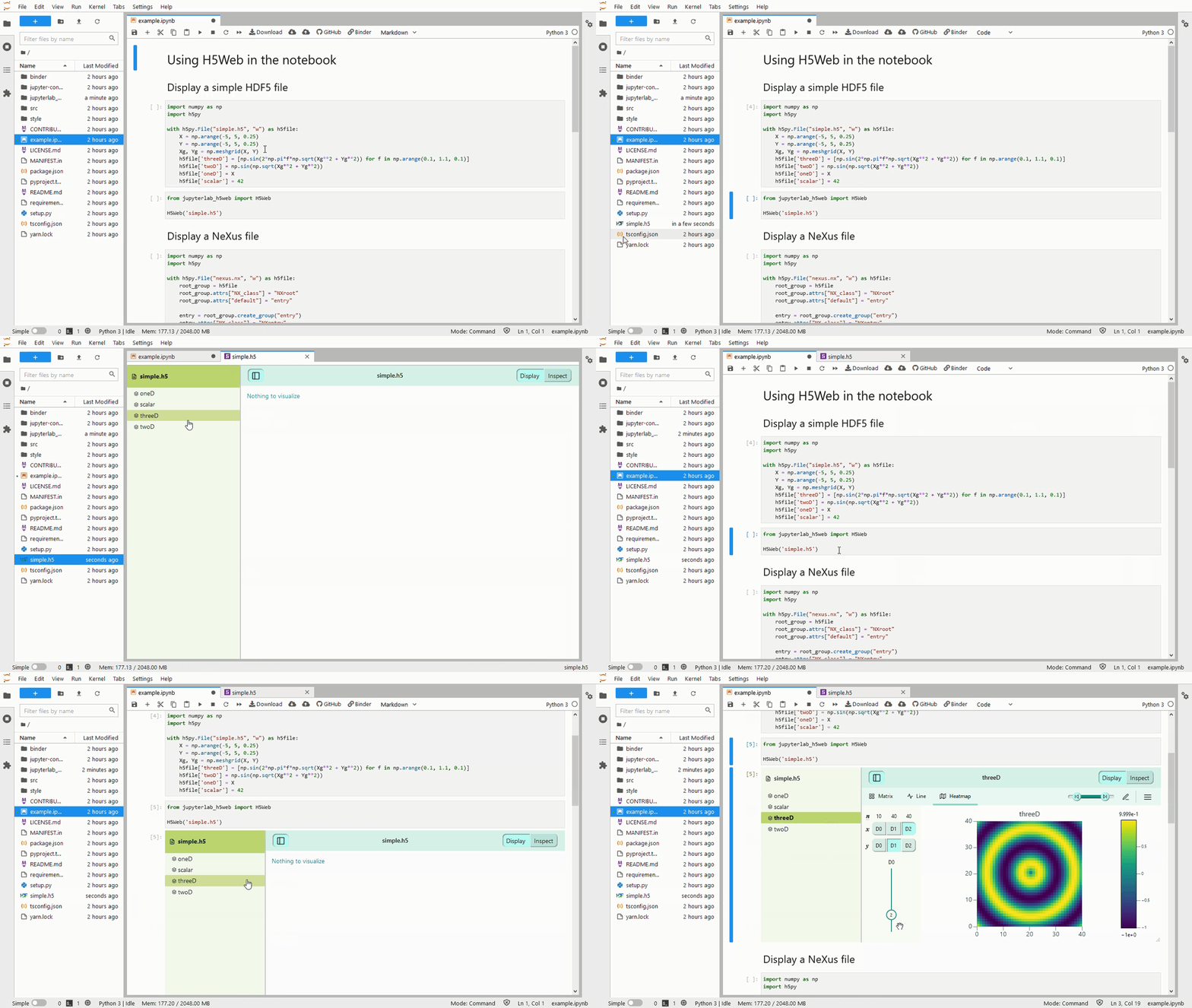
jupyterlab-h5web is a JupyterLab extension to explore and visualize HDF5 file contents, using the web-based viewer h5web. h5web supports the NeXus format.
See Usage for more details.
Requirements
- JupyterLab 4
See the table below for earlier JupyterLab versions
Compatibility table
| JupyterLab 2 | JupyterLab 3 | JupyterLab 4 | |
|---|---|---|---|
| Extension version range | 0.0.1 - 0.3.0 |
1.0.0 - 8.0.0 |
10.0.0 - ... |
Install
With pip
pip install jupyterlab_h5web
To enable support for additional filters such as blosc or bitshuffle:
pip install jupyterlab_h5web[full]
This will install hdf5plugin in addition to the extension.
With conda
conda install -c conda-forge jupyterlab-h5web
Usage
This extension enables opening HDF5 files in a JupyterLab tab and exploring HDF5 files in Jupyter notebooks.
In JupyterLab
You can double-click on an HDF5 file or right-click Open with -> h5web to launch a tab.
This tab is composed of a sidebar, where you can explore the structure of the HDF5 file, and of a main area where the visualization of the selected entity takes place. This visualization is controlled by the upper-right button that can toggle between:
- Display: visualize datasets using
Line,HeatmaporMatrixvisualizations. - Inspect: show the metadata and attributes of any entity
In Jupyter notebooks
To open a HDF5 file with H5Web, use the H5Web widget in a notebook cell:
from jupyterlab_h5web import H5Web

H5Web('<path to the HDF5 file>')
The cell height can be resized with the handle at the bottom-right.
An example is provided in example.ipynb.
Supported file formats
jupyter-h5web detects HDF5 files based on their file extensions. The viewer works for the following extensions:
- "Classic" HDF5:
.h5,.hdf5,.hdf,.hf5 - NeXus:
.nexus,.nx,.nxs,.nx5 - CXI:
.cxi - NetCDF4:
.nc,.nc4 - Loom:
.loom - JLD2:
.jld2 - EBSD-HDF5:
.h5ebsd,.edaxh5,.oh5 - DREAM.3D:
.dream3d - GEOH5:
.geoh5 - Oxford Instruments NanoAnalysis:
.h5oina - AnnData:
.h5ad
For other types of files, you can change the extension to one of the supported extensions or, if it is widespread, open an issue to discuss its support.
Changelog
See https://github.com/silx-kit/jupyterlab-h5web/releases.
Troubleshoot
If the following instructions do not solve your issue, you can open an issue on GitHub.
Check the server extension
If you are seeing the frontend extension but it is not working, check that
jupyterlab_h5web is installed and enabled.
It should be listed when running:
jupyter server extension list
If jupyterlab_h5web does not appear or is disabled, try to enable it:
jupyter server extension enable jupyterlab_h5web
Check the frontend extension
If jupyterlab_h5web is installed and enabled but you are not seeing the
frontend, check the frontend is installed:
jupyter labextension list
Uninstall
pip uninstall jupyterlab_h5web


Release files for jupyterlab-h5web 12.9.0
For a detailed explanation of source distributions (sdists) and built distributions (wheels), please see the package formats documentation.
Source distribution (sdist)
| File | Size | Uploaded | Provenance | |
|---|---|---|---|---|
| jupyterlab_h5web-12.9.0.tar.gz | 530.5 kB | Without provenance | Details |
Built distribution (wheel)
| File | Interpreter | ABI | Platform | Reset |
|---|---|---|---|---|
| jupyterlab_h5web-12.9.0-py3-none-any.whl | Python 3 | none | any | Details |
Total release size: 963.7 kB
Release files / jupyterlab_h5web-12.9.0.tar.gz
| Download URL | jupyterlab_h5web-12.9.0.tar.gz |
|---|---|
| Size | 530.5 kB |
| Tags | Source |
|
SHA-256 checksum How to use checksums |
560b1e0cc26bfc850bb255ac760fcbda2cf737ab67458a9233976b28852454f7
|
|
BLAKE2b-256 checksum How to use checksums |
fa08a78e666ccab0568f8f34373d8c736e749fea08bd90e00050b069c71a02e3
|
| Upload date | |
|
Uploaded using Trusted Publishing? What is trusted publishing? |
No |
| Uploaded via |
twine/7.0.0 CPython/3.13.14
|
Release files / jupyterlab_h5web-12.9.0-py3-none-any.whl
| Download URL | jupyterlab_h5web-12.9.0-py3-none-any.whl |
|---|---|
| Size | 433.2 kB |
| Tags | Python 3 |
|
SHA-256 checksum How to use checksums |
89770089271f6c744404700555f60a69c3ba54bc8dca8fc464a0d95f50517d85
|
|
BLAKE2b-256 checksum How to use checksums |
65a1b804190b3675f30e47597cc6e6c63bd3b028df8337021c69c2230fe57591
|
| Upload date | |
|
Uploaded using Trusted Publishing? What is trusted publishing? |
No |
| Uploaded via |
twine/7.0.0 CPython/3.13.14
|
Security for jupyterlab-h5web 12.9.0
Provenance
Provenance describes where a file came from. On PyPI, provenance is shared via attestations, which provide a verifiable record of the build or publishing details. View details, limitations and caveats.
No provenance found
None of the files in this release were uploaded with provenance metadata.
A note on package security
PyPI is a repository for distributing packages, not a service for auditing them. While third-party security researchers and our staff do their best to detect and remove malicious packages, PyPI cannot guarantee the quality, security or suitability of any given package.














