
This release is a pre-release and may not be stable for production use.
JupyterLab NiiVue
WebGPU/WebGL2 medical image viewer for JupyterLab
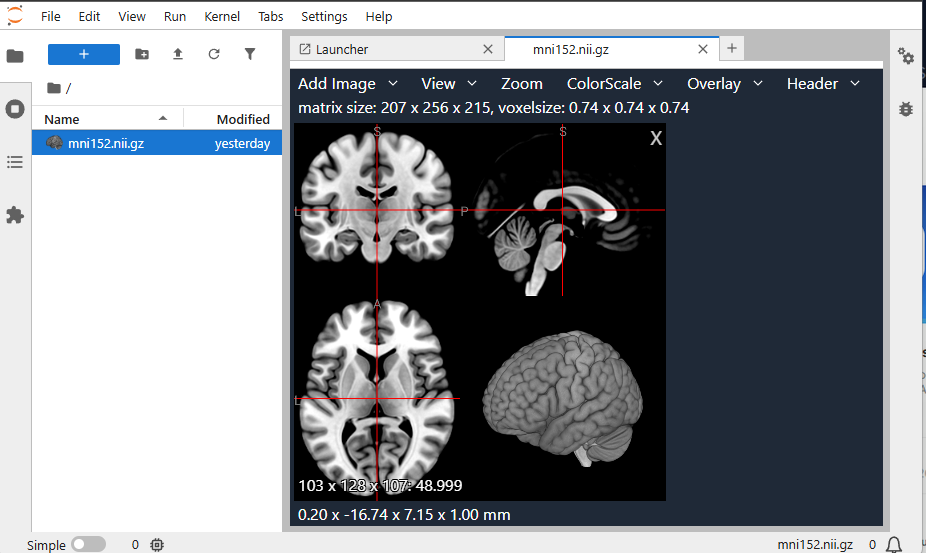
A JupyterLab extension that uses NiiVue to display neuroimaging files directly in JupyterLab. View NIfTI files, meshes, tractography, and DICOM images with an interactive, hardware-accelerated viewer integrated into your JupyterLab environment.
Installation
Install the extension using pip:
pip install jupyterlab-niivue
Usage
Opening Files
- File Browser: Simply double-click any supported neuroimaging file in the JupyterLab file browser
- Right-click Menu: Right-click on a file and select "Open With" → "NiiVue Viewer"
- Compare Multiple Files: Select multiple files (2 or more), right-click, and choose "Compare in NiiVue" to view them side-by-side in a multi-panel layout
Saving Scenes and Figures
NVDocument in the menu bar saves the selected tile as a NiiVue scene document (.nvd, or readable .nvd.json with Save as JSON): its images with their display settings and the view. Screenshot saves the visible tiles as a PNG. Both ask for a path in the workspace, starting in the opened file's folder. Double-click a .nvd in the file browser to open the scene again, or use NVDocument > Load.
Screenshots

Keyboard Shortcuts
Mouse Controls
- Right Mouse: Drag to adjust contrast/brightness (windowing); when Zoom button is pressed, drag to zoom
- Middle Mouse: Drag to pan
- Mouse Scroll: Change slice in currently hovered image
- Shift + Mouse: 2D dragging and 3D viewplane rotation
Navigation
- ← →: Change volume in 4D image
- V: Cycle through view modes
- C: Cycle through clip plane orientations in 3D render
Crosshair Movement
- H: Move crosshair to L (Left)
- L: Move crosshair to R (Right)
- J: Move crosshair to P (Posterior)
- K: Move crosshair to A (Anterior)
- Ctrl+U: Move crosshair to S (Superior)
- Ctrl+D: Move crosshair to I (Inferior)
Supported Formats
NiiVue can open several formats popular with brain imaging:
- Voxel-based: NIfTI (.nii, .nii.gz), NRRD (.nrrd, .nhdr), MRtrix MIF (.mif), AFNI HEAD/BRIK, MGH/MGZ, ITK MHD (.mhd, .mha), ECAT7 (.v), DICOM (.dcm), NumPy (.npy, .npz)
- Mesh-based: GIfTI (.gii), FreeSurfer (pial, white, inflated), MZ3 (.mz3), STL (.stl), Wavefront OBJ (.obj), PLY (.ply), BrainSuite DFS (.dfs), Legacy VTK (.vtk), X3D (.x3d), and others (ASC, BYU, GEO, ICO, TRI, OFF, SRF, NV)
- Mesh Overlays: GIfTI (.gii), CIfTI-2 (.nii), MZ3 (.mz3), FreeSurfer (CURV, ANNOT), SMP, STC
- Tractography: TCK (.tck), TRK (.trk), TRX (.trx), VTK (.vtk), AFNI (.niml.tract)
Requirements
- JupyterLab >= 4.0.0
- A modern web browser with WebGPU or WebGL2 support (Chrome, Firefox, Edge, Safari)
Troubleshooting
Extension not appearing
If the extension doesn't appear after installation, try:
jupyter labextension list
You should see jupyterlab-niivue in the list. If not, try rebuilding JupyterLab:
jupyter lab build
Files not opening
If files don't open when double-clicked:
- Check that the file format is supported (see list above)
- Try right-clicking the file and selecting "Open With" → "NiiVue Viewer"
- Check the browser console for any error messages
Development
This extension is part of the NiiVue monorepo. Contributions are welcome!
If you encounter issues or have feature requests, please open an issue on GitHub.
Citation
If you use this extension in published work, please cite:
Eckstein K, Androulakis A, Dao TT, et al. Seamless neuroimaging visualization: The NiiVue wrapper ecosystem. Aperture Neuro. 2026;6. doi:10.52294/001c.167815
Support This Project
If you find this extension useful, please consider supporting its development through a financial contribution:

License
BSD-2-Clause
Credits
- Built with NiiVue
- Part of Neurodesk, a flexible and scalable data analysis environment for reproducible neuroimaging
- Part of the NiiVue ecosystem for neuroimaging visualization
Related Projects
- NiiVue VS Code Extension - NiiVue for Visual Studio Code
- NiiVue - The core NiiVue library
- NiiVue Web App - Online NiiVue viewer
1 maintainer

Metadata
1 maintainer
Release files for jupyterlab-niivue 0.3.0.dev168
For a detailed explanation of source distributions (sdists) and built distributions (wheels), please see the package formats documentation.
Source distribution (sdist)
| File | Size | Uploaded | Provenance | Actions |
|---|---|---|---|---|
| jupyterlab_niivue-0.3.0.dev168.tar.gz | 4.7 MB | Without provenance | Details for jupyterlab_niivue-0.3.0.dev168.tar.gz |
Built distribution (wheel)
| File | Interpreter | ABI | Platform | Actions Reset |
|---|---|---|---|---|
| jupyterlab_niivue-0.3.0.dev168-py3-none-any.whl | Python 3 | none | any | Details for jupyterlab_niivue-0.3.0.dev168-py3-none-any.whl |
Total release size: 13.3 MB
Release files / jupyterlab_niivue-0.3.0.dev168.tar.gz
| Download URL | jupyterlab_niivue-0.3.0.dev168.tar.gz |
|---|---|
| Size | 4.7 MB |
| Tags | Source |
|
SHA-256 checksum How to use checksums |
30505bf3fbdab927e238cbf450dc9de510da4efb2968ce02b88ca85bc1a64665
|
|
BLAKE2b-256 checksum How to use checksums |
32e22f2e7cc31ca7bc7fcf1a96aadb755884f6e60eb4f37e22221c11a4faf515
|
| Upload date | |
|
Uploaded using Trusted Publishing? What is trusted publishing? |
No |
| Uploaded via |
twine/7.0.0 CPython/3.11.18
|
Release files / jupyterlab_niivue-0.3.0.dev168-py3-none-any.whl
| Download URL | jupyterlab_niivue-0.3.0.dev168-py3-none-any.whl |
|---|---|
| Size | 8.7 MB |
| Tags | Python 3 |
|
SHA-256 checksum How to use checksums |
8d10497b1be580843b9906d661507bb63708db8e7b4104a27d65dbd9d58a1417
|
|
BLAKE2b-256 checksum How to use checksums |
9e028cfddcdfcb660a8018f04cd23a5ec736e5411286f3ec1d43b89c7c880b68
|
| Upload date | |
|
Uploaded using Trusted Publishing? What is trusted publishing? |
No |
| Uploaded via |
twine/7.0.0 CPython/3.11.18
|
Security for jupyterlab-niivue 0.3.0.dev168
Provenance
Provenance describes where a file came from. On PyPI, provenance is shared via attestations, which provide a verifiable record of the build or publishing details. View details, limitations and caveats.
No provenance found
None of the files in this release were uploaded with provenance metadata.
A note on package security
PyPI is a repository for distributing packages, not a service for auditing them. While third-party security researchers and our staff do their best to detect and remove malicious packages, PyPI cannot guarantee the quality, security or suitability of any given package.
To learn more about protecting yourself from malicious actors, visit our package security documentation.














