
A JupyterLab extension for profiling cells execution using NVIDIA Nsight tools.

Project description
NVIDIA Nsight Tools JupyterLab Extension
A JupyterLab extension for profiling cells execution using NVIDIA Nsight tools.
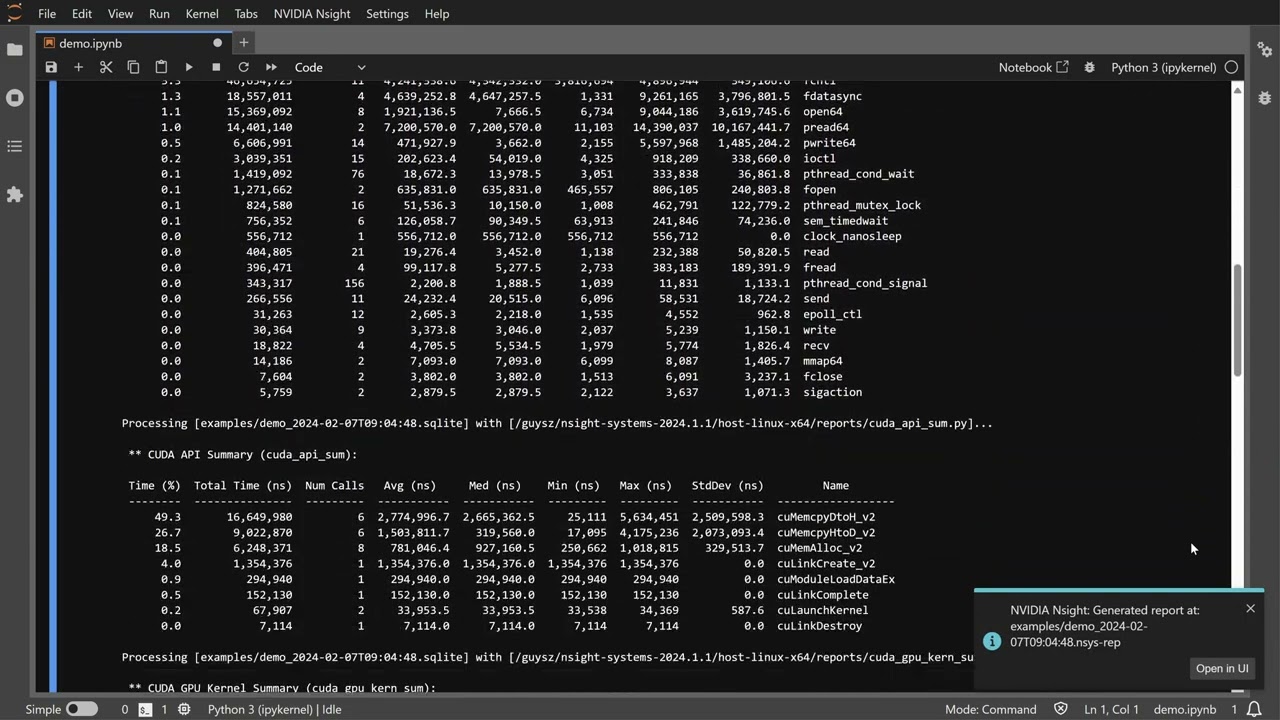
Demo
Click on the image to launch the video
Requirements
- JupyterLab >= 4.0.0
- Docker (optional, for GUI support)
- nvtx (Required for Nsight Compute support)
Nsight tools are not shipped with this extension. The required tool(s) should be installed separately on the JupyterLab server machine.
Install and setup
- To install the extension, execute:
pip install jupyterlab-nvidia-nsight
- Set Nsight Systems and/or Nsight Compute installation location in the extension settings.
Profile JupyterLab cells
- Enable Nsight tool by using the Profiling with Nsight Systems/Compute... command
under the NVIDIA Nsight menu, or by using the command palette.
- Note: This operation restarts the JupyterLab kernel.
- Profile cells execution by using the Run and profile selected cells... command.
- The cell's profiling info is displayed in the cell output area.
Analyzing the profile session in Nsight tools GUI
- GUI display is disabled by default. To use Nsight Systems GUI for analysis of report files, check the Enable Nsight Systems UI checkbox in the extension settings.
- Open Nsight tools report files in a tab inside JupyterLab.
- Release 0.5 supports display of Nsight Systems GUI. Display of Nsight Compute GUI is planned for a future release.
- Display of Nsight tools GUI requires a WebRTC docker image. Build the GUI WebRTC docker image by executing:
<nsys_install_dir>/host-linux-x64/Scripts/WebRTCContainer/build.sh
- Known issue: Keyboard doesn't work in GUI display.
Supported Tools
Nsight Systems
- Supports Nsight Systems release 2024.1.1 or later. It is recommended to use the latest release.
- Use
--stats=truewhen profiling cells execution to see textual output ofnsys stats.
Nsight Compute
- Supports textual output.
- GUI analysis of Nsight Compute report files is planned for a future release.
- Supports Nsight Compute release 2022.2 or later. It is recommended to use the latest release.
Uninstall
To remove the extension, execute:
pip uninstall jupyterlab-nvidia-nsight
Troubleshooting
If you are seeing the frontend extension, but it is not working, check that the server extension is enabled:
jupyter server extension list
If the server extension is installed and enabled, but you are not seeing the frontend extension, check the frontend extension is installed:
jupyter labextension list
Release Notes
0.5.2
- Added Nsight Compute section in the project description.
- Verify server connection on extension load.
0.5.1
- Initial release.


Download files
Download the file for your platform. If you're not sure which to choose, learn more about installing packages.
Source Distributions
Built Distribution
Filter files by name, interpreter, ABI, and platform.
If you're not sure about the file name format, learn more about wheel file names.
Copy a direct link to the current filters
File details
Details for the file jupyterlab_nvidia_nsight-0.5.2-py3-none-any.whl.
File metadata
- Download URL: jupyterlab_nvidia_nsight-0.5.2-py3-none-any.whl
- Upload date:
- Size: 53.4 kB
- Tags: Python 3
- Uploaded using Trusted Publishing? No
- Uploaded via: twine/3.8.0 pkginfo/1.10.0 readme-renderer/43.0 requests/2.31.0 requests-toolbelt/1.0.0 urllib3/2.2.1 tqdm/4.66.2 importlib-metadata/7.0.2 keyring/24.3.1 rfc3986/2.0.0 colorama/0.4.6 CPython/3.10.12
File hashes
| Algorithm | Hash digest | |
|---|---|---|
| SHA256 |
713f473a7c562a8d8d095d4274dbee070a4433f08ec89336c11d24611bfc9ea2
|
|
| MD5 |
5a47414ac608fe55501f1aff151cbd7e
|
|
| BLAKE2b-256 |
6533c0bb4351b076915a7a8ce9708dd3e1bb8b54a157fcefbdf4916a5988812e
|






