
A JupyterLab extension for serving web app.
Verified details
These details have been verified by PyPIProject links
GitHub Statistics
Maintainers

Project description
jupyterpack


A JupyterLite extension to serve in-browser Python and Javascript web application
Features
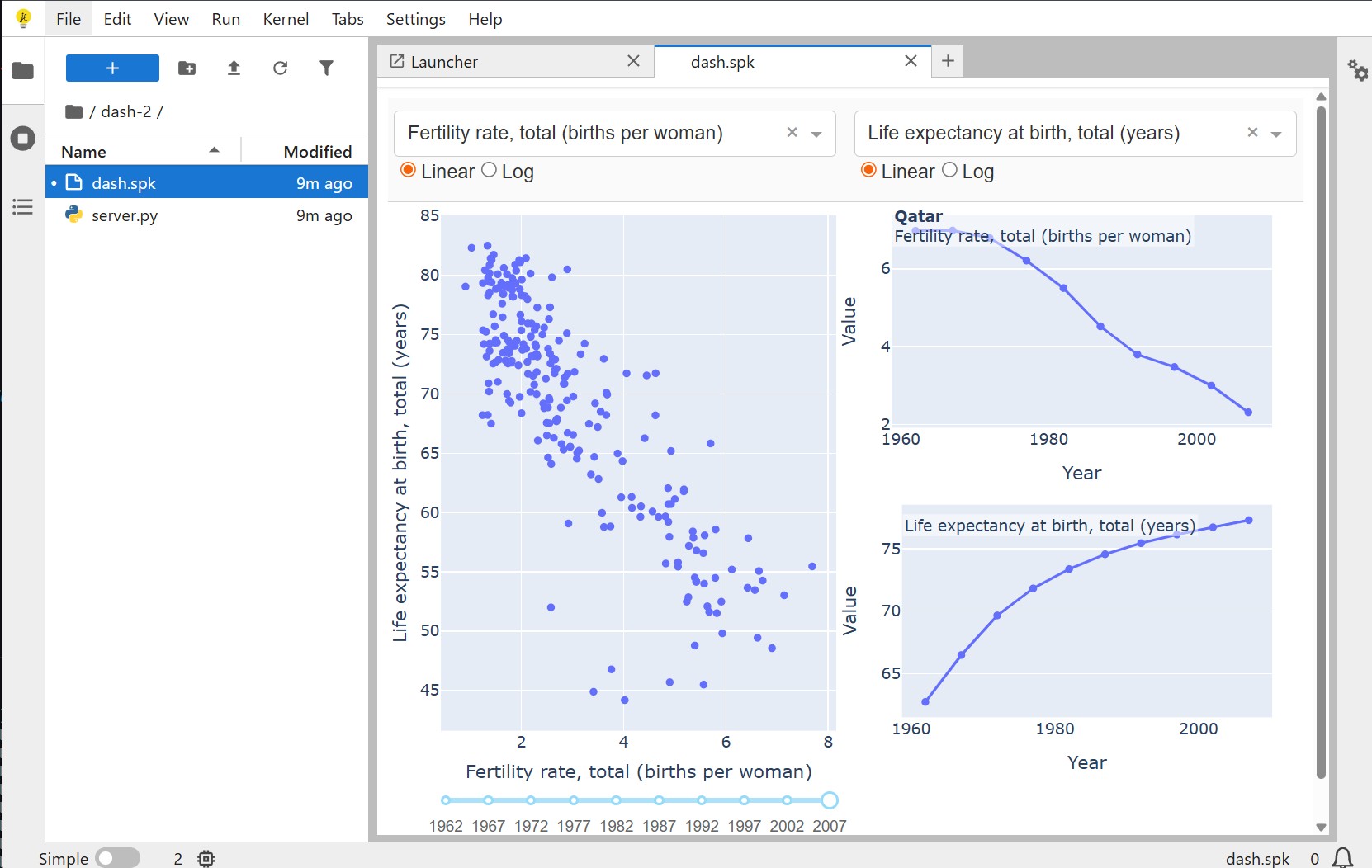
- Python Web Apps: Serve Python web applications directly in the browser using JupyterLite's in-browser Python kernel.
jupyterpackcurrently supports Dash, Streamlit and Shiny for Python. You can also usejupyterpackto serve anyStarletteorTornadoapplication. . - JavaScript Web Apps: Bundle and serve JavaScript web applications using in-browser bundlers.
Installation
You can install jupyterpack using pip or conda
# Install using pip
pip install jupyterpack

# Install using conda
conda install -c conda-forge jupyterpack
Set up JupyterLite deployment
jupyterpack currently supports only xeus-python kernel and does not support pyodide-kernel. You can refer to the xeus-python official documentation for the base setup of JupyterLite with xeus-python kernel.
Framework-specific setup
At runtime, jupyterpack can automatically install the dependencies required by the supported frameworks.
Alternatively, you can preinstall framework dependencies directly into your JupyterLite build. When dependencies are preinstalled, runtime installation can be skipped by setting disableDependencies to true in your .spk file.
Below are example environment.yml files for each supported framework.
- Dash
name: xeus-kernels
channels:
  - https://repo.prefix.dev/emscripten-forge-dev
  - https://repo.prefix.dev/conda-forge
dependencies:
  - xeus-python
  - jupyterpack
  - dash
  - werkzeug>=2.2,<3.0
  - blinker>=1.5.0,<2
  - cachetools>=4.0,<7
  - pip:
      - pyodide_http
- Streamlit
name: xeus-kernels
channels:
  - https://repo.prefix.dev/emscripten-forge-dev
  - https://repo.prefix.dev/conda-forge
dependencies:
  - xeus-python
  - jupyterpack
  - blinker>=1.5.0,<2
  - cachetools>=4.0,<7
  - protobuf
  - altair
  - pyarrow
  - pip:
      - streamlit>=1.50.0
      - pyodide_http
- Shiny
name: xeus-kernels
channels:
  - https://repo.prefix.dev/emscripten-forge-dev
  - https://repo.prefix.dev/conda-forge
dependencies:
  - xeus-python
  - jupyterpack
  - pip:
      - shiny
      - shinychat
      - pyodide_http
- Panel
name: xeus-kernels
channels:
  - https://repo.prefix.dev/emscripten-forge-dev
  - https://repo.prefix.dev/conda-forge
dependencies:
  - xeus-python
  - jupyterpack
  - panel
  - pip:
      - pyodide_http
Usage
To use jupyterpack, you need to create a .spk file that defines your web application. Here's an example structure of a React application:
my_app/
├── app.spk
├── App.js         # Your JS code
├── package.json   # Your JS dependencies
└── index.html      # HTML entry for JS apps
the app.spk is the entry point of your React app, it should contain the following content:
{
  "name": "React Example",
  "entry": "/index.html",
  "framework": "react"
}
Double-clicking the spk file to open the web app as a tab of JupyterLab.
.spk — Jupyter Pack File Format
A .spk file describes how an application should be loaded, executed, and rendered in JupyterLite and JupyterLab.
It defines the entry point, framework, optional dependencies, and runtime metadata, allowing reproducible execution across environments.
The file is expressed in JSON.
Basic Structure
interface IJupyterPackFileFormat {
  entry: string;
  framework: JupyterPackFramework;
  name?: string;
  metadata?: {
    autoreload?: boolean;
  };
  rootUrl?: string;
  dependencies?: IDependencies;
  disableDependencies?: boolean;
}
-
entry(required): Path to the main entry file of the application. For examples:- "app.py"
- "/index.html"
- "dashboard/index.py"
The path is resolved relative to the .spk file location.
-
framework(required): The framework used to run the application. Supported frameworks are:Value Description reactReact-based frontend application dashPlotly Dash application streamlitStreamlit application tornadoTornado web application shinyShiny application (Python) starletteStarlette ASGI application -
name(optional): The name of the application. If not provided, the name will be the name of the .spk file. -
metadata(optional): Additional metadata for the application.autoreload: Enables automatic reload when source files change.
-
rootUrl(optional): The root URL of the web application. Default is/ -
dependencies(optional): The dependencies of the web application. It will be merged with the default dependencies of the selected frameworkmamba: Emscripten-forge packagespip: PYPI packages Example:dependencies: { mamba: ['numpy, scipy']; pip: ['plotly']; }
You only need to specify the dependencies of the application, the required dependencies of the framework will be automatically added.
-
disableDependencies(optional): Disable entirely the dependency installation. This is useful when dependencies are already provided by the environment. Default isfalse.
Full example
{
  "name": "Sales Dashboard",
  "entry": "app.py",
  "framework": "streamlit",
  "rootUrl": "/",
  "metadata": {
    "autoreload": true
  },
  "dependencies": {
    "mamba": ["numpy", "pandas"],
    "pip": []
  },
  "disableDependencies": false
}
Framework-specific configurations
Dash application
Same as the React application, here is the structure of a Dash application:
my_app/
├── app.spk
├── server.py         # Your Dash code
the app.spk is the entry point of your Dash app, it should contain the following content:
{
  "name": "Dash Example",
  "entry": "server.py",
  "framework": "dash"
}
For Dash applications, you must define your Dash instance as a variable named app.
Do not call app.run_server() yourself — jupyterpack is responsible for starting and managing the server lifecycle.
As with React applications, double-clicking the .spk file will open the Dash app in a new JupyterLab tab.
Streamlit application
Streamlit applications follow a similar structure to Dash apps.
Write your code as a standard Streamlit application and do not start the server manually — jupyterpack will handle execution and serving automatically.
Opening the .spk file will launch the Streamlit app in a new JupyterLab tab.
Shiny application
Shiny applications also follow a structure similar to Dash apps.
jupyterpack supports both Shiny Express and Shiny Core applications.
- Shiny Express: no special requirements.
- Shiny Core: the application instance must be assigned to a variable named
app.
In both cases, the server is managed by jupyterpack, and opening the .spk file will launch the app in JupyterLab.
Try it online!
You can try it online by clicking on this badge:
License
jupyterpack is licensed under the BSD-3-Clause license.
Project details
Verified details
These details have been verified by PyPIProject links
GitHub Statistics
Maintainers
Release history Release notifications | RSS feed


Download files
Download the file for your platform. If you're not sure which to choose, learn more about installing packages.
Source Distribution
Built Distribution
Filter files by name, interpreter, ABI, and platform.
If you're not sure about the file name format, learn more about wheel file names.
Copy a direct link to the current filters
File details
Details for the file jupyterpack-0.5.5.tar.gz.
File metadata
- Download URL: jupyterpack-0.5.5.tar.gz
- Upload date:
- Size: 229.1 kB
- Tags: Source
- Uploaded using Trusted Publishing? Yes
- Uploaded via: twine/6.2.0 CPython/3.12.12
File hashes
| Algorithm | Hash digest | |
|---|---|---|
| SHA256 |
897138fd80c79dd0ff33bd31a02c5bed675b733cb03548ef8425356cdd237119
|
|
| MD5 |
07ee9faef986ef7f4f725976668e4fd0
|
|
| BLAKE2b-256 |
eabe8260e7b0dacf510a4cb4d039350d92afaa7e5192d9ceac6a2092746c8137
|
File details
Details for the file jupyterpack-0.5.5-py3-none-any.whl.
File metadata
- Download URL: jupyterpack-0.5.5-py3-none-any.whl
- Upload date:
- Size: 144.4 kB
- Tags: Python 3
- Uploaded using Trusted Publishing? Yes
- Uploaded via: twine/6.2.0 CPython/3.12.12
File hashes
| Algorithm | Hash digest | |
|---|---|---|
| SHA256 |
673bc56858b3af88e5b85bc11f9da1fe994e75b84cea8a3ede84c5a08d00d57a
|
|
| MD5 |
e864f62e1db72e4127f14d293c7b7158
|
|
| BLAKE2b-256 |
f3a36f0719e13b1e0d50d79cd2747861a86b6b2973cbdefc10df494140da92c2
|






