
A TUI command launcher built on top of just. Define recipes once, run them anywhere.

Project description





justx is a TUI command launcher built on top of just. Define recipes once, run them anywhere.
Installation
uv tool install justx   # recommended
# or
pip install justx
Prerequisite: the
justbinary must be available on$PATH.
Quickstart
1. Initialise your global recipe library:
justx init
This creates ~/.justx/ with a sample justfile to get you started. To pull in a richer set of ready-made recipes (git, docker, filesystem tools, and more), run:
justx init --download-examples
2. Launch the TUI:
justx
Browse your recipes with the arrow keys and press Enter to run one. Press q to quit.
Global recipes
justx supports global recipes; recipes that are available from anywhere on your machine, no matter which project you're in.
Split them into topic-focused files if you like:
~/.justx/
├── justfile        # everyday catch-all recipes
├── git.just        # git workflows
├── docker.just     # container management
└── ssh.just        # remote connections
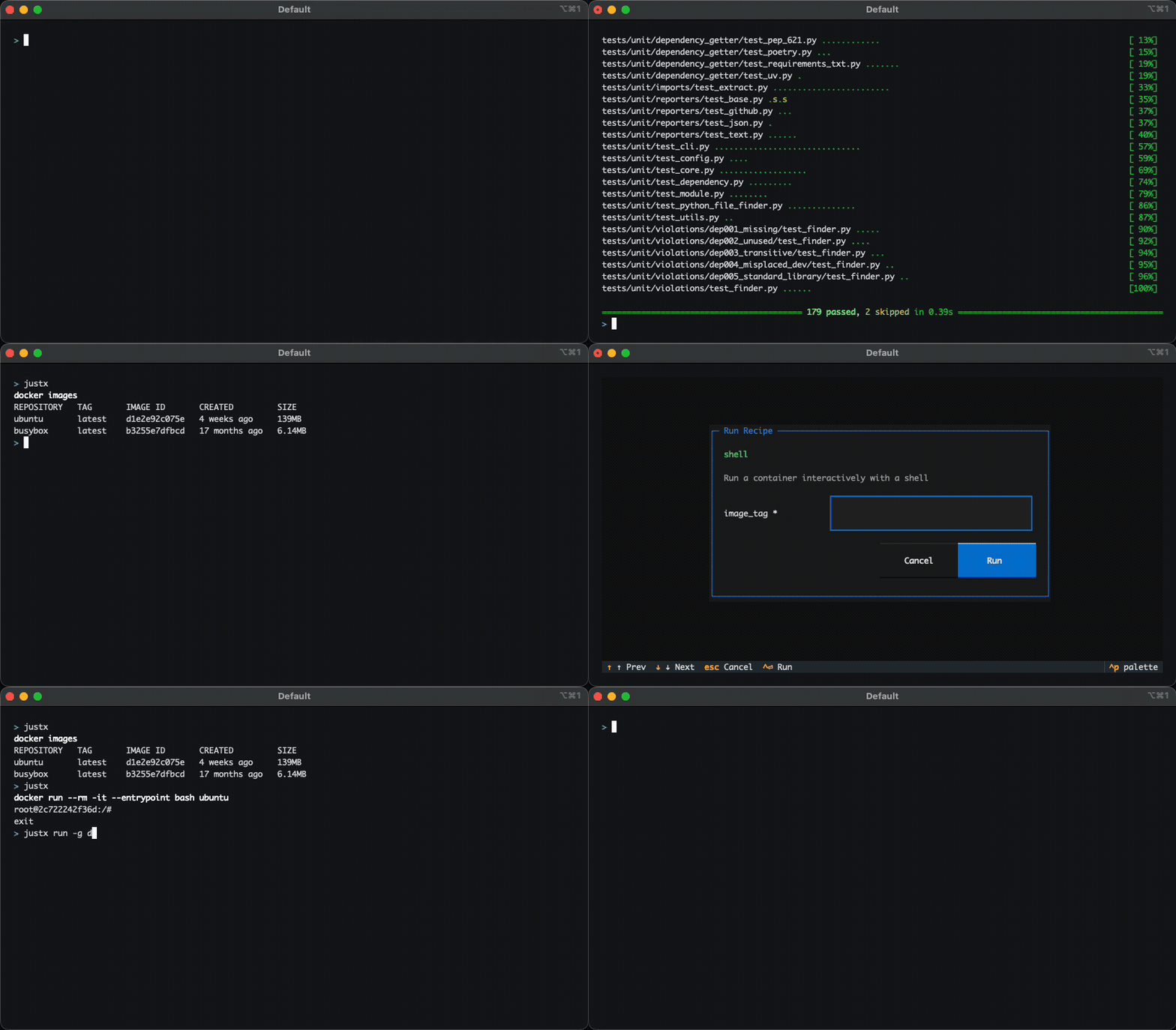
For example, ~/.justx/docker.just might contain:
# Run a container interactively with a shell
shell image_tag:
    docker run --rm -it --entrypoint bash {{image_tag}}
justx discovers these automatically and makes them available everywhere on your system by running justx in your terminal.
You can also skip the TUI and run recipes directly with justx run:
# Run 'shell' from the global 'docker' source with `my-image` as the tag
# Equivalent to: just --justfile ~/.justx/docker.just --working-directory . shell my-image
justx run -g docker:shell my-image
For full configuration details, file discovery behaviour, CLI reference, and example justfiles, see the documentation.
Release history Release notifications | RSS feed


Download files
Download the file for your platform. If you're not sure which to choose, learn more about installing packages.
Source Distribution
Built Distribution
Filter files by name, interpreter, ABI, and platform.
If you're not sure about the file name format, learn more about wheel file names.
Copy a direct link to the current filters
File details
Details for the file justx-0.4.0a4.tar.gz.
File metadata
- Download URL: justx-0.4.0a4.tar.gz
- Upload date:
- Size: 206.5 kB
- Tags: Source
- Uploaded using Trusted Publishing? No
- Uploaded via: uv/0.9.28 {"installer":{"name":"uv","version":"0.9.28","subcommand":["publish"]},"python":null,"implementation":{"name":null,"version":null},"distro":{"name":"Ubuntu","version":"24.04","id":"noble","libc":null},"system":{"name":null,"release":null},"cpu":null,"openssl_version":null,"setuptools_version":null,"rustc_version":null,"ci":true}
File hashes
| Algorithm | Hash digest | |
|---|---|---|
| SHA256 |
bab03fe876d824ef312d8f16659131797bd7346e5680c684848e87cf4b8aea11
|
|
| MD5 |
4a2d687e423d9d1ac1495de5785a8489
|
|
| BLAKE2b-256 |
30268dc2513c548eadca4ca80c7c39711645080139ef0c2420dd6f83bbbe49e0
|
File details
Details for the file justx-0.4.0a4-py3-none-any.whl.
File metadata
- Download URL: justx-0.4.0a4-py3-none-any.whl
- Upload date:
- Size: 25.3 kB
- Tags: Python 3
- Uploaded using Trusted Publishing? No
- Uploaded via: uv/0.9.28 {"installer":{"name":"uv","version":"0.9.28","subcommand":["publish"]},"python":null,"implementation":{"name":null,"version":null},"distro":{"name":"Ubuntu","version":"24.04","id":"noble","libc":null},"system":{"name":null,"release":null},"cpu":null,"openssl_version":null,"setuptools_version":null,"rustc_version":null,"ci":true}
File hashes
| Algorithm | Hash digest | |
|---|---|---|
| SHA256 |
58c2084112e063e90d9d4576b3ae5c96345b890ebcd1ef92feb48a1ae4eaf7c9
|
|
| MD5 |
82b1869f35adec0102b410cd58c699c8
|
|
| BLAKE2b-256 |
5d3625fcdb9e94d26224cefcbfea3e2da4ce085e21e9336b76bfbdf1421b4195
|






