
Execute Python on Kaggle's FREE GPUs (T4/P100/H100) from your terminal. Perfect for AI agents.

Project description
KaggleRun
Execute Python on Kaggle's FREE GPUs from your terminal. No browser needed.






Quick Start • Features • MCP Server • API • Contributing
What is KaggleRun?
KaggleRun bridges your local terminal to Kaggle's free GPU infrastructure. Perfect for:
- AI Coding Agents - Claude Code, Cursor, Cline can execute GPU code natively
- ML Engineers - Train models without leaving your terminal
- Data Scientists - Run experiments on free T4/P100/H100 GPUs
pip install kagglerun
kagglerun --url "$KAGGLE_URL" "import torch; print(torch.cuda.get_device_name(0))"
# Output: Tesla T4
|
Tesla T4 - Quick Commands 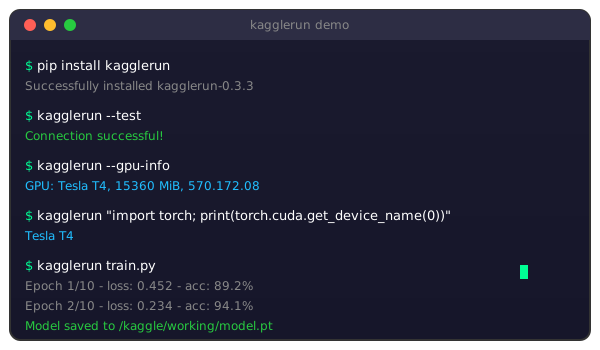
|
H100 80GB - Competition Workflow 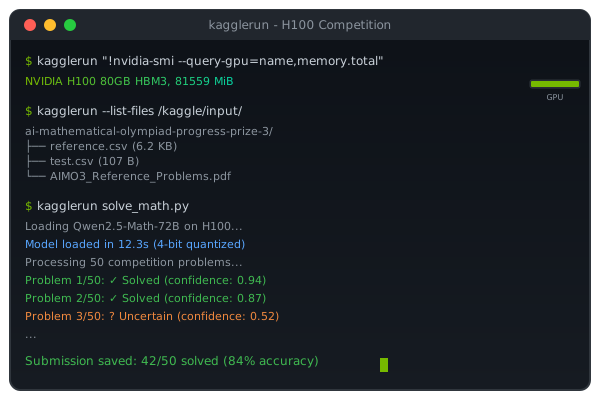
|
Why KaggleRun?
| Feature | KaggleRun | Kaggle Web | Colab | Cloud GPU |
|---|---|---|---|---|
| No browser needed | Yes | No | No | No |
| CLI-native | Yes | No | No | Partial |
| AI agent ready (MCP) | Yes | No | No | No |
| Free GPU access | Yes | Yes | Limited | No |
| Real-time output | Yes | Yes | Yes | Yes |
| Cost | $0 | $0 | $0-10/mo | $$$$ |
Quick Start
Step 1: Get Your Kaggle URL
- Open kaggle.com/code and create/open a notebook
- Enable GPU: Settings > Accelerator > GPU T4 x2 (or P100)
- Click Run menu (top left) > Kaggle Jupyter Server
- Copy the VSCode Compatible URL from the right panel
Step 2: Install
pip install kagglerun
Step 3: Set Environment Variable
Windows (CMD)
:: Temporary (current session only)
set KAGGLE_JUPYTER_URL=https://kkb-production.jupyter-proxy.kaggle.net?token=eyJ...

:: Permanent (persists after restart)
setx KAGGLE_JUPYTER_URL "https://kkb-production.jupyter-proxy.kaggle.net?token=eyJ..."
Note: For
set, do NOT use quotes around the URL. Forsetx, quotes are required.
Windows (PowerShell)
# Temporary (current session only)
$env:KAGGLE_JUPYTER_URL = "https://kkb-production.jupyter-proxy.kaggle.net?token=eyJ..."

# Permanent (user level)
[Environment]::SetEnvironmentVariable("KAGGLE_JUPYTER_URL", "https://kkb-production.jupyter-proxy.kaggle.net?token=eyJ...", "User")
Linux / macOS (Bash/Zsh)
# Temporary (current session only)
export KAGGLE_JUPYTER_URL="https://kkb-production.jupyter-proxy.kaggle.net?token=eyJ..."

# Permanent - add to ~/.bashrc or ~/.zshrc
echo 'export KAGGLE_JUPYTER_URL="https://kkb-production.jupyter-proxy.kaggle.net?token=eyJ..."' >> ~/.bashrc
source ~/.bashrc
Or pass URL directly
# Skip environment variable entirely
kagglerun --url "https://kkb-production.jupyter-proxy.kaggle.net?token=eyJ..." "print('Hello GPU!')"
Step 4: Run!
# Test connection
kagglerun --test

# Check GPU
kagglerun --gpu-info

# Execute code
kagglerun "import torch; print(f'CUDA: {torch.cuda.is_available()}')"

# Run a Python file
kagglerun train.py
Features
CLI Commands
# Execute inline Python code
kagglerun "print('Hello from Kaggle GPU!')"

# Execute a local Python file
kagglerun my_script.py

# GPU and system information
kagglerun --gpu-info
kagglerun --system-info

# File operations
kagglerun --list-files                    # List /kaggle/working/
kagglerun --upload data.csv               # Upload file
kagglerun --download model.pkl -o ./      # Download file
kagglerun --read output.txt               # Read remote file

# Connection
kagglerun --test                          # Test connection
kagglerun --timeout 300 long_script.py    # Custom timeout
Python API
from kagglerun import KaggleExecutor

# Connect to Kaggle
executor = KaggleExecutor("https://your-kaggle-url?token=...")

# Execute code
result = executor.execute("""
import torch
print(f"GPU: {torch.cuda.get_device_name(0)}")
print(f"Memory: {torch.cuda.get_device_properties(0).total_memory / 1e9:.1f} GB")
""")

# File operations
executor.save_text("config.json", '{"epochs": 10}')
executor.upload_file("local_data.csv", "data.csv")
data = executor.download_file("results.csv")

# Get info
executor.get_gpu_info()
executor.get_system_info()
executor.list_files()
MCP Server
KaggleRun includes a Model Context Protocol (MCP) server, enabling AI assistants like Claude to execute code on Kaggle GPUs as a native tool.
Step 1: Install
pip install kagglerun[mcp]
Step 2: Set Environment Variable (Recommended)
Set KAGGLE_JUPYTER_URL as a permanent system variable so all AI tools can use it automatically.
Windows (CMD) - Run as Administrator
:: Set permanently (requires terminal restart)
setx KAGGLE_JUPYTER_URL "https://kkb-production.jupyter-proxy.kaggle.net?token=eyJ..."

:: Also set for current session
set KAGGLE_JUPYTER_URL=https://kkb-production.jupyter-proxy.kaggle.net?token=eyJ...

:: Verify (in NEW terminal)
echo %KAGGLE_JUPYTER_URL%
Note: After
setx, close and reopen your terminal (or restart your IDE/Claude) for changes to take effect.
Windows (PowerShell) - Run as Administrator
# Set permanently (Machine level - all users)
[Environment]::SetEnvironmentVariable("KAGGLE_JUPYTER_URL", "https://kkb-production.jupyter-proxy.kaggle.net?token=eyJ...", "Machine")

# Or User level only
[Environment]::SetEnvironmentVariable("KAGGLE_JUPYTER_URL", "https://kkb-production.jupyter-proxy.kaggle.net?token=eyJ...", "User")

# Also set for current session
$env:KAGGLE_JUPYTER_URL = "https://kkb-production.jupyter-proxy.kaggle.net?token=eyJ..."

# Verify
echo $env:KAGGLE_JUPYTER_URL
Linux / macOS
# Add to ~/.bashrc (Linux) or ~/.zshrc (macOS)
echo 'export KAGGLE_JUPYTER_URL="https://kkb-production.jupyter-proxy.kaggle.net?token=eyJ..."' >> ~/.bashrc

# Reload
source ~/.bashrc

# Verify
echo $KAGGLE_JUPYTER_URL
Step 3: Configure MCP Client
Add KaggleRun to your AI assistant's MCP configuration.
Claude Desktop
Windows
Config file: C:\Users\{username}\AppData\Roaming\Claude\claude_desktop_config.json
{
  "mcpServers": {
    "kagglerun": {
      "command": "python",
      "args": ["-m", "kagglerun.mcp_server"]
    }
  }
}
macOS
Config file: ~/Library/Application Support/Claude/claude_desktop_config.json
{
  "mcpServers": {
    "kagglerun": {
      "command": "python3",
      "args": ["-m", "kagglerun.mcp_server"]
    }
  }
}
Linux
Config file: ~/.config/Claude/claude_desktop_config.json
{
  "mcpServers": {
    "kagglerun": {
      "command": "python3",
      "args": ["-m", "kagglerun.mcp_server"]
    }
  }
}
Claude Code (CLI)
All Platforms
Config file: ~/.claude/mcp_settings.json
| OS | Full Path |
|---|---|
| Windows | C:\Users\{username}\.claude\mcp_settings.json |
| macOS | /Users/{username}/.claude/mcp_settings.json |
| Linux | /home/{username}/.claude/mcp_settings.json |
{
  "mcpServers": {
    "kagglerun": {
      "command": "python",
      "args": ["-m", "kagglerun.mcp_server"]
    }
  }
}
Other MCP-Compatible Tools
| Tool | Config Location |
|---|---|
| Cursor | Settings → MCP → Add Server |
| Cline | .cline/mcp_settings.json |
| Continue | ~/.continue/config.json |
Alternative: Pass URL in Config
If you prefer not to set a system environment variable, include the URL directly in the MCP config:
{
  "mcpServers": {
    "kagglerun": {
      "command": "python",
      "args": ["-m", "kagglerun.mcp_server"],
      "env": {
        "KAGGLE_JUPYTER_URL": "https://kkb-production.jupyter-proxy.kaggle.net?token=eyJ..."
      }
    }
  }
}
Verify MCP Server
Test the server is working:
# Should start without errors (Ctrl+C to exit)
python -m kagglerun.mcp_server
Available Tools
| Tool | Description |
|---|---|
execute_python |
Run Python code on GPU |
get_gpu_info |
Get GPU model, memory, driver |
get_system_info |
Python version, PyTorch, CUDA |
list_files |
Browse /kaggle/working/ |
read_file |
Read remote text files |
save_file |
Save content to files |
download_file |
Download files (base64) |
test_connection |
Verify kernel connectivity |
Example Conversation
You: Train a simple neural network on the Kaggle GPU
Claude: Uses
execute_pythonto run PyTorch training on Kaggle's free GPU
Use Cases
ML Model Training
result = executor.execute("""
import torch
import torch.nn as nn
from torchvision import models

# Load pretrained ResNet50
model = models.resnet50(weights='DEFAULT').cuda()

# Inference test
x = torch.randn(16, 3, 224, 224).cuda()
with torch.amp.autocast('cuda'):
    out = model(x)

print(f"Output: {out.shape}")
print(f"GPU Memory: {torch.cuda.memory_allocated()/1e9:.2f} GB")
""")
LLM Inference
result = executor.execute("""
from transformers import pipeline

generator = pipeline('text-generation', model='gpt2', device=0)
output = generator("The future of AI is", max_length=50)
print(output[0]['generated_text'])
""", timeout=300)
Data Processing
result = executor.execute("""
import pandas as pd
import numpy as np

# Generate large dataset
df = pd.DataFrame(np.random.randn(1_000_000, 50))
print(f"Shape: {df.shape}")
print(f"Memory: {df.memory_usage(deep=True).sum() / 1e6:.1f} MB")

# Save for download
df.to_parquet('/kaggle/working/data.parquet')
""")

# Download result
data = executor.download_file("data.parquet")
API Reference
KaggleExecutor
KaggleExecutor(
    base_url: str,              # Kaggle Jupyter URL
    verbose: bool = True,       # Print status messages
    timeout: int = 120,         # Default timeout (seconds)
    on_output: Callable = None  # Streaming output callback
)
| Method | Description |
|---|---|
execute(code, timeout) |
Execute Python code |
run_file(path, timeout) |
Run local .py file |
upload_file(local, remote) |
Upload to /kaggle/working/ |
download_file(path) |
Download as bytes |
save_text(name, content) |
Save text file |
read_file(path) |
Read text file |
list_files(path) |
List directory |
get_gpu_info() |
GPU information |
get_system_info() |
System information |
test_connection() |
Test connectivity |
interrupt_kernel() |
Stop execution |
Convenience Function
from kagglerun import connect

executor = connect("https://your-url")  # Raises ConnectionError if fails
How It Works
┌─────────────────────┐          ┌─────────────────────┐
│   Your Terminal     │          │   Kaggle Jupyter    │
│   ─────────────     │  REST    │   ──────────────    │
│                     │◄────────►│   Kernel Manager    │
│   kagglerun CLI     │          │                     │
│   Python API        │  WS      │   Python Kernel     │
│   MCP Server        │◄════════►│   GPU: T4/P100/H100 │
│                     │          │                     │
└─────────────────────┘          └─────────────────────┘
      Local Machine                   Kaggle Cloud
- REST API - Kernel lifecycle management
- WebSocket - Real-time code execution & streaming output
- Base64 - Binary file transfers
Limitations
| Limitation | Details |
|---|---|
| Session timeout | ~12 hours of inactivity |
| Token expiration | Get fresh URL when disconnected |
| GPU quota | ~30 hours/week (free accounts) |
| File persistence | Only during active session |
Troubleshooting
"Connection failed"
- Ensure notebook shows "Running" status in Kaggle
- Get a fresh URL (tokens expire)
- Check GPU is enabled in notebook settings
"Kernel is busy"
- KaggleRun auto-interrupts busy kernels
- Use
--timeoutfor long operations - Check if notebook is running other code
"No GPU available"
- Enable GPU: Settings > Accelerator > GPU
- Check quota at kaggle.com/me/quota
Contributing
Contributions welcome! See CONTRIBUTING.md.
git clone https://github.com/Letemoin/kagglerun
cd kagglerun
pip install -e ".[dev]"
pytest tests/ -v
License
MIT License - see LICENSE
Acknowledgments
If KaggleRun helps your workflow, give it a star!

Release history Release notifications | RSS feed


Download files
Download the file for your platform. If you're not sure which to choose, learn more about installing packages.
Source Distribution
Built Distribution
Filter files by name, interpreter, ABI, and platform.
If you're not sure about the file name format, learn more about wheel file names.
Copy a direct link to the current filters
File details
Details for the file kagglerun-0.3.5.tar.gz.
File metadata
- Download URL: kagglerun-0.3.5.tar.gz
- Upload date:
- Size: 20.9 kB
- Tags: Source
- Uploaded using Trusted Publishing? No
- Uploaded via: twine/6.2.0 CPython/3.12.7
File hashes
| Algorithm | Hash digest | |
|---|---|---|
| SHA256 |
c12302fff6d06e87f0418e8d802347ccdc2d1874b2f94534c994d8492d231eec
|
|
| MD5 |
70e6d31aff8bf59bb6deb2c5e77560b7
|
|
| BLAKE2b-256 |
b5c5686c51d254720d14c0515c85de6ee300c62e59930c6004b9450e8db3d1d9
|
File details
Details for the file kagglerun-0.3.5-py3-none-any.whl.
File metadata
- Download URL: kagglerun-0.3.5-py3-none-any.whl
- Upload date:
- Size: 17.5 kB
- Tags: Python 3
- Uploaded using Trusted Publishing? No
- Uploaded via: twine/6.2.0 CPython/3.12.7
File hashes
| Algorithm | Hash digest | |
|---|---|---|
| SHA256 |
d8a7139371b058920f38b6a9942911f8988034d454189f6ae8d82c05e06e568f
|
|
| MD5 |
db1cf9bff1514097b47e86a12550b7cc
|
|
| BLAKE2b-256 |
e747505fa93f2a9f8270dcfccd4f4d73f19e7d12565eec4b88bf9e639fa92d54
|






