








⭐⭐⭐ Kalavai platform is open source, and free to use in both commercial and non-commercial purposes. If you find it useful, consider supporting us by giving a star to our GitHub project, joining our discord channel and follow our Substack.
Kalavai aggregates and coordinates spare GPU capacity
Kalavai is an open source platform that unlocks computing from spare capacity. It aggregates resources from multiple sources to increase your computing budget and run large AI workloads.
Core features
Kalavai helps teams use computing resources more efficiently. It acts as a control plane for all your computing resources, wherever they are: local, on prem and multi-cloud.
- Leverage multi-platform computing resources: ARM64 / AMD64 CPUs, GPUs (NVIDIA, AMD).
- Increase GPU utilisation from your devices (fractional GPU).
- Multi-node, multi-GPU deployments.
- Ready-made templates to deploy common AI building blocks: model inference (vLLM, llama.cpp, SGLang), GPU clusters (Ray, GPUStack), automation workflows (n8n and Flowise), evaluation and monitoring tools (Langfuse), production dev tools (LiteLLM, OpenWebUI) and more.
- Easy to expand to custom workloads
Support for AI engines
We currently support out of the box the following AI engines:
- vLLM: most popular GPU-based model inference.
- llama.cpp: CPU-based GGUF model inference.
- Ray Clusters inference.
Coming soon:
- GPUstack (experimental)
- SGLang: Super fast GPU-based model inference.
- n8n (experimental): no-code workload automation framework.
- Flowise (experimental): no-code agentic AI workload framework.
- Speaches: audio (speech-to-text and text-to-speech) model inference.
- Langfuse (experimental): open source evaluation and monitoring GenAI framework.
- OpenWebUI: ChatGPT-like UI playground to interface with any models.
- diffusers (experimental)
- RayServe inference.
- GPUstack (experimental)
Not what you were looking for? Tell us what engines you'd like to see.
Kalavai is at an early stage of its development. We encourage people to use it and give us feedback! Although we are trying to minimise breaking changes, these may occur until we have a stable version (v1.0).
Want to know more?
- Full documentation for the project.
- Join our Substack for updates and be part of our community
- Join our discord community
Getting started
The kalavai-client is the main tool to interact with the Kalavai platform, to create and manage GPU pools and also to interact with them (e.g. deploy models). A pool consists of:
- A seed node(s): one (or more for high availability deployments) machine that acts as central control plane
- One or many worker nodes: any machine connected to the seed node that can carry out workloads (generally with access to a GPU)
Check our getting started guide for more details.
Requirements
For seed nodes:
- A arm64 or amd64 linux machine (laptop, desktop or VM)
- Docker engine installed with root access.
For workers sharing resources with the pool:
- A laptop, desktop or Virtual Machine. Full support: Linux and Windows; amd64 / ARM architecture.
- If self-hosting, workers should be on the same network as the seed node.
- Docker engine installed (for your OS) with root access.
Compatibility matrix
If your system is not currently supported, open an issue and request it. We are expanding this list constantly.
Pre-requisites
gcc compiler and python3-dev are required:
sudo apt install gcc g++ python3-dev
Install the client
The client is a python package and can be installed with one command:
pip install kalavai-client
Create a a local private pool
For a quick start, get a pool going with:
kalavai pool start
And then start the GUI:
kalavai gui start
This will expose the GUI and the backend services in localhost. By default, the GUI is accessible via http://localhost:49153.

Check out our getting started guide for next steps on how to add more workers to your pool.
Enough already, let's run stuff!
Check out our use cases documentation for inspiration on what you can do with Kalavai:
- Inference (cpu, gpu and multi gpu)
- Fine tuning (ray and axolotl)
- Unified model portal (Deployer)
Contribute
Anything missing here? Give us a shout in the discussion board. We welcome discussions, feature requests, issues and PRs!
- Join the community and share ideas!
- Report bugs, issues and new features.
- Help improve our compatibility matrix by testing on different operative systems.
- Follow our Substack channel for news, guides and more.
- Community integrations are template jobs built by Kalavai and the community that makes deploying distributed workflows easy for users. Anyone can extend them and contribute to the repo.
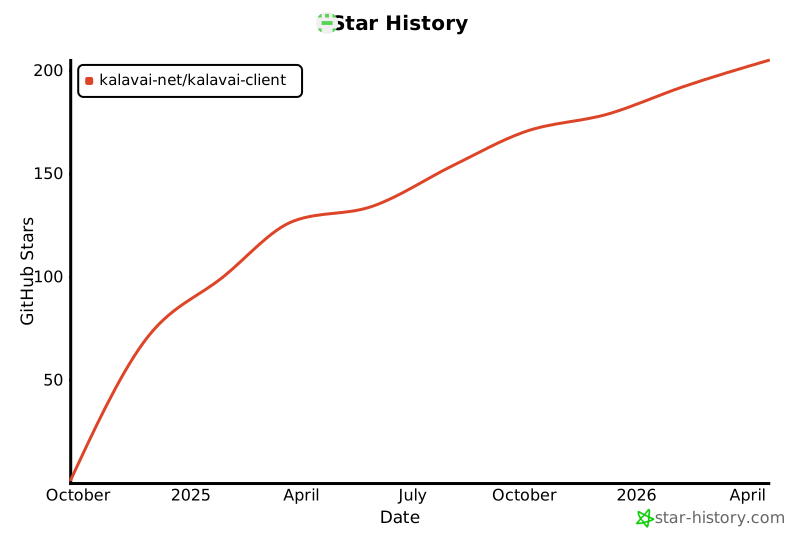
Star History
Build from source
Add Secrets to GitHub
You must store your Docker Hub username and the token you just created as secrets in your GitHub repository:
-
Go to your GitHub repository.
-
Navigate to Settings > Security > Secrets and variables > Actions.
-
Click New repository secret.
-
Create the following two secrets:
Name: DOCKER_HUB_USERNAME
Value: Your Docker Hub username or organization name.

Name: DOCKER_HUB_TOKEN
Value: The Personal Access Token you copied from Docker Hub.
Expand
Python version >= 3.12.
sudo add-apt-repository ppa:deadsnakes/ppa
sudo apt update
sudo apt install python3-dev gcc python3-venv
python3 -m venv env
source env/bin/activate
pip install -U setuptools
pip install -e .[dev]
Build python wheels:
bash publish.sh build
Unit tests
To run the unit tests, use:
python -m unittest
1 maintainer

Metadata
1 maintainer
Release files for kalavai-client 0.11.0
For a detailed explanation of source distributions (sdists) and built distributions (wheels), please see the package formats documentation.
Source distribution (sdist)
| File | Size | Uploaded | |
|---|---|---|---|
| kalavai_client-0.11.0.tar.gz | 60.3 kB | Details |
Built distribution (wheel)
| File | Interpreter | ABI | Platform | Reset |
|---|---|---|---|---|
| kalavai_client-0.11.0-py3-none-any.whl | Python 3 | none | any | Details |
Total release size: 125.7 kB
Release files / kalavai_client-0.11.0.tar.gz
| Download URL | kalavai_client-0.11.0.tar.gz |
|---|---|
| Size | 60.3 kB |
| Tags | Source |
|
SHA-256 checksum How to use checksums |
717b121cf38663981583e4de0d8651215a369b71ccbe7e3ca5bf899021be22da
|
|
BLAKE2b-256 checksum How to use checksums |
37ff26b7d59d2ff012b12b0e5adc5a92c331759ea81f20867ef8c2f4e708d7ab
|
| Upload date | |
|
Uploaded using Trusted Publishing? What is trusted publishing? |
Yes |
| Uploaded via |
twine/7.0.0 CPython/3.13.14
|
Provenance
Provenance describes where a file came from. On PyPI, provenance is shared via attestations, which provide a verifiable record of the build or publishing details. View details, limitations and caveats.


PyPI Publish Attestation
PyPI verified that this artifact, at this checksum, originated from the publisher listed below.
Signed by GitHub Actions, verified by PyPI on Sep 29, 2026.
Transparency logRelease files / kalavai_client-0.11.0-py3-none-any.whl
| Download URL | kalavai_client-0.11.0-py3-none-any.whl |
|---|---|
| Size | 65.4 kB |
| Tags | Python 3 |
|
SHA-256 checksum How to use checksums |
900cc4aab887aefe3d516a91edc2bda03310ea399585d51f9a784f268cd5beef
|
|
BLAKE2b-256 checksum How to use checksums |
bacdbc402501bdf859d9dcff01252ff9459c8f507776a3816fc7646f1a910b8b
|
| Upload date | |
|
Uploaded using Trusted Publishing? What is trusted publishing? |
Yes |
| Uploaded via |
twine/7.0.0 CPython/3.13.14
|
Provenance
Provenance describes where a file came from. On PyPI, provenance is shared via attestations, which provide a verifiable record of the build or publishing details. View details, limitations and caveats.
PyPI Publish Attestation
PyPI verified that this artifact, at this checksum, originated from the publisher listed below.
Signed by GitHub Actions, verified by PyPI on Sep 29, 2026.
Transparency log













