
Kalytera
Know when your AI agent fails — before your users do.
pip install kalytera
import kalytera

kalytera.configure(
    api_key="kly_live_...",
    agent_id="my-agent",
)

kalytera.trace(
    session_id="session-001",
    step_number=1,
    step_name="classify_intent",
    input="I need to cancel my subscription",
    output="I can help with that. What's the reason?",
)
That's it. Kalytera scores every step with an LLM judge and surfaces failure patterns — what's breaking, at which workflow step, and why.
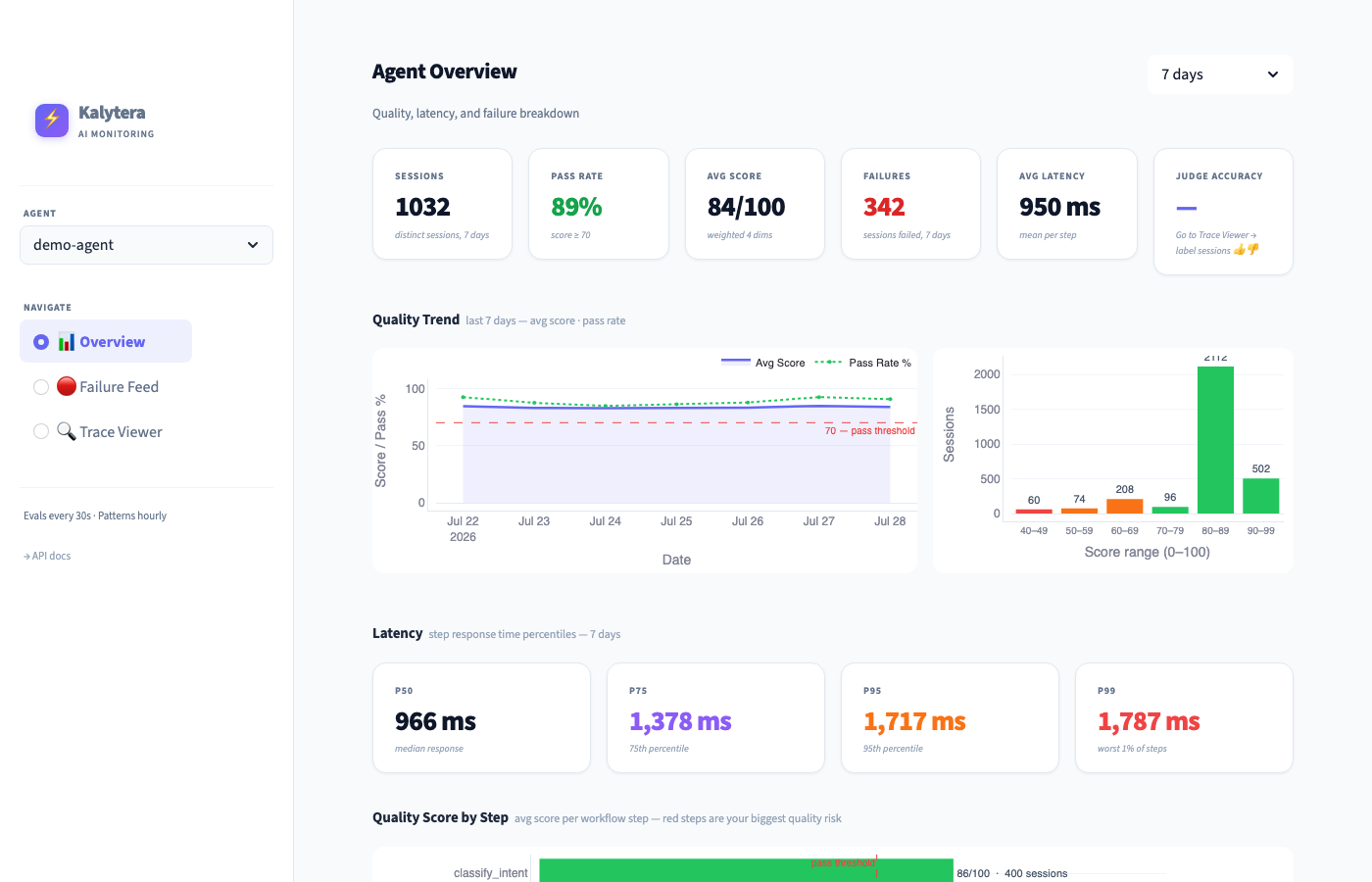
→ Live demo dashboard · Get an API key
Get started
See the whole loop in about two minutes (free key, no credit card, at kalytera.dev → Get API key):
pip install kalytera
export KALYTERA_API_KEY=kly_live_...
kalytera quickstart
A sample refund agent sends 24 conversations to your account. Its refund tool rejects refunds over $500, but the agent tells the customer the refund went through. Kalytera hasn't been told any of that:
2/4  The AI judge reads each conversation and scores it
     ✓ 10 of 24 conversations failed
3/4  Kalytera looked for what the failures have in common
     It compared their tool calls with the ones that went fine, and drafted a rule:
       🛡  Block refund_api when amount is more than 450
          Would have caught 10 of 10 failed conversations · 0 of 14 good ones
4/4  Your agent is about to call refund_api(amount=900)
       guard() → ALLOW   (watching: the rule would have blocked it)
       guard() → DENY    (after you turn on blocking)
       guard() for a $120 refund → ALLOW
Everything goes to a separate agent, quickstart-refund-bot, so your own agents' data is untouched. Open app.kalytera.dev to see it in Failure Feed and Rules.
No key yet? kalytera demo runs a bundled session through Kalytera's checks locally.
Get a key from the terminal
curl -s -X POST https://api.kalytera.dev/signup \
  -H "Content-Type: application/json" \
  -d '{"email": "you@example.com", "name": "my-agent"}' | python3 -m json.tool
Then, with your own agent — confirm your key works end-to-end:
KALYTERA_API_KEY=kly_live_... kalytera check
check verifies the key, records a test step, and waits for the server to score it:
Kalytera check
  ✓ API key accepted
  ✓ Test step recorded  (agent_id='kalytera-check-3f9a1c', session_id='kalytera-check-…')
  … waiting for the server to score it (up to 90s)
  ✓ Scored by the LLM judge: overall 0.88  (passed)
If something is wrong you get a specific reason — a rejected key, the monthly limit, or an unreachable server — instead of an empty dashboard. The same check is available in Python as kalytera.check().
Add Kalytera to an agent in production
Two changes to your code: wrap each conversation in a session, and mark the tools that can do damage with @kalytera.tool.
import kalytera

kalytera.configure(api_key="kly_live_...", agent_id="support-bot")   # agent_id: any name unique to you

@kalytera.tool                          # checks your rules before every call, records it
def refund_api(order_id: str, amount: float) -> str:
    ...

def handle(message: str, conversation_id: str) -> str:
    with kalytera.session(conversation_id, input=message) as s:     # one conversation = one session
        s.output = run_my_agent(message)                            # however your agent works today
        return s.output
That's all. Every conversation is recorded with the tool calls made in it and scored when the with block ends — also when it raises. In the dashboard you get Failure Feed (what keeps going wrong, in how many sessions) and Rules (rules Kalytera drafted from those failures).
When a rule blocks a call. New rules only watch. Once you click Start blocking, a matching call never runs: @kalytera.tool raises kalytera.Blocked (with .decision.reason). To let the agent tell the user instead, return a message:
@kalytera.tool(on_block=lambda d: f"I can't do that automatically: {d.reason}. A person will follow up.")
def refund_api(order_id: str, amount: float) -> str: ...
Works with your stack.
-
Async:
async deftools andasync with kalytera.session(...)work the same way. -
Agent frameworks: put
@kalytera.toolunder the framework's decorator, so the framework still sees your function's signature:@function_tool # OpenAI Agents SDK, or LangChain's @tool @kalytera.tool def refund_api(order_id: str, amount: float) -> str: ...
-
Many steps? Call
s.step("plan", input=..., output=...)inside the session; tool calls attach to the step they happened in. -
Not Python? Send steps to
POST /traceand check calls withPOST /guard(below).
Safe to put in front of production. Recording never blocks or raises: it happens on a background thread, and if your key is rejected or Kalytera is unreachable you get one warning on stderr while your agent keeps running. Rule checks run in your process from a cache (no network or LLM call per check), and if Kalytera is unreachable, tools run — guard fails open. Only rules you promoted can stop a call.
Lower level: kalytera.trace() for full control
kalytera.trace(
    session_id="session-001",   # same ID groups steps of one conversation
    step_number=1,
    step_name="retrieve_policy",
    input="What is the cancellation policy?",
    output="You can cancel anytime. No refunds for partial months.",
    tool_calls=[{"name": "policy_api", "input": {"topic": "cancel"}, "success": True}],
    session_ended=True,         # mark the last step so the session is scored
)
Open the dashboard at app.kalytera.dev — scores appear within a minute of a session ending.
Requires Python 3.9+ (the default python3 on macOS works).
What Kalytera detects
Each session is scored across six dimensions by an LLM judge (Claude Haiku) — or every individual step when per-step scoring is enabled:
| Dimension | Default weight | What it measures |
|---|---|---|
| Accuracy | 25% | Contextually correct answer for the situation |
| Goal alignment | 25% | Agent stayed on what the user actually needed |
| Decision quality | 15% | Reasoning was sound, right tools were chosen |
| Completeness | 15% | Request fully resolved end-to-end |
| Helpfulness | 10% | Response had practical value the user could act on |
| Factuality | 10% | All claims grounded and true — no hallucinations |
Steps scoring below 70% are flagged. Seven failure types are detected automatically:
wrong_answer · tool_failure · goal_drift · hallucination · context_loss · incomplete · loop
Weights and pass threshold are configurable per agent in the dashboard. You can also add custom metrics (e.g. helpfulness, tone, compliance) with their own weights.
Guard rules — block a known failure before it happens
trace() tells you what went wrong. guard() stops the next one. Check a tool call against your rules before it runs:
d = kalytera.guard("refund_api", {"amount": 900}, session_id=session_id)
if not d.allowed:               # DENY or ESCALATE
    return f"Needs review: {d.reason}"
refund_api(amount=900)
No code needed to try it: open app.kalytera.dev → 🛡 Rules → + New rule, and write it as a sentence: when the agent calls refund_api with amount is more than 500, block it. New rules only watch (shadow mode) — use Try it to see what one would do, then Start blocking when its numbers look right. Or let Kalytera write it: on Failure Feed, each problem that keeps happening shows a ready rule and how many of its failed sessions it would have caught, compared from the tool calls of failing and successful sessions. Click ⚡ Make it a rule to add it (watching only). The same suggestions are listed at the top of Rules.
Rules are JSON. Every rule starts in shadow mode: it records what it would have blocked and never changes guard()'s answer. Promote it once the shadow numbers look right.
cat > refund_cap.json <<'JSON'
{"id": "refund_cap",
 "match": {"tool": "refund_api", "args": [{"field": "amount", "op": ">", "value": 500}]},
 "action": "DENY",
 "reason": "Refunds over 500 need review"}
JSON

export KALYTERA_API_KEY=kly_live_... KALYTERA_AGENT_ID=my-agent
kalytera rules add refund_cap.json          # created in shadow mode
kalytera guard refund_api --args '{"amount": 900}'   # ALLOW, shadow: refund_cap would DENY
kalytera rules stats refund_cap             # would-blocks so far
kalytera rules promote refund_cap           # now enforced
kalytera guard refund_api --args '{"amount": 900}'   # DENY
- Operators:
==!=>>=<<=in. Fields can be nested:"customer.tier". All conditions in a rule must hold. - Repeated calls:
"session_conditions": [{"type": "count_in_window", "tool": "refund_api", "op": ">=", "value": 3, "window_seconds": 600}]matches the 3rd call in 10 minutes within one session. - Actions:
DENYorESCALATE(your code decides what escalation means). - Fast: rules are cached in your process and refreshed every 30 s — a check makes no network call and no LLM call.
- Fail-open: if Kalytera is unreachable,
guard()uses the last rules it loaded, or returnsALLOWif it never loaded any, and says why ind.error. Add"fail_closed": trueto a rule to deny instead when evaluation fails.guard()never raises. - Private: decisions are recorded with a hash of the arguments, never the arguments themselves.
- Every change is a new version:
kalytera rules show refund_caplists them. Also:list,demote,delete. - Not using Python?
POST /guardwith{"agent_id", "tool", "args", "session_id"}returns the same decision:
curl -s -X POST https://api.kalytera.dev/guard \
  -H "Authorization: Bearer $KALYTERA_API_KEY" -H "Content-Type: application/json" \
  -d '{"agent_id": "my-agent", "tool": "refund_api", "args": {"amount": 900}, "session_id": "s1"}'
Rules can be managed over HTTP too: GET/POST /rules, PUT /rules/{id}, POST /rules/{id}/promote|demote, DELETE /rules/{id}, GET /rules/{id}/stats — see api.kalytera.dev/docs.
Calibrate the judge
Every judge has bias. Calibration measures whether Kalytera's LLM judge agrees with your own judgement.
In the Trace Viewer, label any session with 👍 passed or 👎 failed. The dashboard shows judge accuracy against your labels and flags when weights need adjustment:
| Agreement | Status |
|---|---|
| ≥ 90% | Calibrated ✓ |
| 80–89% | Good |
| < 80% | Review your scoring weights |
Label 10–20 sessions to get a reliable calibration reading. The more you label, the more precisely Kalytera can tell you if the judge is drifting.
@watch decorator
Zero-config alternative — wraps a function and captures input, output, and latency:
@kalytera.watch
def handle_request(user_input: str) -> str:
    return your_agent_logic(user_input)
Self-host
For teams that want data on their own infrastructure:
git clone https://github.com/priyamathur/kalytera-server
cd kalytera-server
cp .env.example .env        # add ANTHROPIC_API_KEY and DATABASE_URL
docker compose up
API at http://localhost:8000, dashboard at http://localhost:8501. Point the SDK at it with kalytera.configure(api_key=..., api_endpoint="http://localhost:8000").
To develop or run the tests without Docker, use Python 3.11 (pinned in .python-version; the server dependencies don't build on 3.13 yet):
pip install -e ".[server,dev]"
pytest
Roadmap
Shipped — monitoring
- LLM-as-judge scoring (6 built-in dimensions)
- Custom metrics (helpfulness, tone, compliance, …)
- Golden set calibration — label sessions, measure judge accuracy
- Loss pattern detection — failures grouped by tool and workflow step
Now — from failure pattern to blocking rule
- Shadow mode — rules log what they would have blocked, without changing agent behavior
- Enforce mode —
kalytera.guard()checks cached rules in-process (no LLM call) before an action runs - Versioned rules — every edit, promote and demote is a new version; every decision is recorded
- Rules view in the dashboard — create, test a call, shadow counts, promote, demote, delete
- Draft rules — turn a detected failure pattern into an editable rule, with the evidence
Tracing stays fire-and-forget: trace() never blocks. Only guard() can block, and only rules you promoted.
Later
- Real-time alerts when a session scores badly or a loop is detected
- Cross-model agreement — flag low-confidence evals by comparing two judges
- Auto-calibration — suggest weight adjustments when agreement drops below threshold
- Team review queue — route low-confidence evals to a human reviewer
License
MIT — priya@kalytera.ai
1 maintainer

Metadata
1 maintainer
Release files for kalytera 0.2.4
For a detailed explanation of source distributions (sdists) and built distributions (wheels), please see the package formats documentation.
Source distribution (sdist)
| File | Size | Uploaded | |
|---|---|---|---|
| kalytera-0.2.4.tar.gz | 76.2 kB | Details |
Built distribution (wheel)
| File | Interpreter | ABI | Platform | Reset |
|---|---|---|---|---|
| kalytera-0.2.4-py3-none-any.whl | Python 3 | none | any | Details |
Total release size: 158.2 kB
Release files / kalytera-0.2.4.tar.gz
| Download URL | kalytera-0.2.4.tar.gz |
|---|---|
| Size | 76.2 kB |
| Tags | Source |
|
SHA-256 checksum How to use checksums |
7e9475e851231503d655caf11a5f59c23be38b48340401acc1562a2dd0a3a790
|
|
BLAKE2b-256 checksum How to use checksums |
752dec02b1d54345a2dce378ecb0e30f9b54fa6897d67eb3c250dfadd38ad8e0
|
| Upload date | |
|
Uploaded using Trusted Publishing? What is trusted publishing? |
No |
| Uploaded via |
twine/7.0.0 CPython/3.11.17
|
Release files / kalytera-0.2.4-py3-none-any.whl
| Download URL | kalytera-0.2.4-py3-none-any.whl |
|---|---|
| Size | 82.0 kB |
| Tags | Python 3 |
|
SHA-256 checksum How to use checksums |
11eda22d94a87ae540d914eeee04b0c1a7749eac30666905687927620713039d
|
|
BLAKE2b-256 checksum How to use checksums |
9ad9ebfbcd7c7fcf318b2dca402ebd277965b2c09aedb892643a4915a861c180
|
| Upload date | |
|
Uploaded using Trusted Publishing? What is trusted publishing? |
No |
| Uploaded via |
twine/7.0.0 CPython/3.11.17
|














