
Kalytera
Know when your AI agent fails — before your users do.
pip install kalytera
import kalytera

kalytera.configure(
    api_key="kly_live_...",
    agent_id="my-agent",
)

kalytera.trace(
    session_id="session-001",
    step_number=1,
    step_name="classify_intent",
    input="I need to cancel my subscription",
    output="I can help with that. What's the reason?",
)
That's it. Kalytera scores every step with an LLM judge and surfaces failure patterns — what's breaking, at which workflow step, and why.
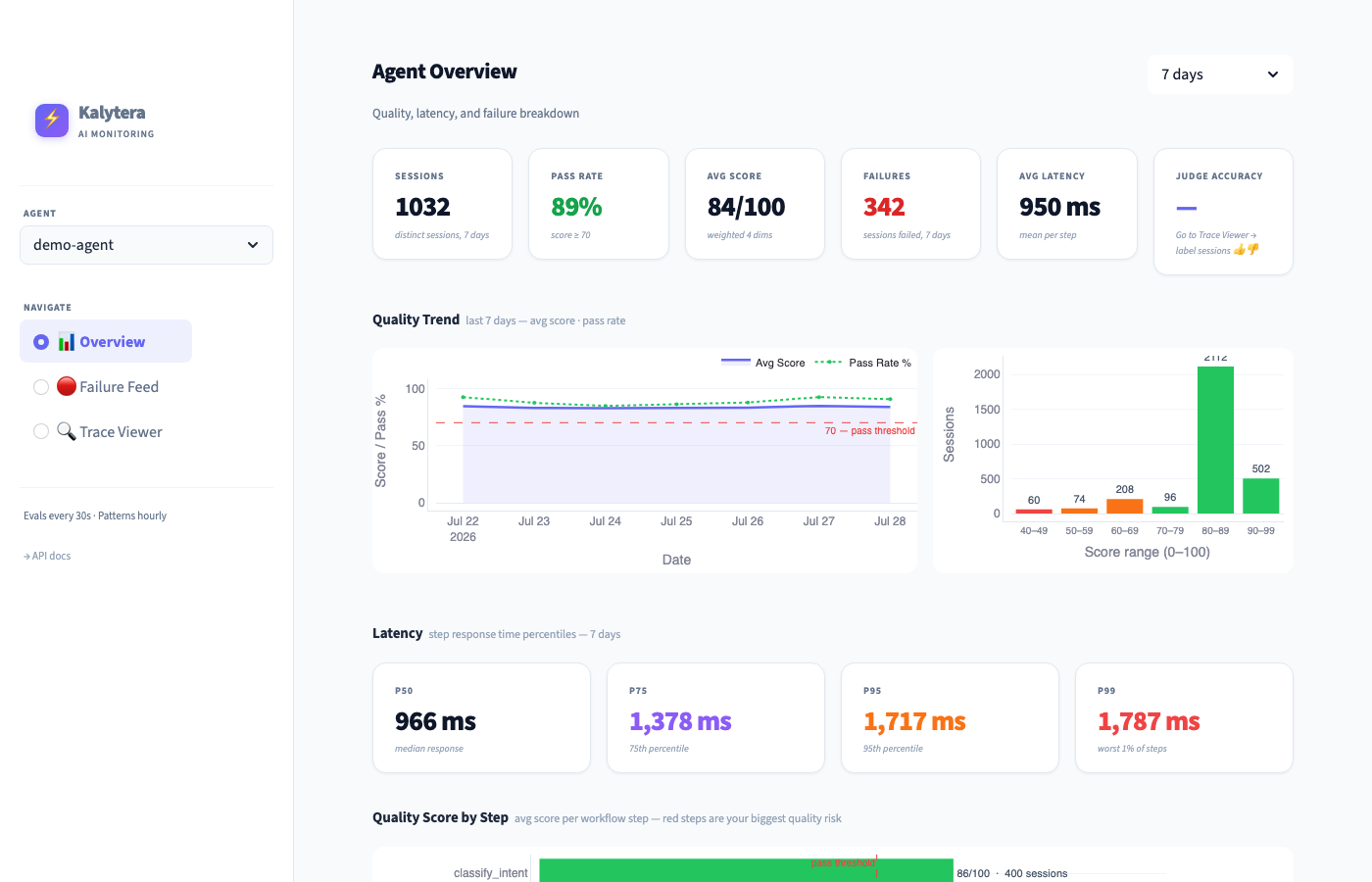
→ Live demo dashboard · Get an API key
Get started
0. See it work first — no account needed:
pip install kalytera
kalytera demo
This runs a bundled billing-agent session through Kalytera's checks on your machine and shows the step where it broke.
1. Get a free API key (no credit card) at kalytera.dev → Get API key. Your key looks like kly_live_....
Prefer the terminal?
curl -s -X POST https://api.kalytera.dev/signup \
  -H "Content-Type: application/json" \
  -d '{"email": "you@example.com", "name": "my-agent"}' | python3 -m json.tool
2. Confirm your key works end-to-end:
KALYTERA_API_KEY=kly_live_... kalytera check
check verifies the key, records a test step, and waits for the server to score it:
Kalytera check
  ✓ API key accepted
  ✓ Test step recorded  (agent_id='kalytera-check', session_id='kalytera-check-…')
  … waiting for the server to score it (up to 90s)
  ✓ Scored by the LLM judge: overall 0.88  (passed)
If something is wrong you get a specific reason — a rejected key, the monthly limit, or an unreachable server — instead of an empty dashboard. The same check is available in Python as kalytera.check().
3. Add to your agent:
import kalytera

kalytera.configure(api_key="kly_live_...", agent_id="my-agent")

# Call after every step in your agent workflow
kalytera.trace(
    session_id="session-001",   # same ID groups steps of one conversation
    step_number=1,
    step_name="retrieve_policy",
    input="What is the cancellation policy?",
    output="You can cancel anytime. No refunds for partial months.",
    tool_calls=[{"name": "policy_api", "success": True, "latency_ms": 210}],
)

# Mark the last step so the session is scored
kalytera.trace(
    session_id="session-001",
    step_number=2,
    step_name="respond",
    input="Draft reply",
    output="You can cancel anytime from Settings → Billing.",
    session_ended=True,
)
trace() returns in under 5ms and never raises — sending happens on a background thread. If your key is rejected or the server is unreachable, Kalytera prints one clear warning to stderr instead of failing silently; your agent keeps running either way.
4. Open the dashboard at app.kalytera.dev — scores appear within a minute of a session ending.
Requires Python 3.9+ (the default python3 on macOS works).
What Kalytera detects
Each session is scored across six dimensions by an LLM judge (Claude Haiku) — or every individual step when per-step scoring is enabled:
| Dimension | Default weight | What it measures |
|---|---|---|
| Accuracy | 25% | Contextually correct answer for the situation |
| Goal alignment | 25% | Agent stayed on what the user actually needed |
| Decision quality | 15% | Reasoning was sound, right tools were chosen |
| Completeness | 15% | Request fully resolved end-to-end |
| Helpfulness | 10% | Response had practical value the user could act on |
| Factuality | 10% | All claims grounded and true — no hallucinations |
Steps scoring below 70% are flagged. Seven failure types are detected automatically:
wrong_answer · tool_failure · goal_drift · hallucination · context_loss · incomplete · loop
Weights and pass threshold are configurable per agent in the dashboard. You can also add custom metrics (e.g. helpfulness, tone, compliance) with their own weights.
Guard rules — block a known failure before it happens
trace() tells you what went wrong. guard() stops the next one. Check a tool call against your rules before it runs:
d = kalytera.guard("refund_api", {"amount": 900}, session_id=session_id)
if not d.allowed:               # DENY or ESCALATE
    return f"Needs review: {d.reason}"
refund_api(amount=900)
No code needed to try it: open app.kalytera.dev → 🛡 Rules. Create a rule with a form, test a call against it, watch its would-blocks and promote it — or open Failure Feed and click Draft a rule on a pattern: Kalytera compares the tool calls of failing and passing sessions and proposes the rule, with the evidence. Nothing is saved until you click Create.
Rules are JSON. Every rule starts in shadow mode: it records what it would have blocked and never changes guard()'s answer. Promote it once the shadow numbers look right.
cat > refund_cap.json <<'JSON'
{"id": "refund_cap",
 "match": {"tool": "refund_api", "args": [{"field": "amount", "op": ">", "value": 500}]},
 "action": "DENY",
 "reason": "Refunds over 500 need review"}
JSON

export KALYTERA_API_KEY=kly_live_... KALYTERA_AGENT_ID=my-agent
kalytera rules add refund_cap.json          # created in shadow mode
kalytera guard refund_api --args '{"amount": 900}'   # ALLOW, shadow: refund_cap would DENY
kalytera rules stats refund_cap             # would-blocks so far
kalytera rules promote refund_cap           # now enforced
kalytera guard refund_api --args '{"amount": 900}'   # DENY
- Operators:
==!=>>=<<=in. Fields can be nested:"customer.tier". All conditions in a rule must hold. - Repeated calls:
"session_conditions": [{"type": "count_in_window", "tool": "refund_api", "op": ">=", "value": 3, "window_seconds": 600}]matches the 3rd call in 10 minutes within one session. - Actions:
DENYorESCALATE(your code decides what escalation means). - Fast: rules are cached in your process and refreshed every 30 s — a check makes no network call and no LLM call.
- Fail-open: if Kalytera is unreachable,
guard()uses the last rules it loaded, or returnsALLOWif it never loaded any, and says why ind.error. Add"fail_closed": trueto a rule to deny instead when evaluation fails.guard()never raises. - Private: decisions are recorded with a hash of the arguments, never the arguments themselves.
- Every change is a new version:
kalytera rules show refund_caplists them. Also:list,demote,delete. - Not using Python?
POST /guardwith{"agent_id", "tool", "args", "session_id"}returns the same decision:
curl -s -X POST https://api.kalytera.dev/guard \
  -H "Authorization: Bearer $KALYTERA_API_KEY" -H "Content-Type: application/json" \
  -d '{"agent_id": "my-agent", "tool": "refund_api", "args": {"amount": 900}, "session_id": "s1"}'
Rules can be managed over HTTP too: GET/POST /rules, PUT /rules/{id}, POST /rules/{id}/promote|demote, DELETE /rules/{id}, GET /rules/{id}/stats — see api.kalytera.dev/docs.
Calibrate the judge
Every judge has bias. Calibration measures whether Kalytera's LLM judge agrees with your own judgement.
In the Trace Viewer, label any session with 👍 passed or 👎 failed. The dashboard shows judge accuracy against your labels and flags when weights need adjustment:
| Agreement | Status |
|---|---|
| ≥ 90% | Calibrated ✓ |
| 80–89% | Good |
| < 80% | Review your scoring weights |
Label 10–20 sessions to get a reliable calibration reading. The more you label, the more precisely Kalytera can tell you if the judge is drifting.
@watch decorator
Zero-config alternative — wraps a function and captures input, output, and latency:
@kalytera.watch
def handle_request(user_input: str) -> str:
    return your_agent_logic(user_input)
Self-host
For teams that want data on their own infrastructure:
git clone https://github.com/priyamathur/kalytera-server
cd kalytera-server
cp .env.example .env        # add ANTHROPIC_API_KEY and DATABASE_URL
docker compose up
API at http://localhost:8000, dashboard at http://localhost:8501. Point the SDK at it with kalytera.configure(api_key=..., api_endpoint="http://localhost:8000").
To develop or run the tests without Docker, use Python 3.11 (pinned in .python-version; the server dependencies don't build on 3.13 yet):
pip install -e ".[server,dev]"
pytest
Roadmap
Shipped — monitoring
- LLM-as-judge scoring (6 built-in dimensions)
- Custom metrics (helpfulness, tone, compliance, …)
- Golden set calibration — label sessions, measure judge accuracy
- Loss pattern detection — failures grouped by tool and workflow step
Now — from failure pattern to blocking rule
- Shadow mode — rules log what they would have blocked, without changing agent behavior
- Enforce mode —
kalytera.guard()checks cached rules in-process (no LLM call) before an action runs - Versioned rules — every edit, promote and demote is a new version; every decision is recorded
- Rules view in the dashboard — create, test a call, shadow counts, promote, demote, delete
- Draft rules — turn a detected failure pattern into an editable rule, with the evidence
Tracing stays fire-and-forget: trace() never blocks. Only guard() can block, and only rules you promoted.
Later
- Real-time alerts when a session scores badly or a loop is detected
- Cross-model agreement — flag low-confidence evals by comparing two judges
- Auto-calibration — suggest weight adjustments when agreement drops below threshold
- Team review queue — route low-confidence evals to a human reviewer
License
MIT — priya@kalytera.ai
1 maintainer

Metadata
1 maintainer
Release files for kalytera 0.2.0
For a detailed explanation of source distributions (sdists) and built distributions (wheels), please see the package formats documentation.
Source distribution (sdist)
| File | Size | Uploaded | |
|---|---|---|---|
| kalytera-0.2.0.tar.gz | 62.8 kB | Details |
Built distribution (wheel)
| File | Interpreter | ABI | Platform | Reset |
|---|---|---|---|---|
| kalytera-0.2.0-py3-none-any.whl | Python 3 | none | any | Details |
Total release size: 129.9 kB
Release files / kalytera-0.2.0.tar.gz
| Download URL | kalytera-0.2.0.tar.gz |
|---|---|
| Size | 62.8 kB |
| Tags | Source |
|
SHA-256 checksum How to use checksums |
38e6515630b3dfd42bd8ac8151c313cdb70a1d8b204f213d027115e3ffb4085b
|
|
BLAKE2b-256 checksum How to use checksums |
1a616b9da61ac668f38ba800824440f38a65d5b9535a0e925645cdbe1fd45719
|
| Upload date | |
|
Uploaded using Trusted Publishing? What is trusted publishing? |
No |
| Uploaded via |
twine/7.0.0 CPython/3.11.17
|
Release files / kalytera-0.2.0-py3-none-any.whl
| Download URL | kalytera-0.2.0-py3-none-any.whl |
|---|---|
| Size | 67.1 kB |
| Tags | Python 3 |
|
SHA-256 checksum How to use checksums |
d8002634a18f09e40fddd23d9b51759533047bcbaae4a050bec953e3b7c8f1c7
|
|
BLAKE2b-256 checksum How to use checksums |
569d19f50a155e76033b6476452f200e3eb3399589972389aededd5d289aa35e
|
| Upload date | |
|
Uploaded using Trusted Publishing? What is trusted publishing? |
No |
| Uploaded via |
twine/7.0.0 CPython/3.11.17
|














