
Kandown
A lightweight, markdown-inspired Kanban board for developers — backed by a plain YAML file that lives right in your project repository.
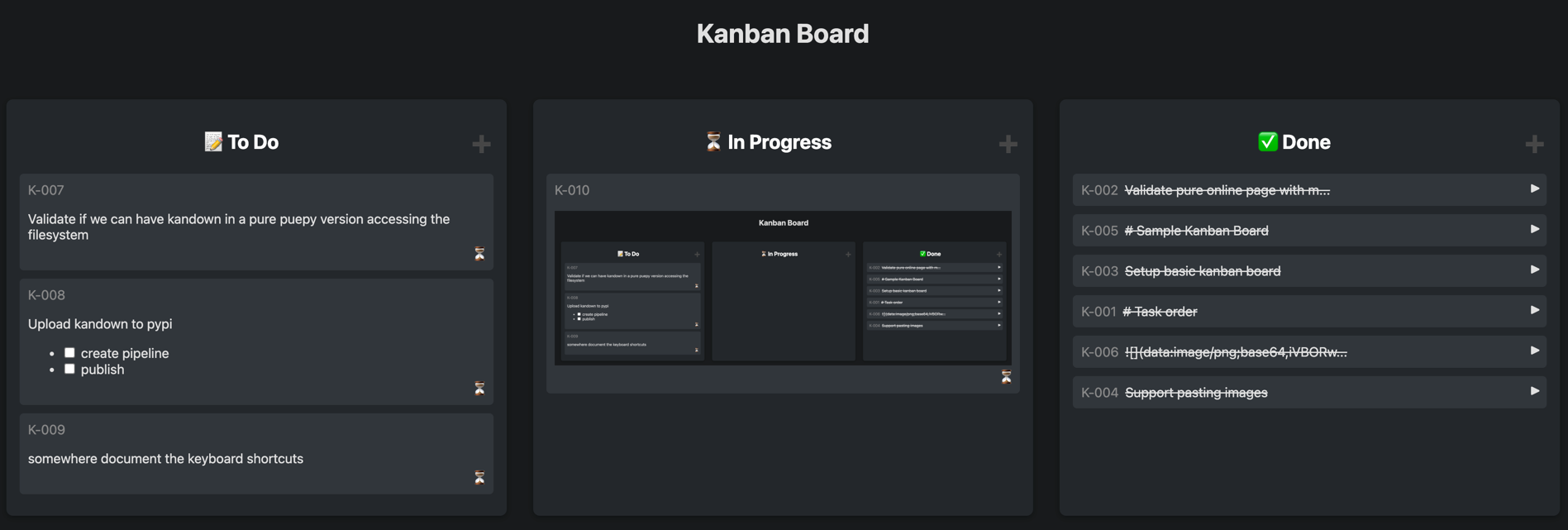
What is Kandown?
Kandown is a simple Kanban board app that stores all your tasks in a single human-readable YAML file. Because it's just a file, you can:
- Version-control your backlog alongside your code in Git
- Edit tasks manually in any text editor
- Share and review your backlog like any other project file
It ships as a Python CLI that starts a local web server, giving you a clean drag-and-drop board in your browser. No database, no cloud account, no complex setup required.
🎯 Quick Start — No Installation Needed
Not a developer? This is the recommended option for you.
Try Kandown instantly in your browser — no install, no sign-up, your data stays private and local:
👉 Open Kandown in your browser
Want to see a real board? Check out our own project backlog.
The hosted static site runs entirely in your browser:
- localStorage mode (default, all browsers) — data is saved in your browser
- File System mode (Chrome / Edge only) — read and write a real
backlog.yamlfile on your computer
Features
- 🗂️ Kanban board — drag-and-drop tasks between Icebox, To Do, In Progress, and Done columns
- ✏️ Markdown descriptions — write rich task descriptions with full Markdown support
- ✅ Interactive checkboxes — check off items directly on the card
- 🏷️ Tags and task types — organise tasks with custom tags and built-in types (feature, bug, chore, epic, experiment, request)
- 🖼️ Paste images — paste screenshots directly into task descriptions
- 📄 YAML-backed storage — all tasks live in a plain, human-readable
backlog.yamlfile - 🌐 Browser-only mode — use without installing anything via the hosted static site
- 🔄 JetBrains IDE integration — view and navigate tasks from any JetBrains IDE
- 🚀 CLI server — start a local server with one command, auto-creates the YAML file if missing
- 🌙 Dark mode — easy on the eyes
Getting Started
For Developers — CLI Mode
Install and run with a single command:
# Run directly without installing (requires uv)
uvx kandown [YAML_FILE]

# Or install permanently
uv tool install kandown
pipx install kandown
pip install kandown
Start the server
# Start with the default backlog.yaml (created automatically if missing)
kandown

# Start with a specific file on a custom port
kandown --port 8080 myproject.yaml
Open your browser at http://127.0.0.1:5001 (default port) to view the board.
CLI Options
| Option | Default | Description |
|---|---|---|
YAML_FILE |
backlog.yaml |
Path to the YAML task file (auto-created if missing) |
--port INTEGER |
5001 |
Port to listen on |
--debug |
off | Enable Flask debug mode |
--help |
Show help and exit |
For Non-Technical Users — Static Site
The easiest way to use Kandown is through the hosted static site. No installation required — just open it in your browser and start adding tasks.
Your data is stored in your browser (localStorage) by default, so it persists between visits without any server. Chrome and Edge users can also connect directly to a folder on their computer to read and write real YAML files.
Storage Modes
Kandown supports four storage modes:
| Mode | How to access | Data stored in | Editable |
|---|---|---|---|
| CLI | kandown myfile.yaml |
Local YAML file on disk | ✅ Yes |
| localStorage (default) | Hosted site | Browser localStorage | ✅ Yes |
| File System | Hosted site → Settings → Use File System | Local YAML file (via browser API) | ✅ Yes (Chrome/Edge only) |
| Read-Only | ?backlog=<url> URL parameter |
Remote YAML (memory only) | 🚫 View only |
Using File System Mode (Chrome / Edge)
- Open the hosted site in Chrome or Edge
- Click the ⚙️ settings button
- Under Storage Mode, click 📂 Use File System (Chrome/Edge)
- Select a folder — Kandown will read/write
backlog.yamlin that folder - Work as normal; all changes are saved directly to the file
Sharing a Board (Read-Only)
Anyone with access to a publicly hosted YAML file can view your board in read-only mode:
https://eruvanos.github.io/kandown/?backlog=https://example.com/path/to/backlog.yaml
The file must be accessible via HTTP and have CORS enabled (GitHub raw URLs work well).
Deploying Your Own Static Site
Fork the repository, enable GitHub Pages (Settings → Pages → Source: GitHub Actions), and push to main. The included workflow will build and deploy the static site automatically.
Settings
The settings panel (⚙️ button) exposes the following options. Availability depends on the active storage mode:
| Setting | Description | CLI | localStorage | File System | Read-Only |
|---|---|---|---|---|---|
| Dark mode | Toggle dark/light theme | ✅ | ✅ | ✅ | ✅ |
| Show Icebox column | Show or hide the leftmost Icebox column | ✅ | ✅ | ✅ | — |
| Random port on startup | Pick a free port automatically instead of using 5001 | ✅ | — | — | — |
| Store images in subfolder | Save pasted images as files in .backlog/ instead of embedding them as base64 |
✅ | — | ✅ | — |
| Download YAML | Export the current board as a backlog.yaml file |
— | ✅ | ✅ | — |
| Import YAML | Load tasks from a backlog.yaml file |
— | ✅ | — | — |
| Switch storage mode | Toggle between localStorage and File System | — | ✅ | ✅ | — |
| Clear / Reset data | Delete all tasks and reset to defaults | — | ✅ | — | — |
Tip: Settings are stored together with your tasks inside the
backlog.yamlfile in CLI and File System modes, so they roam with your project.
JetBrains IDE Integration
Connect Kandown to any JetBrains IDE using the built-in Tasks & Contexts feature:
- Open IDE settings → Tools → Tasks → Servers
- Add a new Generic server with these details:
| Field | Value |
|---|---|
| URL | http://localhost:5001 |
| Login Anonymously | ✅ Checked |
| Task List URL | http://localhost:5001/api/tasks |
| Tasks | $ |
| id field | id |
| summary field | text |
License
MIT License
1 maintainer

Download files
Download the file for your platform. If you're not sure which to choose, learn more about installing packages.
Source Distribution
Built Distribution
Filter files by name, interpreter, ABI, and platform.
If you're not sure about the file name format, learn more about wheel file names.
Copy a direct link to the current filters
File details
Details for the file kandown-0.1.7.tar.gz.
File metadata
- Download URL: kandown-0.1.7.tar.gz
- Upload date:
- Size: 46.2 kB
- Tags: Source
- Uploaded using Trusted Publishing? Yes
- Uploaded via:
twine/6.1.0 CPython/3.13.7
File hashes
| Algorithm | Hash digest | |
|---|---|---|
| SHA256 |
ba5b92d685d9a4d173be1221255687da9134d5fbf16070625f751f3c026cdf66
|
|
| MD5 |
437bd159b5b5688193bce86275fba44f
|
|
| BLAKE2b-256 |
7980be6907765e2392177653215cc699c547be3654393285afe027c4430269bb
|
Provenance
The following attestation bundles were made for kandown-0.1.7.tar.gz:
Publisher:
pypi-release.yml on eruvanos/kandown
-
Statement:
-
Statement type:
https://in-toto.io/Statement/v1 -
Predicate type:
https://docs.pypi.org/attestations/publish/v1 -
Subject name:
kandown-0.1.7.tar.gz -
Subject digest:
ba5b92d685d9a4d173be1221255687da9134d5fbf16070625f751f3c026cdf66 - Sigstore transparency entry: 2101970676
- Sigstore integration time:
-
Permalink:
eruvanos/kandown@c3fc3d9199938b6d95e1172a7e98ee5cbb268eed -
Branch / Tag:
refs/tags/v0.1.7 - Owner: https://github.com/eruvanos
-
Access:
public
-
Token Issuer:
https://token.actions.githubusercontent.com -
Runner Environment:
github-hosted -
Publication workflow:
pypi-release.yml@c3fc3d9199938b6d95e1172a7e98ee5cbb268eed -
Trigger Event:
push
-
Statement type:
File details
Details for the file kandown-0.1.7-py3-none-any.whl.
File metadata
- Download URL: kandown-0.1.7-py3-none-any.whl
- Upload date:
- Size: 56.6 kB
- Tags: Python 3
- Uploaded using Trusted Publishing? Yes
- Uploaded via:
twine/6.1.0 CPython/3.13.7
File hashes
| Algorithm | Hash digest | |
|---|---|---|
| SHA256 |
0e6c93e268dda247737ca8e6979ecb723848eb263d3017e8d068130c62e33705
|
|
| MD5 |
705031894451ed12a1475e0deae82b76
|
|
| BLAKE2b-256 |
c21db9e8b4aa174ef59191aa5d4fb9d3c6c6cb6a6eccf29d7ddc47c432e65a46
|
Provenance
The following attestation bundles were made for kandown-0.1.7-py3-none-any.whl:
Publisher:
pypi-release.yml on eruvanos/kandown
-
Statement:
-
Statement type:
https://in-toto.io/Statement/v1 -
Predicate type:
https://docs.pypi.org/attestations/publish/v1 -
Subject name:
kandown-0.1.7-py3-none-any.whl -
Subject digest:
0e6c93e268dda247737ca8e6979ecb723848eb263d3017e8d068130c62e33705 - Sigstore transparency entry: 2101970748
- Sigstore integration time:
-
Permalink:
eruvanos/kandown@c3fc3d9199938b6d95e1172a7e98ee5cbb268eed -
Branch / Tag:
refs/tags/v0.1.7 - Owner: https://github.com/eruvanos
-
Access:
public
-
Token Issuer:
https://token.actions.githubusercontent.com -
Runner Environment:
github-hosted -
Publication workflow:
pypi-release.yml@c3fc3d9199938b6d95e1172a7e98ee5cbb268eed -
Trigger Event:
push
-
Statement type:














