
Kandown is a lightweight, markdown-inspired Kanban board application that lets you manage tasks using a simple YAML file, featuring a web UI, image and markdown support, and a hybrid demo mode for browser-based or local file storage.
Verified details
These details have been verified by PyPIProject links
GitHub Statistics
Maintainers

Project description
Kandown
A simple, markdown-inspired Kanban board powered by YAML and Flask.
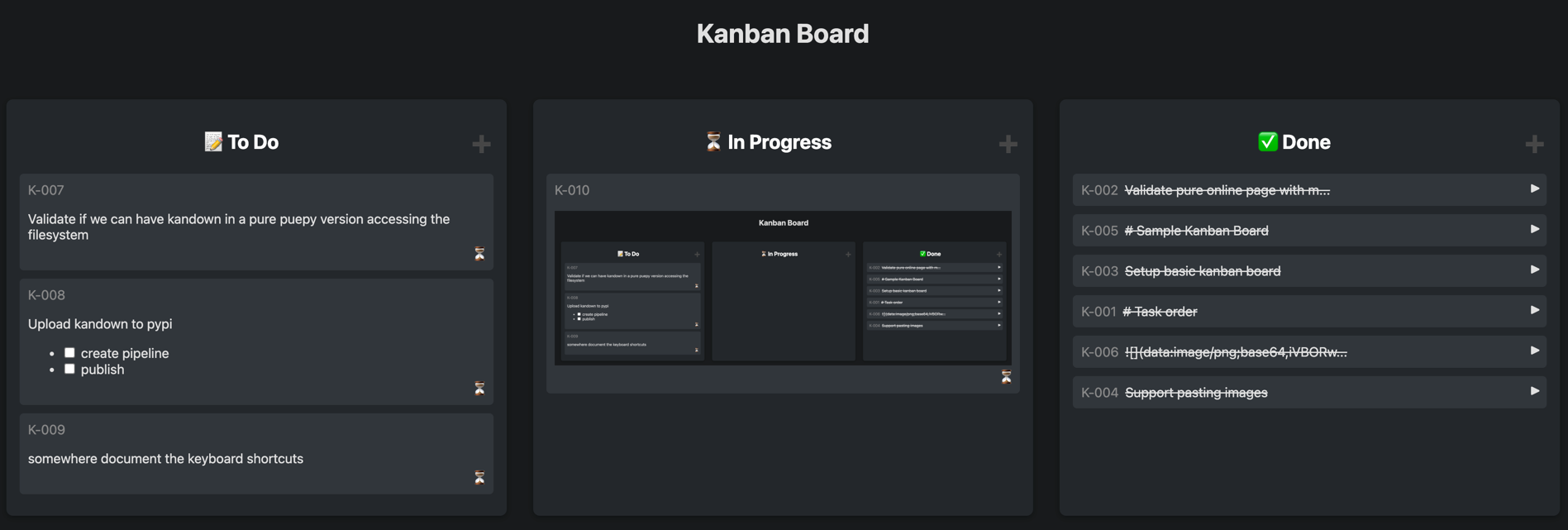
🎯 Try Kandown Instantly Online
Experience Kandown without any installation required!
Access the GitHub hosted demo — your data stays private and is stored locally in your browser.
Want to preview a real project?
Check out our own backlog.
Overview
Kandown is a lightweight web application for visualizing and managing tasks in a Kanban board format. Tasks are stored in a YAML file, making it easy to edit, version, and share your board. The app features a clean, responsive web UI started by the CLI.
Features
- 🗂️ Kanban board UI: Drag-and-drop tasks between columns (To Do, In Progress, Done)
- ✏️ Markdown support: Write task descriptions using Markdown syntax
- 🖼️ Paste images: Task descriptions support pasting images from clipboard
- 🗂️ Image Storage: Images can be embedded as base64 or saved to disk into an
.backlogfolder - ✅ Interactive checkboxes: Clickable checkboxes in task descriptions
- 📄 YAML-backed storage: All tasks are stored in a simple YAML file
- 🔄 Jetbrains IDE integration: View and track tasks directly from JetBrains IDEs
- 🚀 CLI: Start the server, choose host/port/debug, auto-create YAML file if missing
- 🌐 Hybrid demo mode: Try it in your browser with localStorage or connect to local files (Chrome/Edge)
Usage
You can install it or directly or use via uvx.
# install via uv
uv tool install kandown

# or via pipx
pipx install kandown

# or via pip
pip install kandown

# even without installing, you can run it directly:
uvx kandown [OPTIONS] [YAML_FILE]
Usage
Start the Kanban server
kandown [OPTIONS] [YAML_FILE]
- If no YAML file is provided, defaults to
backlog.yaml(auto-created if missing). - Open your browser to
http://127.0.0.1:5001(default) to view the board.
CLI Options
Options:
  --host TEXT     Host to bind to (default: 127.0.0.1)
  --port INTEGER  Port to bind to (default: 5001)
  --debug         Enable debug mode
  --help          Show help message
Examples
# Start server with default YAML file (if exists)
kandown

# Start server with a custom YAML file on a custom port
kandown --port 5001 demo.yml
Hosted Version
A GitHub hosted version of Kandown is hosted at https://eruvanos.github.io/kandown/.
Storage Modes
localStorage Mode (Default - All Browsers):
- ✅ Works in all modern browsers
- ✅ Data stored in browser's localStorage
- ✅ Quick trials without any setup
- ✅ Privacy: Data stays in your browser
- ✅ Offline use after initial load
- ✅ Download data as YAML file
- ✅ Import data from YAML file
File System Mode (Chrome/Edge Only - Optional):
- ✅ Connect to a local folder on your computer
- ✅ Read and write real
backlog.yamlfiles - ✅ Work with existing Kandown projects
- ✅ True file system integration
- ✅ Changes persist to actual files
Demo Mode Features
The demo mode includes all core features:
- ✅ Drag-and-drop task management
- ✅ Markdown rendering
- ✅ Image paste support (stored as base64 in localStorage, or as files in File System mode)
- ✅ Task tags and types
- ✅ Dark mode
- ✅ Data persistence (localStorage or file system)
- ✅ Storage mode switcher (localStorage ↔ File System)
- ✅ Clear data option in settings
- ✅ Load backlog files via URL parameter
Loading a Backlog File via URL Parameter (Read-Only Mode)
You can load and view a specific backlog YAML file in demo mode using URL parameters:
https://eruvanos.github.io/kandown/?backlog=example.yaml
https://eruvanos.github.io/kandown/?file=path/to/backlog.yaml
Read-Only Mode Features: When loading a backlog via URL parameter, the application enters read-only mode to protect your data:
- 📖 View-only access - no modifications allowed
- 🚫 Drag and drop disabled
- 🚫 Text editing disabled
- 🚫 Type changes disabled
- 🚫 Tag editing disabled
- 🚫 Task creation/deletion disabled
- 💾 Data not stored in localStorage - kept only in memory
This is useful for:
- 📤 Sharing backlogs with team members for viewing
- 📚 Providing example projects or templates
- 🎓 Creating tutorial or demo workflows
- 👁️ Previewing backlog files without modifying your local data
Requirements:
- The YAML file must be accessible via HTTP
- Either same-origin or CORS must be enabled on the file's server
- If the file cannot be loaded, the demo falls back to default demo tasks (editable)
Using File System Mode
- Open the demo in Chrome or Edge browser
- Click the settings button (⚙️)
- Scroll to "Storage Mode" section
- Click "📂 Use File System (Chrome/Edge)"
- Select a folder on your computer (it will look for or create
backlog.yaml) - Start working with your local files!
Note:
- In localStorage mode, data is stored in your browser's localStorage. Clearing browser data will delete all tasks.
- In File System mode, your data is stored in actual files on your computer. The browser needs permission to access the folder, which you can revoke at any time.
Deploy Your Own Demo
The demo can be deployed to any static hosting service. A GitHub Actions workflow is included to automatically deploy to GitHub Pages:
- Enable GitHub Pages in your repository settings (Settings → Pages → Source: GitHub Actions)
- Push to the
mainbranch or trigger the workflow manually - The demo will be built and deployed automatically
Jetbrains Task Integration
You can integrate Kandown with Jetbrains IDEs using the Tasks & Contexts feature.
To set up Kandown as a task server open the IDE settings and navigate to Tools > Tasks > Servers.
Add a new generic server with the following details:
- General Settings:
- URL:
http://localhost:5001(or your server URL) - Login Anonymously: Checked
- URL:
- Server Configuration:
- Task List URL:
http://localhost:5001/api/tasks - Tasks: $
- id:
id - summary:
text
- Task List URL:
License
MIT License
Project details
Verified details
These details have been verified by PyPIProject links
GitHub Statistics
Maintainers
Release history Release notifications | RSS feed


Download files
Download the file for your platform. If you're not sure which to choose, learn more about installing packages.
Source Distribution
Built Distribution
Filter files by name, interpreter, ABI, and platform.
If you're not sure about the file name format, learn more about wheel file names.
Copy a direct link to the current filters
File details
Details for the file kandown-0.1.5.tar.gz.
File metadata
- Download URL: kandown-0.1.5.tar.gz
- Upload date:
- Size: 40.1 kB
- Tags: Source
- Uploaded using Trusted Publishing? Yes
- Uploaded via: twine/6.1.0 CPython/3.13.7
File hashes
| Algorithm | Hash digest | |
|---|---|---|
| SHA256 |
b4acf44df69f39078706fb988f632b6bdded7097d011dd9ff976c3ac076df660
|
|
| MD5 |
79a1f6d3a70a77f4724ed9028ef699db
|
|
| BLAKE2b-256 |
96153ae00f89010949b14eb0da5df231b11f6531636991cc7d274cd26336b8e3
|
Provenance
The following attestation bundles were made for kandown-0.1.5.tar.gz:
Publisher:
pypi-release.yml on eruvanos/kandown
-
Statement:
-
Statement type:
https://in-toto.io/Statement/v1 -
Predicate type:
https://docs.pypi.org/attestations/publish/v1 -
Subject name:
kandown-0.1.5.tar.gz -
Subject digest:
b4acf44df69f39078706fb988f632b6bdded7097d011dd9ff976c3ac076df660 - Sigstore transparency entry: 673893933
- Sigstore integration time:
-
Permalink:
eruvanos/kandown@1c13e1fcc1d49eaa1b396b34733e343c56ef5cea -
Branch / Tag:
refs/tags/v0.1.5 - Owner: https://github.com/eruvanos
-
Access:
public
-
Token Issuer:
https://token.actions.githubusercontent.com -
Runner Environment:
github-hosted -
Publication workflow:
pypi-release.yml@1c13e1fcc1d49eaa1b396b34733e343c56ef5cea -
Trigger Event:
push
-
Statement type:
File details
Details for the file kandown-0.1.5-py3-none-any.whl.
File metadata
- Download URL: kandown-0.1.5-py3-none-any.whl
- Upload date:
- Size: 50.4 kB
- Tags: Python 3
- Uploaded using Trusted Publishing? Yes
- Uploaded via: twine/6.1.0 CPython/3.13.7
File hashes
| Algorithm | Hash digest | |
|---|---|---|
| SHA256 |
44954f1b76a9f3faad1509e35f916803b3e573c3faebd1d3b08758b4219f409c
|
|
| MD5 |
98adda46140aaffdbf642b2e9b371467
|
|
| BLAKE2b-256 |
b4c05a4b867bdc76792f8c4b3d2093e9ee5705913326a9f742562eda789dd3f2
|
Provenance
The following attestation bundles were made for kandown-0.1.5-py3-none-any.whl:
Publisher:
pypi-release.yml on eruvanos/kandown
-
Statement:
-
Statement type:
https://in-toto.io/Statement/v1 -
Predicate type:
https://docs.pypi.org/attestations/publish/v1 -
Subject name:
kandown-0.1.5-py3-none-any.whl -
Subject digest:
44954f1b76a9f3faad1509e35f916803b3e573c3faebd1d3b08758b4219f409c - Sigstore transparency entry: 673893945
- Sigstore integration time:
-
Permalink:
eruvanos/kandown@1c13e1fcc1d49eaa1b396b34733e343c56ef5cea -
Branch / Tag:
refs/tags/v0.1.5 - Owner: https://github.com/eruvanos
-
Access:
public
-
Token Issuer:
https://token.actions.githubusercontent.com -
Runner Environment:
github-hosted -
Publication workflow:
pypi-release.yml@1c13e1fcc1d49eaa1b396b34733e343c56ef5cea -
Trigger Event:
push
-
Statement type:






