
Edge bundling algorithms for graph visualization using kernel density estimation (KDE).
Verified details
These details have been verified by PyPIProject links
GitHub Statistics
Maintainers

Project description
KDEdge
KDEEB-style edge bundling for Python.
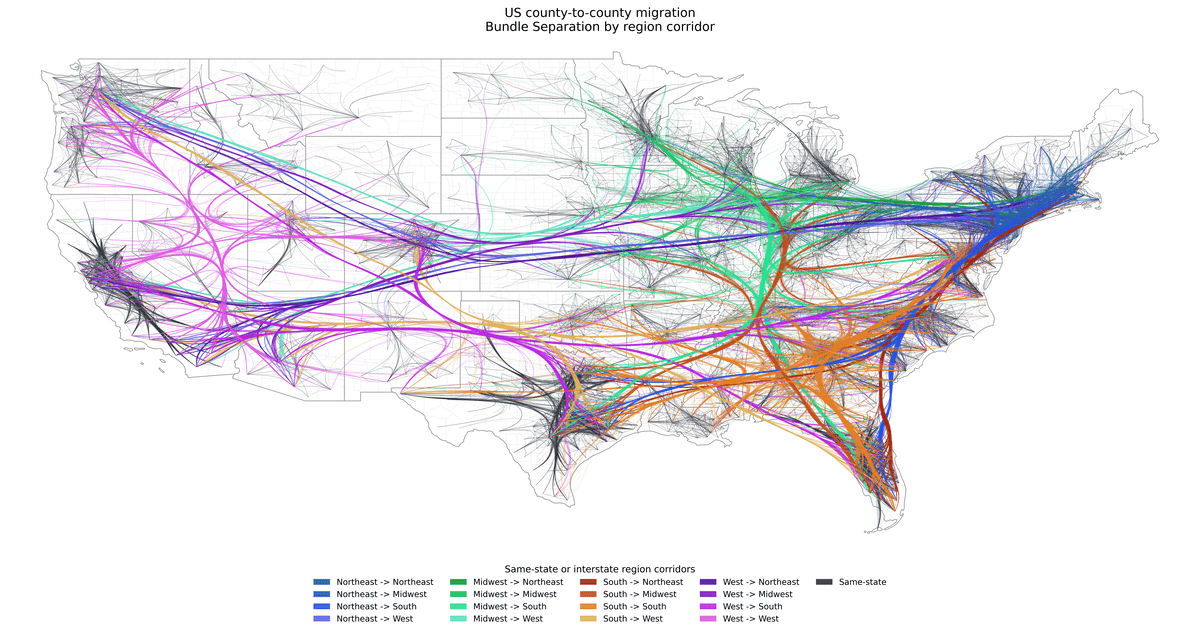
This package bundles graph edges into smooth polylines for visualization. It currently supports one bundling method:
kdeeb: kernel-density edge bundling
Install
Python 3.10 or higher is required.
Install from PyPI:
pip install kdedge
The core package depends only on NumPy. SciPy and Numba are optional and are automatically used when installed. To install both optional dependencies, run:
pip install kdedge[perf]
Documentation
Sphinx documentation sources live in docs/.
Documentation is hosted on Read the Docs.
How it works
The input is a set of 2D node positions and an edge list.
Each edge starts as a straight segment between its source and target node. The edges are then sampled into polylines with control points along the edge.
Each sample point contributes to a density field, a scalar field that counts the number of edges passing through it. The density field is smoothed with a kernel, for example a Gaussian blur.
The sample points are then moved toward the gradient of the density field. This means edges are pulled toward high-density regions where many edges overlap. After moving the sample points, the polylines are smoothed to reduce sharp corners.
This process is repeated for a number of iterations, the edges are resampled, the density field is recomputed, and the sample points are moved again. Over time, edges that share similar routes are pulled together into bundles.
In kdeeb mode, all edges share one density field, so similar routes collapse into common bundles.
Example
import numpy as np

from kdedge import bundle

nodes = np.array(
    [
        [-1.0, 0.0],
        [0.0, 1.0],
        [1.0, 0.0],
        [0.0, -1.0],
    ],
    dtype=np.float64,
)

edges = np.array(
    [
        [0, 2],
        [1, 3],
        [0, 1],
        [2, 3],
    ],
    dtype=np.int64,
)

polylines = bundle(
    nodes=nodes,
    edges=edges,
    iterations=10,
    mode="kdeeb",
)

print(len(polylines))
print(polylines[0].shape)
The result is a list of polylines as NumPy arrays. Each polyline keeps the original edge endpoints and adds interior control points as needed.
Kernel Density Estimation Implementation
This package follows the KDEEB idea from Graph Bundling by Kernel Density Estimation (2012) by Hurter, C., Ersoy, O. and Telea, A. The implementation is inspired by the authors' C# demo.
However, the numerical approximations and the default parameters in this package are different, so values are not directly interchangeable and results are not comparable. This package defaults to a more Python-friendly implementation and default parameters that are efficient in NumPy/SciPy, especially for very dense graphs. A wrapper function kdeeb() is provided for a preset that is closer to the original KDEEB algorithm.
Key differences:
- Density field: by default this package builds a point-count grid and smooths the entire grid with
gaussian_filter(density_mode="gaussian_filter"). The KDEEB paper describes kernel-density estimation in general, and the paper authors' C# demo uses explicit point splatting with an11x11radial kernel on a300x300accumulation grid. - Python-friendly: the default
gaussian_filterpath is chosen because it is efficient to compute with SciPy for dense for dense graphs. Usedensity_mode="point_splat"for a kernel closer to the KDEEB authors' splatting idea. For sparse graphs, explicit point splatting may be more efficient. Custom kernels can be defined by passing a splatting function or by operating on the density grid (numpy.ndarray). - Gradient estimation: this package computes
np.gradient(...)on the full density image and bilinearly interpolates the gradient at each sample point. The authors' demo estimates a local gradient in a15x15window around every sample point. - Coordinate system and grid: this package internally operates on a square pixel grid with
grid_size=512by default. The authors' demo instead operates on normalized coordinates. - Resampling: this package resamples each polyline by uniform arc length with spacing
sampling * grid_size(default0.01 * 512 = 5.12pixels). The authors' demo uses split/remove thresholds in normalized coordinates (splitDistance=0.005,removeDistance=0.0025). - Smoothing: after moving the sample points, the polylines are smoothed to achieve smooth curves. This package defaults to Laplacian smoothing with factor
smooth=0.35andsmooth_iterations=1. The authors' CPU demo instead applies much stronger smoothing, with 50 iterations after every bundling step, with a smoothing factor that is roughly comparable tosmooth=0.333. - Scheduling: the KDEEB paper uses a shared schedule
h_i = l^i h_maxfor both bandwidth and advection. This effectively limits movement of the sample points to the bandwidth of the kernel function. The authors'C# demo instead uses fixed constants such asKernelSize = 11andattractionFactor = 1.0. Thebundle()function in this package uses the parameterssigma(for Gaussian kernel) andattract-strength as separate controls unless they are explicitly coupled by using the same schedule parameter.
KDEEB-style wrapper kdeeb()
This function provides a preset that is closer to the original KDEEB algorithm, with the following defaults:
- a shared schedule
h_i = l^i h_maxfor both density bandwidth and advection - default
bandwidth_decay = 0.7 - automatic
h_maxestimation from the initial straight edges density_mode="point_splat"with an Epanechnikov splat kernel- moderate smoothing with
smooth=1/3andsmooth_iterations=8(Note: the KDEEB C# demo instead applies50smoothing passes) - fixed sampling near
1%of the graph bounding box viasampling=0.01
Example:
from kdedge import kdeeb

polylines = kdeeb(
    nodes=nodes,
    edges=edges,
    iterations=10,
)
Results
Example output images are in results.
Development
The core API is in kdedge/algo.py, the kernel functions are in kdedge/kernels.py.
Tests can be run with pytest for a specific Python version or for multiple Python versions with tox:
pip install pytest
pytest

pip install tox
tox
# Optionally install more Python versions, e.g. with: pyenv install 3.11.8
Static type checking can be tested with mypy or pyright:
pip install pyright
pyright

pip install mypy
mypy kdedge
Runtime type checking can be tested with pytest and the beartype or typeguard plugin:
pip install pytest-beartype
pytest --beartype-packages="kdedge"

pip install typeguard
pytest --typeguard-packages="kdedge"
Code formatting can be checked with ruff:
pip install ruff
ruff check kdedge tests

# Autofix simple issues:
ruff check --fix kdedge tests

# Formatting a file:
ruff format kdedge/algo.py
Numba and SciPy implementations
Some functions are implemented multiple times with different backends (pure NumPy, SciPy or Numba) for performance reasons. See kdedge/impl/impl_numpy.py, kdedge/impl/impl_scipy.py and kdedge/impl/impl_numba.py for the implementations.
The fastest implementation for each function is currently hardcoded (based on benchmarking results). A pure NumPy implementation is used if SciPy or Numba are not available.
Benchmark tests to compare some of the Numba and NumPy functions are in benchmarks/.
Run the benchmarks with:
python -m benchmarks
References
- KDEEB website: https://webspace.science.uu.nl/~telea001/InfoVis/KDEEB
- KDEEB paper: Hurter, C., Ersoy, O. and Telea, A. (2012), Graph Bundling by Kernel Density Estimation, Computer Graphics Forum 31(3).
- KDEEB authors' demo software: https://webspace.science.uu.nl/~telea001/uploads/Software/KDEEB
Project details
Verified details
These details have been verified by PyPIProject links
GitHub Statistics
Maintainers
Release history Release notifications | RSS feed

Download files
Download the file for your platform. If you're not sure which to choose, learn more about installing packages.
Source Distribution
Built Distribution
Filter files by name, interpreter, ABI, and platform.
If you're not sure about the file name format, learn more about wheel file names.
Copy a direct link to the current filters
File details
Details for the file kdedge-0.0.1.tar.gz.
File metadata
- Download URL: kdedge-0.0.1.tar.gz
- Upload date:
- Size: 32.0 kB
- Tags: Source
- Uploaded using Trusted Publishing? Yes
- Uploaded via: twine/6.1.0 CPython/3.13.13
File hashes
| Algorithm | Hash digest | |
|---|---|---|
| SHA256 |
e7890aaef18a972a293ff5512b1c162c81f33e24722e765da34a263c9b12e280
|
|
| MD5 |
4ed108d46c1294fd6579efa8348fa831
|
|
| BLAKE2b-256 |
c6a27647e8c141ceb04082efba118f8da5081bb95a7949f5e5d0e55caebc72f9
|
Provenance
The following attestation bundles were made for kdedge-0.0.1.tar.gz:
Publisher:
pypipublish.yml on cvzi/kdedge
-
Statement:
-
Statement type:
https://in-toto.io/Statement/v1 -
Predicate type:
https://docs.pypi.org/attestations/publish/v1 -
Subject name:
kdedge-0.0.1.tar.gz -
Subject digest:
e7890aaef18a972a293ff5512b1c162c81f33e24722e765da34a263c9b12e280 - Sigstore transparency entry: 2040365127
- Sigstore integration time:
-
Permalink:
cvzi/kdedge@a8be6b6dbe82c3ba269423cbfec268980d3c211d -
Branch / Tag:
refs/tags/v0.0.1 - Owner: https://github.com/cvzi
-
Access:
public
-
Token Issuer:
https://token.actions.githubusercontent.com -
Runner Environment:
github-hosted -
Publication workflow:
pypipublish.yml@a8be6b6dbe82c3ba269423cbfec268980d3c211d -
Trigger Event:
release
-
Statement type:
File details
Details for the file kdedge-0.0.1-py3-none-any.whl.
File metadata
- Download URL: kdedge-0.0.1-py3-none-any.whl
- Upload date:
- Size: 23.8 kB
- Tags: Python 3
- Uploaded using Trusted Publishing? Yes
- Uploaded via: twine/6.1.0 CPython/3.13.13
File hashes
| Algorithm | Hash digest | |
|---|---|---|
| SHA256 |
678be2ca1f8dd51a8f8210146b47b235d3a831f7156db416fb67508d38d2bfe8
|
|
| MD5 |
3b8be836eaaec360bda859432f5e8a8e
|
|
| BLAKE2b-256 |
babfadbfdffe6b02301eb4e7d6405c57df4cb3410300deaa1ab46043d21d94ca
|
Provenance
The following attestation bundles were made for kdedge-0.0.1-py3-none-any.whl:
Publisher:
pypipublish.yml on cvzi/kdedge
-
Statement:
-
Statement type:
https://in-toto.io/Statement/v1 -
Predicate type:
https://docs.pypi.org/attestations/publish/v1 -
Subject name:
kdedge-0.0.1-py3-none-any.whl -
Subject digest:
678be2ca1f8dd51a8f8210146b47b235d3a831f7156db416fb67508d38d2bfe8 - Sigstore transparency entry: 2040365316
- Sigstore integration time:
-
Permalink:
cvzi/kdedge@a8be6b6dbe82c3ba269423cbfec268980d3c211d -
Branch / Tag:
refs/tags/v0.0.1 - Owner: https://github.com/cvzi
-
Access:
public
-
Token Issuer:
https://token.actions.githubusercontent.com -
Runner Environment:
github-hosted -
Publication workflow:
pypipublish.yml@a8be6b6dbe82c3ba269423cbfec268980d3c211d -
Trigger Event:
release
-
Statement type:






