
MCP Server for Google Keep

Project description
keep-mcp
MCP server for Google Keep
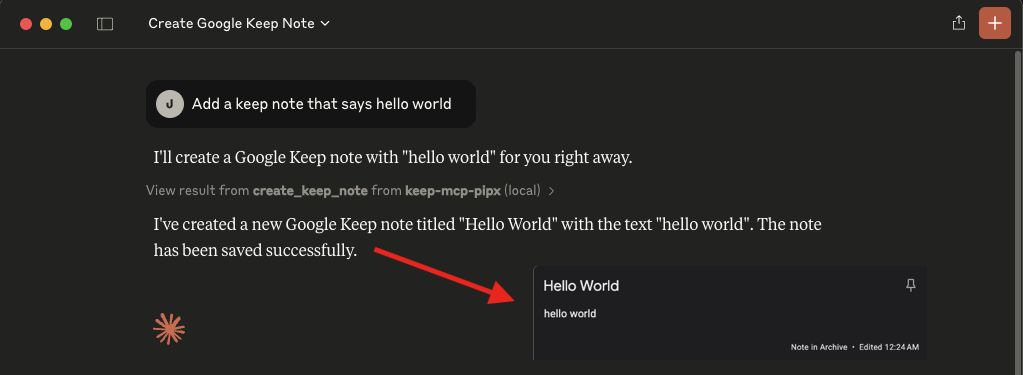
How to use
- Add the MCP server to your MCP servers:
  "mcpServers": {
    "keep-mcp-pipx": {
      "command": "pipx",
      "args": [
        "run",
        "keep-mcp"
      ],
      "env": {
        "GOOGLE_EMAIL": "Your Google Email",
        "GOOGLE_MASTER_TOKEN": "Your Google Master Token - see README.md"
      }
    }
  }
- Add your credentials:
GOOGLE_EMAIL: Your Google account email addressGOOGLE_MASTER_TOKEN: Your Google account master token
Check https://gkeepapi.readthedocs.io/en/latest/#obtaining-a-master-token and https://github.com/simon-weber/gpsoauth?tab=readme-ov-file#alternative-flow for more information.
Features
find: Search for notes based on a query stringcreate_note: Create a new note with title and text (automatically adds keep-mcp label)update_note: Update a note's title and textdelete_note: Mark a note for deletion
By default, all destructive and modification operations are restricted to notes that have were created by the MCP server (i.e. have the keep-mcp label). Set UNSAFE_MODE to true to bypass this restriction.
"env": {
  ...
  "UNSAFE_MODE": "true"
}
Publishing
To publish a new version to PyPI:
- Update the version in
pyproject.toml - Install build tools:
pipx install build
pipx install twine
- Build the package:
python3 -m build
- Upload to PyPI:
twine upload dist/*
Troubleshooting
- If you get "DeviceManagementRequiredOrSyncDisabled" check https://admin.google.com/ac/devices/settings/general and turn "Turn off mobile management (Unmanaged)"


Download files
Download the file for your platform. If you're not sure which to choose, learn more about installing packages.
Source Distribution
Built Distribution
Filter files by name, interpreter, ABI, and platform.
If you're not sure about the file name format, learn more about wheel file names.
Copy a direct link to the current filters
File details
Details for the file keep_mcp-0.2.0.tar.gz.
File metadata
- Download URL: keep_mcp-0.2.0.tar.gz
- Upload date:
- Size: 4.5 kB
- Tags: Source
- Uploaded using Trusted Publishing? No
- Uploaded via: twine/6.1.0 CPython/3.13.2
File hashes
| Algorithm | Hash digest | |
|---|---|---|
| SHA256 |
57832f85ee0c03d1d67895bb73f60e2ea46edc4da59c0a0105aa9aaea010c3a9
|
|
| MD5 |
2e0250bb652f63ee5ca1fa4b2694ae6a
|
|
| BLAKE2b-256 |
fa4f74bd2a9d36b64e93f90ca20a2331312c37490383467ab38eb52a12dbba5c
|
File details
Details for the file keep_mcp-0.2.0-py3-none-any.whl.
File metadata
- Download URL: keep_mcp-0.2.0-py3-none-any.whl
- Upload date:
- Size: 6.1 kB
- Tags: Python 3
- Uploaded using Trusted Publishing? No
- Uploaded via: twine/6.1.0 CPython/3.13.2
File hashes
| Algorithm | Hash digest | |
|---|---|---|
| SHA256 |
2da6b3da11fcc80d04c9882bd0b90207068f321ae8af6301675aadece49d6f39
|
|
| MD5 |
12e2c8e543e5613b91fe7df33917f70e
|
|
| BLAKE2b-256 |
6c727bfc05e36899d3fc563d2967d9a2e6017503816303be36a8ba6e73aa3e60
|






