
MCP Server for Google Keep

Project description
keep-mcp
MCP server for Google Keep
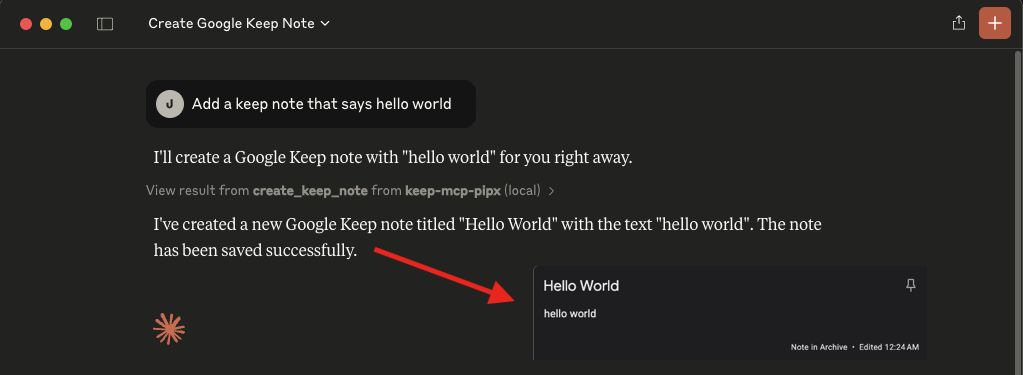
How to use
- Add the MCP server to your MCP servers:
  "mcpServers": {
    "keep-mcp-pipx": {
      "command": "pipx",
      "args": [
        "run",
        "keep-mcp"
      ],
      "env": {
        "GOOGLE_EMAIL": "Your Google Email",
        "GOOGLE_MASTER_TOKEN": "Your Google Master Token - see README.md"
      }
    }
  }
- Add your credentials:
GOOGLE_EMAIL: Your Google account email addressGOOGLE_MASTER_TOKEN: Your Google account master token
Check https://gkeepapi.readthedocs.io/en/latest/#obtaining-a-master-token and https://github.com/simon-weber/gpsoauth?tab=readme-ov-file#alternative-flow for more information.
Features
Query and read tools
find: Search notes with optional filters for labels, colors, pinned, archived, and trashedget_note: Get a single note by ID
Creation and update tools
create_note: Create a new note with title and text (automatically adds keep-mcp label)create_list: Create a checklist noteupdate_note: Update a note's title and textadd_list_item: Add an item to a checklist noteupdate_list_item: Update checklist item text and checked statedelete_list_item: Delete a checklist item
Note state tools
set_note_color: Set a note color (valid values: DEFAULT, RED, ORANGE, YELLOW, GREEN, TEAL, BLUE, CERULEAN, PURPLE, PINK, BROWN, GRAY)pin_note: Pin or unpin a notearchive_note: Archive or unarchive a notetrash_note: Move a note to trashrestore_note: Restore a trashed/deleted notedelete_note: Mark a note for deletion
Labels, collaborators, and media tools
list_labels: List labelscreate_label: Create a labeldelete_label: Delete a labeladd_label_to_note: Add a label to a noteremove_label_from_note: Remove a label from a notelist_note_collaborators: List collaborator emails for a noteadd_note_collaborator: Add a collaborator email to a noteremove_note_collaborator: Remove a collaborator email from a notelist_note_media: List media blobs for a note (with media links)
By default, all destructive and modification operations are restricted to notes that have were created by the MCP server (i.e. have the keep-mcp label). Set UNSAFE_MODE to true to bypass this restriction.
"env": {
  ...
  "UNSAFE_MODE": "true"
}
Local development (uv + make)
If you prefer a JS-style workflow (npm i, npm start), use the included Makefile:
make install   # like npm i
make start     # like npm start
make test
make lint
Run the real-account smoke test with credentials:
GOOGLE_EMAIL="you@example.com" \
GOOGLE_MASTER_TOKEN="..." \
make smoke
Equivalent direct uv commands (without make):
UV_CACHE_DIR=/tmp/uv-cache uv venv --python 3.11 .venv
UV_CACHE_DIR=/tmp/uv-cache uv pip install --python .venv/bin/python -e .
UV_CACHE_DIR=/tmp/uv-cache uv run --no-sync --python .venv/bin/python -m server
Testing
Unit tests (default)
The project includes a lightweight unit test suite under tests/.
It validates:
- note serialization shape for note and list objects (including labels, collaborators, media, and list items)
- modification safety behavior (
keep-mcplabel requirement andUNSAFE_MODE=trueoverride) - MCP tool behavior in
src/server/cli.pyusing mocked Keep client objects (tool happy paths and key error paths)
Run locally:
make test
Smoke test against a real Keep account
For additional confidence, run a basic lifecycle smoke test against a dedicated test account:
GOOGLE_EMAIL="you@example.com" \
GOOGLE_MASTER_TOKEN="..." \
make smoke
What it does:
- create note
- update note
- pin/unpin
- archive/unarchive
- trash/restore
- delete
This script is intended for manual verification and is not run in CI.
CI checks
GitHub Actions runs on every pull request and executes:
- lint (
ruff check .) - unit tests with coverage (
pytest -q --cov=src/server --cov-report=term-missing --cov-fail-under=70) - bytecode sanity (
python -m compileall src)
Publishing
To publish a new version to PyPI:
- Update the version in
pyproject.toml - Build the package:
pipx run build
- Upload to PyPI:
pipx run twine upload --repository pypi dist/*
Run locally with MCP clients
This is useful when you want a client to run this server from your local checkout instead of PyPI.
- Create a local virtualenv and install in editable mode:
cd /ABSOLUTE/PATH/TO/keep-mcp
make install
- Add the server to your MCP client config.
config.toml clients (Codex, Goose, etc.)
[mcp_servers.keep_mcp]
command = "make"
args = ["-C", "/ABSOLUTE/PATH/TO/keep-mcp", "start"]

[mcp_servers.keep_mcp.env]
GOOGLE_EMAIL = "you@example.com"
GOOGLE_MASTER_TOKEN = "your-master-token"
UNSAFE_MODE = "false"
JSON mcpServers clients (Claude Desktop, Cursor, Cline, etc.)
{
  "mcpServers": {
    "keep-mcp-local": {
      "command": "make",
      "args": ["-C", "/ABSOLUTE/PATH/TO/keep-mcp", "start"],
      "env": {
        "GOOGLE_EMAIL": "you@example.com",
        "GOOGLE_MASTER_TOKEN": "your-master-token",
        "UNSAFE_MODE": "false"
      }
    }
  }
}
Alternative (without make):
[mcp_servers.keep_mcp]
command = "uv"
args = [
  "--directory", "/ABSOLUTE/PATH/TO/keep-mcp",
  "run", "--no-sync", "--python", ".venv/bin/python",
  "-m", "server"
]
Notes:
- Run
make installonce before starting from an MCP client. - Only the repo root path is required (no absolute
/.venv/bin/pythonpath). - Ensure
makeanduvare in yourPATH. - Restart your MCP client after updating config files.
UNSAFE_MODEis optional; keep it"false"unless you explicitly want to modify non-keep-mcpnotes.
Troubleshooting
- If you get "DeviceManagementRequiredOrSyncDisabled" check https://admin.google.com/ac/devices/settings/general and turn "Turn off mobile management (Unmanaged)"


Download files
Download the file for your platform. If you're not sure which to choose, learn more about installing packages.
Source Distribution
Built Distribution
Filter files by name, interpreter, ABI, and platform.
If you're not sure about the file name format, learn more about wheel file names.
Copy a direct link to the current filters
File details
Details for the file keep_mcp-0.3.0.tar.gz.
File metadata
- Download URL: keep_mcp-0.3.0.tar.gz
- Upload date:
- Size: 13.2 kB
- Tags: Source
- Uploaded using Trusted Publishing? No
- Uploaded via: twine/6.2.0 CPython/3.13.5
File hashes
| Algorithm | Hash digest | |
|---|---|---|
| SHA256 |
f2eaece3fbc0b757e8fcfe15665b42704afea86a00bdd8ea43eaa47501988fe8
|
|
| MD5 |
ce06e2ef9c9c9b9a7d3e560069f3fef7
|
|
| BLAKE2b-256 |
e161a2989ba496d082bd33f4e1ba9de72e95e3f96875c1d648ebe0bd755365b1
|
File details
Details for the file keep_mcp-0.3.0-py3-none-any.whl.
File metadata
- Download URL: keep_mcp-0.3.0-py3-none-any.whl
- Upload date:
- Size: 9.7 kB
- Tags: Python 3
- Uploaded using Trusted Publishing? No
- Uploaded via: twine/6.2.0 CPython/3.13.5
File hashes
| Algorithm | Hash digest | |
|---|---|---|
| SHA256 |
1271f67daddc9d48f0a1cd3774155748b145273962bb74dac6bc835a0b97cd0b
|
|
| MD5 |
35c6feab84f9692fb5897bdc43f229a2
|
|
| BLAKE2b-256 |
fd723a610b90876d57cd5500affa4d40a148f8ca2024669497535cab47a0b261
|






