
KempnerPulse


nvidia-smisays 100% GPU utilization — but are your tensor cores even active? KempnerPulse shows what's actually happening.
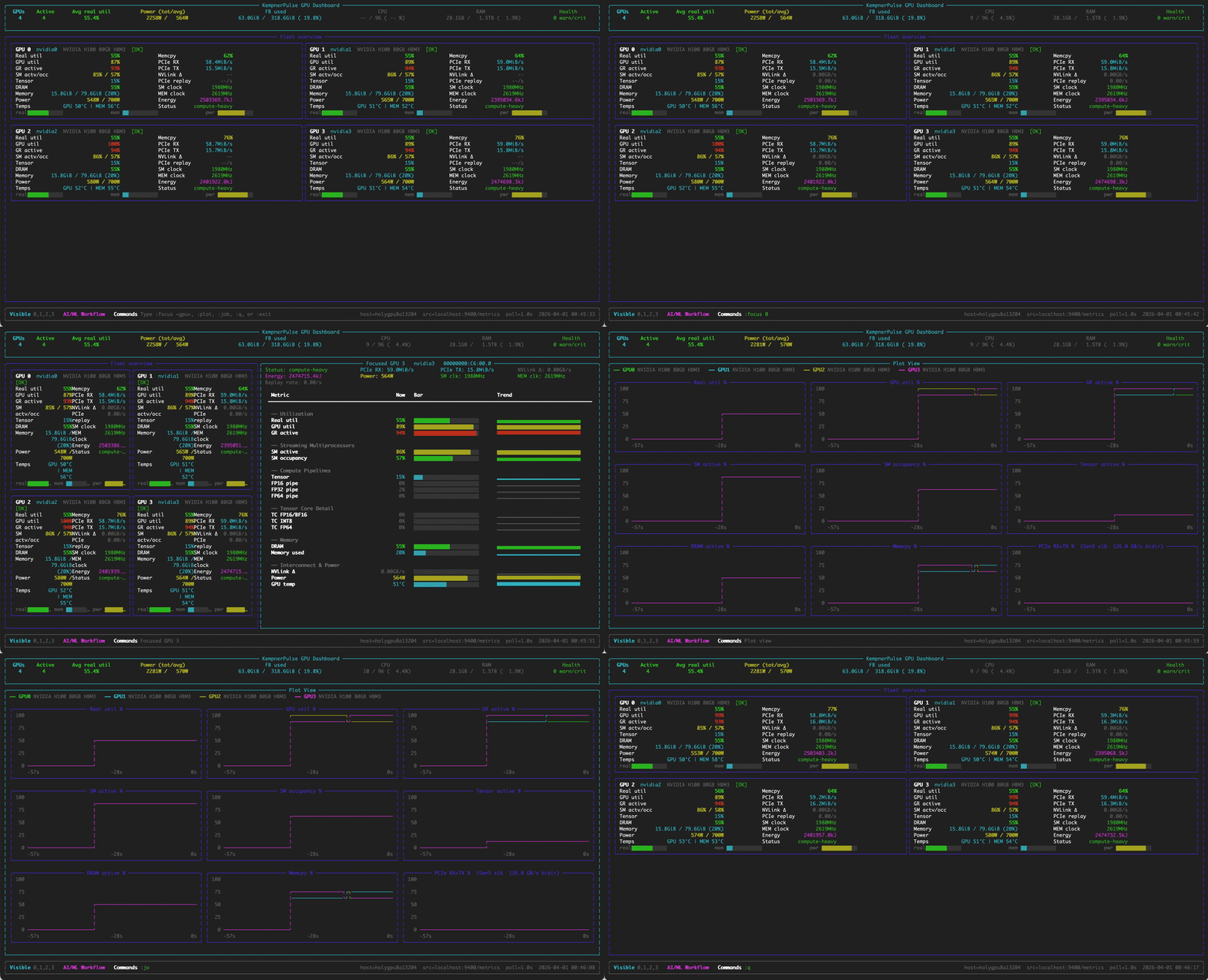
A terminal dashboard for NVIDIA DCGM hardware-counter metrics, with
SLURM/CUDA GPU-visibility awareness. It reads DCGM profiling counters (SM Active,
Tensor Active, DRAM Active, …) directly from dcgmi dmon (~100 ms) or from a
dcgm-exporter endpoint, synthesizes a
weighted Real Utilization score and a 12-category workload
classification, and renders four interactive views in the terminal.
Highlights
- Four views — Fleet, Focus (per-GPU sparkline history), Plot (line charts), Job (running processes).
- Real Utilization — a weighted composite of SM / Tensor / DRAM / GR-engine counters, with AI, HPC, and memory-bound presets.
- 12-category workload classification plus health monitoring (thermal, PCIe replay, ECC), from NVIDIA's DCGM profiling guidance.
- Three backends —
dcgm(directdcgmi dmon),prometheus(dcgm-exporter), andreplay(a saved capture, no GPU needed). - SLURM / CUDA aware — shows only your allocated GPUs.
- Lightweight — standard library +
rich; ~8% of one CPU core.
Install
uv tool install kempnerpulse     # isolated `kempnerpulse` + `kp` commands
# or: pip install kempnerpulse
Requires Linux, Python ≥ 3.9, and NVIDIA data-center GPUs; the dcgm backend
needs the DCGM host engine. See the
installation guide
for uv specifics, the supported-GPU list, and running on a SLURM compute node.
Quick start
kempnerpulse                      # live dashboard (or `kp`)
kp --focus-gpu 0                  # start focused on GPU 0
kp --hpc-weights                  # HPC weight preset
kp --export all > metrics.csv     # CSV capture
kp --backend prometheus --source http://host:9400/metrics
Press Ctrl-C to quit; type :focus <id>, :plot, :job, or :q to switch views.
Documentation
Full documentation: https://kempnerinstitute.github.io/kempnerpulse/
- Quickstart and Views
- CLI reference — every flag and interactive command
- Architecture — the four-layer pipeline
- Workload classification and canonical schema
- CSV export and DCGM metrics
License
MIT. See LICENSE.
1 maintainer

Download files
Download the file for your platform. If you're not sure which to choose, learn more about installing packages.
Source Distribution
Built Distribution
Filter files by name, interpreter, ABI, and platform.
If you're not sure about the file name format, learn more about wheel file names.
Copy a direct link to the current filters
File details
Details for the file kempnerpulse-0.5.0.tar.gz.
File metadata
- Download URL: kempnerpulse-0.5.0.tar.gz
- Upload date:
- Size: 71.1 kB
- Tags: Source
- Uploaded using Trusted Publishing? No
- Uploaded via:
twine/7.0.0 CPython/3.12.11
File hashes
| Algorithm | Hash digest | |
|---|---|---|
| SHA256 |
befd083c71947ca9ebe38b34e46730e5c52249416e1024745965ca5edd84e815
|
|
| MD5 |
3ee8892065a27a480980545d6a6195b8
|
|
| BLAKE2b-256 |
16a6c2b26bdec7b1571c53f0ff7555a598ac94fcc47a211bff1c215632452d2d
|
File details
Details for the file kempnerpulse-0.5.0-py3-none-any.whl.
File metadata
- Download URL: kempnerpulse-0.5.0-py3-none-any.whl
- Upload date:
- Size: 86.2 kB
- Tags: Python 3
- Uploaded using Trusted Publishing? No
- Uploaded via:
twine/7.0.0 CPython/3.12.11
File hashes
| Algorithm | Hash digest | |
|---|---|---|
| SHA256 |
8cf53114d78eaf63cafdbeb58350204cfb1f0e114276d25e5938cb854216406d
|
|
| MD5 |
25d86586e6455b1a8361ef5866bd6ca4
|
|
| BLAKE2b-256 |
c3efc368bde1354808d9abca4ba4c3db23c6a9dfdb370eef9099e2243a07a767
|














