pipinstall-Ukeras-cv-attention-models
# Or
pipinstall-Ugit+https://github.com/leondgarse/keras_cv_attention_models
Refer to each sub directory for detail usage.
Basic model prediction
fromkeras_cv_attention_modelsimportvolomm=volo.VOLO_d1(pretrained="imagenet")""" Run predict """importtensorflowastffromtensorflowimportkerasfromskimage.dataimportchelseaimg=chelsea()# Chelsea the catimm=keras.applications.imagenet_utils.preprocess_input(img,mode='torch')pred=mm(tf.expand_dims(tf.image.resize(imm,mm.input_shape[1:3]),0)).numpy()pred=tf.nn.softmax(pred).numpy()# If classifier activation is not softmaxprint(keras.applications.imagenet_utils.decode_predictions(pred)[0])# [('n02124075', 'Egyptian_cat', 0.9692954),# ('n02123045', 'tabby', 0.020203391),# ('n02123159', 'tiger_cat', 0.006867502),# ('n02127052', 'lynx', 0.00017674894),# ('n02123597', 'Siamese_cat', 4.9493494e-05)]
Or just use model preset preprocess_input and decode_predictions
attention_layers is __init__.py only, which imports core layers defined in model architectures. Like RelativePositionalEmbedding from botnet, outlook_attention from volo.
custom_dataset_script.py can also be used creating a json format file, which can be used as --data_name xxx.json for training, detail usage can be found in Custom recognition dataset.
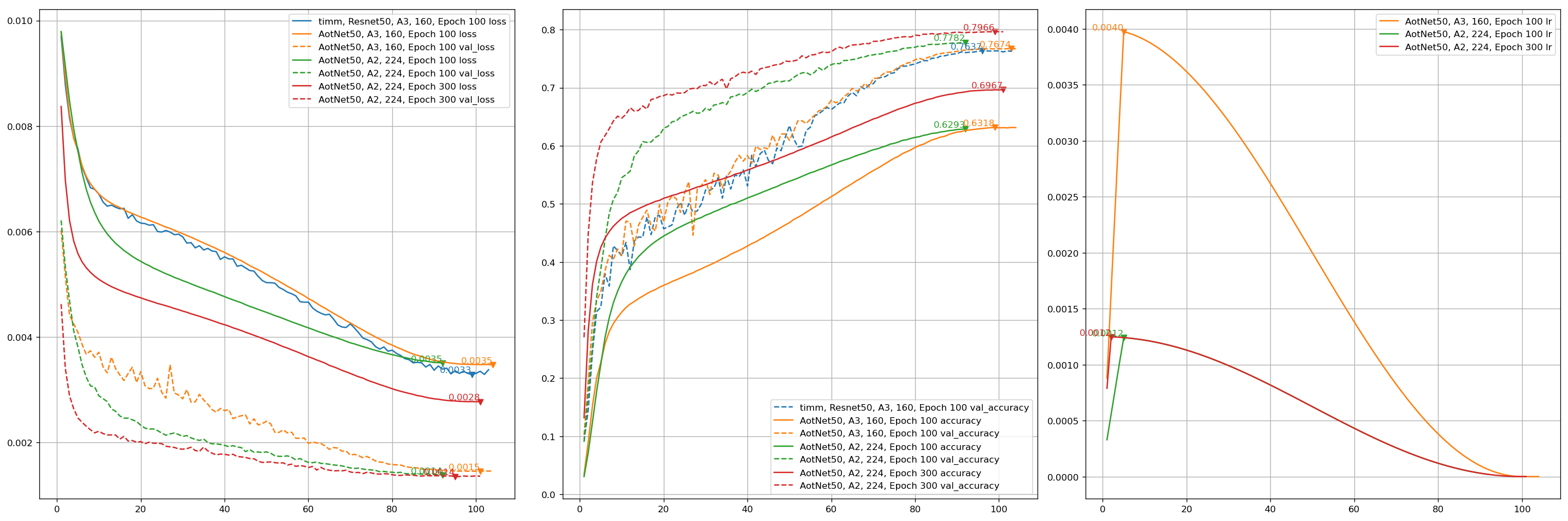
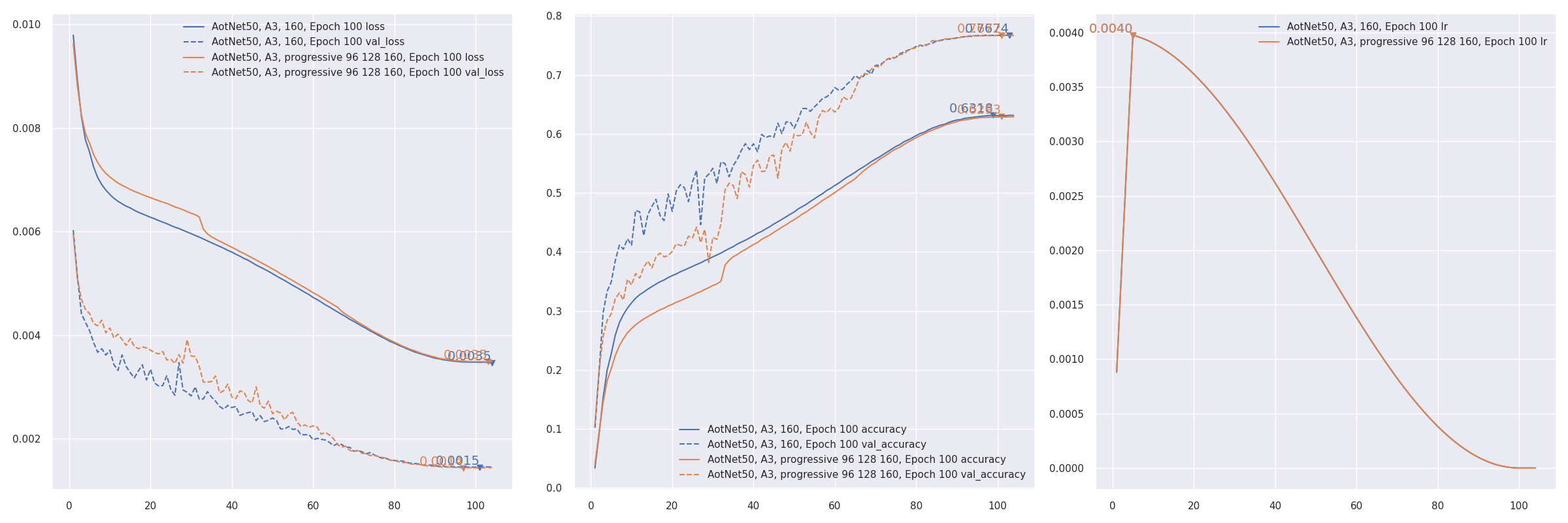
aotnet.AotNet50 default parameters set is a typical ResNet50 architecture with Conv2D use_bias=False and padding like PyTorch.
# `antialias` is default enabled for resize, can be turned off be set `--disable_antialias`.CUDA_VISIBLE_DEVICES='0'TF_XLA_FLAGS="--tf_xla_auto_jit=2"./train_script.py--seed0-saotnet50
# Evaluation using input_shape (224, 224).# `antialias` usage should be same with training.CUDA_VISIBLE_DEVICES='1'./eval_script.py-maotnet50_epoch_103_val_acc_0.7674.h5-i224--central_crop0.95
# >>>> Accuracy top1: 0.78466 top5: 0.94088
custom_dataset_script.py can be used creating a json format file, which can be used as --data_name xxx.json for training, detail usage can be found in Custom detection dataset.
Default parameters for coco_train_script.py is EfficientDetD0 with input_shape=(256, 256, 3), batch_size=64, mosaic_mix_prob=0.5, freeze_backbone_epochs=32, total_epochs=105. Technically, it's any pyramid structure backbone + EfficientDet / YOLOX header / YOLOR header + anchor_free / yolor_anchors / efficientdet_anchors combination supported.
Currently 3 types anchors supported,
use_anchor_free_mode controls if using typical YOLOX anchor_free mode strategy.
use_yolor_anchors_mode controls if using yolor anchors.
Default is use_anchor_free_mode=False, use_yolor_anchors_mode=False, means using efficientdet preset anchors.
anchors_mode
use_object_scores
num_anchors
anchor_scale
aspect_ratios
num_scales
grid_zero_start
efficientdet
False
9
4
[1, 2, 0.5]
3
False
anchor_free
True
1
1
[1]
1
True
yolor_anchors
True
3
None
presets
None
offset=0.5
# Default EfficientDetD0CUDA_VISIBLE_DEVICES='0'./coco_train_script.py
# Default EfficientDetD0 using input_shape 512, optimizer adamw, freezing backbone 16 epochs, total 50 + 5 epochsCUDA_VISIBLE_DEVICES='0'./coco_train_script.py-i512-padamw--freeze_backbone_epochs16--lr_decay_steps50# EfficientNetV2B0 backbone + EfficientDetD0 detection headerCUDA_VISIBLE_DEVICES='0'./coco_train_script.py--backboneefficientnet.EfficientNetV2B0--det_headerefficientdet.EfficientDetD0
# ResNest50 backbone + EfficientDetD0 header using yolox like anchor_free_modeCUDA_VISIBLE_DEVICES='0'./coco_train_script.py--backboneresnest.ResNest50--use_anchor_free_mode
# ConvNeXtTiny backbone + EfficientDetD0 header using yolor anchorsCUDA_VISIBLE_DEVICES='0'./coco_train_script.py--backboneuniformer.UniformerSmall32--use_yolor_anchors_mode
# Typical YOLOXS with anchor_free_modeCUDA_VISIBLE_DEVICES='0'./coco_train_script.py--det_headeryolox.YOLOXS--use_anchor_free_mode
# YOLOXS with efficientdet anchorsCUDA_VISIBLE_DEVICES='0'./coco_train_script.py--det_headeryolox.YOLOXS
# ConvNeXtTiny backbone + YOLOX header with yolor anchorsCUDA_VISIBLE_DEVICES='0'./coco_train_script.py--backbonecoatnet.CoAtNet0--det_headeryolox.YOLOX--use_yolor_anchors_mode
# Typical YOLOR_P6 with yolor anchorsCUDA_VISIBLE_DEVICES='0'./coco_train_script.py--det_headeryolor.YOLOR_P6--use_yolor_anchors_mode
# YOLOR_P6 with anchor_free_modeCUDA_VISIBLE_DEVICES='0'./coco_train_script.py--det_headeryolor.YOLOR_P6--use_anchor_free_mode
# ConvNeXtTiny backbone + YOLOR header with efficientdet anchorsCUDA_VISIBLE_DEVICES='0'./coco_train_script.py--backboneconvnext.ConvNeXtTiny--det_headeryolor.YOLOR
Note: COCO training still under testing, may change parameters and default behaviors. Take the risk if would like help developing.
coco_eval_script.py is used for evaluating model AP / AR on COCO validation set. It has a dependency pip install pycocotools which is not in package requirements. More usage can be found in COCO Evaluation.
# resize method for EfficientDetD0 is bilinear w/o antialiasCUDA_VISIBLE_DEVICES='1'./coco_eval_script.py-mefficientdet.EfficientDetD0--resize_methodbilinear--disable_antialias
# Specify --use_anchor_free_mode for YOLOX, and BGR input formatCUDA_VISIBLE_DEVICES='1'./coco_eval_script.py-myolox.YOLOXTiny--use_anchor_free_mode--use_bgr_input--nms_methodhard--nms_iou_or_sigma0.65
# Specify --use_yolor_anchors_mode for YOLOR. Note: result still lower than official setsCUDA_VISIBLE_DEVICES='1'./coco_eval_script.py-myolox.YOLOR_CSP--use_yolor_anchors_mode--nms_methodhard--nms_iou_or_sigma0.65
# Specific h5 modelCUDA_VISIBLE_DEVICES='1'./coco_eval_script.py-mcheckpoints/yoloxtiny_yolor_anchor.h5--use_yolor_anchors_mode
Visualizing
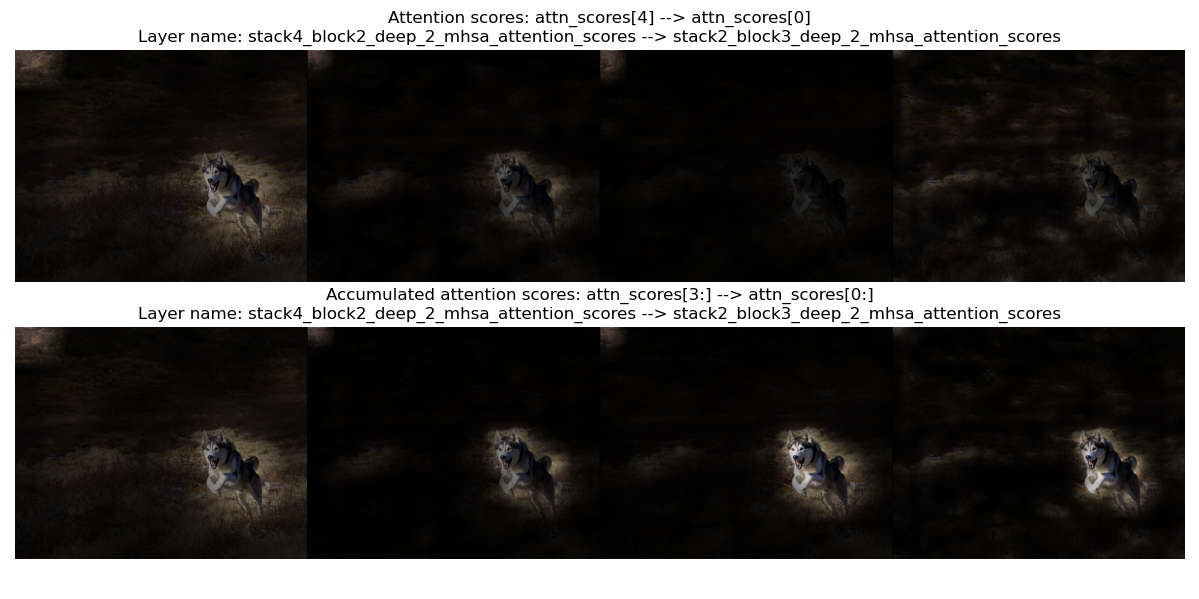
Visualizing is for visualizing convnet filters or attention map scores.
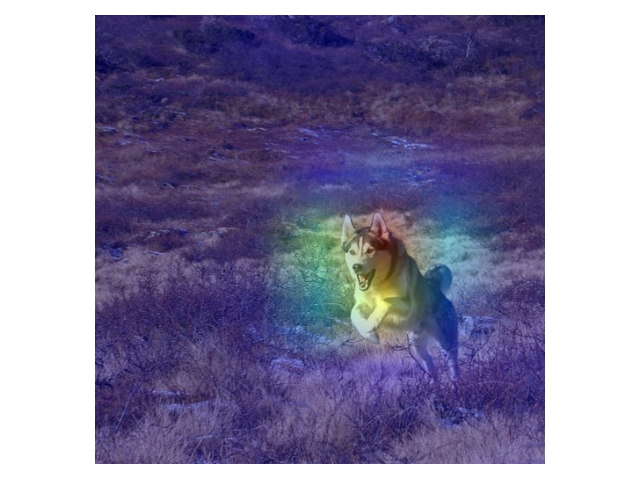
make_and_apply_gradcam_heatmap is for Grad-CAM class activation visualization.
tf.nn.gelu(inputs, approximate=True) activation works for TFLite. Define model with activation="gelu/approximate" or activation="gelu/app" will set approximate=True for gelu. Should better decide before training, or there may be accuracy loss.
model_surgery.convert_groups_conv2d_2_split_conv2d converts model Conv2D with groups>1 layers to SplitConv using split -> conv -> concat:
fromkeras_cv_attention_modelsimportregnet,model_surgeryfromkeras_cv_attention_models.imagenetimporteval_funcbb=regnet.RegNetZD32()mm=model_surgery.convert_groups_conv2d_2_split_conv2d(bb)# converts all `Conv2D` using `groups` to `SplitConv2D`test_inputs=np.random.uniform(size=[1,*mm.input_shape[1:]])print(np.allclose(mm(test_inputs),bb(test_inputs)))# Trueconverter=tf.lite.TFLiteConverter.from_keras_model(mm)open(mm.name+".tflite","wb").write(converter.convert())print(np.allclose(mm(test_inputs),eval_func.TFLiteModelInterf(mm.name+'.tflite')(test_inputs),atol=1e-7))# True
model_surgery.convert_gelu_and_extract_patches_for_tflite converts model gelu activation to gelu approximate=True, and tf.image.extract_patches to a Conv2D version:
Not supporting VOLO / HaloNet models converting, cause they need a longer tf.transposeperm.
Recognition Models
AotNet
Keras AotNet is just a ResNet / ResNetV2 like framework, that set parameters like attn_types and se_ratio and others, which is used to apply different types attention layer. Works like byoanet / byobnet from timm.
Default parameters set is a typical ResNet architecture with Conv2D use_bias=False and padding like PyTorch.
fromkeras_cv_attention_modelsimportaotnet# Mixing se and outlook and halo and mhsa and cot_attention, 21M parameters.# 50 is just a picked number that larger than the relative `num_block`.attn_types=[None,"outlook",["bot","halo"]*50,"cot"],se_ratio=[0.25,0,0,0],model=aotnet.AotNet50V2(attn_types=attn_types,se_ratio=se_ratio,stem_type="deep",strides=1)model.summary()