

kern-sandbox
Run the code your model just wrote in a throwaway container, one per call, on your own machine.




rootless · no daemon · no socket · no VM · no cloud · no account
The runtime · MCP server · Security model · Benchmarks · Operational notes
An agent's tool-call, a generated snippet, a notebook cell, a CI step: code that runs before anyone has read it should not run in your home directory.
# the runtime: one static binary, checksum-verified by the script
curl -fsSL https://raw.githubusercontent.com/getkern/kern/main/install.sh | sh

# the API, in a virtual environment: most distributions refuse a system-wide pip (PEP 668),
# and Debian and Ubuntu ship venv separately, so install it first if the next line fails:
#     sudo apt install python3-venv
python3 -m venv .venv && . .venv/bin/activate
pip install kern-sandbox
Two things, not one: the isolation is the binary's, and this package is the API in front of it.
$KERN_BIN says where to find a kern you already have.
import kern_sandbox as kern

r = kern.run_code("import sys; print(sys.version)")
print(r.stdout, r.success)
What that one call did. It started a container from an OCI image (python:3.12-slim unless you
say otherwise), ran the code inside it with no network, dangerous capabilities dropped, a
deny-by-default seccomp allowlist, memory and PID caps and a wall-clock deadline applied from
outside, and the container was gone by the time the call returned. The next call gets a new one,
so nothing the code leaves inside is there the second time. A call the sandbox STOPPED leaves an exit
record behind, readable with kern ps -a, which is how you read the verdict later: a record, not a
box. A call that simply ended leaves nothing at all.
kern calls that container a box, and so does the rest of this page.
Two modes break the one-box-per-call rule on purpose, and both say so where they are offered: a
kernel() shares one warm interpreter across cells, and the MCP server's KERN_MCP_KERNEL does the
same for a model. A prewarm pool does not: each box it holds still serves exactly one call and is
destroyed.
One thing before you time it: the first call on a machine that has never run it pulls the image, so it is the slow one. Every call after it reads the cache.
kern-sandbox is the Python binding for kern, a rootless container
runtime in one static binary. Node and TypeScript get the same API on npm:
kern-sandbox. The runtime, its tests, the pentest
suites and the other bindings are one repository:
github.com/getkern/kern.
Your loop reads a field, not a stack trace
A timeout, an OOM-kill, a blocked syscall or a missing interpreter each arrive as a typed field on the result, beside stdout and the exit code. The agent branches on a value instead of parsing a traceback to work out whether the sandbox stopped the run or the code did.

Every one of those four endings was captured by running it. The last is the one an agent loop gets
wrong: the network was off, so the code raised, the sandbox did nothing, and fault is None.
fault.type |
what happened |
|---|---|
timeout |
the call exceeded timeout_s; the binding owns that deadline |
oom |
the kernel's OOM killer took the box against its own memory cap. Read from a descriptor the code in the box cannot write, so it is an observation and not a guess from the exit code |
killed |
SIGKILL with no OOM reported: an external kill, or a cap that did not bind here |
escape_blocked |
a syscall the seccomp filter refused (SIGSYS) |
exec_failed |
the box started, the command did not exist in the image; the message names both |
startup_failed |
the box never ran, and kern said why in stderr. Usually a short timeout_s firing during the first, cold image read |
@dataclass
class ExecutionResult:
    stdout: str
    stderr: str
    exit_code: int
    duration_ms: int
    fault: SandboxFault | None   # set ONLY when the SANDBOX acted
    files: list[FileInfo]        # workspace files created or modified this step (.deps excluded)
    results: list[Result]        # rich mime-typed values: last expression, display(), matplotlib
    truncated: bool              # output hit max_output_bytes and the overflow was discarded
    success: bool                # exit_code == 0 AND fault is None
    code_stderr: str             # stderr minus kern's own note:/warning: lines - feed THIS to a model
    runtime_notes: list[str]     # the complement: the lines kern wrote about itself
Branch on fault, not on exit_code: a box that never ran exits 1 like a script that did. Two
cases raise SandboxError instead of returning, and both are in
SANDBOX-NOTES.md with
the rest of the taxonomy.
Use it from an MCP client
The package ships kern-mcp, a dependency-free
Model Context Protocol stdio server: the model writes code, kern
runs it on your machine, and charts come back as images it can see.
{
  "mcpServers": {
    "kern": {
      "command": "kern-mcp",
      "env": { "KERN_MCP_SETUP": "pip install numpy pandas matplotlib" }
    }
  }
}
The client spawns kern-mcp from ITS PATH, so a package installed into a virtual environment is
invisible to it. Either install it where the client can see it (pipx install kern-sandbox), or ask
for it without installing anything:
{ "mcpServers": { "kern": { "command": "uvx", "args": ["--from", "kern-sandbox", "kern-mcp"] } } }
Cursor: Settings, MCP, add a server. LM Studio 0.3.17+: the Program tab, Install, Edit
mcp.json. Claude Desktop: the same shape in claude_desktop_config.json. The client spawns the
server where the client runs, so from macOS or Windows it is one hop and still one line
("command": "wsl", or "command": "ssh" to a VM or a board).
Tools: run_code (python/bash, and node on an image that has it), write_file, read_file,
list_files. File state persists across calls; each call is a fresh, network-off box.
| Env var | Default | |
|---|---|---|
KERN_MCP_IMAGE |
python:3.12-slim |
the image the boxes run in |
KERN_MCP_SETUP |
(none) | one-time pip install ..., the ONLY network-on moment |
KERN_MCP_MEMORY_MB |
1024 |
hard RAM cap per box |
KERN_MCP_TIMEOUT |
60 |
per-call wall-clock deadline |
KERN_MCP_WORKSPACE |
temp dir | persist file state at this path |
Five more (PROFILES, KERNEL, PREWARM, QUIET, TMPFS_MB), the transports and the full
reference: docs/MCP.md.
Safe by default
A bare Sandbox() has no network, no host mounts, seccomp on, dangerous capabilities dropped and a
mandatory finite timeout. Every relaxation is a named argument:
kern.Sandbox(
    image="python:3.12-slim",   # OCI image
    setup="pip install pandas", # the ONLY network window: a separate net-on box; run_code is net-off
    workspace=None,             # None -> temp dir, deleted on exit; a path -> persists
    memory_mb=512,
    cpus=None,                  # CPU cap in cores (e.g. 1.5); None = uncapped
    pids=256,                   # fork-bomb ceiling
    timeout_s=30,               # MANDATORY per-call wall-clock limit
    network=False,              # RELAXES ISOLATION: True shares the host network for every run
    egress_allow=None,          # the middle setting: a named few domains through kern's proxy
    mounts=None,                # {host_src: box_target}; sensitive sources refused even if asked
    env=None,                   # {"NAME": "value"} for the box; the host's own do NOT cross
    tmpfs=None,                 # None -> 64 MiB of scratch at /tmp; {} -> none; {"/tmp": "512m"}
    profiles=None,              # kern.toml profiles: ["vcpu:heavy", "vgpio:leds", "vdisk:scratch"]
    prewarm=0,                  # N boxes started in advance, each with a booted interpreter
    max_output_bytes=64 << 20,  # cap on captured stdout/stderr EACH; result.truncated on overflow
    deps_readonly=True,         # run_code cannot modify setup= deps; False re-opens it
    security_profile=None,      # "untrusted" = seccomp allowlist + cap-drop ALL + read-only root
    apparmor=None,              # a pre-loaded AppArmor profile; kern fails CLOSED if it is not loaded
    require_limits=False,       # True = refuse to start unless memory/pids caps are enforced
    cap_drop=("ALL",),          # default drops ALL; pass () only if the box must bind a port < 1024
)
Mounts over sensitive sources are refused even if you ask for them. Three groups: the host's own
(/, /etc, /root, /proc, /sys, /dev, $HOME, the docker socket), anything with a
credential directory in its path (.ssh, .aws, .gnupg, .kube and a dozen more), and kern's own
state, which is the sandbox's control plane. There is no opt-out: mount a copy of what the code needs.
network=True includes the host's LOOPBACK, which is where unauthenticated services live. A
test's cell connected to 127.0.0.1:22 and read back the host's SSH banner. egress_allow does not:
it goes through kern's proxy, which is a route-level boundary, so a client that cannot speak to
an HTTP proxy (Postgres, Redis) has no path out at all.
The caps bind where your host delegates a cgroup, and nowhere else. A desktop session has one; a
bare root shell, a CI runner or WSL2 without systemd often does not, and there --memory is accepted
and never bites. kern doctor says which you have. require_limits=True makes that fatal, and the
box refuses to start, so it arrives as fault.type == "startup_failed" on the result rather than as
an exception a try around the constructor would catch.
Two things the box does not bound: /dev/shm, which multiprocessing uses by default, and the
workspace, which is a host directory. Point workspace= at a filesystem you have sized.
The rest is in SANDBOX-NOTES.md, where every entry is a measured surprise and none is needed for a first call.
API
A Sandbox is a context manager, and Sandbox(...) alone is not entered: read every
Sandbox(...) below as the s of with Sandbox(...) as s:. Only kern.run_code and the other
module-level helpers stand alone, because each opens and closes one for you.
File state persists and processes do not. A /workspace directory is shared into every box, so a
file written in one call is there in the next, while x = 40 is gone. kernel() is the exception.
kern.run_code(code, **kwargs), one-shot: a throwawaySandboxunder the hood.Sandbox(...).run_code(code, language="python"|"bash"|"sh"|"node"). The enum is what the runner accepts, not a promise about the image: the default tag has nonode, and asking for a missing interpreter returns anexec_failedfault naming the binary and the image. Alpine has nobash.Sandbox(...).run(argv_list), an arbitrary command (an argv list, never a shell string).Sandbox(...).write_file(path, data)takesbytesorstr,.read_file(path)returnsbytes, and.list_files(subdir="")returnsFileInforecords. Confined to/workspace,..-safe, every component openedO_NOFOLLOW, and anything that is not a regular file is refused.Sandbox(...).snapshot(dest)/.restore(src), a portable.tar.gzcheckpoint of the workspace.Sandbox(...).kernel(), one warm interpreter in a long-lived box: state persists across cells and the per-cell cost is sub-millisecond, with the explicit trade that they share one process.
Charts and rich results, without a Jupyter kernel
run_code captures mime-typed values into result.results the way a notebook cell does: the last
bare expression, every display(obj), and every open matplotlib figure automatically, with
no savefig. Accessors: .png, .jpeg, .html, .svg, .markdown, .json, .text.
![A damped sine curve on a dark background, titled 'drawn inside the box, returned as an image'. The figure was drawn by matplotlib running inside a sandbox with the network off and came back as result.results[0].png.](https://pypi-camo.freetls.fastly.net/1543ac6bd273f4e75331a7b10d8dfd89cf326d2c/68747470733a2f2f7261772e67697468756275736572636f6e74656e742e636f6d2f6765746b65726e2f6b65726e2f6d61696e2f6173736574732f6b65726e2d73616e64626f782d63686172742e706e67)
Not a mockup: matplotlib drew that inside a box with the network off, and it came back as
result.results[0].png. No savefig, no shared directory, no Jupyter.
Use it from LangChain
pip install 'kern-sandbox[langchain]'
from kern_sandbox.langchain import kern_code_tool

tool = kern_code_tool(memory_mb=512, timeout_s=30)   # a StructuredTool named `run_python`
print(tool.invoke({"code": "print(6 * 7)"}))         # 42
What comes back is written for a model to act on, and a sandbox fault is labelled
([sandbox: timeout], oom, escape_blocked). Everything a box prints is untrusted text on its way
into a context window, so the rendering strips terminal escapes and neutralises that framing wherever
the code produced it: a cell printing [sandbox: oom] would otherwise claim, byte for byte, that
the sandbox killed it. Ordinary prompt injection is not filtered and cannot be at this layer.
There is also a shell execution policy for LangChain's shell middleware, with its own page: LANGCHAIN-SHELL.md.
Performance
One tool-call, the job an agent loop does a thousand times: hand print(1) to an isolated
environment running python:3.12-slim and get its stdout back. Same machine, same afternoon, wall
clock around the whole call, p50 after a discarded warm-up.
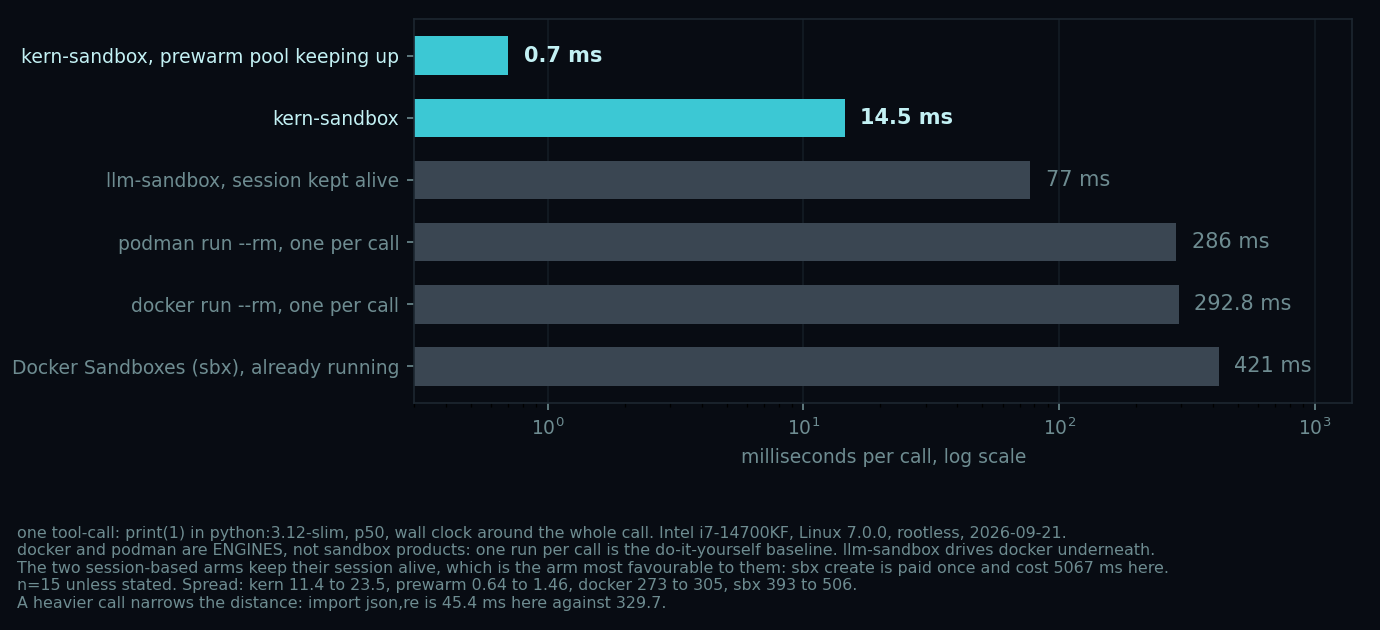
The number to quote is 14.5 ms, the default path. The 0.7 is a prewarm burst, eight calls
into a pool of eight, and a loop that outruns the refill falls back to 14.5. docker and podman are
engines, not sandbox products: one run per tool-call is the do-it-yourself baseline, and it is in
the chart because it is what a reader is probably on today. llm-sandbox drives docker underneath.
The two session-based arms keep their session alive, the arm most favourable to them: sbx create is paid once and cost 5067 ms here. And print(1) is the workload that flatters this
chart most: a call that does some work narrows the distance, because the engines pay their start
once and then run the same code. import json,re measures 47.3 ms here against 320.8, which is
7x rather than 20x. Your hardware will differ: measure your own, and take the p50 rather than the
best run.
Two numbers, not one. The box is the cheap part: run(["true"]), a box with no interpreter in
it, measures 4.9 ms on the same machine, so most of the 14.5 is CPython starting inside. That is
a Python cost, not kern's. And the prewarm bar has a condition: it is what a call gets while the
pool keeps up, and a loop that outruns the refill falls back to the bar above it, a cliff rather
than a slope.
The host and the image are part of the claim. The same call reads ~40 ms on WSL2 and ~17 ms on
python:3.12-alpine. And the image decides more than the runtime does: import json,re costs
46.8 ms on the stock tag against 17.7 ms on one where the bytecode is precompiled, which is worth
more than the box, the interpreter and every flag here combined.
Concurrency: 100 concurrent run_code calls on one Sandbox finish in 0.30 s wall clock,
100/100, no leaked boxes.
Method, the prewarm regimes, the precompiled image and the other runtimes: BENCHMARKS.md and SANDBOX-NOTES.md.
Threat model (honest)
kern is a kernel-boundary sandbox for your own or semi-trusted code. The default seccomp
filter is a deny-by-default allowlist (moby's own default minus kern's 35 escape syscalls): suitable
for agent-generated code, not a hard boundary against deliberately hostile multi-tenant code. For
that, use a microVM (Firecracker, Kata) or gVisor. security_profile="untrusted" bundles the
allowlist with --cap-drop ALL and --read-only. The full statement is in
SECURITY.md.
Two jobs, and the handoff is the point. A microVM gives the code a kernel of its own, and that is the right answer when the code is actively hostile or belongs to someone else. It costs what a machine costs: measured on the same laptop, half a second per command and about three seconds to create one, against 2 ms and 4 ms here. kern is for the OTHER job, the one an agent loop does a thousand times. Pick by which job you have, not by the ratio.
What the box does NOT hide from the code inside it. df on the workspace reports the host's
filesystem, and nproc reports the host's core count even under a cpus cap, which caps TIME and
not the count. Anything that sizes itself from a cgroup-unaware API is in the same family: Go's
GOMAXPROCS, some JVMs, ray-style CPU detection.
pip install kern-sandbox does not install the sandbox. The binding drives a kern binary on
PATH or in $KERN_BIN, and that is a SECOND thing to install and to keep current: an OLDER kern
runs fine and answers fewer questions, because the fault taxonomy reads bytes only newer builds
write. If a verdict looks wrong, print kern --version before anything else.
Also in this repository
integrations/pi routes the bash,
read, write, edit, ls, grep and find tools of pi
through this SDK into a box, with your working directory mounted at /workspace. Its README says
which half runs inside the box and which is a guarded host call.
Requirements
The kern binary on PATH (or $KERN_BIN). A Linux kernel with unprivileged user namespaces and
cgroup v2; on Windows it runs under WSL2. Python 3.9+.
On a Mac this package installs but cannot run, and it says so rather than looking for a download that does not exist: kern is Linux-only, because macOS has no namespaces and no cgroups. Run it inside a Linux VM (colima, Lima, OrbStack, UTM). Verified on Apple Silicon with an Ubuntu 24.04 guest. Install notes.
License
Apache-2.0.
1 maintainer

Release files for kern-sandbox 0.2.33
For a detailed explanation of source distributions (sdists) and built distributions (wheels), please see the package formats documentation.
Source distribution (sdist)
| File | Size | Uploaded | |
|---|---|---|---|
| kern_sandbox-0.2.33.tar.gz | 259.4 kB | Details |
Built distribution (wheel)
| File | Interpreter | ABI | Platform | Reset |
|---|---|---|---|---|
| kern_sandbox-0.2.33-py3-none-any.whl | Python 3 | none | any | Details |
Total release size: 392.6 kB
Release files / kern_sandbox-0.2.33.tar.gz
| Download URL | kern_sandbox-0.2.33.tar.gz |
|---|---|
| Size | 259.4 kB |
| Tags | Source |
|
SHA-256 checksum How to use checksums |
2927d948306b23130952d25bb0f6600892f33ace63cefc7939b15a30c74f1d2d
|
|
BLAKE2b-256 checksum How to use checksums |
26e8774f2f21de51f9a57c7fab3e7d8902125d329551c10c7dea5fa7f39aec11
|
| Upload date | |
|
Uploaded using Trusted Publishing? What is trusted publishing? |
No |
| Uploaded via |
twine/7.0.0 CPython/3.12.3
|
Release files / kern_sandbox-0.2.33-py3-none-any.whl
| Download URL | kern_sandbox-0.2.33-py3-none-any.whl |
|---|---|
| Size | 133.1 kB |
| Tags | Python 3 |
|
SHA-256 checksum How to use checksums |
2f54f61050444355e5a96d27a6395fb77b0d2de133c6b3fca26398a47b2f37e2
|
|
BLAKE2b-256 checksum How to use checksums |
16b0cda675efde0def50e840d079fe8afccac272deb85d4ba67ab02bfc836e44
|
| Upload date | |
|
Uploaded using Trusted Publishing? What is trusted publishing? |
No |
| Uploaded via |
twine/7.0.0 CPython/3.12.3
|














