

Kern Sandbox
Your model writes the code. This runs it where it can't touch your machine.



rootless · no daemon · no socket · no VM · no cloud · no account
Works with MCP clients · LangChain · pi · Python and Node
An agent's tool-call, a generated snippet, a notebook cell, a CI step: it arrives, you run it, and nobody has read it first.
# the runtime: one static binary, checksum-verified by the script
curl -fsSL https://raw.githubusercontent.com/getkern/kern/main/install.sh | sh

# if the venv line fails, your distribution ships it separately:
#     sudo apt install python3-venv
python3 -m venv .venv && . .venv/bin/activate
pip install kern-sandbox
import kern_sandbox as kern

r = kern.run_code("print(sum(range(100)))")
print(r.stdout, r.fault)   # 4950  None
That call ran the code in a fresh container from an OCI image, with no network, memory and PID caps and a deadline applied from outside, and threw the container away before returning.
- Cheap enough for every call: a hundred calls are a hundred containers, 1.4 s in total on an i7-14700KF, and nothing is left behind.
- State when you want it: a
Sandbox()you keep open shares/workspace, andkernel()keeps one warm interpreter where variables carry too. - Two parts: the
kernbinary is the isolation, this package is the API in front of it.
When you would use this
Your model just wrote a script and you are about to run it. Paste it into run_code instead of
your terminal. It runs in a container built from an image, so there is no home directory of yours in
there to delete and no key to read. A hallucinated rm -rf ~ resolves to the container's own
/root, which is mounted read-only, so it fails there too.
An agent writing and running code in a loop. Give it the LangChain tool or the MCP server. Nothing step 3 left behind is waiting for step 12, and a step that hangs or runs out of memory comes back as a value your loop can branch on.
Analysis you did not write. A chart comes back as an image the model can see, and a failure comes back labelled, so you can tell a bug in the code from the sandbox stopping it.
The result says who stopped the run
![A scrolling Python session, seven calls. run_code returns ('4950', None); an infinite loop under timeout_s=3 returns fault.type 'timeout' and exit 137; a 400 MiB allocation under memory_mb=128 returns 'oom' and 137; a urlopen with the network off returns fault None and exit 1, so the code raised and the sandbox stopped nothing; os.remove('/root/.bashrc') comes back OSError [Errno 30] Read-only file system; print(1) on alpine:3.19 returns 'exec_failed' and 127 because alpine ships no python3; and print(1) on an image that does not exist returns 'startup_failed' and 1. Exit 137 does not say which of those it was; the fault field does.](https://pypi-camo.freetls.fastly.net/59ab363be6689342acb050499089e905ebcd695c/68747470733a2f2f7261772e67697468756275736572636f6e74656e742e636f6d2f6765746b65726e2f6b65726e2f6d61696e2f6173736574732f6b65726e2d73616e64626f782d64656d6f2e676966)
docker run gives you exit 137 and leaves you to guess whether that was your timeout, the OOM killer
or something else. This tells you. Every row was run:
| the code | fault.type |
exit_code |
|---|---|---|
print(sum(range(100))) |
None |
0 |
while True: pass, timeout_s=3 |
timeout |
137 |
bytearray(400<<20), memory_mb=128 |
oom |
137 |
urlopen(...), network off |
None |
1 |
print(1) on alpine:3.19, no python3 |
exec_failed |
127 |
print(1) on an image that is not there |
startup_failed |
1 |
The fourth row is the one a loop gets wrong: the network was off, so the code raised and the
sandbox did nothing. fault is read from a pipe kern writes rather than from stdout, so code that
prints [exit 0] can't fake it. Also killed and escape_blocked.
Works with
- Any MCP client: Cursor, Claude Code, Claude Desktop, LM Studio, Zed, Windsurf. The package
ships
kern-mcp, a stdio server, and charts come back as images the model can see. One session backs the connection, so files carry between tool calls and variables do not, unlessKERN_MCP_KERNEL=1: docs/MCP.md. - LangChain:
kern_code_tool()is aStructuredTool, and a fault comes back labelled for the model. There is a shell policy too: LANGCHAIN-SHELL.md. - pi:
kern-piroutes its file and shell tools into a box, your working directory at/workspace. - Python and Node: the same API on both,
pip install kern-sandboxandnpm i kern-sandbox.
{
  "mcpServers": {
    "kern": { "command": "uvx", "args": ["--from", "kern-sandbox", "kern-mcp"] }
  }
}
A client spawns the server from its own PATH, so a venv is invisible to it: uvx installs
nothing, pipx install kern-sandbox is the other way. From macOS or Windows swap the command for
wsl or ssh.
Safe by default
A bare Sandbox() has no network, no host mounts, seccomp on, capabilities dropped and a
mandatory timeout. Every relaxation is a named argument. Two have surprised people, both
measured:
- Mounts over sensitive sources are refused even if you ask: the host's own directories, anything
with
.ssh/.aws/.kubein its path, and kern's own state. No opt-out. Mount a copy. network=Trueincludes the host's loopback, where unauthenticated services live. A test read the host's SSH banner off127.0.0.1:22.egress_allowis the middle setting and is route-level.
How fast
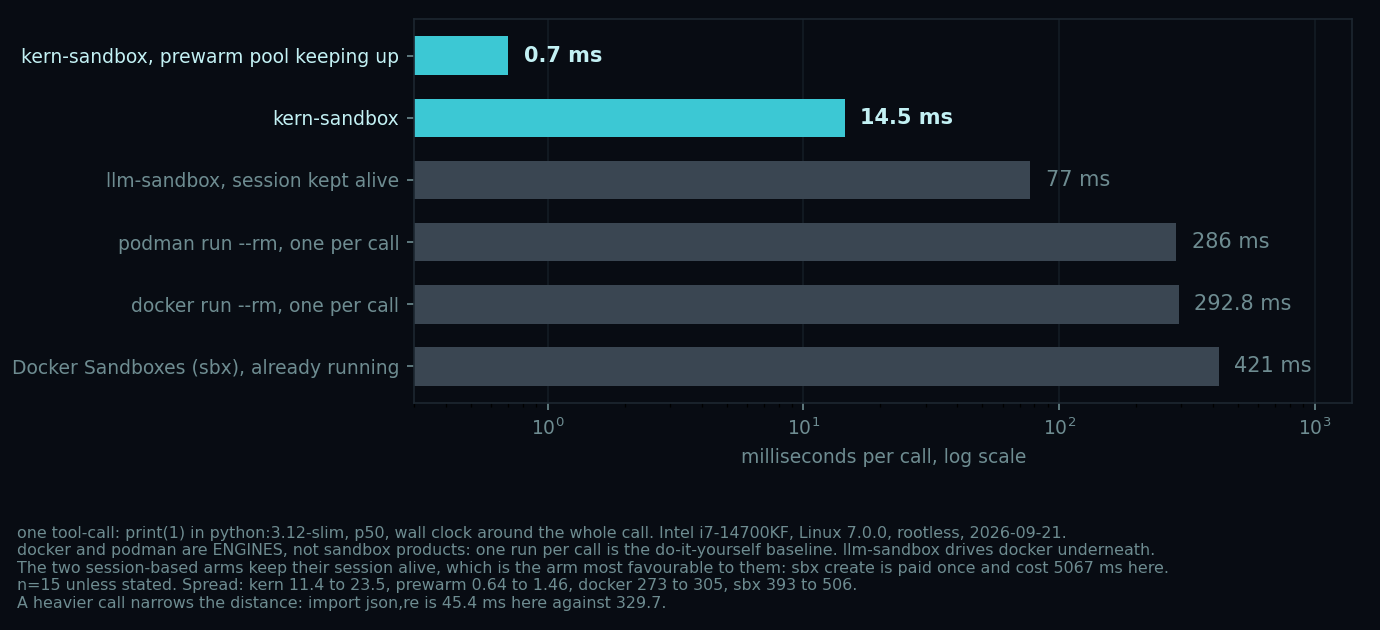
14.5 ms is the number to quote, one tool-call on an i7-14700KF: 4.9 ms of it is the box,
the rest CPython starting. The 0.7 ms bar is a prewarm burst that falls back to 14.5 when the pool
cannot keep up. print(1) flatters everyone: import json,re reads 45.4 ms against docker's 329.7,
7x rather than 20x, and that 45 is the stock image compiling its standard library, not the box, against
17.7 ms on a precompiled one
(BENCHMARKS.md). Measure your own, p50.
Compared to what you are probably doing
- a venv isolates imports, not the process: the code still has your files, your keys and your network.
docker runper call is the same idea with a daemon and a socket in front of it, at 292.8 ms against 14.5 ms on the same machine. That socket is root-equivalent.- nono fences the environment you already have with Landlock, so your own tools are there and state carries between commands. This builds a new one from an image instead. Measured both ways in BENCHMARKS.md.
- bubblewrap and nsjail are the building blocks kern uses: no images, no cgroup caps, and no verdict, so you get an exit code and work out the rest.
- a microVM (Firecracker, Kata) or gVisor is a stronger boundary than this one, and the right answer when the code is actively hostile. It costs what a machine costs.
- E2B, Modal, Daytona do the same job in someone else's cloud, with an account and your code leaving the machine.
Current limitations
- Not a boundary against deliberately hostile code. Namespaces, cgroups and seccomp, for your own or semi-trusted code. If it is hostile or someone else's, use a microVM or gVisor: SECURITY.md.
- Caps bind only where your host delegates a cgroup.
kern doctorsays whether yours does;require_limits=Truerefuses to start rather than run uncapped. - Nothing bounds the workspace. It is a host directory, so a job can fill your disk.
- No
--user, so an image that refuses to run as root has no answer here yet. - Not inside a container without
--privileged, and not on Google Colab. Measured: install notes. pip install kern-sandboxdoes not install the sandbox. It drives akernbinary onPATHor in$KERN_BIN, a second thing to keep current.
More
Charts and mime-typed results without a Jupyter kernel, the full API, snapshots, and the measured sharp edges: SANDBOX-NOTES.md.
Runs on Linux, with unprivileged user namespaces and cgroup v2, and Python 3.9+. Windows through WSL2; on a Mac it installs but runs only inside a Linux VM. install notes. Apache-2.0.
1 maintainer

Release files for kern-sandbox 0.2.35
For a detailed explanation of source distributions (sdists) and built distributions (wheels), please see the package formats documentation.
Source distribution (sdist)
| File | Size | Uploaded | |
|---|---|---|---|
| kern_sandbox-0.2.35.tar.gz | 253.6 kB | Details |
Built distribution (wheel)
| File | Interpreter | ABI | Platform | Reset |
|---|---|---|---|---|
| kern_sandbox-0.2.35-py3-none-any.whl | Python 3 | none | any | Details |
Total release size: 382.7 kB
Release files / kern_sandbox-0.2.35.tar.gz
| Download URL | kern_sandbox-0.2.35.tar.gz |
|---|---|
| Size | 253.6 kB |
| Tags | Source |
|
SHA-256 checksum How to use checksums |
ef2bc3c8ca07e3f82a2e1ce30f02b22db83112eb4f280a2cea6ae300bdc64ff4
|
|
BLAKE2b-256 checksum How to use checksums |
98d8e1760af61a3374f78068b06c39938da11aeffc1cca9db08bf6791ad72665
|
| Upload date | |
|
Uploaded using Trusted Publishing? What is trusted publishing? |
No |
| Uploaded via |
twine/7.0.0 CPython/3.12.3
|
Release files / kern_sandbox-0.2.35-py3-none-any.whl
| Download URL | kern_sandbox-0.2.35-py3-none-any.whl |
|---|---|
| Size | 129.1 kB |
| Tags | Python 3 |
|
SHA-256 checksum How to use checksums |
4876bc44e32b303ec40213a96ebd0fd12f8b9bce035f34c2ac3c435c295cdc3a
|
|
BLAKE2b-256 checksum How to use checksums |
87bd3d357912d44638df7d6ef9ba98cfd3b8143103fcdbe083fe2fa074b54503
|
| Upload date | |
|
Uploaded using Trusted Publishing? What is trusted publishing? |
No |
| Uploaded via |
twine/7.0.0 CPython/3.12.3
|














