
Kerykeion









⭐ Like this project? Star it on GitHub and help it grow! ⭐
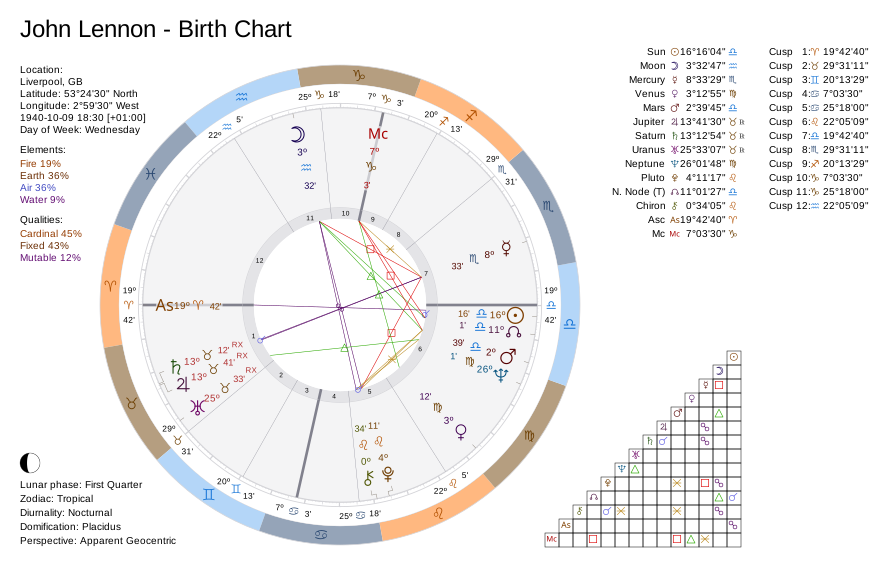
Kerykeion is a Python library for astrological calculations and SVG charts. It calculates planetary positions, houses, aspects, returns, progressions, and other techniques listed in the feature overview.
The defaults use the tropical zodiac, Placidus houses, and apparent geocentric positions. Results are Pydantic models that you can inspect in Python, export as JSON, or serialize as XML for LLM context.
Hosted API
For commercial closed-source projects, including SaaS products and mobile apps, we offer a hosted API.
We also provide an Astrologer API Agent Skill for development with coding agents.
Subscriptions directly support Kerykeion development.
Chart styles and themes
Kerykeion has two SVG chart styles, Modern and Classic, and three built-in themes. Click a preview to open the full-size PNG:
| Classic theme | Dark theme | Black & white | |
|---|---|---|---|
| Modern style |  |
 |
 |
| Classic style |  |
 |
 |
Choose a style with style="modern" or style="classic", and a theme with theme="classic", theme="dark", or theme="black-and-white". See Chart Rendering, Modern Charts, and Theming.
Table of contents
- Hosted API
- Chart styles and themes
- Installation
- Quick start
- How Kerykeion is organized
- Feature overview
- Core workflows
- Calculation configuration
- Chart rendering
- Command-line interface
- Documentation
- Swiss Ephemeris backend
- AI agent skill
- Development
- License and commercial use
- Astrologer Studio
- Contributing and citation
Installation
Kerykeion requires Python 3.12 or newer.
Install the current stable release:
pip install --upgrade "kerykeion"
Before upgrading from v4 or v5, read the v6 release notes and the migration guide.
Supported date ranges
The default reviewed ephemeris tier uses JPL DE440s and covers 1850–2150.
Install a wider reviewed core through libephemeris:
# doc-snippet: no-run - downloads ephemeris kernels
import libephemeris

libephemeris.download_leb_for_tier("medium")    # 1550–2650
libephemeris.download_leb_for_tier("extended")  # DE441, including BCE dates
The core tier controls the date range of the core bodies. Asteroids, exotics, and lunar apsides use separate data groups or runtime models and can have different coverage. See Ephemeris Backend and Backend Precision Comparison.
Quick start
This offline example creates a subject, derives chart data, and saves a natal SVG:
from pathlib import Path

from kerykeion import AstrologicalSubjectFactory, ChartDataFactory, ChartDrawer

subject = AstrologicalSubjectFactory.from_birth_data(
    name="Example Person",
    year=1990,
    month=7,
    day=15,
    hour=10,
    minute=30,
    lng=12.4964,
    lat=41.9028,
    tz_str="Europe/Rome",
    online=False,
)

chart_data = ChartDataFactory.create_natal_chart_data(subject)
drawer = ChartDrawer(chart_data)

output_dir = Path("charts_output")
output_dir.mkdir(exist_ok=True)
drawer.save_svg(output_path=output_dir, filename="example-natal")

print(subject.sun.sign, subject.sun.position)
print((output_dir / "example-natal.svg").resolve())
Expected output (longitude abbreviated):
Can 22.607...
.../charts_output/example-natal.svg
The second line is an absolute path based on your current working directory. Open the generated SVG in a browser to view the chart.
For offline calculations, set online=False and provide longitude, latitude, and an IANA timezone. For automatic location lookup, set online=True, provide city and nation, and configure a GeoNames username through geonames_username or KERYKEION_GEONAMES_USERNAME.
How Kerykeion is organized
Kerykeion separates calculations from presentation:
Birth/event data
      |
      v
AstrologicalSubjectFactory  ->  AstrologicalSubjectModel
      |
      v
ChartDataFactory            ->  ChartDataModel
      |
      +--> ChartDrawer       ->  SVG
      +--> ReportGenerator   ->  text
      +--> to_context        ->  XML for LLMs
      +--> model_dump_json   ->  JSON
AstrologicalSubjectFactorycomputes the sky, houses, points, configuration, and provenance throughfrom_birth_data(),from_iso_utc_time(), orfrom_current_time().ChartDataFactoryadds aspects, distributions, angularities, stelliums, relationship scores, and house comparisons where appropriate.ChartDraweronly renders already-computed chart data.- Every public result is a Pydantic model with attribute access, dictionary-style compatibility, and JSON serialization.
This design lets applications use the calculations without SVG, replace the presentation layer, or send structured results directly to another service.
Feature overview
The tables below list the calculation factories, configuration options, and output formats, with links to their documentation.
Subjects and chart types
| Feature | Main API | Description | Documentation |
|---|---|---|---|
| Natal and event subjects | AstrologicalSubjectFactory |
Planetary positions, houses, axes, lunar phase, configuration, and provenance for a local or UTC moment | Subject Factory |
| Structured chart data | ChartDataFactory |
Typed data for natal, synastry, transit, return, composite, and progression charts | Chart Data |
| Natal charts | ChartDataFactory.create_natal_chart_data |
Single-subject aspects, distributions, angularities, and stelliums | Birth Chart |
| Synastry charts | ChartDataFactory.create_synastry_chart_data |
Cross-chart aspects, reciprocal house placement, and compatibility scoring | Synastry |
| Transit charts | ChartDataFactory.create_transit_chart_data |
Natal-to-transit aspects and projected house positions | Transit Chart |
| Solar and Lunar return charts | PlanetaryReturnFactory |
Exact return moments and single- or dual-wheel return subjects | Planetary Returns · Example |
| Heliocentric returns | PlanetaryReturnFactory.next_heliocentric_return |
Returns of a planet to its natal heliocentric longitude | Planetary Returns |
| Lunar-node crossings | PlanetaryReturnFactory.next_lunar_node_crossing |
Exact moments when the Moon crosses its orbital node | Planetary Returns |
| Midpoint composite charts | CompositeSubjectFactory.get_midpoint_composite_subject_model |
Circular midpoint positions with explicit house-frame metadata | Composite Subjects · Example |
| Davison charts | CompositeSubjectFactory.get_davison_composite_subject_model |
The time-space midpoint recast as a real chart | Composite Subjects |
| Relocated charts | RelocatedChartFactory |
Natal planetary positions with houses, axes, sect, Vertex, and Lots recalculated for another location | Relocated Charts |
| Secondary-progressed charts | SecondaryProgressionFactory |
Day-for-a-year progressed subjects and progressed-to-natal contacts | Secondary Progressions |
| Solar-arc-directed charts | SolarArcFactory |
A uniform progressed-Sun arc applied to natal points and angles | Solar Arc |
Zodiacs, houses, perspectives, and points
| Feature | Configuration/API | Description | Documentation |
|---|---|---|---|
| Tropical zodiac | zodiac_type="Tropical" |
Default zodiac frame | Subject Factory |
| Sidereal zodiac | zodiac_type="Sidereal", sidereal_mode |
47 named modes plus the custom USER mode |
Sidereal Modes |
| Custom ayanamsa | sidereal_mode="USER", custom_ayanamsa_t0, custom_ayanamsa_ayan_t0 |
User-defined reference epoch and offset | Schemas |
| Fixed reference frames | J2000, J1900, B1950, and related modes | Backend-supported sidereal reference-frame choices | Ephemeris Backend |
| House systems | houses_system_identifier |
Placidus by default and all systems supported by the active backend | House Systems |
| Polar house handling | polar_house_fallbacks, coincident_house_cusps |
Machine-readable substitutions and zero-width cusp groups | FAQ |
| Apparent and true geocentric | perspective_type |
Standard apparent positions or true geometric positions | Perspective Types |
| Topocentric | perspective_type="Topocentric", altitude |
Observer-parallax positions at a specific location and elevation | Perspective Types |
| Heliocentric and barycentric | perspective_type |
Sun-centered or Solar System barycenter positions | Perspective Types |
| Planetocentric perspectives | Selenocentric through Saturncentric | Positions observed from another supported planet | Perspective Types |
| Configurable point set | active_points |
Compute only the planets, axes, nodes, Lots, and optional bodies required by the application | Active Points |
| Lunar nodes | True/Mean North and South nodes | Rahu/Ketu pairs with exact derived opposites | Active Points |
| Lilith, Priapus, and White Moon | Mean/True/Interpolated variants | Lunar apogee/perigee families and native Selena support where available | Active Points |
| Arabic Parts / Lots | Fortune, Spirit, Eros, and Faith | Sect-aware points with prerequisites calculated automatically | Active Points |
| Asteroids and centaurs | Chiron, Ceres, Pallas, Juno, Vesta, Pholus | Optional minor-body positions | Active Points |
| Trans-Neptunian objects | Eris, Sedna, Haumea, Makemake, Ixion, Orcus, Quaoar | Optional TNO positions with source/coverage metadata | Active Points |
| Uranian / Hamburg points | Cupido through Poseidon | Eight hypothetical points from runtime analytical models | Active Points |
| Fixed stars | active_fixed_stars, subject.fixed_stars |
Opt-in catalog stars with longitude, latitude, speed, declination, and magnitude | Active Points |
| Dynamic star discovery | FixedStarDiscoveryFactory |
Search the catalog and find prominent stars near subject positions | Fixed Star Discovery |
| Online location resolution | GeoNames integration | Cached city, coordinate, and timezone lookup | GeoNames |
Aspects and chart analysis
| Feature | Main API | Description | Documentation |
|---|---|---|---|
| Single- and dual-chart aspects | AspectsFactory |
Longitudinal aspects within one chart or between two charts | Aspects |
| Declination aspects | single_chart_declination_aspects, dual_chart_declination_aspects |
Parallels and contra-parallels | Aspects |
| Applying/separating motion | AspectModel.aspect_movement |
Aspect movement derived from relative speed | Aspects |
| Custom orbs | active_aspects, point_orb_adjustments |
Per-aspect, per-point, and aspect-specific orb policies | Aspects |
| House comparison | HouseComparisonFactory |
Reciprocal placement of each subject's points in the other's houses | House Comparison · Example |
| Relationship score | RelationshipScoreFactory |
Ciro Discepolo compatibility score with contributing aspects | Relationship Score · Example |
| Element and quality distributions | ChartDataFactory |
Pure count or configurable weighted analysis | Element and Quality |
| Angularities and stelliums | ChartDataModel.angularities, .stelliums |
Planets near axes and concentrations by house | Chart Data |
| Essential dignities | calculate_dignities=True |
Domicile, exaltation, detriment, fall, triplicity, terms, and scores | Subject Factory |
| Vedic nakshatras | calculate_nakshatra=True |
Nakshatra, pada, and Vimshottari lord with an explicit ayanamsa | Subject Factory |
| Motion state | point speed, retrograde, motion_state |
Fast, average, slow, retrograde, and named station states | Schemas |
| Declination and out-of-bounds | point declination, is_out_of_bounds |
OOB detection against the epoch's true obliquity | Schemas |
| Gauquelin sectors | calculate_gauquelin=True |
36-sector cusps and per-point sector values | Subject Factory |
| Local Space | calculate_local_space=True |
Azimuth and altitude above the observer's horizon | Subject Factory |
| Nutation and obliquity | calculate_nutation=True |
True/mean obliquity and nutation components | Schemas |
| Midpoint analysis | MidpointFactory |
Pairwise midpoints, 90° dial positions, and third-point activations | Midpoints |
| Chart dominants | DominantsFactory |
Modern, Almuten Figuris, elemental, or custom DominantStrategy scoring |
Dominants |
Predictive and locational techniques
| Feature | Main API | Description | Documentation |
|---|---|---|---|
| Ephemeris time series | EphemerisDataFactory |
Daily, hourly, or minutely samples as dictionaries, models, or full subjects | Ephemeris Data · Example |
| Transit snapshots | TransitsTimeRangeFactory.get_transit_moments |
Aspects at every supplied ephemeris sample, optionally including the full subject | Transit Ranges |
| Transit events | TransitsTimeRangeFactory.get_transit_events |
Applying/exact/separating runs, retrograde multi-passes, and optional exact-moment refinement | Transit Ranges · Example |
| Solar and Lunar returns | PlanetaryReturnFactory |
Exact return searches in the natal zodiac/perspective, cast for the requested return location | Planetary Returns |
| Secondary progressions | SecondaryProgressionFactory |
Day-for-a-year subjects and contacts | Secondary Progressions |
| Solar arc | SolarArcFactory |
Directed points and directed-to-natal aspects | Solar Arc |
| Primary directions | PrimaryDirectionsFactory |
Placidus semi-arc directions with Ptolemy and Naibod rate keys | Primary Directions |
| Astrocartography | AstroCartographyFactory |
MC, IC, ASC, and DSC lines represented as world-coordinate sequences | Astrocartography |
| Relocation | RelocatedChartFactory |
House and angle changes for a destination while natal planetary longitudes stay fixed | Relocated Charts |
Secondary-progressed houses follow the Q2 / daily houses convention: they are the real angles at the progressed ephemeris instant, not solar-arc-directed angles. Planetary progressions are unaffected by this choice. See Secondary Progressions.
Sky events and time calculations
| Feature | Main API | Description | Documentation |
|---|---|---|---|
| Detailed Moon phase | MoonPhaseDetailsFactory |
Illumination, phase windows, rise/set, Sun data, upcoming phases, and eclipse context | Moon Phase Details · Example |
| Exact lunations | LunationFinderFactory |
New, first-quarter, full, and last-quarter moments across a range | Lunations |
| Sunrise, sunset, and twilight | SunTimesFactory |
Upper-limb rise/set, solar noon, day length, twilight, and polar day/night | Sun Times |
| Planetary hours | PlanetaryHoursFactory |
Twelve unequal day and night hours with Chaldean rulers | Planetary Hours |
| Void-of-course Moon | VoidOfCourseMoonFactory |
Current void state and complete VoC windows before ingress | Void of Course |
| Retrograde stations and periods | RetrogradeStationFactory |
Exact SR/SD events and clipped retrograde spans | Retrograde Stations |
| Sign ingresses and stays | SignIngressFactory |
Exact ingress moments and contiguous sign periods | Sign Ingresses |
| Mundane aspects | MundaneAspectFactory |
Exact moving-body-to-moving-body aspects for aspectarians | Mundane Aspects |
| Solar and Lunar eclipses | EclipseFactory |
Global and local eclipse searches with structured circumstances | Eclipses |
| Planetary phenomena | PlanetaryPhenomenaFactory |
Elongation, phase angle, magnitude, morning/evening status, and solar phase | Planetary Phenomena |
| Planetary nodes and apsides | PlanetaryNodesFactory |
Ascending/descending nodes and periapsis/apoapsis | Planetary Nodes |
| Heliacal events | HeliacalFactory |
Heliacal risings and settings from observer and atmospheric inputs | Heliacal Events |
| Lunar occultations | OccultationFactory |
Global or local occultation searches for supported bodies | Occultations |
Sunrise and subject.is_diurnal intentionally answer different questions. Sunrise uses the apparent upper limb and standard refraction; diurnality uses the Sun's geometric center against the true horizon. See Sun Times.
Traditional techniques
| Feature | Main API | Description | Documentation |
|---|---|---|---|
| Zodiacal releasing | ZodiacalReleasingFactory |
L1–L4 aphesis periods from Fortune or Spirit, with loosing-of-the-bond and peak markers | Zodiacal Releasing |
| Annual profections | ProfectionsFactory |
Activated house/sign, Lord of the Year, and age cycle | Profections |
| Firdaria | FirdariaFactory |
Sect-dependent Persian major and sub-period sequences | Firdaria |
| Mutual receptions | MutualReceptionsFactory |
Domicile and exaltation receptions among classical planets | Mutual Receptions |
| Horary indicators | HoraryIndicatorsFactory |
Querent/quesited rulers, considerations before judgment, VoC state, and receptions | Horary |
Rendering, data, reports, and AI
| Feature | Main API/configuration | Description | Documentation |
|---|---|---|---|
| SVG rendering | ChartDrawer |
Natal, synastry, transit, return, composite, and progression charts | Charts |
| Modern and classic styles | style="modern" / "classic" |
Concentric modern layout or traditional classic wheel | Modern Charts |
| Themes | theme |
Classic/light, dark, black-and-white, or unthemed CSS variables | Theming |
| Ten chart languages | chart_language, language_pack |
EN, FR, PT, ES, TR, RU, IT, CN, DE, HI, plus custom labels | Chart Language |
| Glyph sizing and spreading | glyph_size, automatic decluttering |
Small, medium, or large clusters with collision-aware placement | Glyph Sizes · Glyph Reference |
| Optional visual marks | show_motion_state, show_out_of_bounds, show_aspect_movement, show_relationship_score, show_ayanamsa_value, show_polar_fallback_note |
Opt-in facts already carried by chart data | Chart Marks |
| Minimal SVG outputs | wheel-only and grid-only methods | Reusable wheel or aspect table without the full chart page | Minimalist Charts |
| External natal view | external_view=True, classic style |
Classic natal wheel with planets outside the zodiac ring | Birth Chart |
| SVG portability controls | minify, remove_css_variables, transparent_background, auto_size, custom_title |
Compact, standalone, embeddable, and custom-sized output | Charts |
| Machine-readable SVG metadata | kr: attributes |
Stable point, owner, house, projected-house, and ring identifiers | Chart Internals |
| Pydantic and JSON | .model_dump(), .model_dump_json() |
Typed validation and structured serialization | Schemas |
| Text reports | ReportGenerator |
Reports for subjects, chart data, Moon context, and traditional techniques | Reports · Example |
| LLM context | to_context |
Escaped, non-qualitative XML for prompts and agents | Context Serializer |
| AI Agent Skill | skills/kerykeion, kerykeion/llms.txt |
API-grounded instructions for coding agents | AI Agent Skill |
| Selectable backend | BACKEND_NAME, environment variables |
Default libephemeris or optional Swiss Ephemeris | Ephemeris Backend |
Core workflows
The examples in this section build on each other. Run them in order to reuse john, paul, and natal_data.
Build and inspect a subject
from kerykeion import AstrologicalSubjectFactory

john = AstrologicalSubjectFactory.from_birth_data(
    "John Lennon",
    1940,
    10,
    9,
    18,
    30,
    lng=-2.9833,
    lat=53.4,
    tz_str="Europe/London",
    online=False,
)

print(john.sun.sign, john.sun.position, john.sun.house)
print(john["moon"]["abs_pos"])
print(john.is_diurnal)
print(john.model_dump_json(indent=2))
Each KerykeionPointModel can carry sign, absolute and within-sign longitude, speed, retrograde state, motion state, house, declination, ecliptic latitude, source, precision class, and optional enrichment data. Fields that do not apply remain None rather than receiving fabricated values.
Generate an SVG chart
from pathlib import Path

from kerykeion import ChartDataFactory, ChartDrawer

natal_data = ChartDataFactory.create_natal_chart_data(john)
natal_drawer = ChartDrawer(natal_data)

chart_dir = Path("charts_output")
chart_dir.mkdir(exist_ok=True)
natal_drawer.save_svg(
    output_path=chart_dir,
    filename="john-lennon-natal",
    style="modern",
)
Use generate_svg_string() when the SVG should stay in memory. Wheel-only and aspect-grid-only methods are available for custom layouts. See Charts.
Synastry and transits
from kerykeion import AstrologicalSubjectFactory, ChartDataFactory

paul = AstrologicalSubjectFactory.from_birth_data(
    "Paul McCartney",
    1942,
    6,
    18,
    15,
    30,
    lng=-2.9833,
    lat=53.4,
    tz_str="Europe/London",
    online=False,
)

synastry_data = ChartDataFactory.create_synastry_chart_data(john, paul)
print(len(synastry_data.aspects))
print(synastry_data.relationship_score.score_value)

transit_data = ChartDataFactory.create_transit_chart_data(john, paul)
print(transit_data.chart_type)
A transit chart accepts any event subject as its moving side. For sampled transit timelines and refined exact events, use EphemerisDataFactory with TransitsTimeRangeFactory.
Solar and lunar returns
from kerykeion import ChartDataFactory, PlanetaryReturnFactory

return_factory = PlanetaryReturnFactory(
    john,
    lng=-2.9833,
    lat=53.4,
    tz_str="Europe/London",
    online=False,
)
solar_return = return_factory.next_return_from_date(
    2026,
    1,
    1,
    return_type="Solar",
)

single_return_data = ChartDataFactory.create_single_wheel_return_chart_data(solar_return)
dual_return_data = ChartDataFactory.create_return_chart_data(john, solar_return)

print(solar_return.iso_formatted_utc_datetime)
print(single_return_data.chart_type, dual_return_data.chart_type)
Return instants are reported to the whole second. Feeding a reported instant back to the ISO entry point advances to the following return; backwards=True finds the preceding one. Topocentric returns use the requested return location and altitude consistently for both the crossing search and the returned chart.
Composite and Davison charts
from kerykeion import CompositeSubjectFactory

composite_factory = CompositeSubjectFactory(john, paul, house_anchor="auto")
midpoint_composite = composite_factory.get_midpoint_composite_subject_model()
davison_composite = composite_factory.get_davison_composite_subject_model()

print(midpoint_composite.house_frame)
print(davison_composite.sun.abs_pos)
The midpoint composite is a symbolic midpoint model. The Davison result is a real ephemeris chart cast at the pair's midpoint time and place. See Composite Subject Factory.
Aspects and chart analysis
from kerykeion import AspectsFactory, ChartDataFactory

aspect_result = AspectsFactory.single_chart_aspects(
    john,
    point_orb_adjustments={"Sun": 1.5, "Moon": 1.5},
)
analysis = ChartDataFactory.create_natal_chart_data(
    john,
    distribution_method="weighted",
)

for aspect in aspect_result.aspects[:5]:
    print(aspect.p1_name, aspect.aspect, aspect.p2_name, aspect.orbit)

print(analysis.element_distribution)
print(analysis.angularities[:2])
print(analysis.stelliums)
Use single_chart_declination_aspects() or dual_chart_declination_aspects() for parallels and contra-parallels. See Aspects.
Reports and AI context
from kerykeion import ReportGenerator, to_context

report = ReportGenerator(natal_data).generate_report(max_aspects=10)
xml_context = to_context(natal_data)

print(report[:500])
print(xml_context[:500])
ReportGenerator creates human-readable text. to_context() creates neutral XML intended as factual input to an LLM; it does not generate an astrological interpretation. See Reports and Context Serializer.
Calculation configuration
Active points
active_points is a calculation choice, not only a drawing filter. Request optional points when the subject is created. ChartDataFactory can filter points that already exist, but it does not go back and calculate omitted bodies.
This example requests both Mean and True lunar nodes and their opposites:
from kerykeion import AstrologicalSubjectFactory, ChartDataFactory
from kerykeion.settings.config_constants import DEFAULT_ACTIVE_POINTS

requested_nodes = [
    "Mean_North_Lunar_Node",
    "Mean_South_Lunar_Node",
    "True_North_Lunar_Node",
    "True_South_Lunar_Node",
]
all_requested_points = list(dict.fromkeys([*DEFAULT_ACTIVE_POINTS, *requested_nodes]))

node_subject = AstrologicalSubjectFactory.from_birth_data(
    "Node Example",
    1990,
    7,
    15,
    10,
    30,
    lng=12.4964,
    lat=41.9028,
    tz_str="Europe/Rome",
    online=False,
    active_points=all_requested_points,
)
node_data = ChartDataFactory.create_natal_chart_data(node_subject)

assert node_subject.mean_north_lunar_node is not None
assert node_subject.mean_south_lunar_node is not None
assert set(requested_nodes) <= set(node_data.active_points)
Presets for core, all, Uranian, and other point groups are documented in Active Points and Active Points Examples.
Fixed stars
Request catalog stars by name with active_fixed_stars, separately from active_points:
from kerykeion import AstrologicalSubjectFactory, ChartDataFactory

star_subject = AstrologicalSubjectFactory.from_birth_data(
    "Star Example",
    1990,
    7,
    15,
    10,
    30,
    lng=12.4964,
    lat=41.9028,
    tz_str="Europe/Rome",
    online=False,
    active_fixed_stars=["Sirius", "Regulus", "Aldebaran", "Antares", "Fomalhaut"],
)

sirius = star_subject.find_fixed_star("Sirius")
assert sirius is not None
print(sirius.abs_pos, sirius.declination, sirius.magnitude)

star_chart_data = ChartDataFactory.create_natal_chart_data(star_subject)
Requested stars participate automatically in chart rendering and aspects. Discover catalog names through FixedStarCatalog or FixedStarDiscoveryFactory. See Fixed Star Discovery.
Sidereal modes and custom ayanamsa
from kerykeion import AstrologicalSubjectFactory

sidereal_subject = AstrologicalSubjectFactory.from_birth_data(
    "Sidereal Example",
    1990,
    7,
    15,
    10,
    30,
    lng=12.4964,
    lat=41.9028,
    tz_str="Europe/Rome",
    online=False,
    zodiac_type="Sidereal",
    sidereal_mode="LAHIRI",
)
print(sidereal_subject.ayanamsa_value)
For a custom ayanamsa, use sidereal_mode="USER" and provide both custom_ayanamsa_t0 and custom_ayanamsa_ayan_t0. Nakshatras on a tropical chart use nakshatra_ayanamsa="LAHIRI" by default for the lunar-mansion division only; the chart's tropical longitudes remain unchanged.
See Sidereal Modes and Schemas.
House systems and polar latitudes
Pass a one-character houses_system_identifier; Placidus ("P") is the default. See House Systems for the supported list.
Some quadrant systems are mathematically undefined inside the polar circle. Kerykeion records any substitution in subject.polar_house_fallbacks; houses_system_identifier remains what was requested and effective_houses_system_identifier states what produced the cusps. Systems that legitimately place several cusps at one longitude expose those zero-width groups through coincident_house_cusps.
ChartDrawer(..., show_polar_fallback_note=True) can print the substitution on the chart.
Observer perspectives
The default is "Apparent Geocentric". Available alternatives include "True Geocentric", "Topocentric", "Heliocentric", "Barycentric", "Selenocentric", and supported planetocentric frames.
Frame-specific rules matter:
- a center body has no position as seen from itself and is excluded;
- lunar nodes and lunar apogee variants are geocentric-only;
- Local Space, Gauquelin sectors, and OOB classification are only populated in frames where they are meaningful;
- two-chart operations require compatible frames;
- a Topocentric subject cannot be relocated by keeping its original planetary positions, because their parallax belongs to the original observer.
See Perspective Types.
Timezones, LMT, and calendars
- Use an IANA zone such as
Europe/Rome; a modern fixed UTC offset cannot reproduce historical or DST rules. - If a modern wall time is repeated or skipped by a transition,
is_dst=Trueselects the larger UTC offset andis_dst=Falsethe smaller one. Leaving it unset raises instead of guessing. - Before a zone has a recorded civil clock, a synthetic IANA
LMTrecord is replaced by Local Mean Time at the supplied longitude. Named historical records such as RMT, BMT, KMT, and MMT remain authoritative. - Naive daily
EphemerisDataFactoryinputs advance by local calendar days. Hourly and minutely series advance uniformly in UTC. - CE birth-data components use the proleptic Gregorian calendar. BCE birth input uses astronomical year numbering (
0= 1 BCE) and the Julian-calendar birth path. - ISO event timestamps use the proleptic Gregorian calendar required by ISO 8601.
See Astrological Subject Factory, Ephemeris Data, and Utilities.
Precision, coverage, and provenance
High precision depends on body, date, active data tier, and source. A successful chart can contain points from different producers; applications should inspect the public metadata instead of assuming every optional body came from the core JPL kernel:
subject.ephemeris_warningslists optional points that no permitted source could produce;point.sourceidentifies sources such asLEB,Derived,Analytical, orKeplerian;point.precision_classstates the backend's classification;point.ephemeris_coverage_start_jdandpoint.ephemeris_coverage_end_jdexpose the applicable window;point.source_reviewedreports whether that coverage record is reviewed.
source="Keplerian" is an approximation and is not ephemeris-grade. Geometrically derived points say source="Derived". Uranian points are runtime analytical models and say source="Analytical"; they are not LEB data.
Sun or Moon calculation failure raises because a subject without either luminary is not a usable chart. Optional-body failures can return a valid subject with a machine-readable warning. See Backend Precision Comparison.
Chart rendering
The modern concentric-ring renderer is the default. Use style="classic" for the classic wheel. All chart types support theme="classic", "dark", or "black-and-white". Use theme=None to leave CSS variables unthemed.
from pathlib import Path

from kerykeion import ChartDrawer

styled_drawer = ChartDrawer(
    natal_data,
    theme="dark",
    chart_language="IT",
    glyph_size="large",
    show_motion_state=True,
    show_out_of_bounds=True,
    show_aspect_movement=True,
)
styled_drawer.save_svg(
    output_path=Path("charts_output"),
    filename="john-dark-marked",
    minify=True,
)
The complete visual comparison is shown in Chart Styles and Themes near the top of this README.
Output controls
| Option | Purpose |
|---|---|
style="modern" / "classic" |
Select the wheel renderer |
theme |
Choose a built-in palette or leave CSS variables unthemed |
chart_language / language_pack |
Use one of ten languages or supply custom labels |
colors_settings, celestial_points_settings, aspects_settings |
Customize palette, glyphs, and aspect appearance |
glyph_size |
Select small, medium, or large point clusters on modern wheels |
show_zodiac_background_ring |
Toggle the colored zodiac annulus on modern wheels |
transparent_background=True |
Leave the SVG page unpainted |
auto_size=True and padding |
Fit the page to rendered content |
custom_title |
Replace the generated chart title |
minify=True |
Minify a saved SVG |
remove_css_variables=True |
Inline styles for SVG consumers without CSS-variable support |
external_view=True |
Use the external classic natal layout |
show_degree_indicators, show_aspect_icons |
Toggle classic-wheel degree and aspect symbols |
double_chart_aspect_grid_type |
Choose the "list" or "table" dual-chart aspect layout |
show_house_position_comparison |
Include point-to-house comparison tables on supported dual charts |
show_cusp_position_comparison |
Include reciprocal cusp placement tables |
show_diurnality |
Show or hide applicable diurnal/nocturnal labels |
The optional marks show_motion_state, show_out_of_bounds, show_aspect_movement, show_relationship_score, show_ayanamsa_value, and show_polar_fallback_note default to False. The renderer omits a mark when its source data has no applicable value.
See Charts, Theming, Chart Language, Glyph Sizes, Chart Marks, and Minimalist Charts.
Command-line interface
The core Kerykeion package is a Python library and does not install a shell command. Install the optional kerykeion-cli package for terminal use or automation. It has the same version as the library.
Install the CLI
# Library and CLI in the current environment
pip install "kerykeion[cli]"

# Or install the CLI as an isolated tool
uv tool install "kerykeion-cli"
CLI overview
The CLI exposes natal, synastry, transit, return, progression and midpoint-composite charts, together with aspects, traditional and predictive techniques, sky events, ephemeris series, transit timelines and saved subject profiles. It supports text, JSON, XML and SVG output. Davison charts remain a library feature (CompositeSubjectFactory.get_davison_composite_subject_model) and are reachable from the terminal through kerykeion call.
For automation, the CLI provides structured output and stable exit codes, with diagnostics separate from the output data. Scripts and coding agents can discover commands, reuse saved profiles, call public factories, and check the environment with status --check.
$ kerykeion subject save john --name "John Lennon" --date 1940-10-09 --time 18:30 \
      --lat 53.4 --lng -2.9833 --tz Europe/London --offline
$ kerykeion natal -s john -f svg -o /tmp/john.svg --theme dark
$ kerykeion call ProfectionsFactory.from_subject -s john -f json
$ kerykeion status --check
For installation details, command coverage, output behavior and examples, read the kerykeion-cli README. The CLI documentation provides the complete reference, while the CLI Agent Skill contains tested instructions and recipes for coding agents.
For every commercial CLI workflow, use the hosted Astrologer API. CLI access through Astrologer API is planned.
Documentation
- Getting Started: kerykeion.net/python-library/docs/v6
- Examples Gallery: kerykeion.net/content/examples/v6
- Legacy v5 Python API Reference: kerykeion.net/pydocs
- Migration Guide: v4/v5 to v6
- Cookbook: Practical recipes
- Schemas: Models and literals
- FAQ: Troubleshooting and conventions
- Hosted API: Full API Documentation
- Changelog: CHANGELOG.md and v6 release notes
Troubleshooting
Common first-run issues:
KerykeionExceptionfor dates outside the active kernel (default tier covers 1850–2150, upper bound exclusive). Install a wider tier or narrow the range; see Supported date ranges.- Ambiguous or nonexistent local times during timezone transitions need an explicit
is_dstchoice or a known UTC instant supplied throughfrom_iso_utc_time(). The factory refuses to guess; see the FAQ for offset-selection semantics. online=Truewithout a GeoNames username fails. Either stay offline with explicitlng/lat/tz_strandonline=False, or configuregeonames_username/KERYKEION_GEONAMES_USERNAME. See the FAQ.
Swiss Ephemeris backend
Kerykeion uses libephemeris 3.2.1 by default. To use the optional Swiss Ephemeris backend:
pip install "kerykeion[swiss]"
python -m kerykeion.swisseph_setup
export KERYKEION_BACKEND=swisseph
export KERYKEION_EPHE_PATH=~/.kerykeion/sweph
Swiss Ephemeris needs its .se1 data files for full precision and sefstars.txt for fixed-star features. Without complete files, body and date availability can be narrower. See Swiss Ephemeris Configuration.
Backend selection happens once at import. KERYKEION_BACKEND selects the engine, KERYKEION_LEB_MODE controls the libephemeris calculation mode, and LIBEPHEMERIS_PRECISION selects the active data tier. See Ephemeris Backend.
AI agent skill
The library includes a cross-platform Agent Skill for the Kerykeion Python API. It covers v6 factories, models, configuration and examples, and is checked against the current release with executable documentation tests.
git clone --branch main --depth 1 https://github.com/g-battaglia/kerykeion.git
cd kerykeion

# Claude Code
cp -r skills/kerykeion /path/to/project/.claude/skills/kerykeion

# Codex
cp -r skills/kerykeion /path/to/project/.agents/skills/kerykeion

# Generic agentskills.io layout
cp -r skills/kerykeion /path/to/project/skills/kerykeion
Skills-aware tools can install the repository skill with:
npx skills add g-battaglia/kerykeion
The library wheel also includes kerykeion/llms.txt, a self-contained API guide. For runtime chart context, use to_context(). The separate CLI Agent Skill is documented in the Command-Line Interface section.
Development
Kerykeion uses uv, pytest, Ruff, MyPy, Pyright, and poethepoet. All project gates run locally; the repository intentionally has no GitHub Actions workflows.
git clone --branch main https://github.com/g-battaglia/kerykeion.git
cd kerykeion
uv sync --dev

uv run poe test:core
uv run poe check
uv run poe docs:check
uv run poe docs:snippets
uv run poe build:smoke
Test tiers correspond to installed ephemeris coverage. To run the full-range suite, install the extended kernel and select it explicitly:
LIBEPHEMERIS_PRECISION=extended uv run poe test:extended
License and commercial use
Kerykeion and the default libephemeris backend are distributed under AGPL-3.0. If your software imports or operates the library, review the AGPL's requirements for distribution and network use. See LICENSE and LICENSING.md.
For every commercial application, SaaS product, mobile app, paid service, or closed-source codebase, use the hosted Astrologer API:
Your product calls an external service rather than importing Kerykeion directly. Subscription revenue directly funds the maintenance and continued development of this repository.
CLI access through Astrologer API is planned.
This section is a practical project summary, not legal advice. Consult qualified counsel for your specific use case.
Astrologer Studio
Astrologer Studio is a browser application that uses Kerykeion and the hosted Astrologer API for astrological calculations and charts. It requires no local Python installation or ephemeris setup.
Contributing and citation
Contributions are welcome. Open an issue or discussion before substantial work and follow the local gates in CONTRIBUTING.md. Contributions are accepted under the copyright-assignment terms documented there; authorship remains visible in project history and release notes.
For academic or published work, cite:
Battaglia, G. (2026). Kerykeion: A Python Library for Astrological Calculations and Chart Generation.
https://github.com/g-battaglia/kerykeion
Questions and integration requests: kerykeion.astrology@gmail.com.
1 maintainer

Metadata
1 maintainer
Release files for kerykeion 6.0.4
For a detailed explanation of source distributions (sdists) and built distributions (wheels), please see the package formats documentation.
Source distribution (sdist)
| File | Size | Uploaded | |
|---|---|---|---|
| kerykeion-6.0.4.tar.gz | 806.4 kB | Details |
Built distribution (wheel)
| File | Interpreter | ABI | Platform | Reset |
|---|---|---|---|---|
| kerykeion-6.0.4-py3-none-any.whl | Python 3 | none | any | Details |
Total release size: 1.7 MB
Release files / kerykeion-6.0.4.tar.gz
| Download URL | kerykeion-6.0.4.tar.gz |
|---|---|
| Size | 806.4 kB |
| Tags | Source |
|
SHA-256 checksum How to use checksums |
ceea44cbe66208a22fda46b03209cef2218bb7ca6d407440d270d764e097aca5
|
|
BLAKE2b-256 checksum How to use checksums |
a5f7c28a78f25d4d76dc1e800e9669d2701ec6d4954e01838df8144557bf2813
|
| Upload date | |
|
Uploaded using Trusted Publishing? What is trusted publishing? |
No |
| Uploaded via |
uv/0.12.16 {"installer":{"name":"uv","version":"0.12.16","subcommand":["publish"]},"python":null,"implementation":{"name":null,"version":null},"distro":{"name":"macOS","version":null,"id":null,"libc":null},"system":{"name":null,"release":null},"cpu":null,"openssl_version":null,"setuptools_version":null,"rustc_version":null,"ci":null}
|
Release files / kerykeion-6.0.4-py3-none-any.whl
| Download URL | kerykeion-6.0.4-py3-none-any.whl |
|---|---|
| Size | 866.8 kB |
| Tags | Python 3 |
|
SHA-256 checksum How to use checksums |
31a6edeecc37821c62047f610d2b807df9b6aa98b6e6b99c5a4f7879b0a46ec6
|
|
BLAKE2b-256 checksum How to use checksums |
1bf5cc730af005120f76aec4cdd4140bebb7a35882fc1bf22fbadc5a2297d2e7
|
| Upload date | |
|
Uploaded using Trusted Publishing? What is trusted publishing? |
No |
| Uploaded via |
uv/0.12.16 {"installer":{"name":"uv","version":"0.12.16","subcommand":["publish"]},"python":null,"implementation":{"name":null,"version":null},"distro":{"name":"macOS","version":null,"id":null,"libc":null},"system":{"name":null,"release":null},"cpu":null,"openssl_version":null,"setuptools_version":null,"rustc_version":null,"ci":null}
|














