Chart + Util = Chartil
During EDA/data preparation stage, I use few fixed chart types to analyse the relation among various features. Few are simple chart like univariate and some are complex 3D or even multiple features>3.
Over the period it became complex to maintain all relevant codes or repeat codes. Instead I developed a simple, single api to plot various type of relations which will hide all technical/code details from Data Science task and approch.
Using this approach I just need one api
from KUtils.eda import chartil
chartil.plot(dataframe, [list of columns]) or
chartil.plot(dataframe, [list of columns], {optional_settings})
e.g:
Heatmap
chartil.plot(uci_heart_disease_df, uci_heart_disease_df.columns) # Send all column names chartil.plot(uci_heart_disease_df, uci_heart_disease_df.columns, optional_settings={'include_categorical':True} ) chartil.plot(uci_heart_disease_df, uci_heart_disease_df.columns, optional_settings={'include_categorical':True, 'sort_by_column':'trestbps'} )
Uni-categorical
chartil.plot(uci_heart_disease_df, ['target']) # Barchart as count plot
Uni-Continuous
chartil.plot(heart_disease_df, ['age']) # boxplot chartil.plot(heart_disease_df, ['age'], chart_type='barchart') # Force barchart on cntinuous by auto creating 10 equal bins chartil.plot(heart_disease_df, ['age'], chart_type='barchart', optional_settings={'no_of_bins':5}) # Create custom number of bins chartil.plot(heart_disease_df, ['age'], chart_type='distplot')
Uni-categorical with optional_settings
chartil.plot(heart_disease_df, ['age_bin']) # Barchart as count plot chartil.plot(heart_disease_df, ['age_bin'], optional_settings={'sort_by_value':True}) chartil.plot(heart_disease_df, ['age_bin'], optional_settings={'sort_by_value':True, 'limit_bars_count_to':5})
Bi Category vs Category (& Univariate Segmented)
chartil.plot(heart_disease_df, ['sex', 'target']) chartil.plot(heart_disease_df, ['sex', 'target'], chart_type='crosstab') chartil.plot(heart_disease_df, ['sex', 'target'], chart_type='stacked_barchart')
Bi Continuous vs Continuous
chartil.plot(heart_disease_df, ['chol', 'thalach']) # Scatter plot
Bi Continuous vs Category
chartil.plot(heart_disease_df, ['thalach', 'sex']) # Grouped box plot (Segmented univariate) chartil.plot(heart_disease_df, ['thalach', 'sex'], chart_type='distplot') # Distplot
Multi 3 Continuous
chartil.plot(heart_disease_df, ['chol', 'thalach', 'trestbps']) # Colored 3D scatter plot
Multi 3 Categorical
chartil.plot(heart_disease_df, ['age_bin', 'sex', 'target']) # Paired barchart
Multi 2 Continuous, 1 Category
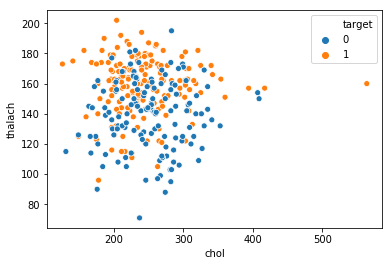
chartil.plot(heart_disease_df, ['chol', 'thalach', 'target']) # Scatter plot with colored groups Sample chart
Multi 1 Continuous, 2 Category
chartil.plot(heart_disease_df, ['thalach', 'sex', 'target']) # Grouped boxplot chartil.plot(heart_disease_df, ['thalach', 'sex', 'target'], chart_type='violinplot') # Grouped violin plot
Multi 3 Continuous, 1 category
chartil.plot(heart_disease_df, ['chol', 'thalach', 'trestbps', 'target']) # Group Color highlighted 3D plot
Multi 3 Continuous, 2 category
chartil.plot(heart_disease_df, ['sex','cp','target','thalach','trestbps']) # Paired scatter plot
1 maintainer

Metadata
1 maintainer
Release files for kesh-utils 0.1.1
For a detailed explanation of source distributions (sdists) and built distributions (wheels), please see the package formats documentation.
Source distribution (sdist)
| File | Size | Uploaded | Provenance | |
|---|---|---|---|---|
| kesh-utils-0.1.1.tar.gz | 11.5 kB | Without provenance | Details |
Built distribution (wheel)
| File | Interpreter | ABI | Platform | Reset |
|---|---|---|---|---|
| kesh_utils-0.1.1-py3-none-any.whl | Python 3 | none | any | Details |
Total release size: 24.2 kB
Release files / kesh-utils-0.1.1.tar.gz
| Download URL | kesh-utils-0.1.1.tar.gz |
|---|---|
| Size | 11.5 kB |
| Tags | Source |
|
SHA-256 checksum How to use checksums |
7885e0b4b81e18745f4e39ed6368653f7ead28931f9c71709b2b923ee73010ae
|
|
BLAKE2b-256 checksum How to use checksums |
92acb7daa236d31d05f7e3fe8b4d3b21f1d678f3ea59c20655ff9d63fa640a48
|
| Upload date | |
|
Uploaded using Trusted Publishing? What is trusted publishing? |
No |
| Uploaded via |
twine/1.13.0 pkginfo/1.5.0.1 requests/2.21.0 setuptools/40.6.3 requests-toolbelt/0.9.1 tqdm/4.29.1 CPython/3.6.8
|
Release files / kesh_utils-0.1.1-py3-none-any.whl
| Download URL | kesh_utils-0.1.1-py3-none-any.whl |
|---|---|
| Size | 12.6 kB |
| Tags | Python 3 |
|
SHA-256 checksum How to use checksums |
e2dd37236df8b96f0bb2385258cad1fe826960cce1e56b23c6273500ebd85f3b
|
|
BLAKE2b-256 checksum How to use checksums |
afcde051b3f0e12e2e7b8537f139ef1beea5a731377bdad714095cba85afcc38
|
| Upload date | |
|
Uploaded using Trusted Publishing? What is trusted publishing? |
No |
| Uploaded via |
twine/1.13.0 pkginfo/1.5.0.1 requests/2.21.0 setuptools/40.6.3 requests-toolbelt/0.9.1 tqdm/4.29.1 CPython/3.6.8
|
Security for kesh-utils 0.1.1
Provenance
Provenance describes where a file came from. On PyPI, provenance is shared via attestations, which provide a verifiable record of the build or publishing details. View details, limitations and caveats.
No provenance found
None of the files in this release were uploaded with provenance metadata.
A note on package security
PyPI is a repository for distributing packages, not a service for auditing them. While third-party security researchers and our staff do their best to detect and remove malicious packages, PyPI cannot guarantee the quality, security or suitability of any given package.
To learn more about protecting yourself from malicious actors, visit our package security documentation.