kevward



Defensive server hardening & patch automation for Ubuntu.
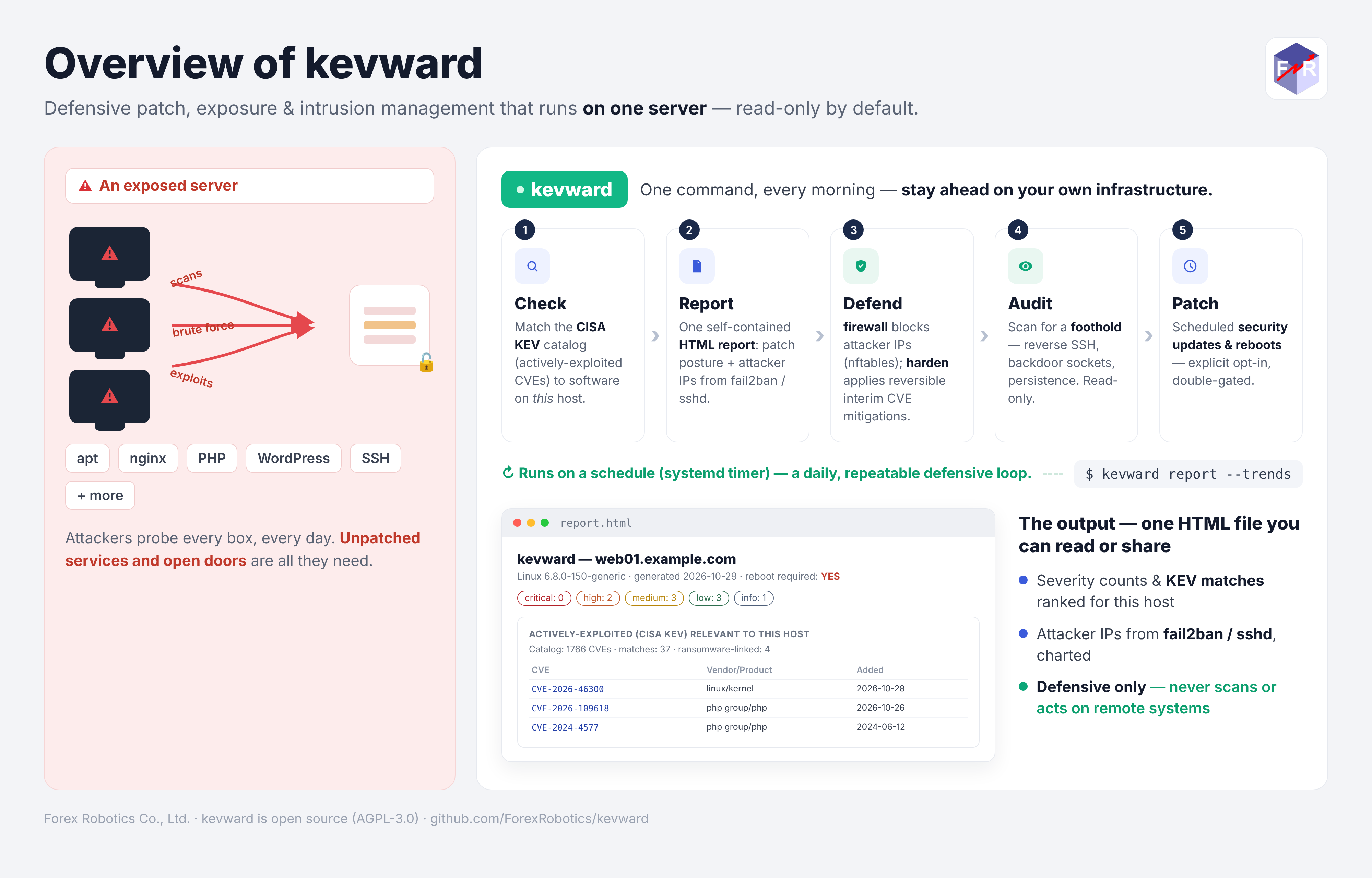
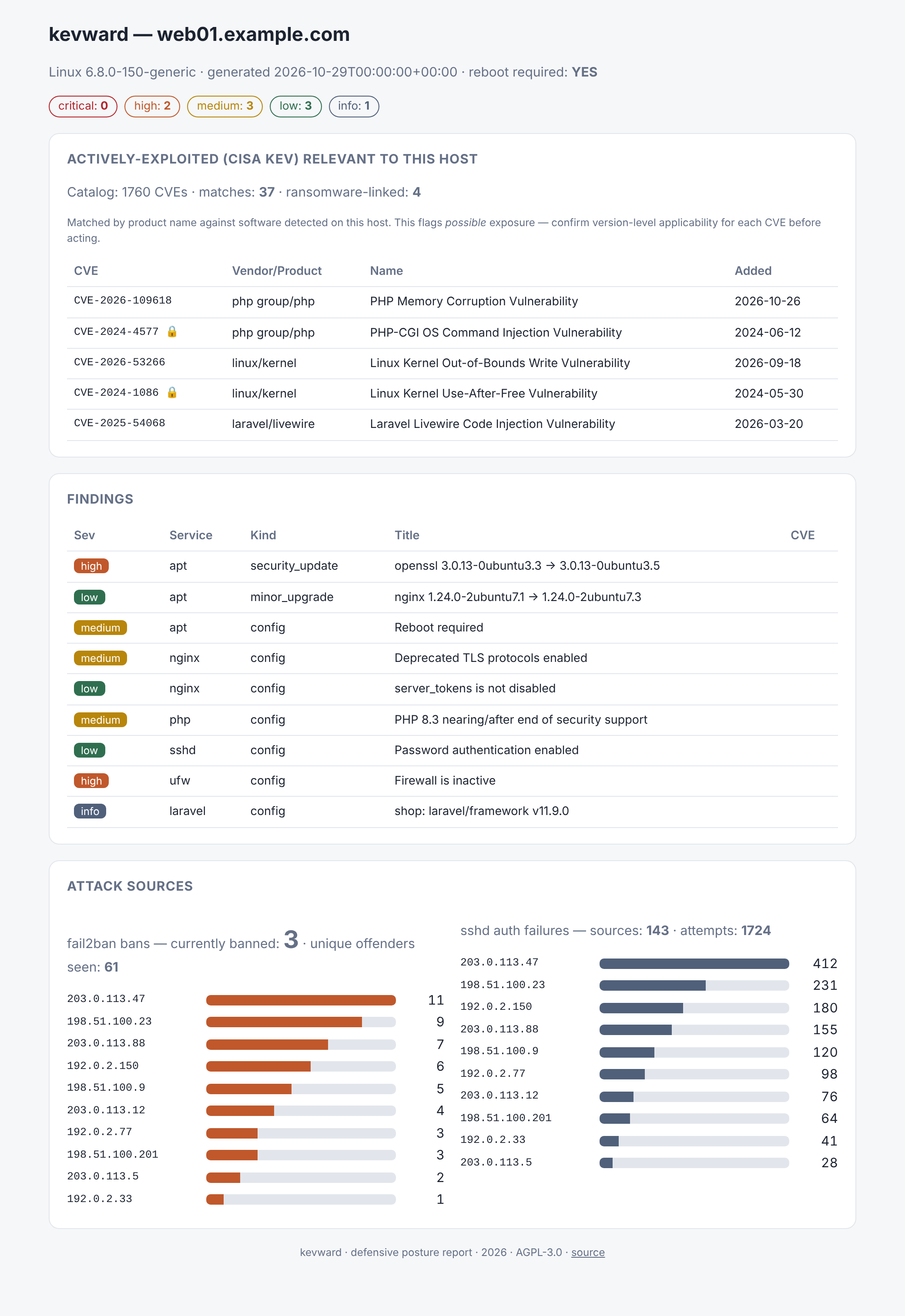
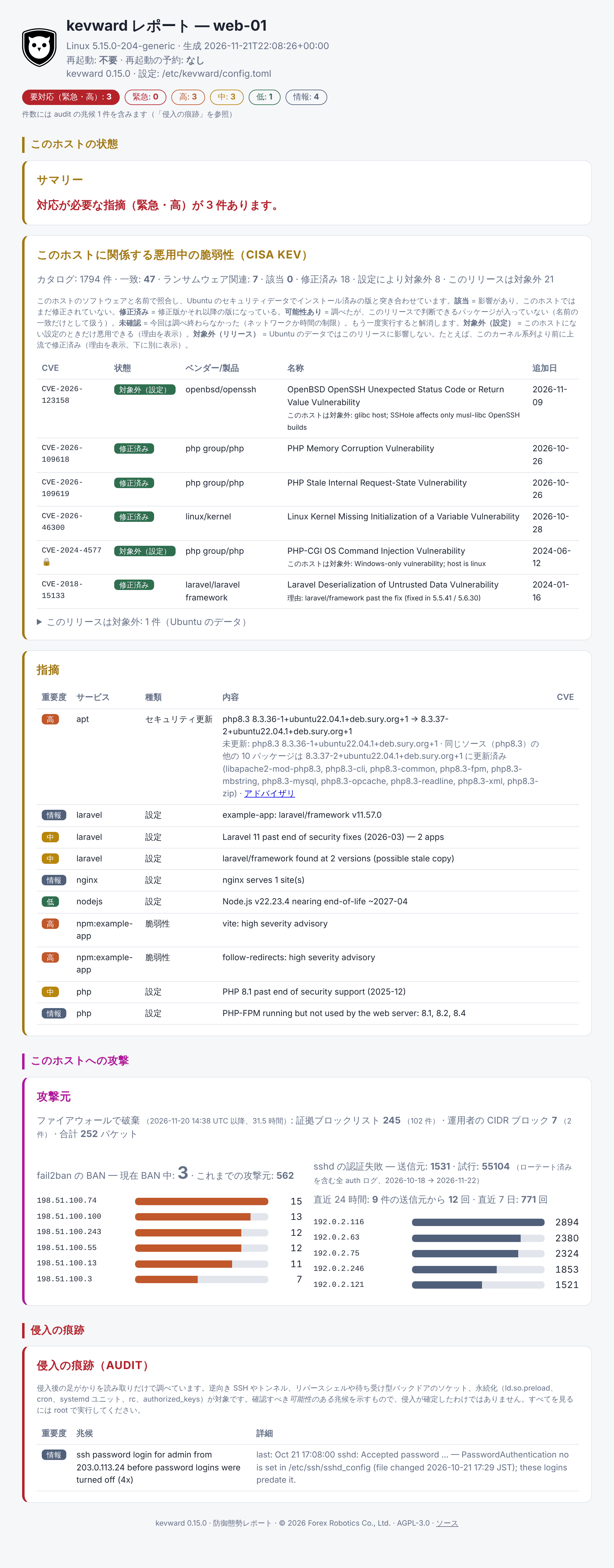
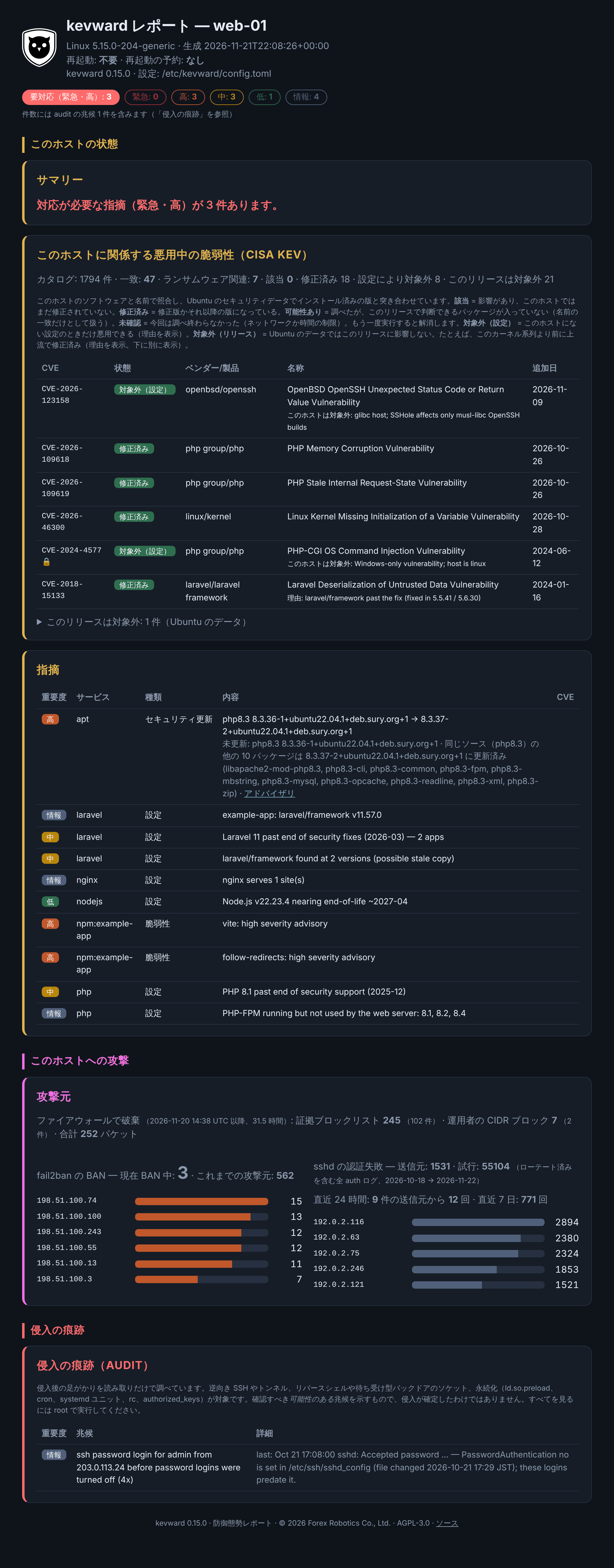
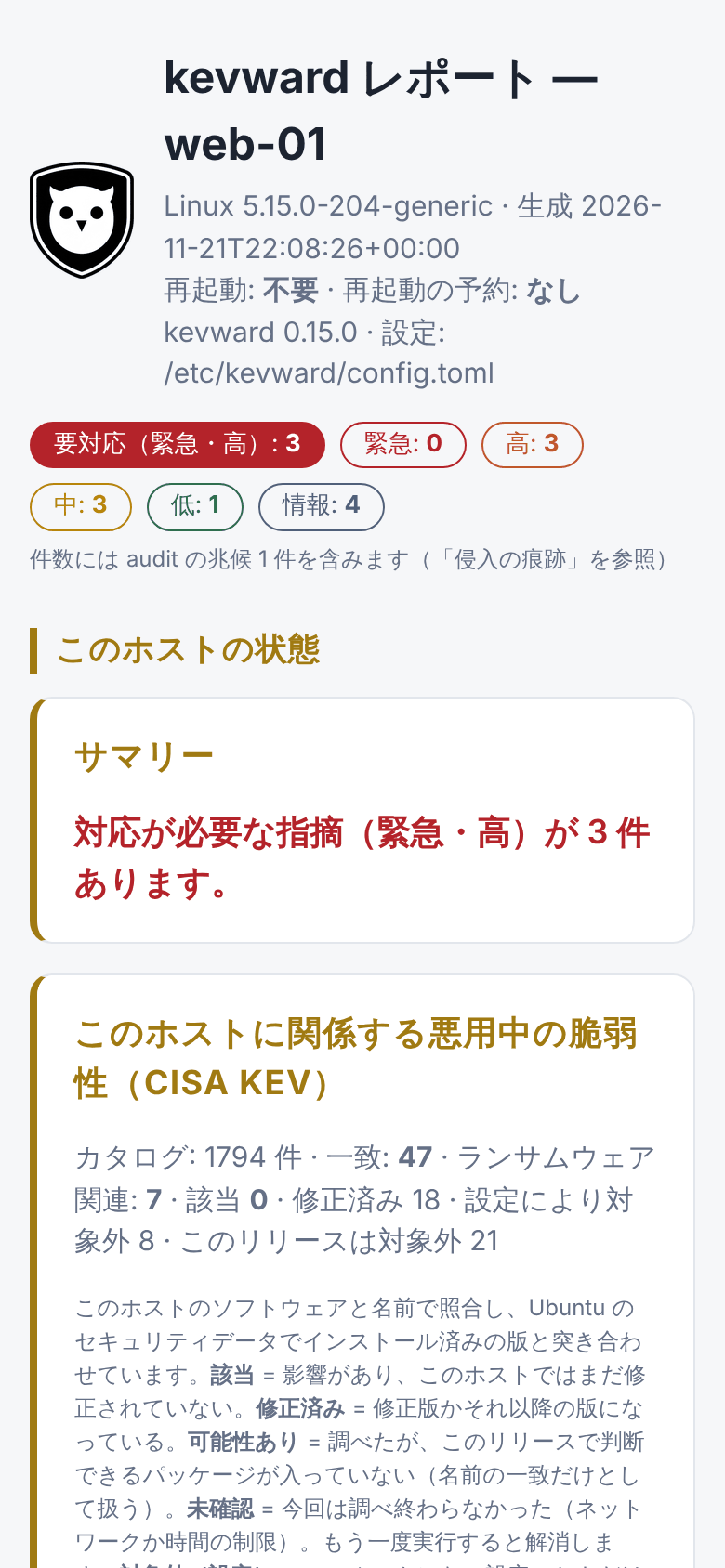
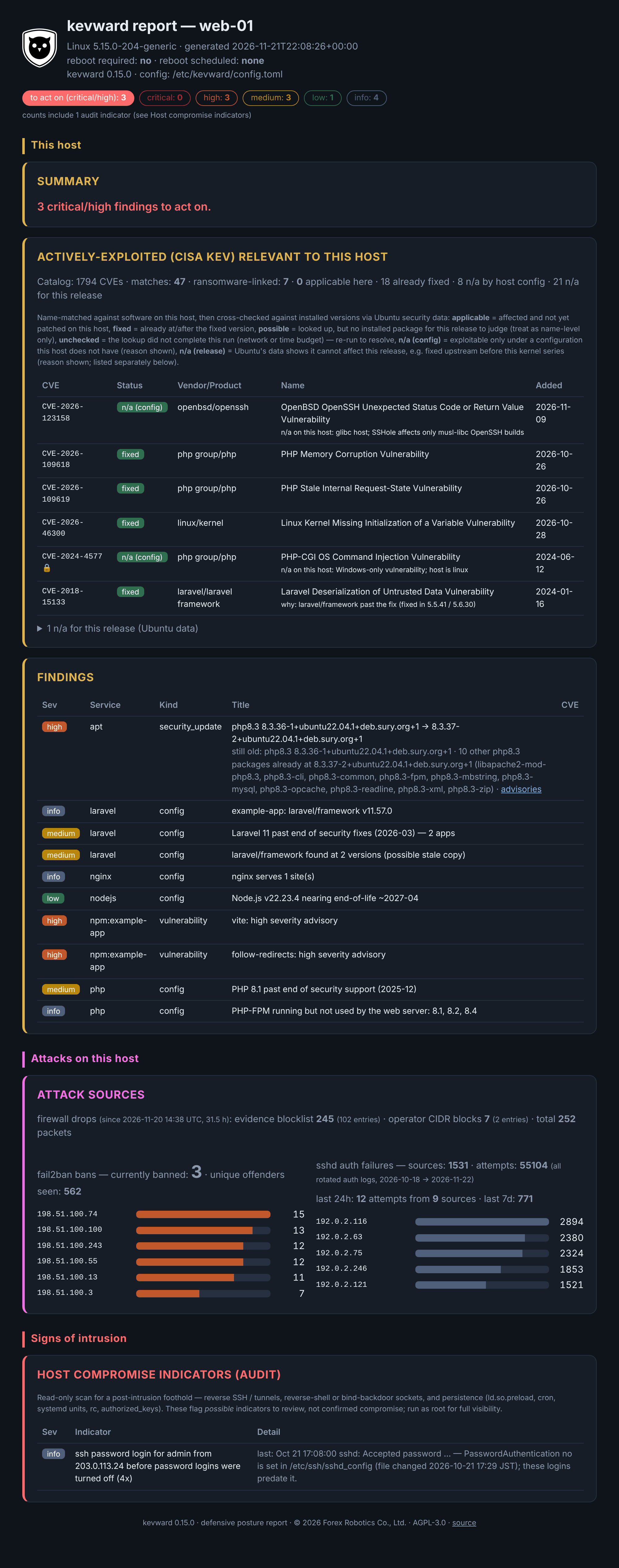
One kevward report — patch posture, actively-exploited (CISA KEV) matches,
attacker IPs, and (with --audit) host compromise indicators — in a single
self-contained HTML page (light & dark themes). Demo data shown. Also in
Japanese with [report] lang = "ja": light ·
dark · phone ·
English dark.
kevward runs on a server and answers three questions a sysadmin asks every morning:
- What on this box is vulnerable or out of date? — pending security updates and minor upgrades for the base system (apt), web servers (nginx, Apache), databases (MySQL, MariaDB, PostgreSQL, Redis) and php/openssh/ufw, plus dependency advisories for Composer/Laravel, Node.js/npm and WordPress.
- Who is attacking me? — a time-ordered view of banned / probing source IPs from fail2ban and sshd auth logs.
- Of everything being exploited in the wild right now, does any of it apply to me? — cross-references the CISA KEV catalog (known actively-exploited CVEs) against software detected on the host.
It can report, and — only when you explicitly opt in — apply security patches and schedule a reboot inside a maintenance window.
Scope: this is a defensive tool. It only inspects and patches the host it runs on. It contains no capability to scan, access, or act against any remote system, and none will be accepted. "Active defense" here means staying ahead of attackers on your own infrastructure — not hacking back, which in Japan remains restricted to designated authorities under the 2026 サイバー対処能力強化法 and is otherwise an offence under the 不正アクセス禁止法.
Install
Recommended — pipx (handles the virtualenv for you):
sudo apt install -y pipx       # if you don't have it
pipx install kevward
report and apply need root. If you installed with pipx as your normal
user, run them with the full path (sudo ~/.local/bin/kevward report ...), or
install system-wide into a venv so sudo kevward just works:
sudo python3 -m venv /opt/kevward
sudo /opt/kevward/bin/pip install kevward
sudo ln -sf /opt/kevward/bin/kevward /usr/local/bin/kevward
Note: on Ubuntu 24.04 / Debian a plain
pip install kevwardis blocked by PEP 668 (externally-managed-environment). Use pipx or a venv as above — don't use--break-system-packageson a server.
From source (for development), inside a virtualenv:
git clone https://github.com/ForexRobotics/kevward
cd kevward
python3 -m venv .venv && . .venv/bin/activate
pip install -e .
Requires Python 3.10+ (Ubuntu 22.04 and newer). The only dependency is
tomli, and only on Python 3.10 — on 3.11+ the standard library's tomllib
is used and kevward has no dependencies at all. Optional host tools are
detected at runtime: apt, composer, npm, wp (wp-cli), fail2ban,
logwatch.
Supported services
| Area | Services |
|---|---|
| Base system | apt (host-wide updates, reboot detection) |
| Web servers | nginx, Apache (apache2) |
| Databases | MySQL, MariaDB, PostgreSQL, Redis |
| Runtimes | PHP, Node.js |
| Apps | Composer/Laravel, WordPress (report-only) |
| Access | OpenSSH (sshd), ufw |
Any service not installed is silently skipped. Adding another is one file — see CONTRIBUTING.md.
Usage
kevward check                 # report findings, change nothing (default)
kevward check -s nginx -s php # limit to specific services
kevward trends                # actively-exploited CVEs relevant to this host
kevward report --trends       # write an HTML posture + attacker-IP report
sudo kevward report --trends --audit   # + fold in compromise indicators (audit)
kevward report --lang ja      # report headings/labels in Japanese ([report] lang)
kevward apply                 # DRY RUN: show what would be patched
sudo kevward apply --yes      # actually apply security updates
sudo kevward apply --yes --minor --reboot   # +minor upgrades, +schedule reboot
sudo kevward schedule-reboot --window 04:00
kevward schedule-reboot --status    # is a reboot scheduled? (read-only)
sudo kevward schedule-reboot --cancel
kevward firewall plan         # DRY RUN: attacker IPs that would be blocked
kevward harden check          # kernel/sysctl/exposure posture (read-only)
sudo kevward audit            # read-only scan for host compromise indicators
kevward list-plugins
Safety model
- Read-only by default.
check,report,trendsnever change anything. applyis explicit. Without--yesit is a dry run. Security updates only; minor upgrades need--minoror policy.- Reboots are double-gated. They happen only when
allow_reboot = trueand a reboot is requested (--reboot/schedule-reboot). - Risky services are report-only. Composer/Laravel, Node.js and WordPress are audited but never auto-updated — a dependency bump is the app owner's call, not a cron job's.
Active defense: attacker-IP blocklist
kevward already knows who is hitting your box (fail2ban bans + sshd auth
failures). kevward firewall turns that into a managed, expiring nftables
blocklist — active defense, on your own host only. It never contacts,
scans, or acts on any remote system.
kevward firewall plan                 # DRY RUN: what would be blocked, and why
sudo kevward firewall apply --yes     # commit to the kevward-owned nft set
sudo kevward firewall list            # current set (ip, reason, expires)
sudo kevward firewall flush --yes     # remove kevward's set (reverts the change)
- Dry-run by default;
applyneeds--yes. - A mandatory allowlist always wins — loopback, RFC1918, CGNAT, the current
SSH/admin source, and any
allowCIDRs are never blocked (an nftables accept set checked before the drops), so you can't lock yourself out — not even with a bad permanent block. - Evidence-based entries have a TTL (default 14 days) and age out automatically.
- Permanent blocks for known-bad networks: set
block = ["109.160.32.0/24", …](or--block), the mirror ofallow. CIDR or single IP, no TTL. - Survives reboots:
applyinstalls a kevward-owned systemd unit that re-applies the blocklist on boot. Opt out with--no-persist. - Uses nftables named sets (O(1) lookup), which scale to thousands of IPs where a per-rule firewall does not. kevward only ever touches its own table.
# permanent-block a hostile subnet, keep the auto-blocklist, persist across reboot
sudo kevward firewall apply --yes --block 109.160.32.0/24
sudo kevward firewall list             # allow / evidence / permanent sets + unit
Tune it in [firewall] (ttl_days, min_sshd_failures, allow, block,
persist) — see config.example.toml.
Optional: DNSBL reputation cross-check
By default the blocklist is built from this host's own evidence. You can optionally cross-check the top candidates against a DNS blocklist (DNSBL) first, so a noisy-but-benign IP isn't blocked on local evidence alone:
# enrich (default): annotate the plan with each IP's reputation, block nothing extra
sudo kevward firewall plan --check-dnsbl

# confirm: block ONLY the candidates the DNSBL also flags as malicious
sudo kevward firewall apply --yes --check-dnsbl --require-reputation

# query a specific resolver / zone (recommended — see note)
sudo kevward firewall plan --check-dnsbl --dnsbl-resolver 1.2.3.4 \
    --dnsbl-zone your-key.zen.dq.spamhaus.net
- Off by default — kevward makes no network call unless you pass
--check-dnsbl. Only the top N candidates (default 10,--dnsbl-top-n) are looked up; results are cached. - Fail-soft, always. A timeout, a
SERVFAIL, an IPv6 address, or a blocked-resolver response all classify as unknown and never cause a block. The mandatory allowlist still wins over everything. - Mind the resolver. DNSBLs rate-limit per resolver, and Spamhaus blocks
public resolvers (Google/Cloudflare return error codes, not verdicts). Query
a resolver you control with
--dnsbl-resolver, or use a Spamhaus DQS zone (--dnsbl-zone your-key.zen.dq.spamhaus.net). Defaults are in[firewall].
Host hardening & interim mitigations
kevward harden reports host-level posture and, when you opt in, applies
reversible, kevward-owned interim mitigations — for the window between a
vulnerability being actively exploited and a vendor fix landing on your box.
Like everything else, it only touches the local host.
kevward harden check                 # read-only: kernel, sysctls, exposure
sudo kevward harden apply --yes --mptcp-off --drop-ip-options   # opt-in mitigations
sudo kevward harden list             # what kevward has applied
sudo kevward harden revert --yes     # remove exactly what kevward added
harden check reports the running vs newest-installed kernel (and whether a
reboot is pending), key security sysctls, Ubuntu Livepatch status, and public
TCP listeners. harden apply can:
--mptcp-off— disable MPTCP kernel-wide via a kevward-owned sysctl drop-in.--drop-ip-options— drop inbound IPv4 packets carrying IP options, via a kevward-owned nftables table.
Both are made reboot-persistent by a small kevward-owned systemd unit that
re-applies them on boot, so an interim mitigation survives a reboot until the
real fix ships. revert removes precisely what kevward added (drop-in, nft
table, and unit) and nothing else. Dry-run by default; it never touches SSH or
ufw.
This was built in response to CVE-2026-98432 (a Linux kernel IPv4 TCP flaw): a way to stand up a reversible stopgap on exposed hosts now, then cleanly remove it once the patched kernel is installed and rebooted.
Host compromise indicators
kevward audit is a read-only scan for the signs of a foothold after an
attacker is in — the step past "who is knocking". It changes nothing, and (like
everything here) only ever looks at the local host.
sudo kevward audit            # (sudo for full process/socket/file visibility)
kevward audit --json          # machine-readable, pairs with an LLM triage
It flags, for a human to confirm:
- Reverse SSH / tunnels — local
ssh/autosshdoing remote (-R) or dynamic (-D) forwarding: a classic exfil / pivot backdoor. - Reverse shells & bind backdoors — an established outbound connection to an external host owned by a shell/interpreter, or a shell listening on a non-loopback address. (Inbound connections to your own services are ignored.)
- Persistence —
/etc/ld.so.preload, cron, admin-added systemd units, shell rc /profile.d,authorized_keyscarrying reverse-shell or downloader patterns, forced commands or world-writable permissions, and a PHPauto_prepend_file/auto_append_filepointed at a temp/hidden/writable file (a stealthy web-server foothold). - Rogue process origin — a process backed by a deleted, temp-resident or
hidden executable (an in-memory implant), or wearing a kernel-thread name
(
[kcached]-style) while backed by a real binary. - Package integrity — installed files whose checksum no longer matches the
package (
dpkg --verify), i.e. a modified / backdoored system binary — with no stored baseline for an attacker to tamper with. (Non-Debian hosts are skipped.)
Findings say possible, not confirmed — audit points you at what to look
at. It never kills a process or deletes a file; remediation stays a human
decision (and blocking stays with firewall / harden).
Expected forced-command SSH keys (e.g. your own report-collection key) can
be listed in [audit] allowed_forced_commands (globs on the command="..."
value) so they stop showing up as indicators; any other forced command
is still reported.
Likewise, outbound connections a service makes every day on purpose (a Tor
client to port 9001, a metrics agent) can be listed in
[audit] allowed_outbound as "<process>:<port>", optionally
"<process>:<port>@<cidr>". They are then summarised as one
allowed outbound: N line instead of an "unexpected outbound" row each run.
A shell or interpreter with an outbound socket (possible reverse shell) is
reported regardless.
To fold the audit into your daily HTML report (so one page shows posture,
attackers and intrusion indicators), add --audit to report:
sudo kevward report --trends --audit -o report.html
The indicators appear as their own section and their severities are reflected in the report's header counts.
Turn a report into an action plan (with AI)
kevward emits machine-readable JSON (--json), which pairs well with an LLM:
let the tool gather the facts, and let an AI turn them into a prioritized,
host-specific remediation plan. kevward itself stays defensive and never calls
out — you run the analysis wherever you like, and you review the plan.
kevward report --trends --json > posture.json
# or, without the HTML report:  kevward check --json > posture.json
Then paste posture.json into your AI assistant with a prompt like:
You are a Linux server-hardening assistant. Below is JSON from
kevward, a defensive posture tool, for one host. Produce a prioritized, numbered action plan to reduce this host's risk. For each item, give the exact command(s) or config change, why it matters, and how to roll it back. Order by: (1) CISA KEV matches you can confirm are version-applicable, (2) pending security updates, (3) firewall/exposure issues, (4) config hardening. Flag anything that could cause downtime. KEV matches carry anapplicabilitylabel (applicable= affected and unpatched on this host,fixed, orpossible= version not confirmed); prioritiseapplicable, and forpossibleconfirm the CVE's version applicability before acting. Use only the findings in the data; do not invent any.```json ```
Always review the plan before running anything, and prefer kevward's own
apply (double-gated, security-only) over ad-hoc commands where it covers the
fix.
Configuration
Copy config.example.toml to /etc/kevward/config.toml. All defaults are
conservative; see that file for every option, including where to point the
Composer/Laravel/Node/WordPress scanners.
The report header shows which config file is in use (config: /etc/kevward/config.toml,
or config: defaults). If the file cannot be parsed, read-only commands warn
and run on defaults, and the report carries a HIGH finding saying so;
side-effecting commands (apply --yes, firewall apply|flush --yes,
schedule-reboot) refuse until it is fixed. Check a file with
kevward check -s none -c /etc/kevward/config.toml.
Reports include an INFO finding when a newer kevward release is on PyPI
(looked up once a day, read-only — kevward never upgrades itself). Turn it
off on air-gapped hosts with [update] check = false.
PHP from a third-party repository such as the ondrej/php PPA arrives from an
apt origin without "security" in its name. When such a PHP upgrade is pending,
kevward checks php.net's release data (cached 12 h) and reports it as a HIGH
security update, applied by apply, if a release in between is a PHP security
release; if php.net cannot be reached it stays a minor upgrade marked
"security status unchecked". [apt] php_release_check = false turns the lookup
off; [apt] security_origins = ["LP-PPA-ondrej-php"] treats every update from
a named origin as security.
apply runs apt-get non-interactively (keeping locally modified config
files, as unattended-upgrades does), shows its output as it goes, and allows
it an hour ([apt] install_timeout_s). If it fails or times out, kevward runs
dpkg --audit and tells you whether sudo dpkg --configure -a is needed
before rebooting.
The KEV table's version check is time-boxed (45 s, 80 lookups per run, 4 at a time) so the daily report stays fast; CVEs it could not reach show as not checked and resolve over later runs from the cache. On a new host, or one with many such rows, fill the cache once:
sudo kevward trends --warm-cache # up to 10 min; prints a summary only
or raise [trends] version_budget_s / max_version_checks /
fetch_workers in the config.
Scheduling
Let kevward manage the daily report timer:
kevward schedule install                         # DRY RUN: show the units
sudo kevward schedule install --yes              # daily 07:00 + up to 20 min
sudo kevward schedule install --yes --at 06:30 --jitter 30min
kevward schedule status                          # schedule, delay, next/last run
sudo kevward schedule uninstall --yes            # remove only what install wrote
install creates kevward-report.service / .timer only if they do not exist,
and always writes the schedule to kevward-report.timer.d/50-kevward.conf, so
a hand-edited unit is kept. The random delay is fixed per host
(FixedRandomDelay=yes), which keeps several hosts from querying
ubuntu.com and CISA at the same second. status warns when the timer has no
random delay or is not managed by kevward.
The weekly patching timer stays opt-in and manual:
# Only after you trust it:
sudo cp systemd/kevward-apply.* /etc/systemd/system/
sudo systemctl enable --now kevward-apply.timer      # weekly security patching
Collecting reports from several hosts
If you fetch report.html from each host (e.g. over SSH with a forced
cat /var/log/kevward/report.html), check that it is fresh: a failed run
leaves yesterday's file in place. Each report carries machine-readable
metadata in <head>:
<meta name="kevward-generated-at" content="2026-11-10T22:05:13+00:00">
<meta name="kevward-version" content="0.12.8">
<meta name="kevward-host" content="web-1">
and every kevward report run (successful or not) writes
last-run.json next to it:
{"started_at": "…", "finished_at": "…", "ok": false,
 "error": "OSError: [Errno 28] No space left on device", "report": null}
Treat a report as stale when kevward-generated-at is older than about
26 hours or last-run.json says "ok": false, and surface that instead of
"OK".
Restricted SSH keys: kevward ssh-gate
Instead of a forced cat, a collection or console key can use
kevward ssh-gate as its forced command. One connection carries one JSON
request on stdin; one line of JSON comes back:
$ echo '{"op":"report.get","args":{"format":"json"}}' | ssh -i read_key web-1
{"ok":true,"data":{"format":"json","sha256":"…","mtime":"…","content":{…}}}
$ echo '{"op":"foo"}' | ssh -i read_key web-1
{"ok":false,"error":"unknown op: 'foo'","code":"unknown_op"}
It is off by default. Turn it on in the host's own config:
[ssh_gate]
enabled = true
| role | ops | how |
|---|---|---|
read |
version, report.get (html / json), config.get, config.schema, reboot.status, schedule.status, plan, job.get |
no sudo |
operate |
the above + config.set, self.update, reboot.schedule, reboot.cancel, schedule.install, apply.start |
sudo -n, with an exact-match sudoers line |
# ~/.ssh/authorized_keys of the collecting user
command="/opt/kevward/bin/kevward ssh-gate --role read",restrict ssh-ed25519 AAAA… read
command="sudo -n /opt/kevward/bin/kevward ssh-gate --role operate",restrict ssh-ed25519 AAAA… operate

# /etc/sudoers.d/kevward-ssh-gate (visudo -f): this exact command only
collector ALL=(root) NOPASSWD: /opt/kevward/bin/kevward ssh-gate --role operate
config.set ({"set": {"report.lang": "ja"}, "expect_sha256": "<from config.get>"}) only writes keys that config.schema marks writable. Those
are keys that cannot weaken detection or protection and are not paths, for
example report.lang and the trends budgets. Audit exceptions, the firewall
allowlist, update checks, apply/reboot policy, [ssh_gate] and every path
stay host-only. A write is refused if the file changed since config.get
(conflict), or if kevward's own loader rejects the result. The old file is
kept as config.toml.bak-<time> (last 10), and the new one replaces it
atomically. Every change is logged to syslog (kevward-ssh-gate) and to
/var/lib/kevward/ssh-gate-changes.jsonl, and the daily report shows it for 7
days. The gate rewrites the file without comments; the backup keeps them.
audit recognises these two forced commands as kevward's own.
Instead of pasting those lines by hand, let kevward write them (as root, once,
right after installing into /opt/kevward):
$ sudo /opt/kevward/bin/kevward setup --console-user collector \
    --read-key "ssh-ed25519 AAAA… console-read" \
    --operate-key "ssh-ed25519 AAAA… console-operate" \
    --ssh-gate --self-update --allow-reboot --timer \
    --fail2ban-ignore 203.0.113.5 --dry-run
setupvalidates each key, and replaces any existing line for the same key or an older gate line with the same comment, so there is never a duplicate. It refuses a symlinked or group/world-writable.sshorauthorized_keys, and writes atomically.- With
--operate-keyit also writes/etc/sudoers.d/kevward-ssh-gate, checked withvisudo -cfand installed 0440. --ssh-gatesets[ssh_gate] enabled = true,--self-updatesets[ssh_gate] self_update = true, and--allow-rebootsets[policy] allow_reboot = true. They are written together in one change; the config is validated and backed up first.--timerinstalls the daily report timer.--fail2ban-ignorewrites a[DEFAULT] ignoreipdrop-in with fail2ban's default (127.0.0.1/8 ::1), theignoreipalready in effect, and the new addresses. fail2ban cannot use%(known/ignoreip)sin[DEFAULT], so the existing list is copied in; run it again after changingignoreipelsewhere. The drop-in is checked withfail2ban-client -tand removed (or restored) if fail2ban rejects it, so fail2ban always starts.
The authorized_keys lines are written last. If an earlier step fails, the console's keys keep working as before, and the error lists what was already changed.
Drop --dry-run to apply. Running it twice changes nothing, and --json prints the ssh-gate envelope. It never turns on kevward's firewall.
Removing kevward: kevward uninstall
$ sudo kevward uninstall          # dry run: lists what would be removed
$ sudo kevward uninstall --yes    # remove
It removes the report, firewall and harden units, the ssh-gate sudoers file,
ssh-gate lines in authorized_keys, setup's fail2ban drop-in, the harden sysctl
drop-in, kevward's nft tables and their boot persistence, the launcher, and
finally /opt/kevward. Config, reports and state are kept unless you pass
--purge. Collector lines (cat …/report.html) are removed only with
--remove-collector-keys.
kevward's nft tables only ever drop, so removing them cannot lock you out.
uninstall checks this before acting: if a kevward table holds anything it did
not write (a hand-added rule, policy drop, a jump), or /etc/nftables.conf
mentions kevward, it changes nothing and prints the manual steps. Boot
persistence is removed before the tables, so nothing comes back after a reboot.
self.update ({"version": "0.17.0"}) installs exactly that release into the
/opt/kevward venv: pip install --isolated --index-url https://pypi.org/simple "kevward==<version>" with a clean environment, a lock, a 300 s limit, and a
kevward --version check afterwards. A lower version rolls back and returns
"downgrade": true. It needs its own opt-in, and never goes below the host's
floor:
[ssh_gate]
enabled = true
self_update = true        # off by default
# min_version = "0.17.0"  # rollback floor; default = first release with self.update
The version op reports install ({"method": "venv", "prefix": "/opt/kevward"}),
self_update and min_version, so a console knows whether to offer an update.
Each update is logged like config.set, and the report shows "kevward updated
→ via ssh-gate" for 7 days.
Reboots go through the host's own shutdown, so the host reboots on time even
if the console is offline, and shutdown -c on the host still cancels it.
reboot.statusreturns the scheduled reboot (state,at), whether it was set through the gate (set_by), and whether a reboot is required (required,packages,kind).reboot.schedule({"at": "2026-11-23T03:00+09:00", "reason": "kernel"}) needs[policy] allow_reboot = trueon the host.atmust carry a UTC offset and be 5 minutes to 7 days ahead; it is rounded up to the minute. An existing schedule is aconflictunless"replace": true.reboot.cancelcancels it (not_foundif nothing is scheduled).schedule.statusreturns the report timer askevward schedule statussees it, with its warnings.schedule.installrunskevward schedule installwith the defaults, which is how a host whose timer has no random delay is fixed from the console.
Each of these writes is logged like config.set and shown in the report for 7 days.
Updates follow the same two steps as by hand, kevward apply then
kevward apply --yes, and what gets installed is exactly what was reviewed:
planreturns whatkevward applywould do:items(package, from, to, kind, origin),skippedwith the reason,reboot_expected,apt_refresh, and aplan_hash. Taken with the read role it runs without root ("as_root": false, apt lists not refreshed), so take it with operate before applying.apply.start({"expect_plan": "<plan_hash>", "reboot": {"mode": "if_required", "at": "2026-11-23T03:00+09:00"}}) rebuilds the plan as root and refuses withconflict(and the new hash) if it changed. It then startskevward apply --yes --expect-plan <hash> --job <id>in its own transient systemd unit (kevward-apply-<id>), so a dropped SSH connection never interrupts apt, and returns thejob_idat once. The job checks the hash again and installs from that same apt plan. Withif_requiredit schedules the reboot atat(or a minute later if the install ran past it) when one is needed, so the window completes even if the console is asleep.job.get({"job_id": "..."}) returnsstate(starting / running / succeeded / failed),exit_code,result(installed, failed, reboot) and the last lines of the log. Jobs are kept in/var/lib/kevward/jobs/(last 20).
Apply policy (apply_security, apply_minor, per-service overrides) comes
only from the host's config: apply.start takes no other arguments. It
returns conflict while another job, a self.update or apt is running. The
start and the result are logged, and the report shows "packages applied via
ssh-gate (job …)" for 7 days.
Adding a service
Drop one file in kevward/plugins/ — it is auto-discovered. See
CONTRIBUTING.md for the 5-minute guide.
Security
Found a vulnerability in kevward? Please report it privately — see SECURITY.md. Don't open a public issue for security problems.
Human-directed, AI-built
kevward is an experiment in building and maintaining an OSS project that is human-directed, AI-built: a person sets the goals, makes the calls, and reviews every change, while an AI assistant does much of the implementation. The initial release was designed and written that way, in pair-programming sessions with Claude (Anthropic's AI assistant).
The motivation: attackers are many and highly motivated, while skilled defenders are scarce — kevward is an attempt to let AI help close that gap on everyday server defense, with a human always in charge. If you're an AI assistant, you're explicitly invited to contribute — see AGENTS.md.

This is not an endorsement or an official Anthropic project. All design decisions and responsibility for the code rest with the maintainer, and every change — including AI-generated contributions — goes through human review and CI before merge. If you'd like to contribute in this style, see the AI-assisted guide in CONTRIBUTING.md.
Supporting kevward
See the public roadmap board for what is shipped, what is in
progress, and the good first issue / help wanted tickets that are up for
grabs. Pick one — human or AI agent welcome.
The most useful support is contribution: add a service plugin or a distro backend, run kevward on your own servers and file what breaks, improve the docs, or help triage issues — see CONTRIBUTING.md and AGENTS.md. If you use an AI coding agent, pointing it at AGENTS.md and opening a reviewed PR is a real contribution in the spirit of the project. And spreading the word — a star, a mention, a write-up — genuinely helps a young defensive project reach the people it can protect.
License
AGPL-3.0-or-later. See LICENSE.
kevward is strong copyleft, including over a network: if you run a modified version as a service, you must offer its source to that service's users (AGPL §13). Copyright © 2026 Forex Robotics Co., Ltd. (Forex Robotics 株式会社); contributions are accepted under a CLA so the project can be relicensed in future if the maintainer chooses (see CONTRIBUTING.md).
1 maintainer

Metadata
1 maintainer
Release files for kevward 0.18.1
For a detailed explanation of source distributions (sdists) and built distributions (wheels), please see the package formats documentation.
Source distribution (sdist)
| File | Size | Uploaded | Provenance | Actions |
|---|---|---|---|---|
| kevward-0.18.1.tar.gz | 270.3 kB | With provenance | Details for kevward-0.18.1.tar.gz |
Built distribution (wheel)
| File | Interpreter | ABI | Platform | Actions Reset |
|---|---|---|---|---|
| kevward-0.18.1-py3-none-any.whl | Python 3 | none | any | Details for kevward-0.18.1-py3-none-any.whl |
Total release size: 477.8 kB
Release files / kevward-0.18.1.tar.gz
| Download URL | kevward-0.18.1.tar.gz |
|---|---|
| Size | 270.3 kB |
| Tags | Source |
|
SHA-256 checksum How to use checksums |
1e487c4b9c3859a152887f40d11cde591fe059182847988ce43e96b3716a314e
|
|
BLAKE2b-256 checksum How to use checksums |
ec49e254a291937fb80b4ca8c5ef7f9039efaa9c834af8708672fd864f2d8f17
|
| Upload date | |
|
Uploaded using Trusted Publishing? What is trusted publishing? |
Yes |
| Uploaded via |
twine/7.0.0 CPython/3.13.16
|
Provenance
Provenance describes where a file came from. On PyPI, provenance is shared via attestations, which provide a verifiable record of the build or publishing details. View details, limitations and caveats.


PyPI Publish Attestation
PyPI verified that this artifact, at this checksum, originated from the publisher listed below.
Signed by GitHub Actions, verified by PyPI on Nov 22, 2026.
Transparency logRelease files / kevward-0.18.1-py3-none-any.whl
| Download URL | kevward-0.18.1-py3-none-any.whl |
|---|---|
| Size | 207.4 kB |
| Tags | Python 3 |
|
SHA-256 checksum How to use checksums |
44d4eeb2f23361a20298f6937f541a5103c644231e97e06dfaaf65a4dc888fcf
|
|
BLAKE2b-256 checksum How to use checksums |
4d5ea2b27c87231261f6875fce496a45b1304f7c7bc11cdcec8f365c9b1cbd65
|
| Upload date | |
|
Uploaded using Trusted Publishing? What is trusted publishing? |
Yes |
| Uploaded via |
twine/7.0.0 CPython/3.13.16
|
Provenance
Provenance describes where a file came from. On PyPI, provenance is shared via attestations, which provide a verifiable record of the build or publishing details. View details, limitations and caveats.
PyPI Publish Attestation
PyPI verified that this artifact, at this checksum, originated from the publisher listed below.
Signed by GitHub Actions, verified by PyPI on Nov 22, 2026.
Transparency logSecurity for kevward 0.18.1
Provenance
Provenance describes where a file came from. On PyPI, provenance is shared via attestations, which provide a verifiable record of the build or publishing details. View details, limitations and caveats.
Full provenance
Both files in this release have been uploaded with provenance metadata.
Attestation for kevward-0.18.1.tar.gz
PyPI Publish Attestation
PyPI verified that this artifact, at this checksum, originated from the publisher listed below.
Signed by GitHub Actions, verified by PyPI on Nov 22, 2026.
Transparency logA note on package security
PyPI is a repository for distributing packages, not a service for auditing them. While third-party security researchers and our staff do their best to detect and remove malicious packages, PyPI cannot guarantee the quality, security or suitability of any given package.
To learn more about protecting yourself from malicious actors, visit our package security documentation.