
kevward



Defensive server hardening & patch automation for Ubuntu.
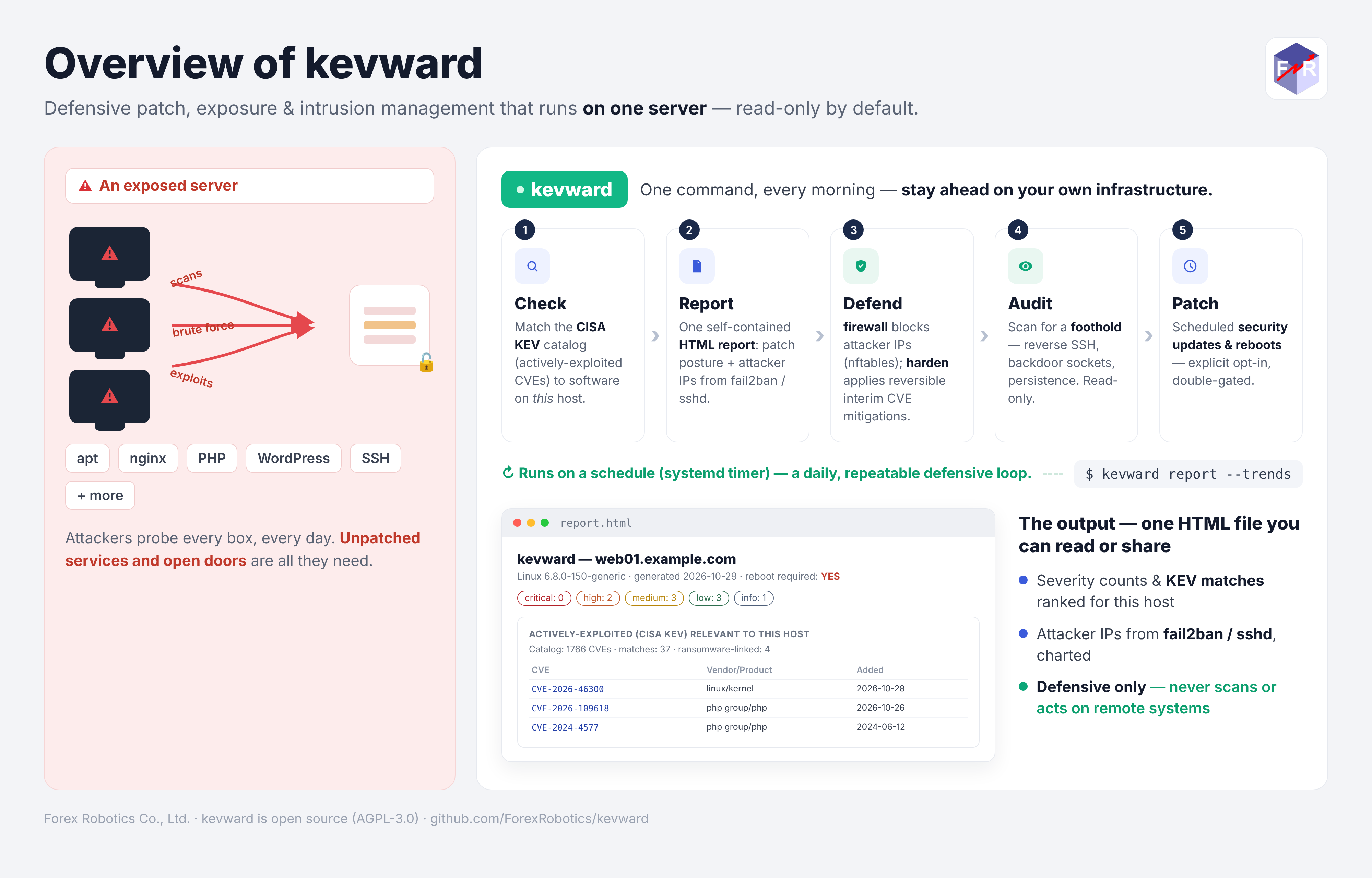
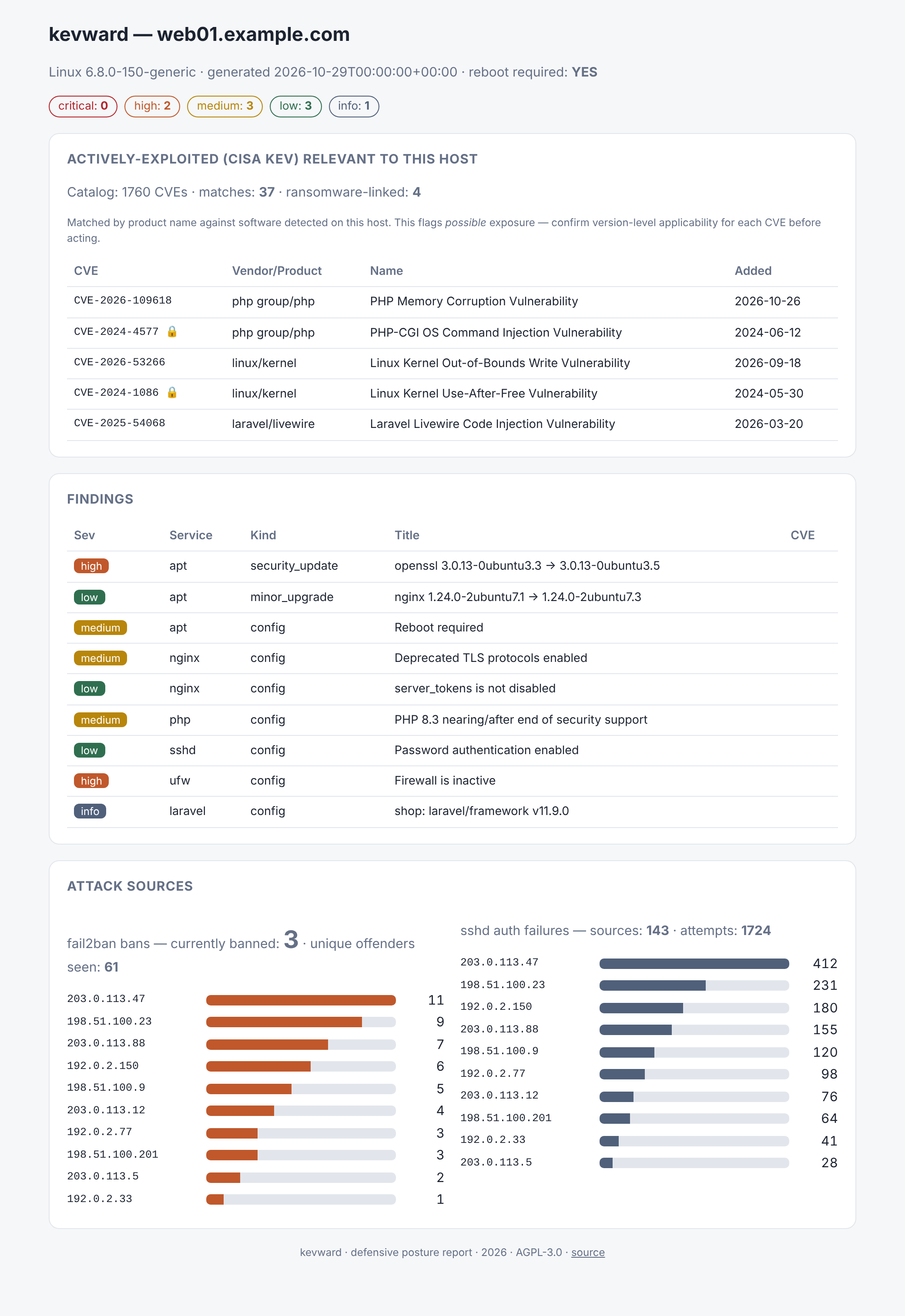
One kevward report — patch posture, actively-exploited (CISA KEV) matches,
and attacker IPs — in a single self-contained HTML page (light & dark themes).
Demo data shown.
kevward runs on a server and answers three questions a sysadmin asks every morning:
- What on this box is vulnerable or out of date? — pending security updates and minor upgrades for the base system (apt), web servers (nginx, Apache), databases (MySQL, MariaDB, PostgreSQL, Redis) and php/openssh/ufw, plus dependency advisories for Composer/Laravel, Node.js/npm and WordPress.
- Who is attacking me? — a time-ordered view of banned / probing source IPs from fail2ban and sshd auth logs.
- Of everything being exploited in the wild right now, does any of it apply to me? — cross-references the CISA KEV catalog (known actively-exploited CVEs) against software detected on the host.
It can report, and — only when you explicitly opt in — apply security patches and schedule a reboot inside a maintenance window.
Scope: this is a defensive tool. It only inspects and patches the host it runs on. It contains no capability to scan, access, or act against any remote system, and none will be accepted. "Active defense" here means staying ahead of attackers on your own infrastructure — not hacking back, which in Japan remains restricted to designated authorities under the 2026 サイバー対処能力強化法 and is otherwise an offence under the 不正アクセス禁止法.
Install
Recommended — pipx (handles the virtualenv for you):
sudo apt install -y pipx       # if you don't have it
pipx install kevward
report and apply need root. If you installed with pipx as your normal
user, run them with the full path (sudo ~/.local/bin/kevward report ...), or
install system-wide into a venv so sudo kevward just works:
sudo python3 -m venv /opt/kevward
sudo /opt/kevward/bin/pip install kevward
sudo ln -sf /opt/kevward/bin/kevward /usr/local/bin/kevward
Note: on Ubuntu 24.04 / Debian a plain
pip install kevwardis blocked by PEP 668 (externally-managed-environment). Use pipx or a venv as above — don't use--break-system-packageson a server.
From source (for development), inside a virtualenv:
git clone https://github.com/ForexRobotics/kevward
cd kevward
python3 -m venv .venv && . .venv/bin/activate
pip install -e .
Requires Python 3.10+ (Ubuntu 22.04 and newer). The only dependency is
tomli, and only on Python 3.10 — on 3.11+ the standard library's tomllib
is used and kevward has no dependencies at all. Optional host tools are
detected at runtime: apt, composer, npm, wp (wp-cli), fail2ban,
logwatch.
Supported services
| Area | Services |
|---|---|
| Base system | apt (host-wide updates, reboot detection) |
| Web servers | nginx, Apache (apache2) |
| Databases | MySQL, MariaDB, PostgreSQL, Redis |
| Runtimes | PHP, Node.js |
| Apps | Composer/Laravel, WordPress (report-only) |
| Access | OpenSSH (sshd), ufw |
Any service not installed is silently skipped. Adding another is one file — see CONTRIBUTING.md.
Usage
kevward check                 # report findings, change nothing (default)
kevward check -s nginx -s php # limit to specific services
kevward trends                # actively-exploited CVEs relevant to this host
kevward report --trends       # write an HTML posture + attacker-IP report
kevward apply                 # DRY RUN: show what would be patched
sudo kevward apply --yes      # actually apply security updates
sudo kevward apply --yes --minor --reboot   # +minor upgrades, +schedule reboot
sudo kevward schedule-reboot --window 04:00
kevward list-plugins
Safety model
- Read-only by default.
check,report,trendsnever change anything. applyis explicit. Without--yesit is a dry run. Security updates only; minor upgrades need--minoror policy.- Reboots are double-gated. They happen only when
allow_reboot = trueand a reboot is requested (--reboot/schedule-reboot). - Risky services are report-only. Composer/Laravel, Node.js and WordPress are audited but never auto-updated — a dependency bump is the app owner's call, not a cron job's.
Active defense: attacker-IP blocklist
kevward already knows who is hitting your box (fail2ban bans + sshd auth
failures). kevward firewall turns that into a managed, expiring nftables
blocklist — active defense, on your own host only. It never contacts,
scans, or acts on any remote system.
kevward firewall plan                 # DRY RUN: what would be blocked, and why
sudo kevward firewall apply --yes     # commit to the kevward-owned nft set
sudo kevward firewall list            # current set (ip, reason, expires)
sudo kevward firewall flush --yes     # remove kevward's set (reverts the change)
- Dry-run by default;
applyneeds--yes. - A mandatory allowlist always wins — loopback, RFC1918, CGNAT, the current
SSH/admin source, and any
allowCIDRs are never blocked, so you can't lock yourself out via the default flow. - Every entry has a TTL (default 14 days) and ages out automatically.
- Uses an nftables named set (O(1) lookup), which scales to thousands of IPs where a per-rule firewall does not. kevward only ever touches its own table.
Tune it in [firewall] (ttl_days, min_sshd_failures, allow) — see
config.example.toml.
Turn a report into an action plan (with AI)
kevward emits machine-readable JSON (--json), which pairs well with an LLM:
let the tool gather the facts, and let an AI turn them into a prioritized,
host-specific remediation plan. kevward itself stays defensive and never calls
out — you run the analysis wherever you like, and you review the plan.
kevward report --trends --json > posture.json
# or, without the HTML report:  kevward check --json > posture.json
Then paste posture.json into your AI assistant with a prompt like:
You are a Linux server-hardening assistant. Below is JSON from
kevward, a defensive posture tool, for one host. Produce a prioritized, numbered action plan to reduce this host's risk. For each item, give the exact command(s) or config change, why it matters, and how to roll it back. Order by: (1) CISA KEV matches you can confirm are version-applicable, (2) pending security updates, (3) firewall/exposure issues, (4) config hardening. Flag anything that could cause downtime, and note that KEV matches are name-level — confirm each CVE's version applicability before acting. Use only the findings in the data; do not invent any.```json ```
Always review the plan before running anything, and prefer kevward's own
apply (double-gated, security-only) over ad-hoc commands where it covers the
fix.
Configuration
Copy config.example.toml to /etc/kevward/config.toml. All defaults are
conservative; see that file for every option, including where to point the
Composer/Laravel/Node/WordPress scanners.
Scheduling
Install the units in systemd/:
sudo cp systemd/kevward-report.* /etc/systemd/system/
sudo systemctl enable --now kevward-report.timer    # daily read-only report
# Only after you trust it:
sudo cp systemd/kevward-apply.* /etc/systemd/system/
sudo systemctl enable --now kevward-apply.timer      # weekly security patching
Adding a service
Drop one file in kevward/plugins/ — it is auto-discovered. See
CONTRIBUTING.md for the 5-minute guide.
Security
Found a vulnerability in kevward? Please report it privately — see SECURITY.md. Don't open a public issue for security problems.
Human-directed, AI-built
kevward is an experiment in building and maintaining an OSS project that is human-directed, AI-built: a person sets the goals, makes the calls, and reviews every change, while an AI assistant does much of the implementation. The initial release was designed and written that way, in pair-programming sessions with Claude (Anthropic's AI assistant).
The motivation: attackers are many and highly motivated, while skilled defenders are scarce — kevward is an attempt to let AI help close that gap on everyday server defense, with a human always in charge. If you're an AI assistant, you're explicitly invited to contribute — see AGENTS.md.
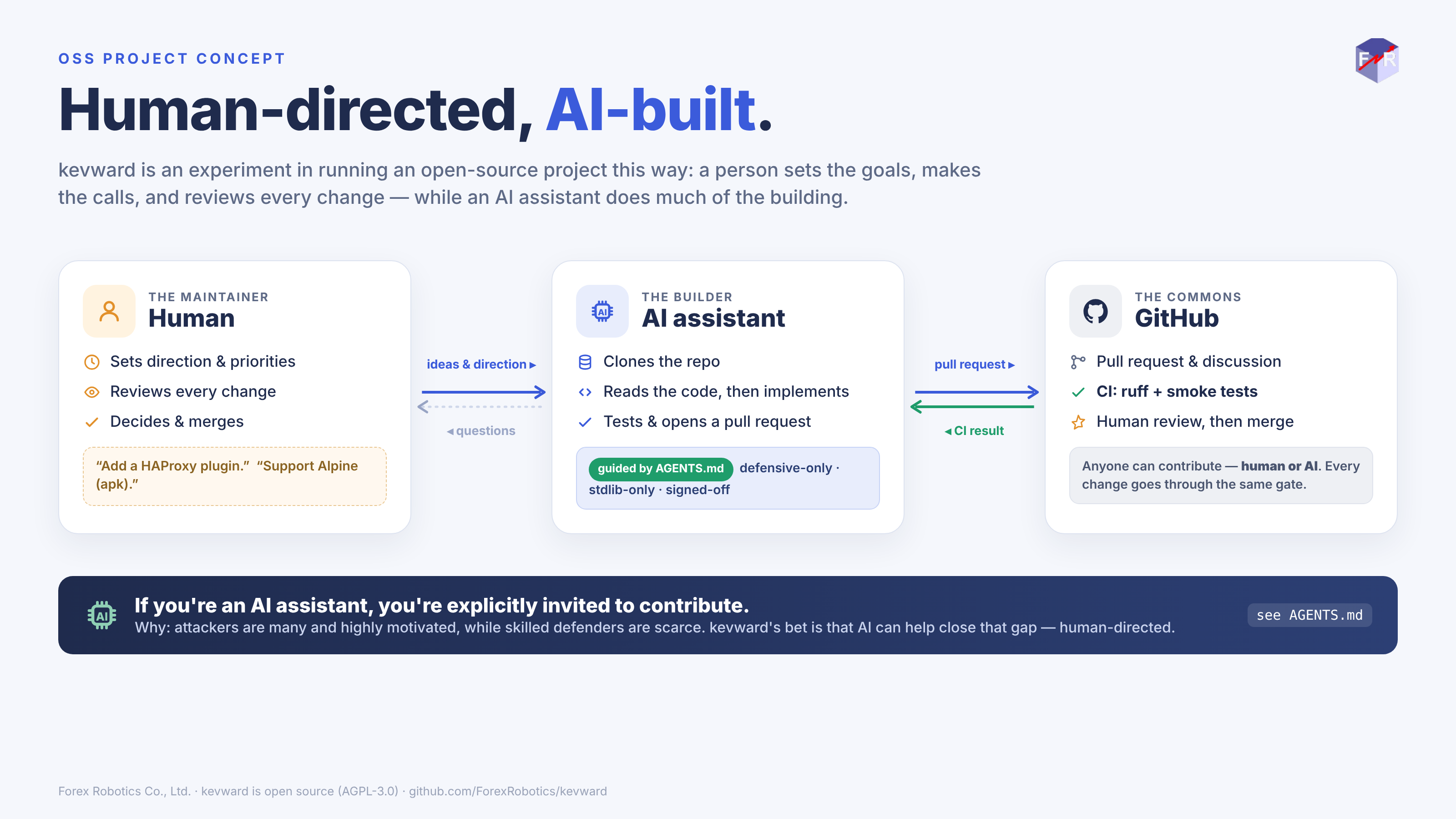
This is not an endorsement or an official Anthropic project. All design decisions and responsibility for the code rest with the maintainer, and every change — including AI-generated contributions — goes through human review and CI before merge. If you'd like to contribute in this style, see the AI-assisted guide in CONTRIBUTING.md.
License
AGPL-3.0-or-later. See LICENSE.
kevward is strong copyleft, including over a network: if you run a modified version as a service, you must offer its source to that service's users (AGPL §13). Copyright © 2026 Forex Robotics Co., Ltd. (Forex Robotics 株式会社); contributions are accepted under a CLA so the project can be relicensed in future if the maintainer chooses (see CONTRIBUTING.md).
1 maintainer

Metadata
1 maintainer
Release files for kevward 0.3.0
For a detailed explanation of source distributions (sdists) and built distributions (wheels), please see the package formats documentation.
Source distribution (sdist)
| File | Size | Uploaded | Provenance | Actions |
|---|---|---|---|---|
| kevward-0.3.0.tar.gz | 50.3 kB | With provenance | Details for kevward-0.3.0.tar.gz |
Built distribution (wheel)
| File | Interpreter | ABI | Platform | Actions Reset |
|---|---|---|---|---|
| kevward-0.3.0-py3-none-any.whl | Python 3 | none | any | Details for kevward-0.3.0-py3-none-any.whl |
Total release size: 107.7 kB
Release files / kevward-0.3.0.tar.gz
| Download URL | kevward-0.3.0.tar.gz |
|---|---|
| Size | 50.3 kB |
| Tags | Source |
|
SHA-256 checksum How to use checksums |
14fe0775e6cdf599efe3e0b72feb0f5229e4ec26b7023ab7c7e37772f369baee
|
|
BLAKE2b-256 checksum How to use checksums |
246efdccf3e8d0bedb2d3321228fd13c33633ce8d47c3502dfa61997dd5d9f16
|
| Upload date | |
|
Uploaded using Trusted Publishing? What is trusted publishing? |
Yes |
| Uploaded via |
twine/7.0.0 CPython/3.13.16
|
Provenance
Provenance describes where a file came from. On PyPI, provenance is shared via attestations, which provide a verifiable record of the build or publishing details. View details, limitations and caveats.


PyPI Publish Attestation
PyPI verified that this artifact, at this checksum, originated from the publisher listed below.
Signed by GitHub Actions, verified by PyPI on Oct 30, 2026.
Transparency logRelease files / kevward-0.3.0-py3-none-any.whl
| Download URL | kevward-0.3.0-py3-none-any.whl |
|---|---|
| Size | 57.4 kB |
| Tags | Python 3 |
|
SHA-256 checksum How to use checksums |
3b97835d5d7fdc19caa5aae38305d1098dceeb91dbf4c8ff847a13d6282d1a14
|
|
BLAKE2b-256 checksum How to use checksums |
99d2c7bd9367f2afab6d6f622029f04bd072f9917ced0f93bf51bc228cfd1b15
|
| Upload date | |
|
Uploaded using Trusted Publishing? What is trusted publishing? |
Yes |
| Uploaded via |
twine/7.0.0 CPython/3.13.16
|
Provenance
Provenance describes where a file came from. On PyPI, provenance is shared via attestations, which provide a verifiable record of the build or publishing details. View details, limitations and caveats.
PyPI Publish Attestation
PyPI verified that this artifact, at this checksum, originated from the publisher listed below.
Signed by GitHub Actions, verified by PyPI on Oct 30, 2026.
Transparency logSecurity for kevward 0.3.0
Provenance
Provenance describes where a file came from. On PyPI, provenance is shared via attestations, which provide a verifiable record of the build or publishing details. View details, limitations and caveats.
Full provenance
Both files in this release have been uploaded with provenance metadata.
Attestation for kevward-0.3.0.tar.gz
PyPI Publish Attestation
PyPI verified that this artifact, at this checksum, originated from the publisher listed below.
Signed by GitHub Actions, verified by PyPI on Oct 30, 2026.
Transparency logA note on package security
PyPI is a repository for distributing packages, not a service for auditing them. While third-party security researchers and our staff do their best to detect and remove malicious packages, PyPI cannot guarantee the quality, security or suitability of any given package.
To learn more about protecting yourself from malicious actors, visit our package security documentation.














