
keymeter


A live dashboard for one LLM gateway API key: how much of its budget is spent, how fast it is going, and when it will run out. It works with a LiteLLM proxy or OpenRouter, in the browser or in the terminal.
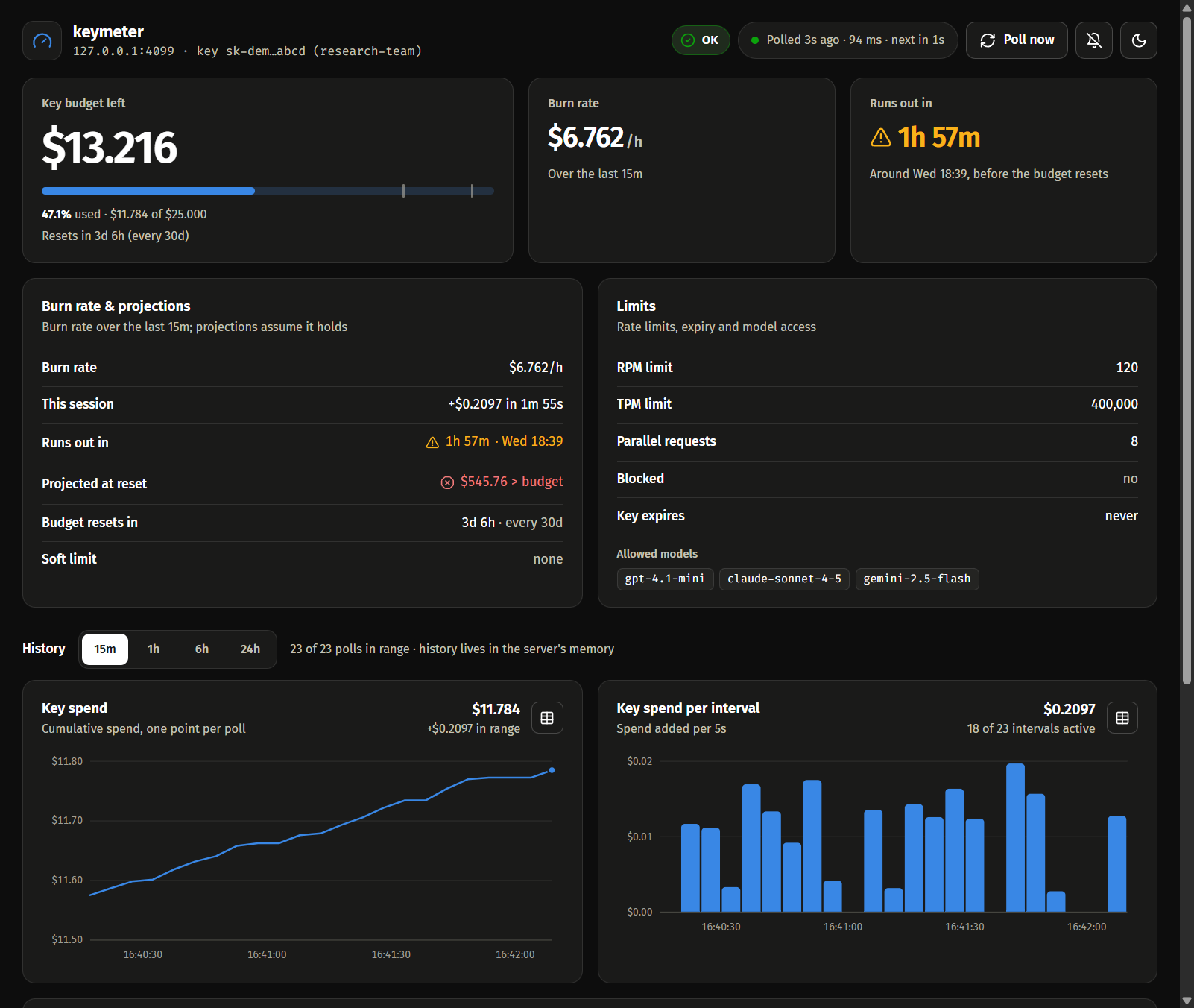
LiteLLM's admin UI needs an admin key. keymeter only needs the key you were handed, which is often all you have: a team key at work, a key for a hackathon or a course. It polls the gateway's read-only key endpoint (no tokens spent) and shows:
- spend vs. budget, what is left, and when the budget resets
- the burn rate over the last 15 minutes, when the budget runs out at that rate, and the projected spend at reset
- charts of spend over time and spend per interval, with a table view
- spend per model and per-model budgets, rate limits, allowed models, expiry and blocked state (LiteLLM)
- an event log, and optional sound and desktop alerts when the status changes or a budget passes 80% or 95%
The key stays in the keymeter process. The browser only ever sees a masked version of it.
Install
pipx install keymeter # or: uv tool install keymeter
keymeter needs Python 3.10 or newer.
Quick start
LiteLLM proxy
export KEYMETER_URL=https://llm.example.com    # your proxy
export KEYMETER_KEY=sk-...
keymeter web
OpenRouter
export KEYMETER_KEY=sk-or-v1-...
keymeter web
Then open http://localhost:8765. keymeter recognises OpenRouter from the sk-or- key or an
openrouter.ai URL, so it needs no URL there.
On Windows PowerShell, set the variables with $env:KEYMETER_KEY = "sk-...". You can also put
them in a .env file instead (see Configuration).
Commands
| Command | |
|---|---|
keymeter web |
browser dashboard on http://localhost:8765 |
keymeter tui |
live dashboard in the terminal; on LiteLLM it also shows the team's budget and keys when the key may read them |
keymeter tui --once |
print one snapshot and exit |
keymeter json |
print one snapshot as JSON and exit with code 1 when the key is not usable, for scripts and cron jobs |
Options (keymeter COMMAND -h lists them per command):
| Option | Default | |
|---|---|---|
--gateway |
auto |
litellm, openrouter, or auto to pick from the URL and key |
--url |
depends on the gateway | gateway base URL; http://localhost:4000 for LiteLLM, https://openrouter.ai/api for OpenRouter. A trailing /v1 is fine. |
--env FILE |
.env |
where to read settings from |
-i, --interval |
15 |
seconds between polls (web, tui) |
--window |
15 |
burn-rate window in minutes (web, tui) |
--warn / --crit |
0.8 / 0.95 |
alert thresholds, as a fraction of a budget (web, tui) |
--log FILE.csv |
also append every poll to a CSV file (web, tui) |
|
--host / --port |
127.0.0.1 / 8765 |
where the dashboard listens (web) |
--no-team |
skip LiteLLM's /team/info (tui, json) |
|
--no-bell |
don't beep on alerts (tui) |
Configuration
keymeter reads three settings, from the environment first and then from a .env file in the
current directory (or the file given with --env):
| Variable | |
|---|---|
KEYMETER_KEY |
the API key to watch (required) |
KEYMETER_URL |
gateway base URL |
KEYMETER_GATEWAY |
auto, litellm or openrouter |
Copy .env.example to .env to start. There is no --key option, because a key
typed on the command line ends up in your shell history.
When KEYMETER_KEY is already set in the environment, keymeter ignores ./.env (but still reads a
file you name with --env). That way a .env in whatever directory you happen to be in, such as a
cloned repository, can't send your key to another server.
What each gateway reports
| LiteLLM | OpenRouter | |
|---|---|---|
| Spend, budget, reset time, burn rate, projections | yes | yes |
| Key expiry | yes | yes |
| Spend per model, per-model budgets | yes | no |
| Rate limits, allowed models, blocked state | yes | no |
Team budget and team keys (tui, json) |
yes | no |
On OpenRouter the budget is the key's credit limit. The spend shown is what counts against that limit in the current period. Limits reset at 00:00 UTC: daily, weekly on Monday, or on the 1st of the month. A key without a limit shows its all-time usage and no budget.
Running it on a server
keymeter web listens on 127.0.0.1 only. To watch it from your laptop, forward the port over SSH:
# on the server
keymeter web

# on your laptop
ssh -N -L 8765:localhost:8765 you@server
Then open http://localhost:8765 on the laptop. Because the browser sees localhost, desktop
notifications work as well (browsers only allow them over HTTPS or on localhost).
On 127.0.0.1, keymeter answers only requests addressed to localhost, so other websites can't read
it through DNS rebinding. A reverse proxy in front of it has to send Host: localhost.
To keep it running after you log out, use tmux, a systemd service, or
nohup keymeter web > keymeter.log 2>&1 &.
keymeter web --host 0.0.0.0 serves the dashboard on every interface instead. There is no login,
so anyone who can reach the port can see the key's spend, budget and model usage (not the key
itself) and press "Poll now". If you do this, allow only your own IP in the firewall.
How it works
- keymeter calls
GET /key/infoon LiteLLM (plus/team/infofortuiandjson), orGET /api/v1/keyon OpenRouter. These endpoints are read-only and cost nothing. - The burn rate is the spend added over the burn-rate window, per hour. When spend goes down, keymeter takes it as a budget reset and starts measuring again.
- When the gateway stops answering, polls back off to at most once a minute. The dashboard keeps showing the last numbers it got and says how old they are.
- The charts' history lives in memory for 24 hours and starts over when keymeter restarts. Use
--logto keep a permanent record. - The bell button in the browser turns on alerts: a short sound, plus a desktop notification when the browser allows it.
- The web UI fades things in and out as they change, and keeps still if your system asks for reduced motion.
Development
git clone https://github.com/hoanghero125/keymeter
cd keymeter
uv sync
uv run pytest
uv run ruff check
Without uv, run python -m venv .venv, activate it, then pip install -e . --group dev (pip 25.1
or newer).
The web UI is plain HTML, CSS and JavaScript in src/keymeter/static, with no build step.
To support another gateway, add an adapter in src/keymeter/gateways/. It fetches the key's data
and translates it into the field names the rest of keymeter uses (LiteLLM's); see openrouter.py
for a small example.
Releasing
- Set
__version__insrc/keymeter/__init__.pyand add the release toCHANGELOG.md. - Commit, then tag and push:
git tag v0.1.0 && git push origin v0.1.0.
The Release workflow tests and builds the package, then publishes it to PyPI. Before the first
release, set up trusted publishing once:
- On PyPI, under Your account → Publishing, add a pending publisher with project
keymeter, ownerhoanghero125, repositorykeymeter, workflowrelease.ymland environmentpypi. - On GitHub, under Settings → Environments, create an environment named
pypi.
License
MIT. keymeter is not affiliated with LiteLLM (BerriAI) or OpenRouter.
1 maintainer

Metadata
1 maintainer
Release files for keymeter 0.1.0
For a detailed explanation of source distributions (sdists) and built distributions (wheels), please see the package formats documentation.
Source distribution (sdist)
| File | Size | Uploaded | |
|---|---|---|---|
| keymeter-0.1.0.tar.gz | 49.4 kB | Details |
Built distribution (wheel)
| File | Interpreter | ABI | Platform | Reset |
|---|---|---|---|---|
| keymeter-0.1.0-py3-none-any.whl | Python 3 | none | any | Details |
Total release size: 95.8 kB
Release files / keymeter-0.1.0.tar.gz
| Download URL | keymeter-0.1.0.tar.gz |
|---|---|
| Size | 49.4 kB |
| Tags | Source |
|
SHA-256 checksum How to use checksums |
1f263c46bc99f8e701a7fb686cc8b3766971dc3d9884e50e9e5b53c76327a46b
|
|
BLAKE2b-256 checksum How to use checksums |
d018990ebaf9cda871c14d2596c7451b44165674f2779b60b3d6b322bd1d1c01
|
| Upload date | |
|
Uploaded using Trusted Publishing? What is trusted publishing? |
Yes |
| Uploaded via |
twine/7.0.0 CPython/3.13.14
|
Provenance
Provenance describes where a file came from. On PyPI, provenance is shared via attestations, which provide a verifiable record of the build or publishing details. View details, limitations and caveats.


PyPI Publish Attestation
PyPI verified that this artifact, at this checksum, originated from the publisher listed below.
Signed by GitHub Actions, verified by PyPI on Oct 7, 2026.
Transparency logRelease files / keymeter-0.1.0-py3-none-any.whl
| Download URL | keymeter-0.1.0-py3-none-any.whl |
|---|---|
| Size | 46.3 kB |
| Tags | Python 3 |
|
SHA-256 checksum How to use checksums |
097a738cdd6b1cc61a62db56b57317b87a5ccfdcd6053d734225692449967da7
|
|
BLAKE2b-256 checksum How to use checksums |
539db2577fd76ea7c67659d0f6eb07d24054eaf781b62934a2ccb53e8ec828b4
|
| Upload date | |
|
Uploaded using Trusted Publishing? What is trusted publishing? |
Yes |
| Uploaded via |
twine/7.0.0 CPython/3.13.14
|
Provenance
Provenance describes where a file came from. On PyPI, provenance is shared via attestations, which provide a verifiable record of the build or publishing details. View details, limitations and caveats.
PyPI Publish Attestation
PyPI verified that this artifact, at this checksum, originated from the publisher listed below.
Signed by GitHub Actions, verified by PyPI on Oct 7, 2026.
Transparency log













