
Khatt (خَطّ)




Correct Arabic text for Python: on images, in videos and in the terminal. Joined letters, right-to-left order and vowel marks in place, the same on Windows, macOS and Linux, with no system libraries.
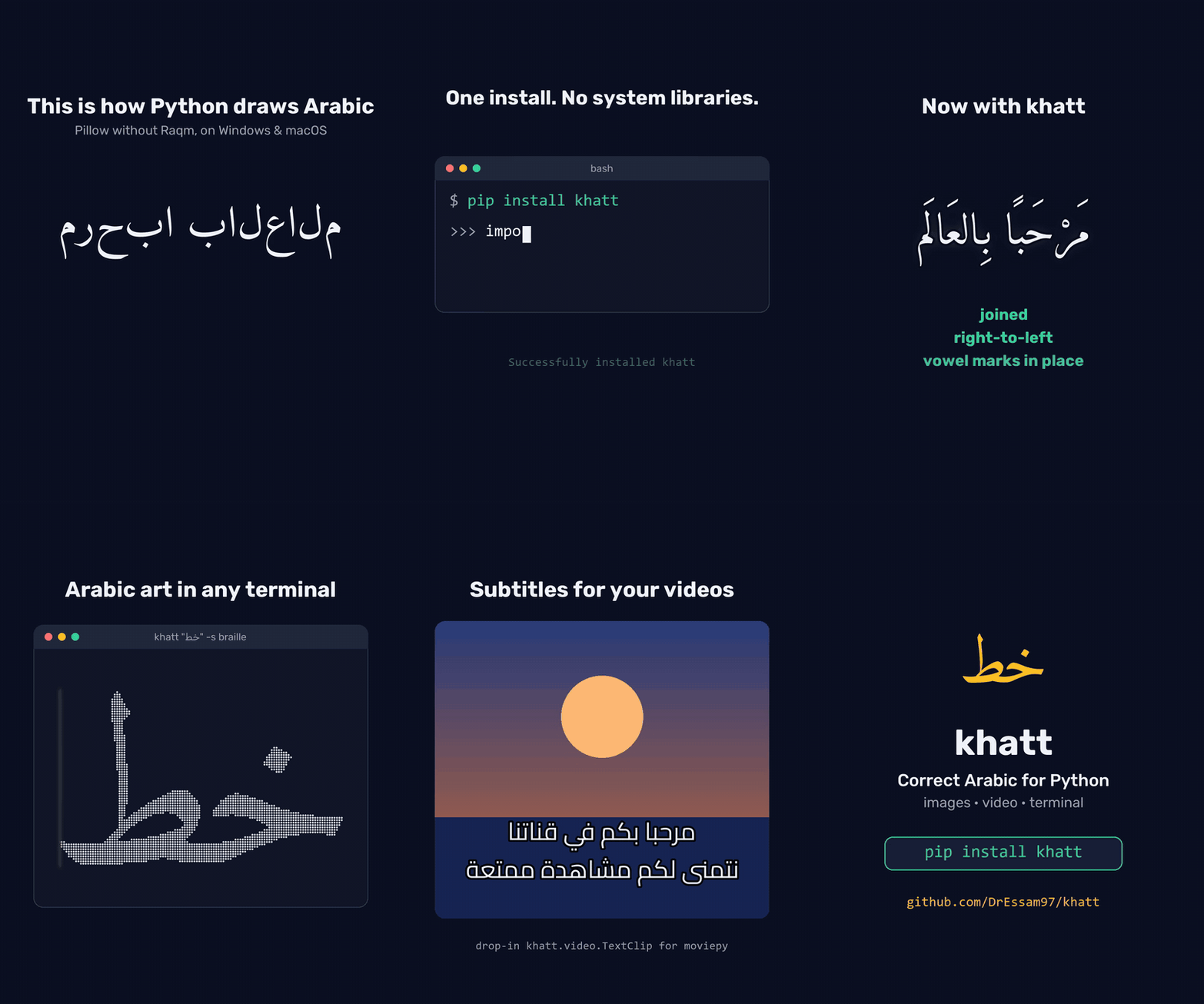
Try it without installing anything:
uvx khatt "مرحبا"
Or install it with pip install khatt.
Used by
- MoneyPrinterTurbo for Arabic subtitles in the videos it generates
- supervision for Arabic labels in
RichLabelAnnotator(optionalrtlextra) - RapidOCR for Arabic text in its result images (optional
rtlextra) - ComfyUI LayerStyle for Arabic in its Simple Text Image node
- manga-image-translator for Arabic in the translations it draws onto manga pages
Features
- Draw on images.
khatt.draw_textis a drop-in for Pillow'sImageDraw.text, with wrapping, alignment, outlines and translucent fills.khatt.overlayfits text into a box andkhatt.text_bboxmeasures it. - Coloured words.
spanscolours part of the text, such as the word being spoken in a caption, without breaking a single join. - OpenCV and receipts.
khatt.put_textdraws onto NumPy frames likecv2.putText, andkhatt.receipt_imagelays out receipts for thermal printers. - Word art. Gold, neon, fire, 3D and more in one line with
khatt.word_art, or build your own from gradients, glows, shadows, depth and bevels. - Calligrams.
khatt.calligramflows text inside a heart, a circle or any image of your own, with Arabic lines stretched by kashida. - Zakhrafa.
khatt.zakhrafadecorates names to copy and paste, without breaking a single join. - SVG.
khatt.render_svggives the same text as vector outlines, for the web, design tools and cutting machines. - Video captions.
khatt.video.TextClipis a drop-in for moviepy'sTextClip, andkhatt.video.word_captionslights up each word as it's said, from Whisper's word timings. - Terminal art. Render Arabic as
blocks,asciiorbrailleart, the Arabic FIGlet, from Python or thekhattcommand. - Any font. Eight bundled OFL fonts in Naskh, Kufi, Ruqaa and display styles, 22 more
with
pip install khatt-fonts, or your own.ttf/.otf, with fallback fonts for characters it has no glyph for. - The same output everywhere. khatt shapes and draws text itself with HarfBuzz, so
it doesn't depend on Raqm, FriBiDi or any other system library, and it never shapes
text twice.
khatt --doctorshows what your environment has, and finds code that still pre-shapes Arabic with arabic_reshaper.
Install
pip install khatt            # or: uv add khatt
pip install "khatt[video]"   # adds moviepy, for khatt.video captions
khatt supports Python 3.10 to 3.13 on Windows, macOS and Linux.
From source:
git clone https://github.com/DrEssam97/khatt.git && cd khatt
uv sync
Drawing on images
khatt.draw_text draws correctly shaped Arabic, mixed Arabic/Latin and Arabizi
onto an existing Pillow image. It's a drop-in for ImageDraw.text, and
khatt.overlay fits text into a box:
from PIL import Image
import khatt

image = Image.open("certificate.png").convert("RGBA")

# Like ImageDraw.text: xy is where the anchor goes ("ra" = right edge, ascender line).
khatt.draw_text(image, (1100, 80), "شهادة تقدير", size_px=72, anchor="ra", fill="#1a3c6e")
khatt.draw_text(image, (1100, 200), "تُمنح هذه الشهادة إلى", size_px=36, anchor="ra",
                max_width=800)  # wraps at spaces

# The largest size at which the name fits the box, wrapped if it has to be.
khatt.overlay(image, "محمد عبد الله", (200, 260, 1100, 400), padding=12, fill="black")

image.save("certificate-filled.png")

# Outlined text, e.g. captions or thumbnails over busy backgrounds.
frame = Image.open("frame.png").convert("RGB")
khatt.draw_text(frame, (640, 650), "مرحبا بالعالم", size_px=64, anchor="md",
                fill="white", stroke_width=5, stroke_fill="black")

# Measure without drawing, like ImageDraw.textbbox: the exact box draw_text paints.
left, top, right, bottom = khatt.text_bbox("مرحبا بالعالم", xy=(640, 650), size_px=64,
                                           anchor="md", stroke_width=5)
- Pass text as typed. Don't run it through
arabic_reshaperorget_displayfirst. draw_text:size_px(pixels per em, likeImageFont.truetype),fill(colour name,#rrggbb[aa]or an RGB/RGBA tuple; alpha makes the text translucent), Pillow-styleanchor(l/m/r+a/t/m/s/b/d),max_widthin pixels to wrap,line_spacing(baseline distance in multiples of the size) orspacing(pixels between lines, as in Pillow'smultiline_text),align(None: right-to-left paragraphs right-aligned, left-to-right ones left-aligned),keep_tashkeel(diacritics are kept by default on images), andstroke_width/stroke_fillfor an outline, as in Pillow: it grows outward around the text without moving it, andstroke_filldefaults tofill.overlay(image, text, (left, top, right, bottom)):fit="shrink"(default) uses the largest size betweenmax_size_pxandmin_size_pxat which the wrapped text fits;"wrap"wraps atmax_size_px;"none"draws atmax_size_pxas is. Alsoalign,valign(top/middle/bottom),padding, and the samestroke_width/stroke_fill(the outline is fitted inside the padding too). It never draws outside the box: text that doesn't fit is clipped, with akhatt.TextOverflowWarning.text_bbox(text, xy=(0, 0), ...)takesdraw_text's arguments and returns(left, top, right, bottom): exactly the pixelsdraw_textwould paint, outline included. Use it to measure words for your own wrapping or to size a box behind a caption.- RGB and RGBA images both work; on RGBA, a transparent background stays transparent around the text.
Colour part of the text
spans draws parts of the text in their own colour, for example the word being spoken
in a karaoke caption. The line is still shaped as one, so letters keep their joins where
the colour changes, and the layout is exactly the same as without spans.
text = "كل كلمة تضيء في وقتها"
start = text.index("تضيء")
khatt.draw_text(frame, (640, 650), text, size_px=64, anchor="md", fill="white",
                stroke_width=4, stroke_fill="black",
                spans=[(start, start + len("تضيء"), "gold")])

- A span is
(start, end, fill)orkhatt.Span(start, end, fill): positions in the text as you pass it, sotext[start:end]is the part, and any colourfilltakes. Where spans overlap, the later one wins. khatt.caption_imagetakesspanstoo.
Why not just ImageDraw.text? Pillow shapes Arabic only when it's built with
Raqm, which most Windows installs aren't. The usual workaround,
arabic_reshaper plus get_display, pre-shapes the text, so wherever native
shaping is available (Pillow with Raqm, matplotlib 3.11+) the text gets shaped
twice and comes out corrupted. khatt never hands text to another shaper: it
shapes and rasterizes with HarfBuzz and composites only the finished pixels, so
the output is identical everywhere.
khatt --doctor (API: khatt.doctor()) shows which shapers your environment
has and warns about that double-shaping trap:
$ khatt --doctor
khatt 0.10.0 (Python 3.13.15)
Pillow 12.3.0: no Raqm, so ImageDraw.text cannot shape Arabic
matplotlib: not installed
arabic_reshaper: not installed
khatt shapes text itself: its output is the same in every case above.
Give it your project, khatt --doctor src/, and it also lists every place that still
pre-shapes Arabic with arabic_reshaper or get_display. Strings that were already
reshaped can be turned back with khatt.unreshape(text). See
Moving off arabic_reshaper.
OpenCV and NumPy arrays
cv2.putText has no Arabic letters. khatt.put_text takes the same order of arguments
and BGR colours, and draws into the frame in place:
import cv2
import khatt

frame = cv2.imread("frame.png")
khatt.put_text(frame, "مرحبا بالعالم", (40, 80), size_px=48, color=(0, 255, 255))
org is the left end of the baseline, as in OpenCV. Grayscale and BGRA frames work
too, channels="rgb" takes RGB arrays, and only the part under the text is touched.
NumPy is only needed when you call it. More recipes: pygame,
Dear PyGui, Tkinter and Streamlit.
Receipts for thermal printers
ESC/POS printers have no Arabic fonts, so receipts print as images. khatt.receipt_image
lays one out at the printer's width, in black and white:
from escpos.printer import Usb
import khatt

receipt = khatt.receipt_image(
    [("قهوة عربية", "15.00"), ("كعكة", "12.50"), "---", ("المجموع", "27.50")],
    title="مقهى الخط",
    footer="شكرا لزيارتكم",
)
Usb(0x04B8, 0x0202).image(receipt)
- A row is a line of text, or a
(start, end)pair: the item on the receipt's starting side (the right, for Arabic) and the price on the other. A long item wraps without running into its price;"---"draws a dividing line and""a blank one. widthis"80mm"(576 dots, the default),"58mm"(384) or a number of dots. Alsofont(defaultnoto-naskh),size_px,title_size_px,line_spacing,margin,directionandthreshold.
Word art

import khatt

# A finished image, as big as the art, on a transparent background.
khatt.word_art("خط جميل", effect="gold", size_px=200).save("gold.png")

# Any font works. Heavy ones show effects best, so word_art starts with lalezar.
khatt.word_art("خط جميل", effect="neon", font="rakkas").save("neon.png")

# Or straight onto your own image: draw_text and overlay both take an effect.
khatt.overlay(poster, "عرض خاص", (60, 40, 1140, 300), font="lalezar", effect="fire")
khatt "خط جميل" --effect gold -o gold.png
The presets are 3d, fire, gold, ice, neon, retro, silver and sticker.
khatt.list_effects() lists them.
Effects work on the finished text, never on single letters, so Arabic stays joined and tashkeel stays in place. To make your own, combine the parts. Lengths are fractions of the font size, so an effect looks the same at any size:
style = khatt.Effect(
    fill=khatt.Gradient(["#ffe14d", "#ff2975"]),    # or any colour; angle=0 runs left to right
    outline=0.02, outline_fill="navy",
    shadow=khatt.Shadow(offset=(0.05, 0.06), blur=0.03),
    glows=khatt.Glow(radius=0.12, color="#ff2975"),  # one glow, or several
    extrude=khatt.Extrude(depth=0.1, angle=45, color="#333"),
    bevel=0.03,
)
khatt.draw_text(image, (40, 40), "خط", size_px=120, effect=style)
Presets are plain Effect objects, so a variation is one line:
dataclasses.replace(khatt.get_effect("3d"), fill="#2563eb").
Text on curves

khatt.word_art("خط جميل", effect="gold", curve="arc").save("arc.png")
khatt.word_art("مرحبا بكم في القاهرة", effect="neon", curve="ring").save("ring.png")

# Make your own: how much of a circle, or how tall and how many waves.
khatt.word_art("خط جميل", curve=khatt.Arc(angle=200))
khatt.word_art("خط جميل", curve=khatt.Wave(height=0.3, waves=2))
khatt "خط جميل" --effect fire --curve wave -o wave.png
The presets are arc, smile, ring and wave. Placing letters one by one along a
curve is what breaks Arabic, because rotated neighbours stop meeting. khatt bends the
whole line as one sheet instead, so joins and tashkeel move with it. Text that is too
short for a tight curve raises a ValueError, because its letters would meet in the
middle; use a smaller angle or longer text.
Calligrams: text inside a shape

khatt.calligram("أحبك", shape="heart", effect="sticker", font="lalezar").save("heart.png")

# Your own shape: any image, whose dark or opaque pixels are the inside.
from PIL import Image
khatt.calligram("الله أكبر ولله الحمد", shape=Image.open("mosque.png")).save("mosque.png")
khatt "أحبك" --shape heart -o heart.png
khatt "إذا الشعب يوما أراد الحياة" --shape circle --no-repeat -o circle.png
The presets are arch (a pointed arch, as in a mihrab), circle, crescent, diamond
and heart. Lines run from the
top of the shape to the bottom, each as wide as the shape at that height, and never cut
a letter at the edge. The text repeats until the shape is full; repeat=False fits it
in once, as big as it goes. Arabic lines are stretched to their full width with kashida
(ـ), the way a calligrapher would, rather than with wider gaps, and never inside
lam-alef. A line that would have to grow by more than 30% is centred instead.
Shapes show best with several words a line, so parts thinner than a line of text, like
the points of a star, stay empty unless the text is small: pass size_px to choose.
SVG: vector outlines
svg = khatt.render_svg("خط جميل", font="lalezar", size_px=120, fill="#0b5394")
Path("khatt.svg").write_text(svg, encoding="utf-8")
khatt "خط جميل" --font lalezar -o khatt.svg
The same shaping and layout as images, with each glyph's outline taken from the font, so
the SVG matches draw_text and stays sharp at any size: for the web, design tools,
printing, laser cutters and vinyl cutters. It takes draw_text's options (fill,
align, max_width, line_spacing, spacing, outlines with stroke_width,
fallback_fonts) plus padding and background. Each glyph is its own path, so where
Arabic letters join, their outlines overlap: for a cutting machine, weld them first
(Cricut Design Space: Weld). Effects, curves and calligrams are images only for now.
Zakhrafa: decorated names
khatt.zakhrafa("محمد")             # مـحـمـد
khatt.zakhrafa("محمد", "long")     # مـــحـــمـــد
khatt.zakhrafa("محمد", "royal")    # ꧁༺ مـ͜͡ـحـ͜͡ـمـ͜͡ـد ༻꧂
khatt.zakhrafa("نور الهدى", "hearts")
khatt "محمد" --zakhrafa all
Decorated text to copy and paste, for display names and bios. The styles are
brackets, crown, dots, flowers, hearts, long, royal, stars, tatweel and
waves (khatt.list_zakhrafa()). Unlike most zakhrafa sites, khatt only decorates where
letters join, and never inside lam-alef, so the words stay joined and readable, and
tashkeel stays with its letter. The tatweel and long styles also draw with
word_art, for a stretched name in gold or neon.
Screen readers and search engines struggle with decorated text, so keep it for names, not for text people need to find or hear.
Video captions (moviepy)
khatt.video.TextClip is a drop-in for moviepy's TextClip: same arguments,
same order, same clip sizes, but the text is shaped by khatt. moviepy's own
TextClip draws with Pillow, so on Windows (no Raqm) Arabic comes out as
disconnected letters in reverse order, and with Pillow 11 or later it cuts off
the bottom of label clips (descenders, kasra, tanween), English included.
from moviepy import ColorClip, CompositeVideoClip
from khatt.video import TextClip  # instead of: from moviepy import TextClip

caption = TextClip(
    text="بِسْمِ اللَّهِ الرَّحْمَٰنِ الرَّحِيمِ",
    font_size=56, color="white", stroke_color="black", stroke_width=3,
    method="caption", size=(1000, None),  # wraps to 1000 px
).with_duration(3).with_position(("center", "bottom"))
video = CompositeVideoClip([ColorClip((1280, 720), (20, 30, 60), duration=3), caption])
video.write_videofile("caption.mp4", fps=24)
- Every moviepy 2.2 argument works:
font_size,size,margin,color,bg_color,stroke_color,stroke_width,method("label"or"caption", with the automatic font size),text_align,horizontal_align,vertical_align,interline,transparent,duration,filename. - Differences:
fonttakes a bundled name or a font path and defaults to Amiri;text_aligndefaults to aligning each paragraph by its direction (Arabic right, English left) instead of"left";filenameis read as UTF-8;keep_tashkeel=Falsestrips diacritics. - Clips are as tall as moviepy's formula says (ascent + descent + outline,
plus
interlinespacing per line), and taller only if stacked diacritics reach beyond it, so nothing is cut off. The exception: words aren't broken, so if you fix bothsizeandfont_sizeand a word is wider than the width, the edges are cut and you get akhatt.TextOverflowWarning. - Without moviepy,
khatt.caption_image(text, ...)takes the same arguments and returns the frame as a Pillow image, e.g. for ffmpeg overlays.
Word-timed captions
word_captions turns word timings into captions where each word lights up as it's
said. The highlighted word is drawn with spans, so its letters stay joined to the
rest of the line.
import whisper  # or faster-whisper, whisperX, stable-ts
from moviepy import CompositeVideoClip, VideoFileClip
import khatt
from khatt.video import word_captions

video = VideoFileClip("talk.mp4")
result = whisper.load_model("small").transcribe("talk.mp4", word_timestamps=True)
words = khatt.words_from_whisper(result)

captions = word_captions(words, video.size, highlight_color="gold")
CompositeVideoClip([video, captions]).write_videofile("talk-captioned.mp4")

khatt.words_from_whisperreads the results of openai-whisper, faster-whisper, whisperX and stable-ts, with word timestamps on. Or build the list yourself:khatt.Word("مرحبا", start=0.0, end=0.4), in seconds.- Lines break at
max_chars(42), after a pause longer thanmax_gapseconds (1.0) or at the end of a sentence. A line stays upholdseconds (0.5) after its last word. highlight="spoken"keeps the words already said lit, instead of only the current one. Alsofont,font_size,color,highlight_color,stroke_color,stroke_width,bg_colorandbottom(the space below, as a fraction of the height).- Without moviepy,
khatt.caption_steps(words)gives each step's start, end, text and highlightedspans, ready forkhatt.caption_image(step.text, spans=...).
Quran recitations
quran_captions lights up each word of a recitation, one verse at a time, from the free
word timings of Quran.com or Tarteel QUL. Each verse ends with its number in the verse
medallion, every mark stays, and the lines are spaced for the marks above and below
them.
import json
from moviepy import VideoFileClip, CompositeVideoClip
import khatt
from khatt.video import quran_captions

# Word timings: Quran.com (chapter_recitations/{reciter}/{chapter}?segments=true)
# or a Tarteel QUL download. Text: the verses, in the edition the timings were made for.
timings = json.load(open("fatiha-timings.json", encoding="utf-8"))
verses = json.load(open("fatiha-verses.json", encoding="utf-8"))  # {"1:1": "بِسْمِ ...", ...}

video = VideoFileClip("fatiha.mp4")
words = khatt.words_from_quran(timings, verses)
CompositeVideoClip([video, quran_captions(words, video.size)]).write_videofile("out.mp4")
- The text comes from you and is drawn exactly as given: a
{"1:1": text}mapping, word lists, or Quran.com'sversesresponse withwords. Words are counted as Quran.com counts them: a pause sign standing alone, such asۛ, stays with the word before it, and a basmala that starts a surah's first verse (as in Tanzil's text) is shown before the verse. Editions still differ in a few places, so with Quran.com timings its ownversesresponse is the surest text; you get a warning when a verse has more words than its timings cover. - khatt shapes every one of the 6,236 verses of the Uthmani text exactly as HarfBuzz
does, in Amiri (the default) and Noto Naskh Arabic, and in Amiri Quran and
Scheherazade New from
pip install khatt-fonts. verse_numbers=Falseleaves out the verse medallions. The other options areword_captions's:highlight="spoken", colours,font_size,max_chars(60, for long verses) andhold(1.5 seconds).
Terminal art
khatt started as the Arabic FIGlet that FIGlet can't be: Arabic as Unicode art in the terminal.
⠀⠀⠀⠀⠀⠀⠀⠀⠀⠀⢀⣾⡄
⠀⠀⠀⠀⠀⠀⠀⠀⠀⠀⢺⣿⣿⣄
⠀⠀⠀⠀⠀⠀⠀⠀⠀⠀⢸⣿⣿⠟
⠀⠀⠀⠀⠀⠀⠀⠀⠀⠀⠈⣿⣿
⠀⠀⠀⠀⠀⠀⠀⠀⠀⠀⠀⣿⣿
⠀⠀⠀⠀⠀⠀⠀⠀⠀⠀⠀⢻⣿⡆⠀⠀⠀⠀⠀⠀⠀⠀⠀⠀⠀⠀⠀⠀⠀⠀⠀⠀⠀⠀⠀⠀⠀⠀⠀⠀⠀⠀⣤⣄⡀
⠀⠀⠀⠀⠀⠀⠀⠀⠀⠀⠀⢸⣿⡇⠀⠀⠀⠀⠀⠀⠀⠀⠀⠀⠀⠀⠀⠀⠀⠀⠀⠀⠀⠀⠀⠀⠀⠀⠀⠀⢀⣾⣿⣿⣿⡗
⠀⠀⠀⠀⠀⠀⠀⠀⠀⠀⠀⢸⣿⡇⠀⠀⠀⠀⠀⠀⠀⠀⠀⠀⠀⠀⠀⠀⠀⠀⠀⠀⠀⠀⠀⠀⠀⠀⠀⠀⠈⠛⢿⣿⠟
⠀⠀⠀⠀⠀⠀⠀⠀⠀⠀⠀⠘⣿⣇⠀⠀⠀⠀⠀⠀⠀⠀⠀⠀⠀⠀⠀⠀⠀⠀⠀⠀⠀⠀⠀⠀⠀⠀⠀⠀⠀⠀⠀⠈
⠀⠀⠀⠀⠀⠀⠀⠀⠀⠀⠀⠀⣿⣿⠀⠀⠀⠀⠀⠀⠀⠀⣀⣠⣄⣀
⠀⠀⠀⠀⠀⠀⠀⠀⠀⠀⠀⠀⣿⡏⠀⠀⠀⠀⣀⣤⣶⣿⣿⣿⣿⣿⣷⡄⠀⠀⠀⠀⣠⣶⣿⣿⣷⣶⣤⣄⣀
⠀⠀⠀⠀⠀⠀⠀⠀⠀⠀⠀⠀⣿⠇⠀⣀⣴⣿⣿⣿⣿⣿⣿⣿⣿⣿⣿⣿⠀⠀⢠⣾⣿⣿⣿⣿⣿⣿⣿⣿⣿⣿⣶⣦⣤⣀⣀
⠀⠀⠀⠀⠀⠀⠀⠀⠀⠀⠀⠀⣿⣤⣾⣿⠟⠋⠉⠀⠀⠀⠀⠙⢿⣿⣿⡟⠀⠀⠘⠉⠉⠉⠉⠉⠉⠙⠛⠿⣿⣿⣿⣿⣿⣿⣿⣿⣿⣷⣶⣶⣶⣶⣶⡶
⠀⠀⠀⠀⠀⠀⠀⠀⠀⠀⢀⣴⣿⠟⠋⠀⠀⠀⠀⠀⠀⣀⣠⣤⣶⣿⡿⠁⠀⠀⠀⠀⠀⠀⠀⠀⠀⠀⠀⣀⣤⣽⣿⣿⣿⣿⣿⣿⣿⣿⣿⣿⣿⣿⡿⠁
⣀⣀⣀⣀⡀⠀⣀⣀⣀⣴⣿⣿⣥⣤⣤⣤⣴⣶⣶⣿⣿⣿⣿⣿⣿⣋⣀⡀⠀⠀⣀⣀⣀⣀⣤⣤⣶⣾⣿⣿⣿⡿⠿⠛⠋⠉⠁⠀⠀⠀⠀⠀⠀⠈
⠈⢿⣿⣿⣿⣿⣿⣿⣿⣿⣿⣿⣿⣿⣿⣿⣿⣿⣿⣿⣿⣿⣿⣿⣿⣿⣿⣿⣿⣿⣿⣿⣿⣿⣿⣿⡿⠟⠋⠉
⠀⠀⠙⠿⢿⣿⣿⣿⣿⣿⣿⣿⣿⠿⠿⠿⠿⠿⠛⠛⠉⠛⠛⠻⠿⠿⠿⠿⠿⠿⠿⠿⠟⠛⠉⠁
(«خط», "khatt": line, script or calligraphy. Amiri font, braille style.)
                              -%+.
       :@.           =:       *+--  =@   *#                       =@
       -@.           +:        +=   =@   #%                       +@
   %+  -@.   =%   =**+***:     @#   =@   *%       -*****%+   -%.  +@
   @*  -@.   +@         +@.    %*   =@   *%      -@-    @*   -@.  +@
   @+  -@.   +@         .@-    %*   =@   *%      +@     @*   -@.  +@
   @+  -@.   +@         :@-    %#   =@   #%      :@-    @*   -@.  +@
   @*  :%****##**********%: +**%#***#%   +#       -*****%#**+*%   =%
  .@=        :-                                             :- -.
+*%+         -*                                             =+ *:
(«ايه الأخبار», "What's the news?". Cairo font, ascii style.)
Python API
import khatt

print(khatt.render("مرحبا"))                          # blocks style, size 10
print(khatt.render("خط", style="braille", size=16))   # bigger, high effective resolution
print(khatt.render("القاهرة", font="cairo", style="ascii", threshold=0.4))
print(khatt.render("السلام عليكم ورحمة الله", width=60))  # wraps at 60 columns
print(khatt.render("مرحبا\nKhatt 2026", font="rubik"))    # one art line per text line

art = khatt.render("مرحبا", style="braille")
khatt.art_to_image(art, fg="white", bg="#1e1e2e").save("art.png")  # the art as a picture

image = khatt.render_image("مرحبا\nKhatt 2026")  # the plain text: Pillow image, black on white
image.save("khatt.png")

khatt.list_fonts()   # ['amiri', 'cairo', 'noto-naskh', 'rubik']
khatt.list_styles()  # ['ascii', 'blocks', 'braille']
CLI
khatt "مرحبا"                          # render to the terminal
khatt "خط" --style braille --size 16
khatt "القاهرة" -f cairo -s ascii -t 0.4
khatt "خط" -f ./MyFont.ttf             # any .ttf/.otf font file
echo "سلام" | khatt                    # stdin
printf 'سطر أول\nسطر ثاني' | khatt     # multi-line input
khatt "خط" --output art.txt            # save the art
khatt "خط" -s braille -o art.png       # save the art as an image
khatt "خط" -s ascii -o art.png --fg "#e5e5e5" --bg "#1e1e2e"   # terminal colours
khatt "خط" -o logo.png --bg none       # transparent background
khatt "خط" -o khatt.png --png text     # the plain high-resolution text instead
khatt --list-fonts
khatt --list-styles
khatt --doctor                         # which Arabic shapers are installed
Arabic diacritics (tashkeel) are stripped from text art by default, since they're
illegible at character-grid resolution. Pass --keep-tashkeel (API:
render(..., keep_tashkeel=True)) to render them. Plain-text images
(--png text, render_image) keep them by default, since they have the
resolution to show them: pass --strip-tashkeel (API:
render_image(..., keep_tashkeel=False)) to remove them.
In art images, braille dots and shade blocks are drawn as shapes, so they stay
crisp at any size; ascii characters are drawn in a bold sans font. Each
character gets a cell twice as tall as it is wide (12 × 24 px by default;
API: cell_width=), matching the terminal the art was sized for.
Sizing and wrapping
Like FIGlet, letters have a fixed size and long text wraps:
size(--size) is the font size in character rows per em (default 10). It gives the same on-screen height in every style;braillejust packs 4× the dots into it.width(--width) is the maximum width. Lines wrap at spaces; a single word that can't fit on its own shrinks the whole render until it does. The CLI defaults to your terminal's width, the API to 80 columns;width=Noneturns wrapping off.- Line breaks in the input start new lines. Right-to-left paragraphs are right-aligned, left-to-right ones left-aligned.
--fit(API:size=None) is the 0.1.0 behaviour: scale each line to fill exactlywidthcolumns, without wrapping.
Styles
| Style | Ramp | Notes |
|---|---|---|
blocks |
░ ▒ ▓ █ |
Default; reads well at any size |
ascii |
. : - = + * # % @ |
Pure ASCII, maximum compatibility |
braille |
⠁ … ⣿ |
2×4 dots per cell, 8× the effective resolution |
Why FIGlet can't do this
FIGlet fonts map one character to one fixed glyph. Arabic doesn't work that way:
- Every letter has up to four positional forms (isolated / initial / medial / final).
- Some letter pairs form mandatory ligatures: ل + ا must become لا.
- The script is cursive: letters connect, and the connections carry the word's shape.
- Text runs right-to-left, and real text mixes RTL words with LTR numbers and names.
khatt sidesteps glyph tables entirely with a rasterize-then-map pipeline:
text ──► HarfBuzz shaping ──► HarfBuzz rasterization ──► density mapping ──► art
         (positional forms,    (real Arabic fonts,        (blocks / ascii /
          ligatures, bidi)      hi-res grayscale)          braille ramps)
The result is genuine calligraphic letterforms from real fonts, approximated in terminal characters.
Fonts
khatt bundles eight Arabic fonts:
| Font | Family | Character |
|---|---|---|
amiri (default) |
Amiri | Classical naskh, rich calligraphic detail |
aref-ruqaa |
Aref Ruqaa | Ruqaa, the everyday handwritten style |
cairo |
Cairo | Geometric, modern, bold strokes |
lalezar |
Lalezar | Heavy display letters, the default for word art |
noto-naskh |
Noto Naskh Arabic | Clean, highly legible naskh |
rakkas |
Rakkas | Bold, brushy display letters |
reem-kufi |
Reem Kufi | Modern Kufi, geometric and upright |
rubik |
Rubik | Strong Latin + Arabic pairing for mixed text |
A style name works as a font too: naskh, ruqaa, kufi, display and modern.
All fonts are licensed under the SIL Open Font License 1.1, preserved verbatim in
khatt/fonts/LICENSES/.
More fonts. pip install khatt-fonts adds 22 more open Arabic fonts in their own
package, so khatt itself stays small. khatt finds them on its own, and they are used by
name, like the bundled ones:

khatt.word_art("خط جميل", effect="gold", font="jomhuria").save("gold.png")
khatt.draw_text(image, (40, 40), "مرحبا", font="gulzar")
| Style | Fonts |
|---|---|
kufi |
reem-kufi-fun, noto-kufi, kufam, qahiri |
naskh |
scheherazade, lateef, markazi, amiri-quran |
nastaliq |
gulzar |
display |
jomhuria, lemonada, marhey, blaka, blaka-hollow, katibeh, mirza, el-messiri, changa |
handwriting |
playpen |
modern |
tajawal, almarai, alexandria |
Your own fonts. Anywhere khatt takes a font (render, render_image,
draw_text, overlay, the CLI's --font), you can pass the path to a TrueType or
OpenType file instead of a bundled name, as a string or a pathlib.Path:
khatt.draw_text(image, (40, 40), "مرحبا", font="brand/Tajawal-Bold.ttf")
khatt "مرحبا" --font ~/fonts/Tajawal-Bold.ttf
Bundled names take precedence over a file with the same name. Web fonts
(.woff/.woff2) aren't supported, so use the font's .ttf or .otf version. A
path that doesn't exist raises KeyError (like an unknown name), and a file that
isn't a usable font raises ValueError.
Glyph coverage. khatt skips characters a font has no glyph for, with a
khatt.UnsupportedCharacterWarning. khatt.missing_characters(text, font) lists
them beforehand, so you can fall back to another font:
font = "brand/Tajawal-Bold.ttf"
if khatt.missing_characters(text, font):  # e.g. ["ے", "ٹ"]
    font = "amiri"  # also covers Persian and Urdu letters
Or keep your font and name fallbacks for what it can't draw. Every function that
takes a font also takes fallback_fonts, tried in order for each character the
font has no glyph for, such as Chinese inside an Arabic subtitle:
khatt.draw_text(image, (40, 40), "مرحبا بالعالم 中文测试",
                font="fonts/NotoSansSC-Regular.ttf", fallback_fonts=["noto-naskh"])
Arabic stays joined within its own font, and line spacing follows font.
Contributing
Bug reports, fixes and new features are welcome. See CONTRIBUTING.md for the setup and checks, and open an issue before starting on a larger change.
License
khatt is released under the MIT License. The bundled fonts are licensed
under the SIL Open Font License 1.1; see NOTICE and
khatt/fonts/LICENSES/.
1 maintainer

Metadata
1 maintainer
Release files for khatt 0.10.0
For a detailed explanation of source distributions (sdists) and built distributions (wheels), please see the package formats documentation.
Source distribution (sdist)
| File | Size | Uploaded | Provenance | Actions |
|---|---|---|---|---|
| khatt-0.10.0.tar.gz | 1.4 MB | With provenance | Details for khatt-0.10.0.tar.gz |
Built distribution (wheel)
| File | Interpreter | ABI | Platform | Actions Reset |
|---|---|---|---|---|
| khatt-0.10.0-py3-none-any.whl | Python 3 | none | any | Details for khatt-0.10.0-py3-none-any.whl |
Total release size: 2.7 MB
Release files / khatt-0.10.0.tar.gz
| Download URL | khatt-0.10.0.tar.gz |
|---|---|
| Size | 1.4 MB |
| Tags | Source |
|
SHA-256 checksum How to use checksums |
e6ee139bed4c6c6cb18e6e80351c03b02630f4a9b8672244d8593ff0b6ea0f91
|
|
BLAKE2b-256 checksum How to use checksums |
be9a992fbd2684d4d555f04f039c89b579cbca019fe5f941a2f4ab2f0ec78d04
|
| Upload date | |
|
Uploaded using Trusted Publishing? What is trusted publishing? |
Yes |
| Uploaded via |
twine/7.0.0 CPython/3.13.16
|
Provenance
Provenance describes where a file came from. On PyPI, provenance is shared via attestations, which provide a verifiable record of the build or publishing details. View details, limitations and caveats.


PyPI Publish Attestation
PyPI verified that this artifact, at this checksum, originated from the publisher listed below.
Signed by GitHub Actions, verified by PyPI on Nov 13, 2026.
Transparency logRelease files / khatt-0.10.0-py3-none-any.whl
| Download URL | khatt-0.10.0-py3-none-any.whl |
|---|---|
| Size | 1.2 MB |
| Tags | Python 3 |
|
SHA-256 checksum How to use checksums |
2bcfd24d69263fb304714ed7d28ef195d92c764a78c8391e34396534e297e8c4
|
|
BLAKE2b-256 checksum How to use checksums |
f34071c6f17aca7426c6598860116fc92280b436631cce8362be1a2b2326c2ca
|
| Upload date | |
|
Uploaded using Trusted Publishing? What is trusted publishing? |
Yes |
| Uploaded via |
twine/7.0.0 CPython/3.13.16
|
Provenance
Provenance describes where a file came from. On PyPI, provenance is shared via attestations, which provide a verifiable record of the build or publishing details. View details, limitations and caveats.
PyPI Publish Attestation
PyPI verified that this artifact, at this checksum, originated from the publisher listed below.
Signed by GitHub Actions, verified by PyPI on Nov 13, 2026.
Transparency logSecurity for khatt 0.10.0
Provenance
Provenance describes where a file came from. On PyPI, provenance is shared via attestations, which provide a verifiable record of the build or publishing details. View details, limitations and caveats.
Full provenance
Both files in this release have been uploaded with provenance metadata.
Attestation for khatt-0.10.0.tar.gz
PyPI Publish Attestation
PyPI verified that this artifact, at this checksum, originated from the publisher listed below.
Signed by GitHub Actions, verified by PyPI on Nov 13, 2026.
Transparency logA note on package security
PyPI is a repository for distributing packages, not a service for auditing them. While third-party security researchers and our staff do their best to detect and remove malicious packages, PyPI cannot guarantee the quality, security or suitability of any given package.
To learn more about protecting yourself from malicious actors, visit our package security documentation.














