
Kiri OCR 📄






Kiri OCR is a lightweight OCR library for English and Khmer documents. It provides document-level text detection, recognition, and rendering capabilities.
🚀 Try the Live Demo | 📚 Full Documentation

✨ Key Features
- High Accuracy: Transformer model with hybrid CTC + attention decoder
- Bi-lingual: Native support for English and Khmer (and mixed text)
- Document Processing: Automatic text line and word detection
- Streaming: Real-time character-by-character output (like LLM streaming)
- Easy to Use: Simple Python API and CLI
📦 Installation
pip install kiri-ocr
💻 Quick Start
CLI Tool
kiri-ocr document.jpg
Python API
from kiri_ocr import OCR

# Initialize (auto-downloads from Hugging Face)
ocr = OCR()

# Extract text from document
text, results = ocr.extract_text('document.jpg')
print(text)

# Get detailed box-by-box results
for line in results:
    print(f"{line['text']} (confidence: {line['confidence']:.1%})")
Decoding Methods
Choose the decoding method based on your speed/quality tradeoff:
# Fast (CTC) - Fastest, good for batch processing
ocr = OCR(decode_method="fast")

# Accurate (Decoder) - Balanced speed and quality (default)
ocr = OCR(decode_method="accurate")

# Beam Search - Best quality, slowest
ocr = OCR(decode_method="beam")
Streaming Recognition
Get character-by-character output like LLM streaming:
from kiri_ocr import OCR

ocr = OCR(decode_method="accurate")

# Stream characters as they're decoded
for chunk in ocr.extract_text_stream_chars('document.jpg'):
    print(chunk['token'], end='', flush=True)
    if chunk['document_finished']:
        print()  # Done!
📚 Documentation
Full documentation is available on the Wiki:
- Installation
- Quick Start Guide
- Python API Reference
- CLI Reference
- Training Guide
- Detector API
- Architecture
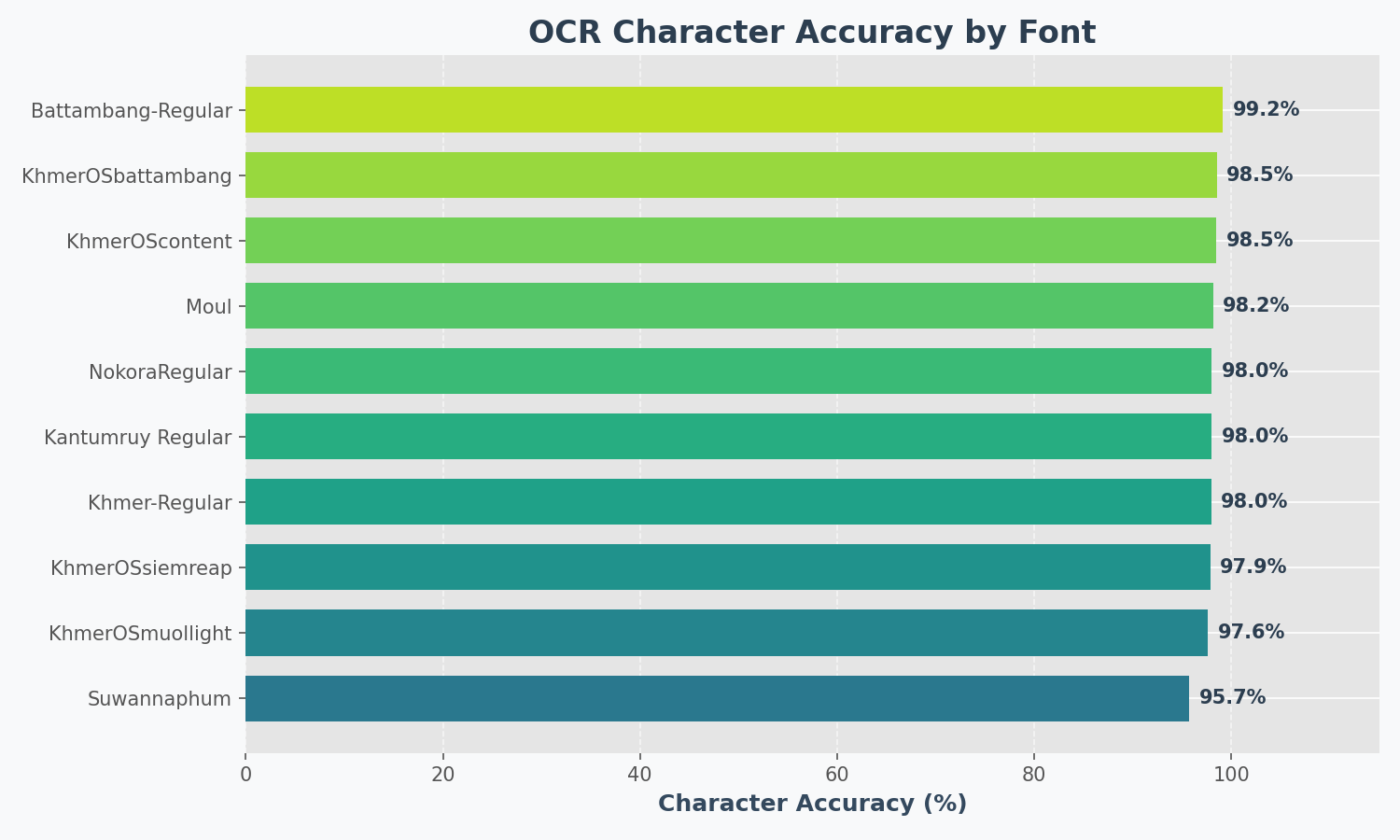
📊 Benchmark
Results on synthetic test images (10 popular fonts):
📁 Project Structure
kiri_ocr/
├── core.py               # OCR class
├── model.py              # Transformer model
├── training.py           # Training code
├── cli.py                # Command-line interface
└── detector/             # Text detection
    ├── db/               # DB detector
    └── craft/            # CRAFT detector
☕ Support
If you find this project useful:
- ⭐ Star this repository
- Buy Me a Coffee
- ABA Payway
Join our Discord Community](https://discord.gg/Vcrw274RVC)
⚖️ License
1 maintainer

Metadata
1 maintainer
Release files for kiri-ocr 0.2.15
For a detailed explanation of source distributions (sdists) and built distributions (wheels), please see the package formats documentation.
Source distribution (sdist)
| File | Size | Uploaded | |
|---|---|---|---|
| kiri_ocr-0.2.15.tar.gz | 84.5 kB | Details |
Built distribution (wheel)
| File | Interpreter | ABI | Platform | Reset |
|---|---|---|---|---|
| kiri_ocr-0.2.15-py3-none-any.whl | Python 3 | none | any | Details |
Total release size: 174.3 kB
Release files / kiri_ocr-0.2.15.tar.gz
| Download URL | kiri_ocr-0.2.15.tar.gz |
|---|---|
| Size | 84.5 kB |
| Tags | Source |
|
SHA-256 checksum How to use checksums |
feb4ef5b65cd862551abc44da760d4ad07b96f595b6353920c65b6485dc08aab
|
|
BLAKE2b-256 checksum How to use checksums |
03736c0de25d338ec3748b78cece30ca8d121fbc82197a38a27aa3953502d1e6
|
| Upload date | |
|
Uploaded using Trusted Publishing? What is trusted publishing? |
No |
| Uploaded via |
twine/6.1.0 CPython/3.13.7
|
Release files / kiri_ocr-0.2.15-py3-none-any.whl
| Download URL | kiri_ocr-0.2.15-py3-none-any.whl |
|---|---|
| Size | 89.9 kB |
| Tags | Python 3 |
|
SHA-256 checksum How to use checksums |
cd15330d2cebf787f43bb1df6802fcb6f011c5f03a289089b7bc079bb1826ac1
|
|
BLAKE2b-256 checksum How to use checksums |
2d0bcde4028cb9a3bfb37d2fc8a04177990330e13dfc9055e490cca8fa90ac1c
|
| Upload date | |
|
Uploaded using Trusted Publishing? What is trusted publishing? |
No |
| Uploaded via |
twine/6.1.0 CPython/3.13.7
|














