
A lightweight OCR library for Khmer and English documents

Project description
Kiri OCR 📄






Kiri OCR is a lightweight OCR library for English and Khmer documents. It provides document-level text detection, recognition, and rendering capabilities in a compact package.
✨ Key Features
- Lightweight: Compact CRNN model optimized for speed and efficiency
- Bi-lingual: Native support for English and Khmer (and mixed text)
- Document Processing: Automatic text line and word detection
- Easy to Use: Simple Python API and CLI
- Two Architectures:
- CRNN (default): Fast, lightweight, great for production
- Transformer: Higher accuracy, hybrid CTC + attention decoder
📊 Dataset
The model is trained on the mrrtmob/khmer_english_ocr_image_line dataset, which contains 12 million synthetic images of Khmer and English text lines.
📈 Benchmark
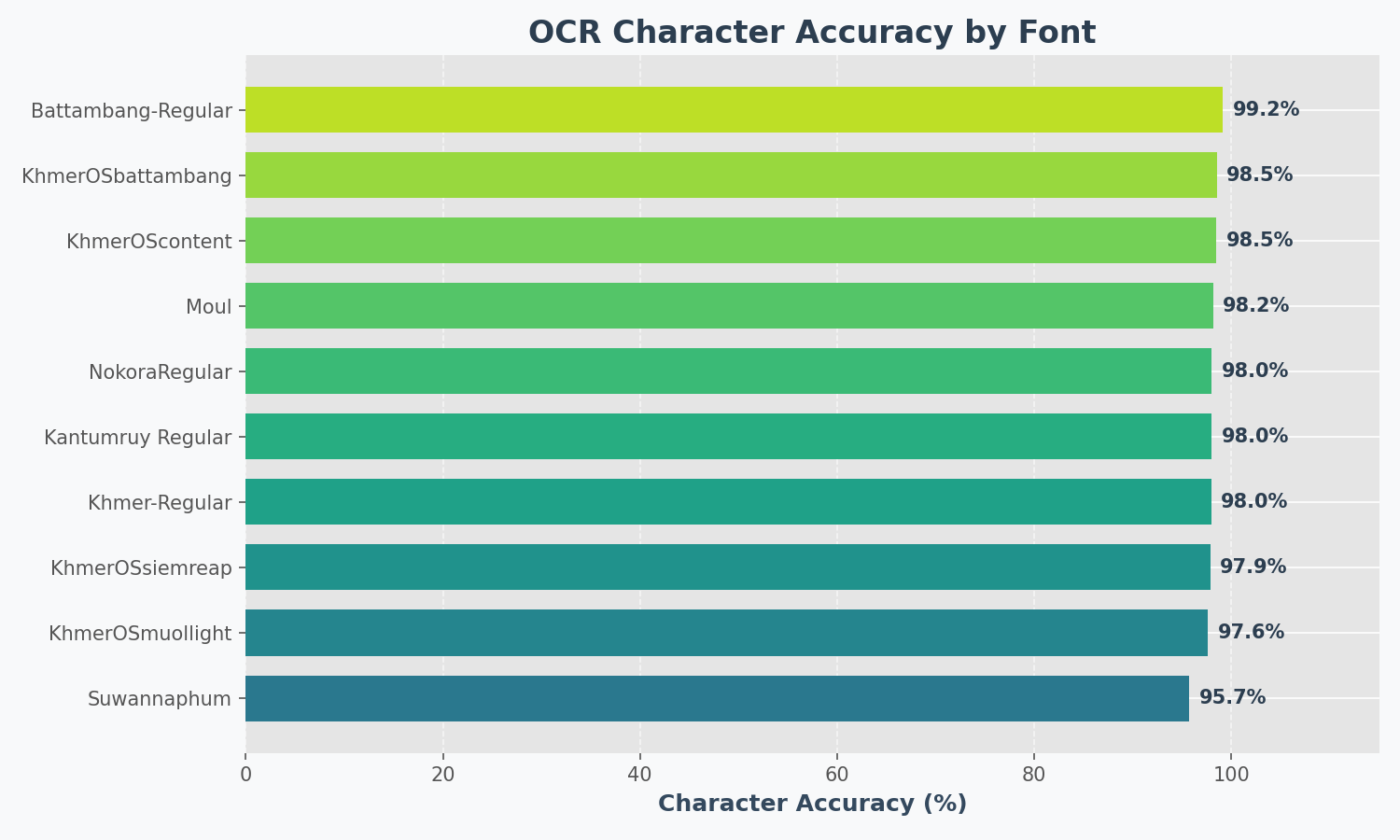
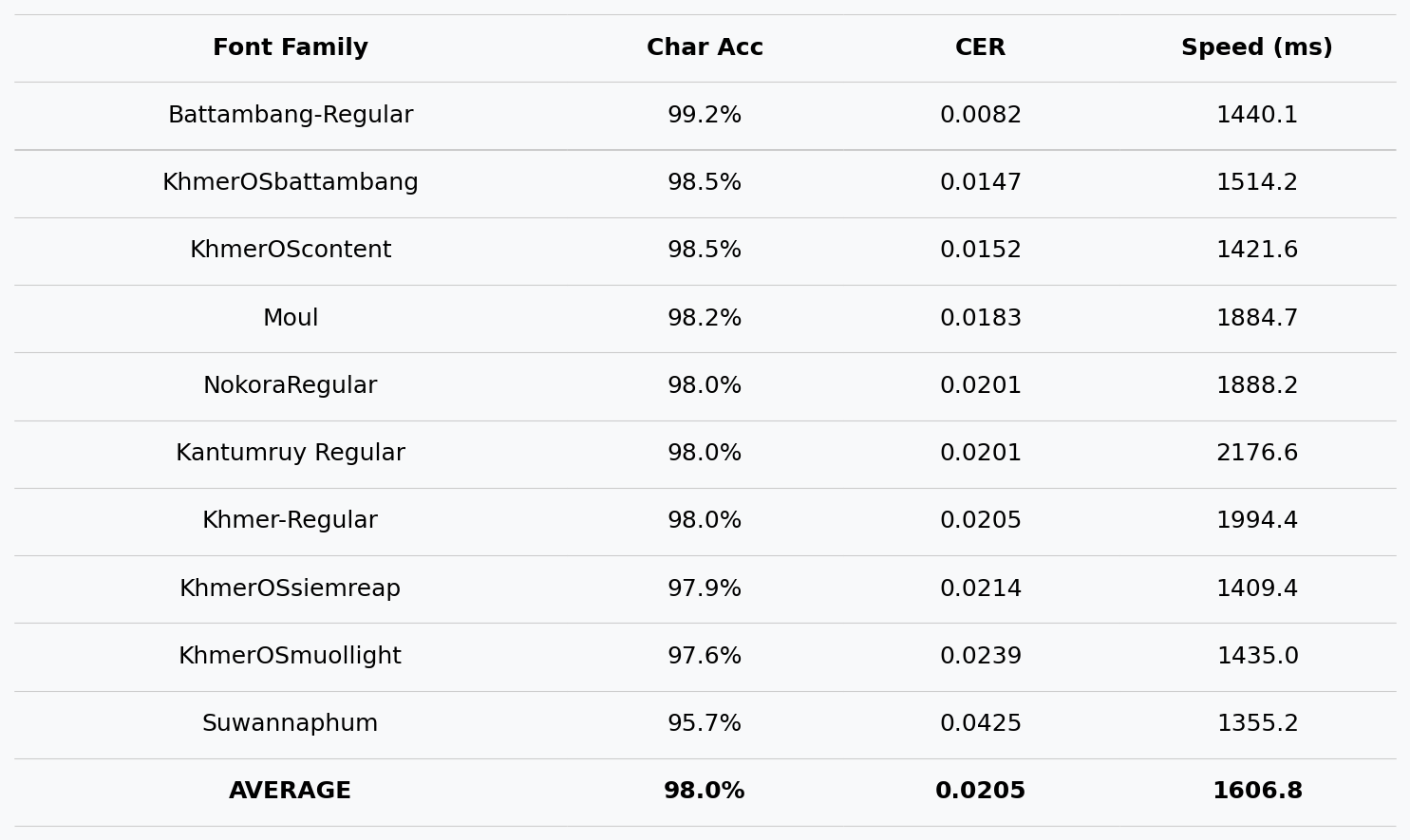
Results on synthetic test images (10 popular fonts):
📦 Installation
Install via pip:
pip install kiri-ocr
Or install from source:
git clone https://github.com/mrrtmob/kiri-ocr.git
cd kiri-ocr
pip install -e .
💻 Quick Start
CLI Tool
# Run OCR on an image
kiri-ocr predict document.jpg --output results/

# Or simply
kiri-ocr document.jpg
Python API
from kiri_ocr import OCR

# Initialize (auto-downloads from Hugging Face)
ocr = OCR()

# Extract text from document
text, results = ocr.extract_text('document.jpg')
print(text)

# Get detailed results with confidence scores
for line in results:
    print(f"{line['text']} (confidence: {line['confidence']:.1%})")
Single Line Recognition
from kiri_ocr import OCR

ocr = OCR(device='cuda')

# Recognize a single text line image
text, confidence = ocr.recognize_single_line_image('text_line.png')
print(f"'{text}' ({confidence:.1%})")
🎓 Training Models
Kiri OCR supports two model architectures:
| Architecture | Speed | Accuracy | Image Height | Best For |
|---|---|---|---|---|
| CRNN | ⚡ Fast | Good | 32px | Production, mobile |
| Transformer | 🐢 Slower | Higher | 48px | Maximum accuracy |
🏋️ Training CRNN Model (Default)
Option A: Using Hugging Face Dataset
kiri-ocr train \
    --arch crnn \
    --hf-dataset mrrtmob/km_en_image_line \
    --epochs 100 \
    --batch-size 32 \
    --device cuda \
    --output-dir output_crnn
Option B: Using Local Data
- Prepare your data:
data/
├── train/
│   ├── labels.txt       # Format: filename<TAB>text
│   └── images/
│       ├── img_001.png
│       └── ...
└── val/
    ├── labels.txt
    └── images/
- Train:
kiri-ocr train \
    --arch crnn \
    --train-labels data/train/labels.txt \
    --val-labels data/val/labels.txt \
    --epochs 100 \
    --batch-size 32 \
    --device cuda
🚀 Training Transformer Model (Higher Accuracy)
The Transformer model uses a hybrid architecture with:
- CNN backbone for visual feature extraction
- Transformer encoder for contextual understanding
- CTC head for fast alignment-free decoding
- Attention decoder for accurate sequence generation
Basic Training
kiri-ocr train \
    --arch transformer \
    --hf-dataset mrrtmob/km_en_image_line \
    --output-dir output_transformer \
    --epochs 100 \
    --batch-size 32 \
    --device cuda
Full Configuration
kiri-ocr train \
    --arch transformer \
    --hf-dataset mrrtmob/km_en_image_line \
    --output-dir output_transformer \
    --height 48 \
    --width 640 \
    --batch-size 32 \
    --epochs 100 \
    --lr 0.0003 \
    --weight-decay 0.01 \
    --ctc-weight 0.5 \
    --dec-weight 0.5 \
    --save-steps 5000 \
    --device cuda
Transformer-Specific Arguments
| Argument | Default | Description |
|---|---|---|
--height |
48 | Image height (must be 48 for transformer) |
--width |
640 | Image width |
--ctc-weight |
0.5 | Weight for CTC loss |
--dec-weight |
0.5 | Weight for decoder loss |
--vocab |
Auto | Path to vocab JSON (auto-generated if not provided) |
--save-steps |
0 | Save checkpoint every N steps |
--resume |
False | Resume from latest checkpoint |
Resume Training
If training is interrupted:
kiri-ocr train \
    --arch transformer \
    --hf-dataset mrrtmob/km_en_image_line \
    --output-dir output_transformer \
    --epochs 100 \
    --resume \
    --device cuda
☁️ Google Colab Training

# Cell 1: Setup
!pip install -q kiri-ocr datasets

from google.colab import drive
drive.mount('/content/drive')

# Cell 2: Train
!kiri-ocr train \
    --arch transformer \
    --hf-dataset mrrtmob/km_en_image_line \
    --output-dir /content/drive/MyDrive/kiri_models/v1 \
    --height 48 \
    --width 640 \
    --batch-size 32 \
    --epochs 100 \
    --lr 0.0003 \
    --ctc-weight 0.5 \
    --dec-weight 0.5 \
    --save-steps 5000 \
    --device cuda

# Cell 3: Test
from kiri_ocr import OCR

ocr = OCR(
    model_path="/content/drive/MyDrive/kiri_models/v1/best_model.pt",
    device="cuda"
)

text, confidence = ocr.recognize_single_line_image("test.png")
print(f"'{text}' ({confidence:.1%})")
Training Time Estimates (Colab T4 GPU)
| Dataset Size | Epochs | Time |
|---|---|---|
| 10K samples | 100 | ~10 hours |
| 50K samples | 100 | ~24 hours |
| 100K samples | 100 | ~48 hours |
📁 Output Files
After training, your output directory will contain:
output_transformer/
├── vocab_auto.json          # Vocabulary (required for inference!)
├── latest.pt                # Latest checkpoint (for resume)
├── best_model.pt            # Best validation accuracy
├── model_epoch_1.pt
├── model_epoch_2.pt
├── ...
├── checkpoint_step_5000.pt
└── history.json             # Training metrics
🔧 Using Custom Models
Load Transformer Model
from kiri_ocr import OCR

# Kiri OCR auto-detects the model type!
ocr = OCR(
    model_path="output_transformer/best_model.pt",
    device="cuda"
)

# Works the same as default model
text, confidence = ocr.recognize_single_line_image("image.png")
print(f"'{text}' ({confidence:.1%})")
Load from Hugging Face
from kiri_ocr import OCR

# Default model (CRNN)
ocr = OCR(model_path="mrrtmob/kiri-ocr")

# Or specify explicitly
ocr = OCR(model_path="your-username/your-model")
🎨 Generate Synthetic Data
Create training data from text files:
kiri-ocr generate \
    --train-file data/textlines.txt \
    --output data \
    --fonts-dir fonts \
    --augment 2 \
    --random-augment \
    --height 32 \
    --width 512
Arguments:
| Argument | Description |
|---|---|
--train-file |
Source text file (one line per sample) |
--fonts-dir |
Directory with .ttf font files |
--augment |
Augmentation factor per line |
--random-augment |
Apply random noise/rotation |
--height |
Image height (32 for CRNN, 48 for Transformer) |
🎯 Train Text Detector (Optional)
Kiri OCR uses CRAFT for text detection. Train a custom detector:
1. Generate Detector Dataset
kiri-ocr generate-detector \
    --text-file data/textlines.txt \
    --fonts-dir fonts \
    --output detector_dataset \
    --num-train 1000 \
    --num-val 200
2. Train Detector
kiri-ocr train-detector \
    --epochs 50 \
    --batch-size 8 \
    --name my_craft_detector
3. Use Custom Detector
from kiri_ocr import OCR

ocr = OCR(
    det_model_path="runs/detect/my_craft_detector/weights/best.pth",
    det_method="craft"
)
⚙️ Configuration File
Use a YAML config file for complex setups:
# Generate default config
kiri-ocr init-config -o config.yaml

# Train with config
kiri-ocr train --config config.yaml
Example config.yaml:
# Model Architecture
arch: transformer

# Image dimensions
height: 48
width: 640

# Training
batch_size: 32
epochs: 100
lr: 0.0003
weight_decay: 0.01

# Loss weights (transformer only)
ctc_weight: 0.5
dec_weight: 0.5

# Paths
output_dir: output_transformer
save_steps: 5000

# Device
device: cuda

# Dataset (HuggingFace)
hf_dataset: mrrtmob/km_en_image_line
hf_train_split: train
hf_image_col: image
hf_text_col: text

# Resume training
resume: false
🔍 HuggingFace Dataset Options
| Argument | Default | Description |
|---|---|---|
--hf-dataset |
- | Dataset ID (e.g.,username/dataset) |
--hf-train-split |
train | Training split name |
--hf-val-split |
- | Validation split (auto-detected if not set) |
--hf-val-percent |
0.1 | Val split from train if no val split exists |
--hf-image-col |
image | Column name for images |
--hf-text-col |
text | Column name for text labels |
--hf-subset |
- | Dataset subset/config name |
--hf-streaming |
False | Stream instead of download |
📊 Expected Training Progress
Epoch   1/100 | Loss: 4.50 (CTC: 5.0, Dec: 4.0) | Val Acc:  2%
Epoch  10/100 | Loss: 2.10 (CTC: 2.3, Dec: 1.9) | Val Acc: 25%
Epoch  25/100 | Loss: 1.20 (CTC: 1.3, Dec: 1.1) | Val Acc: 55%
Epoch  50/100 | Loss: 0.60 (CTC: 0.7, Dec: 0.5) | Val Acc: 78%
Epoch 100/100 | Loss: 0.25 (CTC: 0.3, Dec: 0.2) | Val Acc: 92%
🐛 Troubleshooting
Model outputs garbage/random characters
Cause: Model not trained enough (need 50-100 epochs minimum)
# Check your model
python -c "
import torch
ckpt = torch.load('model.pt', map_location='cpu')
print(f\"Epoch: {ckpt.get('epoch', 'unknown')}\")
print(f\"Step: {ckpt.get('step', 'unknown')}\")
"
Vocab file not found
Cause: vocab_auto.json must be in the same directory as the model
# Check files
ls output_transformer/
# Should show: vocab_auto.json, best_model.pt, etc.
CUDA out of memory
Fix: Reduce batch size
kiri-ocr train --arch transformer --batch-size 16 ...
Low confidence scores
Cause: Use CTC decoding for inference (more reliable)
# In OCR initialization
ocr = OCR(model_path="model.pt", use_beam_search=False)
☕ Support
If you find this project useful:
- ⭐ Star this repository
- Buy Me a Coffee
- ABA Payway
⚖️ License
📚 Citation
@software{kiri_ocr,
  author = {MRTMOB},
  title = {Kiri OCR: Lightweight Khmer and English OCR},
  year = {2024},
  url = {https://github.com/mrrtmob/kiri-ocr}
}
Release history Release notifications | RSS feed


Download files
Download the file for your platform. If you're not sure which to choose, learn more about installing packages.
Source Distribution
Built Distribution
Filter files by name, interpreter, ABI, and platform.
If you're not sure about the file name format, learn more about wheel file names.
Copy a direct link to the current filters
File details
Details for the file kiri_ocr-0.1.8.tar.gz.
File metadata
- Download URL: kiri_ocr-0.1.8.tar.gz
- Upload date:
- Size: 79.6 kB
- Tags: Source
- Uploaded using Trusted Publishing? No
- Uploaded via: twine/6.1.0 CPython/3.13.7
File hashes
| Algorithm | Hash digest | |
|---|---|---|
| SHA256 |
5a59dcee4be55f18de62a658af40954e7eec11eb9db02528c794a44b1de3c948
|
|
| MD5 |
4e99460aeeb36bc96ecf897aa37b9781
|
|
| BLAKE2b-256 |
4efe9bb74655b7454a32e095862a0b554d25562a5aa5ef61b6bfd4525e1043df
|
File details
Details for the file kiri_ocr-0.1.8-py3-none-any.whl.
File metadata
- Download URL: kiri_ocr-0.1.8-py3-none-any.whl
- Upload date:
- Size: 84.8 kB
- Tags: Python 3
- Uploaded using Trusted Publishing? No
- Uploaded via: twine/6.1.0 CPython/3.13.7
File hashes
| Algorithm | Hash digest | |
|---|---|---|
| SHA256 |
4fbefa446f956b8c94598236dcffa33c6cfae8ca72ba5604e1b8a3162140dab2
|
|
| MD5 |
7f50a752fcb8f81b8f58c8f8c11e97b4
|
|
| BLAKE2b-256 |
3805303cd95a74fe1d225e67967b142ded77376c199cdb2e93216d92a5ed6282
|






