
Kishi Shell (v2.0.2.4)

If you like this project, please give it a ⭐ star on GitHub and vote on AUR! Your support helps the project grow.
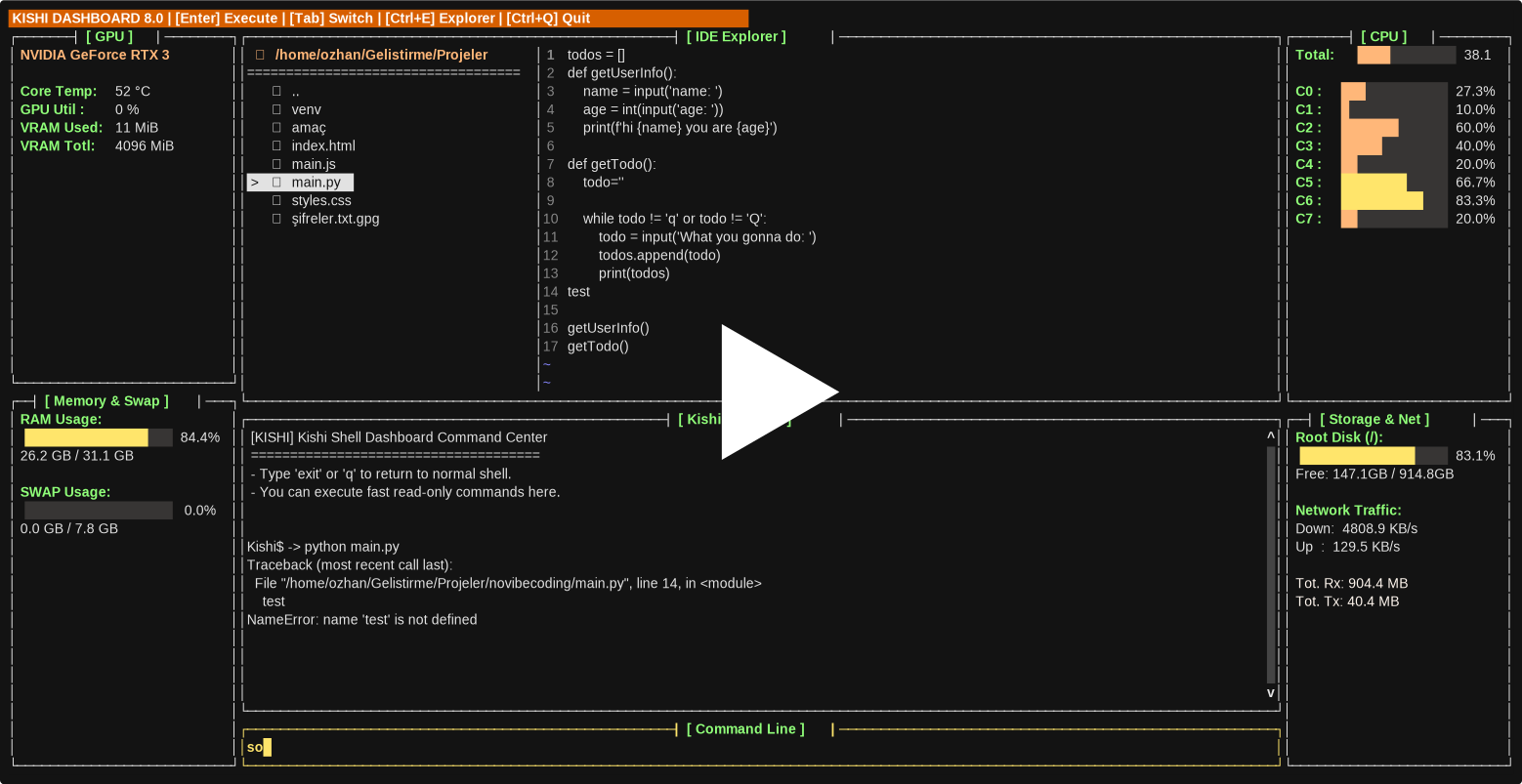
Kishi Shell is a next-generation command line developed 100% in Python that transforms into a full-fledged Terminal User Interface (TUI) Operating System without requiring any external software (Go, C) or plugins. It combines the traditional Bash command set with modern IDE (Code Editor) and System Monitor features.
Installation & Running
Option 1: Install via AUR (Arch Linux) — Recommended
yay -S kishi-shell
Option 2: Install from Source
git clone https://github.com/ozhangebesoglu/Kishi-Shell.git
cd Kishi-Shell
chmod +x install.sh
./install.sh
The installer will try pip3 install . first. If your system uses PEP 668 protection, it will offer you to create a virtual environment (recommended) or use --break-system-packages.
Option 3: Install via pip (PyPI)
pip install --upgrade kishi-shell           # Core shell only (~30 KB)
pip install --upgrade "kishi-shell[krep]"   # + numpy/scipy for Krep AI's LSA model
The base install gives you the full Kishi Shell + the keyword-based krep
engine. The [krep] optional extra adds numpy + scipy for the dictionary-free
LSA model (krep --learn PATH and friends). Most shell users never need this.
Type kishi in your terminal to launch Kishi Shell. Type exit to return to your default shell.
How the Installer Works
Linux (install.sh)
The installer automatically detects your distro (Arch, Fedora, Debian/Ubuntu, openSUSE, Void, etc.) and:
- Installs system dependencies (
python3,pip,prompt_toolkit,psutil) via your package manager - Runs
pip3 install .— if PEP 668 protection blocks it, you can choose between--break-system-packagesor a virtual environment (~/.kishi-venv) - Verifies the
kishicommand is available in your PATH
Windows (install.bat)
- Runs
pip install .(triespip,python -m pip,python3 -m pip) - Auto-detects the Python Scripts directory and adds it to your user PATH
- You can always run with
python -m kishias a fallback
Using Kishi as Your Login Shell (Optional)
Note: Kishi works perfectly as a regular shell — just type
kishito launch it. Setting it as a login shell is entirely optional and only needed if you want Kishi to be your default system shell.
If you want to set Kishi as your login shell:
# 1. Register kishi as an allowed shell
kishi --setup
# or manually:
echo $(which kishi) | sudo tee -a /etc/shells

# 2. Set as your default login shell
chsh -s $(which kishi)

# To revert back to bash at any time:
chsh -s /bin/bash
Safety Features:
- Fallback protection: If Kishi crashes on startup, it automatically falls back to
/bin/bashor/bin/sh— your system will never be locked out - Profile sourcing: Automatically sources
/etc/profileand~/.profile(or~/.bash_profile) so your environment is properly set up - Display manager compatible: Properly handles
kishi -c "exec gnome-session"for GDM, SDDM, LightDM - Non-interactive mode: Pipes (
echo "echo hello" | kishi) and scripts work without blocking
Invocation Modes:
kishi                              # Interactive mode (prompt + UI)
kishi -c "ls -la"                  # Execute a single command and exit
kishi --login                      # Login shell mode (source profiles)
kishi -l -c "exec gnome-session"   # Login + command (used by display managers)
echo "echo hello" | kishi          # Pipe mode (non-interactive, no banner)
Advanced Visual Interfaces (TUI)
Kishi Shell doesn't make you install Midnight Commander or top/htop. It has its own zero-latency tools rendered 100% in Python.
1-) VSCode-like Unified IDE & Dashboard
No more reading files on a plain black screen! Kishi Shell doesn't make you install Midnight Commander or top/htop. It merges both into a perfect VSCode-like layout.
-
Command:
dashboardRunning isolated in the background, this system displays CPU Core Usage, RAM / SWAP Metrics, Root Disk space, and Live Network Traffic (Down/Up) in side panels. -
When you press
Ctrl + E, the massive terminal in the center instantly transforms into a Dual-Panel IDE (Development Environment). The screen splits from the top into two sections, placing the Folder Tree on the left and the Code Editor on the right. The bottom section remains as the Kishi Terminal. -
You can navigate between panels using the
Tabkey, creating a perfect cycle between Tree -> Editor -> Terminal -> Input Line. -
Write your code and save it instantly with
Ctrl + S.


Dashboard Keyboard Shortcuts
| Shortcut | Action |
|---|---|
Enter |
Execute command |
Tab |
Auto-complete commands and paths |
Ctrl + E |
Toggle IDE Explorer (file tree + editor) |
Shift + Tab |
Cycle focus between panels |
Ctrl + R |
Fuzzy search command history |
Ctrl + C |
Send SIGINT to running process |
Ctrl + Q |
Quit dashboard |
PgUp / PgDn |
Scroll terminal output |
Home / End |
Jump to top / bottom of output |
2-) Interactive Terminal & Directory Synchronization
The Kishi Terminal at the bottom of the screen works in live sync with the Folder Tree!
- When you type
cdin the command line to change directories, the Tree updates automatically. - When you run long-running Python or Bash scripts that wait for your input (like
input()), the interface never freezes! Thanks to background binary streaming, command outputs are printed directly to the interface, and inputs you type in the command line at the bottom are forwarded directly to the code'sstdininput. - You can send
Ctrl + Cto kill a running process without closing the dashboard, then continue using the terminal normally. - Programs that require a terminal (
python,node,java) work properly thanks to full pseudo-terminal (PTY) support.


3-) Standalone File Explorer
The IDE Explorer also works as a standalone dual-pane file browser outside the dashboard. Navigate your entire filesystem, preview directories, and edit code with line numbers.
- Command:
explore - Shortcut:
Ctrl + E


4-) Tab Completion & Syntax Highlighting
Kishi provides real-time tab completion for system commands, builtins, and filesystem paths. Known commands appear in green, unknown ones in red.

5-) Help System & History Search (Fuzzy Search)
- For Comprehensive Help:
help— For Quick Shortcuts:help less


No need to install external FZF to find your old commands.
- Shortcut:
Ctrl + RAs you type like a typewriter, it performs character matching among thousands of your old commands and brings the desired command to your screen in seconds. PressEnterto pull the command.
Plugin Marketplace
Kishi Shell features a dynamic, Python-powered plugin ecosystem. You can browse, install, and manage official extensions natively without leaving the terminal or reloading the environment.
Plugin Commands
| Command | Description |
|---|---|
plugin list |
List all installed plugins |
plugin market |
Browse available plugins in the marketplace |
plugin install <name> |
Install a plugin by name from the marketplace |
plugin install <url> |
Install a plugin from a direct GitHub raw URL |
plugin remove <name> |
Uninstall a plugin |
Available Plugins
| Plugin | Command | Description | Usage |
|---|---|---|---|
| weather | weather |
Live weather from wttr.in | weather (auto-detect location) or weather Istanbul |
| ip | ip |
Public IP & location info via ipinfo.io | ip |
| qr | qr |
Generate ASCII QR codes in your terminal | qr https://github.com or qr "Hello World" |
| hello | hello |
Demo plugin — test your marketplace connection | hello |
Example Usage
# Browse the marketplace
Kishi$ -> plugin market
 Available Plugins in Kishi Marketplace:
  - hello.py
  - weather.py
  - ip.py
  - qr.py

# Install a plugin
Kishi$ -> plugin install weather
[*] Downloading 'weather.py' from marketplace...
[+] Plugin 'weather' installed successfully!

# Use it immediately — no restart needed
Kishi$ -> weather Istanbul
Istanbul: ⛅️ +18°C

# Check what you have installed
Kishi$ -> plugin list
 Installed Plugins:
  - weather

# Remove when you no longer need it
Kishi$ -> plugin remove weather
[+] Plugin 'weather' removed.
Once installed, plugins operate at native speed and are fully integrated into Kishi's event loop. Plugins are stored in ~/.kishi/plugins/ and loaded automatically on shell startup.
Creating Your Own Plugin
Create a .py file where the filename must exactly match the command name it exports:
# mycommand.py
def mycommand(args):
    """args[0] = command name, args[1:] = user arguments"""
    if len(args) < 2:
        print("Usage: mycommand <text>")
        return 1

    print(f"Hello, {args[1]}!")
    return 0  # exit code: 0 = success

PLUGIN_COMMANDS = {
    "mycommand": mycommand  # key MUST match filename (mycommand.py -> "mycommand")
}
Install from any source:
# From the official marketplace (submit a PR to Kishi-Plugins repo)
plugin install mycommand

# Or from any raw GitHub URL
plugin install https://raw.githubusercontent.com/user/repo/main/mycommand.py
For more details, see the Kishi-Plugins repository.
Scripting and Environment Variables
Setting and Reading Variables (export)
You can define new variables in the Kishi environment that other programs can also read.
Kishi$ -> export MY_KEY="12345"
Kishi$ -> echo $MY_KEY
12345
Simply type unset MY_KEY to remove it. You can list all loaded variables in the environment by just typing export.
Customizing the Terminal Cursor
You can customize the terminal cursor globally across all TUI interfaces (Dashboard, Explorer, etc.) by exporting the CURSOR_SHAPE variable. Add this to your ~/.kishirc:
export CURSOR_SHAPE="BLINKING_BLOCK"
Available options: BLOCK, BLINKING_BLOCK, UNDERLINE, BLINKING_UNDERLINE, BEAM, BLINKING_BEAM.
Create Your Own Commands (myfunc)
If you keep repeating a task, you can instantly teach Kishi code blocks (Sub-Routines). Defining functions is very easy:
Kishi$ -> greet() { echo "Welcome to the System $USER"; ls -l; }
Kishi$ -> greet
Welcome to the System ozhangebesoglu
drwxrwxr-x 2 user user 4096 ...
You can chain functions with semicolons (;) and run massive automation scripts in a single line. Moreover, you can squeeze complex Shell operators like |, &&, >, >> in between your commands and outputs!
Architecture
Kishi is built on a classic compiler pipeline following SOLID principles:
Input → Lexer → Parser → Expander → Executor
         │        │         │          │
      tokens     AST    expanded    fork/exec
                          args      pipelines
| Module | Responsibility |
|---|---|
lexer.py |
Tokenization, quote tracking |
parser.py |
Recursive descent parser, AST generation |
expander.py |
$VAR, glob, tilde, $(cmd) expansion |
executor.py |
fork/exec, pipelines, redirections, job control |
builtins.py |
26 built-in commands |
tui_dashboard.py |
VS Code-style dashboard (5 SOLID classes) |
tui_explorer.py |
Dual-pane IDE explorer |
tui_fuzzy.py |
Ctrl+R fuzzy search engine |
ui.py |
Syntax highlighting, completions, keybindings |
main.py |
Login shell, mode detection, profile sourcing |
krep.py |
3D semantic vector search engine |
krep_learn.py |
PPMI + SVD model: dictionary-free corpus learning |
krep_core.pyx |
Cython acceleration for vectorize / cosine |
krep_cli.py |
Standalone krep CLI entry point |
Krep AI — Semantic Search (v2.0.2.3+)
Krep is a 3D semantic vector search tool. Unlike grep, it understands
meaning: searching "auth login" also surfaces lines containing
"password validated", "token issued", or "yetkilendirme reddedildi".
Krep ships as both an embedded Kishi builtin and a standalone CLI.
pip install kishi-shell adds two binaries to your PATH: kishi and krep.
# From any shell (bash, zsh, fish, sh):
$ krep "auth login" /var/log/
$ krep --learn /var/log/ --auto-refresh 1h
$ cat app.log | krep error

# From inside Kishi REPL:
Kishi$ -> krep "auth login" /var/log/
What's new in v2.0.2.4 — Theme System
Kishi ships with 5 built-in color themes: Monokai (default), Dracula, One Dark, Solarized Dark, Solarized Light. The Pygments style is merged into the dashboard, editor, explorer, and REPL prompt so the editor's syntax highlighting is finally bright and readable on any dark terminal.
# Install the theme picker plugin (one-time)
Kishi$ -> plugin install theme

# List themes
Kishi$ -> theme
Kishi Themes
  - dracula
  - monokai (active)
  - one-dark
  - solarized-dark
  - solarized-light

# Switch
Kishi$ -> theme set dracula
[+] Theme set to: dracula
    Restart Kishi to apply (themes load at startup).
Selection is persisted to ~/.config/kishi/theme (or
$XDG_CONFIG_HOME/kishi/theme). Restart Kishi to apply — hot-reload is
not supported.
What's new in v2.0.2.3
- Cleaner output — single-line header with right-aligned elapsed time, scores colored by similarity (green/yellow/red), terminal-width aware.
- i18n (EN default, TR optional) —
--lang en|trswitches header, error messages, and scatter labels. Default is English. - Opt-in 3D scatter — the ASCII vector chart is now hidden by default.
Pass
--scatterto render it. - Shell-agnostic — verified on bash, zsh, fish, and POSIX sh.
$ krep "auth login" /var/log/
krep · 3 results · 'auth login' · keyword engine                            4 ms
────────────────────────────────────────────────────────────────────────────────
1.00  auth.log:4   login authorization required
1.00  auth.log:6   login: success
0.89  auth.log:1   auth login failed

$ krep --lang tr "auth login" /var/log/
krep · 3 sonuç · 'auth login' · anahtar kelime motoru                       4 ms
────────────────────────────────────────────────────────────────────────────────
1.00  auth.log:4   login authorization required
...

$ krep --scatter "auth login" /var/log/   # also draws the 3D ASCII chart
Two engines, automatic dispatch
- Keyword engine (default, zero-setup): built-in 178-word vocabulary across 3 axes — Error / Security / Data. Works out of the box.
- LSA model (
krep --learn PATH): PPMI + SVD trained on your corpus. Vocabulary, axes, and word vectors are learned from the actual files — no manual dictionary. Multilingual by construction. Requires the optional extra:pip install kishi-shell[krep](adds numpy + scipy).
When you run krep --learn /var/log/, Krep:
- Scans every non-binary file, tokenizes (Unicode-aware)
- Builds a sparse cooccurrence matrix
- Normalizes with PPMI (Positive Pointwise Mutual Information)
- Computes SVD rank-50 word embeddings (HD for cosine ranking)
- Reduces to PCA-3 (only for the ASCII scatter visualization)
- Auto-labels each axis from its top-5 representative terms
- Saves to
~/.cache/kishi/krep_models/<path-hash>/
$ krep --learn /var/log/ --auto-refresh 1h
[krep --learn] Vocab: 12,438 terms, 891,234 lines
[krep --learn] SVD rank-50 + PCA-3 (var=17.3%), 2.1s
[krep --learn] Axis 0: error fail timeout exception denied
[krep --learn] Axis 1: auth login user session token
[krep --learn] Axis 2: file query select read write
[+] Model saved: ~/.cache/kishi/krep_models/var_log_a8f3.../
    12438 terms, 891234 lines, 2.1s · auto-refresh 1h
Tail-aware incremental updates
Log files are append-only. Krep tracks each file's last-read byte offset,
mtime, and size. When you run krep --update-learn, only new lines
are processed:
$ krep --update-learn /var/log/        # tail-only, ~%5 of full build time
$ krep --list-models                   # see what's cached
$ krep --purge-models                  # wipe everything
Rotation/truncate is detected automatically: if a file's size shrinks, it's re-read from the beginning.
Lazy auto-refresh (no daemon, no cron)
--auto-refresh INTERVAL writes a freshness threshold into the model.
On every query, if the model is older than the threshold, Krep fires a
background subprocess to refresh it (fire-and-forget). The current
query keeps running with the old model; the next query sees the new one.
$ krep --learn /var/log/ --auto-refresh 1h
$ krep "auth failure" /var/log/         # 5 hours later
  # ↓ Lazy refresh triggered in background
  # ↓ This query uses the old model (still fast)
$ krep "auth failure" /var/log/         # 3 seconds later
  # ↓ New model loaded automatically (cache mtime-invalidated)
Intervals are human-readable: 1h, 30m, 1d, 2w, 45s, or 0 to disable.
When ripgrep is installed: 200-3000× speedup
If rg (ripgrep) is on your PATH, Krep automatically uses it as a
streaming prefilter: only matching lines are vectorized, the rest is
skipped. Early-termination after limit × 10 matches. Falls back to the
built-in Python walker when:
rgnot installed,- stdin pipe mode,
rgreturns 0 hits (semantic neighbor lookup needs the walker).
$ krep --no-rg "auth login" /var/log/ # force pure-Python engine
Verified benchmarks (3-run averages, 12-core x86_64):
| Corpus | Query | Walker | rg-streaming | Speedup |
|---|---|---|---|---|
| Kishi repo (~5k lines) | auth login |
1068 ms | 5 ms | 206× |
| Python stdlib (~6.8M lines) | auth login |
timeout | 11 ms | >5000× |
| Python stdlib | database query |
timeout | 14 ms | >4000× |
| 1 GB single file (17M lines) | auth login |
timeout | 6 ms | >10000× |
Krep Performance (v2.0.1.1+)
Krep AI uses a two-path search architecture for the krep builtin:
-
ripgrep-streaming (default when
rgis installed):- Builds a word-only regex from the query (
auth login→auth|login). - Runs
rg -i -n --max-count=20as a streaming subprocess. - Reads stdout line by line, vectorizes each match, computes cosine similarity.
- Terminates
rgearly whenlimit × 10matches are collected. - Result: 100-3000x faster than the sequential walker.
- Builds a word-only regex from the query (
-
Built-in Python walker (semantic fallback): mtime-keyed in-memory concept-vector cache + line-level bigram vectorization. Used when:
- ripgrep isn't installed,
- stdin is the input,
- rg's literal pass returned 0 matches but the user's query has a
semantic neighbour in the corpus (e.g.
login authorization→ matchesauth token expired).
Override:
krep --no-rg PATTERN PATH # Force the Python fallback (debug/test)
Verified benchmarks (3-run averages, 12-core x86_64, Python 3.14, ripgrep 15.1):
| Corpus | Query | Walker | rg-streaming | Speedup |
|---|---|---|---|---|
| Kishi repo (~5k lines) | auth login |
1068 ms | 5 ms | 206x |
| Kishi repo | error timeout |
1103 ms | 7 ms | 156x |
| Kishi repo | database query |
1071 ms | 5 ms | 210x |
| Tests dir (~3k lines) | auth login |
1053 ms | 6 ms | 171x |
| Python stdlib (~6.8M lines) | auth login |
timeout (>60 s) | 11 ms | >5000x |
| Python stdlib | error timeout |
timeout | 9 ms | >6000x |
| Python stdlib | database query |
timeout | 14 ms | >4000x |
Help Center (help)
Kishi always assists you. If you want to remember all system features and command tips:
- For Comprehensive (Full) Help:
help - For Quick Shortcut Summaries:
help lessis all you need to type.
Contributing
We welcome contributions! Check out CONTRIBUTING.md for guidelines on how to get started.
Developed by: Ozhan Gebesoglu
Designed to push the limits of Python in the Terminal.
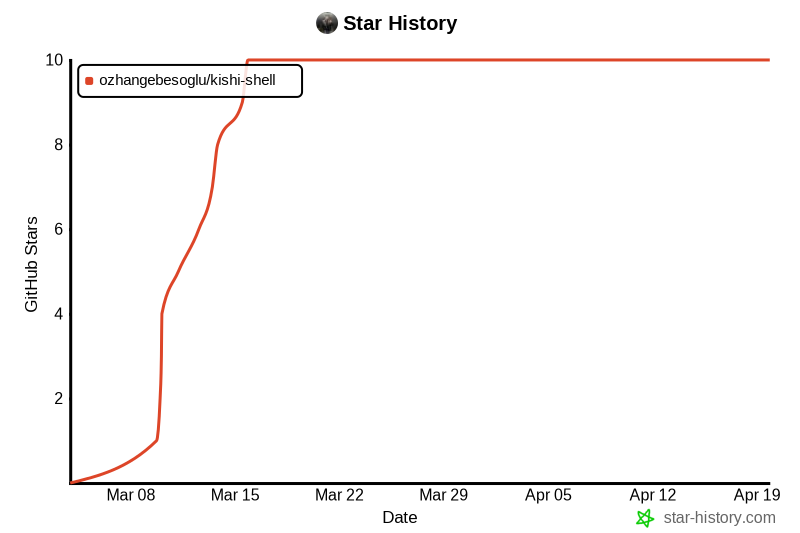
Star History
1 maintainer

Metadata
1 maintainer
Release files for kishi-shell 2.0.2.4
For a detailed explanation of source distributions (sdists) and built distributions (wheels), please see the package formats documentation.
Source distribution (sdist)
| File | Size | Uploaded | Provenance | Actions |
|---|---|---|---|---|
| kishi_shell-2.0.2.4.tar.gz | 7.6 MB | With provenance | Details for kishi_shell-2.0.2.4.tar.gz |
Built distributions (wheels)
Total release size: 11.5 MB
Release files / kishi_shell-2.0.2.4.tar.gz
| Download URL | kishi_shell-2.0.2.4.tar.gz |
|---|---|
| Size | 7.6 MB |
| Tags | Source |
|
SHA-256 checksum How to use checksums |
d419cc7a6ee6e111fecf6259b4f20e8e3f79ce9b5ee9d5730967d28a9a57e9cd
|
|
BLAKE2b-256 checksum How to use checksums |
100ca1bc741203d249d274786b8d50ef97c0192bb0b66897a5a81c6ffd8c1d9c
|
| Upload date | |
|
Uploaded using Trusted Publishing? What is trusted publishing? |
Yes |
| Uploaded via |
twine/6.1.0 CPython/3.13.12
|
Provenance
Provenance describes where a file came from. On PyPI, provenance is shared via attestations, which provide a verifiable record of the build or publishing details. View details, limitations and caveats.


PyPI Publish Attestation
PyPI verified that this artifact, at this checksum, originated from the publisher listed below.
Signed by GitHub Actions, verified by PyPI on Jun 4, 2026.
Transparency logRelease files / kishi_shell-2.0.2.4-cp313-cp313-win_amd64.whl
| Download URL | kishi_shell-2.0.2.4-cp313-cp313-win_amd64.whl |
|---|---|
| Size | 193.6 kB |
| Tags | CPython 3.13 Windows x86-64 |
|
SHA-256 checksum How to use checksums |
35105dc679aa7abf8bca5806ba82b249348b8994a98db9227b199d774b7f653e
|
|
BLAKE2b-256 checksum How to use checksums |
985efa2f60e6189aa68bc89f2db1c62e804b16a70cc957c82999a6fe77b1f1cc
|
| Upload date | |
|
Uploaded using Trusted Publishing? What is trusted publishing? |
Yes |
| Uploaded via |
twine/6.1.0 CPython/3.13.12
|
Provenance
Provenance describes where a file came from. On PyPI, provenance is shared via attestations, which provide a verifiable record of the build or publishing details. View details, limitations and caveats.
PyPI Publish Attestation
PyPI verified that this artifact, at this checksum, originated from the publisher listed below.
Signed by GitHub Actions, verified by PyPI on Jun 4, 2026.
Transparency logRelease files / kishi_shell-2.0.2.4-cp313-cp313-musllinux_1_2_x86_64.whl
| Download URL | kishi_shell-2.0.2.4-cp313-cp313-musllinux_1_2_x86_64.whl |
|---|---|
| Size | 236.8 kB |
| Tags | CPython 3.13 Linux musl 1.2+ x86-64 |
|
SHA-256 checksum How to use checksums |
b92a70a1bf9b7106577d6870f1ec495ef1da500c10ec0d463bb16e920390b3ae
|
|
BLAKE2b-256 checksum How to use checksums |
c2200b99a836250e14e6d0ced12c1adb9368070225a12bf51972d29db40a5a33
|
| Upload date | |
|
Uploaded using Trusted Publishing? What is trusted publishing? |
Yes |
| Uploaded via |
twine/6.1.0 CPython/3.13.12
|
Provenance
Provenance describes where a file came from. On PyPI, provenance is shared via attestations, which provide a verifiable record of the build or publishing details. View details, limitations and caveats.
PyPI Publish Attestation
PyPI verified that this artifact, at this checksum, originated from the publisher listed below.
Signed by GitHub Actions, verified by PyPI on Jun 4, 2026.
Transparency logRelease files / kishi_shell-2.0.2.4-cp313-cp313-manylinux_2_5_x86_64.manylinux1_x86_64.manylinux_2_17_x86_64.manylinux2014_x86_64.whl
| Download URL | kishi_shell-2.0.2.4-cp313-cp313-manylinux_2_5_x86_64.manylinux1_x86_64.manylinux_2_17_x86_64.manylinux2014_x86_64.whl |
|---|---|
| Size | 240.0 kB |
| Tags | CPython 3.13 Linux glibc 2.17+ x86-64 Linux glibc 2.5+ x86-64 |
|
SHA-256 checksum How to use checksums |
73723a9fc932f1c0445c80e54343a7e8bf64ed8777636e257198f31b30e1b45d
|
|
BLAKE2b-256 checksum How to use checksums |
9b97eb7998d52e3530985834d625cf44bc62db73107ac616b12453c6a25896b5
|
| Upload date | |
|
Uploaded using Trusted Publishing? What is trusted publishing? |
Yes |
| Uploaded via |
twine/6.1.0 CPython/3.13.12
|
Provenance
Provenance describes where a file came from. On PyPI, provenance is shared via attestations, which provide a verifiable record of the build or publishing details. View details, limitations and caveats.
PyPI Publish Attestation
PyPI verified that this artifact, at this checksum, originated from the publisher listed below.
Signed by GitHub Actions, verified by PyPI on Jun 4, 2026.
Transparency logRelease files / kishi_shell-2.0.2.4-cp313-cp313-macosx_11_0_arm64.whl
| Download URL | kishi_shell-2.0.2.4-cp313-cp313-macosx_11_0_arm64.whl |
|---|---|
| Size | 119.9 kB |
| Tags | CPython 3.13 macOS 11.0+ ARM64 |
|
SHA-256 checksum How to use checksums |
ec70679a65f4be65ac871bf0891709624edd6a4d8fb2ce777336ff4bf0f8f98a
|
|
BLAKE2b-256 checksum How to use checksums |
72f39fc0589007080c8d1c98e86619c48477d3c6da5087b3a50dc4218e134ac5
|
| Upload date | |
|
Uploaded using Trusted Publishing? What is trusted publishing? |
Yes |
| Uploaded via |
twine/6.1.0 CPython/3.13.12
|
Provenance
Provenance describes where a file came from. On PyPI, provenance is shared via attestations, which provide a verifiable record of the build or publishing details. View details, limitations and caveats.
PyPI Publish Attestation
PyPI verified that this artifact, at this checksum, originated from the publisher listed below.
Signed by GitHub Actions, verified by PyPI on Jun 4, 2026.
Transparency logRelease files / kishi_shell-2.0.2.4-cp312-cp312-win_amd64.whl
| Download URL | kishi_shell-2.0.2.4-cp312-cp312-win_amd64.whl |
|---|---|
| Size | 193.6 kB |
| Tags | CPython 3.12 Windows x86-64 |
|
SHA-256 checksum How to use checksums |
2ca7a84028044664c062871448febd7c2d834a4feedeb5012af03e60ae7e8b17
|
|
BLAKE2b-256 checksum How to use checksums |
d93d001870516de7eef218af5f74cf145e9edeb2797ffa12eb074e5263098eff
|
| Upload date | |
|
Uploaded using Trusted Publishing? What is trusted publishing? |
Yes |
| Uploaded via |
twine/6.1.0 CPython/3.13.12
|
Provenance
Provenance describes where a file came from. On PyPI, provenance is shared via attestations, which provide a verifiable record of the build or publishing details. View details, limitations and caveats.
PyPI Publish Attestation
PyPI verified that this artifact, at this checksum, originated from the publisher listed below.
Signed by GitHub Actions, verified by PyPI on Jun 4, 2026.
Transparency logRelease files / kishi_shell-2.0.2.4-cp312-cp312-musllinux_1_2_x86_64.whl
| Download URL | kishi_shell-2.0.2.4-cp312-cp312-musllinux_1_2_x86_64.whl |
|---|---|
| Size | 237.4 kB |
| Tags | CPython 3.12 Linux musl 1.2+ x86-64 |
|
SHA-256 checksum How to use checksums |
75e727674878b991f4ca6b7ee9f2fb1bac8ae8aec4465e37ee5aa1a6898af26b
|
|
BLAKE2b-256 checksum How to use checksums |
1cea66ef90ccfb456b85aa2cec0baca6213b6a1aa9837dbfca2eaca51e9c4dac
|
| Upload date | |
|
Uploaded using Trusted Publishing? What is trusted publishing? |
Yes |
| Uploaded via |
twine/6.1.0 CPython/3.13.12
|
Provenance
Provenance describes where a file came from. On PyPI, provenance is shared via attestations, which provide a verifiable record of the build or publishing details. View details, limitations and caveats.
PyPI Publish Attestation
PyPI verified that this artifact, at this checksum, originated from the publisher listed below.
Signed by GitHub Actions, verified by PyPI on Jun 4, 2026.
Transparency logRelease files / kishi_shell-2.0.2.4-cp312-cp312-manylinux_2_5_x86_64.manylinux1_x86_64.manylinux_2_17_x86_64.manylinux2014_x86_64.whl
| Download URL | kishi_shell-2.0.2.4-cp312-cp312-manylinux_2_5_x86_64.manylinux1_x86_64.manylinux_2_17_x86_64.manylinux2014_x86_64.whl |
|---|---|
| Size | 241.3 kB |
| Tags | CPython 3.12 Linux glibc 2.17+ x86-64 Linux glibc 2.5+ x86-64 |
|
SHA-256 checksum How to use checksums |
8f7336341313042c2ea5f5883bd472f2c55dd4dd201cf63a037cf35e88fdc543
|
|
BLAKE2b-256 checksum How to use checksums |
7506d32e3510be07a6eb33a734889087f74b01999b3d10fa5a4265c6dfc199c7
|
| Upload date | |
|
Uploaded using Trusted Publishing? What is trusted publishing? |
Yes |
| Uploaded via |
twine/6.1.0 CPython/3.13.12
|
Provenance
Provenance describes where a file came from. On PyPI, provenance is shared via attestations, which provide a verifiable record of the build or publishing details. View details, limitations and caveats.
PyPI Publish Attestation
PyPI verified that this artifact, at this checksum, originated from the publisher listed below.
Signed by GitHub Actions, verified by PyPI on Jun 4, 2026.
Transparency logRelease files / kishi_shell-2.0.2.4-cp312-cp312-macosx_11_0_arm64.whl
| Download URL | kishi_shell-2.0.2.4-cp312-cp312-macosx_11_0_arm64.whl |
|---|---|
| Size | 120.1 kB |
| Tags | CPython 3.12 macOS 11.0+ ARM64 |
|
SHA-256 checksum How to use checksums |
ee0e9f8366c99df857e7074d651a7ecdd591d17412d70ef142c8696078f1e013
|
|
BLAKE2b-256 checksum How to use checksums |
1298de89482951f97a08f286d64c1280bde76c467055c93043118917ca932f83
|
| Upload date | |
|
Uploaded using Trusted Publishing? What is trusted publishing? |
Yes |
| Uploaded via |
twine/6.1.0 CPython/3.13.12
|
Provenance
Provenance describes where a file came from. On PyPI, provenance is shared via attestations, which provide a verifiable record of the build or publishing details. View details, limitations and caveats.
PyPI Publish Attestation
PyPI verified that this artifact, at this checksum, originated from the publisher listed below.
Signed by GitHub Actions, verified by PyPI on Jun 4, 2026.
Transparency logRelease files / kishi_shell-2.0.2.4-cp311-cp311-win_amd64.whl
| Download URL | kishi_shell-2.0.2.4-cp311-cp311-win_amd64.whl |
|---|---|
| Size | 193.2 kB |
| Tags | CPython 3.11 Windows x86-64 |
|
SHA-256 checksum How to use checksums |
4417691f35943968a342bbaccb68f1aedfc0a1a29a9c1a87ea89406bd6a2edd4
|
|
BLAKE2b-256 checksum How to use checksums |
9bc31288d0275053a9e464cb765ce4fb96b87034c0a1bf91d44af3030697d73d
|
| Upload date | |
|
Uploaded using Trusted Publishing? What is trusted publishing? |
Yes |
| Uploaded via |
twine/6.1.0 CPython/3.13.12
|
Provenance
Provenance describes where a file came from. On PyPI, provenance is shared via attestations, which provide a verifiable record of the build or publishing details. View details, limitations and caveats.
PyPI Publish Attestation
PyPI verified that this artifact, at this checksum, originated from the publisher listed below.
Signed by GitHub Actions, verified by PyPI on Jun 4, 2026.
Transparency logRelease files / kishi_shell-2.0.2.4-cp311-cp311-musllinux_1_2_x86_64.whl
| Download URL | kishi_shell-2.0.2.4-cp311-cp311-musllinux_1_2_x86_64.whl |
|---|---|
| Size | 229.2 kB |
| Tags | CPython 3.11 Linux musl 1.2+ x86-64 |
|
SHA-256 checksum How to use checksums |
31ff1b198c9895b76ef784c8d692ccf9c0149cd98b4164189b006d2c10a3d946
|
|
BLAKE2b-256 checksum How to use checksums |
3a9905f1510a5544c2bd9d0d1a01d1a485d543d663005697b0f4f5a51214116c
|
| Upload date | |
|
Uploaded using Trusted Publishing? What is trusted publishing? |
Yes |
| Uploaded via |
twine/6.1.0 CPython/3.13.12
|
Provenance
Provenance describes where a file came from. On PyPI, provenance is shared via attestations, which provide a verifiable record of the build or publishing details. View details, limitations and caveats.
PyPI Publish Attestation
PyPI verified that this artifact, at this checksum, originated from the publisher listed below.
Signed by GitHub Actions, verified by PyPI on Jun 4, 2026.
Transparency logRelease files / kishi_shell-2.0.2.4-cp311-cp311-manylinux_2_5_x86_64.manylinux1_x86_64.manylinux_2_17_x86_64.manylinux2014_x86_64.whl
| Download URL | kishi_shell-2.0.2.4-cp311-cp311-manylinux_2_5_x86_64.manylinux1_x86_64.manylinux_2_17_x86_64.manylinux2014_x86_64.whl |
|---|---|
| Size | 230.2 kB |
| Tags | CPython 3.11 Linux glibc 2.17+ x86-64 Linux glibc 2.5+ x86-64 |
|
SHA-256 checksum How to use checksums |
2e27014b9007ae36dad86c8e5c1796ec755af6d5368036a310a58f7df5893dd8
|
|
BLAKE2b-256 checksum How to use checksums |
3d975410503ab8c87753f2ccc3e7c6717357d249501ffac6c21638f6d548ac0d
|
| Upload date | |
|
Uploaded using Trusted Publishing? What is trusted publishing? |
Yes |
| Uploaded via |
twine/6.1.0 CPython/3.13.12
|
Provenance
Provenance describes where a file came from. On PyPI, provenance is shared via attestations, which provide a verifiable record of the build or publishing details. View details, limitations and caveats.
PyPI Publish Attestation
PyPI verified that this artifact, at this checksum, originated from the publisher listed below.
Signed by GitHub Actions, verified by PyPI on Jun 4, 2026.
Transparency logRelease files / kishi_shell-2.0.2.4-cp311-cp311-macosx_11_0_arm64.whl
| Download URL | kishi_shell-2.0.2.4-cp311-cp311-macosx_11_0_arm64.whl |
|---|---|
| Size | 119.6 kB |
| Tags | CPython 3.11 macOS 11.0+ ARM64 |
|
SHA-256 checksum How to use checksums |
2de4ed073a9e3c1a77fb86f464139b3a6d3726942ae73b832c7431ed44ec210b
|
|
BLAKE2b-256 checksum How to use checksums |
508742ad9c7a5e07ea434206e08d3fe121dd1d031ef23595c3b4f761c8d5445e
|
| Upload date | |
|
Uploaded using Trusted Publishing? What is trusted publishing? |
Yes |
| Uploaded via |
twine/6.1.0 CPython/3.13.12
|
Provenance
Provenance describes where a file came from. On PyPI, provenance is shared via attestations, which provide a verifiable record of the build or publishing details. View details, limitations and caveats.
PyPI Publish Attestation
PyPI verified that this artifact, at this checksum, originated from the publisher listed below.
Signed by GitHub Actions, verified by PyPI on Jun 4, 2026.
Transparency logRelease files / kishi_shell-2.0.2.4-cp310-cp310-win_amd64.whl
| Download URL | kishi_shell-2.0.2.4-cp310-cp310-win_amd64.whl |
|---|---|
| Size | 193.2 kB |
| Tags | CPython 3.10 Windows x86-64 |
|
SHA-256 checksum How to use checksums |
8a6ff7012260bbda2020a3d7dac5bf44975def9eb21f9f34bf9dfc793c18274c
|
|
BLAKE2b-256 checksum How to use checksums |
58a6fba7ba14076d033dab9061ae6b8dd9a971f6a174569ac43a7c8cb6efd3ef
|
| Upload date | |
|
Uploaded using Trusted Publishing? What is trusted publishing? |
Yes |
| Uploaded via |
twine/6.1.0 CPython/3.13.12
|
Provenance
Provenance describes where a file came from. On PyPI, provenance is shared via attestations, which provide a verifiable record of the build or publishing details. View details, limitations and caveats.
PyPI Publish Attestation
PyPI verified that this artifact, at this checksum, originated from the publisher listed below.
Signed by GitHub Actions, verified by PyPI on Jun 4, 2026.
Transparency logRelease files / kishi_shell-2.0.2.4-cp310-cp310-musllinux_1_2_x86_64.whl
| Download URL | kishi_shell-2.0.2.4-cp310-cp310-musllinux_1_2_x86_64.whl |
|---|---|
| Size | 220.4 kB |
| Tags | CPython 3.10 Linux musl 1.2+ x86-64 |
|
SHA-256 checksum How to use checksums |
b1175faab640a691ed76181581c2cfc8ab326ec8514d07aab30cace53bb125ae
|
|
BLAKE2b-256 checksum How to use checksums |
726b3f4a7e990c5e00b0d66dfa6c8daaf5db5e9f6f94aaa72869af7dbf0d48bf
|
| Upload date | |
|
Uploaded using Trusted Publishing? What is trusted publishing? |
Yes |
| Uploaded via |
twine/6.1.0 CPython/3.13.12
|
Provenance
Provenance describes where a file came from. On PyPI, provenance is shared via attestations, which provide a verifiable record of the build or publishing details. View details, limitations and caveats.
PyPI Publish Attestation
PyPI verified that this artifact, at this checksum, originated from the publisher listed below.
Signed by GitHub Actions, verified by PyPI on Jun 4, 2026.
Transparency logRelease files / kishi_shell-2.0.2.4-cp310-cp310-manylinux_2_5_x86_64.manylinux1_x86_64.manylinux_2_17_x86_64.manylinux2014_x86_64.whl
| Download URL | kishi_shell-2.0.2.4-cp310-cp310-manylinux_2_5_x86_64.manylinux1_x86_64.manylinux_2_17_x86_64.manylinux2014_x86_64.whl |
|---|---|
| Size | 220.9 kB |
| Tags | CPython 3.10 Linux glibc 2.17+ x86-64 Linux glibc 2.5+ x86-64 |
|
SHA-256 checksum How to use checksums |
19c386d474fbcf4d51f9ade67118e0db06fa2ddae76d35bd04d2002f33ba0cb3
|
|
BLAKE2b-256 checksum How to use checksums |
8bf387019848457290e7921a09bc66474a134366d0e2ae0eeecfe833cecd1e68
|
| Upload date | |
|
Uploaded using Trusted Publishing? What is trusted publishing? |
Yes |
| Uploaded via |
twine/6.1.0 CPython/3.13.12
|
Provenance
Provenance describes where a file came from. On PyPI, provenance is shared via attestations, which provide a verifiable record of the build or publishing details. View details, limitations and caveats.
PyPI Publish Attestation
PyPI verified that this artifact, at this checksum, originated from the publisher listed below.
Signed by GitHub Actions, verified by PyPI on Jun 4, 2026.
Transparency logRelease files / kishi_shell-2.0.2.4-cp310-cp310-macosx_11_0_arm64.whl
| Download URL | kishi_shell-2.0.2.4-cp310-cp310-macosx_11_0_arm64.whl |
|---|---|
| Size | 119.7 kB |
| Tags | CPython 3.10 macOS 11.0+ ARM64 |
|
SHA-256 checksum How to use checksums |
2c2321c33a6b576ef56ebb769f02d0b45f52a5c3a0afb54f49743fa24fabdc5a
|
|
BLAKE2b-256 checksum How to use checksums |
2b069bf3cf2c88aba19b725bb94944289227fce7317d26c885477ce96b814186
|
| Upload date | |
|
Uploaded using Trusted Publishing? What is trusted publishing? |
Yes |
| Uploaded via |
twine/6.1.0 CPython/3.13.12
|
Provenance
Provenance describes where a file came from. On PyPI, provenance is shared via attestations, which provide a verifiable record of the build or publishing details. View details, limitations and caveats.
PyPI Publish Attestation
PyPI verified that this artifact, at this checksum, originated from the publisher listed below.
Signed by GitHub Actions, verified by PyPI on Jun 4, 2026.
Transparency logRelease files / kishi_shell-2.0.2.4-cp39-cp39-win_amd64.whl
| Download URL | kishi_shell-2.0.2.4-cp39-cp39-win_amd64.whl |
|---|---|
| Size | 193.3 kB |
| Tags | CPython 3.9 Windows x86-64 |
|
SHA-256 checksum How to use checksums |
2cae2c56a7a202594c97f69d2e3f5c02681441e88358016d29437ed0b5188b72
|
|
BLAKE2b-256 checksum How to use checksums |
b65756a74794a29df90260fff62e1ddcb9aab54878fb35ceddaa485ba0a07c47
|
| Upload date | |
|
Uploaded using Trusted Publishing? What is trusted publishing? |
Yes |
| Uploaded via |
twine/6.1.0 CPython/3.13.12
|
Provenance
Provenance describes where a file came from. On PyPI, provenance is shared via attestations, which provide a verifiable record of the build or publishing details. View details, limitations and caveats.
PyPI Publish Attestation
PyPI verified that this artifact, at this checksum, originated from the publisher listed below.
Signed by GitHub Actions, verified by PyPI on Jun 4, 2026.
Transparency logRelease files / kishi_shell-2.0.2.4-cp39-cp39-musllinux_1_2_x86_64.whl
| Download URL | kishi_shell-2.0.2.4-cp39-cp39-musllinux_1_2_x86_64.whl |
|---|---|
| Size | 219.8 kB |
| Tags | CPython 3.9 Linux musl 1.2+ x86-64 |
|
SHA-256 checksum How to use checksums |
abbaab7fb4fe59b2655e5a6202895f948f0f3c88ad66a86e18c3fe07ed5b69b0
|
|
BLAKE2b-256 checksum How to use checksums |
aba83757fc67741bac35d78ebc134a2ac3ef96fb192ca0c630949d774774310d
|
| Upload date | |
|
Uploaded using Trusted Publishing? What is trusted publishing? |
Yes |
| Uploaded via |
twine/6.1.0 CPython/3.13.12
|
Provenance
Provenance describes where a file came from. On PyPI, provenance is shared via attestations, which provide a verifiable record of the build or publishing details. View details, limitations and caveats.
PyPI Publish Attestation
PyPI verified that this artifact, at this checksum, originated from the publisher listed below.
Signed by GitHub Actions, verified by PyPI on Jun 4, 2026.
Transparency logRelease files / kishi_shell-2.0.2.4-cp39-cp39-manylinux_2_5_x86_64.manylinux1_x86_64.manylinux_2_17_x86_64.manylinux2014_x86_64.whl
| Download URL | kishi_shell-2.0.2.4-cp39-cp39-manylinux_2_5_x86_64.manylinux1_x86_64.manylinux_2_17_x86_64.manylinux2014_x86_64.whl |
|---|---|
| Size | 220.4 kB |
| Tags | CPython 3.9 Linux glibc 2.17+ x86-64 Linux glibc 2.5+ x86-64 |
|
SHA-256 checksum How to use checksums |
9edc947e2d9a3f858277e3a29c5aca9a1ac6bd60ba48cf3de6b7350c9a308ea2
|
|
BLAKE2b-256 checksum How to use checksums |
d06406fb06c3bb83b5092e3a827529c22a91fc7bd9529c0957fd07c931ab38c4
|
| Upload date | |
|
Uploaded using Trusted Publishing? What is trusted publishing? |
Yes |
| Uploaded via |
twine/6.1.0 CPython/3.13.12
|
Provenance
Provenance describes where a file came from. On PyPI, provenance is shared via attestations, which provide a verifiable record of the build or publishing details. View details, limitations and caveats.
PyPI Publish Attestation
PyPI verified that this artifact, at this checksum, originated from the publisher listed below.
Signed by GitHub Actions, verified by PyPI on Jun 4, 2026.
Transparency logRelease files / kishi_shell-2.0.2.4-cp39-cp39-macosx_11_0_arm64.whl
| Download URL | kishi_shell-2.0.2.4-cp39-cp39-macosx_11_0_arm64.whl |
|---|---|
| Size | 119.9 kB |
| Tags | CPython 3.9 macOS 11.0+ ARM64 |
|
SHA-256 checksum How to use checksums |
94f8af9e0c6d5bf577e05f13d506ce2c52ec23fc721468e69e84ec356264d08f
|
|
BLAKE2b-256 checksum How to use checksums |
f07b121b68c54393dd2d60472dc1f4bf8264080138d04114b66f36cf2a9efbaf
|
| Upload date | |
|
Uploaded using Trusted Publishing? What is trusted publishing? |
Yes |
| Uploaded via |
twine/6.1.0 CPython/3.13.12
|
Provenance
Provenance describes where a file came from. On PyPI, provenance is shared via attestations, which provide a verifiable record of the build or publishing details. View details, limitations and caveats.
PyPI Publish Attestation
PyPI verified that this artifact, at this checksum, originated from the publisher listed below.
Signed by GitHub Actions, verified by PyPI on Jun 4, 2026.
Transparency logSecurity for kishi-shell 2.0.2.4
Provenance
Provenance describes where a file came from. On PyPI, provenance is shared via attestations, which provide a verifiable record of the build or publishing details. View details, limitations and caveats.
Full provenance
All 21 files in this release have been uploaded with provenance metadata.
Attestation for kishi_shell-2.0.2.4.tar.gz
PyPI Publish Attestation
PyPI verified that this artifact, at this checksum, originated from the publisher listed below.
Signed by GitHub Actions, verified by PyPI on Jun 4, 2026.
Transparency logA note on package security
PyPI is a repository for distributing packages, not a service for auditing them. While third-party security researchers and our staff do their best to detect and remove malicious packages, PyPI cannot guarantee the quality, security or suitability of any given package.
To learn more about protecting yourself from malicious actors, visit our package security documentation.














