
A powerful, highly modular, Python-based modern shell.
Verified details
These details have been verified by PyPIProject links
GitHub Statistics
Maintainers

Project description
Kishi Shell (v2.0.0.1)

If you like this project, please give it a ⭐ star on GitHub and vote on AUR! Your support helps the project grow.
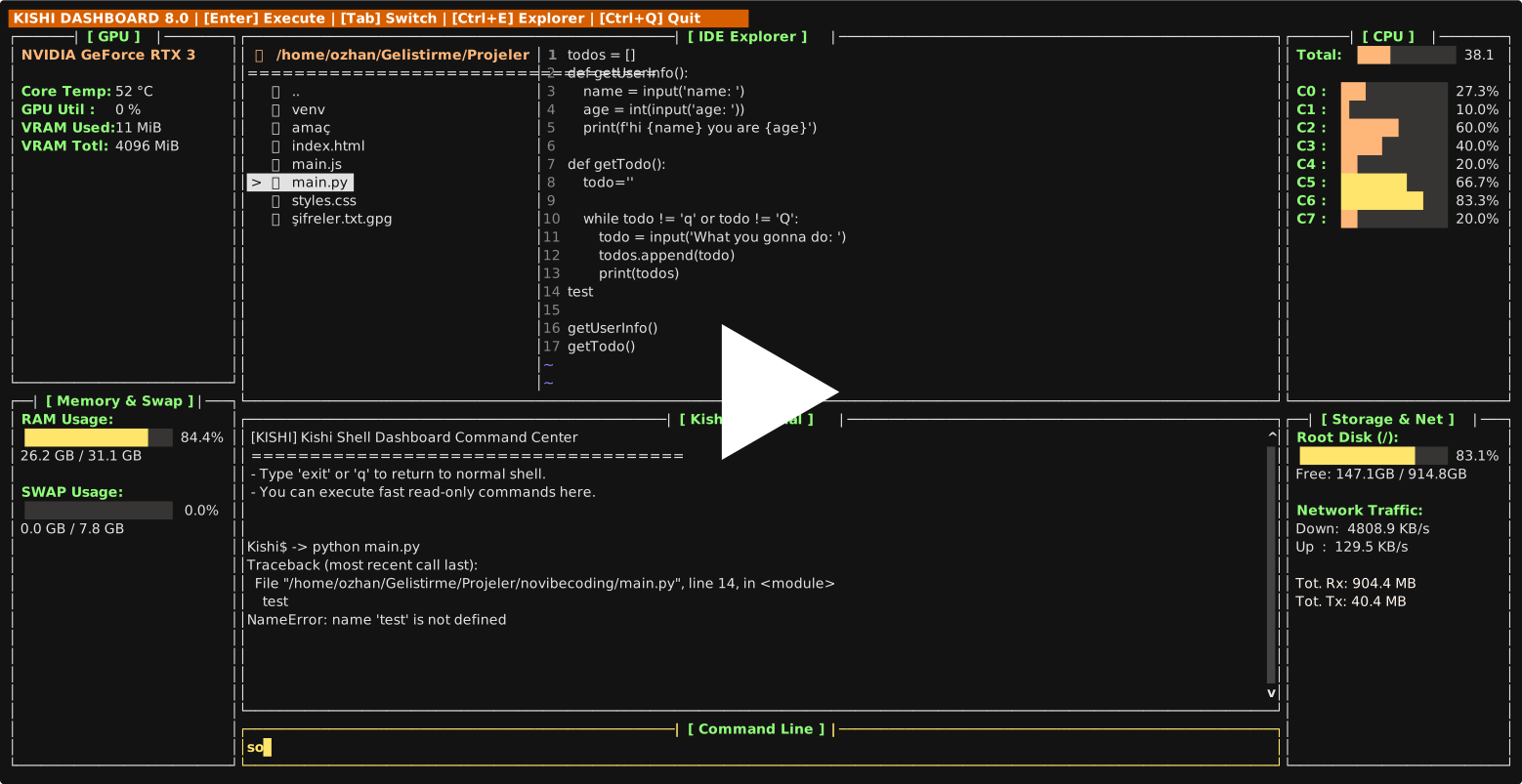
Kishi Shell is a next-generation command line developed 100% in Python that transforms into a full-fledged Terminal User Interface (TUI) Operating System without requiring any external software (Go, C) or plugins. It combines the traditional Bash command set with modern IDE (Code Editor) and System Monitor features.
Installation & Running
Option 1: Install via AUR (Arch Linux) — Recommended
yay -S kishi-shell
Option 2: Install from Source
git clone https://github.com/ozhangebesoglu/Kishi-Shell.git
cd Kishi-Shell
chmod +x install.sh
./install.sh
The installer will try pip3 install . first. If your system uses PEP 668 protection, it will offer you to create a virtual environment (recommended) or use --break-system-packages.
Option 3: Install via pip (PyPI)
pip install --upgrade kishi-shell
Type kishi in your terminal to launch Kishi Shell. Type exit to return to your default shell.
Advanced Visual Interfaces (TUI)
Kishi Shell doesn't make you install Midnight Commander or top/htop. It has its own zero-latency tools rendered 100% in Python.
1-) VSCode-like Unified IDE & Dashboard
No more reading files on a plain black screen! Kishi Shell doesn't make you install Midnight Commander or top/htop. It merges both into a perfect VSCode-like layout.
-
Command:
dashboardRunning isolated in the background, this system displays CPU Core Usage, RAM / SWAP Metrics, Root Disk space, and Live Network Traffic (Down/Up) in side panels. -
When you press
Ctrl + E, the massive terminal in the center instantly transforms into a Dual-Panel IDE (Development Environment). The screen splits from the top into two sections, placing the Folder Tree on the left and the Code Editor on the right. The bottom section remains as the Kishi Terminal. -
You can navigate between panels using the
Tabkey, creating a perfect cycle between Tree -> Editor -> Terminal -> Input Line. -
Write your code and save it instantly with
Ctrl + S.


2-) Interactive Terminal & Directory Synchronization
The Kishi Terminal at the bottom of the screen works in live sync with the Folder Tree!
- When you type
cdin the command line to change directories, the Tree updates automatically. - When you run long-running Python or Bash scripts that wait for your input (like
input()), the interface never freezes! Thanks to background binary streaming, command outputs are printed directly to the interface, and inputs you type in the command line at the bottom are forwarded directly to the code'sstdininput. - You can send
Ctrl + Cto kill a running process without closing the dashboard, then continue using the terminal normally.


3-) Standalone File Explorer
The IDE Explorer also works as a standalone dual-pane file browser outside the dashboard. Navigate your entire filesystem, preview directories, and edit code with line numbers.
- Command:
explore - Shortcut:
Ctrl + E


4-) Tab Completion & Syntax Highlighting
Kishi provides real-time tab completion for system commands, builtins, and filesystem paths. Known commands appear in green, unknown ones in red.

5-) Help System & History Search (Fuzzy Search)
- For Comprehensive Help:
help— For Quick Shortcuts:help less


No need to install external FZF to find your old commands.
- Shortcut:
Ctrl + RAs you type like a typewriter, it performs character matching among thousands of your old commands and brings the desired command to your screen in seconds. PressEnterto pull the command.
Scripting and Environment Variables
Setting and Reading Variables (export)
You can define new variables in the Kishi environment that other programs can also read.
Kishi$ -> export MY_KEY="12345"
Kishi$ -> echo $MY_KEY
12345
Simply type unset MY_KEY to remove it. You can list all loaded variables in the environment by just typing export.
Create Your Own Commands (myfunc)
If you keep repeating a task, you can instantly teach Kishi code blocks (Sub-Routines). Defining functions is very easy:
Kishi$ -> greet() { echo "Welcome to the System $USER"; ls -l; }
Kishi$ -> greet
Welcome to the System ozhangebesoglu
drwxrwxr-x 2 user user 4096 ...
You can chain functions with semicolons (;) and run massive automation scripts in a single line. Moreover, you can squeeze complex Shell operators like |, &&, >, >> in between your commands and outputs!
Help Center (help)
Kishi always assists you. If you want to remember all system features and command tips:
- For Comprehensive (Full) Help:
help - For Quick Shortcut Summaries:
help lessis all you need to type.
Contributing
We welcome contributions! Check out CONTRIBUTING.md for guidelines on how to get started.
Developed by: Ozhan Gebesoglu
Designed to push the limits of Python in the Terminal.
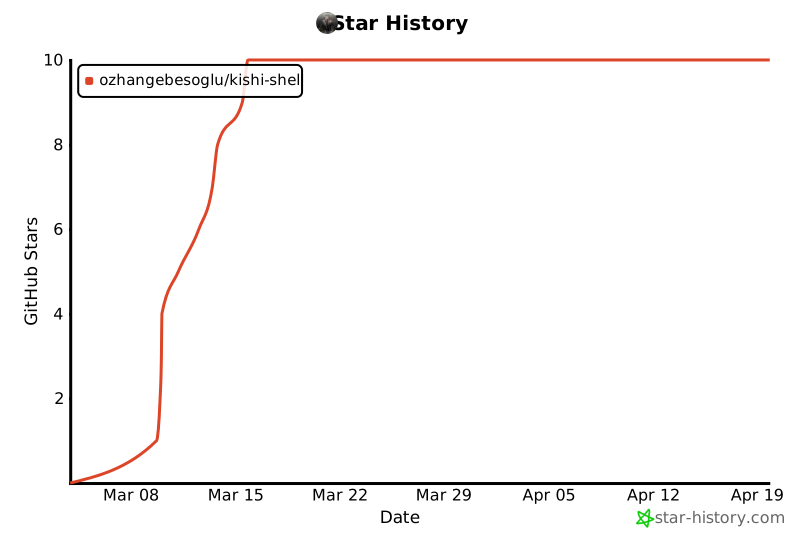
Star History
Project details
Verified details
These details have been verified by PyPIProject links
GitHub Statistics
Maintainers
Release history Release notifications | RSS feed


Download files
Download the file for your platform. If you're not sure which to choose, learn more about installing packages.
Source Distribution
Built Distribution
Filter files by name, interpreter, ABI, and platform.
If you're not sure about the file name format, learn more about wheel file names.
Copy a direct link to the current filters
File details
Details for the file kishi_shell-2.0.0.1.tar.gz.
File metadata
- Download URL: kishi_shell-2.0.0.1.tar.gz
- Upload date:
- Size: 46.5 kB
- Tags: Source
- Uploaded using Trusted Publishing? Yes
- Uploaded via: twine/6.1.0 CPython/3.13.7
File hashes
| Algorithm | Hash digest | |
|---|---|---|
| SHA256 |
45ba1d44641973f16ffac6314bc47e0e4b1cc4b2afa8b0ec5770f791827fd8ab
|
|
| MD5 |
991afc1f642d98eb62011e960f3ba856
|
|
| BLAKE2b-256 |
696cb1d35c382b5e74b05ca1d798d905ffbcb0c51ffbfe792c23dc0cde00a48e
|
Provenance
The following attestation bundles were made for kishi_shell-2.0.0.1.tar.gz:
Publisher:
publish.yml on ozhangebesoglu/Kishi-Shell
-
Statement:
-
Statement type:
https://in-toto.io/Statement/v1 -
Predicate type:
https://docs.pypi.org/attestations/publish/v1 -
Subject name:
kishi_shell-2.0.0.1.tar.gz -
Subject digest:
45ba1d44641973f16ffac6314bc47e0e4b1cc4b2afa8b0ec5770f791827fd8ab - Sigstore transparency entry: 1092907214
- Sigstore integration time:
-
Permalink:
ozhangebesoglu/Kishi-Shell@4ffd853a7156c8121619714e0fc8952034c7cc32 -
Branch / Tag:
refs/tags/v2.0.0.1 - Owner: https://github.com/ozhangebesoglu
-
Access:
public
-
Token Issuer:
https://token.actions.githubusercontent.com -
Runner Environment:
github-hosted -
Publication workflow:
publish.yml@4ffd853a7156c8121619714e0fc8952034c7cc32 -
Trigger Event:
push
-
Statement type:
File details
Details for the file kishi_shell-2.0.0.1-py3-none-any.whl.
File metadata
- Download URL: kishi_shell-2.0.0.1-py3-none-any.whl
- Upload date:
- Size: 46.3 kB
- Tags: Python 3
- Uploaded using Trusted Publishing? Yes
- Uploaded via: twine/6.1.0 CPython/3.13.7
File hashes
| Algorithm | Hash digest | |
|---|---|---|
| SHA256 |
fdf2aefa517292806ce99574764e26f8564a8cd74d59fc949303581ec77434e5
|
|
| MD5 |
8d03ca7040f287342cbb2c2aa87e54e7
|
|
| BLAKE2b-256 |
628d79718d8529fd6a7c4da6681a018de2b3a9a0ed23c61c218e2469999f3b93
|
Provenance
The following attestation bundles were made for kishi_shell-2.0.0.1-py3-none-any.whl:
Publisher:
publish.yml on ozhangebesoglu/Kishi-Shell
-
Statement:
-
Statement type:
https://in-toto.io/Statement/v1 -
Predicate type:
https://docs.pypi.org/attestations/publish/v1 -
Subject name:
kishi_shell-2.0.0.1-py3-none-any.whl -
Subject digest:
fdf2aefa517292806ce99574764e26f8564a8cd74d59fc949303581ec77434e5 - Sigstore transparency entry: 1092907272
- Sigstore integration time:
-
Permalink:
ozhangebesoglu/Kishi-Shell@4ffd853a7156c8121619714e0fc8952034c7cc32 -
Branch / Tag:
refs/tags/v2.0.0.1 - Owner: https://github.com/ozhangebesoglu
-
Access:
public
-
Token Issuer:
https://token.actions.githubusercontent.com -
Runner Environment:
github-hosted -
Publication workflow:
publish.yml@4ffd853a7156c8121619714e0fc8952034c7cc32 -
Trigger Event:
push
-
Statement type:






