
SEO addon for Plone


Project description
kitconcept.seo
SEO addon for Plone








SEO enhancements for the Plone Content Management System.
kitconcept.seo works with the latest Plone 6 and its default frontend Volto.
It might still work with Plone Classic but that is not officially supported.
If you are looking for a full featured SEO solution for Plone Classic or older versions of Plone, we suggest looking into fourdigits.seo.
Features
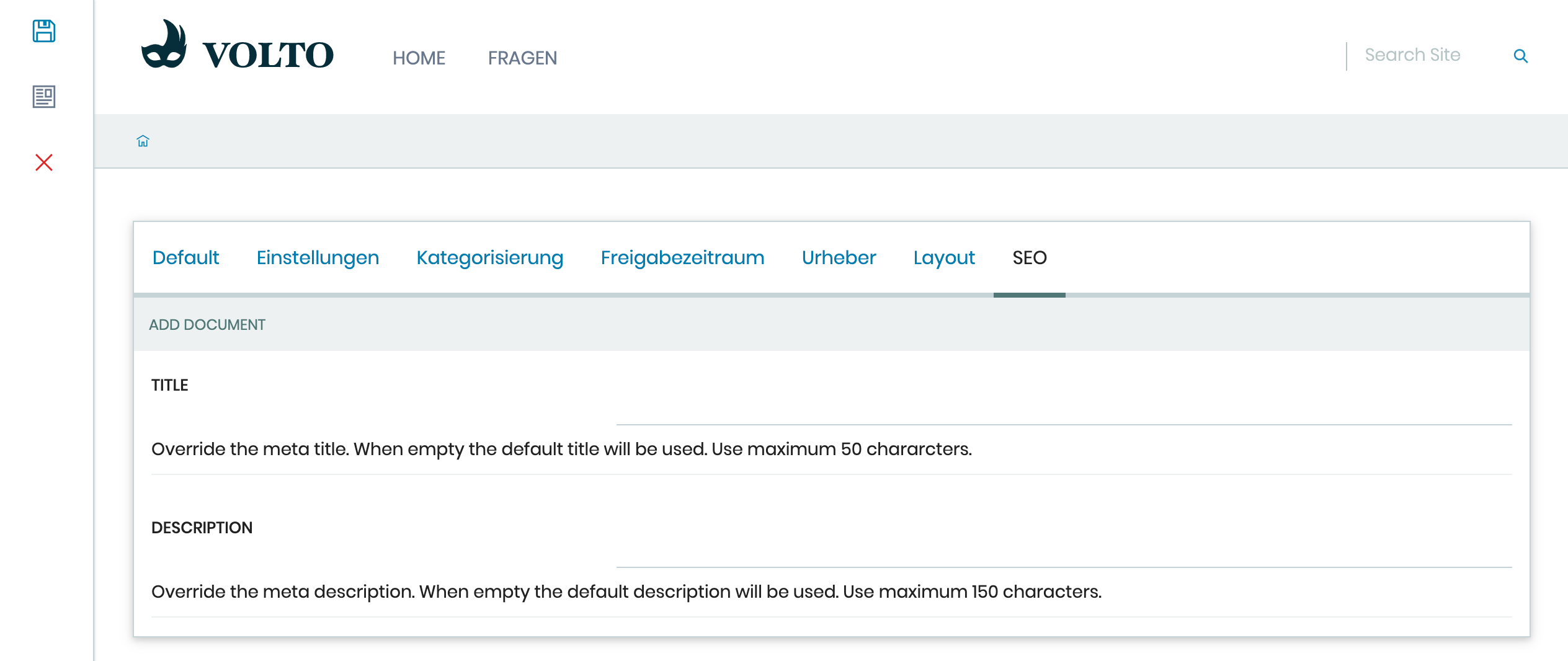
- Allows to override meta title and meta description per page
- Allows to set the noindex header to exclude pages from being indexed
- Allows to set a canonical URL
- Allows to set Open Graph title, description and image
Examples
This add-on can be seen in action at the following sites:
Translations
This product has been translated into
- German
- Italian
- Spanish
Installation
Install kitconcept.seo with pip:
pip install kitconcept.seo
And to create the Plone site:
make create-site
Enable the SEO behavior
To enable the SEO tab for a specific content type you have to enable the kitconcept.seo behavior.
Go to the page setup and then to the Dexterity Content Types control panel.
Choose the content type you want to enable SEO for and enable the kitconcept.seo behavior.
Enable the SEO behavior programmatically
Enable the kitconcept.seo behavior by adding the behavior to the Factory Type Information (FTI) of your type in your generic setup profile. E.g. to enable SEO for the document type, drop a Document.xml file into the profiles/default/types folder of your add-on product with the following content:
   <?xml version="1.0" encoding="utf-8"?>
   <object name="Document" meta_type="Dexterity FTI" i18n:domain="plone"
     xmlns:i18n="http://xml.zope.org/namespaces/i18n">
     <property name="behaviors" purge="False">
       <element value="kitconcept.seo" />
     </property>
   </object>
Add to Volto project or add-on
To add kitconcept.seo to your Volto project/add-on you need to edit the component you want to use it for.
If you want use it for your whole page you can use it in the View.jsx (see here for further information on editing views in Volto).
Than you use react-helmet Volto helper to set the title and description of the component. So import react-helmet
with:
import { Helmet } from '@plone/volto/helpers';
And finally add this to the jsx code of your component:
   <Helmet
          title={
            this.props.content.seo_title
              ? this.props.content.seo_title
              : this.props.content.title
          }
          meta={
            this.props.content.seo_description
              ? [
                  {
                    name: 'description',
                    content: this.props.content.seo_description,
                  },
                ]
              : [
                  {
                    name: 'description',
                    content: this.props.content.description,
                  },
                ]
          }
          bodyAttributes={{
            class: `view-${viewName.toLowerCase()}`,
          }}
        />
Usage
In your Volto page you need to go to the edit mode of the page you want to add a title and description for SEO and open the properties of the page by clicking the properties under the save button. Choose SEO there and add a title and description in the fields. When you are done hit the save button.
Contribute
Prerequisites ✅
- An operating system that runs all the requirements mentioned.
- uv
- Make
- Git
- Docker (optional)
Installation 🔧
-
Clone this repository, then change your working directory.
git clone git@github.com:kitconcept/kitconcept.seo.git
cd kitconcept.seo
-
Install this code base.
make install
License
The project is licensed under GPLv2.
Credits and acknowledgements 🙏
Generated using Cookieplone (0.9.10) and cookieplone-templates (dd13073) on 2026-01-27 09:51:10.480177. A special thanks to all contributors and supporters!
Project details
Release history Release notifications | RSS feed


Download files
Download the file for your platform. If you're not sure which to choose, learn more about installing packages.
Source Distribution
Built Distribution
Filter files by name, interpreter, ABI, and platform.
If you're not sure about the file name format, learn more about wheel file names.
Copy a direct link to the current filters
File details
Details for the file kitconcept_seo-3.0.0a2.tar.gz.
File metadata
- Download URL: kitconcept_seo-3.0.0a2.tar.gz
- Upload date:
- Size: 175.2 kB
- Tags: Source
- Uploaded using Trusted Publishing? No
- Uploaded via: twine/6.2.0 CPython/3.10.13
File hashes
| Algorithm | Hash digest | |
|---|---|---|
| SHA256 |
9387806269c785c49f5d192e25895ad0159baff4652ad68a70afcce210304394
|
|
| MD5 |
29ee6c70aca9efaf8748283e050cc17e
|
|
| BLAKE2b-256 |
ef472190877ba56bdea49f50dfc3027e1f8cc78471e316f5927868968673e738
|
File details
Details for the file kitconcept_seo-3.0.0a2-py3-none-any.whl.
File metadata
- Download URL: kitconcept_seo-3.0.0a2-py3-none-any.whl
- Upload date:
- Size: 28.9 kB
- Tags: Python 3
- Uploaded using Trusted Publishing? No
- Uploaded via: twine/6.2.0 CPython/3.10.13
File hashes
| Algorithm | Hash digest | |
|---|---|---|
| SHA256 |
b6ec636a154a5d7052c99c7265b641367aa1dfd938958221c7b051cd076317df
|
|
| MD5 |
3476a18b59b59ddab0ca13440bfe5cdc
|
|
| BLAKE2b-256 |
4e953f24f77fc93303137da50a0f0872f83add7e5d380431a8e5ed4b222b69ae
|






