
Kitsune




Bring your coding agent into Firefox—and keep working alongside it.
Kitsune lets AI agents like Claude Code, Codex, Pi, and OpenCode use the Firefox, Zen, or LibreWolf browser you already have open. Your sessions, cookies, and extensions stay in place. No Playwright, Chromium, or WebDriver required.
Research in background tabs, prepare form drafts, and continue browser tasks with an agent you already use—not a separate browser or built-in AI assistant.
Two principles guide every trade-off: the user's browser belongs to the user, and fewer, sharper tools. See Philosophy.
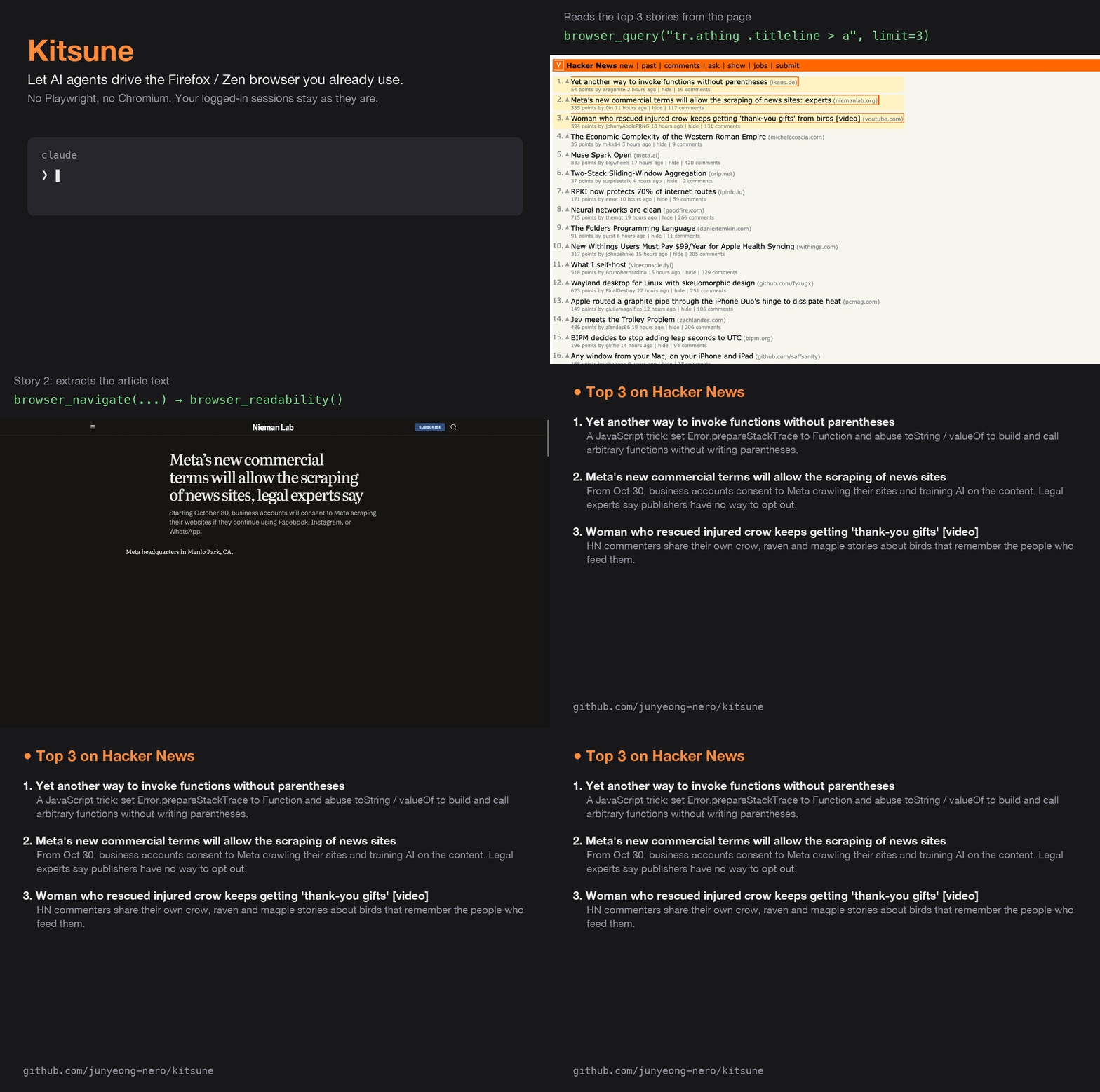
A real run in Zen Browser. Page images are Kitsune's own screenshots of background tabs; the user's tab titles are hidden.
Why Kitsune?
- Work alongside your agent. Agent-created tabs open in the background. Writes to a tab you are actively using are held, and closing your own tabs requires a separate confirmation step. These protections reduce interference; OS-level clicks and site-opened popups still have focus and input limitations.
- Choose how much to delegate. Configure
KITSUNE_MODE=read,draft, oractto limit the available tools and bridge requests. Draft mode allows supported field input without click or submit tools; sites may still autosave edits. The default isact, not a restricted mode. See Task modes. - Keep the tool list small. Start with Playwright MCP's 25 core tools. Kitsune's other tools stay off until you allow them, and the agent can find and call the ones you allow without restarting its session. See Choosing tools.
- Recover without blindly repeating work. With the optional
automationcapability, interrupted batch, parallel, and workflow calls can be resumed without resending successful writes. Uncertain writes require an observation before retrying. Checkpoints are temporary and do not survive a bridge restart.
What can it do?
- Research the web. Search, read pages, and summarize findings with links.
- Interact with websites. Click, type, select options, and fill forms—even on sites you're already signed into.
- Capture and extract. Take screenshots or turn page content into text and Markdown.
- Work across tabs. Keep research and tasks in separate tabs without replacing the page you're using.
Benchmark
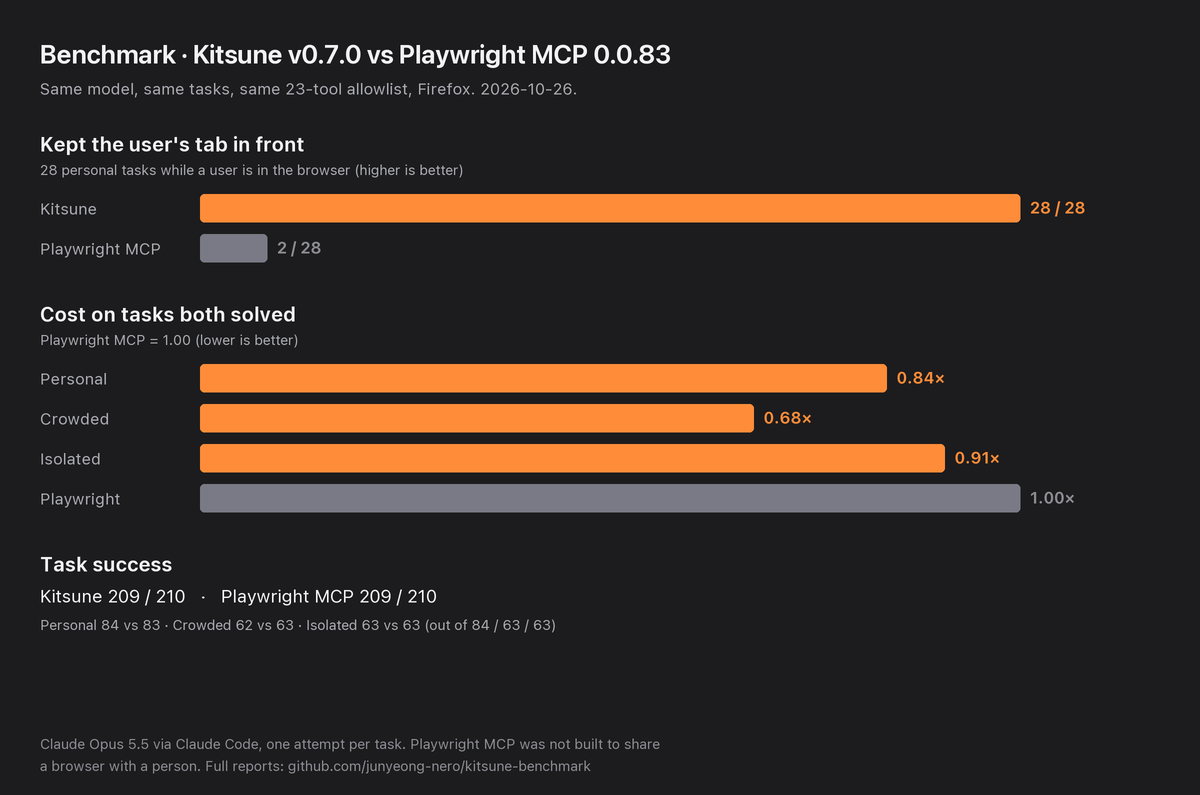
On the same tasks and tool allowlist, Kitsune v0.4.0 kept the user's tab in front in 23 of 24 shared-browser tasks (Playwright MCP: 2 of 24) and cost 0.83–0.93× as much on tasks both solved. It solved 191 of 198 tasks to Playwright MCP's 197. One attempt per task with Claude Opus 5.5; Playwright MCP was not designed to share a browser with a person. See the full reports.
How is it different?
Kitsune is one of several ways to connect an agent to a browser. Choose by the browser you use and the work you want to hand off:
| If you want to… | Consider |
|---|---|
| Delegate tasks in the Firefox-family browser you are using, with background tabs, read/draft/act modes, and resumable batches | Kitsune |
| Debug or profile pages in Firefox (debugger, profiler, deep protocol access) | Mozilla Firefox DevTools MCP, which attaches to a running Firefox started with remote-debugging flags |
| Test across Chromium, Firefox, and WebKit in launched browsers | Playwright MCP; Kitsune publishes its 25 core tools, so prompts written for it carry over |
| Drive the Chrome you already use | A Chromium extension MCP such as Browser MCP |
Kitsune connects through an extension and a local bridge, so Firefox needs no startup flags or WebDriver. Other Firefox extension projects also reuse your logins; Kitsune's focus is working alongside you in the same browser. For the full comparison and its limits, see Positioning.
How do I use it?
-
Connect once. Install uv, then follow the MCP setup for your agent below. Install the browser extension in Firefox, Zen, or LibreWolf: the signed build installs once, while the developer build (needed for
browser_evaluate) is a temporary add-on. -
Keep your browser open. Kitsune starts its shared bridge automatically. Ask your agent to check the connection before your first task.
-
Ask in plain language. For example:
Research these three products in new background tabs and compare them with source links. Leave my current tab alone.
Inspect this page's form and fill a draft. Don't submit it yet.
Open Hacker News in a background tab and summarize the top three stories with links.
For an enforced draft-only tool surface, configure
KITSUNE_MODE=draftbefore starting the MCP client; asking in plain language does not change the mode.
Use a dedicated browser profile and only give access to accounts the agent needs. Ask for confirmation before sending, purchasing, or deleting anything. The opt-in ask-before-act policy makes the bridge hold submits, payment pages, JavaScript, and cookie access until the agent repeats the call with a confirmation token. That second step is not proof of human approval, and these controls do not prevent prompt injection. Read the security guidance before using sensitive accounts.
MCP setup
All clients launch the same local stdio server:
uvx --from kitsune-browser-mcp kitsune. Choose one setup method for each
client you use. Several clients can share the same bridge; keep their Kitsune
versions and install sources consistent.
CLI registration: Claude Code, Codex, and Pi
Claude Code — available in every project with --scope user:
claude mcp add --scope user kitsune -- uvx --from kitsune-browser-mcp kitsune
Codex CLI — registers the server in ~/.codex/config.toml:
codex mcp add kitsune -- uvx --from kitsune-browser-mcp kitsune
Pi — uses built-in MCP support with user-level configuration by default:
pi mcp add kitsune -- uvx --from kitsune-browser-mcp kitsune
pi mcp list
Add --local before kitsune to register Pi's server only for the current
project. In an already running Pi session, run /reload, then /mcp to inspect
the connection. If an MCP adapter extension overrides Pi's built-in support,
follow that extension's configuration instructions instead.
OpenCode
Merge this into ~/.config/opencode/opencode.json (global) or opencode.json
in your project root. OpenCode uses an mcp object and a command array, not
mcpServers:
{
  "$schema": "https://opencode.ai/config.json",
  "mcp": {
    "kitsune": {
      "type": "local",
      "command": ["uvx", "--from", "kitsune-browser-mcp", "kitsune"],
      "enabled": true
    }
  }
}
JSON configuration: Pi, Claude Desktop, and Cursor
These clients share the same mcpServers format. As an alternative to CLI
registration where available, merge the following entry into your client's
config; keep any existing servers:
| Client | Config file |
|---|---|
| Pi (built-in MCP) | ~/.pi/agent/mcp.json (user) or .pi/mcp.json (project; requires project trust) |
| Claude Desktop (macOS) | ~/Library/Application Support/Claude/claude_desktop_config.json |
| Cursor | ~/.cursor/mcp.json (global) or .cursor/mcp.json (project) |
{
  "mcpServers": {
    "kitsune": {
      "command": "uvx",
      "args": ["--from", "kitsune-browser-mcp", "kitsune"]
    }
  }
}
Restart or reconnect your client after configuring it, then ask it to list your tabs
(browser_tabs with action: "list"); an error's hint says what to fix. GUI apps may need the full path returned by
which uvx instead of uvx if they do not inherit your shell's PATH.
Choosing tools
By default Kitsune publishes exactly Playwright MCP's
25 core tools (same names, descriptions and schemas), driving your own browser, so
prompts and clients written for Playwright MCP work unchanged
(Core tools). Kitsune's own tools come in capability groups that
you enable with KITSUNE_CAPS in the MCP server's environment:
| Group | Tools for |
|---|---|
browse |
Scrolling, forward navigation, checkboxes, focus, form submits, trusted OS clicks |
read |
Page text and Markdown, forms, DOM, links, images, metadata |
inspect |
Element bounds, computed styles, selector diagnosis, highlights |
tabs |
Pinning, muting, zoom, windows, tab tags, keep-alive |
automation |
Batches, retries, workflows, parallel tabs, resume |
network |
Downloads, request interception and capture |
admin |
Connection status, logs, audit, cache, policy |
storage, history |
Cookies, page storage, clipboard and saved sessions; history and bookmarks. They read personal data, so all leaves them out: name them |
To keep the agent's tool list small, allow more than you publish. With
KITSUNE_CAPS=all and KITSUNE_PUBLISH=core, the agent starts with the core tools
and finds and calls the others in the same session
(Finding tools without a restart). For
example, with Claude Code:
claude mcp add --scope user kitsune -e KITSUNE_CAPS=all -e KITSUNE_PUBLISH=core -- uvx --from kitsune-browser-mcp kitsune
In the JSON configurations above, add "env": {"KITSUNE_CAPS": "all", "KITSUNE_PUBLISH": "core"}
next to "args". The bridge checks the groups on every request, batch steps included,
and tools you call without a tab act on the agent's current tab, not the one you are
looking at.
Upgrading from 0.3? The devtools, parallel, windows and session groups were
replaced by the groups above, and all no longer includes storage. A configuration
that names a removed group fails at startup; see Tools for where each
tool went.
For Codex's TOML alternative, environment variables, version pinning, and upgrades, see Installation.
For the details: Tools · Configuration · Troubleshooting · Updating · API reference · Development
For architecture, product trade-offs, and the wider browser MCP landscape, see Positioning.
MIT · Based on ZenLink and ZenLink-MCP by Jay-Quan. Credits · License
1 maintainer

Metadata
1 maintainer
Release files for kitsune-browser-mcp 0.4.1
For a detailed explanation of source distributions (sdists) and built distributions (wheels), please see the package formats documentation.
Source distribution (sdist)
| File | Size | Uploaded | Provenance | Actions |
|---|---|---|---|---|
| kitsune_browser_mcp-0.4.1.tar.gz | 419.3 kB | Without provenance | Details for kitsune_browser_mcp-0.4.1.tar.gz |
Built distribution (wheel)
| File | Interpreter | ABI | Platform | Actions Reset |
|---|---|---|---|---|
| kitsune_browser_mcp-0.4.1-py3-none-any.whl | Python 3 | none | any | Details for kitsune_browser_mcp-0.4.1-py3-none-any.whl |
Total release size: 540.7 kB
Release files / kitsune_browser_mcp-0.4.1.tar.gz
| Download URL | kitsune_browser_mcp-0.4.1.tar.gz |
|---|---|
| Size | 419.3 kB |
| Tags | Source |
|
SHA-256 checksum How to use checksums |
66378d39cd19f9fb30b96d95e23ff08328409c4fc0aa13898f54c896546f92e7
|
|
BLAKE2b-256 checksum How to use checksums |
d782d6814fb8895ee393a02d0bf7671303aa7be6184c4968be05bcc8a49ad714
|
| Upload date | |
|
Uploaded using Trusted Publishing? What is trusted publishing? |
Yes |
| Uploaded via |
uv/0.13.5 {"installer":{"name":"uv","version":"0.13.5","subcommand":["publish"]},"python":null,"implementation":{"name":null,"version":null},"distro":{"name":"Ubuntu","version":"24.04","id":"noble","libc":null},"system":{"name":null,"release":null},"cpu":null,"openssl_version":null,"setuptools_version":null,"rustc_version":null,"ci":true}
|
Release files / kitsune_browser_mcp-0.4.1-py3-none-any.whl
| Download URL | kitsune_browser_mcp-0.4.1-py3-none-any.whl |
|---|---|
| Size | 121.4 kB |
| Tags | Python 3 |
|
SHA-256 checksum How to use checksums |
6f612858beb867ecce8cc0f9734c9f722c58618b5314e71c9f0a39c3b8db6043
|
|
BLAKE2b-256 checksum How to use checksums |
796bfd3b3de13cee1b7e82231bda6c051b7f2bbccf3833325195092880c78268
|
| Upload date | |
|
Uploaded using Trusted Publishing? What is trusted publishing? |
Yes |
| Uploaded via |
uv/0.13.5 {"installer":{"name":"uv","version":"0.13.5","subcommand":["publish"]},"python":null,"implementation":{"name":null,"version":null},"distro":{"name":"Ubuntu","version":"24.04","id":"noble","libc":null},"system":{"name":null,"release":null},"cpu":null,"openssl_version":null,"setuptools_version":null,"rustc_version":null,"ci":true}
|
Security for kitsune-browser-mcp 0.4.1
Provenance
Provenance describes where a file came from. On PyPI, provenance is shared via attestations, which provide a verifiable record of the build or publishing details. View details, limitations and caveats.
No provenance found
None of the files in this release were uploaded with provenance metadata.
A note on package security
PyPI is a repository for distributing packages, not a service for auditing them. While third-party security researchers and our staff do their best to detect and remove malicious packages, PyPI cannot guarantee the quality, security or suitability of any given package.
To learn more about protecting yourself from malicious actors, visit our package security documentation.














