
kiwitcms-requirements
Requirements management and traceability plugin for Kiwi TCMS.
A first-class registry of requirements mapped many-to-many to test cases, with a Sankey traceability diagram, coverage dashboard, document-control fields, CSV / XLSX / DOCX / PDF / JIRA-native exports, and configurable level profiles for ASPICE, ISO 9001, IEC 62304, DO-178C, or plain generic use.
Why
Kiwi TCMS ships with a single TestCase.requirement CharField (max 255 characters). That's a label, not traceability. Teams working to quality or safety standards need:
- A first-class Requirement entity with identity, source, level, and status
- Many-to-many links to test cases with typed relationships (verifies / validates / derives-from / related)
- Coverage analytics — what's tested, what isn't, and by how much
- Document-control fields (doc ID, revision, effective date, supersession chain) for ISO 9001 §7.5
- JIRA-ready CSV export so requirements can be pushed into downstream ALM tools
- Full audit trail of every change via
django-simple-history
This plugin adds that layer alongside the existing TestCase.requirement CharField (which is left untouched for backward-compat).
Features
Registry, list & detail
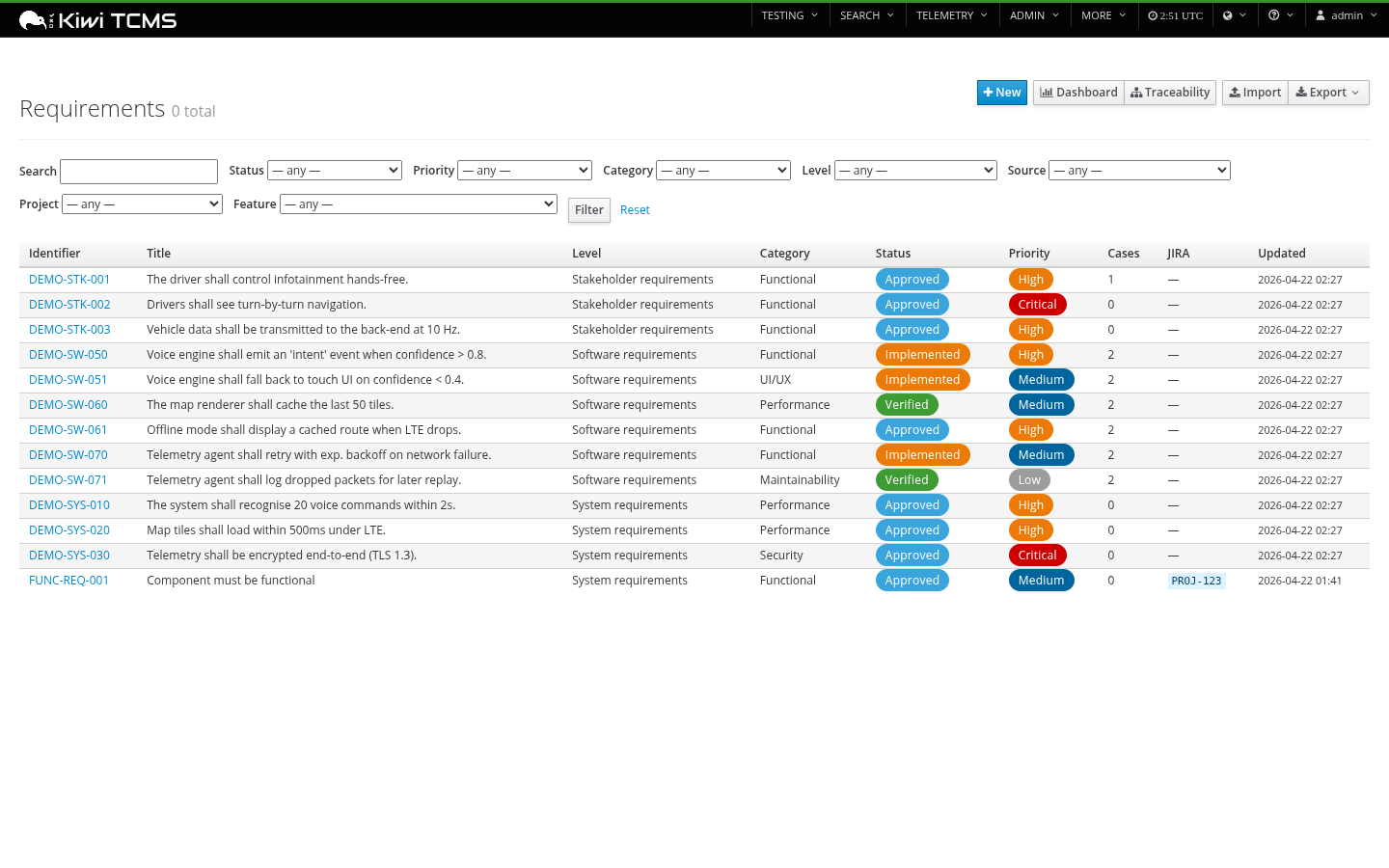
Filterable list with status / priority / level / category / source / project / feature filters, pill-style status and priority badges, JIRA issue keys, link counts.
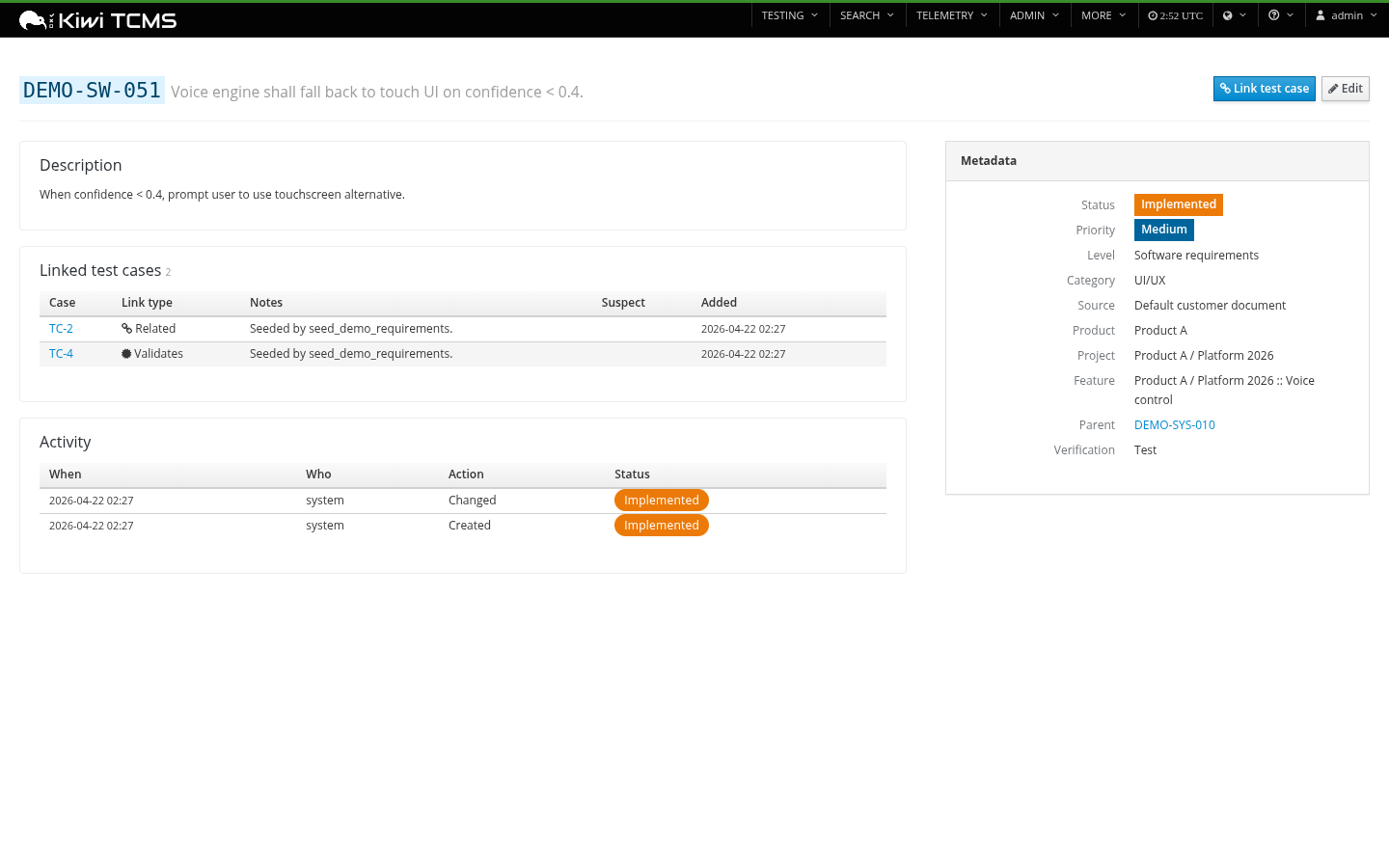
Per-requirement detail page with description, rationale, linked test cases (with link-type icons + suspect badges), child requirements, full activity history, and a PatternFly metadata sidebar.
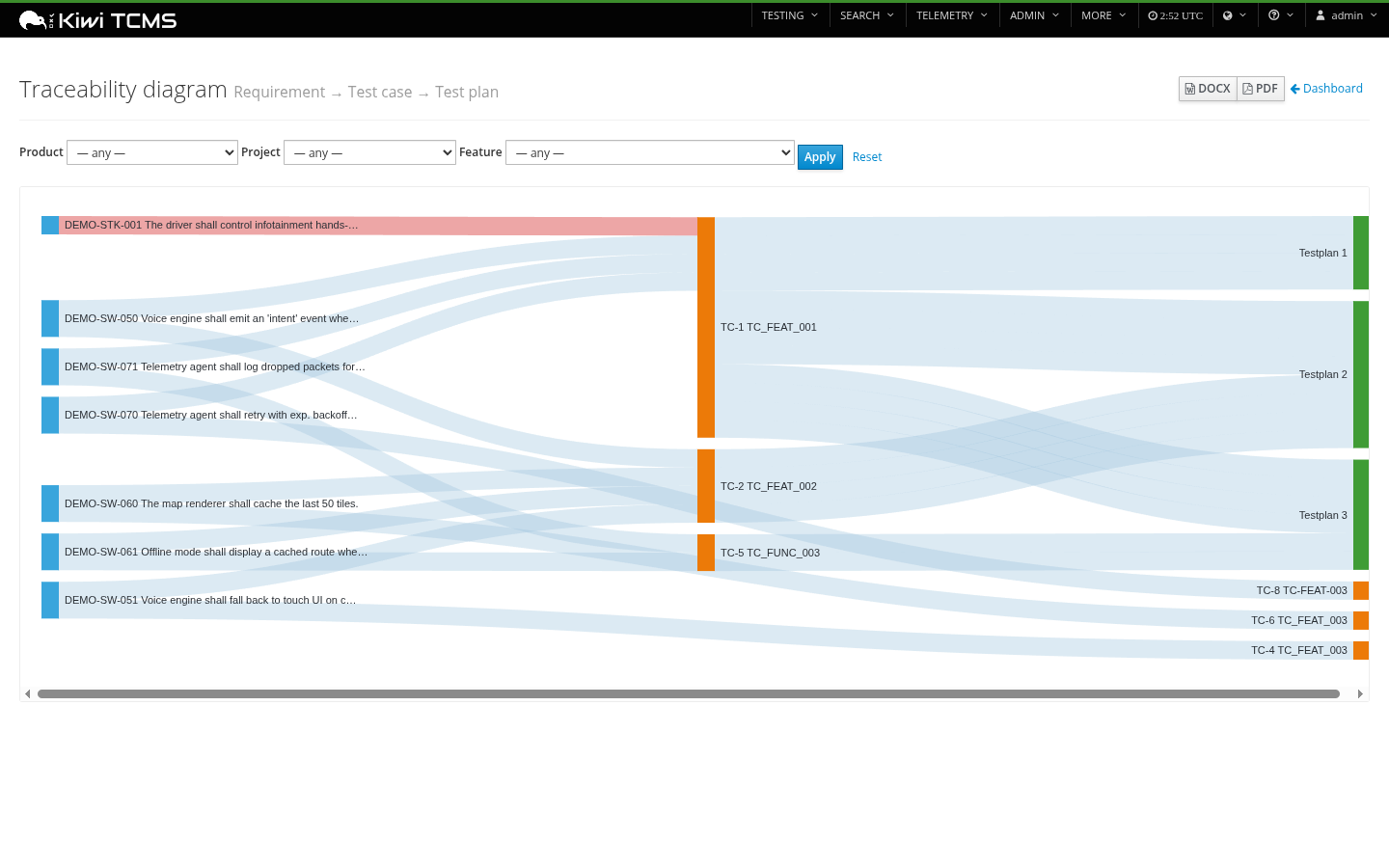
Sankey traceability diagram
Requirement → Test case → Test plan, filterable by product / project / feature, colour-coded by node kind, with suspect links shown in red. Export to DOCX or PDF embeds the live-rendered SVG on page 1 followed by a full row-by-row traceability table on page 2+.
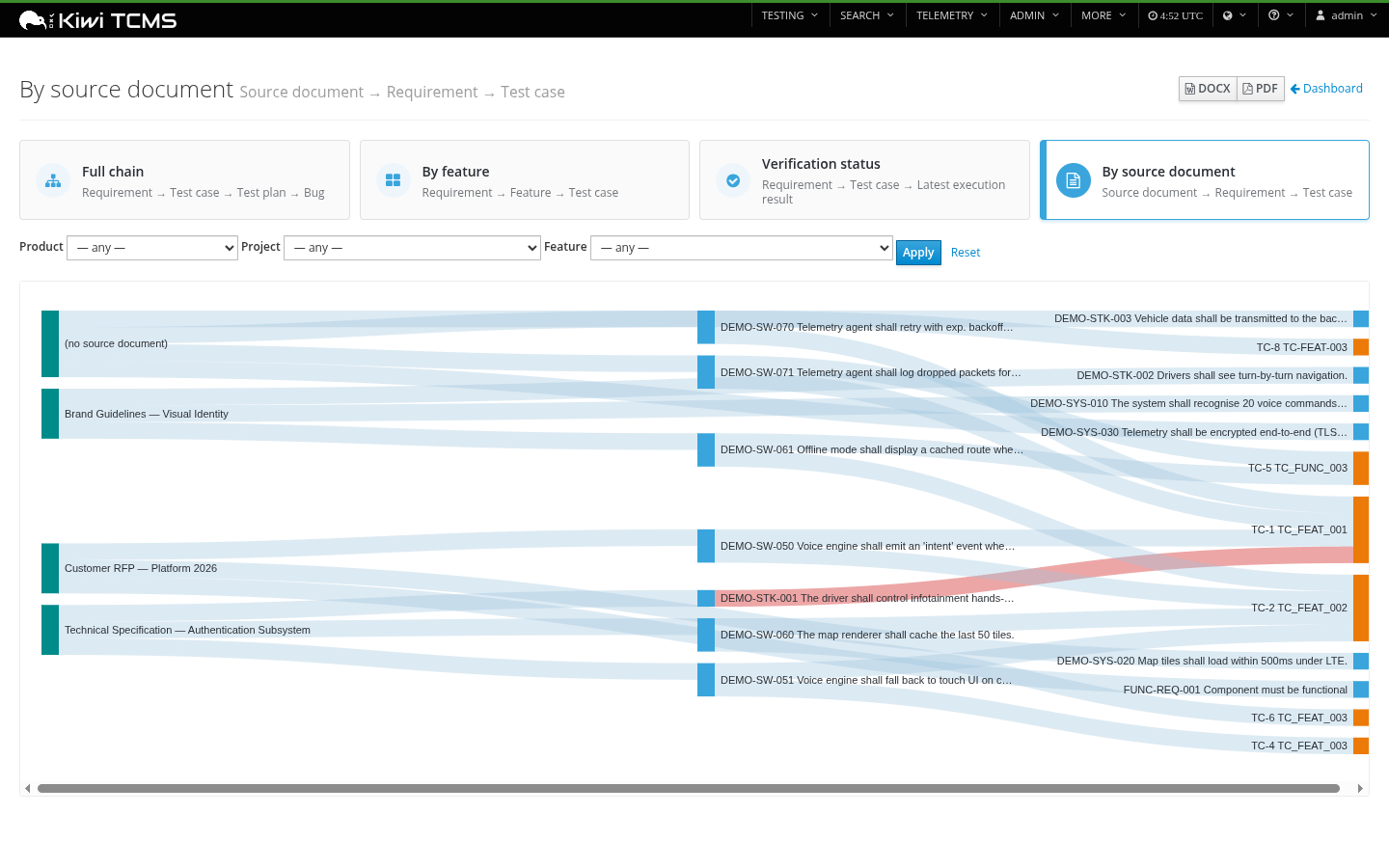
A second Sankey view added in v0.4.1 flows source document → requirement → test case so you can see at a glance which controlled documents (RFPs, specifications, brand guidelines) are actually exercised by tests. Requirements without a source document fall under a (no source document) node so the gap is obvious.
Coverage dashboard
Coverage %, orphan requirements, suspect links, plus donuts and bars for status / priority / level / category breakdown. ASIL / DAL / IEC 62304 safety-distribution chart shown only when at least one requirement has safety classification.
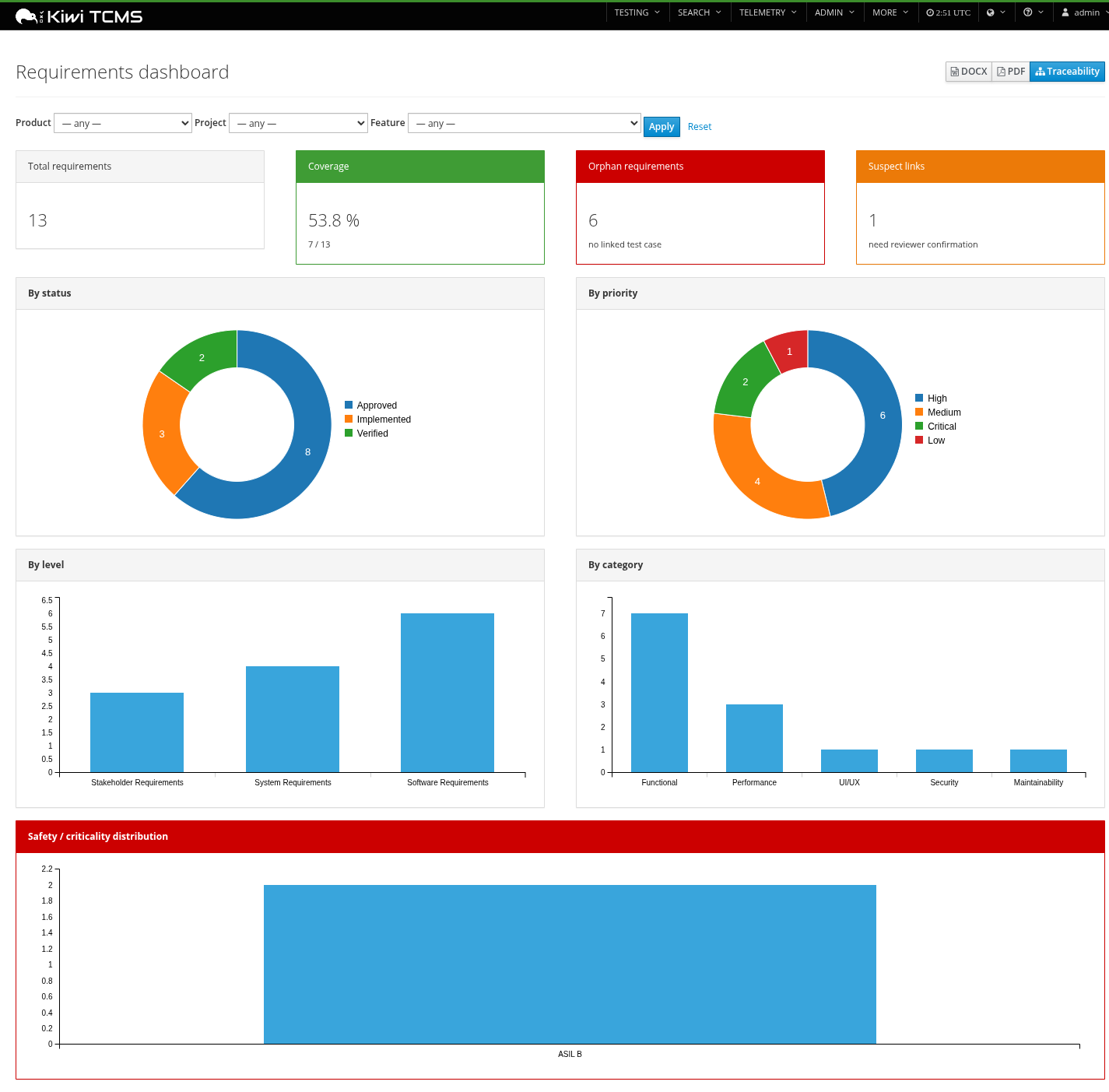
Export the dashboard snapshot to DOCX or PDF directly from the page header.
Programmes / projects (v0.3.0)
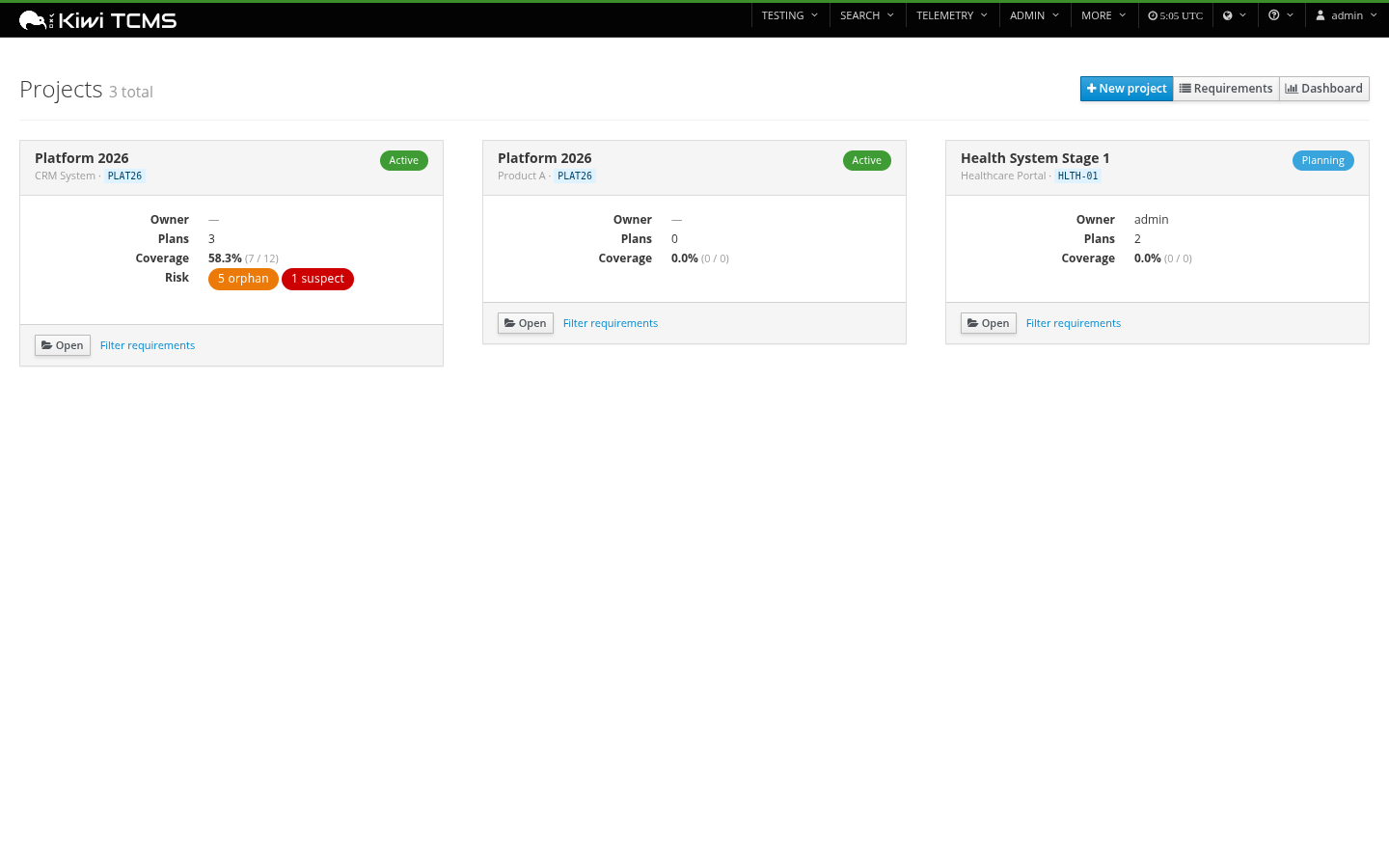
A Project is a programme record scoped to a Kiwi Product. Each project carries status, owner, stakeholders, target / actual end dates, JIRA project key, an open-ended external_refs JSON map, and an M2M to Kiwi TestPlans for in-scope test work. The list view is a card grid with status pills, owner, dates, and live coverage% per project.
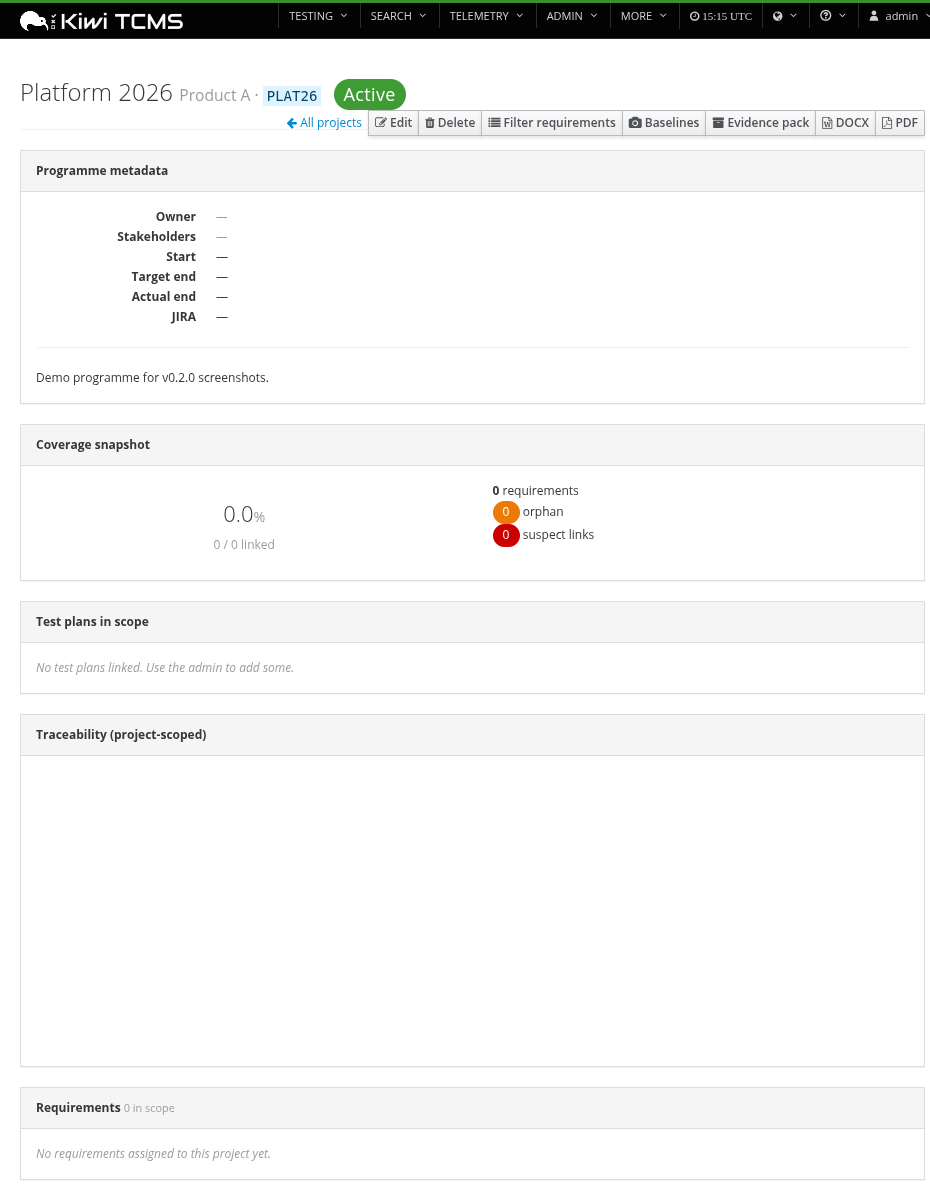
The detail page surfaces programme metadata, a project-scoped coverage donut + orphan / suspect counts, the linked plans, the requirements list, a project-scoped mini-Sankey, and one-click DOCX / PDF exports for just that project. Create / edit / delete is in-page (no admin round-trip needed).
Document fields & dynamic custom fields (v0.4.0)
Each requirement now carries optional document_file_name and document_title fields under the Taxonomy fieldset, capturing the controlled document the requirement was sourced from (a RequirementSource is the catalog entry; these fields are the per-requirement provenance). Both fields round-trip through CSV / XLSX import + export and are first-class filterable columns.
For organisation-specific metadata that doesn't warrant a schema migration, admins can register CustomFieldDefinition rows from Django admin (text / int / date / choice / bool). Each definition shows as a real form input on the requirement page and persists to the existing Requirement.external_refs JSON column — so adding a field never costs a migration.
Authoring
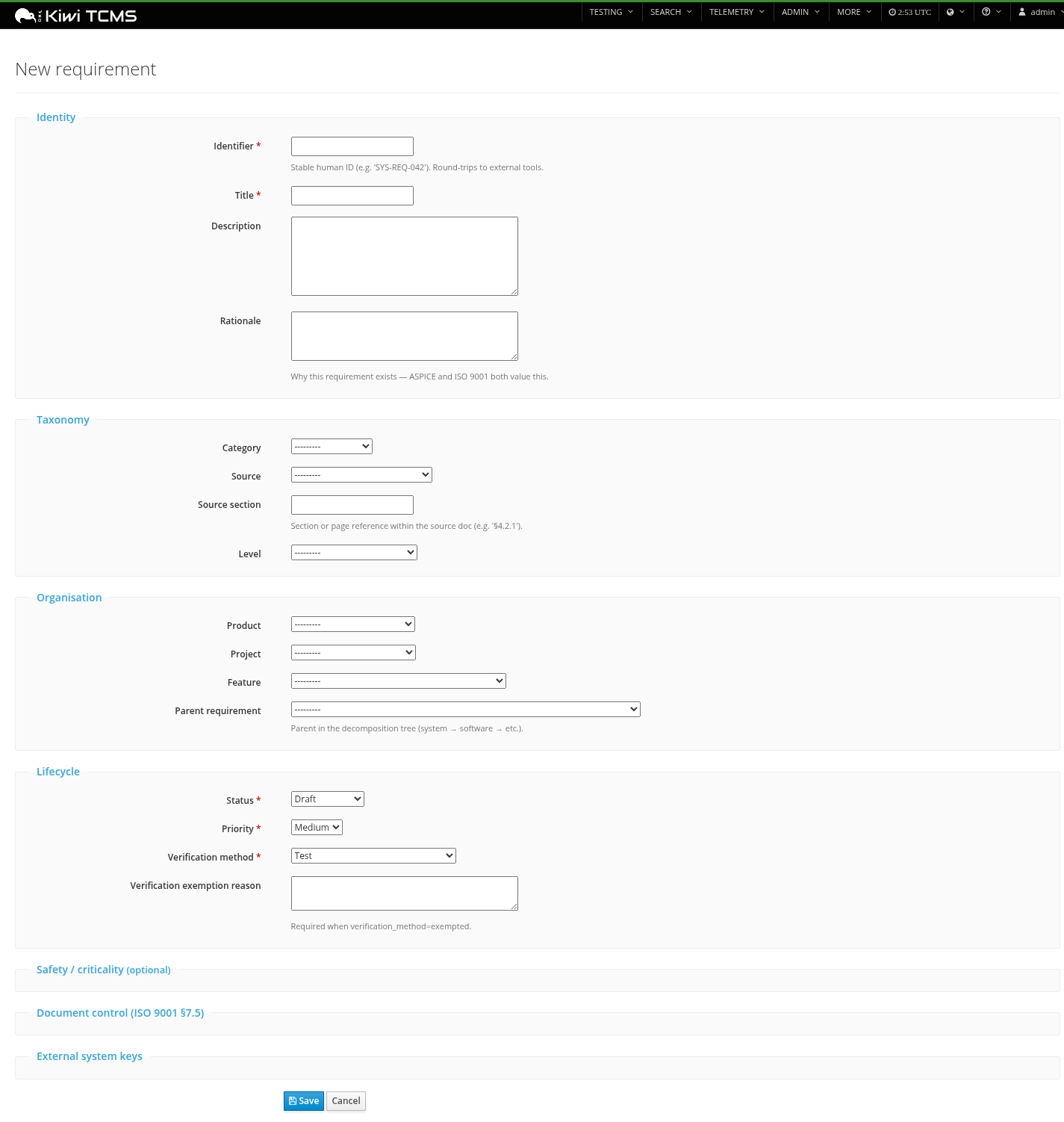
Fieldset-grouped form organised by concern: identity, taxonomy, organisation, lifecycle, and collapsible sections for safety/criticality classifications, ISO 9001 document control, and external system keys.
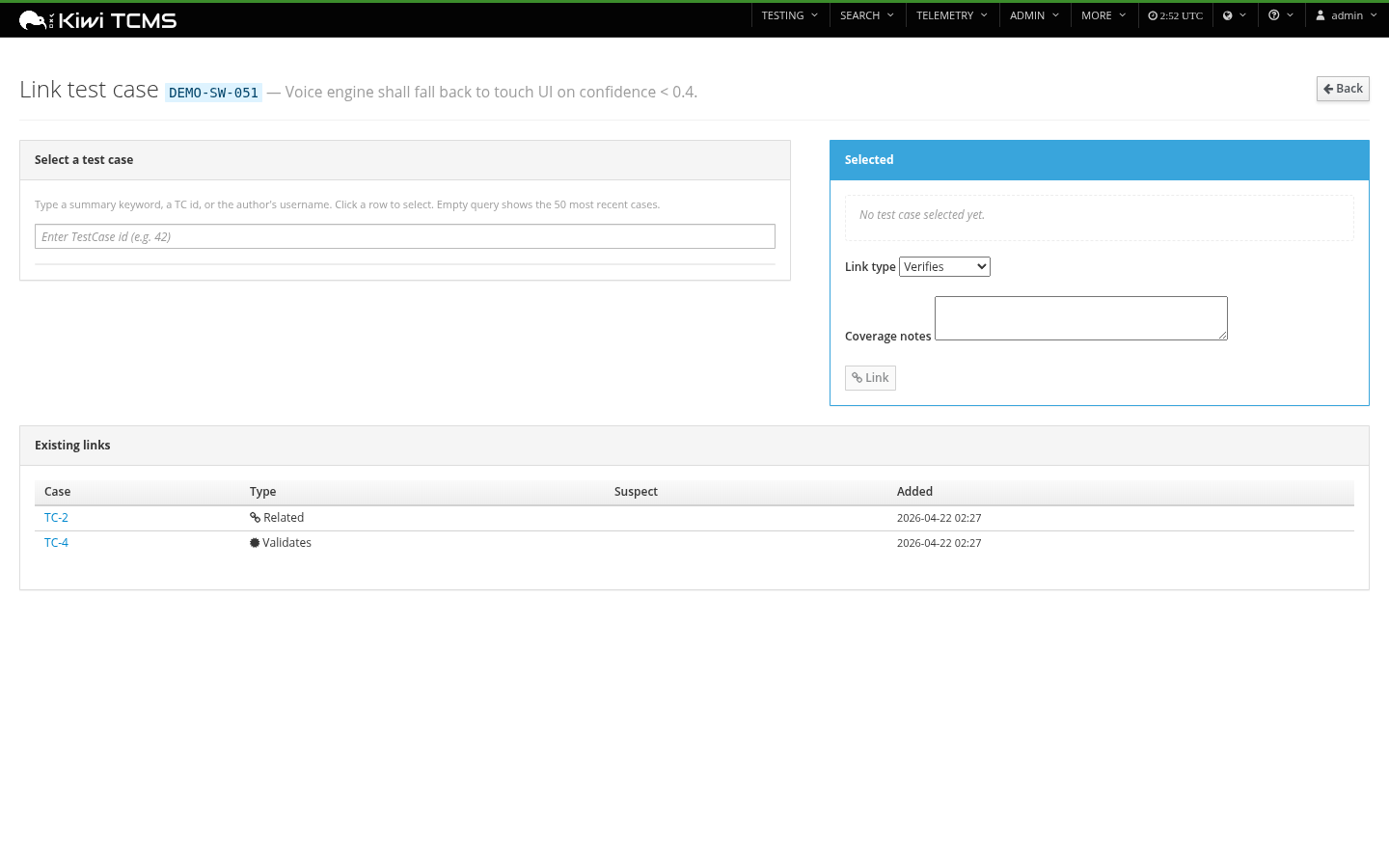
Test case linking
Dedicated picker with JSON-RPC-driven search that calls Kiwi's TestCase.filter; manual TC-id fallback when the JSON-RPC helper isn't available on the page.
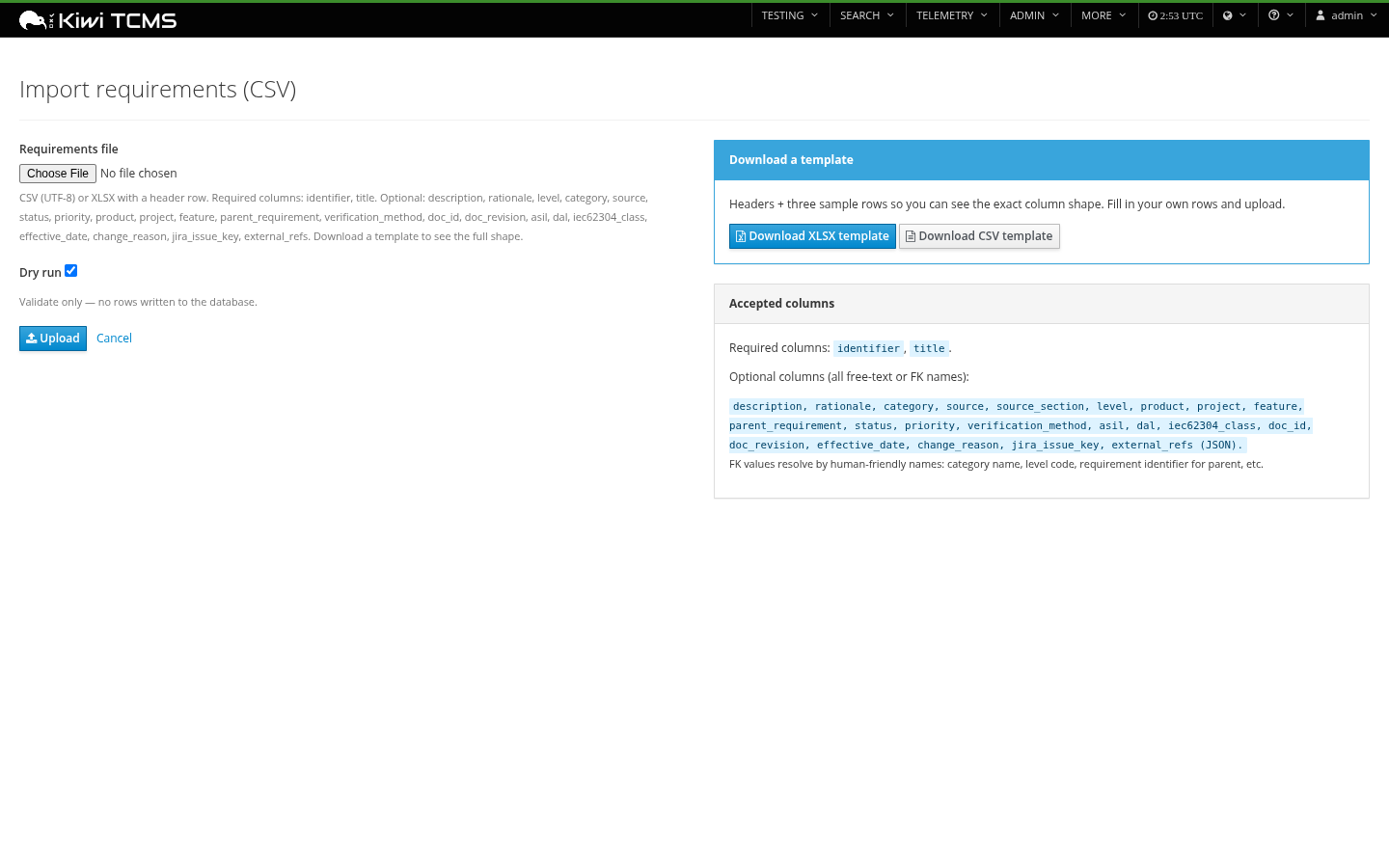
Import — CSV or XLSX with dry-run
Dry-run preview validates FK references, reports per-row errors, then commits with a re-submit. Download ready-to-use XLSX or CSV templates with headers + three sample rows.
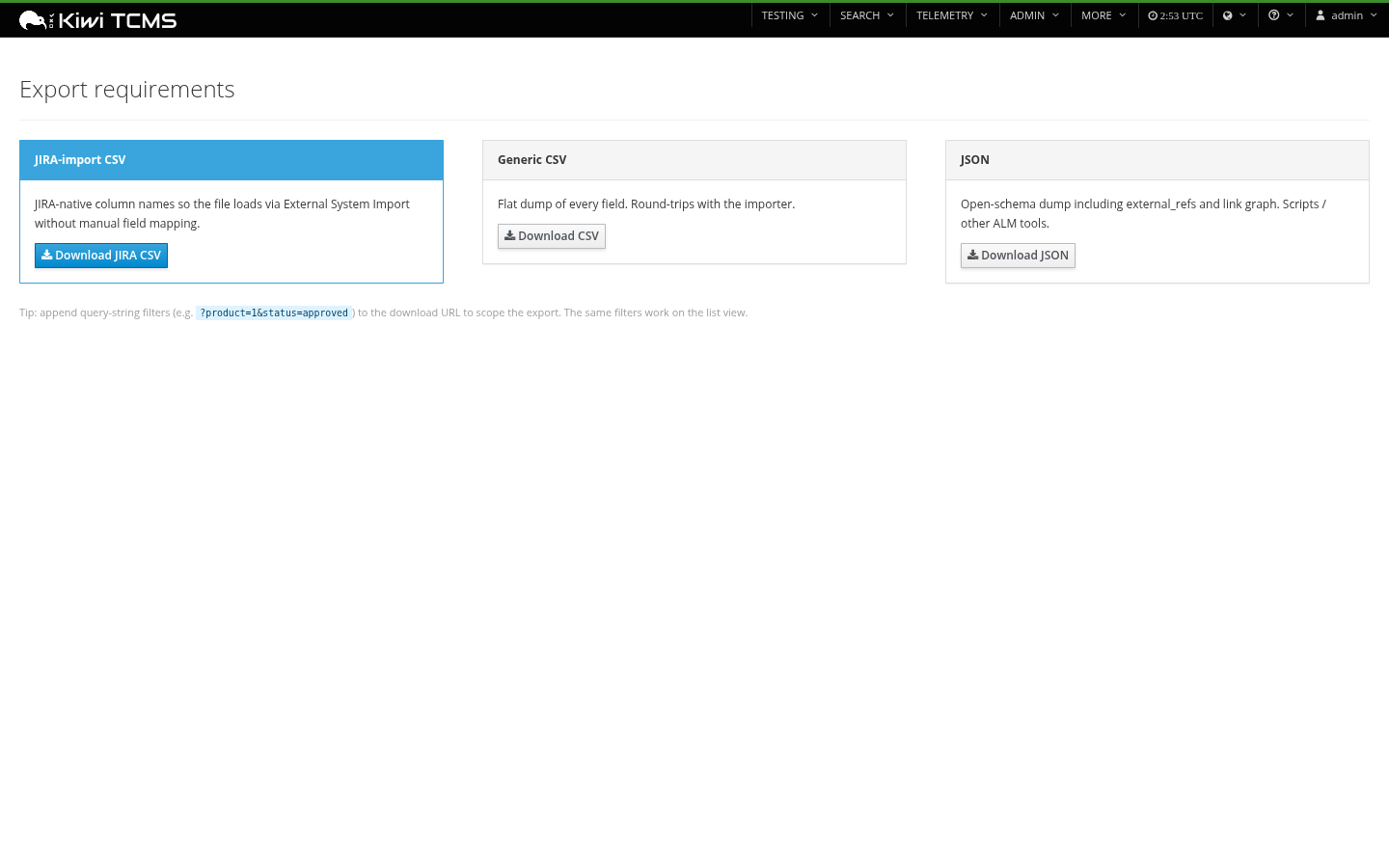
Export — JIRA, CSV, JSON, DOCX, PDF
The JIRA-import CSV uses JIRA-native column names so a direct import via System → External System Import → CSV works with no manual field mapping. Operator overrides via REQUIREMENTS_JIRA_EXPORT_MAPPING for issue type, status, priority, and custom-field IDs.
Safety / traceability affordances
- Suspect-link flagging on requirement text change (automatic; cleared by reviewer)
- Supersession chain (
Requirement.superseded_by) for ISO 9001 §7.5 controlled documents - Change-reason enforcement on status → deprecated / superseded
- Configurable level profile (
REQUIREMENTS_LEVEL_PROFILE):aspice/iso9001/iec62304/do178c/generic - Full
django-simple-historyaudit trail on every mutating model - Safety/criticality fields: ASIL (ISO 26262), SIL (IEC 61508), DAL (DO-178C), IEC 62304 Class
Install
pip install kiwitcms-requirements
The package exposes a kiwitcms.plugins entry point; Kiwi discovers it automatically on next start.
./manage.py migrate tcms_requirements
./manage.py collectstatic
That's it. The plugin registers its menu entries, admin tabs, and middleware in apps.py::ready() — no manual INSTALLED_APPS or MIDDLEWARE editing required.
Sankey-in-export extras (optional)
Embedding the live-rendered Sankey into DOCX / PDF exports needs svglib plus pycairo so reportlab's renderPM can rasterise the SVG to PNG. PDF exports embed the SVG natively (no PNG needed) and work without these extras — only DOCX exports degrade to table-only when they're missing.
pycairo is a binding around the system cairo library, so install the OS package first, then the Python wheels:
Linux (Debian / Ubuntu / WSL):
sudo apt-get update
sudo apt-get install -y libcairo2-dev pkg-config python3-dev
pip install "kiwitcms-requirements[diagrams]"
Linux (Fedora / RHEL / Rocky):
sudo dnf install -y cairo-devel pkgconf-pkg-config python3-devel
pip install "kiwitcms-requirements[diagrams]"
Linux (Alpine):
sudo apk add cairo-dev pkgconf python3-dev build-base
pip install "kiwitcms-requirements[diagrams]"
Windows:
pycairo ships pre-built wheels for CPython 3.9+ on Windows x64, so no system install is needed in most cases:
pip install "kiwitcms-requirements[diagrams]"
If pip can't find a wheel (PyPy, ARM64, or older CPython), fall back to the unofficial Christoph Gohlke wheels:
# Replace cp311 / win_amd64 with your CPython tag.
pip install https://download.lfd.uci.edu/pythonlibs/archived/pycairo-1.26.0-cp311-cp311-win_amd64.whl
pip install "kiwitcms-requirements[diagrams]"
For a fully native Windows build (advanced) you'd need MSVC and the GTK runtime for cairo headers — wheels are strongly preferred.
Verifying the install:
python -c "from svglib.svglib import svg2rlg; from reportlab.graphics import renderPM; print('OK')"
If you see RenderPMError: cannot import desired renderPM backend rlPyCairo, cairo isn't on the loader path; revisit the OS-package step.
Skip the extras altogether if you only need PDF exports with the diagram, or DOCX exports without — the plugin gracefully degrades and logs svglib or reportlab.renderPM unavailable to tcms_requirements logger when it falls back.
Level profiles
The RequirementLevel table is configurable. The seed migration applies a profile based on your REQUIREMENTS_LEVEL_PROFILE setting (default: aspice):
| Profile | Default levels |
|---|---|
aspice (default) |
stakeholder → system → software → component → unit |
iso9001 |
customer_requirement → product_requirement → process_requirement → quality_objective |
iec62304 |
user_need → software_req → arch_req → detailed_design → unit |
do178c |
high_level → low_level → source_code |
generic |
requirement (single level, no decomposition enforced) |
Add to tcms_settings_dir/requirements.py:
REQUIREMENTS_LEVEL_PROFILE = "iso9001"
…and rerun ./manage.py migrate. The seed migration is idempotent — existing requirements keep their FK regardless of profile changes; the operator can edit, add, or deactivate level rows from the Django admin at any time.
Standards support
| Standard | What the plugin provides |
|---|---|
| ASPICE / ISO 26262 | Level profile maps to SYS.2 / SYS.5 / SWE.1 / SWE.6 / SUP.10 / MAN.5 / SUP.8. ASIL classification per requirement. Bidirectional trace from requirements to TestCase + TestExecution. |
| ISO 9001 / ISO 13485 | Document-control fields (doc_id, doc_revision, effective_date, superseded_by), change-reason enforcement, approval/verification gates, auditable supersession chain. |
| IEC 62304 | iec62304_class (A/B/C) per requirement, level profile for user need → software → architecture → detailed design → unit. |
| DO-178C | dal (A–E) per requirement, level profile for high-level → low-level → source code. |
| No formal standard | generic level profile; registry, M2M, exports all still work. |
Exporting to JIRA
The JIRA-import CSV export lands at:
/requirements/export/jira-csv/
Append filter query-params (?product=1&status=approved) to scope the export. The resulting file imports directly via JIRA's System → External System Import → CSV with no manual field mapping.
Column mapping is overridable via REQUIREMENTS_JIRA_EXPORT_MAPPING:
REQUIREMENTS_JIRA_EXPORT_MAPPING = {
    "issue_type": "Requirement",    # if your JIRA has a Requirement issue type
    "priority": {"critical": "Blocker", "high": "Critical"},
    "status": {"approved": "Approved"},
    "custom_fields": {
        "level": "customfield_10045",          # direct custom-field ID
        "parent_requirement": "Parent Link",
    },
}
The mapping merges over the defaults — only declare what you want to change. Issue Key is populated on re-export after the first round-trip, so JIRA-assigned keys round-trip cleanly back into Requirement.jira_issue_key.
Demo data
Seeds 12 demo requirements across 3 features with a stakeholder → system → software decomposition chain, mixed link types, and realistic source-document titles so both Sankey views and the dashboard have something to show:
./manage.py seed_demo_requirements
Flags:
--product "Infotainment ECU"— scope under a specific product (defaults to first)--cases 8— number of TestCases to link (default 8)--flush— delete previousDEMO-*rows before re-seeding
For an end-to-end demo with projects, baselines, and custom fields wired up too:
./manage.py seed_demo_all
Permissions
Seeded on post_migrate and granted to the Tester / Administrator groups:
requirements.view_requirement/add_/change_/delete_requirements.add_requirementtestcaselink/change_/delete_- (future v0.3+)
requirements.approve_requirement— gates approved/verified status
Dependencies
Runtime (installed automatically):
- Django 4.2 / 5.0 / 5.2
- django-simple-history
- django-modern-rpc
- markdown, requests
- openpyxl (XLSX import/templates)
- python-docx (DOCX reports)
- reportlab (PDF reports — also embeds Sankey directly into PDF, no system deps)
Optional [diagrams] extra (pip install "kiwitcms-requirements[diagrams]"):
- svglib, Pillow — for embedding the Sankey image into DOCX exports
- pycairo (transitive) — needs system cairo headers; see the Sankey-in-export extras section above for the exact OS package per platform.
Running the test suite
cd tcms_requirements
PYTHONPATH=.. DJANGO_SETTINGS_MODULE=tcms_requirements.tests.settings \
    python -m unittest discover tests
The unit tests don't require a live Kiwi install — they exercise state_machine and exports/jira_csv_export in isolation.
Compatibility
- Python 3.9 +
- Django 4.2 / 5.0 / 5.2
- Kiwi TCMS (current stable release)
License
GPL-2.0-or-later. See LICENSE.
1 maintainer

Metadata
1 maintainer
Release files for kiwitcms-requirements 0.4.3
For a detailed explanation of source distributions (sdists) and built distributions (wheels), please see the package formats documentation.
Source distribution (sdist)
| File | Size | Uploaded | |
|---|---|---|---|
| kiwitcms_requirements-0.4.3.tar.gz | 325.2 kB | Details |
Built distribution (wheel)
| File | Interpreter | ABI | Platform | Reset |
|---|---|---|---|---|
| kiwitcms_requirements-0.4.3-py3-none-any.whl | Python 3 | none | any | Details |
Total release size: 696.9 kB
Release files / kiwitcms_requirements-0.4.3.tar.gz
| Download URL | kiwitcms_requirements-0.4.3.tar.gz |
|---|---|
| Size | 325.2 kB |
| Tags | Source |
|
SHA-256 checksum How to use checksums |
aad85f92f51e2620247b1ae23afa58474781174c5d869d8c732618b02a818849
|
|
BLAKE2b-256 checksum How to use checksums |
236bc821264c69b6d7312e99bdc4e5825ff1ce356a23ab957abc43cd48bf498f
|
| Upload date | |
|
Uploaded using Trusted Publishing? What is trusted publishing? |
No |
| Uploaded via |
twine/6.2.0 CPython/3.11.14
|
Release files / kiwitcms_requirements-0.4.3-py3-none-any.whl
| Download URL | kiwitcms_requirements-0.4.3-py3-none-any.whl |
|---|---|
| Size | 371.7 kB |
| Tags | Python 3 |
|
SHA-256 checksum How to use checksums |
8f4cfb7ccce2ad799f8f6e1da1b5f33ff5d5c9c3eda7f9a4a2efdc0c6df214d0
|
|
BLAKE2b-256 checksum How to use checksums |
a631548dc3b024c3318a2676834414abeb60f0d0a642aded3fda0297fc619991
|
| Upload date | |
|
Uploaded using Trusted Publishing? What is trusted publishing? |
No |
| Uploaded via |
twine/6.2.0 CPython/3.11.14
|














