
Requirements management and traceability plugin for Kiwi TCMS: registry of requirements, M2M trace to test cases, Sankey traceability, coverage dashboard with charts, JIRA-ready CSV export, XLSX/DOCX/PDF reports, ASPICE / ISO 9001 support.

Project description
kiwitcms-requirements
Requirements management and traceability plugin for Kiwi TCMS.
A first-class registry of requirements mapped many-to-many to test cases, with a Sankey traceability diagram, coverage dashboard, document-control fields, CSV / XLSX / DOCX / PDF / JIRA-native exports, and configurable level profiles for ASPICE, ISO 9001, IEC 62304, DO-178C, or plain generic use.
Why
Kiwi TCMS ships with a single TestCase.requirement CharField (max 255 characters). That's a label, not traceability. Teams working to quality or safety standards need:
- A first-class Requirement entity with identity, source, level, and status
- Many-to-many links to test cases with typed relationships (verifies / validates / derives-from / related)
- Coverage analytics — what's tested, what isn't, and by how much
- Document-control fields (doc ID, revision, effective date, supersession chain) for ISO 9001 §7.5
- JIRA-ready CSV export so requirements can be pushed into downstream ALM tools
- Full audit trail of every change via
django-simple-history
This plugin adds that layer alongside the existing TestCase.requirement CharField (which is left untouched for backward-compat).
Features
Registry, list & detail
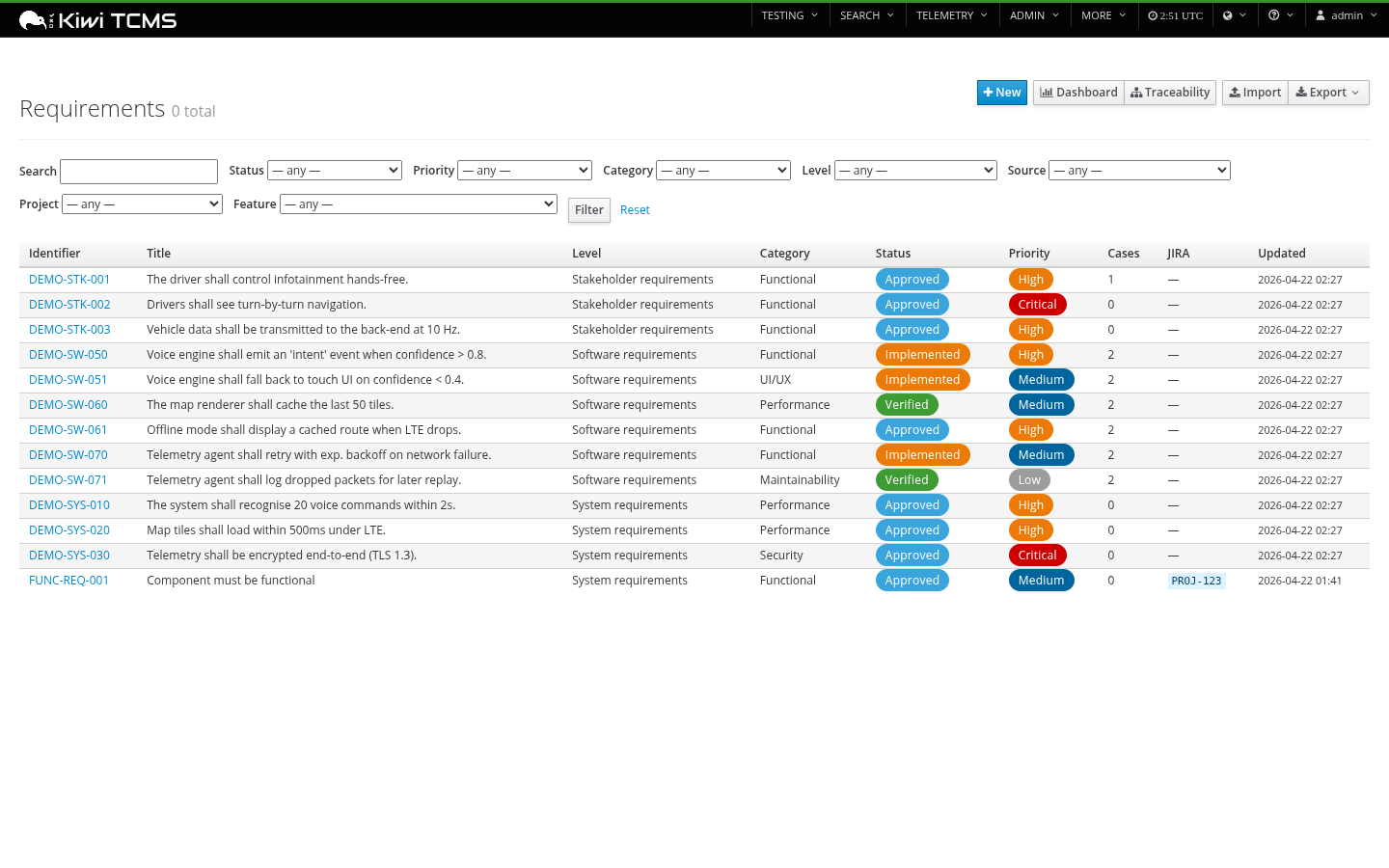
Filterable list with status / priority / level / category / source / project / feature filters, pill-style status and priority badges, JIRA issue keys, link counts.
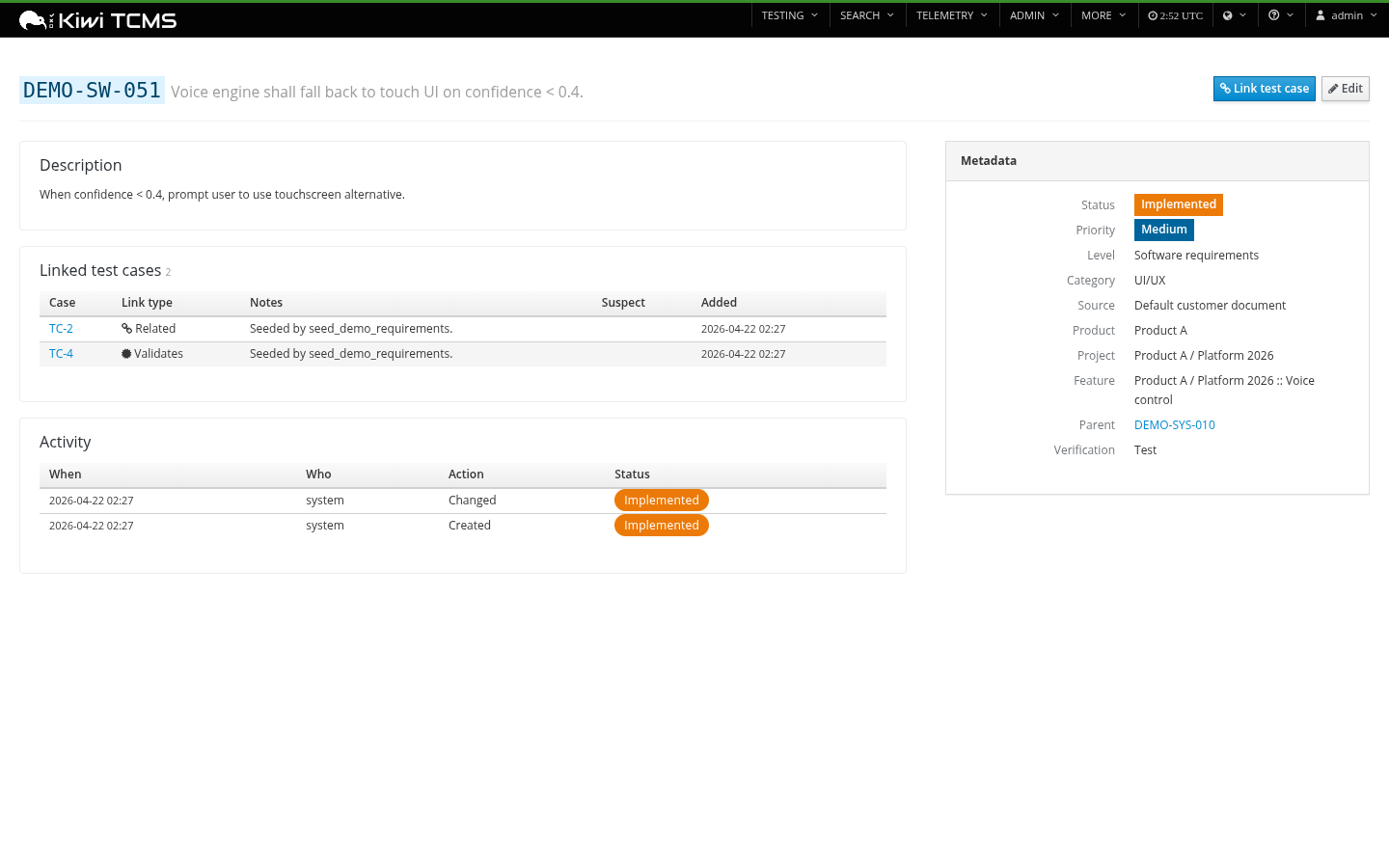
Per-requirement detail page with description, rationale, linked test cases (with link-type icons + suspect badges), child requirements, full activity history, and a PatternFly metadata sidebar.
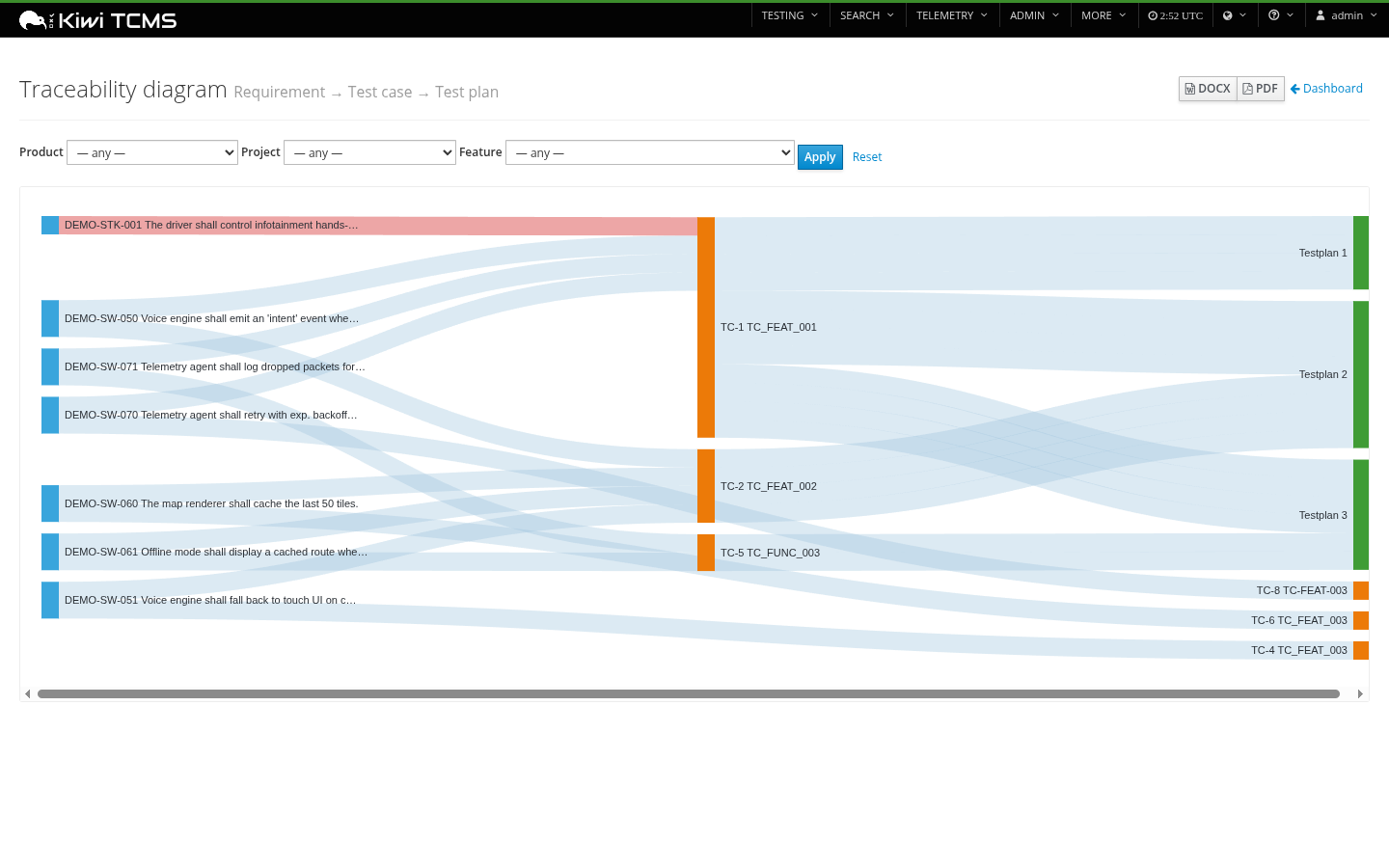
Sankey traceability diagram
Requirement → Test case → Test plan, filterable by product / project / feature, colour-coded by node kind, with suspect links shown in red. Export to DOCX or PDF embeds the live-rendered SVG on page 1 followed by a full row-by-row traceability table on page 2+.
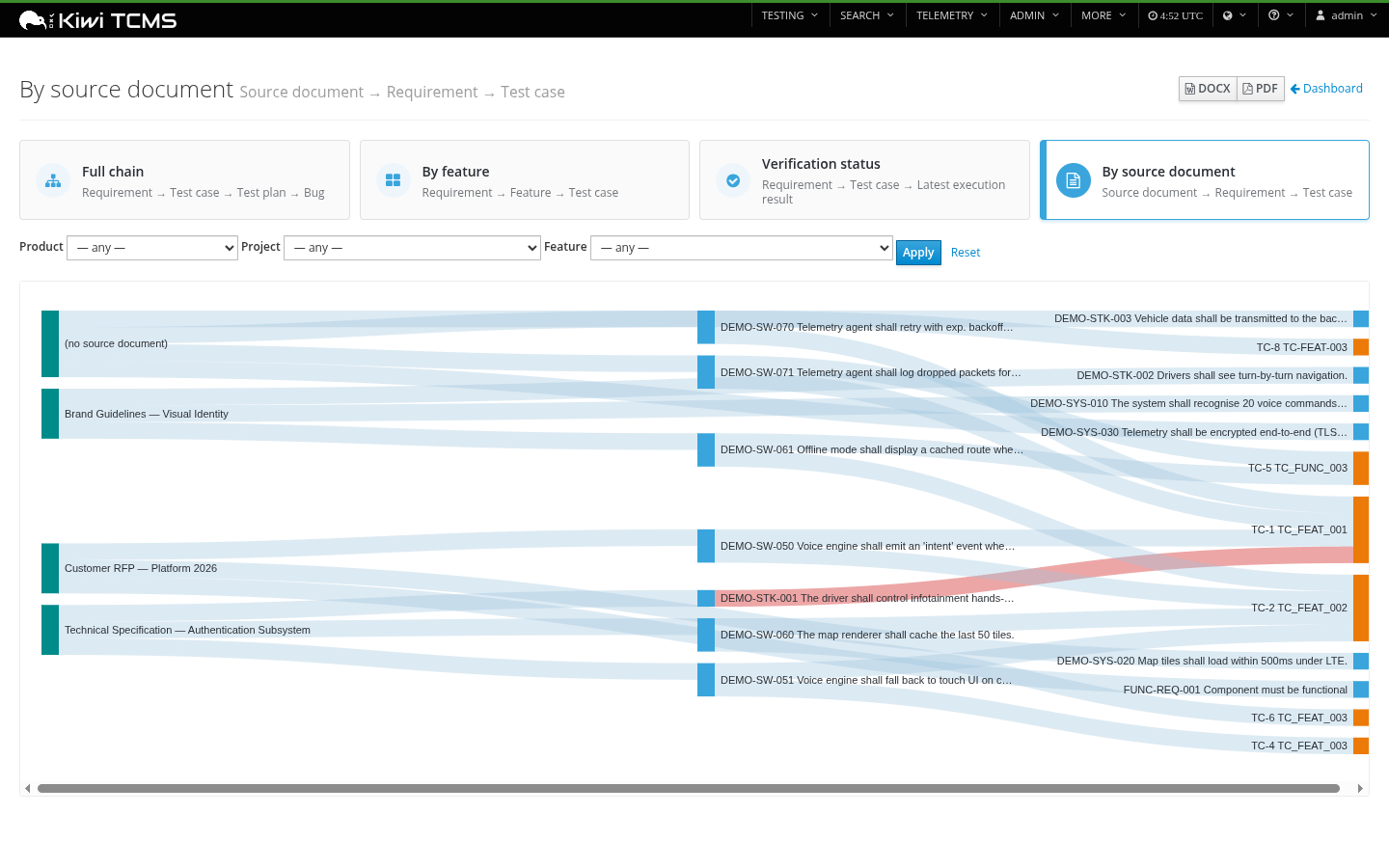
A second Sankey view added in v0.4.1 flows source document → requirement → test case so you can see at a glance which controlled documents (RFPs, specifications, brand guidelines) are actually exercised by tests. Requirements without a source document fall under a (no source document) node so the gap is obvious.
Coverage dashboard
Coverage %, orphan requirements, suspect links, plus donuts and bars for status / priority / level / category breakdown. ASIL / DAL / IEC 62304 safety-distribution chart shown only when at least one requirement has safety classification.
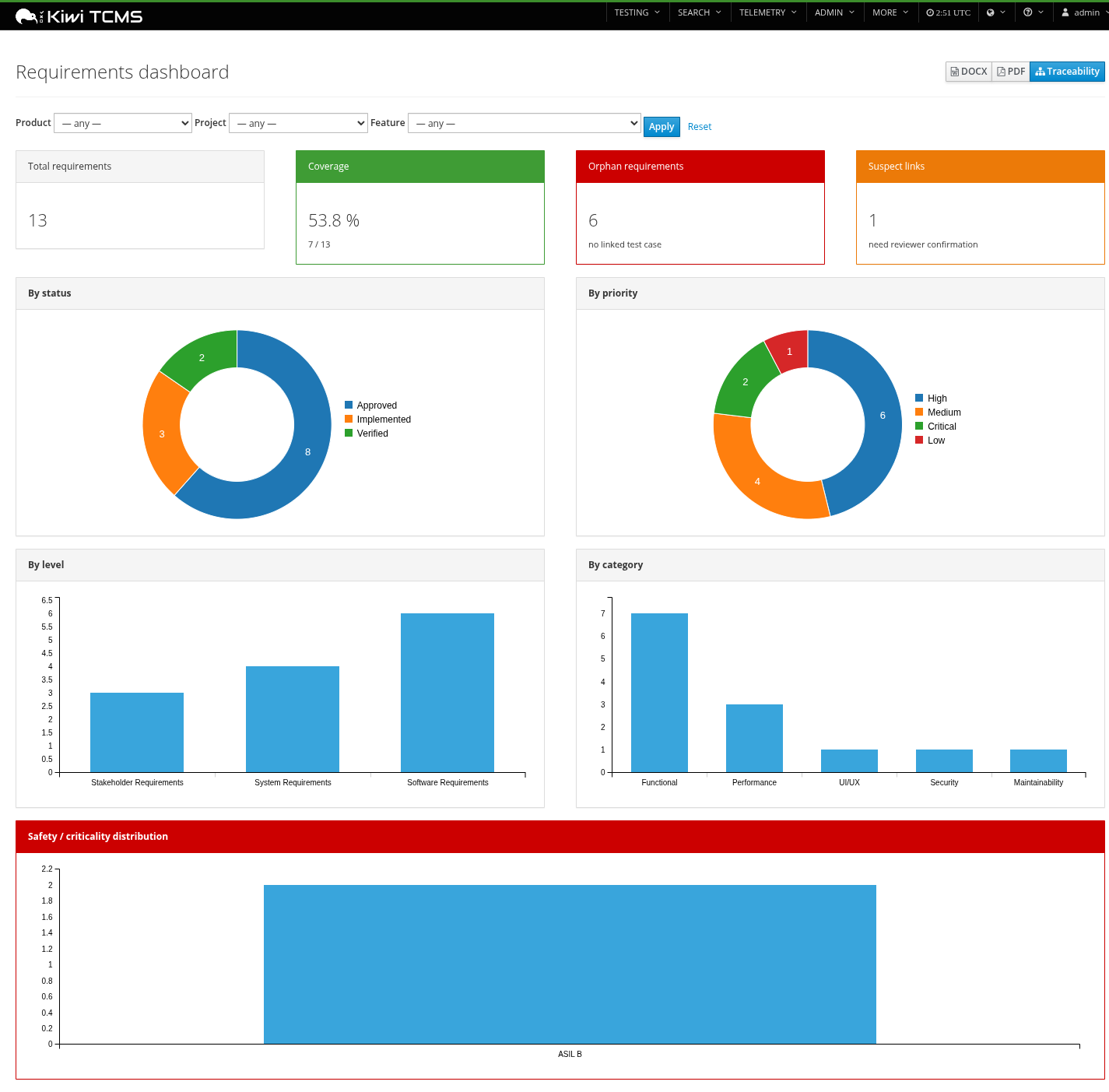
Export the dashboard snapshot to DOCX or PDF directly from the page header.
Programmes / projects (v0.3.0)
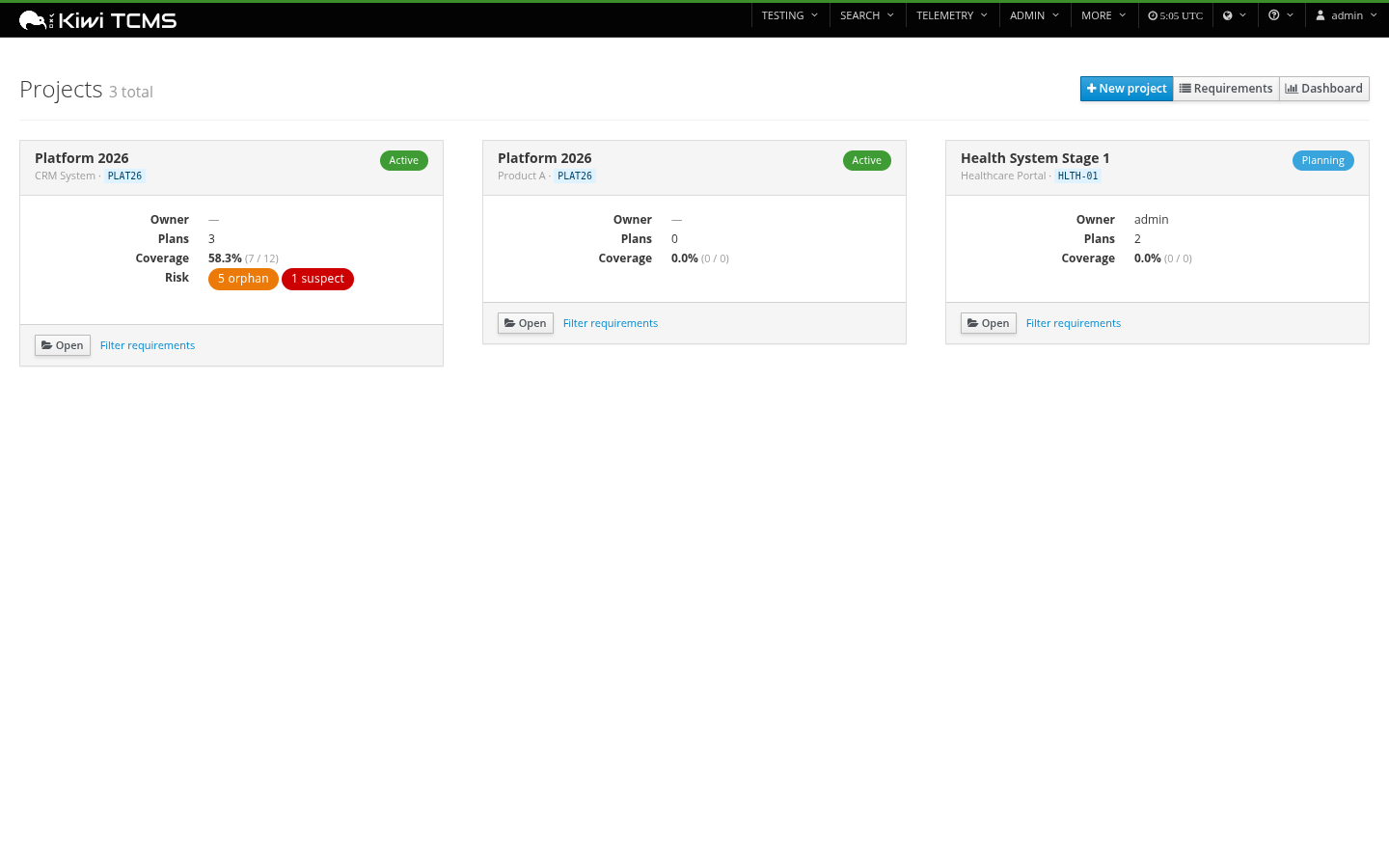
A Project is a programme record scoped to a Kiwi Product. Each project carries status, owner, stakeholders, target / actual end dates, JIRA project key, an open-ended external_refs JSON map, and an M2M to Kiwi TestPlans for in-scope test work. The list view is a card grid with status pills, owner, dates, and live coverage% per project.
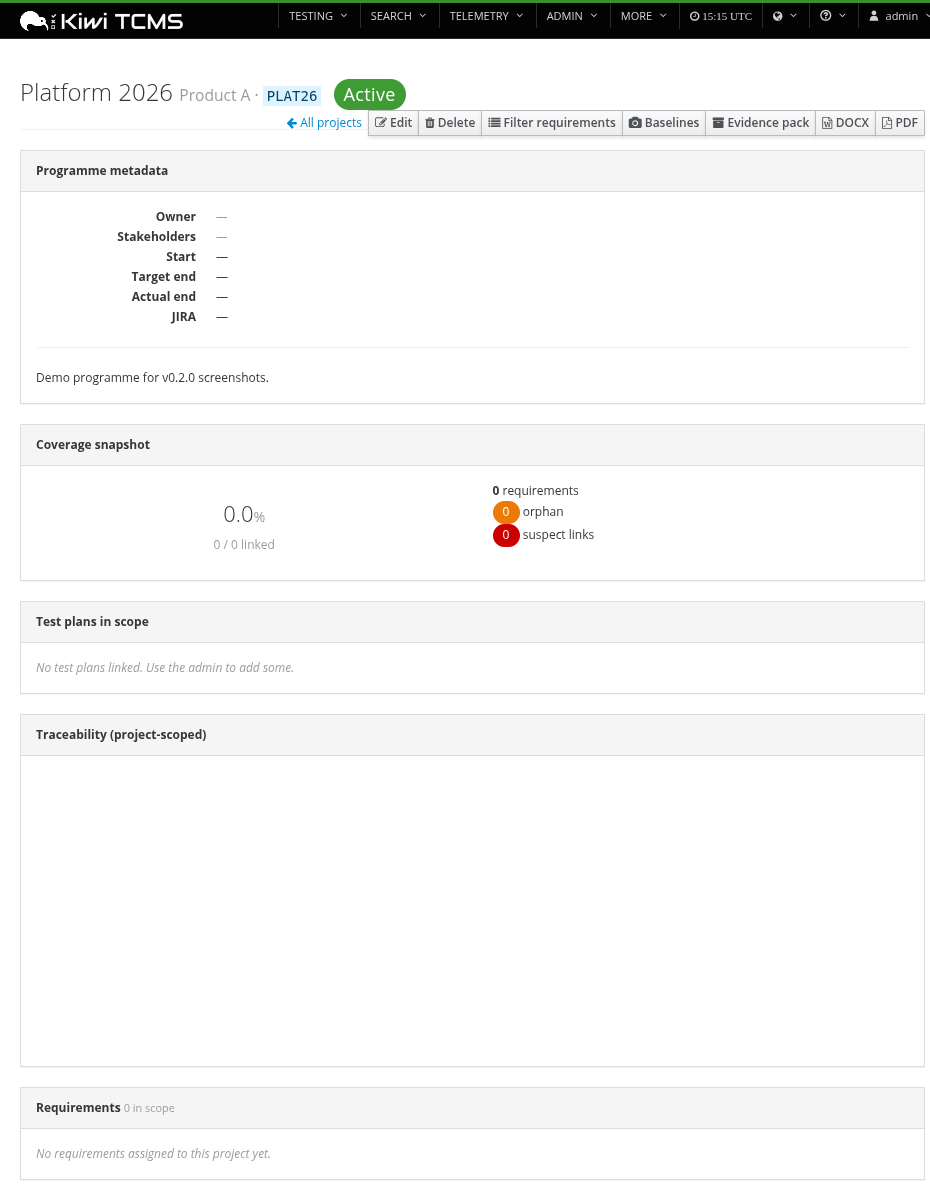
The detail page surfaces programme metadata, a project-scoped coverage donut + orphan / suspect counts, the linked plans, the requirements list, a project-scoped mini-Sankey, and one-click DOCX / PDF exports for just that project. Create / edit / delete is in-page (no admin round-trip needed).
Document fields & dynamic custom fields (v0.4.0)
Each requirement now carries optional document_file_name and document_title fields under the Taxonomy fieldset, capturing the controlled document the requirement was sourced from (a RequirementSource is the catalog entry; these fields are the per-requirement provenance). Both fields round-trip through CSV / XLSX import + export and are first-class filterable columns.
For organisation-specific metadata that doesn't warrant a schema migration, admins can register CustomFieldDefinition rows from Django admin (text / int / date / choice / bool). Each definition shows as a real form input on the requirement page and persists to the existing Requirement.external_refs JSON column — so adding a field never costs a migration.
Authoring
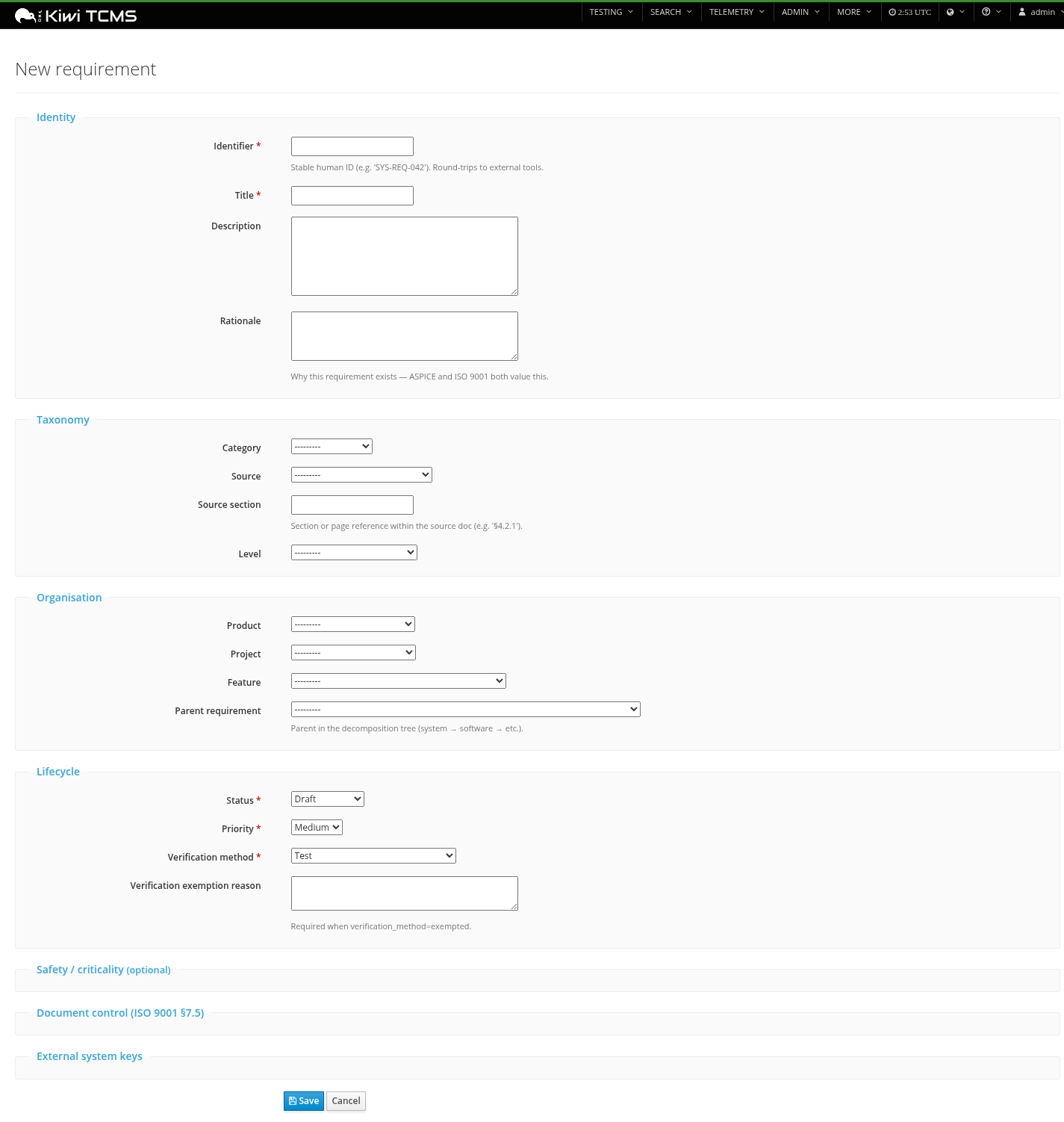
Fieldset-grouped form organised by concern: identity, taxonomy, organisation, lifecycle, and collapsible sections for safety/criticality classifications, ISO 9001 document control, and external system keys.
Test case linking
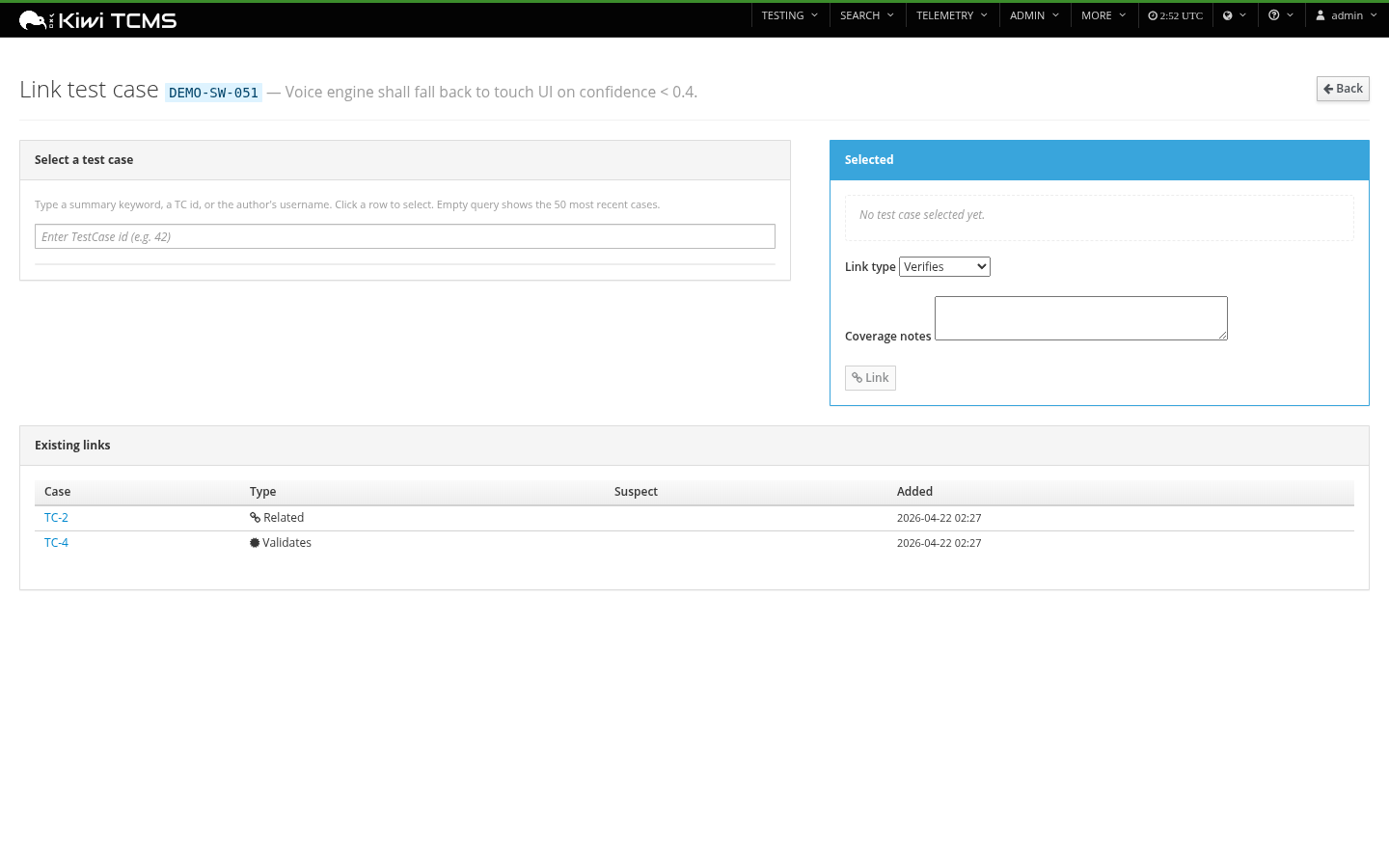
Dedicated picker with JSON-RPC-driven search that calls Kiwi's TestCase.filter; manual TC-id fallback when the JSON-RPC helper isn't available on the page.
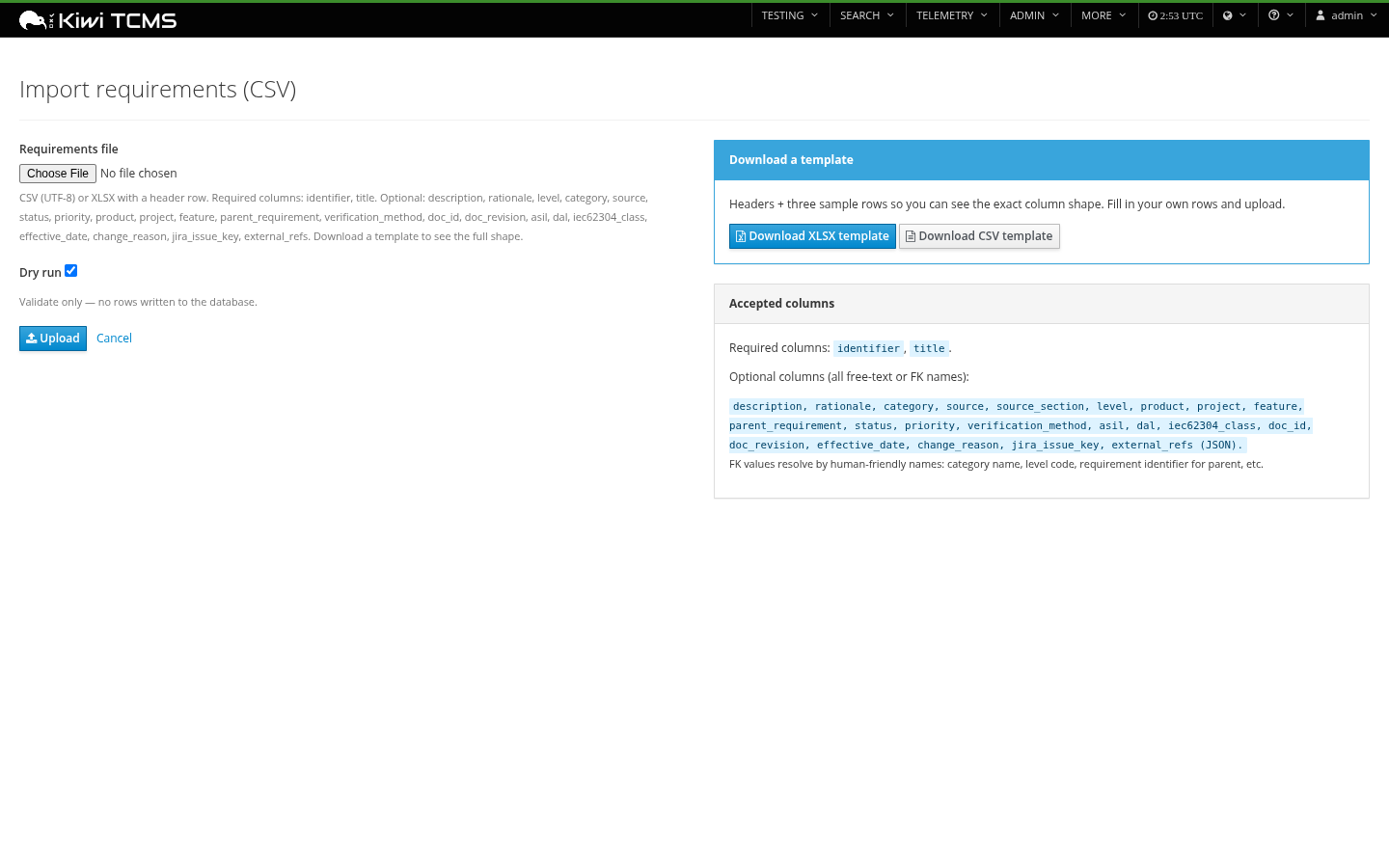
Import — CSV or XLSX with dry-run
Dry-run preview validates FK references, reports per-row errors, then commits with a re-submit. Download ready-to-use XLSX or CSV templates with headers + three sample rows.
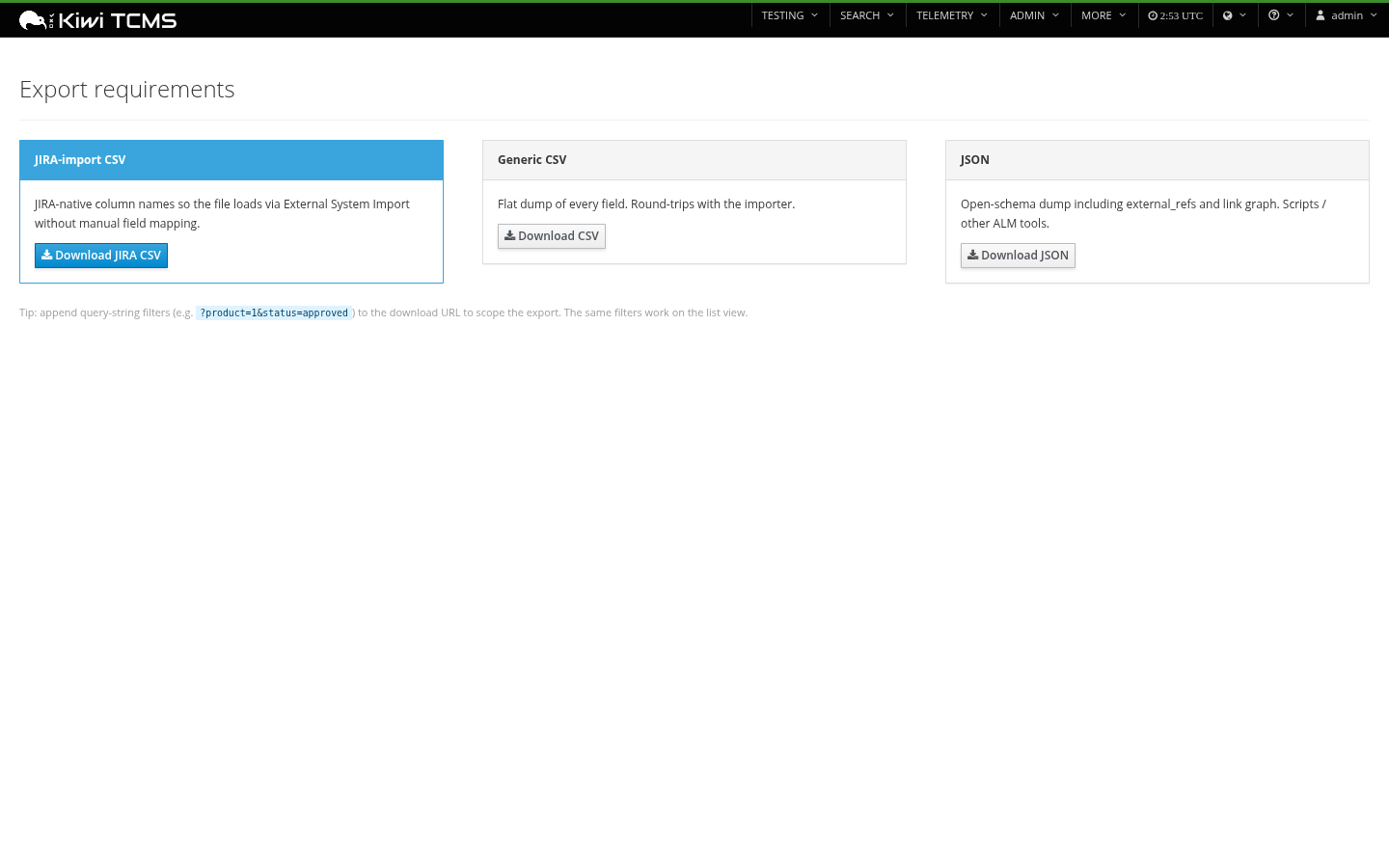
Export — JIRA, CSV, JSON, DOCX, PDF
The JIRA-import CSV uses JIRA-native column names so a direct import via System → External System Import → CSV works with no manual field mapping. Operator overrides via REQUIREMENTS_JIRA_EXPORT_MAPPING for issue type, status, priority, and custom-field IDs.
Safety / traceability affordances
- Suspect-link flagging on requirement text change (automatic; cleared by reviewer)
- Supersession chain (
Requirement.superseded_by) for ISO 9001 §7.5 controlled documents - Change-reason enforcement on status → deprecated / superseded
- Configurable level profile (
REQUIREMENTS_LEVEL_PROFILE):aspice/iso9001/iec62304/do178c/generic - Full
django-simple-historyaudit trail on every mutating model - Safety/criticality fields: ASIL (ISO 26262), SIL (IEC 61508), DAL (DO-178C), IEC 62304 Class
Install
pip install kiwitcms-requirements
The package exposes a kiwitcms.plugins entry point; Kiwi discovers it automatically on next start.
./manage.py migrate tcms_requirements
./manage.py collectstatic
That's it. The plugin registers its menu entries, admin tabs, and middleware in apps.py::ready() — no manual INSTALLED_APPS or MIDDLEWARE editing required.
Level profiles
The RequirementLevel table is configurable. The seed migration applies a profile based on your REQUIREMENTS_LEVEL_PROFILE setting (default: aspice):
| Profile | Default levels |
|---|---|
aspice (default) |
stakeholder → system → software → component → unit |
iso9001 |
customer_requirement → product_requirement → process_requirement → quality_objective |
iec62304 |
user_need → software_req → arch_req → detailed_design → unit |
do178c |
high_level → low_level → source_code |
generic |
requirement (single level, no decomposition enforced) |
Add to tcms_settings_dir/requirements.py:
REQUIREMENTS_LEVEL_PROFILE = "iso9001"
…and rerun ./manage.py migrate. The seed migration is idempotent — existing requirements keep their FK regardless of profile changes; the operator can edit, add, or deactivate level rows from the Django admin at any time.
Standards support
| Standard | What the plugin provides |
|---|---|
| ASPICE / ISO 26262 | Level profile maps to SYS.2 / SYS.5 / SWE.1 / SWE.6 / SUP.10 / MAN.5 / SUP.8. ASIL classification per requirement. Bidirectional trace from requirements to TestCase + TestExecution. |
| ISO 9001 / ISO 13485 | Document-control fields (doc_id, doc_revision, effective_date, superseded_by), change-reason enforcement, approval/verification gates, auditable supersession chain. |
| IEC 62304 | iec62304_class (A/B/C) per requirement, level profile for user need → software → architecture → detailed design → unit. |
| DO-178C | dal (A–E) per requirement, level profile for high-level → low-level → source code. |
| No formal standard | generic level profile; registry, M2M, exports all still work. |
Exporting to JIRA
The JIRA-import CSV export lands at:
/requirements/export/jira-csv/
Append filter query-params (?product=1&status=approved) to scope the export. The resulting file imports directly via JIRA's System → External System Import → CSV with no manual field mapping.
Column mapping is overridable via REQUIREMENTS_JIRA_EXPORT_MAPPING:
REQUIREMENTS_JIRA_EXPORT_MAPPING = {
    "issue_type": "Requirement",    # if your JIRA has a Requirement issue type
    "priority": {"critical": "Blocker", "high": "Critical"},
    "status": {"approved": "Approved"},
    "custom_fields": {
        "level": "customfield_10045",          # direct custom-field ID
        "parent_requirement": "Parent Link",
    },
}
The mapping merges over the defaults — only declare what you want to change. Issue Key is populated on re-export after the first round-trip, so JIRA-assigned keys round-trip cleanly back into Requirement.jira_issue_key.
Demo data
Seeds 12 demo requirements across 3 features with a stakeholder → system → software decomposition chain, mixed link types, and realistic source-document titles so both Sankey views and the dashboard have something to show:
./manage.py seed_demo_requirements
Flags:
--product "Infotainment ECU"— scope under a specific product (defaults to first)--cases 8— number of TestCases to link (default 8)--flush— delete previousDEMO-*rows before re-seeding
For an end-to-end demo with projects, baselines, and custom fields wired up too:
./manage.py seed_demo_all
Permissions
Seeded on post_migrate and granted to the Tester / Administrator groups:
requirements.view_requirement/add_/change_/delete_requirements.add_requirementtestcaselink/change_/delete_- (future v0.3+)
requirements.approve_requirement— gates approved/verified status
Dependencies
Runtime (installed automatically):
- Django 4.2 / 5.0 / 5.2
- django-simple-history
- django-modern-rpc
- markdown, requests
- openpyxl (XLSX import/templates)
- python-docx (DOCX reports)
- reportlab (PDF reports)
- svglib, Pillow (Sankey → DOCX/PDF image embedding)
Running the test suite
cd tcms_requirements
PYTHONPATH=.. DJANGO_SETTINGS_MODULE=tcms_requirements.tests.settings \
    python -m unittest discover tests
The unit tests don't require a live Kiwi install — they exercise state_machine and exports/jira_csv_export in isolation.
Compatibility
- Python 3.9 +
- Django 4.2 / 5.0 / 5.2
- Kiwi TCMS (current stable release)
License
GPL-2.0-or-later. See LICENSE.


Download files
Download the file for your platform. If you're not sure which to choose, learn more about installing packages.
Source Distribution
Built Distribution
Filter files by name, interpreter, ABI, and platform.
If you're not sure about the file name format, learn more about wheel file names.
Copy a direct link to the current filters
File details
Details for the file kiwitcms_requirements-0.4.1.tar.gz.
File metadata
- Download URL: kiwitcms_requirements-0.4.1.tar.gz
- Upload date:
- Size: 302.8 kB
- Tags: Source
- Uploaded using Trusted Publishing? No
- Uploaded via: twine/6.2.0 CPython/3.11.14
File hashes
| Algorithm | Hash digest | |
|---|---|---|
| SHA256 |
2c22f24869499fd083f86c52725a62da06008949eb9fa115f81b6e494c505956
|
|
| MD5 |
1de3e743776bc594e2392c3f7866fddf
|
|
| BLAKE2b-256 |
c55a1e2b3e07cfd1f2e1c79456376d9c5b253664488ced90f27b8760b01346e3
|
File details
Details for the file kiwitcms_requirements-0.4.1-py3-none-any.whl.
File metadata
- Download URL: kiwitcms_requirements-0.4.1-py3-none-any.whl
- Upload date:
- Size: 341.6 kB
- Tags: Python 3
- Uploaded using Trusted Publishing? No
- Uploaded via: twine/6.2.0 CPython/3.11.14
File hashes
| Algorithm | Hash digest | |
|---|---|---|
| SHA256 |
7ff554d074b94da19af001a4d1227909f0dece7d291e47364acca79744a5df0f
|
|
| MD5 |
d1650f8e525f6028652273be8d039401
|
|
| BLAKE2b-256 |
9b2d7f62c02bf6706a0afbad59aa1679cd5a6d4a815dc522f770caf347c9f0ca
|






