
KoikatuCharaLoader
A simple deserializer and serializer for character and scene data from Koikatu, EmotionCreators, Honeycome, SummerVacationScramble, Aicomi and AmanatsuLocation.




Installation
You can install the module from PyPI.
$ pip install kkloader
If this doesn't work, try the following command (this is typically needed for Windows users).
$ python -m pip install kkloader
If you just want to quickly try out this module, you can click the "Open In Colab" button above to run it directly on Colab.
Basic Usage
$ python
>>> from kkloader import KoikatuCharaData # Import the module.
>>> kc = KoikatuCharaData.load("./data/chara/kk_chara.png") # Load character data.
>>> kc
KoikatuCharaData(product_no=100, header='【KoiKatuChara】', version='0.0.0', name='白峰 一乃 ( かずのん )', blocks=['Custom', 'Coordinate', 'Parameter', 'Status'], has_kkex=False, original_file_path='/path/to/data/chara/kk_chara.png')
>>> kc["Parameter"]["nickname"] # Print the character's nickname.
'かずのん'
>>> kc["Parameter"]["nickname"] = "chikarin" # Change the nickname.
>>> kc.save("./kk_chara_modified.png") # Save to `kk_chara_modified.png`.
That's it! :)
List of Classes
- Supports saving and loading:
KoikatuCharaDataKoikatuCharaData.CoordinateEntry(Koikatu / Koikatsu Sunshine coordinate data)KoikatuSceneDataEmocreCharaDataEmocreCharaData.CoordinateEntry(EmotionCreators coordinate data)HoneycomeCharaDataHoneycomeCharaData.CoordinateEntry(Honeycome coordinate data)SummerVacationCharaDataSummerVacationCharaData.CoordinateEntry(SummerVacationScramble coordinate data)SummerVacationSaveDataAicomiCharaDataAicomiCharaData.CoordinateEntry(Aicomi coordinate data)AicomiSaveDataAmanatsuCharaDataAmanatsuCharaData.CoordinateEntry(AmanatsuLocation coordinate data)AmanatsuSaveDataHoneycomeSceneData(also compatible with DigitalCraft)EmocreSceneData
- Supports loading only:
KoikatuSaveDataEmocreMapData
Any class can be imported with from kkloader import KoikatuCharaData and data can be loaded using the .load(filename) method.
How Block Data Works
Koikatu character data consists of several block data sections. Each block data contains various character parameters. A typical Koikatu character data includes the following block data:
| name of blockdata | description |
|---|---|
| Custom | Values for the character's face, body, and hairstyle. |
| Coordinate | Values for clothes and accessories worn by characters. |
| Parameter | Values for character's name, birthday, preferences, etc. |
| Status | Values for clothed states, etc. (Usage in the game is unclear) |
| About | userID & dataID (added from Koikatu Sunshine) |
| KKEx | Data used by mods |
You can check which block data is present in blockdata from the KoikatuCharaData object:
>>> kc.blockdata
['Custom', 'Coordinate', 'Parameter', 'Status']
If there is block data in an unknown format, it can be found using unknown_blockdata.
Accessing Block Data
The block data can be accessed either as a member variable of the KoikatuCharaData class or as a dictionary.
>>> kc.Custom
<kkloader.KoikatuCharaData.Custom object at 0x7f406bf18460>
>>> kc["Custom"]
<kkloader.KoikatuCharaData.Custom object at 0x7f406bf18460>
As shown, both lines access the same kc.Custom.
Find Variables
You can try out the character information display from this program in your browser on this site. If you are looking to identify which variables to modify, this interface can serve as a useful starting point for narrowing down potential candidates.
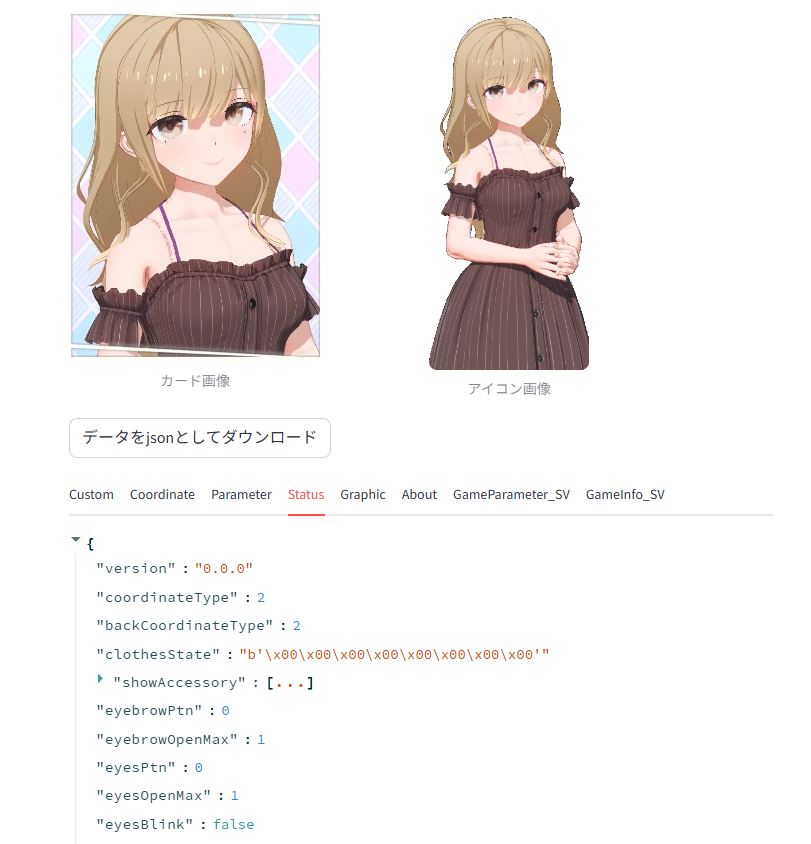
By using the prettify method, the contents of the variables within the data block will be displayed in a more readable format.
This is useful for identifying which variables exist.
>>> kc["Custom"].prettify()
{
  "face": {
    "version": "0.0.2",
    "shapeValueFace": [
      ...
    ],
    "headId": 0,
    "skinId": 0,
    "detailId": 0,
    "detailPower": 0.41674190759658813,
    ...
KKEx MessagePack Handling
The KKEx in blockdata sometimes contains fields encoded as raw bytes that are themselves MessagePack payloads.
kkloader automatically deserializes and reserializes such fields for known plugins listed in KKEx.NESTED_KEYS.
Export to JSON file
from kkloader import KoikatuCharaData

k = KoikatuCharaData.load("./data/chara/kk_chara.png")
k.save_json("data.json")
data.json
{
  "product_no": 100,
  "header": "\u3010KoiKatuChara\u3011",
  "version": "0.0.0",
  "Custom": {
    "face": {
      "version": "0.0.2",
      "shapeValueFace": [
        0.5403226017951965,
        1.0,
        0.2016129046678543,
        0.0,
        0.22580644488334656,
        0.0,
        0.0,
        0.1794193685054779,
        0.0,
...
If you add include_image=True to the save_json function's arguments, base64-encoded images will be included in the JSON output.
Recipes
Change Character Name
from kkloader import KoikatuCharaData

k = KoikatuCharaData.load("./data/chara/kk_chara.png")
k["Parameter"]["lastname"] = "春野"
k["Parameter"]["firstname"] = "千佳"
k["Parameter"]["nickname"] = "ちかりん"
k.save("./data/kk_chara_modified")
Set Character Height to 50
from kkloader import KoikatuCharaData

k = KoikatuCharaData.load("./data/chara/kk_chara.png")
k["Custom"]["body"]["shapeValueBody"][0] = 0.5
k.save("./data/kk_chara_modified.png")
Put a Coordinate File on a Character
A coordinate file (【KoiKatuClothes】) holds exactly the same payload as one element of a character's Coordinate block, so it can be assigned as-is.
from kkloader import KoikatuCharaData
from kkloader.KoikatuCharaData import CoordinateEntry

chara = KoikatuCharaData.load("./data/chara/kk_chara.png")
coordinate = CoordinateEntry.load("./data/coordinate/kk_coordinate.png", contains_png=True)

# 0=School01, 1=School02, 2=Gym, 3=Swim, 4=Club, 5=Plain, 6=Pajamas
chara["Coordinate"].data[0] = coordinate.data
chara.save("./data/kk_chara_modified.png")
The other way round, saving one outfit of a character as a coordinate file:
coordinate = CoordinateEntry()
coordinate.data = chara["Coordinate"].data[3]
coordinate.coordinate_name = "coordinate name".encode()
coordinate.image = chara.image
coordinate.save("./data/exported_coordinate.png")
The same works for Honeycome, SummerVacationScramble, Aicomi and AmanatsuLocation with their own CoordinateEntry classes.
Convert Character Cards from EmotionCreators to Koikatu
ec_to_kk.py in the sample directory might be helpful.
Using this web app, you can easily perform the conversion directly from your browser.
Load Scene Data
The walk() method recursively traverses all objects including nested children (e.g., items attached to characters, objects inside folders).
from kkloader import KoikatuSceneData

scene = KoikatuSceneData.load("./data/scene/kk_scene.png")

# Simple iteration over all objects
for key, obj in scene.walk():
    obj_type = obj["type"]
    print(f"Key: {key}, Type: {obj_type}")

# With depth information (useful for visualizing hierarchy)
for key, obj, depth in scene.walk(include_depth=True):
    indent = "  " * depth
    obj_type = obj["type"]
    print(f"{indent}[depth={depth}] Key: {key}, Type: {obj_type}")

# Type-filtered iteration is also possible
for key, obj in scene.walk(object_type=KoikatuSceneData.CHARACTER):
    print(f"Character Key: {key}")
Object types: 0=Character, 1=Item, 2=Light, 3=Folder, 4=Route, 5=Camera, 7=Text
Extract Character Data from Scene
You can easily extract character data using the walk() method above.
import copy

from kkloader import KoikatuSceneData

# Load scene data
scene = KoikatuSceneData.load("./data/scene/kk_scene.png")

# Iterate only character objects in the scene
for _, obj_info in scene.walk(object_type=KoikatuSceneData.CHARACTER):
    chara = obj_info["data"]["character"]

    # Use face thumbnail as the character card image
    chara.image = copy.deepcopy(chara.face_image)

    # Save the character data
    chara.save("./data/{}.png".format(name))
Others
Various examples using this module can be found in this repository, and you can also use it on this site.
Sample Scripts
The scripts in the samples/ folder can be run directly with uv run after setting up the environment with uv.
Converting between KK and EC
You can convert character cards directly in your browser at this site, without needing a Python environment.
Koikatu → EmotionCreators:
uv run samples/kk_to_ec.py <input> <output>
EmotionCreators → Koikatu:
uv run samples/ec_to_kk.py <input> <output>
Example:
uv run samples/kk_to_ec.py ./data/chara/kk_chara.png ./data/converted.png
uv run samples/ec_to_kk.py ./data/chara/ec_chara.png ./data/converted.png
Apply a Coordinate File to a Character
Overwrites one coordinate slot of a character card with a coordinate file.
Koikatu (--slot: 0=School01, 1=School02, 2=Gym, 3=Swim, 4=Club, 5=Plain, 6=Pajamas):
uv run samples/apply_coordinate_kk.py <character card> <coordinate file> <output> [--slot N]
Honeycome (--slot: 0=Plain, 1=Roomwear, 2=Bathing):
uv run samples/apply_coordinate_hc.py <character card> <coordinate file> <output> [--slot N]
Example:
uv run samples/apply_coordinate_kk.py ./data/chara/kk_chara.png ./data/coordinate/kk_coordinate.png ./data/dressed.png --slot 3
uv run samples/apply_coordinate_hc.py ./data/chara/hc_chara.png ./data/coordinate/hc_coordinate.png ./data/dressed.png
The Honeycome script warns when the coordinate's sex does not match the character's, since clothes ids are numbered per sex.
Extract Character Data from a Koikatu Scene
Saves all characters found in a scene file to the specified directory.
uv run samples/salvage_character_from_scene.py <scene file> <output dir>
Example:
uv run samples/salvage_character_from_scene.py ./data/scene/kk_scene.png ./data/
Contributing
You'll need Python 3.11 and the uv command (see this page for installation).
- Fork the repository and pull the latest changes.
- Run
make installto set up the environment with uv. - Create a new branch and make changes to the code.
- Run
make formatandmake check - Once
make checkpasses, push the code and open a pull request on the repository.
Related
A JavaScript/TypeScript port of this library is available at koikatu.js.
Acknowledgements
Contact
1 maintainer

Release files for kkloader 0.1.24
For a detailed explanation of source distributions (sdists) and built distributions (wheels), please see the package formats documentation.
Source distribution (sdist)
| File | Size | Uploaded | |
|---|---|---|---|
| kkloader-0.1.24.tar.gz | 16.3 MB | Details |
Built distribution (wheel)
| File | Interpreter | ABI | Platform | Reset |
|---|---|---|---|---|
| kkloader-0.1.24-py3-none-any.whl | Python 3 | none | any | Details |
Total release size: 16.4 MB
Release files / kkloader-0.1.24.tar.gz
| Download URL | kkloader-0.1.24.tar.gz |
|---|---|
| Size | 16.3 MB |
| Tags | Source |
|
SHA-256 checksum How to use checksums |
f1ad4ac3fa057fab38376a015cc728581162e6f448b50ee42d0a521799e6762b
|
|
BLAKE2b-256 checksum How to use checksums |
c34011206090f99d8302b007d65f00519f77d5b751cd756fc94134729bbd685f
|
| Upload date | |
|
Uploaded using Trusted Publishing? What is trusted publishing? |
Yes |
| Uploaded via |
uv/0.12.15 {"installer":{"name":"uv","version":"0.12.15","subcommand":["publish"]},"python":null,"implementation":{"name":null,"version":null},"distro":{"name":"Ubuntu","version":"24.04","id":"noble","libc":null},"system":{"name":null,"release":null},"cpu":null,"openssl_version":null,"setuptools_version":null,"rustc_version":null,"ci":true}
|
Release files / kkloader-0.1.24-py3-none-any.whl
| Download URL | kkloader-0.1.24-py3-none-any.whl |
|---|---|
| Size | 78.3 kB |
| Tags | Python 3 |
|
SHA-256 checksum How to use checksums |
47f77bb0bee57a221d9bf3c69d9f87e380f57ee8b0561ac0ec4994e188607aca
|
|
BLAKE2b-256 checksum How to use checksums |
744d12c4bd8f13ec648375b95f54bbae30ae48ef727c7fbc8ea09e4184721580
|
| Upload date | |
|
Uploaded using Trusted Publishing? What is trusted publishing? |
Yes |
| Uploaded via |
uv/0.12.15 {"installer":{"name":"uv","version":"0.12.15","subcommand":["publish"]},"python":null,"implementation":{"name":null,"version":null},"distro":{"name":"Ubuntu","version":"24.04","id":"noble","libc":null},"system":{"name":null,"release":null},"cpu":null,"openssl_version":null,"setuptools_version":null,"rustc_version":null,"ci":true}
|














