
klaridian



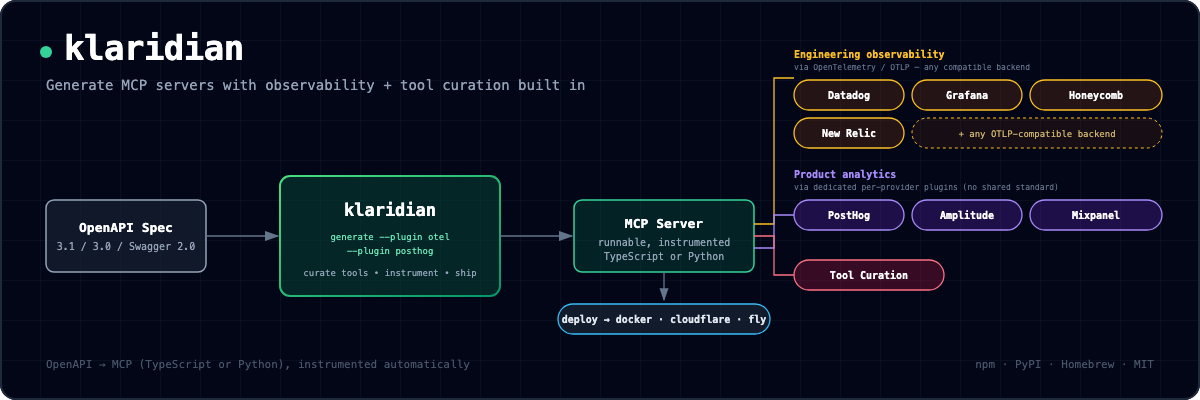
⚡ Generate MCP servers with engineering + product observability built in—no manual instrumentation.
This PyPI package is the klaridian CLI as a prebuilt native binary—no Node.js, nothing to compile. Install it with
pip install klaridian,uv tool install klaridian, orpipx install klaridian. It's the same CLI published to npm, shipped as platform-tagged wheels (the pattern ruff and uv use).
Status: v0.5.0. klaridian is a CLI that turns an OpenAPI spec into a real, runnable Model Context Protocol server—in TypeScript or Python—with observability and tool curation wired in from the start. See PLAN.md for strategy and ARCHITECTURE.md for design + decision history.
Contents: What you get · Why · Install · Quickstart · Upstream auth · Repository layout · Tests · Development · License · Contributing
What you get
- Two languages, one feature set—TypeScript (default) or Python (
--language python): identical tools, annotations, curation, and instrumentation. - Every OpenAPI flavor—3.1, 3.0, and Swagger 2.0 (converted automatically). klaridian owns the whole spec→server pipeline (on
@apidevtools/swagger-parser+swagger2openapi). - The latest MCP protocol—serves
2026-07-28(viaserver/discover) and keeps2025-11-25clients working, on one server. - Observability, one flag—OpenTelemetry (
--plugin otel, spans over OTLP to Datadog/Grafana/Honeycomb/New Relic/any OTLP backend) or product analytics (--plugin posthog|amplitude|mixpanel, an event per tool call). One plugin per server today. - Tool curation—choose which operations become tools by tag, path, or HTTP method, or interactively—so a large spec doesn't ship every operation as a tool.
- Structured, annotated tools—each tool advertises an
outputSchema+ returnsstructuredContent(JSON Schema 2020-12), and carries a title plus read-only / destructive / idempotent / open-world hints. Binary/download responses (files, images, audio) come back as MCP resource links or inline media, never decoded into the model's context. - Real upstream auth—the generated server authenticates using each operation's actual OpenAPI
securityScheme, from environment variables. Details below. - Ships where you deploy—a built-in HTML test client for streamable-http servers, plus
deploy --target docker|cloudflare|fly. - Runs everywhere—one CLI on npm, PyPI, and Homebrew, with prebuilt native binaries for macOS, Linux, and Windows.
- Open by default—a real
LICENSEfile in every generated server.
You can also curate and annotate from inside the spec with the x-klaridian extension (klaridian's own x-<vendor> field): expose: false hides an operation, title overrides the tool name, and readOnly/destructive/openWorld set the matching MCP annotations.
paths:
  /books/{id}:
    delete:
      x-klaridian:
        title: "Remove a book from the catalog"   # overrides the generated tool name
        destructive: true                          # sets destructiveHint
    get:
      x-klaridian: { readOnly: true }              # sets readOnlyHint
  /internal/admin:
    post:
      x-klaridian: { expose: false }               # never surfaced as a tool
Why
Building an MCP server means writing the server, then hand-wiring tracing and analytics from scratch. Datadog, PostHog, and Grafana ship MCP servers that let an agent query their platforms—they don't instrument a new server you're building. klaridian closes that gap.
No phone-home, and here's the proof
klaridian collects no telemetry. The CLI has no analytics, no usage counter, no update check, no license ping—it never contacts any endpoint we operate. This matters most if you generate servers for regulated or sensitive APIs (healthcare, finance, EU data), where a tool that quietly phones home is exactly what a security review flags.
The promise is verifiable, not just stated. scripts/verify-no-phone-home.sh runs klaridian generate from a local spec inside a network namespace with no connectivity at all, and checks a server is still produced—if the generator reached out anywhere it wasn't told to, an air-gapped run would fail. It runs on every CI build (the No phone-home check), and you can run it yourself:
bash scripts/verify-no-phone-home.sh
The only network calls the generator ever makes are ones you ask for by flag: a --spec <url> fetches that URL, --oauth-issuer does one OIDC discovery request to your identity provider, and --allow-external-refs (off by default) resolves remote $refs in your spec. With a local spec and none of those, generating is fully offline. (Two things this doesn't cover, so we don't overstate it: the generated server does make network calls—that's its job, proxying your API and exporting to the OTel/analytics backends you configure—and installing klaridian downloads it from your package registry like any other package. The promise is about running the generator, and it holds.)
Install
klaridian is one CLI on every major channel—pick whichever fits your toolchain:
# npx (Node.js) — run once, nothing installed; recommended for a generator
npx klaridian generate --spec ./api.yaml --out ./my-server

# npm (Node.js) — install the command globally
npm install -g klaridian

# PyPI — prebuilt native binary, no Node.js required
pip install klaridian           # or: uv tool install klaridian / pipx install klaridian

# Homebrew (macOS + Linux) — prebuilt native binary
brew tap klaridian/klaridian && brew install klaridian
The PyPI and Homebrew channels ship a standalone native binary (compiled with bun --compile, byte-identical to the Node build), so they run with zero Node.js—the same pattern ruff and uv use. Every GitHub Release also attaches a raw binary per platform (macOS arm64/x64, Linux arm64/x64, Windows x64). To build from source, see Development.
Using an AI coding agent?
Install the klaridian Agent Skill so the agent curates tools, reads --json results, and runs the generated server correctly:
npx skills add klaridian/klaridian
Quickstart
# Generate an MCP server from an OpenAPI spec, with OTel instrumentation:
klaridian generate \
  --spec ./openapi.json \
  --out /tmp/my-server \
  --name my-petstore-server \
  --base-url https://petstore3.swagger.io/api/v3 \
  --plugin otel --plugin-config otel.serviceName=my-petstore-server

# Then run it:
cd /tmp/my-server && npm install && npm run build && npm start
Prefer Python? Add --language python for an official mcp SDK project (requirements.txt, pyproject.toml, server.py)—same tools and instrumentation. Run it with pip install -r requirements.txt then python server.py (set KLARIDIAN_BASE_URL).
Omit --plugin for a plain server. Curate with --include-tags/--exclude-tags/--exclude-operation-ids (tag-based) or --include-paths/--exclude-paths/--include-methods/--exclude-methods (regex/method, works even with zero OpenAPI tags), or --interactive. Every server ships a real LICENSE by default (--license mit/apache-2.0; --license none opts out with a warning; --author sets the copyright holder).
Publishing to the MCP Registry? --registry-name io.github.you/server sets the reverse-DNS name and marks the project publishable; the version is derived from your spec's info.version (or --server-version). See Publishing to the MCP Registry.
For the full flag reference: CLI reference. Machine-readable output for scripts/agents: --json (single result + stable stage tag on error), --quiet, --force.
Upstream authentication
The generated server authenticates to the upstream API using the actual OpenAPI securityScheme each operation declares—not a one-size-fits-all bearer. Credentials come from environment variables, so one build points at different deployments without a rebuild (TypeScript and Python emit identical wiring):
| Scheme | Environment variable(s) | What the server sends |
|---|---|---|
http bearer |
KLARIDIAN_AUTH_TOKEN |
Authorization: Bearer … |
apiKey (header/query/cookie) |
KLARIDIAN_API_KEY |
the named header, query param, or Cookie entry |
http basic |
KLARIDIAN_BASIC_USER + KLARIDIAN_BASIC_PASS |
Authorization: Basic … |
oauth2 / openIdConnect |
KLARIDIAN_OAUTH_TOKEN |
Authorization: Bearer … (you supply the token) |
mutualTLS is unsupported (a client cert can't come from an env var)—klaridian fails loudly if an operation offers only that. Two flags cover the rest: --forward-headers forwards named inbound headers from the MCP client to the upstream (streamable-http only), for per-user credentials; --auth-hook emits an editable pre-auth hook for request signing, token exchange, or any scheme not emitted natively. Full guide: Upstream authentication.
Repository layout
klaridian/
├── packages/
│   └── cli/                        # the klaridian CLI
│       ├── src/
│       │   ├── emit/               # emits the stateless SDK-v2 MCP server project from tool data
│       │   ├── plugins/            # ObservabilityPlugin interface + otel/posthog/amplitude/mixpanel
│       │   ├── curation/           # tool curation + interactive prompt
│       │   └── commands/           # generate, deploy, start, init
│       └── test/                   # end-to-end tests (real npm install + build + run)
├── examples/                       # petstore (test fixture) + annotated (x-klaridian demo)
├── spikes/                         # throwaway spikes that validated risky mechanics
├── PLAN.md                         # business/strategy plan
├── ARCHITECTURE.md                 # technical design, decisions, validation history
└── AGENTS.md                       # working agreements for AI agents (CLAUDE.md symlinks here)
Running the tests
cd packages/cli && npm test
Real end-to-end tests: emit a project, wire in a plugin, npm install it for real, build with tsc, spawn it, and drive it over stdio JSON-RPC—not just unit tests on generated strings.
Development environment
A devcontainer is provided, pinned to the Node/Python versions CI runs against (Node 22, Python 3.11) plus gh. Open in VS Code / GitHub Codespaces and "Reopen in Container"—dependencies for both packages install automatically.
License
MIT for the open-core CLI and base plugins—see PLAN.md §3 for the open-core model this sits within.
Contributing
Early-stage, but open to issues and discussion—see CONTRIBUTING.md. Please open an issue before a non-trivial PR, since the core direction is still being validated. Documentation follows the Microsoft Writing Style Guide—see STYLE.md.
1 maintainer

Metadata
1 maintainer
Release files for klaridian 0.5.0
For a detailed explanation of source distributions (sdists) and built distributions (wheels), please see the package formats documentation.
Built distributions (wheels)
| File | Reset | |||
|---|---|---|---|---|
| klaridian-0.5.0-py3-none-win_amd64.whl | Python 3 | none | Windows x86-64 | Details |
| klaridian-0.5.0-py3-none-manylinux2014_x86_64.whl | Python 3 | none | Linux glibc 2.17+ x86-64 | Details |
| klaridian-0.5.0-py3-none-manylinux2014_aarch64.whl | Python 3 | none | Linux glibc 2.17+ ARM64 | Details |
| klaridian-0.5.0-py3-none-macosx_13_0_x86_64.whl | Python 3 | none | macOS 13.0+ x86-64 | Details |
| klaridian-0.5.0-py3-none-macosx_13_0_arm64.whl | Python 3 | none | macOS 13.0+ ARM64 | Details |
Total release size: 168.6 MB
Release files / klaridian-0.5.0-py3-none-win_amd64.whl
| Download URL | klaridian-0.5.0-py3-none-win_amd64.whl |
|---|---|
| Size | 40.1 MB |
| Tags | Python 3 Windows x86-64 |
|
SHA-256 checksum How to use checksums |
d644782c32beaa4c915b472db04381abb082dcc667f740a1dae91296bfe40e04
|
|
BLAKE2b-256 checksum How to use checksums |
e01ae3ebe6f8f78c4d76ed0278db14ae33c482bf33538e1e21ed5c50538ea9b1
|
| Upload date | |
|
Uploaded using Trusted Publishing? What is trusted publishing? |
Yes |
| Uploaded via |
twine/7.0.0 CPython/3.13.14
|
Provenance
Provenance describes where a file came from. On PyPI, provenance is shared via attestations, which provide a verifiable record of the build or publishing details. View details, limitations and caveats.


PyPI Publish Attestation
PyPI verified that this artifact, at this checksum, originated from the publisher listed below.
Signed by GitHub Actions, verified by PyPI on Oct 18, 2026.
Transparency logRelease files / klaridian-0.5.0-py3-none-manylinux2014_x86_64.whl
| Download URL | klaridian-0.5.0-py3-none-manylinux2014_x86_64.whl |
|---|---|
| Size | 36.9 MB |
| Tags | Linux glibc 2.17+ x86-64 Python 3 |
|
SHA-256 checksum How to use checksums |
7bfbf9ad7024dd6f287f8104b1fd41429ef2438906cc598e83e81b39f4509b92
|
|
BLAKE2b-256 checksum How to use checksums |
cbc3b56cfb05b3af13c775e9d9488dbc54f353f2b345b4f50c02ca39063a0352
|
| Upload date | |
|
Uploaded using Trusted Publishing? What is trusted publishing? |
Yes |
| Uploaded via |
twine/7.0.0 CPython/3.13.14
|
Provenance
Provenance describes where a file came from. On PyPI, provenance is shared via attestations, which provide a verifiable record of the build or publishing details. View details, limitations and caveats.
PyPI Publish Attestation
PyPI verified that this artifact, at this checksum, originated from the publisher listed below.
Signed by GitHub Actions, verified by PyPI on Oct 18, 2026.
Transparency logRelease files / klaridian-0.5.0-py3-none-manylinux2014_aarch64.whl
| Download URL | klaridian-0.5.0-py3-none-manylinux2014_aarch64.whl |
|---|---|
| Size | 36.9 MB |
| Tags | Linux glibc 2.17+ ARM64 Python 3 |
|
SHA-256 checksum How to use checksums |
1f32726f00f8f8e0590852ad0446349b2492297779a318734ec3eb24cde4a0cc
|
|
BLAKE2b-256 checksum How to use checksums |
822b9e04c30c1bcf62e76993a209a69e121f5dc99dbe6e2b36cce0f6ed99d3cd
|
| Upload date | |
|
Uploaded using Trusted Publishing? What is trusted publishing? |
Yes |
| Uploaded via |
twine/7.0.0 CPython/3.13.14
|
Provenance
Provenance describes where a file came from. On PyPI, provenance is shared via attestations, which provide a verifiable record of the build or publishing details. View details, limitations and caveats.
PyPI Publish Attestation
PyPI verified that this artifact, at this checksum, originated from the publisher listed below.
Signed by GitHub Actions, verified by PyPI on Oct 18, 2026.
Transparency logRelease files / klaridian-0.5.0-py3-none-macosx_13_0_x86_64.whl
| Download URL | klaridian-0.5.0-py3-none-macosx_13_0_x86_64.whl |
|---|---|
| Size | 28.7 MB |
| Tags | Python 3 macOS 13.0+ x86-64 |
|
SHA-256 checksum How to use checksums |
82bfd2995f9f58bd47c2132ade2983309786efb12c5c752bb326dc41bf5c3fe3
|
|
BLAKE2b-256 checksum How to use checksums |
fb4467a75c5534fb2412130282d3892246d587540424d1a68c6a8222be3883a6
|
| Upload date | |
|
Uploaded using Trusted Publishing? What is trusted publishing? |
Yes |
| Uploaded via |
twine/7.0.0 CPython/3.13.14
|
Provenance
Provenance describes where a file came from. On PyPI, provenance is shared via attestations, which provide a verifiable record of the build or publishing details. View details, limitations and caveats.
PyPI Publish Attestation
PyPI verified that this artifact, at this checksum, originated from the publisher listed below.
Signed by GitHub Actions, verified by PyPI on Oct 18, 2026.
Transparency logRelease files / klaridian-0.5.0-py3-none-macosx_13_0_arm64.whl
| Download URL | klaridian-0.5.0-py3-none-macosx_13_0_arm64.whl |
|---|---|
| Size | 26.0 MB |
| Tags | Python 3 macOS 13.0+ ARM64 |
|
SHA-256 checksum How to use checksums |
39181eeb492377081ec5b3130cfd1832324a6c68f9e50b7d11e286ac62742565
|
|
BLAKE2b-256 checksum How to use checksums |
f7495c9525f5901c77cb03a1256c47c5022c40cdaa69fb833f437f209825328a
|
| Upload date | |
|
Uploaded using Trusted Publishing? What is trusted publishing? |
Yes |
| Uploaded via |
twine/7.0.0 CPython/3.13.14
|
Provenance
Provenance describes where a file came from. On PyPI, provenance is shared via attestations, which provide a verifiable record of the build or publishing details. View details, limitations and caveats.
PyPI Publish Attestation
PyPI verified that this artifact, at this checksum, originated from the publisher listed below.
Signed by GitHub Actions, verified by PyPI on Oct 18, 2026.
Transparency log













