
knowledge-worker

A personal knowledge graph that survives between AI conversations.
User-centered (not conversation-centered). Provenance-or-bust. Built on boring infrastructure.
Your AI is only as smart as what it remembers about you.
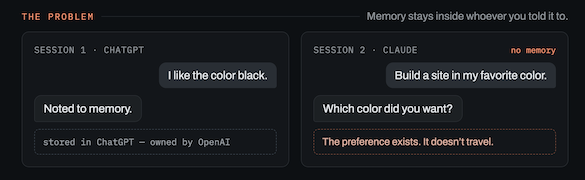
knowledge-worker is a local-first personal knowledge graph for carrying context across AI sessions. It turns notes into reviewable concepts, decisions, goals, and relationships, keeps source excerpts attached, and exports compact context you can paste into Claude, GPT, Ollama, or any other LLM workflow.
Your private graph stays on your machine, enabling you to preserve the thread of your own reasoning across AI sessions.
Why
AI conversations usually start from zero. You clarify a decision, name a constraint, sketch a goal, and then the next session forgets it. RAG can be heavy, full-note prompts are noisy, and most note apps do not plug cleanly into chat workflows.
Stop dumping context. Build memory. knowledge-worker turns chats, notes, decisions, and sources into a local provenance-backed knowledge graph, then uses graph analytics to show what matters, what connects, what is weak, and what context an AI should see.
knowledge-worker keeps the useful parts: cited claims, explicit relationships, human review, and a small context snapshot when you need continuity.
Quick Start
Requirements: Python 3.10+ on macOS, Linux, or Windows.
Install from PyPI
The core CLI has no runtime dependencies beyond the standard library. Optional extras pull in LLM backends and RDF export only when you need them:
pip install knowledge-worker                # core CLI, stdlib only (mykg / mygraph)
pip install "knowledge-worker[rdf]"        # + Turtle/RDF export (rdflib)
pip install "knowledge-worker[anthropic]"  # + Claude-backed ingest
pip install "knowledge-worker[openai]"     # + OpenAI-backed ingest
pip install "knowledge-worker[ollama]"     # + local Ollama ingest
pip install "knowledge-worker[all]"        # all ingest backends + RDF exports
Verify the install (no clone needed — seed generates its own demo graph):
mykg --help
MYGRAPH_PATH=/tmp/knowledge-worker-demo.jsonld mykg seed
MYGRAPH_PATH=/tmp/knowledge-worker-demo.jsonld mykg summary
Using a virtual environment avoids Homebrew/system Python's externally-managed install errors:
python3 -m venv .venv
source .venv/bin/activate
pip install knowledge-worker
export MYGRAPH_PATH=/tmp/knowledge-worker-demo.jsonld
mykg summary
What It Does
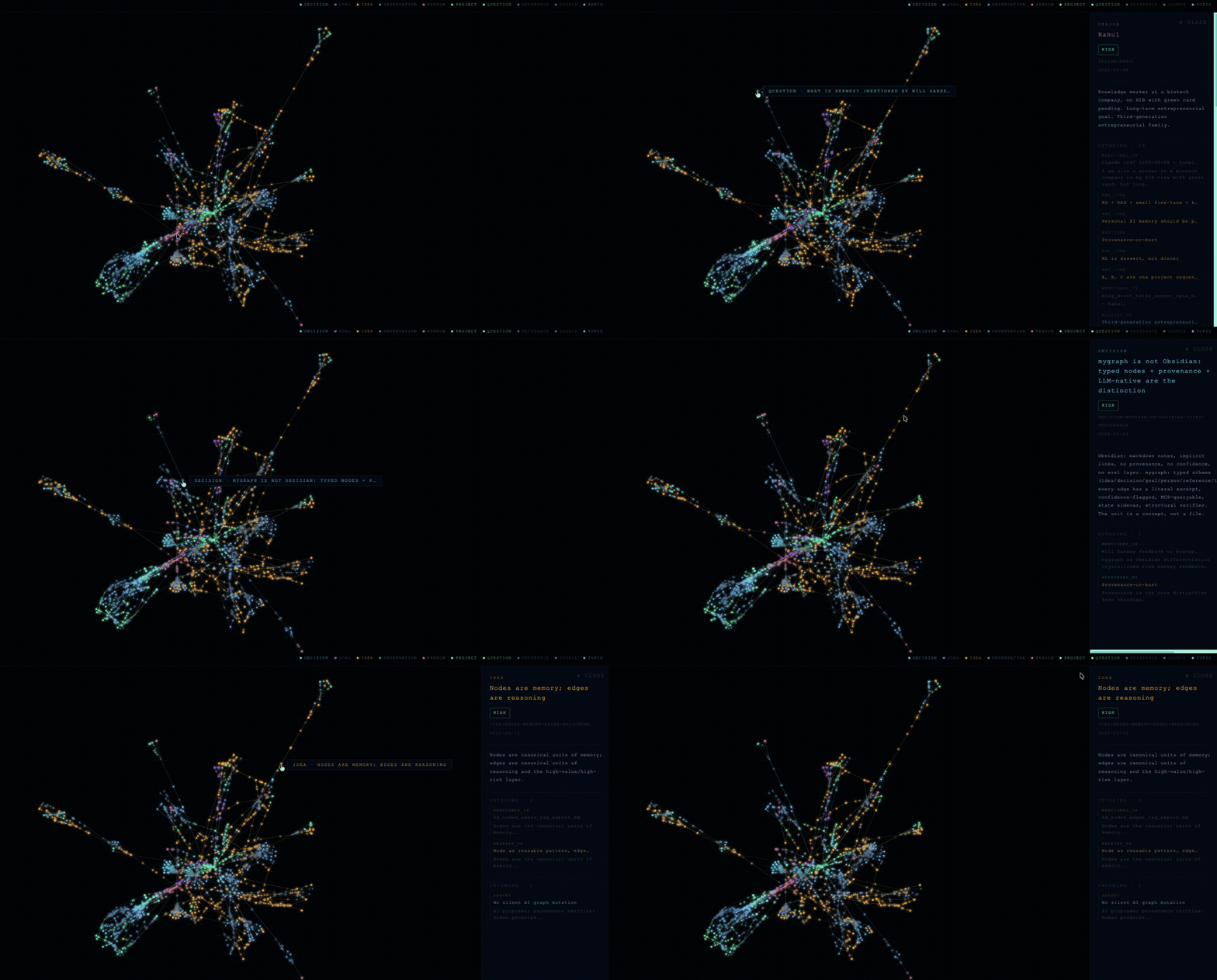
- Ingests markdown notes (generated from AI skill) into candidate graph nodes and edges.
- Generates pre-ingest deep-dive workspaces for sources that need synthesis before graph promotion.
- Requires provenance excerpts before claims become durable memory.
- Lets you review, accept, reject, or edit LLM proposals before merge.
- Searches by term, lists nodes by type, and finds paths between ideas.
- Exports an LLM-ready context snapshot for a fresh chat session.
- Audits memory shape with PageRank, betweenness, k-core, communities, weak claims, and provenance coverage.
- Generates an offline HTML graph viewer for exploration and demos.
How Memory Enters The Graph
Graph memory is promoted through a review lifecycle:
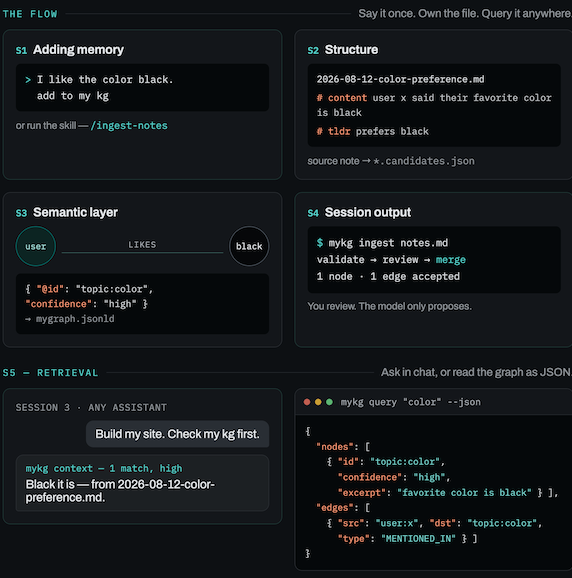
source note
  -> candidates.json
  -> validate
  -> review
  -> merge accepted items into MYGRAPH_PATH
Candidates are proposals, not memory. Validation checks schema, IDs, provenance excerpts, and edge endpoints. Review is the promotion gate. The active graph changes only after accepted candidates are merged.
The product contract is:
The model proposes. Artifacts expose reasoning. Provenance verifies. Human review promotes.
Claude or Codex App, No API Key
If you are already working with Claude, Codex, or ChatGPT in an app session, you do not need an API key. Ask the assistant to produce a *.candidates.json file that follows the schema in mygraph/extractor.py, then let the local CLI validate, review, and merge it. In Claude Code, the bundled /ingest-notes skill runs this flow for you:
python3 -m venv .venv
source .venv/bin/activate
python -m pip install -e .

mykg ingest path/to/your/notes.md --candidates-file path/to/your/notes.candidates.json
The app subscription helps you create the candidates file. The user (default) or AI gets to decide what needs to go in to the memory.
Design Principles
Provenance first. Every durable claim points back to a source document and literal excerpt.
Local first. The graph is a file on your machine. No cloud sync, accounts, or telemetry.
Review before merge. The LLM proposes. You decide. Deterministic validation runs before anything enters the graph.
Boring persistence. Compact JSON-LD until it becomes the limiting factor. The schema stays stable across storage backends.
Open-web storage. Local JSON-LD is the source of truth; JSONL records capture history, and Turtle/RDF exports let the graph participate in linked-data workflows without moving private memory into a hosted system. Additionally, JSON-LD, which has clear semantic markup gives AI engines like Google Gemini or Microsoft Copilot higher attribution confidence when extracting facts
For the shorter mykg command from a clone, install it editable inside a
virtual environment:
python3 -m venv .venv
source .venv/bin/activate
python -m pip install -e .
MYGRAPH_PATH=examples/demo_graph.jsonld mykg query provenance
On Windows PowerShell:
py -3 -m venv .venv
.\.venv\Scripts\Activate.ps1
python -m pip install knowledge-worker

$env:MYGRAPH_PATH = "$env:TEMP\knowledge-worker-demo.jsonld"
mykg seed
mykg summary
From a clone, install editable instead:
python -m pip install -e .

$env:MYGRAPH_PATH = "examples\demo_graph.jsonld"
mykg query provenance
mykg audit --out "$env:TEMP\analytics.json" --html "$env:TEMP\memory_audit.html"
If PowerShell blocks activation scripts, run this for the current terminal session and activate again:
Set-ExecutionPolicy -Scope Process -ExecutionPolicy Bypass
Commands
| Command | What it does |
|---|---|
seed |
Populate a fictional demo graph |
summary |
Show node and edge counts by type |
query <term> |
Search nodes, neighbors, and provenance |
list <type> |
List nodes of a given type |
path <a> <b> |
Find the shortest path between two nodes |
ingest <file.md> |
Extract, validate, review, merge, and eval candidates |
deep-dive <file.md> |
Generate a pre-ingest workspace with artifacts and candidates |
check --provenance |
Flag nodes with missing source citations |
export / export --jsonld |
Emit canonical JSON-LD |
export --ttl |
Emit Turtle/RDF |
context |
Print a compact LLM-ready context snapshot |
viz |
Generate an offline single-file HTML viewer |
audit |
Emit graph analytics, directed idea-flow queues, and optional Memory Audit HTML |
discover |
Propose derived edges and second-order insights (read-only, promotion queue) |
state "<entry>" |
Append a mood/state sidecar entry |
dump |
Print the raw graph JSON |
reset |
Delete the active graph file |
Use Your Own Notes
You can ingest your notes with or without an API key.
Claude or Codex App, No API Key
If you are already working with Claude, Codex, or ChatGPT in an app session, you do not need an API key. Ask the assistant to produce a *.candidates.json file that follows the schema in mygraph/extractor.py, then let the local CLI validate, review, and merge it. In Claude Code, the bundled /ingest-notes skill runs this flow for you:
python3 -m venv .venv
source .venv/bin/activate
python -m pip install -e .

mykg ingest path/to/your/notes.md --candidates-file path/to/your/notes.candidates.json
The app subscription helps you create the candidates file. The repo still keeps graph validation and merge local.
Deep Dive Workflow
Use deep-dive when a source needs synthesis, challenge, or a reasoning
workspace before it becomes graph memory:
mykg deep-dive notes.md --out-dir ~/private/deepdives/notes
mykg deep-dive inspect ~/private/deepdives/notes
mykg deep-dive add-to-graph ~/private/deepdives/notes
Generation creates a workspace with manifest.json, artifact-plan.json,
Markdown artifacts, validation reports, an artifact-local graph summary, and
canonical candidates. It does not mutate MYGRAPH_PATH.
add-to-graph reads the workspace manifest and delegates to the existing ingest
validation/review/merge path. Keep using ingest directly when you already have
a focused source note or hand-curated candidates file.
See Deep-Dive Interaction Model for the generate, inspect, challenge, approve, and add-to-graph semantics.
Automated API-Backed Ingest
If you want the CLI to call an LLM directly, use a provider API key or local Ollama.
For Anthropic API:
python3 -m venv .venv
source .venv/bin/activate
python -m pip install -e ".[anthropic]"
export ANTHROPIC_API_KEY=...

mykg ingest path/to/your/notes.md
The Claude backend also auto-detects Anthropic-compatible provider env:
- Anthropic API:
ANTHROPIC_API_KEYorANTHROPIC_AUTH_TOKEN - Foundry:
ANTHROPIC_FOUNDRY_API_KEYplusANTHROPIC_FOUNDRY_RESOURCEorANTHROPIC_FOUNDRY_BASE_URL - Bedrock:
AWS_BEARER_TOKEN_BEDROCK, or AWS credentials plusAWS_REGION/AWS_DEFAULT_REGION
For OpenAI API:
python3 -m venv .venv
source .venv/bin/activate
python -m pip install -e ".[openai]"
export OPENAI_API_KEY=...

mykg ingest path/to/your/notes.md --backend openai --model gpt-5.2
Graph Workflow
The public repo ships code, docs, and a fictional demo graph. Your real graph should live outside the repo or in the ignored default path, then be loaded explicitly:
MYGRAPH_PATH=~/my-private-graph/mygraph.jsonld mykg summary
MYGRAPH_PATH=~/my-private-graph/mygraph.jsonld mykg query "architecture"
MYGRAPH_PATH=~/my-private-graph/mygraph.jsonld mykg context
Your private mygraph.jsonld and/or legacy mygraph.json, generated private
viewers, TTL/JSON-LD exports, eval logs, state logs, and local env files are
ignored by default.
Storage Direction
In v0.8.0, knowledge-worker resolves the storage question this way: JSON-LD is
the canonical local graph; JSONL is the append-only history layer for reviews,
evals, analyzer runs, and future replay; Turtle/RDF export is the semantic-web
bridge. Kuzu is a future optional local query backend, and graphify.net is a
future publishing or interchange target.
See Storage Decision for the full decision record.
Memory Audit
mykg audit is a read-only layer over the graph. It ranks important concepts
with PageRank, bridge ideas with betweenness, structural strength with k-core,
communities with deterministic graph splitting, and weak claims from confidence
and provenance gaps. It also includes directed idea-flow queues:
idea_attractors for concepts that many edges point into, idea_generators
for ideas that branch outward, and a weak_claim_queue that asks for human
review actions instead of auto-promoting conclusions.
MYGRAPH_PATH=examples/demo_graph.jsonld mykg audit \
  --out /tmp/analytics.json \
  --html /tmp/memory_audit.html
The generated HTML puts ranked panels and legwork queues first, with the graph canvas second. This keeps the feature focused on memory governance instead of making the raw graph view the product.
Discovery Layer
Where audit ranks what the graph already says, mykg discover infers what it
implies but does not yet say — and turns every inference into a reviewable
proposal:
- Staleness radar: important nodes whose evidence trail has gone cold, scored by importance × days since the graph last touched them.
- Co-mention candidates: pairs that recur together across multiple sources
but were never linked (
CO_MENTIONED_WITH). - Goal-alignment candidates: ideas and decisions structurally entangled
with a goal they have no contribution path to (
SERVES_CANDIDATE). - Link prediction: Adamic-Adar over the semantic graph (
RELATES_TO). - Question debt: open questions ranked by age, centrality, and missing
evidence; answered questions are detected via decision
ABOUTedges. - Corroboration: claims that hang on a single source (
SINGLE_SOURCE). - Bridge finder: cross-community connectors that remain after removing
dominant hub "spines" that mask real bridges (
BRIDGES). - Tension detector: claims that are both supported and challenged, and
goal contributions that inherit a challenge to the goal (
TENSION_WITH).
MYGRAPH_PATH=examples/demo_graph.jsonld mykg discover \
  --out /tmp/discovery.json \
  --candidates /tmp/discovery.candidates.json
Discover never mutates the graph. Derived edges land in a candidates file — a
promotion queue for human review. AI proposes, provenance verifies, the owner
promotes. Committed sample output: examples/demo_discovery.json.
Contributing
See CONTRIBUTING.md. The core graph model is intentionally minimal; contributions that preserve that shape are preferred.
License
MIT
1 maintainer

Metadata
1 maintainer
Release files for knowledge-worker 0.8.2
For a detailed explanation of source distributions (sdists) and built distributions (wheels), please see the package formats documentation.
Source distribution (sdist)
| File | Size | Uploaded | |
|---|---|---|---|
| knowledge_worker-0.8.2.tar.gz | 85.4 kB | Details |
Built distribution (wheel)
| File | Interpreter | ABI | Platform | Reset |
|---|---|---|---|---|
| knowledge_worker-0.8.2-py3-none-any.whl | Python 3 | none | any | Details |
Total release size: 172.7 kB
Release files / knowledge_worker-0.8.2.tar.gz
| Download URL | knowledge_worker-0.8.2.tar.gz |
|---|---|
| Size | 85.4 kB |
| Tags | Source |
|
SHA-256 checksum How to use checksums |
b9bb22160b47f89215656eaf1af5ac247483c35f50ce70bdf482333f122712ed
|
|
BLAKE2b-256 checksum How to use checksums |
503f08cbc982c1a3a2a73e26769566c781e3e0ab9ea128480c9a2b327e064d22
|
| Upload date | |
|
Uploaded using Trusted Publishing? What is trusted publishing? |
Yes |
| Uploaded via |
twine/7.0.0 CPython/3.13.14
|
Provenance
Provenance describes where a file came from. On PyPI, provenance is shared via attestations, which provide a verifiable record of the build or publishing details. View details, limitations and caveats.


PyPI Publish Attestation
PyPI verified that this artifact, at this checksum, originated from the publisher listed below.
Signed by GitHub Actions, verified by PyPI on Aug 30, 2026.
Transparency logRelease files / knowledge_worker-0.8.2-py3-none-any.whl
| Download URL | knowledge_worker-0.8.2-py3-none-any.whl |
|---|---|
| Size | 87.3 kB |
| Tags | Python 3 |
|
SHA-256 checksum How to use checksums |
4c393a032370b37c349fde348d963ad07a9fdf7cf301850596a21d771821a682
|
|
BLAKE2b-256 checksum How to use checksums |
64d6741914647a02d9a4a7811887613a1bfc121017a141833ce12f23053c111b
|
| Upload date | |
|
Uploaded using Trusted Publishing? What is trusted publishing? |
Yes |
| Uploaded via |
twine/7.0.0 CPython/3.13.14
|
Provenance
Provenance describes where a file came from. On PyPI, provenance is shared via attestations, which provide a verifiable record of the build or publishing details. View details, limitations and caveats.
PyPI Publish Attestation
PyPI verified that this artifact, at this checksum, originated from the publisher listed below.
Signed by GitHub Actions, verified by PyPI on Aug 30, 2026.
Transparency log













