
Provenance-backed personal knowledge graph for local AI workflows
Verified details
These details have been verified by PyPIProject links
GitHub Statistics
Maintainers

Project description
knowledge-worker

A personal knowledge graph that survives between AI conversations.
User-centered (not conversation-centered). Provenance-or-bust. Built on boring infrastructure.
Your AI is only as smart as what it remembers about you.
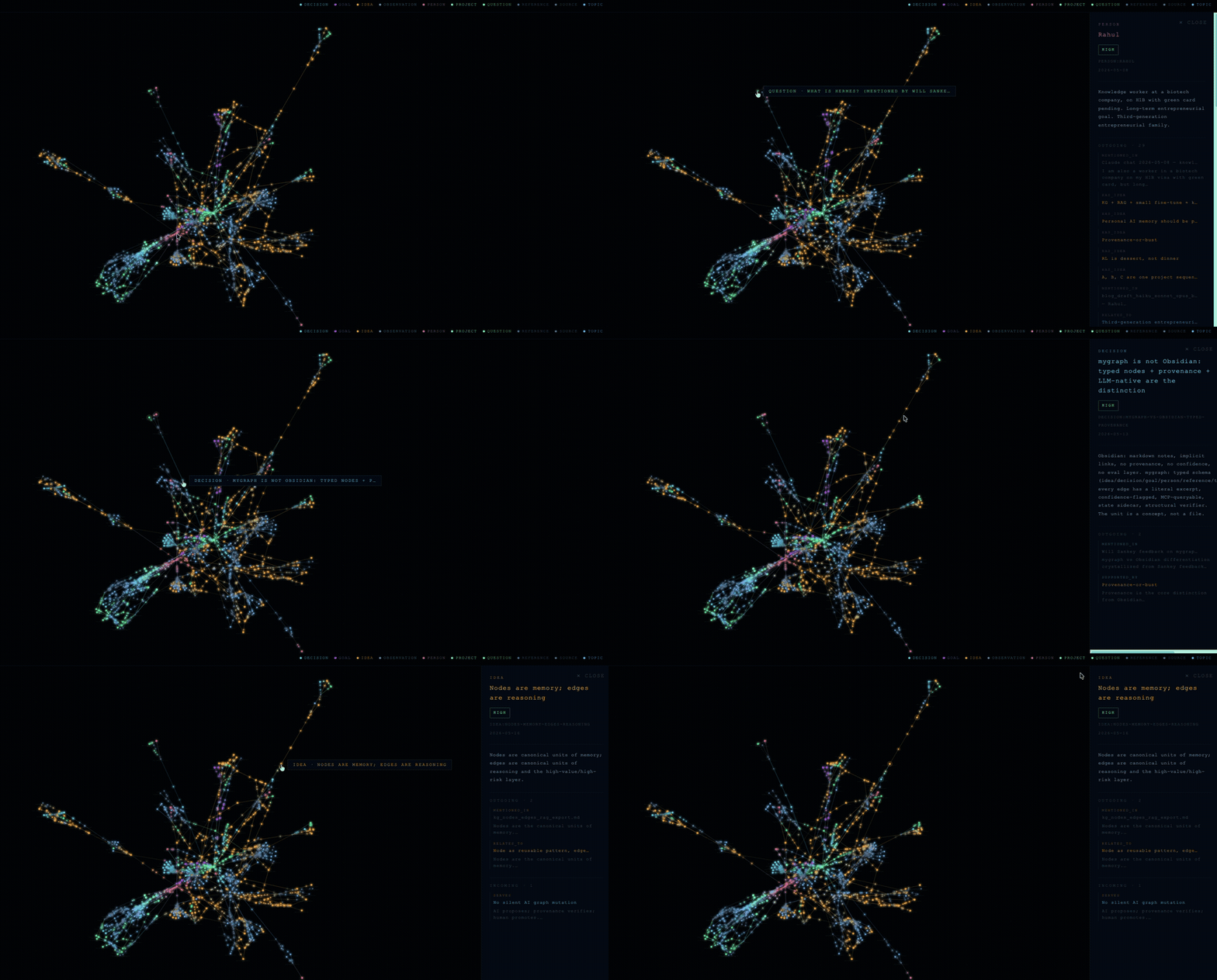
knowledge-worker is a local-first personal knowledge graph for carrying context across AI sessions. It turns notes into reviewable concepts, decisions, goals, and relationships, keeps source excerpts attached, and exports compact context you can paste into Claude, GPT, Ollama, or any other LLM workflow.
Your private graph stays on your machine, enabling you to preserve the thread of your own reasoning across AI sessions.
Why
AI conversations usually start from zero. You clarify a decision, name a constraint, sketch a goal, and then the next session forgets it. RAG can be heavy, full-note prompts are noisy, and most note apps do not plug cleanly into chat workflows.
Stop dumping context. Build memory. knowledge-worker turns chats, notes, decisions, and sources into a local provenance-backed knowledge graph, then uses graph analytics to show what matters, what connects, what is weak, and what context an AI should see.
knowledge-worker keeps the useful parts: cited claims, explicit relationships, human review, and a small context snapshot when you need continuity.
How It Compares
knowledge-worker is personal AI memory with source-backed claims, not a team
chat-to-wiki system. It keeps reasoning local, reviewable, and tied to literal
provenance excerpts before claims become durable graph knowledge.
See Competitive Analysis for the category matrix and Benchmarks for the offline demo-graph checks.
What It Does
- Ingests markdown notes into candidate graph nodes and edges.
- Requires provenance excerpts before claims become durable memory.
- Lets you review, accept, reject, or edit LLM proposals before merge.
- Searches by term, lists nodes by type, and finds paths between ideas.
- Exports an LLM-ready context snapshot for a fresh chat session.
- Audits memory shape with PageRank, betweenness, k-core, communities, weak claims, and provenance coverage.
- Generates an offline HTML graph viewer for exploration and demos.
Design Principles
Provenance first. Every durable claim points back to a source document and literal excerpt.
Local first. The graph is a file on your machine. No cloud sync, accounts, or telemetry.
Review before merge. The LLM proposes. You decide. Deterministic validation runs before anything enters the graph.
Boring persistence. Plain JSON until it becomes the limiting factor. The schema stays stable across storage backends.
Quick Start
Requirements: Python 3.10+ on macOS, Linux, or Windows.
Install from PyPI
The core CLI has no runtime dependencies beyond the standard library. Optional extras pull in LLM backends and RDF export only when you need them:
python -m pip install knowledge-worker               # core CLI, stdlib only (mykg / mygraph)
python -m pip install "knowledge-worker[rdf]"        # + Turtle/RDF export (rdflib)
python -m pip install "knowledge-worker[anthropic]"  # + Claude-backed ingest
python -m pip install "knowledge-worker[openai]"     # + OpenAI-backed ingest
python -m pip install "knowledge-worker[ollama]"     # + local Ollama ingest
python -m pip install "knowledge-worker[all]"        # all ingest backends + RDF
Verify the install (no clone needed — seed generates its own demo graph):
mykg --help
MYGRAPH_PATH=/tmp/knowledge-worker-demo.json mykg seed
MYGRAPH_PATH=/tmp/knowledge-worker-demo.json mykg summary
Using a virtual environment avoids Homebrew/system Python's externally-managed install errors:
python3 -m venv .venv
source .venv/bin/activate
python -m pip install knowledge-worker
Run from a clone (no install)
The core demo CLI uses only the standard library, so you can run it straight from a checkout without installing anything:
git clone https://github.com/rahulmranga/knowledge-worker
cd knowledge-worker

# Run the public demo graph, no API key needed
MYGRAPH_PATH=examples/demo_graph.json python3 mygraph/mygraph.py summary
MYGRAPH_PATH=examples/demo_graph.json python3 mygraph/mygraph.py query "provenance"

# Generate an LLM-ready context snapshot
MYGRAPH_PATH=examples/demo_graph.json python3 mygraph/mygraph.py context

# Audit memory structure and proof coverage
MYGRAPH_PATH=examples/demo_graph.json python3 mygraph/mygraph.py audit --out /tmp/analytics.json --html /tmp/memory_audit.html

# Visualize the graph as a self-contained HTML file
python3 mygraph/mygraph.py viz --graph examples/demo_graph.json --out /tmp/demo.html
For the shorter mykg command from a clone, install it editable inside a
virtual environment:
python3 -m venv .venv
source .venv/bin/activate
python -m pip install -e .
MYGRAPH_PATH=examples/demo_graph.json mykg query provenance
On Windows PowerShell:
py -3 -m venv .venv
.\.venv\Scripts\Activate.ps1
python -m pip install knowledge-worker

$env:MYGRAPH_PATH = "$env:TEMP\knowledge-worker-demo.json"
mykg seed
mykg summary
From a clone, install editable instead:
python -m pip install -e .

$env:MYGRAPH_PATH = "examples\demo_graph.json"
mykg query provenance
mykg audit --out "$env:TEMP\analytics.json" --html "$env:TEMP\memory_audit.html"
If PowerShell blocks activation scripts, run this for the current terminal session and activate again:
Set-ExecutionPolicy -Scope Process -ExecutionPolicy Bypass
Commands
| Command | What it does |
|---|---|
seed |
Populate a fictional demo graph |
summary |
Show node and edge counts by type |
query <term> |
Search nodes, neighbors, and provenance |
list <type> |
List nodes of a given type |
path <a> <b> |
Find the shortest path between two nodes |
ingest <file.md> |
Extract, validate, review, merge, and eval candidates |
check --provenance |
Flag nodes with missing source citations |
export --ttl |
Emit Turtle/RDF |
context |
Print a compact LLM-ready context snapshot |
viz |
Generate an offline single-file HTML viewer |
audit |
Emit graph analytics, directed idea-flow queues, and optional Memory Audit HTML |
discover |
Propose derived edges and second-order insights (read-only, promotion queue) |
state "<entry>" |
Append a mood/state sidecar entry |
dump |
Print the raw graph JSON |
reset |
Delete the active graph file |
Use Your Own Notes
You can ingest your notes with or without an API key.
Claude or Codex App, No API Key
If you are already working with Claude, Codex, or ChatGPT in an app session, you do not need an API key. Ask the assistant to produce a *.candidates.json file that follows the schema in mygraph/extractor.py, then let the local CLI validate, review, and merge it. In Claude Code, the bundled /ingest-notes skill runs this flow for you:
python3 -m venv .venv
source .venv/bin/activate
python -m pip install -e .

mykg ingest path/to/your/notes.md --candidates-file path/to/your/notes.candidates.json
The app subscription helps you create the candidates file. The repo still keeps graph validation and merge local.
Automated API-Backed Ingest
If you want the CLI to call an LLM directly, use a provider API key or local Ollama.
For Anthropic API:
python3 -m venv .venv
source .venv/bin/activate
python -m pip install -e ".[anthropic]"
export ANTHROPIC_API_KEY=...

mykg ingest path/to/your/notes.md
The Claude backend also auto-detects Anthropic-compatible provider env:
- Anthropic API:
ANTHROPIC_API_KEYorANTHROPIC_AUTH_TOKEN - Foundry:
ANTHROPIC_FOUNDRY_API_KEYplusANTHROPIC_FOUNDRY_RESOURCEorANTHROPIC_FOUNDRY_BASE_URL - Bedrock:
AWS_BEARER_TOKEN_BEDROCK, or AWS credentials plusAWS_REGION/AWS_DEFAULT_REGION
For OpenAI API:
python3 -m venv .venv
source .venv/bin/activate
python -m pip install -e ".[openai]"
export OPENAI_API_KEY=...

mykg ingest path/to/your/notes.md --backend openai --model gpt-5.2
Graph Workflow
The public repo ships code, docs, and a fictional demo graph. Your real graph should live outside the repo or in the ignored default path, then be loaded explicitly:
MYGRAPH_PATH=~/my-private-graph/mygraph.json mykg summary
MYGRAPH_PATH=~/my-private-graph/mygraph.json mykg query "architecture"
MYGRAPH_PATH=~/my-private-graph/mygraph.json mykg context
Your private mygraph.json, generated private viewers, TTL exports, eval logs, state logs, and local env files are ignored by default.
Memory Audit
mykg audit is a read-only layer over the graph. It ranks important concepts
with PageRank, bridge ideas with betweenness, structural strength with k-core,
communities with deterministic graph splitting, and weak claims from confidence
and provenance gaps. It also includes directed idea-flow queues:
idea_attractors for concepts that many edges point into, idea_generators
for ideas that branch outward, and a weak_claim_queue that asks for human
review actions instead of auto-promoting conclusions.
MYGRAPH_PATH=examples/demo_graph.json mykg audit \
  --out /tmp/analytics.json \
  --html /tmp/memory_audit.html
The generated HTML puts ranked panels and legwork queues first, with the graph canvas second. This keeps the feature focused on memory governance instead of making the raw graph view the product.
Discovery Layer
Where audit ranks what the graph already says, mykg discover infers what it
implies but does not yet say — and turns every inference into a reviewable
proposal:
- Staleness radar: important nodes whose evidence trail has gone cold, scored by importance × days since the graph last touched them.
- Co-mention candidates: pairs that recur together across multiple sources
but were never linked (
CO_MENTIONED_WITH). - Goal-alignment candidates: ideas and decisions structurally entangled
with a goal they have no contribution path to (
SERVES_CANDIDATE). - Link prediction: Adamic-Adar over the semantic graph (
RELATES_TO). - Question debt: open questions ranked by age, centrality, and missing
evidence; answered questions are detected via decision
ABOUTedges. - Corroboration: claims that hang on a single source (
SINGLE_SOURCE). - Bridge finder: cross-community connectors that remain after removing
dominant hub "spines" that mask real bridges (
BRIDGES). - Tension detector: claims that are both supported and challenged, and
goal contributions that inherit a challenge to the goal (
TENSION_WITH).
MYGRAPH_PATH=examples/demo_graph.json mykg discover \
  --out /tmp/discovery.json \
  --candidates /tmp/discovery.candidates.json
Discover never mutates the graph. Derived edges land in a candidates file — a
promotion queue for human review. AI proposes, provenance verifies, the owner
promotes. Committed sample output: examples/demo_discovery.json.
Local LLM Support
The ollama_proxy/ package adds three local-model surfaces:
server.py: MCP wrapper for Claude/Cowork-style tool use.proxy.py: Ollama-compatible logging passthrough for HTTP clients.extractor_adapter.py: drop-in extraction backend formykg ingest --backend ollama.
See ollama_proxy/README.md for setup.
Repository Layout
mygraph/          Core CLI and pipeline modules
examples/         Fictional demo graph, TTL, and HTML viewer
docs/             Roadmap and public assets
ollama_proxy/     Adapter, MCP server, and proxy for local Ollama workflows
tests/            CLI smoke tests
SPEC.md           Graph model specification
DESIGN.md         Pipeline design notes
Contributing
See CONTRIBUTING.md. The core graph model is intentionally minimal; contributions that preserve that shape are preferred.
License
MIT
Project details
Verified details
These details have been verified by PyPIProject links
GitHub Statistics
Maintainers
Release history Release notifications | RSS feed


Download files
Download the file for your platform. If you're not sure which to choose, learn more about installing packages.
Source Distribution
Built Distribution
Filter files by name, interpreter, ABI, and platform.
If you're not sure about the file name format, learn more about wheel file names.
Copy a direct link to the current filters
File details
Details for the file knowledge_worker-0.6.2.tar.gz.
File metadata
- Download URL: knowledge_worker-0.6.2.tar.gz
- Upload date:
- Size: 75.0 kB
- Tags: Source
- Uploaded using Trusted Publishing? Yes
- Uploaded via: twine/6.1.0 CPython/3.13.12
File hashes
| Algorithm | Hash digest | |
|---|---|---|
| SHA256 |
2912aeb98d4a29171daa673864a31ff27a6ba5203d06dadb85850a0ca1b0f97e
|
|
| MD5 |
cdda664c08c55b51f0b522abccb44ea9
|
|
| BLAKE2b-256 |
280fcad697709a4ea7817ae8f89e6a755846db0a7afbd4982361fbf6409a7ee5
|
Provenance
The following attestation bundles were made for knowledge_worker-0.6.2.tar.gz:
Publisher:
publish.yml on rahulmranga/knowledge-worker
-
Statement:
-
Statement type:
https://in-toto.io/Statement/v1 -
Predicate type:
https://docs.pypi.org/attestations/publish/v1 -
Subject name:
knowledge_worker-0.6.2.tar.gz -
Subject digest:
2912aeb98d4a29171daa673864a31ff27a6ba5203d06dadb85850a0ca1b0f97e - Sigstore transparency entry: 1859608849
- Sigstore integration time:
-
Permalink:
rahulmranga/knowledge-worker@1e6dc2f3017134c0b2e27ddcc5370bd69405ff9e -
Branch / Tag:
refs/tags/0.6.2 - Owner: https://github.com/rahulmranga
-
Access:
public
-
Token Issuer:
https://token.actions.githubusercontent.com -
Runner Environment:
github-hosted -
Publication workflow:
publish.yml@1e6dc2f3017134c0b2e27ddcc5370bd69405ff9e -
Trigger Event:
release
-
Statement type:
File details
Details for the file knowledge_worker-0.6.2-py3-none-any.whl.
File metadata
- Download URL: knowledge_worker-0.6.2-py3-none-any.whl
- Upload date:
- Size: 79.5 kB
- Tags: Python 3
- Uploaded using Trusted Publishing? Yes
- Uploaded via: twine/6.1.0 CPython/3.13.12
File hashes
| Algorithm | Hash digest | |
|---|---|---|
| SHA256 |
e6de591ef52bafc0bc3e8191f67c85e6f1c6426439f369e64f82065923b75b27
|
|
| MD5 |
cda743b15244536c8a721cead2ef7129
|
|
| BLAKE2b-256 |
89e20d36ea0c98db36b60622bc0df3a1b4eda4677ee726e00407574883fe9b13
|
Provenance
The following attestation bundles were made for knowledge_worker-0.6.2-py3-none-any.whl:
Publisher:
publish.yml on rahulmranga/knowledge-worker
-
Statement:
-
Statement type:
https://in-toto.io/Statement/v1 -
Predicate type:
https://docs.pypi.org/attestations/publish/v1 -
Subject name:
knowledge_worker-0.6.2-py3-none-any.whl -
Subject digest:
e6de591ef52bafc0bc3e8191f67c85e6f1c6426439f369e64f82065923b75b27 - Sigstore transparency entry: 1859608876
- Sigstore integration time:
-
Permalink:
rahulmranga/knowledge-worker@1e6dc2f3017134c0b2e27ddcc5370bd69405ff9e -
Branch / Tag:
refs/tags/0.6.2 - Owner: https://github.com/rahulmranga
-
Access:
public
-
Token Issuer:
https://token.actions.githubusercontent.com -
Runner Environment:
github-hosted -
Publication workflow:
publish.yml@1e6dc2f3017134c0b2e27ddcc5370bd69405ff9e -
Trigger Event:
release
-
Statement type:






