
This release is a pre-release and may not be stable for production use.

Built on Kubernetes. Konduktor uses existing open source tools to build a platform that makes it easy for ML Researchers to submit batch jobs and for administrative/infra teams to easily manage GPU clusters.
How it works
Konduktor uses a combination of open source projects. Where tools exist with MIT, Apache, or another compatible open license, we want to use and even contribute to that tool. Where we see gaps in tooling, we build it.
Architecture
Konduktor can be self-hosted and run on any certified Kubernetes distribution or managed by us. Contact us at founders@trainy.ai if you are just interested in the managed version. We're focused on tooling for clusters with NVIDIA cards for now but in the future we may expand to our scope to support other accelerators.
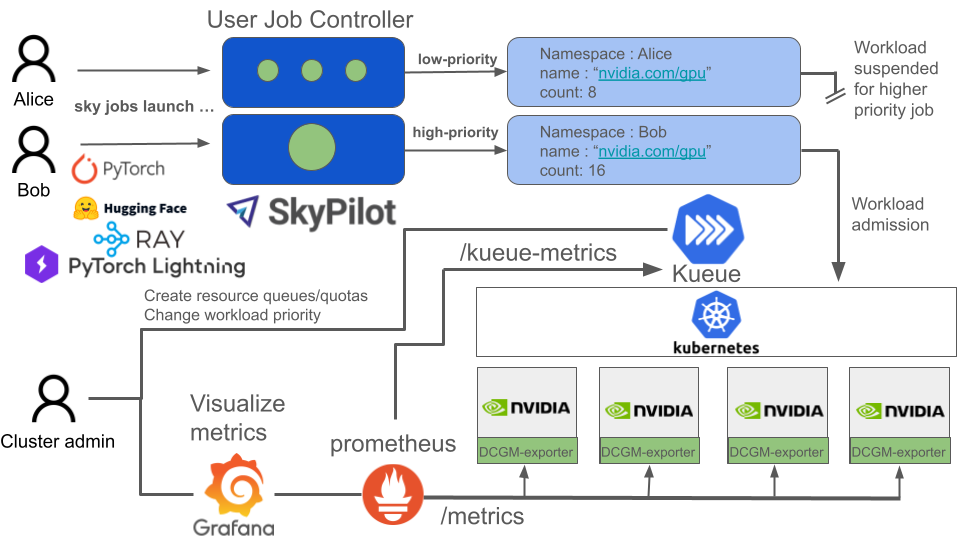
For ML researchers
- Konduktor CLI & SDK - user friendly batch job framework, where users only need to specify the resource requirements of their job and a script to launch that makes simple to scale work across multiple nodes. Works with most ML application frameworks out of the box.
num_nodes: 100

resources:
  accelerators: H100:8
  cloud: kubernetes
  labels:
    kueue.x-k8s.io/queue-name: user-queue
    kueue.x-k8s.io/priority-class: low-priority

run: |
  torchrun \
  --nproc_per_node 8 \
  --rdzv_id=1 --rdzv_endpoint=$master_addr:1234 \
  --rdzv_backend=c10d --nnodes $num_nodes \
  torch_ddp_benchmark.py --distributed-backend nccl
For cluster administrators
- DCGM Exporter, GPU operator, Network Operator - For installing NVIDIA driver, container runtime, and exporting node health metrics.
- Kueue - centralized creation of job queues, gang-scheduling, and resource quotas and sharing across projects.
- Prometheus - For publishing metrics about node health and workload queues.
- OpenTelemetry - For pushing logs from each node
- Grafana, Loki - Visualizations for metrics/logging solution.
Community & Support
Development Setup
Prerequisites
- Python 3.9+ (3.10+ recommended)
- Poetry for dependency management (installation guide)
- kubectl and access to a Kubernetes cluster (for integration/smoke tests)
Quick Start
# Clone the repository
git clone https://github.com/Trainy-ai/konduktor.git
cd konduktor

# Install dependencies (including dev tools)
poetry install --with dev

# Verify installation
poetry run konduktor --help
Running Tests
# Run unit tests
poetry run pytest tests/unit_tests/ -v

# Run smoke tests (requires Kubernetes cluster)
poetry run pytest tests/smoke_tests/ -v
Code Formatting
All code must pass linting before being merged. Run the format script to auto-fix issues:
bash format.sh
This runs:
- ruff - Python linter and formatter
- mypy - Static type checking
Local Kubernetes Cluster (Optional)
For running smoke tests locally, you can set up a kind cluster:
# Install kind and set up a local cluster with JobSet and Kueue
bash tests/kind_install.sh
1 maintainer

Metadata
1 maintainer
Release files for konduktor-nightly 0.1.0.dev20260305003826
For a detailed explanation of source distributions (sdists) and built distributions (wheels), please see the package formats documentation.
Source distribution (sdist)
| File | Size | Uploaded | |
|---|---|---|---|
| konduktor_nightly-0.1.0.dev20260305003826.tar.gz | 254.6 kB | Details |
Built distribution (wheel)
| File | Interpreter | ABI | Platform | Reset |
|---|---|---|---|---|
| konduktor_nightly-0.1.0.dev20260305003826-py3-none-any.whl | Python 3 | none | any | Details |
Total release size: 554.6 kB
Release files / konduktor_nightly-0.1.0.dev20260305003826.tar.gz
| Download URL | konduktor_nightly-0.1.0.dev20260305003826.tar.gz |
|---|---|
| Size | 254.6 kB |
| Tags | Source |
|
SHA-256 checksum How to use checksums |
a1f62ba7fa0001c622a9d6517cf4e2b16bc9a8edec9770e8911e2b7f9ee7e475
|
|
BLAKE2b-256 checksum How to use checksums |
0a2b3abfca737a6503e63705efd103604a34e2adc0add467dbf55c5f5b0ee5e5
|
| Upload date | |
|
Uploaded using Trusted Publishing? What is trusted publishing? |
No |
| Uploaded via |
poetry/2.1.1 CPython/3.10.19 Linux/6.14.0-1017-azure
|
Release files / konduktor_nightly-0.1.0.dev20260305003826-py3-none-any.whl
| Download URL | konduktor_nightly-0.1.0.dev20260305003826-py3-none-any.whl |
|---|---|
| Size | 300.0 kB |
| Tags | Python 3 |
|
SHA-256 checksum How to use checksums |
67c35dd67e27f9867284585cd538da847b2c066beaa2039d33db0d87ad39b404
|
|
BLAKE2b-256 checksum How to use checksums |
0dc80e9a032ccf78f380a1fd9e7d9b7e925bd6b2ae2777137e5a047e294483da
|
| Upload date | |
|
Uploaded using Trusted Publishing? What is trusted publishing? |
No |
| Uploaded via |
poetry/2.1.1 CPython/3.10.19 Linux/6.14.0-1017-azure
|














