
Automatic performance capture and analysis for production applications in Python using a custom columnar database written in Rust.

Project description


Automatic performance capture and analysis for production applications in Python using a custom columnar database written in Rust.




[!IMPORTANT] Kronicler is still early in development! Currently you can install and try out the logging. Analysis features are coming soon.
Benefits of using Kronicler
- Automatic performance capturing
- Lightweight and concurrent*
- One Python dependency
- Works out-of-the-box without configuration
* concurrency is in development but not fully implemented as of version 0.1.0. Track concurrency in issue #41.
Why use Kronicler?
If you want to monitor the performance of a production application, kronicler offers efficient and lightweight logging with a single library. Kronicler lets you view runtime statistics for functions like mean and median as well as statistics for different percentiles.
A use-case for these statistics is to find functions that occasionally operate much slower than they do on average. By looking at the "slowest" speed, the standard error, and the mean, you can find functions that occasionally run much slower than expected. Sometimes it's hard to find and replicate these issues in a test environment, so keeping logs in your production application can improve your ability to find these issues.
Install (Python)
Install with Pip for Python
pip install kronicler
Usage (Python)
Kronicler provides a Python decorator called capture that will calculate the time it takes to run the function.
import kronicler

@kronicler.capture()
def my_function():
	pass
Architecture
Simplified version of the package and database architecture. The data is passed from the Python decorator called capture to the database's queue. It then consumes that queue to insert each field into its respective column. The column uses the bufferpool to operate on pages.


This does not include details on:
- How the
bufferpoolmanagespages. - How
pagesoperate. capture,index,row, or saving and loading withmetadata.
The Database
The columnar database is somewhat inspired by my previous database called RedoxQL. A lot of the structure and architecture is different as well as how data is stored.
The Bufferpool
The bufferpool is based on my bufferpool project. I had to modify it to work with the rest of this database.
Future Languages
Install and Usage for Rust is coming soon...
I plan to implement the Rust version as an attribute to be used like the following:
#[capture]
fn foo() {
	todo!()
}
Examples
Using Kronicler with FastAPI
With just two lines of code, you can add Kronicler to your FastAPI server.
from fastapi import FastAPI
import uvicorn
import kronicler

app = FastAPI()


# You need to wrap helper functions
@kronicler.capture
def foo():
    return {"Hello": "World"}

# You cannot wrap routes right now
@app.get("/")
def read_root():
    return foo()

if __name__ == "__main__":
    uvicorn.run(app, host="0.0.0.0", port=8000)
Code from tests/fastapi-test/main.py.
Using Kronicler's database directly
If you're interested in using Kronicler's database directly to add custom logging functions (or just to use a columnar database), the library is published to crates.io.
Install with Cargo for Rust
cargo install kronicler
Add as a dependency in your Cargo.toml.
[dependencies]
kronicler = "0.1.0"
Performance
Kronicler is designed to be as lightweight as possible. By adding logs to a queue concurrently*, Kronicler doesn't affect performance by much [citation needed].
For accessing logs and running calculations, Kronicler uses a columnar database design to optimize file operations when looking at lots of data from only a few columns typical of analytics tasks.
* concurrency is in development but not fully implemented as of version 0.1.0. Track concurrency in issue #41.
Analysis Web Dashboard
The Analysis Web Dashboard is still under construction. This feature will let you remotely view the logs collected from Kronicler.
Mock-up
The Web Dashboard may look something like this. It will show important information about all of the functions at the top. It will also include a graph of the functions performance over time.
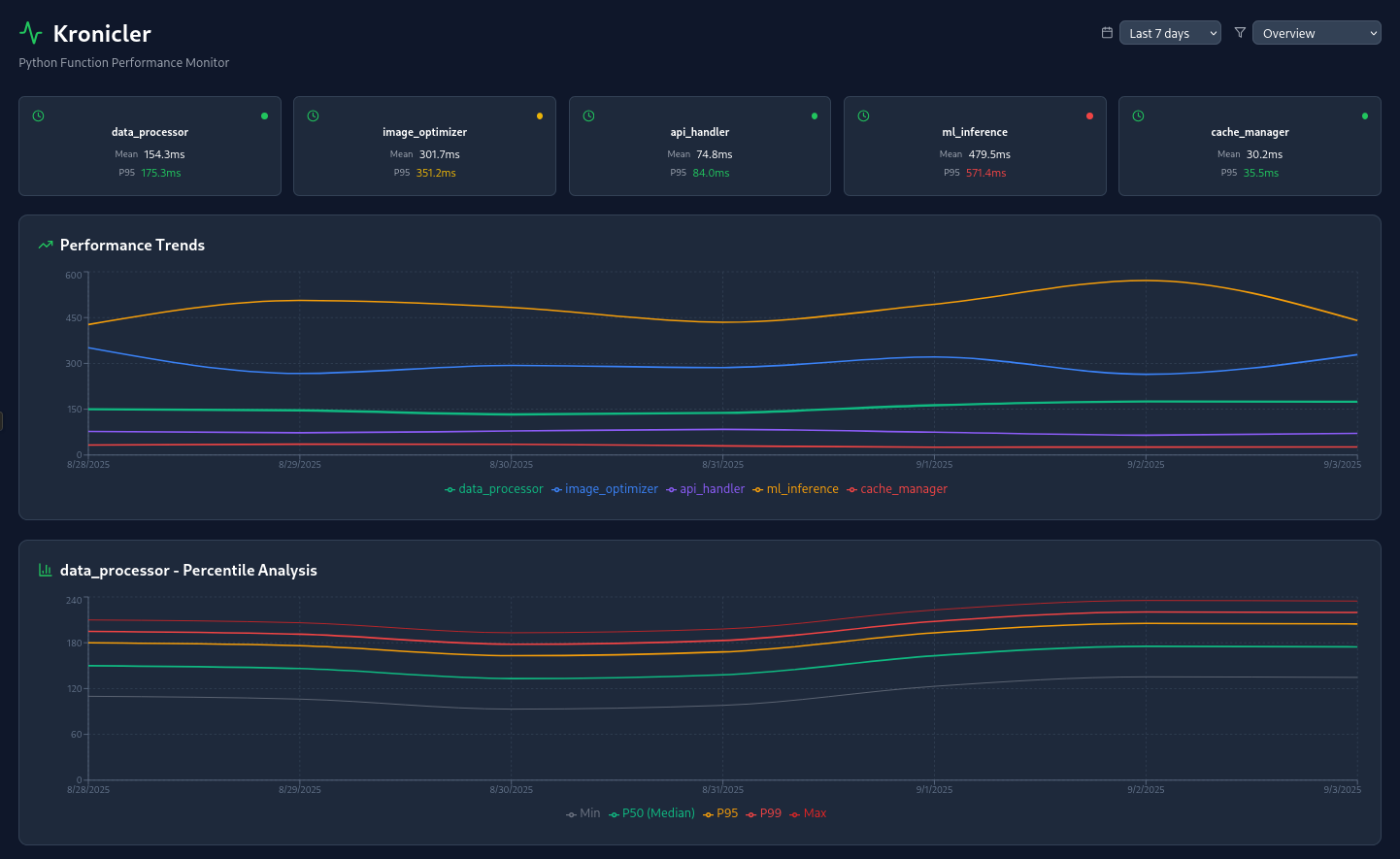
This mock-up was created with Claude and the future dashboard may vary substantially.
Analytics CLI
Install the Analytics CLI
cargo install kronicler
You can view all of your data by running kr in the directory of your data:
kr --fetch all
kr --fetch <index>
You should see the data collected:
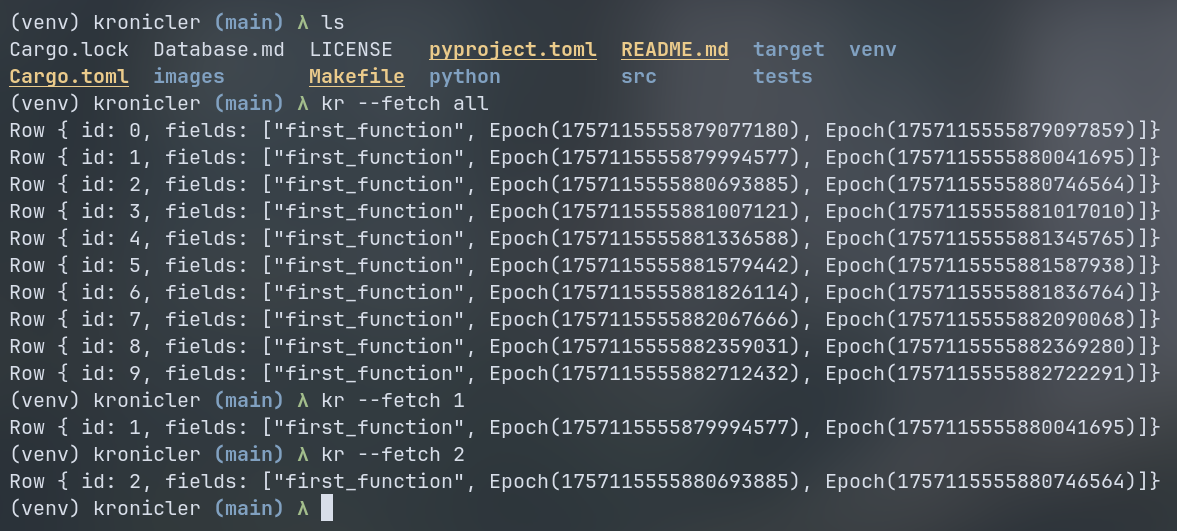
In the future, there will be many options for sorting, filtering, and viewing specific statistics.
Logging
By adding the capture decorator to your code (as seen below), Kronicler will automatically test the runtime of your function when it gets called. The results of the test get added to the database. This data can later be viewed in the Analysis Web Dashboard or the Analytics CLI.
import kronicler

@kronicler.capture()
def my_function():
	pass
Development
Building the Python package
Build the package
maturin build
Install the package
pip install --force-reinstall target/wheels/kronicler-*
Testing
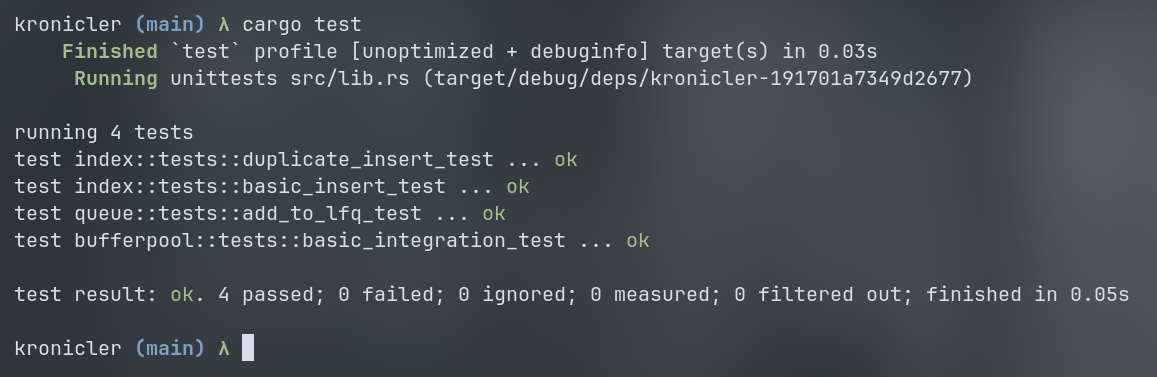
You can run the testing suite with the following command:
cargo test
The tests should all succeed


Download files
Download the file for your platform. If you're not sure which to choose, learn more about installing packages.
Source Distribution
Built Distribution
Filter files by name, interpreter, ABI, and platform.
If you're not sure about the file name format, learn more about wheel file names.
Copy a direct link to the current filters
File details
Details for the file kronicler-0.1.0.tar.gz.
File metadata
- Download URL: kronicler-0.1.0.tar.gz
- Upload date:
- Size: 22.8 kB
- Tags: Source
- Uploaded using Trusted Publishing? No
- Uploaded via: maturin/1.9.3
File hashes
| Algorithm | Hash digest | |
|---|---|---|
| SHA256 |
7203116e4a1a401abd0a863ea1c1a4e47a6eb4b8954f7c18fbdf1aa8c0206a14
|
|
| MD5 |
a58661dbd26a50e9ea5153333f5121a7
|
|
| BLAKE2b-256 |
1a4a725172fec362ca0149200616ff02d468c276f3cec24d41d75f46735872a4
|
File details
Details for the file kronicler-0.1.0-cp313-cp313-manylinux_2_34_x86_64.whl.
File metadata
- Download URL: kronicler-0.1.0-cp313-cp313-manylinux_2_34_x86_64.whl
- Upload date:
- Size: 753.9 kB
- Tags: CPython 3.13, manylinux: glibc 2.34+ x86-64
- Uploaded using Trusted Publishing? No
- Uploaded via: maturin/1.9.3
File hashes
| Algorithm | Hash digest | |
|---|---|---|
| SHA256 |
ee30656b47b8de910aac1939c0e4a4c8128433ca44601767784e7bdf65dbda5c
|
|
| MD5 |
105ff6c4f2e3a5c7650460dbaad6963a
|
|
| BLAKE2b-256 |
67e301fdc96830783de9f479fa0bb37c1a7456020e70c8e83e693c3a8c7abfec
|






