
krunic


Automated hyperparameter search for image classifiers - from dataset to tuned model with one command. Distributed across GPUs and across hosts, locally and on the cloud (AWS).
krunic uses off-the-shelf models and packages, so you won't get SOTA performance. But it can get surprisingly close, with almost zero effort. Useful as a baseline, or experimentation with architectures, GPUs etc.
Built on Ray Tune, Optuna, timm, and SkyPilot. NOTE: Requires Python ≥ 3.12. Ubuntu 22.04 users need to install it via deadsnakes or upgrade their OS.
Install (Mac and Linux)
$ pipx install krunic
This installs three commands: tunic (local training), krunic (cloud launcher), and tunic-plotter (results visualizer). The installation takes a couple of minutes.
Install (Windows)
Note: 1. This is untested because I don't have Windows access. But I'm guessing it should work. 2. The SkyPilot support for Windows is poor. Thus, only the tunic (local classifier tuning) should work
winget install Python.Python.3   # if Python not already installed
py -m pip install --user pipx
py -m pipx ensurepath            # restart terminal after this
pipx install krunic
Quick start
Local:
$ tunic --data /path/to/dataset --model resnet50 --n_trials 30 --epochs 30 --output results.json
Cloud (AWS):
This requires, obviously, an AWS account. The image data must be copied to S3 prior to the run, for example like this:
$ aws s3 sync ~/image_data/tin s3://image.data/tin
$ krunic \
  --cluster skya \
  --s3-path my-dataset \
  --model resnet50 \
  --accelerator T4:4 \
  --num-nodes 4 \
  --n-trials 48 \
  --n-epochs 50 \
  --prefix kaws
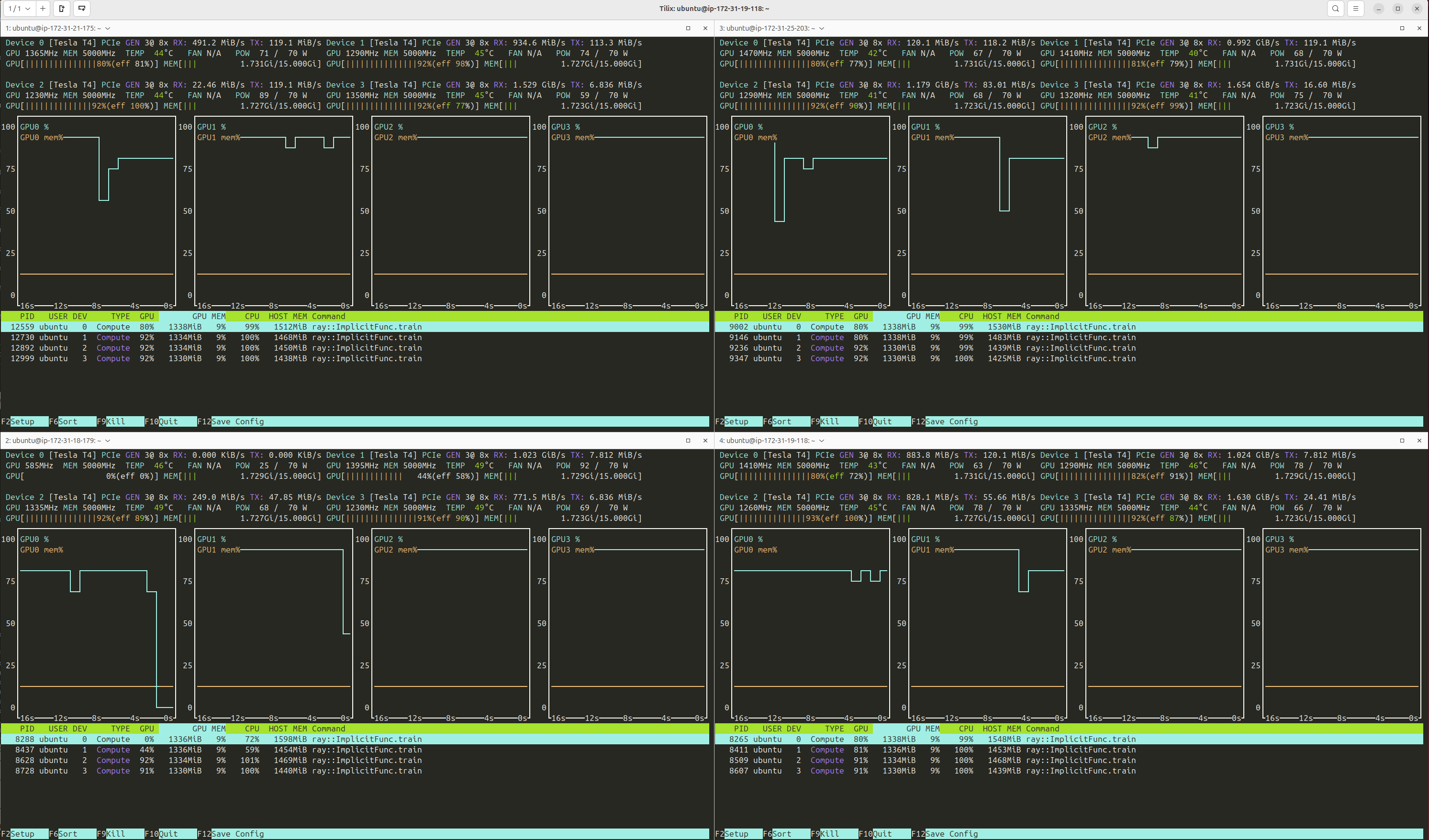
SkyPilot creates the cluster, Ray distributes the load across the GPUs. In my experiments, it achieves very good GPU utilization:
Upon completion, get the best model hyperparameters:
$ aws s3 cp s3://image.data/ray-results/tin6/kaws_results.json .
Plot metric per trial:
$ tunic-plotter kaws_results.json
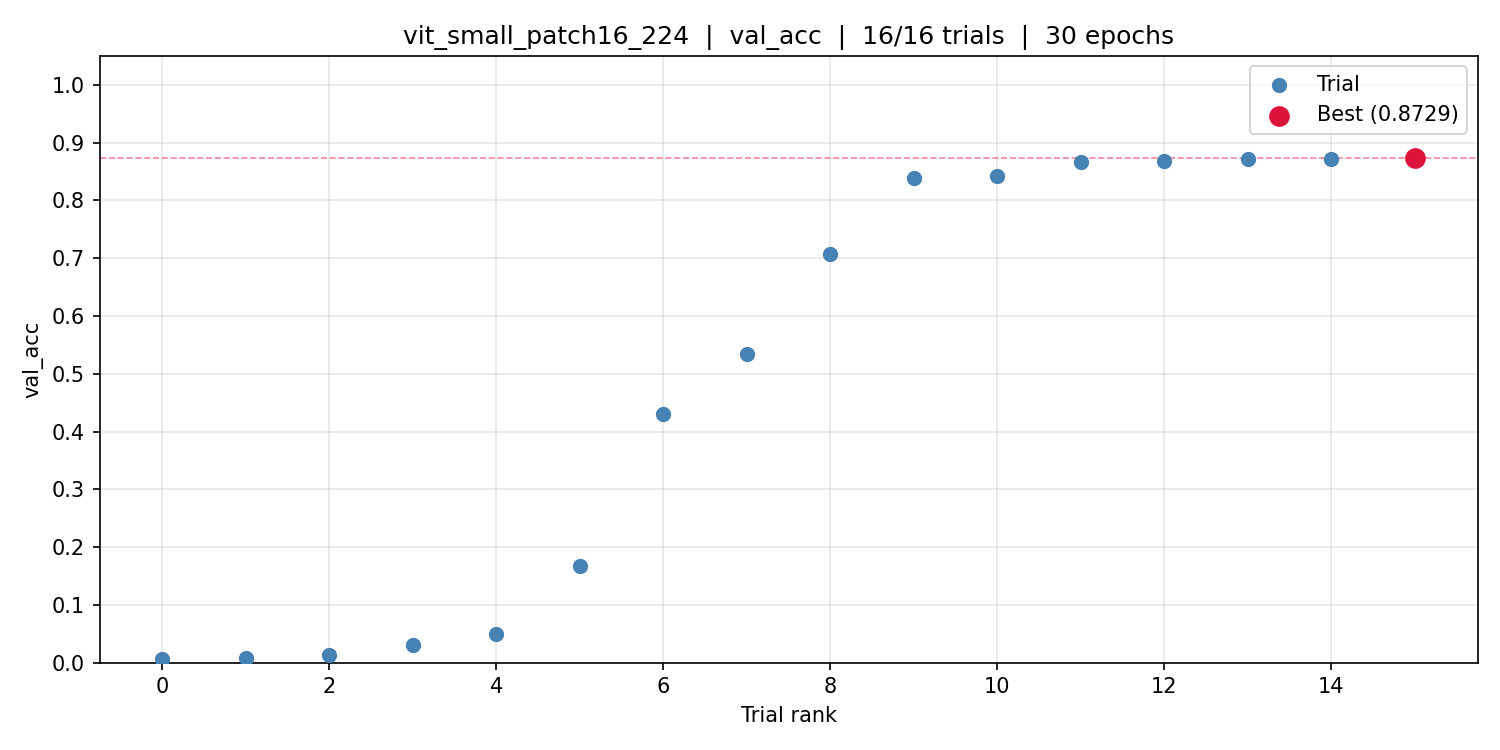
Remember to take down the cluster after downloading the results.
$ yes | sky down skya
Train final model from tuning results (locally):
$ tunic --final kaws_results.json --data /path/to/dataset --epochs 50 --amp
Results on common benchmarks
| Dataset | Model | Metric | Validation | Test | SOTA |
|---|---|---|---|---|---|
| PCam | ResNet18 | AUROC | 0.96 | 0.96 | 0.96 |
| TinyImageNet | ViT-Small | Accuracy | 0.87 | 0.91 | |
| ChestMNIST | ResNet18 | AUROC | 0.75 | 0.75 | 0.77 |
| TissueMNIST | ResNet18 | AUROC | 0.92 | 0.94 | 0.93 |
All runs use generic off-the-shelf models with no domain-specific modifications.
Search space
| Parameter | Range |
|---|---|
| Optimizer | AdamW, SGD |
| Learning rate | 1e-5 – 1e-1 (log) |
| Weight decay | 1e-6 – 1e-1 (log) |
| Label smoothing | 0 – 0.3 |
| Dropout rate | 0 – 0.5 |
| RandAugment magnitude | 1 – 15 |
| RandAugment num ops | 1 – 4 |
| Mixup alpha | 0 – 0.5 |
| CutMix alpha | 0 – 1.0 |
Override any part with a YAML file via --search-space.
tunic - local hyperparameter search
tunic --data PATH --model MODEL [options]
| Flag | Default | Description |
|---|---|---|
--data |
required | Dataset root (ImageFolder or WebDataset) |
--model |
required | Any timm model name |
--n_trials |
80 | Number of Optuna trials |
--epochs |
30 | Training epochs per trial (also used for --final) |
--tune-metric |
val_auroc |
Metric for trial selection and pruning |
--training_fraction |
1.0 | Fraction of training data (val always uses 1.0) |
--batch-size |
32 | Batch size per trial |
--amp |
Enable automatic mixed precision | |
--resume |
Warm-start from a previous experiment directory | |
--final |
Skip tuning; train final model from results JSON | |
--combine |
Train final model on train+val combined | |
--final-model |
tunic_final.pt |
Output path for final model weights |
--final-stats |
Output path for final model stats (JSON) | |
--device |
auto |
auto, cuda, mps, or cpu |
--smoke-test |
Quick end-to-end test with synthetic data |
krunic - cloud launcher
krunic generates a SkyPilot YAML and launches the job. The dataset is S3-mounted (or copied); results are uploaded to S3 when the job completes.
Prerequisites
1. AWS credentials
aws configure
Prompts for your Access Key ID, Secret Access Key, and region (e.g. us-east-1). Your IAM user needs EC2 and S3 permissions. SkyPilot uses these credentials directly - no separate SkyPilot account or configuration needed.
2. Verify SkyPilot sees AWS
sky check
Should show AWS: enabled.
3. Dataset in S3
aws s3 sync ~/image_data/my-dataset s3://my-bucket/my-dataset
Monitor and tear down
krunic launches the cluster and streams logs. Once the job completes, download results and tear down:
sky status                          # check cluster state
sky logs my-cluster 1               # stream logs (job ID increments with each run)
aws s3 cp s3://my-bucket/ray-results/prefix/prefix_results.json .
yes | sky down my-cluster           # terminate cluster
--workdir defaults to the installed package directory (contains tunic.py and requirements.txt). Override it only if you are developing from a local source checkout and want to test unpublished changes.
krunic --cluster NAME --workdir DIR --s3-path PATH --model MODEL [options]
| Flag | Default | Description |
|---|---|---|
--cluster |
required | SkyPilot cluster name |
--workdir |
package dir | Local directory synced to the cluster. Used for development |
--s3-path |
required | Dataset path within the S3 bucket |
--model |
required | Any timm model name |
--accelerator |
T4:4 |
GPU spec (e.g. T4:4, A10G:1, A100:8) |
--num-nodes |
1 | Number of cluster nodes |
--n-trials |
30 | Number of Optuna trials |
--n-epochs |
30 | Training epochs per trial |
--batch-size |
32 | Batch size per trial |
--training-fraction |
1.0 | Fraction of training data per trial |
--tune-metric |
val_auroc |
Metric for trial selection and pruning |
--bucket |
image.data |
S3 bucket name |
--prefix |
tunic |
Prefix for output files and S3 paths |
--spot |
— | Use spot instances (with retry-until-up) |
--copy |
— | Copy data from S3 to local disk instead of mounting |
--idle-minutes |
60 | Auto-stop cluster after N idle minutes |
--no-autostop |
— | Disable auto-stop |
Results are uploaded to s3://<bucket>/ray-results/<prefix>/<prefix>_results.json.
tunic-plotter - visualize results
tunic-plotter results.json                  # plots val_auroc and val_acc
tunic-plotter results.json --metric val_acc # single metric
tunic-plotter results.json --trial_sort     # keep original trial order, show running best
Saves PNG files alongside the results JSON.
Dataset format
tunic auto-detects the dataset format:
- ImageFolder - standard
split/class/image.extlayout - WebDataset - sharded TAR files; detected when
wds/dataset_info.jsonexists
Scaling
Concurrent trials = total GPUs: --num-nodes 4 --accelerator T4:4 --> 16 concurrent trials.
Optuna's TPE needs ~20 trials before it outperforms random search. 32–64 trials is a practical range for most problems.
Output format
{
  "model": "resnet18",
  "best_val_auroc": 0.963,
  "best_val_acc": 0.891,
  "best_params": {
    "optimizer": "AdamW",
    "lr": 0.0028,
    "weight_decay": 3.6e-06,
    "label_smoothing": 0.058,
    "drop_rate": 0.183
  },
  "n_trials": 48,
  "completed_trials": 48,
  "epochs": 50,
  "all_trials": [...]
}
1 maintainer

Metadata
1 maintainer
Release files for krunic 0.12.1
For a detailed explanation of source distributions (sdists) and built distributions (wheels), please see the package formats documentation.
Source distribution (sdist)
| File | Size | Uploaded | Provenance | |
|---|---|---|---|---|
| krunic-0.12.1.tar.gz | 615.8 kB | Without provenance | Details |
Built distribution (wheel)
| File | Interpreter | ABI | Platform | Reset |
|---|---|---|---|---|
| krunic-0.12.1-py3-none-any.whl | Python 3 | none | any | Details |
Total release size: 680.3 kB
Release files / krunic-0.12.1.tar.gz
| Download URL | krunic-0.12.1.tar.gz |
|---|---|
| Size | 615.8 kB |
| Tags | Source |
|
SHA-256 checksum How to use checksums |
073e03d3c8741dfeedfeb5b16d8faba7cef2c70a8c5a09a5f82d65a1410af012
|
|
BLAKE2b-256 checksum How to use checksums |
9fe3b2265a143545d98f472e87cd97656921d5b5b952b6ae51506244b61b91b5
|
| Upload date | |
|
Uploaded using Trusted Publishing? What is trusted publishing? |
No |
| Uploaded via |
uv/0.8.4
|
Release files / krunic-0.12.1-py3-none-any.whl
| Download URL | krunic-0.12.1-py3-none-any.whl |
|---|---|
| Size | 64.5 kB |
| Tags | Python 3 |
|
SHA-256 checksum How to use checksums |
85af3240ac9b6b0e86b79c18e5c7ccf155cac39095d3f4f274b08f37ad6705b5
|
|
BLAKE2b-256 checksum How to use checksums |
9ccfa8a55d5f28c86c5b98d7449f461663623cb64b49077821a8a76c0c443718
|
| Upload date | |
|
Uploaded using Trusted Publishing? What is trusted publishing? |
No |
| Uploaded via |
uv/0.8.4
|
Security for krunic 0.12.1
Provenance
Provenance describes where a file came from. On PyPI, provenance is shared via attestations, which provide a verifiable record of the build or publishing details. View details, limitations and caveats.
No provenance found
None of the files in this release were uploaded with provenance metadata.
A note on package security
PyPI is a repository for distributing packages, not a service for auditing them. While third-party security researchers and our staff do their best to detect and remove malicious packages, PyPI cannot guarantee the quality, security or suitability of any given package.
To learn more about protecting yourself from malicious actors, visit our package security documentation.














