



Documentation · Install · Guides · Commands
A kubectl wrapper that adds index-based resource selection.
Run kx get <resource> once, then reference any result by number instead of typing full resource names.

Install
Requires kubectl on your PATH.
Every install method delivers the same prebuilt binary.
On Linux or macOS, the install script fetches the newest build, checks it against the release's checksums, and installs it without sudo:
curl -fsSL https://jzills.github.io/kx/install.sh | sh
Or as a kubectl plugin via krew, where kx is published as idx:
kubectl krew install idx
alias kx="kubectl idx"
Or from PyPI with uv — no Python runtime or dependencies required:
uv tool install kx-cli
Standalone binaries for Linux, macOS and Windows are attached to every GitHub Release.
Other ways to install
With pipx or pip:
pipx install kx-cli
pip install kx-cli
Or run it without installing — the package is kx-cli, the command is kx:
uvx --from kx-cli kx get pods
pipx run --spec kx-cli kx get pods
See the install guide for more.
Usage
No more copying names out of kubectl get — one listing, then everything after it by number.
kx get pods    # lists pods, numbering each row
kx logs 3      # the third pod
kx diag 3      # why it's unhealthy
Indexes come several at a time, as ranges, or narrowed.
kx delete 3 5                   # several at once
kx delete 3..7                  # an inclusive range, either direction
kx delete ..5                   # open at the start
kx delete 5..                   # open to the end of the listing
kx get pods -m api              # --match/-m filters rows by name substring
kx get pods -n prod -l app=api  # anything else passes through to kubectl
- kubectl's own flags pass through —
kx delete 3 --force --grace-period=0,kx logs 3 -f --tail=100. Passing-nwith an index is refused, since the index already carries the namespace it was listed from. So is--context,--kubeconfig,--clusteror--server, for the cluster, and a listing taken with one prints unnumbered. - Listings made with
-Aare indexed too, each row with its own namespace. - Known kinds drop the
get—kx pods,kx deploy -n kube-system— kubectl's shorthands and your CRDs included. - The
--watch/-wflag redraws the table in place rather than appending lines. - Tab completion, from
kx completion <shell>, shows the resource behind each index:kx describe <TAB>offers1 api-7d8f (Pod), not a bare number.
See the indexes guide for more.
Triage a namespace
Bare kx diag sweeps the current namespace — every workload kind, plus Services, PVCs, Ingresses and pods nothing owns — and ranks what's unhealthy.
It reads live usage too, so a pod running hot against its memory limit is flagged as an OOMKill risk before it dies.

With an index, kx diag diagnoses a single resource: a top level verdict, a findings summary, a per-pod status table, log tails from broken containers and warning events — one screen instead of four kubectl commands.
See the triage guide for more.
Read a Secret in plaintext
The kx secret <index> --decode command prints an indexed Secret's keys and values decoded.
With --key/-k, it prints a single value raw — no banner, no wrapping — so it drops straight into a shell.
export PGPASSWORD=$(kx secret 1 --decode -k password)

Bare kx secret --decode decodes every Secret in the namespace in one call, confirming first — that prints every credential you have.
See the secrets guide for more.
Scan images for CVEs
The kx scan <index> command scans the unique container images of an indexed workload.
Bare kx scan sweeps every workload in the namespace.
Results come back as a severity summary, or the full per-image CVE report with --full.

Requires the CLI for the selected engine — Docker Scout by default, or Trivy and Grype via kx engine.
See the scan guide for more.
See what owns what
The kx tree <index> command walks the ownership graph — Deployment to ReplicaSet to Pods — and indexes every node it draws, so anything in the tree is one number away.
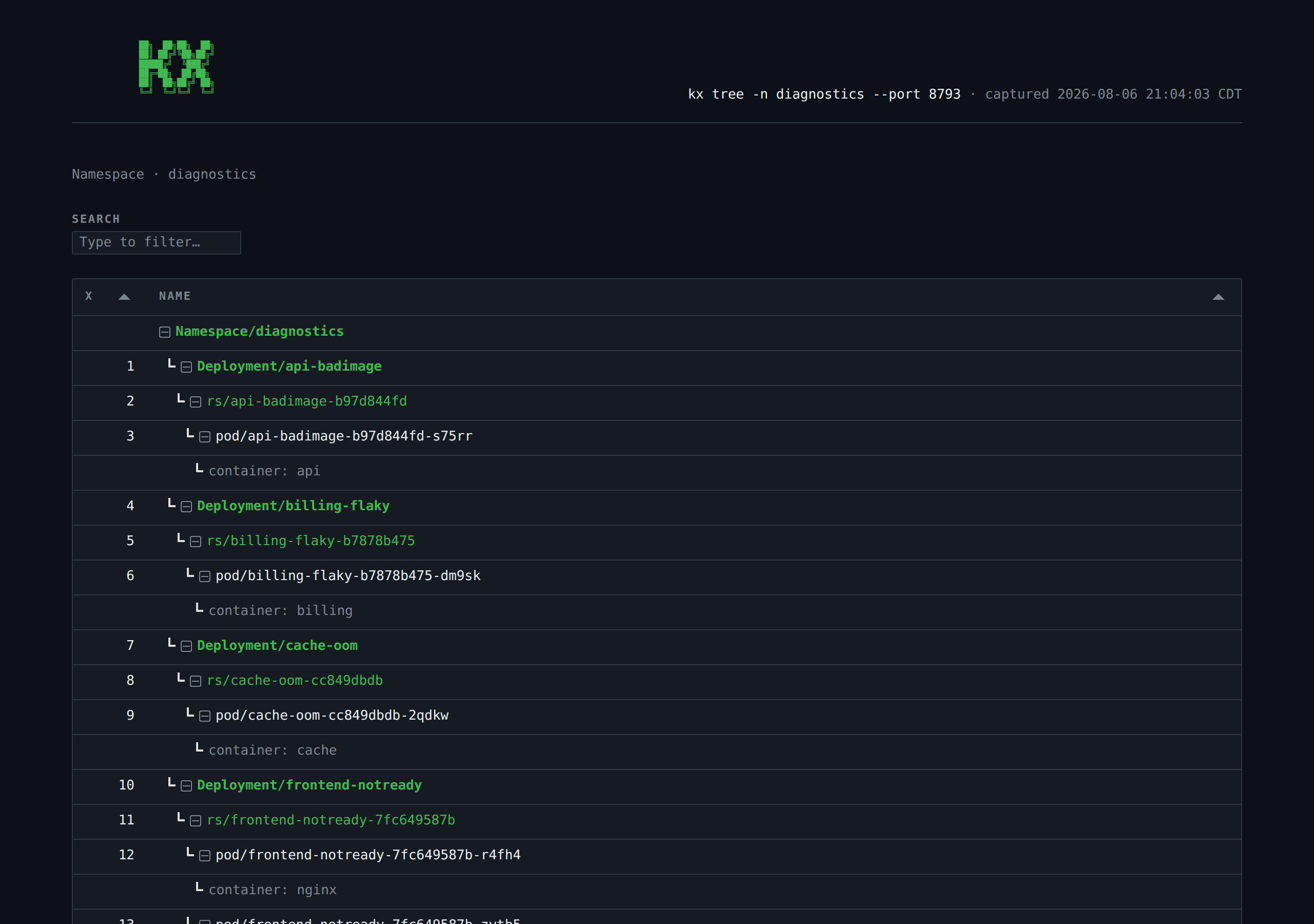
Bare kx tree graphs the whole namespace.
See the ownership guide for more.
Reports in the browser
The --html flag on kx diag, kx scan, kx tree, and kx top renders the same analysis as a page and opens it in your browser.
It binds 127.0.0.1 only and writes nothing to disk.
The page is drawn in your active theme. Sweep rows expand into that resource's full report, image rows into the CVEs behind their counts — detail the terminal has no room for.
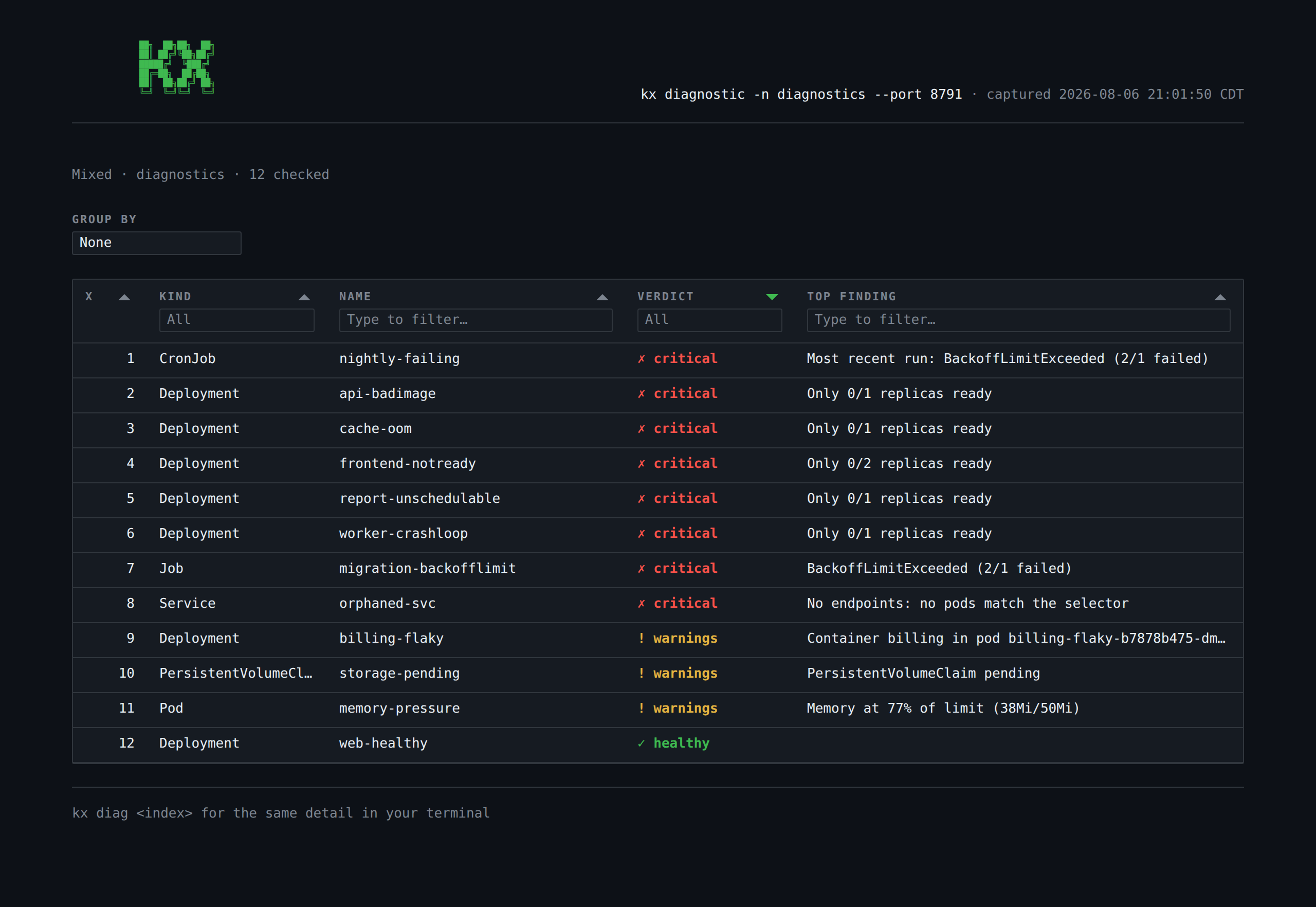
Add --out <path> to write the page to a file instead of serving it — what you want in CI, where kx diag --out report.html is the whole command.
See the browser reports guide for more.
Spend an index anywhere
Beyond the two dozen kubectl verbs kx wraps, the kx ref command covers the rest, and every tool that isn't kubectl: it prints what an index refers to, as an argument fragment that drops straight into another command.
kx ref 3                                     # pod/web-abc-xyz -n prod
kubectl exec $(kx ref 3) -- sh               # a verb kx doesn't wrap
kubectl get $(kx ref 1..3)                   # one line each, so ranges work too
stern $(kx ref 3 --name) -n $(kx ref 3 --namespace)
kx ref 1..9 --name | xargs -n1 some-tool
The --name, --namespace and --kind flags print one field alone, and nothing here touches the cluster, so kx ref answers instantly even with nothing reachable.
See the kx ref guide for more.
Marks
An index is a position, and positions move — the next kx get renumbers everything out from under it.
A mark is a name you choose instead, pinned to one resource, so it keeps working across every listing that comes after it.
kx mark api 3          # pin what index 3 is right now
kx logs @api -f        # spend it where a command takes an index
kx exec @api -- sh
kx mark                # list marks
kx unmark api
kx unmark --all
A mark survives re-listing, which is what an index cannot do.
It is pinned to the cluster it was taken in, and will not resolve in another — the same name means a different resource there, or none at all.
Running kx state drop --all leaves marks alone; only kx unmark --all removes them.
See the marks guide for more.
Use kx in CI
The --fail-on <severity> flag turns a sweep into a build gate, and --json prints the same analysis as a document for anything downstream.
kx diag -A --fail-on critical                    # 0 if healthy, 2 if not
kx scan -A --fail-on high                        # the same, for image CVEs
kx diag -A --fail-on critical --out report.html  # publish the report, then gate
kx diag -A --fail-on warning --since 24h         # ignore failures before today
kx scan --fail-on high --json | jq '.images[] | select(.counts.critical > 0)'
Exit 2 means findings breached the threshold, 1 means kx itself failed — so a pipeline can tell "the cluster is sick" from "the check never ran". See the CI guide for more.
MCP server
The kx mcp command runs a Model Context Protocol server on stdio, so an agent — Claude Code, an IDE, an agent framework — reads a cluster the way you do: by kind and name, by a mark, or by an index from your current listing.
claude mcp add kx -- kx mcp
The MCP tools are read-only against the cluster; mark, the one write, only adds a name to kx's own state.
Start it with --write-listings and the agent's listings join your history, tagged as the agent's, so you can spend its numbers yourself — and kx warns before a mutating command does.
claude mcp add kx -- kx mcp --write-listings
See the agent guide for more.
State and history
Recent kx get results are kept as a history — 10 by default, configurable — with a cursor marking the entry indexes resolve against.
kx state              # the listing indexes currently resolve against
kx state --all        # the whole history, with positions
kx state --all --json # the same, as JSON for a script
kx state 2            # jump to position 2
kx state back         # step back one (forward steps the other way)
kx state drop 2       # remove position 2 (--all clears the history; marks stay)
kx state drop --empty # drop the entries whose listing found nothing
Each entry remembers the context it was listed in, so a staging index is never resolved against production — kx refuses and relists instead. See the state guide for more.
Configuration
Settings live in ~/.kx/config.toml, and every one takes a KX_* environment override.
The two worth changing have commands of their own — kx theme and kx engine both persist your choice.
Styling is dropped when stdout isn't a terminal, so kx get pods | grep worker stays clean.
NO_COLOR is honored too.
See the configuration guide for more.
Themes
The kx theme command lists the available themes with a preview of each, and kx theme <name> persists your choice, by name or index.

Eleven themes ship with it, github-dark by default.
See the themes guide for more.
Commands
Every command takes indexes from the listing kx get last produced.
The command reference covers every argument and flag.
All commands
| Command | Description |
|---|---|
kx annotate <index> [<key=value>...] |
Set or remove annotations on an indexed resource. |
kx annotations <index>... |
Show annotations for one or more indexed resources. |
kx context [<index>] |
List kubeconfig contexts, or switch to an indexed one; alias: kx contexts. |
kx cordon <index>... |
Mark one or more indexed Nodes unschedulable. |
kx cp <src> <dest> |
Copy files to or from an indexed pod via kubectl cp. |
kx debug <index> [<command>...] |
Open a debug shell on an indexed Pod (an ephemeral container, for images with no shell) or Node (a privileged pod on the host). |
kx delete <index>... |
Delete one or more indexed resources (prompts for confirmation unless --yes). |
kx describe <index>... |
Show full kubectl describe output for one or more indexed resources. |
kx diagnostic [<index>] |
Diagnose an indexed Deployment, StatefulSet, DaemonSet, Job, CronJob, Service, PersistentVolumeClaim, Ingress, Pod, or Node, or triage a whole namespace when no index is given (-n to pick one, -A for every namespace); alias: kx diag. |
kx drain <index> |
Evict the pods from an indexed Node (prompts for confirmation unless --yes). |
kx edit <index> |
Open an indexed resource in your editor via kubectl edit. |
kx events <index>... |
Show Kubernetes events for one or more indexed resources. |
kx exec <index> [<command>...] |
Open an interactive shell in an indexed Pod, Deployment, ReplicaSet, StatefulSet or DaemonSet (bash, falling back to sh). |
kx get <resource> [<index>...] |
List resources and assign index numbers for use with other commands; shorthand: kx (e.g. kx pods, kx po 3). |
kx label <index> [<key=value>...] |
Set or remove labels on an indexed resource. |
kx labels <index>... |
Show labels for one or more indexed resources; --selector formats output as a label selector. |
kx logs <index>... |
Stream logs for an indexed resource; aggregates across pods for Deployments, StatefulSets, DaemonSets, Jobs, and Services. |
kx mark [<name>] [<index>] |
Pin an indexed resource to a name that survives re-listing; with no arguments, lists marks. |
kx namespace [<index>] |
List namespaces, or switch to an indexed one; alias: kx ns. |
kx port-forward <index> <port> |
Forward a local port to an indexed resource (Pod, Deployment, ReplicaSet, StatefulSet, DaemonSet, Service). |
kx ref <index>... |
Print what an index refers to, for commands kx doesn't wrap. |
kx rollout <action> <index> |
Run a rollout action (status, restart, pause, resume, history, undo) on a Deployment, StatefulSet, or DaemonSet. |
kx scale <index> <replicas> |
Scale an indexed Deployment, StatefulSet, or ReplicaSet to a given replica count. |
kx scan [<index>] |
Scan the unique container images of an indexed workload for vulnerabilities, or a whole namespace when no index is given (-n to pick one, -A for every namespace); prints a severity summary table by default, or the raw scanner output with --full. Requires the CLI for the selected scan engine (Docker Scout by default; Trivy or Grype via --engine — see kx engine). |
kx secret [<index>...] |
List Secrets like kx get, or show an indexed Secret's data with --decode; alias: kx secrets. |
kx set |
Change an indexed workload's container images with kx set image, printing each one before and after. |
kx top [<resource>] |
List CPU/memory usage for pods (default) or nodes and assign index numbers, like kx get; shows usage as a percent of limits (pods) or capacity (nodes) unless --no-limits. |
kx tree [<index>] |
Show the ownership graph for an indexed resource, or the whole current namespace when no index is given (-n to pick one, -A for every namespace); assigns indexes to tree nodes by default. A Namespace index graphs that namespace. |
kx uncordon <index>... |
Mark one or more indexed Nodes schedulable again. |
kx unmark [<name>...] |
Remove marks by name; --all removes every mark. |
kx wait <index>... |
Wait until indexed resources are ready: a Pod or Node Ready, a PVC Bound, a Job Complete, a LoadBalancer Service given an address. |
kx yaml <index>... |
Print the raw YAML manifest for one or more indexed resources; --show filters to specific top-level fields. |
kx state [<position>] |
Show current state, jump to a history position, list all entries with --all, or expand the switch targets with --targets. |
kx engine [<name>] |
List available scan engines or persist a default choice by name or index. |
kx theme [<name>] |
List available color themes or persist a choice by name or index. |
kx mcp |
Serve kx's diagnostics, ownership trees, evidence and marks to AI agents over MCP (stdio). |
kx completion |
Generate a shell completion script for kx (bash, zsh, fish, powershell). |
Contributing
Building, testing and releasing kx are covered in CONTRIBUTING.md.
License
Released under the MIT License.
1 maintainer

Metadata
1 maintainer
Release files for kx-cli 0.8.0
For a detailed explanation of source distributions (sdists) and built distributions (wheels), please see the package formats documentation.
Built distributions (wheels)
| File | Reset | |||
|---|---|---|---|---|
| kx_cli-0.8.0-py3-none-win_arm64.whl | Python 3 | none | Windows ARM64 | Details |
| kx_cli-0.8.0-py3-none-win_amd64.whl | Python 3 | none | Windows x86-64 | Details |
| kx_cli-0.8.0-py3-none-musllinux_1_2_x86_64.whl | Python 3 | none | Linux musl 1.2+ x86-64 | Details |
| kx_cli-0.8.0-py3-none-musllinux_1_2_aarch64.whl | Python 3 | none | Linux musl 1.2+ ARM64 | Details |
| kx_cli-0.8.0-py3-none-manylinux_2_17_x86_64.whl | Python 3 | none | Linux glibc 2.17+ x86-64 | Details |
| kx_cli-0.8.0-py3-none-manylinux_2_17_aarch64.whl | Python 3 | none | Linux glibc 2.17+ ARM64 | Details |
| kx_cli-0.8.0-py3-none-macosx_11_0_arm64.whl | Python 3 | none | macOS 11.0+ ARM64 | Details |
| kx_cli-0.8.0-py3-none-macosx_10_9_x86_64.whl | Python 3 | none | macOS 10.9+ x86-64 | Details |
Total release size: 414.7 MB
Release files / kx_cli-0.8.0-py3-none-win_arm64.whl
| Download URL | kx_cli-0.8.0-py3-none-win_arm64.whl |
|---|---|
| Size | 50.1 MB |
| Tags | Python 3 Windows ARM64 |
|
SHA-256 checksum How to use checksums |
708c910ca905c3207b95cc989fd24579d5172353d6ae11353120e9c6dcb4e2d2
|
|
BLAKE2b-256 checksum How to use checksums |
f394b08bcfa496ef31ae5f2e99d0086879d74f007b3bfe60289153be94ae3ad2
|
| Upload date | |
|
Uploaded using Trusted Publishing? What is trusted publishing? |
No |
| Uploaded via |
twine/7.0.0 CPython/3.12.3
|
Release files / kx_cli-0.8.0-py3-none-win_amd64.whl
| Download URL | kx_cli-0.8.0-py3-none-win_amd64.whl |
|---|---|
| Size | 54.3 MB |
| Tags | Python 3 Windows x86-64 |
|
SHA-256 checksum How to use checksums |
08f0cccbd6427f08ccd98acebe41810aa7693deb4869be526c1a6522fc2892de
|
|
BLAKE2b-256 checksum How to use checksums |
886ab8b2e72277c1f72e33440c0adaaa51915cdbd09653dd096209d4f87464b2
|
| Upload date | |
|
Uploaded using Trusted Publishing? What is trusted publishing? |
No |
| Uploaded via |
twine/7.0.0 CPython/3.12.3
|
Release files / kx_cli-0.8.0-py3-none-musllinux_1_2_x86_64.whl
| Download URL | kx_cli-0.8.0-py3-none-musllinux_1_2_x86_64.whl |
|---|---|
| Size | 53.0 MB |
| Tags | Linux musl 1.2+ x86-64 Python 3 |
|
SHA-256 checksum How to use checksums |
e3320ced8968ae2e8dbdef55a0bdb17d2c311a98ce417a692c7d96461bc28d8e
|
|
BLAKE2b-256 checksum How to use checksums |
f388677e3da167e6b4f305b36ceb22df09f03b0a29a79999de71cd692bee80e1
|
| Upload date | |
|
Uploaded using Trusted Publishing? What is trusted publishing? |
No |
| Uploaded via |
twine/7.0.0 CPython/3.12.3
|
Release files / kx_cli-0.8.0-py3-none-musllinux_1_2_aarch64.whl
| Download URL | kx_cli-0.8.0-py3-none-musllinux_1_2_aarch64.whl |
|---|---|
| Size | 49.6 MB |
| Tags | Linux musl 1.2+ ARM64 Python 3 |
|
SHA-256 checksum How to use checksums |
918e80557bf58a629d48e736ea3407e5822a12af117901c9f41c6b97a215807f
|
|
BLAKE2b-256 checksum How to use checksums |
a3f31b609981846b9690ca411e2cb8ad2a2d9fc376a57666596c0c4ab0978e13
|
| Upload date | |
|
Uploaded using Trusted Publishing? What is trusted publishing? |
No |
| Uploaded via |
twine/7.0.0 CPython/3.12.3
|
Release files / kx_cli-0.8.0-py3-none-manylinux_2_17_x86_64.whl
| Download URL | kx_cli-0.8.0-py3-none-manylinux_2_17_x86_64.whl |
|---|---|
| Size | 53.0 MB |
| Tags | Linux glibc 2.17+ x86-64 Python 3 |
|
SHA-256 checksum How to use checksums |
c3935d854ab2dca6e0167adaae070b72af261f031a003a71d47be746caab74a5
|
|
BLAKE2b-256 checksum How to use checksums |
e500ace349b82e7a9fddaa18ec9e6815356e3f02d0632841038c7a123c6a4ce5
|
| Upload date | |
|
Uploaded using Trusted Publishing? What is trusted publishing? |
No |
| Uploaded via |
twine/7.0.0 CPython/3.12.3
|
Release files / kx_cli-0.8.0-py3-none-manylinux_2_17_aarch64.whl
| Download URL | kx_cli-0.8.0-py3-none-manylinux_2_17_aarch64.whl |
|---|---|
| Size | 49.6 MB |
| Tags | Linux glibc 2.17+ ARM64 Python 3 |
|
SHA-256 checksum How to use checksums |
3df70c096c1cb4acb73dca3e0c3b5850a21dbd5fec076549995437d21371c887
|
|
BLAKE2b-256 checksum How to use checksums |
27e61bec5e99333d082a303220b30ee5dd3f8412cc12496f669b8503a705243e
|
| Upload date | |
|
Uploaded using Trusted Publishing? What is trusted publishing? |
No |
| Uploaded via |
twine/7.0.0 CPython/3.12.3
|
Release files / kx_cli-0.8.0-py3-none-macosx_11_0_arm64.whl
| Download URL | kx_cli-0.8.0-py3-none-macosx_11_0_arm64.whl |
|---|---|
| Size | 51.0 MB |
| Tags | Python 3 macOS 11.0+ ARM64 |
|
SHA-256 checksum How to use checksums |
0c9b411d6a409c9f566025724af26b6e61828a3e09f16f72136c2a43717f3fc9
|
|
BLAKE2b-256 checksum How to use checksums |
3439458e68710ac0191ca73165f37a889a66c8e25a23b053077c7a590d48fd77
|
| Upload date | |
|
Uploaded using Trusted Publishing? What is trusted publishing? |
No |
| Uploaded via |
twine/7.0.0 CPython/3.12.3
|
Release files / kx_cli-0.8.0-py3-none-macosx_10_9_x86_64.whl
| Download URL | kx_cli-0.8.0-py3-none-macosx_10_9_x86_64.whl |
|---|---|
| Size | 54.1 MB |
| Tags | Python 3 macOS 10.9+ x86-64 |
|
SHA-256 checksum How to use checksums |
8eae07383463f4eb3cbf11a791af371571d8c025047bf0924969ae1e835bcd53
|
|
BLAKE2b-256 checksum How to use checksums |
88851a137b486835d6930cc93e635ecb84c835dab13820c22063b0a8ae5b2bc8
|
| Upload date | |
|
Uploaded using Trusted Publishing? What is trusted publishing? |
No |
| Uploaded via |
twine/7.0.0 CPython/3.12.3
|
Security for kx-cli 0.8.0
Provenance
Provenance describes where a file came from. On PyPI, provenance is shared via attestations, which provide a verifiable record of the build or publishing details. View details, limitations and caveats.
No provenance found
None of the files in this release were uploaded with provenance metadata.
A note on package security
PyPI is a repository for distributing packages, not a service for auditing them. While third-party security researchers and our staff do their best to detect and remove malicious packages, PyPI cannot guarantee the quality, security or suitability of any given package.














