
A desktop application for calculating network configurations
Verified details
These details have been verified by PyPIProject links
GitHub Statistics
Maintainers

Project description
LanCalc
LanCalc is a desktop application built with PyQt5, designed to calculate network configurations for Windows, macOS, and Linux systems.
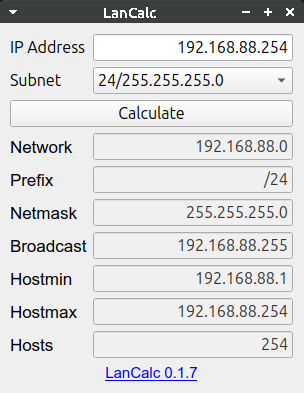
It provides a user-friendly interface to compute essential network parameters such as network address, broadcast address, the minimum and maximum host addresses, and the number of hosts within a given subnet.
Support IPv4 address formats, subnet masks and prefixes. This tool is particularly useful for network administrators and IT professionals who require quick calculations of network parameters.
Quick Start
Installation
Install PIP
curl https://bootstrap.pypa.io/get-pip.py -o /tmp/get-pip.py
python3 /tmp/get-pip.py
Install LanCalc with one command:
pip3 install git+https://github.com/lancalc/lancalc.git
If the lancalc command is not found after installation, add the local packages path to PATH:
export PATH="$HOME/.local/bin:$PATH"
To permanently add to PATH, add this line to your ~/.bashrc or ~/.zshrc:
echo 'export PATH="$HOME/.local/bin:$PATH"' >> ~/.bashrc
source ~/.bashrc
Running the Application
GUI Mode
After installation, launch the application with the command:
lancalc
CLI Mode
LanCalc also supports command-line interface for automation and scripting:
# Basic usage
lancalc 192.168.1.1/24

# JSON output for parsing
lancalc 192.168.1.1/24 --json

# Examples
lancalc 10.0.0.1/8
lancalc 172.16.0.1/16
lancalc 192.168.1.100/31  # Point-to-point network
lancalc 192.168.1.1/32    # Single host
Output Format
Text mode (default):
Network: 192.168.1.0
Prefix: /24
Netmask: 255.255.255.0
Broadcast: 192.168.1.255
Hostmin: 192.168.1.1
Hostmax: 192.168.1.254
Hosts: 254
JSON mode (--json):
{
  "Network": "192.168.1.0",
  "Prefix": "/24",
  "Netmask": "255.255.255.0",
  "Broadcast": "192.168.1.255",
  "Hostmin": "192.168.1.1",
  "Hostmax": "192.168.1.254",
  "Hosts": "254"
}
Special Cases
- /31 networks: Show
2*in Hosts field - both addresses are usable (RFC 3021) - /32 networks: Show
1*in Hosts field - single host network - The asterisk (*) indicates special network types where all addresses are usable
Uninstall
pip3 uninstall -y lancalc
That's it! The application will start and automatically detect your current network settings.
For Developers
Prerequisites
Python 3.9+ is required.
For production use (CLI only):
pip3 install -r requirements.txt
For GUI support:
pip3 install -e .[gui]
For development:
pip3 install -e .[dev,gui]
Installation for Development
Clone the repository and install in development mode:
git clone https://github.com/lancalc/lancalc.git
Running from Source
python3 lancalc/main.py
Development Tools
pip3 install pre-commit flake8 pytest pytest-qt
pre-commit install
pre-commit run --all-files
pre-commit autoupdate
Running Tests
pytest -v
Test Build
pip3 install -e .
~/.local/bin/lancalc
Test Build Linux
pip3 install git+file://$(pwd)
export PATH="$HOME/.local/bin:$PATH"
lancalc
Test Build Windows
pip3 install "git+file://$(Get-Location)"
lancalc
License
Distributed under the MIT License. See LICENSE for more information.
Contact
Notes
A /31 mask allows the use of 2 addresses. The first will be the network address, the last the broadcast address, and for connecting hosts we use these same addresses.
Limitations when using a /31 prefix:
Protocols that use L3 broadcast stop working. In fact, at present there are almost no protocols left that rely on L3 broadcast in their operation. The main currently relevant protocols, such as OSPF, IS-IS, EIGRP, and BGP, use multicast or unicast addresses instead. This limitation can even be seen as an advantage, because it increases resistance to DoS attacks based on broadcast traffic distribution.
Not all devices support /31 prefixes. On Juniper and Cisco devices, you can safely use a /31 mask, although Cisco will issue a warning (% Warning: use /31 mask on non point-to-point interface cautiously). ZyXEL, however, does not allow you to select a /31 mask at all. As a result, there are additional limitations in network operation — from using equipment of different manufacturers to even using equipment from the same vendor but with different firmware versions.
If you are not concerned by the above limitations, you can confidently save addresses by using the /31 prefix.
The use of the /31 prefix is described in detail in RFC 3021 — Using 31-Bit Prefixes on IPv4 Point-to-Point Links.
Project details
Verified details
These details have been verified by PyPIProject links
GitHub Statistics
Maintainers


Download files
Download the file for your platform. If you're not sure which to choose, learn more about installing packages.
Source Distribution
Built Distribution
Filter files by name, interpreter, ABI, and platform.
If you're not sure about the file name format, learn more about wheel file names.
Copy a direct link to the current filters
File details
Details for the file lancalc-0.1.7.tar.gz.
File metadata
- Download URL: lancalc-0.1.7.tar.gz
- Upload date:
- Size: 19.8 kB
- Tags: Source
- Uploaded using Trusted Publishing? Yes
- Uploaded via: twine/6.1.0 CPython/3.12.9
File hashes
| Algorithm | Hash digest | |
|---|---|---|
| SHA256 |
5b071363a508e2f5d024e6a44f809fa54a10b68953c888dfd3f7c48072789c4d
|
|
| MD5 |
ca090e861e2942aa1c89d0f6b2d55c28
|
|
| BLAKE2b-256 |
d2499538d0a12c4a7f979027932b6590385913e2abb459444d27993385d68d41
|
Provenance
The following attestation bundles were made for lancalc-0.1.7.tar.gz:
Publisher:
publish.yml on lancalc/lancalc
-
Statement:
-
Statement type:
https://in-toto.io/Statement/v1 -
Predicate type:
https://docs.pypi.org/attestations/publish/v1 -
Subject name:
lancalc-0.1.7.tar.gz -
Subject digest:
5b071363a508e2f5d024e6a44f809fa54a10b68953c888dfd3f7c48072789c4d - Sigstore transparency entry: 399925969
- Sigstore integration time:
-
Permalink:
lancalc/lancalc@1ffdf21a41f8fff82a492e8c6f9af83d886b65ae -
Branch / Tag:
refs/tags/0.1.7 - Owner: https://github.com/lancalc
-
Access:
public
-
Token Issuer:
https://token.actions.githubusercontent.com -
Runner Environment:
github-hosted -
Publication workflow:
publish.yml@1ffdf21a41f8fff82a492e8c6f9af83d886b65ae -
Trigger Event:
push
-
Statement type:
File details
Details for the file lancalc-0.1.7-py3-none-any.whl.
File metadata
- Download URL: lancalc-0.1.7-py3-none-any.whl
- Upload date:
- Size: 13.1 kB
- Tags: Python 3
- Uploaded using Trusted Publishing? Yes
- Uploaded via: twine/6.1.0 CPython/3.12.9
File hashes
| Algorithm | Hash digest | |
|---|---|---|
| SHA256 |
f86df0ba014794283f3de11adbfdb01df4ba85bba7439499339faf3d9aa5a29e
|
|
| MD5 |
b47d8dad328912d8d95d6d7aaa09ca92
|
|
| BLAKE2b-256 |
22420cb154c8a74ae622b8be5d0c163edb682e55ed3897b44d9998bcf099946d
|
Provenance
The following attestation bundles were made for lancalc-0.1.7-py3-none-any.whl:
Publisher:
publish.yml on lancalc/lancalc
-
Statement:
-
Statement type:
https://in-toto.io/Statement/v1 -
Predicate type:
https://docs.pypi.org/attestations/publish/v1 -
Subject name:
lancalc-0.1.7-py3-none-any.whl -
Subject digest:
f86df0ba014794283f3de11adbfdb01df4ba85bba7439499339faf3d9aa5a29e - Sigstore transparency entry: 399925984
- Sigstore integration time:
-
Permalink:
lancalc/lancalc@1ffdf21a41f8fff82a492e8c6f9af83d886b65ae -
Branch / Tag:
refs/tags/0.1.7 - Owner: https://github.com/lancalc
-
Access:
public
-
Token Issuer:
https://token.actions.githubusercontent.com -
Runner Environment:
github-hosted -
Publication workflow:
publish.yml@1ffdf21a41f8fff82a492e8c6f9af83d886b65ae -
Trigger Event:
push
-
Statement type:






