
LangChain & LangGraph extensions that parse LLM prompts into Timbr semantic SQL and execute them.

Project description





Timbr LangChain LLM SDK
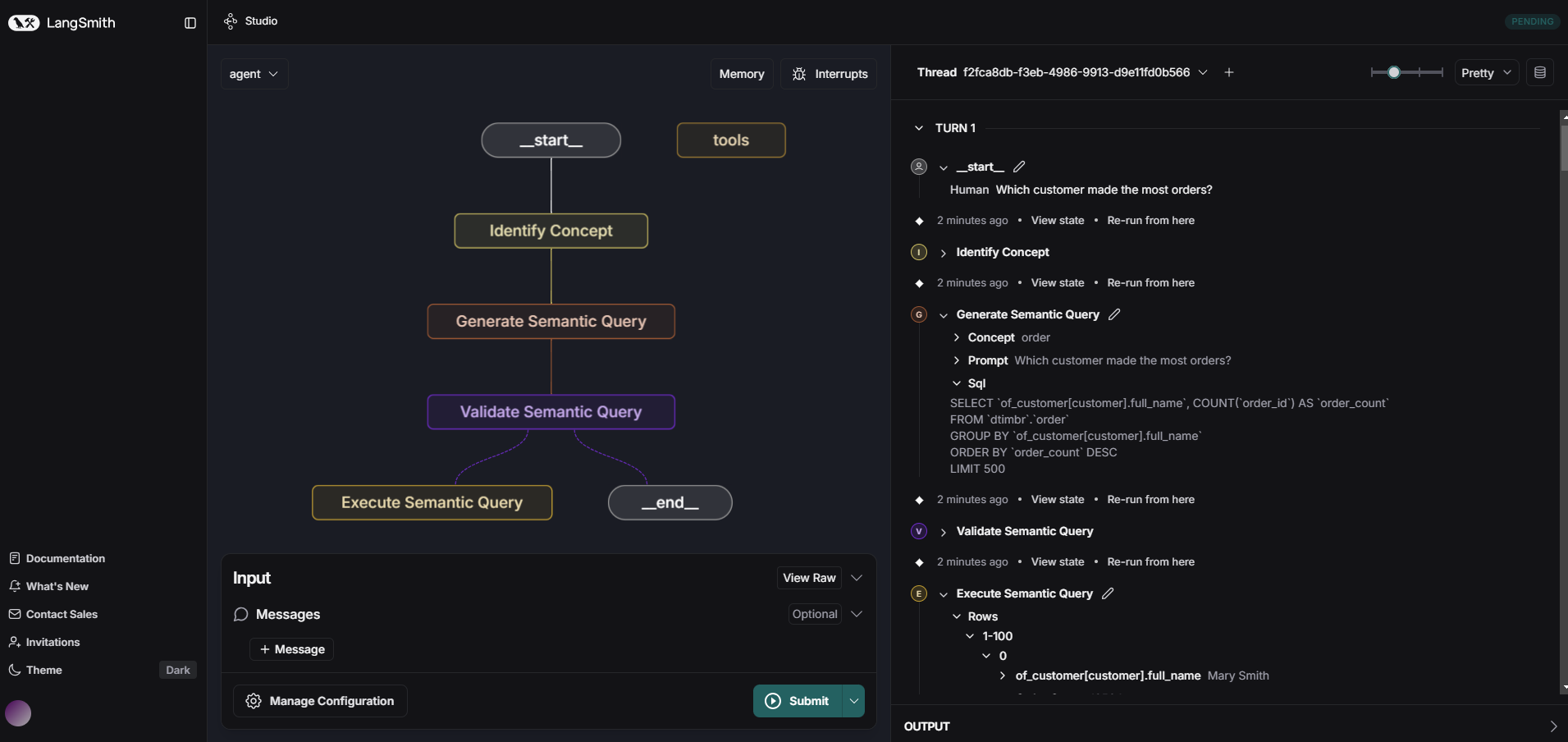
Timbr LangChain LLM SDK is a Python SDK that extends LangChain and LangGraph with custom agents, chains, and nodes for seamless integration with the Timbr semantic layer. It enables converting natural language prompts into optimized semantic-SQL queries and executing them directly against your data.
Dependencies
- Access to a timbr-server
- Python 3.10 or newer
Installation
Using pip
python -m pip install langchain-timbr
Install with selected LLM providers
One of: openai, anthropic, google, azure_openai, snowflake, databricks, vertex_ai (or 'all')
python -m pip install 'langchain-timbr[<your selected providers, separated by comma w/o space>]'
Using pip from github
pip install git+https://github.com/WPSemantix/langchain-timbr
Documentation
For comprehensive documentation and usage examples, please visit:
Configuration
The SDK uses environment variables for configuration. All configurations are optional - when set, they serve as default values for langchain-timbr provided tools. Below are all available configuration options:
Configuration Options
Timbr Connection Settings
TIMBR_URL- The URL of your Timbr serverTIMBR_TOKEN- Authentication token for accessing the Timbr serverTIMBR_ONTOLOGY- The ontology to use (also acceptsONTOLOGYas an alias)IS_JWT- Whether the token is a JWT token (true/false)JWT_TENANT_ID- Tenant ID for JWT authentication
Cache and Data Processing
CACHE_TIMEOUT- Timeout for caching operations in secondsIGNORE_TAGS- Comma-separated list of tags to ignore during processingIGNORE_TAGS_PREFIX- Comma-separated list of tag prefixes to ignore during processing
LLM Configuration
LLM_TYPE- The type of LLM provider to useLLM_MODEL- The specific model to use with the LLM providerLLM_API_KEY- API key or client secret for the LLM providerLLM_TEMPERATURE- Temperature setting for LLM responses (controls randomness)LLM_ADDITIONAL_PARAMS- Additional parameters to pass to the LLMLLM_TIMEOUT- Timeout for LLM requests in secondsLLM_TENANT_ID- LLM provider tenant/directory ID (Used for Service Principal authentication)LLM_CLIENT_ID- LLM provider client ID (Used for Service Principal authentication)LLM_CLIENT_SECRET- LLM provider client secret (Used for Service Principal authentication)LLM_ENDPOINT- LLM provider OpenAI endpoint URLLLM_API_VERSION- LLM provider API versionLLM_SCOPE- LLM provider authentication scope
Release history Release notifications | RSS feed


Download files
Download the file for your platform. If you're not sure which to choose, learn more about installing packages.
Source Distribution
Built Distribution
Filter files by name, interpreter, ABI, and platform.
If you're not sure about the file name format, learn more about wheel file names.
Copy a direct link to the current filters
File details
Details for the file langchain_timbr-2.1.3.tar.gz.
File metadata
- Download URL: langchain_timbr-2.1.3.tar.gz
- Upload date:
- Size: 55.9 kB
- Tags: Source
- Uploaded using Trusted Publishing? No
- Uploaded via: twine/6.1.0 CPython/3.13.7
File hashes
| Algorithm | Hash digest | |
|---|---|---|
| SHA256 |
7b9ea162641a00c91a0da255085b671fe59ac93da236b68cc410ba22f77517da
|
|
| MD5 |
bae1edf7afa0778e8f6d9cec0bd13ae8
|
|
| BLAKE2b-256 |
2494ca1e7797ad5e3597c2061314ff8d3b4191913fb51fa608758566656f973a
|
File details
Details for the file langchain_timbr-2.1.3-py3-none-any.whl.
File metadata
- Download URL: langchain_timbr-2.1.3-py3-none-any.whl
- Upload date:
- Size: 58.0 kB
- Tags: Python 3
- Uploaded using Trusted Publishing? No
- Uploaded via: twine/6.1.0 CPython/3.13.7
File hashes
| Algorithm | Hash digest | |
|---|---|---|
| SHA256 |
92cf60a473c89af882e8153855fca9555ddfdff3b2cd889770737fa2a9003967
|
|
| MD5 |
3540208fc1df3be449e650a036fcdddf
|
|
| BLAKE2b-256 |
141eb8d12e9028e1ff38cfbbf4db8859db19a4cba80c5acd09b385bf8f2def99
|






