
LangGraph Mini Dash
A lightweight real-time visualization and debugging dashboard for LangGraph multi-agent workflows.
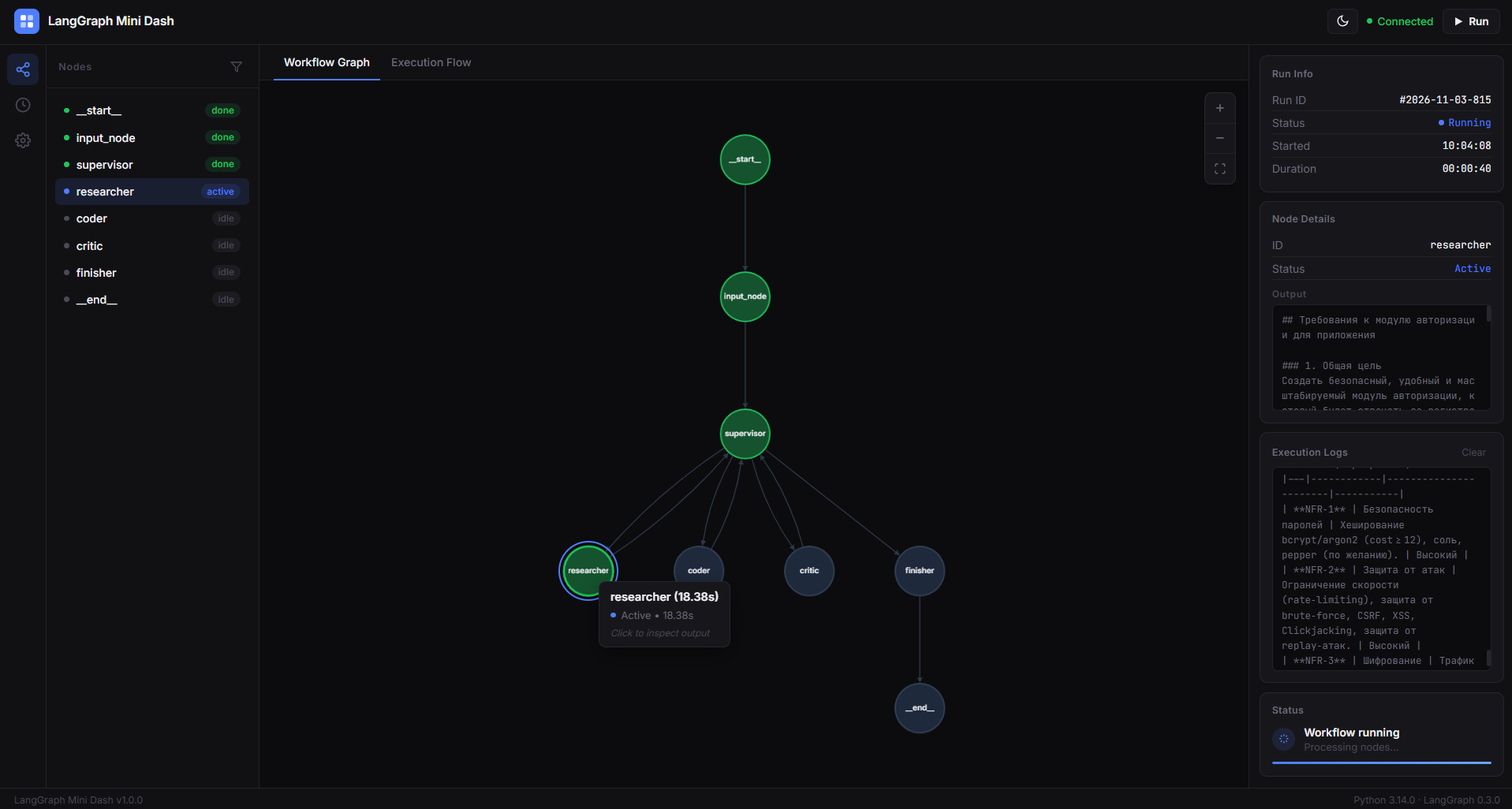
LangGraph Mini Dash is a lightweight developer tool for visualizing, debugging, and monitoring LangGraph workflows through an interactive local web interface.
Monitor node execution, track performance, and understand how your AI agents interact in real time.
Features
- Interactive Graph Visualization - Explore your LangGraph workflows with Cytoscape.js.
- Real-Time Execution Monitoring - Track node states:
idle,active, anddone. - Live Updates - Receive execution updates through Server-Sent Events (SSE).
- Execution Timing - Measure the execution time of individual nodes.
- Node Search - Quickly find specific nodes in your workflow.
- Node Filtering - Filter nodes to navigate complex graphs.
- Dark & Light Themes - Switch between themes with saved preferences.
- Local Dashboard - Runs locally using FastAPI without external monitoring infrastructure.
Installation
pip install langgraph-mini-dash
Quick Start
Create a LangGraph workflow and pass the compiled graph to LangGraphMiniDash.
from langgraph.graph import StateGraph, START, END
from langgraph_mini_dash.server import LangGraphMiniDash

# 1. Create a workflow
workflow = StateGraph(dict)

def my_node(state):
    return {"messages": ["Hello from the test agent!"]}

workflow.add_node("agent_node", my_node)
workflow.add_edge(START, "agent_node")
workflow.add_edge("agent_node", END)

# 2. Compile the graph
graph = workflow.compile()

# 3. Launch the dashboard
if __name__ == "__main__":
    dash = LangGraphMiniDash(graph)
    dash.run(host="127.0.0.1", port=8000)
Open your browser at:
Your local dashboard will display the workflow graph and provide execution monitoring.
How It Works
LangGraph Mini Dash connects your compiled LangGraph workflow to a local FastAPI dashboard.
- Graph Initialization - Pass your compiled LangGraph graph to
LangGraphMiniDash. - Server Startup - Launch the local dashboard using
dash.run(). - Execution Monitoring - Track node execution states and timing.
- Live Visualization - Observe workflow execution through the interactive graph.
Use Cases
- Debugging multi-agent AI workflows.
- Visualizing complex LangGraph architectures.
- Monitoring agent execution in real time.
- Identifying slow workflow nodes.
- Understanding execution order and graph structure.
License
MIT License.
1 maintainer

Metadata
1 maintainer
Release files for langgraph-mini-dash 1.0.1
For a detailed explanation of source distributions (sdists) and built distributions (wheels), please see the package formats documentation.
Source distribution (sdist)
| File | Size | Uploaded | Provenance | Actions |
|---|---|---|---|---|
| langgraph_mini_dash-1.0.1.tar.gz | 15.9 kB | Without provenance | Details for langgraph_mini_dash-1.0.1.tar.gz |
Built distribution (wheel)
| File | Interpreter | ABI | Platform | Actions Reset |
|---|---|---|---|---|
| langgraph_mini_dash-1.0.1-py3-none-any.whl | Python 3 | none | any | Details for langgraph_mini_dash-1.0.1-py3-none-any.whl |
Total release size: 31.5 kB
Release files / langgraph_mini_dash-1.0.1.tar.gz
| Download URL | langgraph_mini_dash-1.0.1.tar.gz |
|---|---|
| Size | 15.9 kB |
| Tags | Source |
|
SHA-256 checksum How to use checksums |
de8e572fc79eb373c9d8c0967203a75b4bbbfec8dfa149a7a6037d10f33d3098
|
|
BLAKE2b-256 checksum How to use checksums |
05f80bbc31f612a9112115f8825395766e894d7124f3532758c567301e531eba
|
| Upload date | |
|
Uploaded using Trusted Publishing? What is trusted publishing? |
No |
| Uploaded via |
twine/7.0.0 CPython/3.14.5
|
Release files / langgraph_mini_dash-1.0.1-py3-none-any.whl
| Download URL | langgraph_mini_dash-1.0.1-py3-none-any.whl |
|---|---|
| Size | 15.6 kB |
| Tags | Python 3 |
|
SHA-256 checksum How to use checksums |
55049728d3f7f19ed4af320d7a1f9b46e2b4fd59e386274f519d35d6e556d595
|
|
BLAKE2b-256 checksum How to use checksums |
39d98e9cf14098b5eefc100a9153be9550e3d9d0f49668cb08577cfc2e0fd0ea
|
| Upload date | |
|
Uploaded using Trusted Publishing? What is trusted publishing? |
No |
| Uploaded via |
twine/7.0.0 CPython/3.14.5
|
Security for langgraph-mini-dash 1.0.1
Provenance
Provenance describes where a file came from. On PyPI, provenance is shared via attestations, which provide a verifiable record of the build or publishing details. View details, limitations and caveats.
No provenance found
None of the files in this release were uploaded with provenance metadata.
A note on package security
PyPI is a repository for distributing packages, not a service for auditing them. While third-party security researchers and our staff do their best to detect and remove malicious packages, PyPI cannot guarantee the quality, security or suitability of any given package.
To learn more about protecting yourself from malicious actors, visit our package security documentation.














