
LangGraph Mini Dash
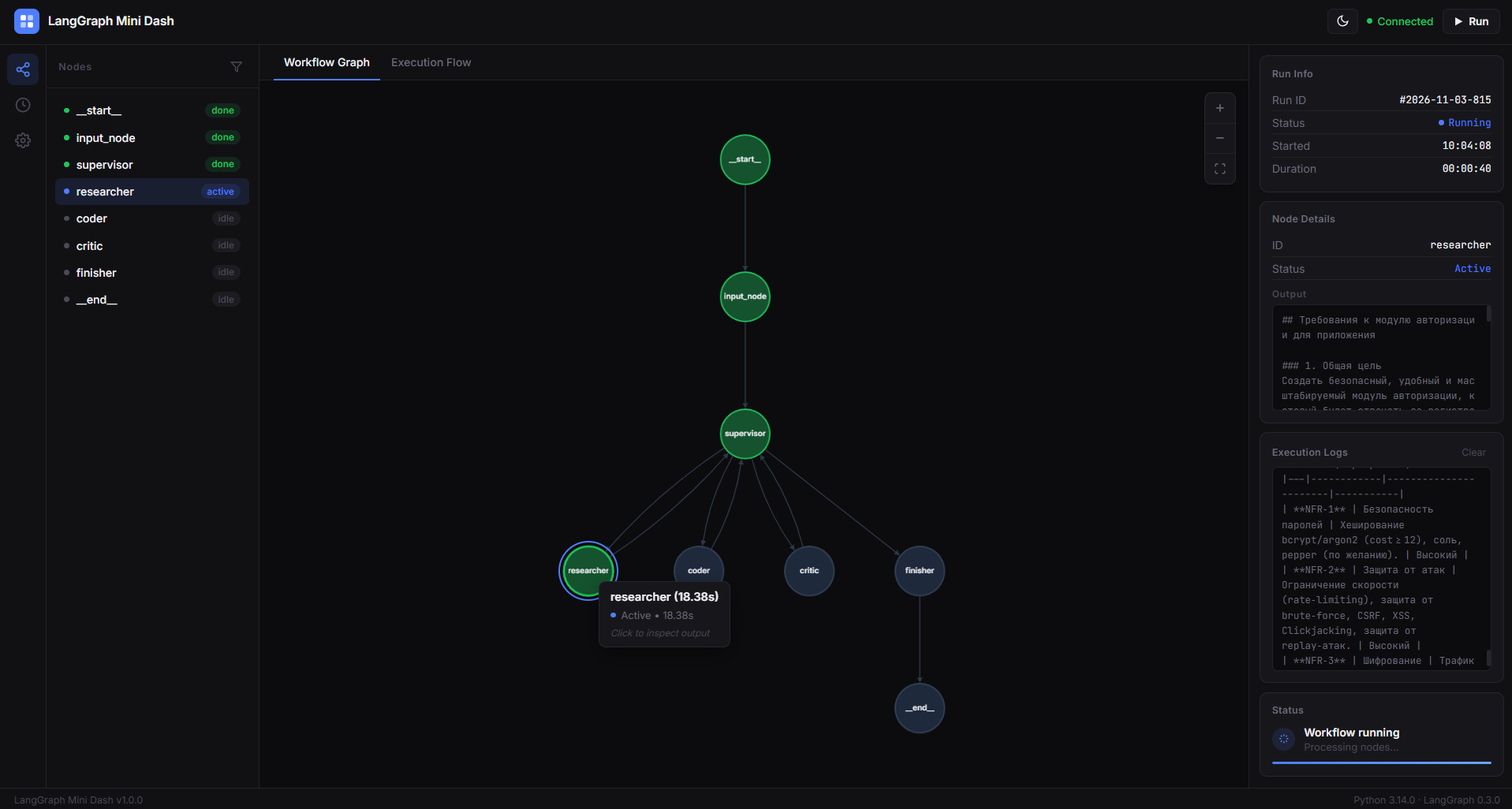
A lightweight visual dashboard for LangGraph workflows.
LangGraph Mini Dash is a Python library that brings a visual interface to your LangGraph applications.
It allows you to explore your workflow structure, inspect connections between nodes, provide graph inputs through a web interface, and monitor execution in real time.
The goal is simple: make LangGraph workflows easier to understand, debug, and monitor without having to build a custom dashboard for every project.
Preview
Why LangGraph Mini Dash?
When working with LangGraph, understanding how a workflow is structured and how its nodes execute can become difficult, especially as the project grows.
LangGraph Mini Dash provides a visual way to work with your existing graphs.
Instead of relying only on terminal output, you get a dashboard where you can see your workflow and follow its execution.
You don't need to rewrite your graph or build a separate frontend. Just pass your compiled graph to the dashboard.
Features
- Interactive graph visualization - explore your workflow through a visual representation of nodes and connections.
- Automatic input forms - generate input fields using the graph's input schema.
- Real-time execution monitoring - follow workflow execution directly in the dashboard.
- Node status tracking - see which nodes are active and which have completed execution.
- Message updates - receive message-related updates from nodes during execution.
- Local web interface - run the dashboard locally without deploying a separate frontend.
- Simple integration - connect an existing compiled LangGraph graph with minimal code.
- No graph rewriting - continue building your workflows with the standard LangGraph API.
Installation
Install LangGraph Mini Dash using pip:
pip install langgraph-mini-dash
To upgrade an existing installation:
pip install --upgrade langgraph-mini-dash
Quick Start
You can integrate LangGraph Mini Dash into an existing LangGraph project in just a few steps.
1. Create a LangGraph workflow
First, define your graph as you normally would.
from typing import TypedDict

from langgraph.graph import StateGraph, START, END


class SimpleState(TypedDict):
    name: str


def greeting_node(state: SimpleState):
    user_name = state.get('name', 'Guest')

    greeting_text = (
        f'Hello, {user_name}! '
        'LangGraph Mini Dash is working correctly.'
    )

    print(greeting_text)

    return {'name': user_name}


builder = StateGraph(SimpleState)

builder.add_node('greeter', greeting_node)
builder.add_edge(START, 'greeter')
builder.add_edge('greeter', END)

graph = builder.compile()
2. Connect the dashboard
Import LangGraphMiniDash, pass your compiled graph to it, and start the server.
from langgraph_mini_dash import LangGraphMiniDash

dashboard = LangGraphMiniDash(graph)

dashboard.run(
    host='127.0.0.1',
    port=8000
)
3. Run your application
Save your code in main.py and execute:
python main.py
Open the dashboard in your browser:
Your compiled LangGraph workflow is now available through the visual dashboard.
Usage
Visualizing your graph
Once the dashboard starts, it retrieves the structure of your compiled graph and displays its nodes and connections.
This makes it easier to understand how different parts of your workflow are connected.
Providing graph inputs
LangGraph Mini Dash uses the graph's input schema to generate an input form.
You can provide values through the dashboard instead of manually constructing an input dictionary every time you want to test your workflow.
The available fields depend on the input schema defined by your LangGraph application.
Note: If you use a state schema as the graph's input schema, its required fields will also be treated as required inputs.
Monitoring execution
When you start a workflow through the dashboard, execution updates are displayed as the graph runs.
You can follow node activity and see when individual nodes complete their execution.
This is useful when testing multi-step workflows and inspecting how your graph behaves.
Integration with Existing Projects
LangGraph Mini Dash is designed to work with compiled LangGraph graphs.
You can keep your existing graph construction logic and add the dashboard separately.
For example:
graph = builder.compile()

dashboard = LangGraphMiniDash(graph)
dashboard.run()
You can also configure the local server:
dashboard.run(
    host='127.0.0.1',
    port=8000
)
The default host is 127.0.0.1 and the default port is 8000.
Requirements
- Python
- LangGraph
Install the library and its dependencies using pip:
pip install langgraph-mini-dash
Project Links
- GitHub Repository: arturbuilds/langgraph-mini-dash
- PyPI Package: langgraph-mini-dash
License
See the LICENSE file for license information.
Author
Created by Artur.
GitHub: @arturbuilds
1 maintainer

Metadata
1 maintainer
Release files for langgraph-mini-dash 1.0.3
For a detailed explanation of source distributions (sdists) and built distributions (wheels), please see the package formats documentation.
Source distribution (sdist)
| File | Size | Uploaded | Provenance | Actions |
|---|---|---|---|---|
| langgraph_mini_dash-1.0.3.tar.gz | 21.0 kB | Without provenance | Details for langgraph_mini_dash-1.0.3.tar.gz |
Built distribution (wheel)
| File | Interpreter | ABI | Platform | Actions Reset |
|---|---|---|---|---|
| langgraph_mini_dash-1.0.3-py3-none-any.whl | Python 3 | none | any | Details for langgraph_mini_dash-1.0.3-py3-none-any.whl |
Total release size: 40.7 kB
Release files / langgraph_mini_dash-1.0.3.tar.gz
| Download URL | langgraph_mini_dash-1.0.3.tar.gz |
|---|---|
| Size | 21.0 kB |
| Tags | Source |
|
SHA-256 checksum How to use checksums |
a83a6269b59be7e2a64cbe454f0ce32a7810cc72b09a159dd7399524b37ed094
|
|
BLAKE2b-256 checksum How to use checksums |
ad44a4802b6757c8d9c1fdfb8409ce50e19acfc00a618698c1224e57052ac745
|
| Upload date | |
|
Uploaded using Trusted Publishing? What is trusted publishing? |
No |
| Uploaded via |
twine/7.0.0 CPython/3.14.5
|
Release files / langgraph_mini_dash-1.0.3-py3-none-any.whl
| Download URL | langgraph_mini_dash-1.0.3-py3-none-any.whl |
|---|---|
| Size | 19.7 kB |
| Tags | Python 3 |
|
SHA-256 checksum How to use checksums |
6762ee4d01c51f3ac7b73d77426641e3480f4a60d0df3530efa215582eb13cba
|
|
BLAKE2b-256 checksum How to use checksums |
fc6efa973f390597b49ca99f12a3d9d9a1302c9977906c5f266b67bb4c04424e
|
| Upload date | |
|
Uploaded using Trusted Publishing? What is trusted publishing? |
No |
| Uploaded via |
twine/7.0.0 CPython/3.14.5
|
Security for langgraph-mini-dash 1.0.3
Provenance
Provenance describes where a file came from. On PyPI, provenance is shared via attestations, which provide a verifiable record of the build or publishing details. View details, limitations and caveats.
No provenance found
None of the files in this release were uploaded with provenance metadata.
A note on package security
PyPI is a repository for distributing packages, not a service for auditing them. While third-party security researchers and our staff do their best to detect and remove malicious packages, PyPI cannot guarantee the quality, security or suitability of any given package.
To learn more about protecting yourself from malicious actors, visit our package security documentation.














