
🧠 Langvio: Natural Language Computer Vision





Connect language models to vision models for natural language visual analysis
🚀 Quick Start • 📖 Documentation • 🎯 Examples • 🔧 Installation • 🤝 Contributing
✨ What is Langvio?
Langvio bridges the gap between human language and computer vision. Ask questions about images and videos in plain English, and get intelligent analysis powered by state-of-the-art vision models and language models.
🎯 Key Features
- 🗣️ Natural Language Interface: Ask questions like "Count all red cars" or "Find people wearing yellow"
- 🎥 Multi-Modal Support: Works with both images and videos
- 🚀 Powered by YOLO-World v2: Fast, accurate object detection without predefined classes
- 📹 ByteTracker Integration: Advanced multi-object tracking for video analysis with boundary crossing detection
- 🤖 Local VLM Integration: Uses a local Vision Language Model (Qwen2.5-VL) for query parsing and intelligent explanations — no API keys required
- 📊 Advanced Analytics: Object counting, speed estimation, spatial relationships, temporal tracking
- 🎨 Visual Output: Generates annotated images/videos with detection highlights and tracking trails
- 🌐 Web Interface: Includes a Flask web app for easy interaction
- 🔧 Extensible: Easy to add new models and capabilities
🎬 See It In Action
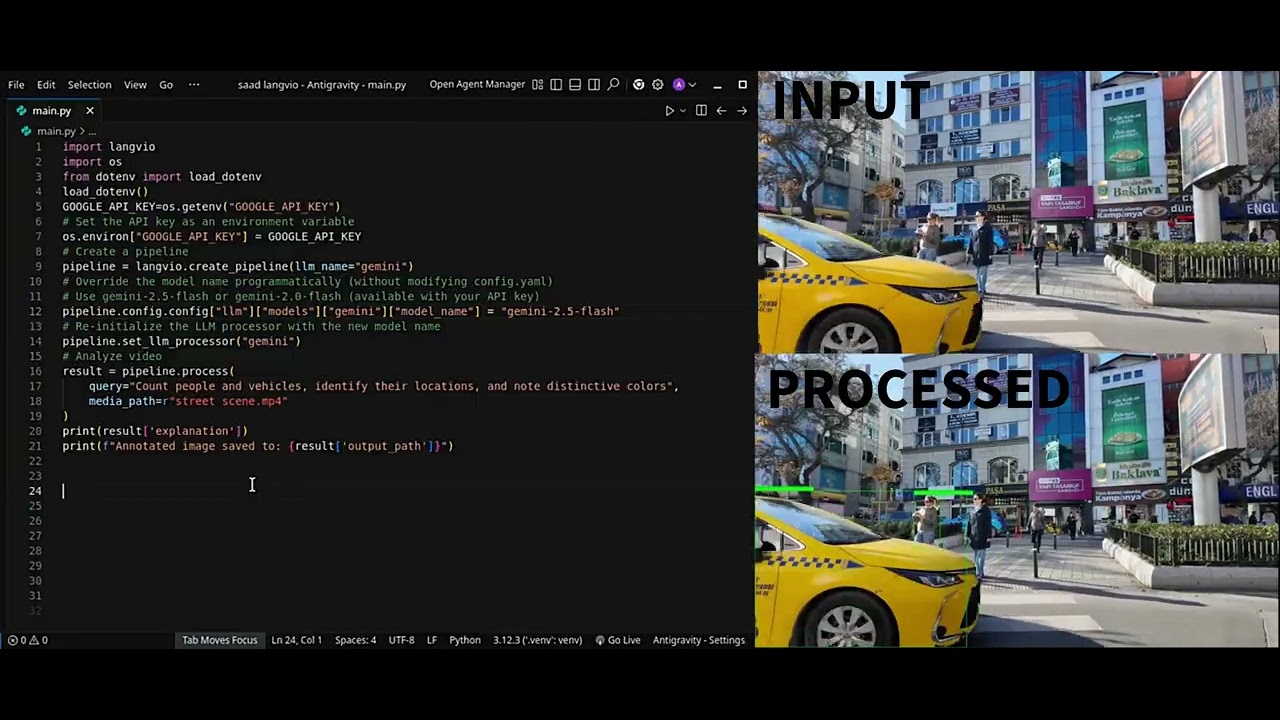
Python API Example
import langvio

# Create a pipeline
pipeline = langvio.create_pipeline()

# Analyze an image
result = pipeline.process(
    query="Count how many people are wearing red shirts",
    media_path="street_scene.jpg"
)

print(result['explanation'])
# Output: "I found 3 people wearing red shirts in the image.
#          Two are located in the center-left area, and one is on the right side."

# View the annotated result
print(f"Annotated image saved to: {result['output_path']}")
Command-Line Interface Example
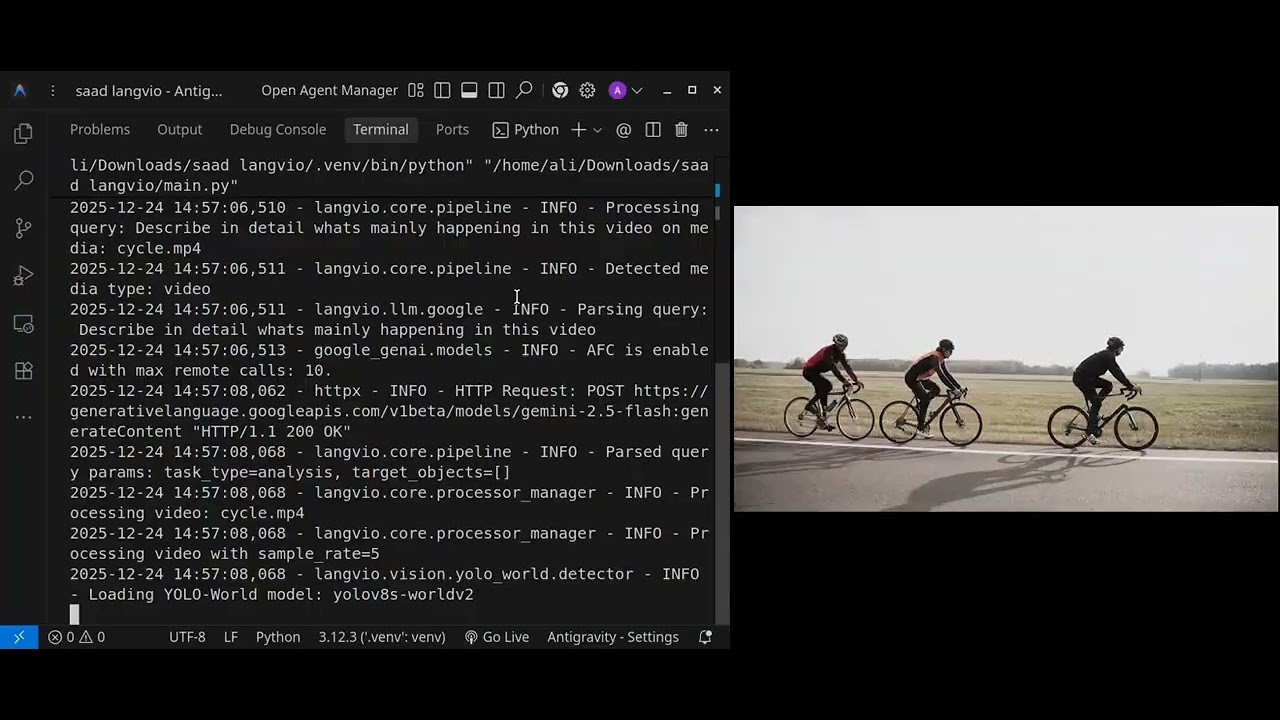
# Basic usage
langvio --query "Count the cars" --media image.jpg

# With custom configuration
langvio --query "Find red objects" --media scene.jpg --config custom.yaml
🔧 Installation
Basic Installation
pip install langvio
With the Local VLM Backend
langvio uses a local Vision Language Model (Qwen2.5-VL) as its language layer — no API keys, no cloud calls. Install the backend:
# Local VLM (Qwen2.5-VL via HuggingFace transformers)
pip install langvio[vlm]

# Equivalent grouped extra
pip install langvio[all-llm]

# For development
pip install langvio[dev]
The first run downloads the model weights from HuggingFace (a few GB). A CUDA GPU is strongly recommended; CPU works but is slow.
Environment Setup
No API keys are required. Optionally create a .env file to point HuggingFace at
a custom cache or provide a token for gated models:
# Copy the template
cp .env.template .env
# Optional
# HF_HOME=/path/to/hf-cache
# HF_TOKEN=your_huggingface_token_here
LANGVIO_DEFAULT_LLM=qwen
🚀 Quick Start
Basic Usage
import langvio

# Create a pipeline (automatically detects available LLM providers)
pipeline = langvio.create_pipeline()

# Process an image
result = pipeline.process(
    query="What objects are in this image?",
    media_path="path/to/your/image.jpg"
)

print(result['explanation'])
print(f"Output: {result['output_path']}")
Video Analysis
# Analyze videos with temporal understanding
result = pipeline.process(
    query="Count vehicles crossing the intersection",
    media_path="traffic_video.mp4"
)

# Get detailed analysis including speed and movement patterns
print(result['explanation'])
Web Interface
# Launch the web interface
cd webapp
python app.py

# Visit http://localhost:5000 in your browser
🎯 Examples
Object Detection & Counting
# Count specific objects
pipeline.process("How many cars are in this parking lot?", "parking.jpg")

# Find objects by attributes
pipeline.process("Find all red objects in this image", "scene.jpg")

# Spatial relationships
pipeline.process("What objects are on the table?", "kitchen.jpg")
Video Analysis with ByteTracker
# Track movement patterns (uses ByteTracker for multi-object tracking)
pipeline.process("Track people walking through the scene", "crowd.mp4")

# Boundary crossing detection (ByteTracker tracks entry/exit)
pipeline.process("How many vehicles entered vs exited the intersection?", "traffic.mp4")

# Speed analysis (uses tracked trajectories from ByteTracker)
pipeline.process("What's the average speed of vehicles?", "highway.mp4")

# Activity detection with temporal tracking
pipeline.process("Detect any unusual activities", "security_footage.mp4")

# Object counting with tracking
pipeline.process("Count people entering and exiting the building", "entrance.mp4")
Advanced Queries
# Complex multi-part analysis
pipeline.process(
    "Count people and vehicles, identify their locations, and note distinctive colors",
    "street_scene.jpg"
)

# Verification tasks
pipeline.process("Is there a dog in this image?", "park_scene.jpg")

# Temporal analysis
pipeline.process("How many people entered vs exited the building?", "entrance.mp4")
🏗️ Architecture
graph TD
    A[User Query] --> B[LLM Processor]
    B --> C[Query Parser]
    C --> D[Vision Processor]
    D --> E[YOLO-World Detection]
    E --> F[Attribute Analysis]
    F --> G[Spatial Relationships]
    G --> H{Is Video?}
    H -->|Yes| I[ByteTracker Multi-Object Tracking]
    H -->|No| J[LLM Explanation]
    I --> K[Boundary Crossing Detection]
    K --> L[Speed Estimation]
    L --> M[Temporal Analysis]
    M --> J
    J --> N[Visualization]
    N --> O[Output with Tracking Trails]
Core Components
- 🧠 VLM Processor: Parses queries and generates explanations (local Qwen2.5-VL)
- 👁️ Vision Processor: Detects objects and attributes using YOLO-World v2
- 📹 ByteTracker: Multi-object tracking system for video analysis with boundary crossing detection
- 🎨 Media Processor: Creates visualizations and handles I/O
- ⚙️ Pipeline: Orchestrates the entire workflow
📊 Supported Models
Vision Models
- YOLO-World v2 (small, medium, large, extra-large)
yolo_world_v2_s- Small (fastest)yolo_world_v2_m- Medium (balanced, recommended)yolo_world_v2_l- Large (most accurate)yolo_world_v2x- Extra-large (highest accuracy)
- Aliases (all map to YOLO-World v2):
yolo11n,yolo,yoloe- Fastest (map to small)yoloe_medium- Balanced (maps to medium)yoloe_large- Accurate (maps to large)
- Automatic model selection based on performance needs
Language Models (local VLM)
- Qwen2.5-VL (run locally, no API keys):
qwen/qwen-3b- Default,Qwen/Qwen2.5-VL-3B-Instruct(smallest, fastest)qwen-7b-Qwen/Qwen2.5-VL-7B-Instruct(higher quality)qwen2-vl-7b-Qwen/Qwen2-VL-7B-Instruct
- Extensible architecture for adding more local models
🛠️ Configuration
Custom Configuration
# config.yaml
llm:
  default: "qwen"  # Local Qwen2.5-VL
  models:
    qwen:
      model_name: "Qwen/Qwen2.5-VL-3B-Instruct"
      model_kwargs:
        temperature: 0.2
        max_new_tokens: 1024
    qwen-7b:
      model_name: "Qwen/Qwen2.5-VL-7B-Instruct"
      model_kwargs:
        temperature: 0.2
        max_new_tokens: 1024

vision:
  default: "yolo11n"  # Fastest default, or "yolo_world_v2_m" for balanced
  models:
    yolo_world_v2_m:
      type: "yolo_world"
      model_name: "yolov8m-worldv2"
      confidence: 0.45
      # ByteTracker configuration
      track_thresh: 0.3      # Detection confidence threshold for tracking
      track_buffer: 70       # Frames to keep lost tracks
      match_thresh: 0.6      # IoU threshold for track matching

media:
  output_dir: "./results"
  visualization:
    box_color: [0, 255, 0]
    line_thickness: 2
# Use custom configuration
pipeline = langvio.create_pipeline(config_path="config.yaml")
Command Line Interface
# Basic usage
langvio --query "Count the cars" --media image.jpg

# With custom configuration
langvio --query "Find red objects" --media scene.jpg --config custom.yaml

# List available models
langvio --list-models
🌟 Advanced Features
Video Tracking with ByteTracker
Langvio uses ByteTracker for robust multi-object tracking in videos. ByteTracker is a state-of-the-art tracking algorithm that maintains object identity across video frames, even through occlusions and complex scenes.
Key ByteTracker Capabilities:
- Multi-Object Tracking: Tracks multiple objects simultaneously with unique persistent IDs
- Boundary Crossing Detection: Automatically detects when objects enter/exit defined regions
- Object Counting: Accurate counting with entry/exit tracking (in/out counts)
- Speed Estimation: Calculates object speeds based on tracked trajectories over time
- Track Persistence: Maintains object identity even through occlusions and temporary disappearances
- Configurable Tracking: Adjustable thresholds for tracking confidence, buffer, and matching
ByteTracker Technical Features:
- Kalman filter-based motion prediction for smooth tracking
- IoU-based data association for matching detections to tracks
- Track buffer management for handling occlusions (configurable buffer size)
- High/low confidence detection handling for robust tracking
- Automatic track initialization and termination
YOLO-World v2 + ByteTracker Integration
The combination of YOLO-World v2 detection and ByteTracker tracking provides:
- Seamless Integration: YOLO-World detections feed directly into ByteTracker for tracking
- Efficient Processing: Optimized frame sampling (default: every 5th frame, every 2nd for tracking tasks)
- Track File Management: Saves/loads tracking data as JSON for faster re-analysis
- Visualization: Draws tracking trails, object IDs, and trajectories on video output
- Performance: Handles real-time video processing with configurable quality/speed tradeoffs
Spatial Relationship Analysis
- Positional Understanding: "objects on the table", "cars in the parking lot"
- Relative Positioning: left/right, above/below, near/far relationships
- Containment Detection: objects inside other objects
Temporal Analysis (Video)
Powered by ByteTracker multi-object tracking:
- Movement Patterns: Track object trajectories and behaviors across frames
- Activity Recognition: Detect activities and interactions over time
- Temporal Relationships: Understand object co-occurrence and interactions
- Trajectory Analysis: Visualize and analyze object movement paths
- Entry/Exit Tracking: Monitor objects crossing boundaries or entering/exiting regions
Color & Attribute Detection
- Advanced Color Recognition: 50+ color categories with confidence scoring
- Size Classification: Automatic small/medium/large categorization
- Multi-attribute Analysis: Combined color, size, and position analysis
🚀 Performance & Optimization
Model Selection Strategy
# Automatic model selection based on use case
pipeline = langvio.create_pipeline()  # Uses best available model

# Manual model selection for specific needs
pipeline = langvio.create_pipeline(
    vision_name="yolo_world_v2_l",  # High accuracy
    llm_name="qwen-7b"              # Higher-quality VLM (or "qwen" for speed)
)
Optimization Tips
- YOLO-World models: Better accuracy for complex scenes with flexible object detection
- Model selection: Use smaller models (
yolo_world_v2_s) for speed, larger (yolo_world_v2_l) for accuracy - Confidence thresholds: Adjust based on precision/recall needs (lower = more detections)
- Frame sampling: Control video processing speed vs accuracy (default: every 5th frame)
- Environment variables: Use
LANGVIO_DEFAULT_LLMandLANGVIO_DEFAULT_VISIONto set defaults
🧪 Testing
Langvio includes a comprehensive test suite. Run tests with:
# Install test dependencies
pip install langvio[dev]

# Run all tests
pytest

# Run with coverage
pytest --cov=langvio --cov-report=html

# Run specific test file
pytest tests/test_config.py
See tests/README.md for more testing information.
🤝 Contributing
We welcome contributions! Here's how to get started:
Development Setup
# Clone the repository
git clone https://github.com/MugheesMehdi07/langvio.git
cd langvio

# Install in development mode
pip install -e .[dev]

# Run tests
pytest

# Format code
black langvio/
isort langvio/
Contributing Guidelines
- Fork the repository
- Create a feature branch (
git checkout -b feature/amazing-feature) - Commit your changes (
git commit -m 'Add amazing feature') - Push to the branch (
git push origin feature/amazing-feature) - Open a Pull Request
📚 Documentation
- 📖 Full Documentation: Comprehensive guides and API reference
- 🎯 Examples: Ready-to-run example scripts
- 🌐 Web App: Flask web interface for easy testing
- ⚙️ Configuration: Sample configuration files
🔗 Links & Resources
📄 MIT License
Copyright (c) 2025 LangVio
Permission is hereby granted, free of charge, to any person obtaining a copy of this software and associated documentation files (the "Software"), to deal in the Software without restriction, including without limitation the rights to use, copy, modify, merge, publish, distribute, sublicense, and/or sell copies of the Software, and to permit persons to whom the Software is furnished to do so, subject to the following conditions:
The above copyright notice and this permission notice shall be included in all copies or substantial portions of the Software.
THE SOFTWARE IS PROVIDED "AS IS", WITHOUT WARRANTY OF ANY KIND, EXPRESS OR IMPLIED, INCLUDING BUT NOT LIMITED TO THE WARRANTIES OF MERCHANTABILITY, FITNESS FOR A PARTICULAR PURPOSE AND NONINFRINGEMENT. IN NO EVENT SHALL THE AUTHORS OR COPYRIGHT HOLDERS BE LIABLE FOR ANY CLAIM, DAMAGES OR OTHER LIABILITY, WHETHER IN AN ACTION OF CONTRACT, TORT OR OTHERWISE, ARISING FROM, OUT OF OR IN CONNECTION WITH THE SOFTWARE OR THE USE OR OTHER DEALINGS IN THE SOFTWARE.
Usage and License Notices
This project utilizes certain datasets, models, APIs, and algorithms that are subject to their respective original licenses and terms of use. Users must comply with all terms and conditions of these original licenses, including but not limited to:
-
Qwen (Tongyi Qianwen) License: This project uses Alibaba Cloud's Qwen2.5-VL / Qwen2-VL models, run locally via HuggingFace transformers. Users must comply with the Qwen license terms published on the respective HuggingFace model cards.
-
YOLO World License: This project uses YOLO-World v2 models developed by Ultralytics. Users must comply with the Ultralytics YOLO License (AGPL-3.0) and any additional terms specified by Ultralytics for YOLO-World models.
-
ByteTracker License: This project uses the ByteTracker algorithm for multi-object tracking. Users must comply with the original ByteTracker license terms as specified in the ByteTracker repository.
This project does not impose any additional constraints beyond those stipulated in the original licenses. Furthermore, users are reminded to ensure that their use of the datasets, models, APIs, and algorithms is in compliance with all applicable laws and regulations.
For the full license text, see the LICENSE file.
🙏 Acknowledgments
- Ultralytics for the amazing YOLO-World v2 models
- ByteTracker algorithm for robust multi-object tracking
- LangChain for the LLM integration framework
- Alibaba Cloud / Qwen and HuggingFace for the local Vision Language Model
- OpenCV for computer vision utilities
⭐ Star us on GitHub if Langvio helps you!
1 maintainer

Metadata
1 maintainer
Release files for langvio 0.0.7
For a detailed explanation of source distributions (sdists) and built distributions (wheels), please see the package formats documentation.
Source distribution (sdist)
| File | Size | Uploaded | Provenance | |
|---|---|---|---|---|
| langvio-0.0.7.tar.gz | 135.4 kB | Without provenance | Details |
Built distribution (wheel)
| File | Interpreter | ABI | Platform | Reset |
|---|---|---|---|---|
| langvio-0.0.7-py3-none-any.whl | Python 3 | none | any | Details |
Total release size: 257.5 kB
Release files / langvio-0.0.7.tar.gz
| Download URL | langvio-0.0.7.tar.gz |
|---|---|
| Size | 135.4 kB |
| Tags | Source |
|
SHA-256 checksum How to use checksums |
7b9de350e934bbf6bad4363c85002d624ef139cf02edb83adacd86cb252f1ca1
|
|
BLAKE2b-256 checksum How to use checksums |
bc02047285d9643bb736cdd5d956eedd883077f1f254516804346e219a2d3dda
|
| Upload date | |
|
Uploaded using Trusted Publishing? What is trusted publishing? |
No |
| Uploaded via |
twine/7.0.0 CPython/3.13.14
|
Release files / langvio-0.0.7-py3-none-any.whl
| Download URL | langvio-0.0.7-py3-none-any.whl |
|---|---|
| Size | 122.1 kB |
| Tags | Python 3 |
|
SHA-256 checksum How to use checksums |
47e31baa18a74448e571e9032c18b5d5f9d72b8bc499fcf702c9de30c0f2e329
|
|
BLAKE2b-256 checksum How to use checksums |
a77aa902a4efe79b4f8b03802ba9132d91d5df24bfc591ec2963bc73243e7b10
|
| Upload date | |
|
Uploaded using Trusted Publishing? What is trusted publishing? |
No |
| Uploaded via |
twine/7.0.0 CPython/3.13.14
|
Security for langvio 0.0.7
Provenance
Provenance describes where a file came from. On PyPI, provenance is shared via attestations, which provide a verifiable record of the build or publishing details. View details, limitations and caveats.
No provenance found
None of the files in this release were uploaded with provenance metadata.
A note on package security
PyPI is a repository for distributing packages, not a service for auditing them. While third-party security researchers and our staff do their best to detect and remove malicious packages, PyPI cannot guarantee the quality, security or suitability of any given package.














