
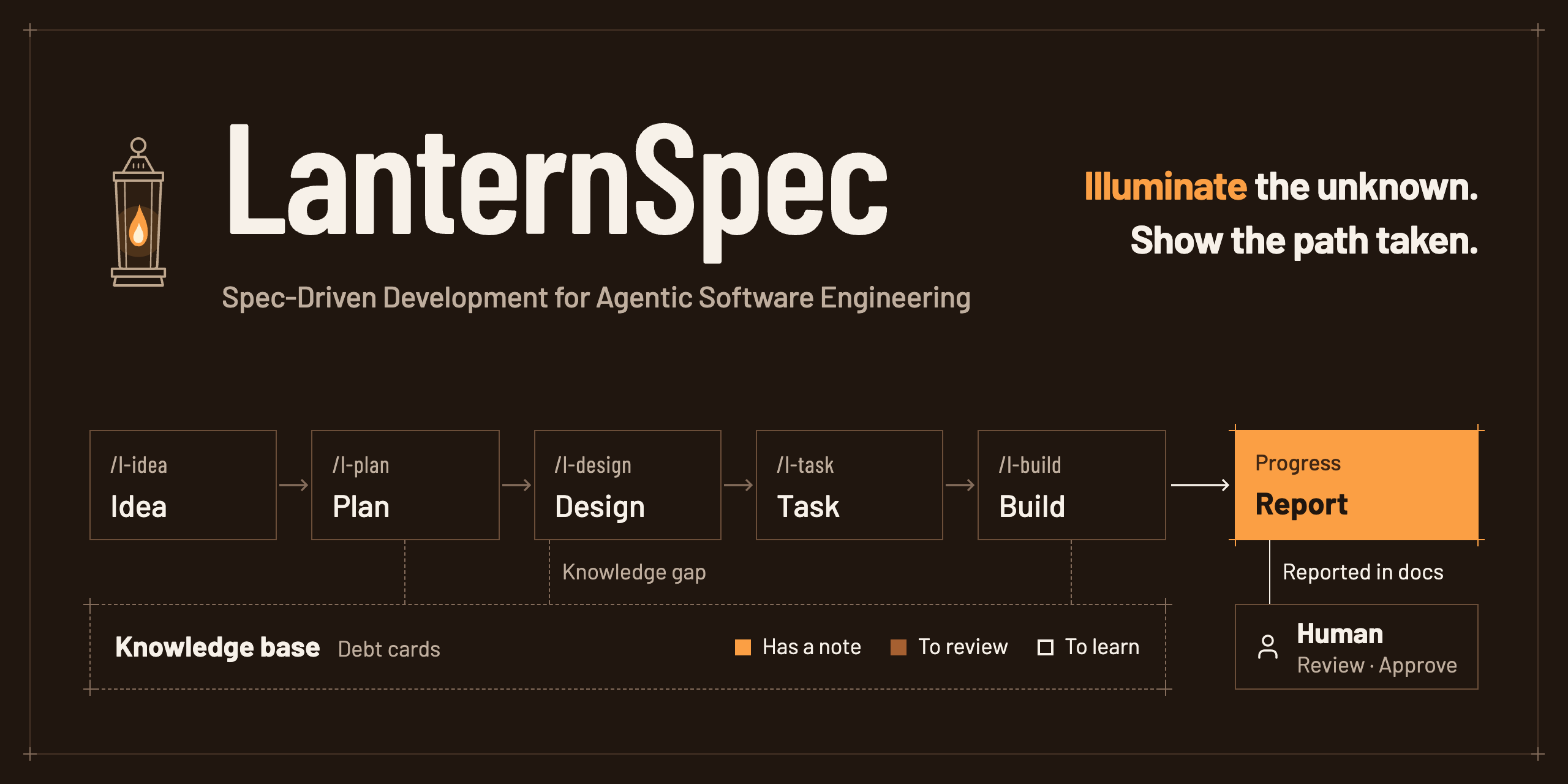


Hand the work to an AI agent and still be able to follow what was built, why, and how — all the way through.
- 📄 Leaves familiar documents — idea → plan → design → tasks → code, in the document formats teams already know
- 🏮 Illuminates the unknown — compares the technologies the AI used with your own knowledge base and tells you what to review and what to learn
- 📈 Shows the path taken — kanban, timeline and understanding-debt views, all readable in Obsidian
Language note: the documents, skills and CLI messages LanternSpec produces are currently in Korean.
Compared with other SDD tools
| Spec Kit | OpenSpec | 🏮 LanternSpec | |
|---|---|---|---|
| Flow | constitution → specify → plan → tasks → implement → converge | explore → propose → apply → archive | idea → plan → design → tasks → build (+ learn · report) |
| Documents | spec · plan · tasks per feature | proposal · requirements · design · tasks folder per change | 24 familiar document templates (plan, design, tasks, log …) |
| When done | repeat implementation until converged | merge requirements into specs and archive | merge into the "current state" docs after approval, then archive |
| Strengths | swap processes via extensions, presets and workflows; bug-fix and idea-assessment extensions | lightweight, no enforced phases, brownfield-first, cross-repo planning (beta) | compares unfamiliar tech with your knowledge base (understanding debt), progress reports, picks design principles for you |
| AI tools | many coding agents | 30+ | Claude Code · Codex · Antigravity |
| Install | Python 3.11+ · uv | single binary · npm · Homebrew | Python 3.12+ · uv |
| Document language | English (README in several languages) | English | Korean |
Install
Requirements: Python 3.12+ · git · uv
uv tool install lanternspec      # installs the lantern command
cd my-project
lantern install --language en    # installs skills, rules and hooks into this project (Claude Code by default)
Then call /l-init inside your AI tool ($l-init in Codex).
- Language: documents, skills and rules come in English (
--language en) or Korean (the default). It is chosen at the first install and kept inlantern.yaml. - Using several AI tools:
lantern install --language en --tools claude,codex,antigravity - Skills live in your project: they are written straight into the project, not installed as a plugin. So they are called without a prefix (
/l-init) and shared with your team through git. - When a new version comes out:
uv tool upgrade lanternspec→lantern upgrade. If the version changed the documents' folder layout, it first shows what would move and stops — check it, thenlantern upgrade --apply(moved with git so history continues, links rewritten, one commit)
Quick start
/l-init                       answer a few questions → lantern.yaml · docs/ · draft project definition · design principles
/l-idea dark mode support     record an idea right away → 1. Ideas/IDEA-001
/l-plan IDEA-001              what and why, with acceptance criteria → 2. Work/W-001 …/Plan.md
/l-design W-001               how — only the structure, screens and data that change; a person approves
/l-task W-001                 an ordered task list
/l-build W-001                implement → test → one commit per task, report with evidence → merge into the current state
/l-pr                         open a pull request that fits the branch flow (if you use PRs)
/l-report                     kanban · timeline · debt · a three-line status report
lantern numbers every document in order.
| ID | Meaning |
|---|---|
IDEA-001 |
idea #1 |
W-001 |
work item #1 (one bundle from plan to build) |
W-001-T02 |
the 2nd task of work item #1 |
D-001 · ADR-001 |
debt card · decision record |
Commands for checking where you are
| Command | When to use it |
|---|---|
lantern status |
when you pick the work back up — shows the work in progress, the next task and open questions in three lines |
lantern doctor |
right after installing, or when something feels off — checks that install, settings and folders match lantern.yaml, and that each installed AI tool's version and hooks are working |
lantern --help |
when you forget a command — options per command with lantern <command> --help |
Flow and skills
What the concepts in this document mean and where they are used is gathered in Concepts.
flowchart LR
  S["⚙️ /l-init"] --> I
  subgraph W["🛠 Work flow"]
    I["💡 /l-idea"] --> P["📋 /l-plan"] --> D["📐 /l-design"] --> T["✅ /l-task"] --> B["🔨 /l-build"]
  end
  P & D & B -.unfamiliar tech.-> L["🧭 /l-learn"]
  B -->|merge when done| C["📘 3. Current state"]
  W & L --> R["📊 /l-report"]
| Skill | What it does | What it leaves |
|---|---|---|
/l-init |
sets up the document structure and design principles from the questions the earlier answers call for (new or existing · team size · project kind · server · knowledge base · design tool · technology choice and so on), and picks the branch flow | lantern.yaml, docs/, project definition, MOC, design principles |
/l-idea |
records a thought from the conversation, as said and as summarised | 1. Ideas/IDEA-001 … |
/l-plan |
what and why — a work folder and acceptance criteria | 2. Work/W-001 …/Plan.md |
/l-design |
how — only the structure, screens and data (DBML) that change, wireframes, behind an approval gate | Design.md, Screens/, ADR |
/l-task |
an ordered task list (size · acceptance criteria · dependencies) | Tasks.md |
/l-build |
implement → test → one commit per task, report with evidence, open and check screens itself, merge into the current state when done (in a parallel worktree, only its own tasks) | code, Log.md |
/l-learn |
compares unfamiliar tech with your knowledge base → 🟢 · 🟡 · 🔴, debt cards and draft study notes | 📒 Debt/Cards/D-001 … |
/l-report |
kanban · timeline · domain · traceability · debt · docs-vs-code status + a three-line report | 4. Operations/Reports/Status Report.md |
/l-template |
create, refine and migrate templates (without losing content) | 0. Templates/… |
/l-check |
format check (required sections · values · links · versions · IDs · length) | — |
/l-sync |
finds where documents and code disagree and brings them back in line | — |
/l-map |
updates the MOC (document map) | Docs MOC.md |
/l-adr |
records decisions that are hard to reverse | Decisions/ADR-001 … |
/l-resume |
carries on an earlier conversation — from any AI tool, from where it stopped even if it was cut off | — |
/l-ref |
brings in company rules, glossaries and domain knowledge, indexes them by section and gets each section's use approved | the index, company rules in AGENTS.md, Glossary.md |
/l-domain |
when domain rules matter, finds the matching section in the index and reads just that section word for word | (the plan's "Domain Knowledge Used") |
/l-pr |
writes the title and body for the direction that fits the branch flow, and opens the PR once confirmed (never merges) | — |
/l-parallel |
before starting several works at once, checks what they must decide together and their order, records the decisions as ADRs, then opens a worktree per work | ADR |
/l-finish |
when parallel works are done, gathers person checks in the base folder, merges them one at a time, then updates the current state, archives and reports once | current state, Archive/ |
How it works
- Scripts handle the format, the AI writes the content. Numbering, files, folders, checks and status changes all go through the
lanterncommand; the AI only writes content. - Every document starts from a template. The AI fills in the template's
{{blanks}}; changing the section structure is flagged immediately. - Every skill ends the same way. A skill that changed documents runs
lantern close <skill>: check → update the map → log the run. - Show before writing. Designs and changes to the current state are summarised and approved first (
/l-ideais the only exception). - Your knowledge base is read-only. Notes are written only after you approve.
Document structure
Documents are stored in one folder per work item, and the MOC (document map) collects them by stage. Folder and file names are Korean.
docs/
├─ Docs MOC.md           document map + view by stage (lantern map rewrites the marked part)
├─ 0. Templates/          templates you refine over time · _meta/enums.yaml (the single source of status and kind names)
├─ 1. Ideas/              ideas
├─ 2. Work/W-001 …/       plan · design · tasks · log — the only place edited while working
│   └─ Archive/           archive
├─ 3. Current State/     what the system looks like now — updated only when work is done, after approval
│   └─ Rules/ (Tech Selection Criteria · Repository File Rules …) · Decisions/ · Deployment and Operations/ · Glossary …
├─ 4. Operations/        reports · session logs · (teams of 2+) meeting notes
├─ 5. Legacy Docs/       (existing projects) original documents, kept unchanged
├─ 📒 Debt/              understanding debt — one card per debt
└─ 📚 Domain Knowledge/  laws · policies · business rules (the Domain Knowledge MOC shows the index)
Which documents you get depends on your /l-init answers (lantern.yaml; check with lantern profile docs).
- A mobile app adds deployment and platform-integration documents.
- A team of two or more adds collaboration rules and meeting notes.
If you don't want documents on the remote, use lantern docs-mode local. Documents then live only on a docs-local branch in the same repository, and pushing that branch is blocked.
Sections lantern reads and writes (protected sections, such as "Now" in a log) may be renamed or deleted too. lantern doesn't put them back; lantern check asks whether it was on purpose (lantern sections). The list is in 0. Templates/_meta/Protected Sections.md.
Viewing the docs in Obsidian
Open the docs/ folder as a vault in Obsidian and it is already set up for reading (docs/.obsidian/).
lantern obsidian plugins also adds Lantern Timeline, which shows the report's timeline as bars by day. Drag a task that has not started to move it, or drag its ends to change its length; the dates are saved in its planned and due attributes.
- Folder colors, folder and file icons, callouts and quotes — each document stage has its own folder color, folders and files get icons, and callouts and quotes look clean. Works on top of any theme.
- Picking status and kind — each document type offers only its own choices in a menu (Metadata Menu). The choices are generated from
enums.yaml, so renaming a value updates them too. - Recommended plugins — Dataview (shows
[start:: …]fields in task lists) and Metadata Menu (choice menus)./l-initasks whether to download them; to do it later:
lantern obsidian plugins # downloads the latest official release files of both plugins into docs/.obsidian/plugins/
When Obsidian first asks whether to turn on community plugins, turn them on (leave restricted mode). Plugin code and the window layout (workspace.json) stay out of git; only the settings are committed. Teammates run the same command.
Branch flow
One work is one branch. /l-init asks how finished work gets merged, and lantern work flow works out the recommendation from the branches and remote.
| Flow | How it goes | Good for |
|---|---|---|
| A. Keep it simple | work → default branch | starting out, or building fast on your own |
| B. Separate development from deployment | work → dev, then a PR from dev to the default branch when deploying |
a service that deploys as soon as the default branch changes |
| C. A PR for each work | work → PR → base branch | getting code reviews |
| D. Keep what you use now | records only where work merges; branches stay as they are | a project that already has a strategy |
Work branches are named work/W-012 by default; change it with git.branch in lantern.yaml.
git:
  branch: feature/{id}-{slug}   # → feature/W-012-login (blanks other than {id} are named for each work)
To run several works at once, check them with /l-parallel, run /l-build in each work's worktree in its own terminal, and merge them with /l-finish in the base folder once all are done.
Supported AI tools
| Tool | Skills | Rules | Agent hooks | MCP (--mcp) |
|---|---|---|---|---|
| Claude Code | .claude/skills |
AGENTS.md (an existing CLAUDE.md gets @AGENTS.md) |
.claude/settings.json |
.mcp.json |
| Codex | .agents/skills ($l-…) |
AGENTS.md |
.codex/hooks.json |
.codex/config.toml |
Antigravity CLI (agy) |
.agents/skills |
AGENTS.md |
.agents/hooks.json (no save-before-compaction — there is no compaction hook) |
.agents/plugins/lanternspec/ |
- Rules live in
AGENTS.md. LanternSpec manages only the<!-- lanternspec:start -->block inside it and leaves everything outside the block alone. When a file goes past what the installed tools read in full,lantern doctortells you. - Codex and Antigravity share the skills folder. When you use both, skill bodies say
/l-build, andAGENTS.mdtells Codex to use$instead.
Keeping documents and code in line
git and AI tools already have hooks: they run a script at set moments (just before a commit, right after a file is written, and so on).
LanternSpec connects its checks to those hooks, so lantern checks at every stage that documents and code still match. The checks are done by a script, not by the AI, so they always apply the same rules.
| Stage | What it does | Example |
|---|---|---|
| While talking to the AI | shows where things stand when a session starts, and checks the format as soon as the AI writes a document | warns right away when the AI deletes a required section of a plan |
| Just before a commit | looks at what the commit contains and checks that the records that should go with it are there | warns when the database structure changed but the work log doesn't mention it |
| After the commit message | checks that the message says which task the commit belongs to | warns when the message has no task ID (e.g. [W-001-T02] = the 2nd task of work item #1) |
| Just before a push | checks that nothing that must stay local is being pushed | blocks pushing the documents branch you chose to keep off the remote |
| After pushing to GitHub | runs the same checks again on GitHub, whoever pushed (CI) | marks the run failed if document format, lint, type checks or tests break; on PRs it also looks for work IDs in the title and commits |
| On demand | scans past commits and lists where documents and code drifted apart (lantern scan) |
documents not reviewed for a while although their code changed |
- Warnings by default. Work is never blocked. To make the commit checks blocking, set
git.hookstoblockinlantern.yaml. - Hard-to-undo mistakes are always blocked. For example, pushing documents you chose to keep off the remote is blocked regardless of settings.
lantern hooks install            # turns on the commit and push checks (/l-init asks before installing)
lantern install --ci             # also checks on GitHub (turn off with --no-ci)
lantern install --pr-template    # adds a PR template for GitHub
lantern install --commit-template  # adds a commit message template and sets it for this clone
References — company rules, terms and domain knowledge
Material people already have stays in its own form and is indexed by section, so the AI reads only the sections it needs (/l-ref). It can live inside the project or outside it (~/…).
| Material | When it is read | How |
|---|---|---|
| Company rules | always | each section's scope and strength are approved, then it goes word for word into the matching AGENTS.md |
| Terms | when needed | lantern check finds the glossary's "words to avoid" in the documents |
| Domain knowledge | only the section, only when needed | sections picked from the 📚 Domain Knowledge/ index are attached to a work's plan and read when their task starts |
- Outside material never reaches git. Its paths, titles and index all stay in
.lantern/. - Sections are read by address.
lantern ref read "Privacy#Retention period" - Originals are read through copies.
lantern ref convert --applyturns PDF · Word · PowerPoint · HWP into Markdown cut into sections, and Excel · CSV into a card of sheets, columns and row counts, next to the original. It marks the quality too (HWP without headings or tables is "check it", a scanned PDF "no text"). PDF needspdftotext(poppler).
Managing unfamiliar tech — knowledge base and understanding debt
When the AI uses a technology you don't know, LanternSpec compares it with the notes in your knowledge base and sorts it into three groups.
- 🟢 you have a note → links the note
- 🟡 you have a note but asked again → tells you what to review
- 🔴 no note yet → suggests a draft study note
Anything you don't understand yet is kept as a debt card, and every time you ask about it again the count goes up.
Knowledge base (knowledge.type) |
How | Writing |
|---|---|---|
obsidian · folder |
reads Markdown files directly | creates notes after approval (drafts only with propose_only) |
notion |
planned | — |
Every knowledge base supports the same four actions: search · read · propose · write. The CLI (lantern knowledge …) and the MCP server (lantern mcp) use the same functions.
There are three kinds of debt.
| Kind | Meaning |
|---|---|
| 🧠 Understanding | you follow it when it's explained, but it isn't yours yet. Reopened if you ask again after resolving it |
| 🛠 Competency | you understand it but haven't done it yourself, or a blocked idea needs it. Practised with exercises (lantern debt promote) |
| 🧱 Technical | debt left in the code (technical debt) |
Design principles and ways of working
Design principles and code conventions
Picks design principles and code conventions from a table, based on the project kind chosen in /l-init and the measured size (lines of code · team size).
- Languages: Python · TypeScript · Swift · Rust · Go
- The essentials go into
AGENTS.md; the full explanation goes intoDevelopment Principles.md. - When two or more folders have their own package file (
pyproject.toml,package.json…) (such asbackendandweb,lantern parts), each part gets its ownAGENTS.mdwith its language conventions and check commands, and hooks hand it to tools that don't read folderAGENTS.mdfiles themselves (Codex · Antigravity). - In existing projects, lint and format settings already in use are recorded, never changed.
- When the code grows past a size boundary,
lantern doctorasks whether to raise the principles one level. - The language of code comments can be set apart from the documents with
project.comment_language. - See the result with
lantern principles show; run lint and type checks withlantern lint(in each part's folder when there are parts) - CI (
lantern install --ci) prepares tools and checks in each part's folder. Leave a heavy part out withci: falseon that part inlantern.yaml. In existing projects, lint and type errors only warn at first and CI passes; once they are clean, setbuild.ci_lint: block.
Build mode
lantern build-mode suggest looks at code size, work in progress, whether tests exist and past runs, and recommends one axis at a time.
- Loop scope: check each task (the default for small projects) or loop automatically until the acceptance tests pass —
--applysetsbuild.loop - Task delegation: whether to hand
[P]tasks that don't depend on each other in one work to sub-agents - Parallel works: whether to run different works at once in worktrees (checked with
/l-parallel)
Evaluation
lantern eval uses the run log to compare cost (time · tool calls) and results (format errors at wrap-up) per skill, model and setting.
Design tools
Claude Design: in Claude Code, the AI draws wireframes on a Design canvas itself. Figma and Canva work through each tool's MCP.
Import mockups with lantern screen import; lantern screen compare finds where the built screen differs from the mockup.
/l-build opens built screens with the AI tool's browser to check them, and leaves "waiting for a person" when it can't (verify.browser). Whether a screen matches the mockup is a person's call.
CLI at a glance
setup      install [--language] [--tools] [--mcp] [--ci|--no-ci] [--pr-template] [--commit-template] · upgrade [--apply] · doctor · build-mode suggest
profile    profile show|docs|write|set · principles show|detect · parts [add|ignore] · enums list|rename · sections list|rename|off|on
documents  scaffold init [--plan] | work | doc | idea | adr | meeting | custom · new-id · map · meta get|set
checks     check [--changed] [--epic W-012] · check-pr · lint [--ci] · check-dbml · dbml render|from-sql|diff
work       task next [--all]|start|done|ac|list|estimate · task add [--parallel] · pack · screen import|compare
           work branch|start|list|overlap|finish|archive|stage|flow · design approve · unit-log add · idea find|status
learning   knowledge search|read|propose|write|areas · debt find|new|ask|resolve|promote|practice|known|status|list · mcp
reports    report [--views] [--summary] · status · resume [--session] [--more] · scan [--tests] [--ci] · sync adopt · eval · obsidian plugins
templates  template list|show|lint|level|bump|outdated|diff|usage|new|migrate · legacy adopt|todos
references ref list|check|index|read · tag|exclude|rules · terms|term|glossary|candidate · domain|describe|attach · convert [--apply]|preview
git        hooks install|uninstall|status · docs-mode local|shared
wrap-up    close <skill>
License
1 maintainer

Metadata
1 maintainer
Release files for lanternspec 0.3.0
For a detailed explanation of source distributions (sdists) and built distributions (wheels), please see the package formats documentation.
Source distribution (sdist)
| File | Size | Uploaded | Provenance | Actions |
|---|---|---|---|---|
| lanternspec-0.3.0.tar.gz | 612.8 kB | Without provenance | Details for lanternspec-0.3.0.tar.gz |
Built distribution (wheel)
| File | Interpreter | ABI | Platform | Actions Reset |
|---|---|---|---|---|
| lanternspec-0.3.0-py3-none-any.whl | Python 3 | none | any | Details for lanternspec-0.3.0-py3-none-any.whl |
Total release size: 1.3 MB
Release files / lanternspec-0.3.0.tar.gz
| Download URL | lanternspec-0.3.0.tar.gz |
|---|---|
| Size | 612.8 kB |
| Tags | Source |
|
SHA-256 checksum How to use checksums |
95977737488fce35a241f4c896c6e003407bfe4525917e13495c0e389e484df3
|
|
BLAKE2b-256 checksum How to use checksums |
cb1411c01d19c411938904654813072ee2de716fccf373058eb1eb5de8292b82
|
| Upload date | |
|
Uploaded using Trusted Publishing? What is trusted publishing? |
Yes |
| Uploaded via |
uv/0.13.7 {"installer":{"name":"uv","version":"0.13.7","subcommand":["publish"]},"python":null,"implementation":{"name":null,"version":null},"distro":{"name":"Ubuntu","version":"26.04","id":"resolute","libc":null},"system":{"name":null,"release":null},"cpu":null,"openssl_version":null,"setuptools_version":null,"rustc_version":null,"ci":true}
|
Release files / lanternspec-0.3.0-py3-none-any.whl
| Download URL | lanternspec-0.3.0-py3-none-any.whl |
|---|---|
| Size | 655.3 kB |
| Tags | Python 3 |
|
SHA-256 checksum How to use checksums |
97eeee73d1f48d2d9a5f2b0cca7a40a9881cfa14a35242b0880e63f4942ae903
|
|
BLAKE2b-256 checksum How to use checksums |
f41bc03a13d17a7f0a784d50adf37b0e0efe6526735c1cc6ab58791cfa1a68f6
|
| Upload date | |
|
Uploaded using Trusted Publishing? What is trusted publishing? |
Yes |
| Uploaded via |
uv/0.13.7 {"installer":{"name":"uv","version":"0.13.7","subcommand":["publish"]},"python":null,"implementation":{"name":null,"version":null},"distro":{"name":"Ubuntu","version":"26.04","id":"resolute","libc":null},"system":{"name":null,"release":null},"cpu":null,"openssl_version":null,"setuptools_version":null,"rustc_version":null,"ci":true}
|
Security for lanternspec 0.3.0
Provenance
Provenance describes where a file came from. On PyPI, provenance is shared via attestations, which provide a verifiable record of the build or publishing details. View details, limitations and caveats.
No provenance found
None of the files in this release were uploaded with provenance metadata.
A note on package security
PyPI is a repository for distributing packages, not a service for auditing them. While third-party security researchers and our staff do their best to detect and remove malicious packages, PyPI cannot guarantee the quality, security or suitability of any given package.
To learn more about protecting yourself from malicious actors, visit our package security documentation.














