
laya-apple




Correctness-validated, adaptive Laya inference on Apple silicon: the MLX GPU and the Apple Neural Engine, serving at the same time.
Fetch validated ANE artifacts, then route and predict (1.6)
laya-apple artifacts fetch → from_pretrained("auto") → predict / predict_shortlist.
pip install -U 'laya-apple[ane]'
laya-apple artifacts fetch laya                  # prebuilt ANE artifacts, validated here
laya-apple artifacts fetch laya-multilingual
from laya_apple import Laya

with Laya.from_pretrained("auto") as model:       # laya or laya-multilingual, per request
    result = model.predict(context=context, questions=questions)
    rt = result.runtime
    print(rt.model, rt.model_routing, rt.device, rt.routing_reason)
- Language routing.
Laya.from_pretrained("auto")returns aLayaRouterthat loadslayaandlaya-multilingualand picks one per request by the language of the context, with the same functionlaya-apple serve --model autouses. Why is inRuntimeInfo.model_routing(docs/api.md). - Prebuilt ANE artifacts, checked on your Mac.
laya-apple artifacts fetch MODELdownloads a prebuilt artifact fromtc3oliver/laya-apple-artifactsand registers it through the validatingartifacts import: SHA-256 against the index, manifest and platform profile, compute plan, the full FP16 parity gate and the placement probe, all on the receiving machine. A download is trusted no more than a local build. laya-apple 1.6.0 reads that repository at the commit it was validated against, never at its mutablemain. It replaces the local build and its PyTorch dependency: theconvertextra is not needed. predictas before;predict_shortlistopt-in. Forchoicequestions with many labels,predict_shortlist(..., embed_fn, k=20)keeps theklabels most similar to the request, then runs onepredict.predictitself is unchanged (examples/auto_fetch_shortlist.py).
Limits:
- Prebuilt artifacts exist for exactly one platform profile: Apple M4 Max, macOS 26,
coremltools 9.0. Every other Mac gets
ArtifactMissingErrornaming the build command, and builds locally as before (laya-apple artifacts build MODEL,convertextra). - The published artifacts were checked by a clean-cache download on that profile: fetch,
verify, parity and placement passed for all 10 model/bucket pairs
(
benchmarks/prebuilt-artifacts-1.6.0.md). That check ran on the build machine with an empty cache. Every receiving machine repeats the integrity, platform, parity and placement checks before it registers an artifact. - The first Core ML load still compiles on the device: about 4.5 minutes. In one run,
laya-typed-decisions (buckets 64/96/128) took 273.5 s cold at a new location against 2.7 s
warm (
research/coreml-compile-cache/screen.md). Fetching does not remove it.ane_startup="background"serves on MLX in the meantime.
Also in 1.6, not headlines: an MLX fast path (a token-id cache on by default; mx.compile
and length-bucketed batching opt-in; see Limitations for what was measured),
and W8 ANE research that ships nothing (Limitations). Release notes:
docs/releases/v1.6.0.md.
Adaptive GPU + Neural Engine serving (1.5)
laya-apple sends short, single-question decisions to the Apple Neural Engine (ANE) and keeps long or multi-question work on the MLX GPU, with both engines serving at once. Since v1.0, this split has kept short requests from queueing behind long GPU work.
The GPU was done. Python was still waiting. With the ANE on a thread in the same process,
the synchronous Core ML call holds the GIL for much of each prediction. A GPU request that had
already finished could not hand its result back until that call returned
(research/coreml-gil-completion-path/).
In 1.5, laya and laya-typed-decisions run eligible ANE requests through asynchronous Core ML
execution, which avoids the synchronous path's long GIL hold. The runtime watches that faster
path, and on a sustained slowdown falls back to the known-safe 1.4 synchronous path. With
execution="workers" and device="auto" it is on by default and needs no other code change.
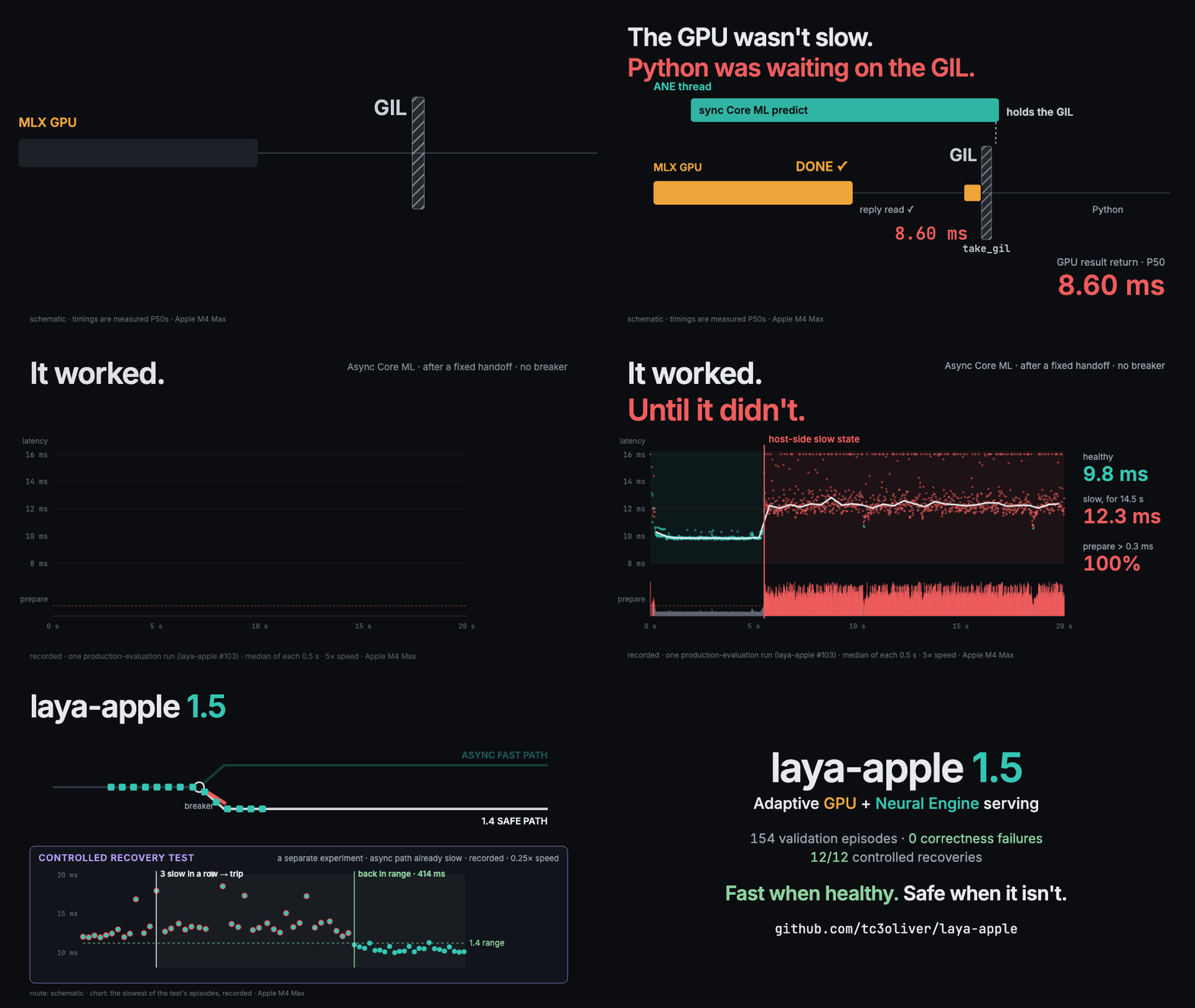
The first 10 s are a schematic. Sources for every number on screen:
docs/media/release15-social.md.
| vs the 1.4 path (one Apple M4 Max) | laya | laya-typed-decisions |
|---|---|---|
| GPU return (P50) | 4.28–4.29 → 0.035–0.037 ms | 8.60 → 0.043 ms |
| Throughput | 1.042× | 1.038× |
GPU return is the time from the GPU worker finishing a request to its result reaching the caller, not GPU compute time. On the 1.4 path, finished work waited 4.3–8.6 ms, almost all of it for the GIL.
- Validation. 154 production validation episodes (76 laya, 78 typed-decisions, including
bursts and soaks). Every episode stayed on the asynchronous path after the handoff, with no
mismatches, routing failures, lost requests or crashes. No slow state occurred in these
runs, so the fallback never triggered in them
(
val_tables.md). - Recovery, a separate controlled experiment. In 12 of 12 episodes where the asynchronous
path was already slow, the runtime detected it within 40 ms and was back to the 1.4 path's
latency within 164–414 ms
(
phase1_tables.md).
Try Switchyard · Install · Local Jev-compatible server
Install
Apple silicon, Python 3.11–3.13:
pip install 'laya-apple[ane]' # MLX GPU + the Neural Engine runtime
| Extra | Adds |
|---|---|
| (none) | The MLX GPU runtime only |
ane |
The Neural Engine runtime (coremltools 9.0, pyobjc-framework-CoreML) |
convert |
Building ANE artifacts on this Mac (torch 2.7.0); not needed for artifacts fetch |
serve |
laya-apple serve, the local Jev-compatible server |
Without the ane extra, or without a built ANE artifact, everything runs on the MLX GPU. To
run from source or develop laya-apple, see CONTRIBUTING.md.
Quickstart (30 seconds)
from laya_apple import Laya

model = Laya.from_pretrained("convaiinnovations/laya-typed-decisions", device="auto")

result = model.predict(
    context="The customer was charged twice for the same invoice and is frustrated.",
    questions={
        "urgency": {
            "type": "choice",
            "instructions": "How urgent is this?",
            "criteria": ["low", "medium", "high"],
        }
    },
)
rt = result.runtime
print(result.answers["urgency"]["choice"])
print(rt.device, rt.routing_reason, f"{rt.latency_ms:.1f} ms")
On the tested machine:
high
ane validated_short_single_question_path 11.2 ms
- The first call downloads the pinned checkpoint. After that it works offline
(
local_files_only=True). - Without an ANE artifact the same request runs on MLX, and
routing_reasonsays why. On Apple M4 Max, macOS 26, coremltools 9.0, fetch a prebuilt one, validated on this Mac:laya-apple artifacts fetch laya-typed-decisions. On any other Mac, build and parity-validate one (with theconvertextra):laya-apple artifacts build laya-typed-decisions. - Probabilities, other question types and the full API:
examples/, the user guide anddocs/api.md.
For concurrent GPU + ANE serving, use execution="workers" and submit requests from any thread:
with Laya.from_pretrained("convaiinnovations/laya-typed-decisions", execution="workers") as model:
    futures = [model.submit(context=c, questions=q) for c, q in requests]   # thread-safe
How it works
Laya answers typed questions about a context (choice, score, noul) in one forward pass.
A Mac has two engines that can run it, and each is faster for different requests.
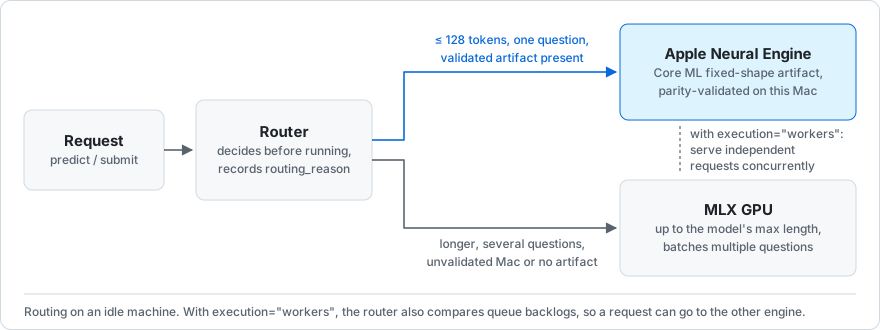
- Correct ANE execution. A fast Core ML export is not necessarily a correct one. On the tested Mac, the ordinary export ran on the Neural Engine without any error and disagreed with upstream on up to 85 decisions. laya-apple uses an ANE artifact only after it passes a parity gate on the machine that uses it (Correctness).
- Automatic routing. The router picks a device before a request runs and records why in
routing_reason. Under load it also compares the two queues' backlogs. - Concurrent GPU + ANE serving. With
execution="workers", the GPU runs in a worker process and the ANE on its own dispatcher, so short requests stop queueing behind long ones. - Adaptive ANE execution (1.5). After a conservative handoff at the start of each GPU + ANE
overlap, eligible ANE requests use asynchronous Core ML, so finished GPU work is not held
back by the synchronous path's long GIL hold. Per-request timing tells the runtime when
that path slows down; a sustained slowdown sends the rest of the overlap back to the
known-safe synchronous path.
ane_handoff=Falseturns it off (guide).
| Request | Goes to | Why (measured on the tested Mac) |
|---|---|---|
| One question, ≤ 128 tokens, validated artifact present | ANE | Faster: laya-typed-decisions L128 takes 9.9 ms on the ANE against 12.2 ms on MLX (forward P50) |
| Longer context | MLX GPU | MLX is faster there: 19.2 ms at L256 and 71.0 ms at L1024 |
| Several questions | MLX GPU | MLX batches the questions; the ANE runs them one at a time |
| Unvalidated Mac, missing artifact, or no Core ML | MLX GPU | Recorded as platform_not_validated, ane_artifact_unavailable or ane_runtime_unavailable |
Full routing thresholds and calibration evidence: docs/support-matrix.md.
Completed requests can emit a RequestTrace (routing decision, queue, service and response
timing) through trace= (docs/api.md). Adaptive execution watches the same
per-request timing; you do not need to pass trace= for it. Architecture:
docs/architecture.md.
See it yourself: Switchyard
uvx laya-apple switchyard
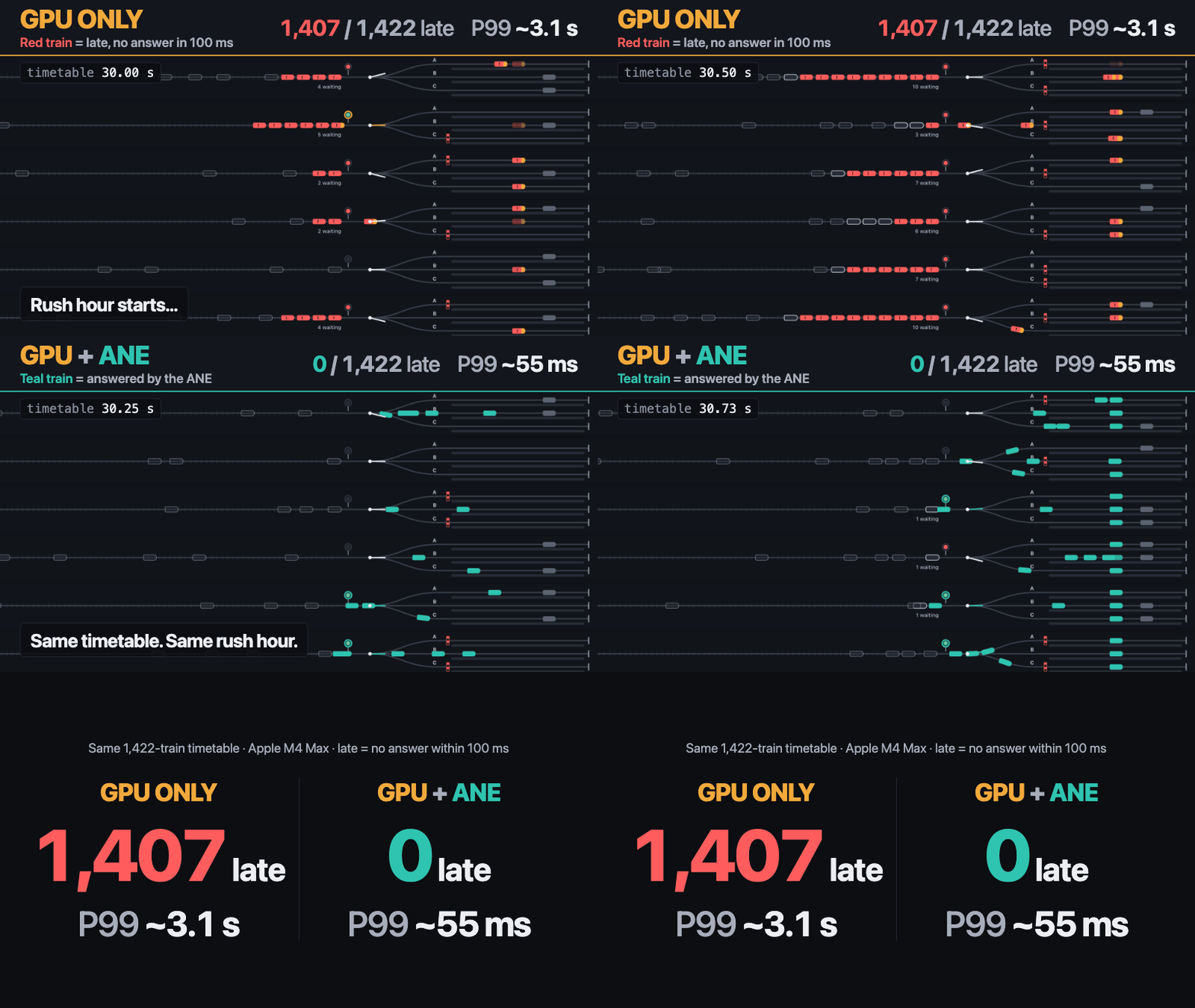
Every train is a real Laya decision ("which platform is clear?"). A red signal means the train is waiting for the model's answer; a train is late when it has no answer within 100 ms. Rush hour adds bursts of load, with long background requests on the GPU.
| Same timetable, same model | MLX GPU only | MLX GPU + Neural Engine |
|---|---|---|
| Late trains | 1,407–1,408 / 1,422 | 0 / 1,422 |
| P99 decision latency | 3,107.7–3,170.6 ms | 54.5–54.7 ms |
| P99 queue wait | 3,095.9–3,158.8 ms | 39.6–42.8 ms |
- Three standard runs on one Apple M4 Max (macOS 26.6.2,
laya-typed-decisions). In every run both rounds gave the same answer for every train. - Most of the gap comes from short decisions no longer waiting in the GPU queue while the long requests keep running there.
- The benchmark runs headless; the animation is a replay, not the measurement. These numbers are not comparable with the v1.0 results below (different rate, boundary and workload).
First-run download, setup, method and raw data: docs/switchyard.md
and benchmarks/switchyard/README.md.
Local Jev-compatible server
laya-apple serve is a local stand-in for the Jev API. It serves the same API
(POST /v1/systemone) on loopback and answers with upstream Laya, running on your Mac. Point
an existing Jev client at it through its base-URL setting; the client's code does not change.
pip install 'laya-apple[serve,ane]'
laya-apple serve                                   # http://127.0.0.1:8642
export TYPESAFE_BASE_URL=http://127.0.0.1:8642     # then run your Jev client as usual
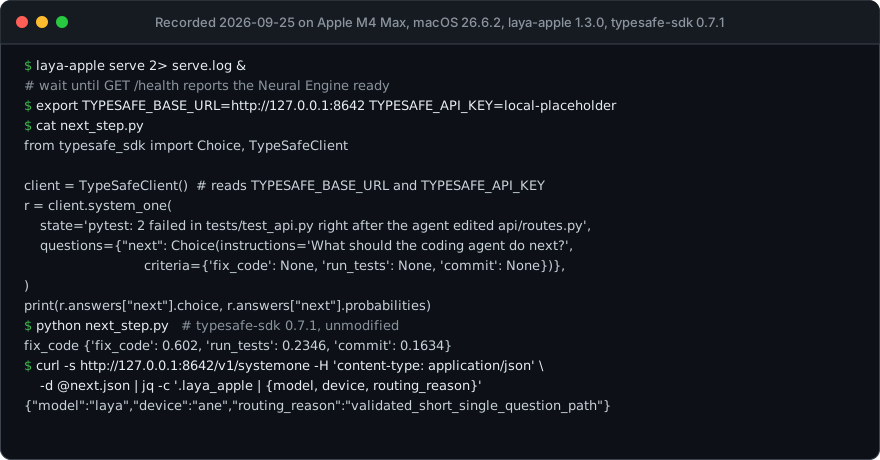
- Tested with 7 unmodified Jev clients at their released versions, including the Python
and JS SDKs and two Claude Code plugins
(
integrations/jev-plugins/README.md). - The answers are Laya's, not Jev's. 792 of 792 requests matched unmodified upstream
laya.serve0.3.20 within the FP16 parity gate (benchmarks/serve-compat/). No claim is made about accuracy relative to Jev.
API keys, models, security and client caveats: docs/serve.md.
Earlier serve benchmark
Measured on the 1.3 path with a 27B local LLM generating at saturation on the same Mac,
short-decision P99 was 47.2 ms with heterogeneous auto serving against 122.3 ms
GPU-only (one run on one M4 Max, --model laya). Run 3, on laya-apple 1.5.0 with its
defaults, measured 41.7 ms (auto) against 79.5 ms (--device gpu), and every
preregistered criterion passed. Adaptive execution was enabled, but its asynchronous path
engaged in 0 of 3,222 Neural Engine forwards, so run 3 measures 1.5 serve as shipped, not the
asynchronous path (benchmarks/serve/m4-max-r3/tables.md). The runs are separate campaigns, compared descriptively only.
LLM throughput cost, method and limits:
docs/serve.md.
Correctness
Parity against upstream Laya on PyTorch CPU FP32, over the shipped golden rows (v1.0). Each cell gives hard mismatches, then the max probability error.
| Implementation on the tested Mac | laya | laya-multilingual | laya-typed-decisions |
|---|---|---|---|
Ordinary Core ML export · CPU_AND_NE |
❌ 12, 0.56 | ❌ 85, 1.0 | ❌ 19, 0.42 |
Ordinary Core ML export · CPU_AND_GPU |
✅ 0, 0.0066 | ✅ 0, 0.0059 | ✅ 0, 0.0028 |
| laya-apple MLX FP16 | ✅ 0, 0.0037 | ✅ 0, 0.0045 | ✅ 0, 0.0017 |
| laya-apple ANE FP16 | ✅ 0 (1 near-tie), 0.012 | ✅ 0, 0.013 | ✅ 0, 0.0077 |
- The FP16 gate: probability error ≤ 0.02 and 0 hard mismatches. Near-tie flips are listed, not hidden.
- No silent fallback: an explicit ANE request runs the validated artifact or raises.
- The 1.5 asynchronous path must match coremltools' output exactly on the goldens.
Definitions, every configuration tested and the fallback audit:
docs/correctness.md and
docs/no-silent-fallback.md.
Original heterogeneous serving benchmark (v1.0)
These results showed the value of GPU + ANE serving and were measured before 1.5 adaptive execution.
| Model | Throughput vs GPU-only | Short P99, GPU-only | Short P99, GPU + ANE |
|---|---|---|---|
| laya | 2.92× | 1538.0 ms | 108.5 ms |
| laya-multilingual | 4.34× | 2052.3 ms | 29.6 ms |
| laya-typed-decisions | 4.57× | 1592.9 ms | 79.5 ms |
One Apple M4 Max, a short and a long request stream through one Laya(execution="workers").
Short P99 is measured from arrival under open-loop bursty load, so queueing counts. The gain
comes from running both engines at once, not from raw ANE speed. Method and raw data:
benchmarks/v1.0.md.
Supported models and platforms
| Model | max_len | MLX GPU | ANE buckets (explicit) | ANE buckets used by auto |
Adaptive ANE execution |
|---|---|---|---|---|---|
convaiinnovations/laya |
512 | FP16 / FP32, any length | 64, 96, 128 | 64, 96, 128 | Yes |
convaiinnovations/laya-multilingual |
1024 | FP16 / FP32, any length | 64, 96, 128, 256 | 64, 96, 128 | No (worker-process ANE) |
convaiinnovations/laya-typed-decisions |
1024 | FP16 / FP32, any length | 64, 96, 128 | 64, 96, 128 | Yes |
Adaptive ANE execution applies with execution="workers" and device="auto". Validated on one Apple M4 Max with macOS 26.6.2. On other Macs, auto stays on MLX until
ANE artifacts are built and calibrated there (laya-apple calibrate). Prebuilt artifacts
(laya-apple artifacts fetch) exist for Apple M4 Max, macOS 26, coremltools 9.0 only.
Details: docs/compatibility.md.
Community benchmarks
Every benchmark above ran on an M4 Max. The community matrix keeps results from other Macs separate, and already has an M4 Pro, an M4 and an M2 Pro (MLX only). One command adds yours:
uv run python scripts/hardware_report.py --quick
The full steps, from git clone to the pull request, are in the
guide.
Reproduction
Each headline number above traces to a report, raw data, a command and an environment in
docs/reproducibility.md. The 1.6 prebuilt-artifact check is in
benchmarks/prebuilt-artifacts-1.6.0.md. The 1.5 evidence is in
research/coreml-adaptive-breaker/. The research
line that led to it, failed routes included, is mapped in research/README.md.
Limitations
- One test machine. Every benchmark, including the 1.5 validation and recovery runs, is from one Apple M4 Max on macOS 26.6.2. Routing thresholds are not assumed to hold on other Apple SoCs.
- Adaptive execution hands off conservatively: the first ANE requests of every GPU + ANE overlap run the 1.4 path. laya-multilingual, whose ANE runs in a worker process, does not use it.
- The asynchronous path of 1.5 adaptive execution is not measured in
laya-apple serve. Serve uses adaptive execution by default. Its run-3 benchmark beside a local LLM ran with it enabled, but every one of 3,222 Neural Engine forwards ran on the 1.4 Core ML path (benchmarks/serve/m4-max-r3/tables.md). - Long and multi-question requests stay on the GPU, which is faster for them. The ANE path is batch 1 only.
- Isolation is partial. Under concurrency, each stream's P99 is above its solo value.
- Cold start on a fresh artifact location costs 3–5 minutes of Core ML compile per
model.
ane_startup="background"serves on MLX in the meantime. - Prebuilt artifacts do not remove the cold start. A fetched artifact still compiles on
the device at first load: 273.5 s for laya-typed-decisions (buckets 64/96/128) in one run,
against 2.7 s warm
(
research/coreml-compile-cache/screen.md). - Core ML's compile cache grows without eviction: 0.7–1.4 GB per bucket for every new artifact location (a fetch, an import, a moved cache). laya-apple never evicts it (guide).
- Prebuilt artifacts exist for one platform profile only (Apple M4 Max, macOS 26,
coremltools 9.0), and have been fetched only on the machine that built them, with an empty
cache (
benchmarks/prebuilt-artifacts-1.6.0.md). No independent check on a second machine of the same profile has been done yet. It is recommended, not required, before publishing (docs/publishing.md); each receiving machine still validates every artifact before registering it. - No quantized artifact ships. In the W8 research only the laya-typed-decisions L64
w8-ptresult is reproduced (0.650 of FP16 latency); laya and laya-multilingual failed the parity gate (research/ane-w8/README.md). - The MLX fast-path gains (about 1–4%) come from a screen, not a full benchmark
(
benchmarks/mlx-fast-path-screen/README.md). - Switchyard does not counterbalance round order: with the standard seed, GPU + ANE ran first in all three runs.
Benchmark-specific limitations are documented with each experiment, for example option
order in docs/correctness.md, serve and client caveats
in docs/serve.md, and what has not been measured in
docs/compatibility.md.
Contributing
The most useful first contribution is a benchmark from a Mac other than an M4 Max (how).
CONTRIBUTING.md covers setup, test tiers and parity checks; coding
agents follow AGENTS.md. Open work is labelled good first issue,
help wanted and research.
More: user guide · stable API · architecture · changes · security.
Apache-2.0; see LICENSE and NOTICE. Model weights are downloaded
from their pinned Hugging Face revisions and are not redistributed. This is an independent
project, not an official release of Convai Innovations, Apple or MLX.
1 maintainer

Release files for laya-apple 1.6.0
For a detailed explanation of source distributions (sdists) and built distributions (wheels), please see the package formats documentation.
Source distribution (sdist)
| File | Size | Uploaded | |
|---|---|---|---|
| laya_apple-1.6.0.tar.gz | 278.8 kB | Details |
Built distribution (wheel)
| File | Interpreter | ABI | Platform | Reset |
|---|---|---|---|---|
| laya_apple-1.6.0-py3-none-any.whl | Python 3 | none | any | Details |
Total release size: 576.0 kB
Release files / laya_apple-1.6.0.tar.gz
| Download URL | laya_apple-1.6.0.tar.gz |
|---|---|
| Size | 278.8 kB |
| Tags | Source |
|
SHA-256 checksum How to use checksums |
c0bd0925ffcfd48c91ff5c8729502b20900e9e34271db94f8f300bc2731174f1
|
|
BLAKE2b-256 checksum How to use checksums |
03f173c11e221402fb669daf0c9318d32f8ff5a29f79285d60ed30821da522c1
|
| Upload date | |
|
Uploaded using Trusted Publishing? What is trusted publishing? |
Yes |
| Uploaded via |
twine/7.0.0 CPython/3.13.14
|
Provenance
Provenance describes where a file came from. On PyPI, provenance is shared via attestations, which provide a verifiable record of the build or publishing details. View details, limitations and caveats.


PyPI Publish Attestation
PyPI verified that this artifact, at this checksum, originated from the publisher listed below.
Signed by GitHub Actions, verified by PyPI on Sep 27, 2026.
Transparency logRelease files / laya_apple-1.6.0-py3-none-any.whl
| Download URL | laya_apple-1.6.0-py3-none-any.whl |
|---|---|
| Size | 297.2 kB |
| Tags | Python 3 |
|
SHA-256 checksum How to use checksums |
9e9ea0bbda6c338c6e57f5f01ad19856c71ecbf28cb692de73348565f0f835c3
|
|
BLAKE2b-256 checksum How to use checksums |
7f32c8aa67047d66d3475fe990bc8643f800c3b9b4b6cd0fc70482b665b422a1
|
| Upload date | |
|
Uploaded using Trusted Publishing? What is trusted publishing? |
Yes |
| Uploaded via |
twine/7.0.0 CPython/3.13.14
|
Provenance
Provenance describes where a file came from. On PyPI, provenance is shared via attestations, which provide a verifiable record of the build or publishing details. View details, limitations and caveats.
PyPI Publish Attestation
PyPI verified that this artifact, at this checksum, originated from the publisher listed below.
Signed by GitHub Actions, verified by PyPI on Sep 27, 2026.
Transparency log













