

LayaEval
Ultra-Fast Neural Evaluation Framework for Agent and RAG Systems
42 production-ready metrics • Sub-50ms latency • Zero external LLM judge costs • Calibrated confidence





Documentation Index • Highlights • Why LayaEval • Installation • Quickstart • Notebooks • Architecture • Metric Catalog (42) • CLI Reference • Acknowledgements • License
Table of Contents
- Key Highlights
- Why LayaEval?
- Installation
- Quickstart & Real Code Examples
- Interactive Notebooks
- How It Works & Architecture
- Model Calibration & Best Practices
- Supported Metrics Catalog (42 Metrics)
- CLI Usage Reference
- Development & Testing
- Acknowledgements & Special Thanks
- License
LayaEval is a fast, developer-first Python evaluation SDK for Agentic workflows and RAG pipelines, powered by the Laya MCP Server.
LayaEval brings 42 production-grade evaluation metrics (20 RAG metrics + 22 Agent metrics) directly into your CI/CD and production verification loops—executed as calibrated, non-autoregressive neural decisions with zero external LLM API cost and sub-50ms GPU latency.
Key Highlights
- Fast Non-Autoregressive Inference: Replaces slow, multi-second LLM-as-a-judge roundtrips with sub-50ms evaluation on modern GPUs (e.g. NVIDIA CUDA, Apple Silicon Metal) and ~150–450ms on CPU.
- Zero External Token Cost: No OpenAI or Anthropic API bills for running quality guardrails and regression suites. All inference runs on your own local infrastructure.
- 42 Production-Ready Metrics: Comprehensive coverage spanning retrieval quality, groundedness, hallucination risk, multi-step agent traces, tool accuracy, policy compliance, and prompt injections.
- Single Forward Pass Batching: Evaluates multiple metrics for an interaction in a unified forward pass for optimal throughput.
- Calibrated Probabilities & Scores: Outputs statistical probabilities ($P(\text{true})$), confidence intervals, and configurable pass/fail thresholds.
- Ultra-Lightweight Client SDK: Zero heavy dependencies required for the client library (
numpyonly). Connects to a local or remotelaya-mcp-server. - Two Execution Modes: Supports both live local neural evaluation via Laya MCP Server and fast offline demo simulation (
demo=True) for lightweight testing and development without loading neural weights.
Why LayaEval?
| Feature | Traditional LLM-as-a-Judge | LayaEval |
|---|---|---|
| Latency per Metric | 1,500ms – 5,000ms | < 50ms (GPU) / ~200ms (CPU) |
| API Cost | ~$0.01 – $0.05 per eval call | $0.00 (Zero external API fees) |
| Data Privacy | Sends traces to third-party APIs | 100% Local (data never leaves your machine) |
| Determinism & Calibration | Brittle prompt parsing & text generation | Calibrated neural probabilities & confidence |
| Multi-Metric Evaluation | Sequential calls or bloated judge prompts | Single forward-pass batching |
| CI/CD Regression Suitability | Slow, flaky, expensive | Fast, offline-capable, cost-free |
| Client Dependencies | Bulky orchestration frameworks | Ultra-lightweight SDK (numpy only) |
Installation
Install via uv (recommended) or pip:
1. Client SDK Only (Ultra-lightweight, NumPy only)
Use this if you already have laya-mcp-server running, or plan to use offline simulation mode (demo=True):
uv add layaeval
# or: pip install layaeval
2. Full Setup with Local Laya MCP Server (Includes PyTorch & neural weights)
Use this to run local neural inference on your machine:
uv add "layaeval[laya]"
# or: pip install "layaeval[laya]"
Google Colab / Jupyter Notebooks:
!pip install "layaeval[laya]"
Quickstart
Execution Modes:
- Live Neural Evaluation (Production): When
layaeval[laya]is installed, LayaEval connects to the local non-autoregressive neural model (laya-mcp-server), running genuine semantic evaluations directly on your GPU/CPU with zero external API fees.- Mock Test Mode (
MockMCPClient/demo=True): Designed specifically for CI/CD pipeline integration and offline wiring tests where loading PyTorch and neural model weights is not desired. It returns deterministic mock fixtures.
1. Instant Multi-Metric RAG Evaluation
Evaluate multiple metrics in a single neural forward pass with zero boilerplate:
import layaeval

results = layaeval.evaluate(
    ["groundedness", "hallucination", "response_relevance"],
    query="What is the capital and population of France?",
    retrieved_context="Paris is the capital and most populous city of France, with 2.1M residents.",
    response="Paris is the capital of France, home to about 2.1 million people.",
)

for r in results:
    print(
        f"[{r.metric_name:<20}] Passed: {r.passed:<5} | Value: {r.value:.2f} | Confidence: {r.confidence:.2f}"
    )
Output:
[groundedness        ] Passed: True  | Value: 3.60 | Confidence: 0.49
[hallucination       ] Passed: True  | Value: 0.13 | Confidence: 0.87
[response_relevance  ] Passed: True  | Value: 3.55 | Confidence: 0.45
2. Autonomous Agent Execution & Trace Evaluation
Audit multi-step tool calls, goal achievement, and task completion using metric classes or identifiers:
import layaeval
from layaeval import TaskCompletion, ToolCallAccuracy

task = "Find user #104 and check subscription status."
trace = "Step 1: db.query(user_id=104) -> Plan: Pro\nStep 2: stripe.check(sub_id=sub_104) -> Active"
result = "User #104 has an active Pro subscription."

res = layaeval.evaluate(
    TaskCompletion(threshold=0.50),
    task=task,
    agent_trace=trace,
    final_result=result,
)

print(f"Task Completed: {res.passed} (P(true) = {res.noul:.2f}, confidence = {res.confidence:.2f})")
Output:
Task Completed: True (P(true) = 0.68, confidence = 0.68)
3. Direct Callable Metric Objects
Metric objects can be instantiated with custom thresholds and called directly like standard functions:
from layaeval import Groundedness

groundedness = Groundedness(threshold=3.0)

res = groundedness(
    retrieved_context="Paris is the capital of France.",
    response="Paris is the capital of France.",
)

print(f"Passed: {res.passed} (Score: {res.score:.2f}/4.0 | Confidence: {res.confidence:.2f})")
Output:
Passed: True (Score: 3.17/4.0 | Confidence: 0.24)
4. Managed Evaluator Context
For dedicated server processes, custom models, or high-throughput batch sessions:
from layaeval import Evaluator, Groundedness, HallucinationRisk

with Evaluator(model="auto") as ev:
    results = ev.evaluate(
        [Groundedness(threshold=3.0), HallucinationRisk(threshold=0.2)],
        retrieved_context="Revenue grew by 24% year-over-year.",
        response="The company posted 24% YoY revenue growth.",
    )
    for r in results:
        print(f"{r.metric_name}: {r.passed} (Score/Risk: {r.value:.2f})")
Output:
groundedness: True (Score/Risk: 3.82)
hallucination: True (Score/Risk: 0.00)
5. Dataset Evaluation & Reporting
Run evaluations against entire benchmark datasets and generate structured summary reports:
from layaeval import EvalDataset, EvalReport, evaluate

dataset = EvalDataset.from_jsonl("eval_benchmark.jsonl")

report = evaluate(
    dataset,
    metrics=["groundedness", "hallucination", "response_relevance"],
    name="v1.2-rag-baseline",
)

print(report.summary())
print(f"Pass Rate: {report.pass_rate * 100:.1f}%")
print(f"Total Evaluations: {report.total_evaluations}")

# Save report to JSON for CI/CD gates or archiving
report.save("eval_report.json")

# Reload saved report for regression checks or downstream analysis
loaded_report = EvalReport.load("eval_report.json")
Output:
======================================================================
LayaEval Evaluation Report  (Total: 9, Pass Rate: 100.0%)
======================================================================
Metric                       Type     Count   Pass Rate    Mean Value
----------------------------------------------------------------------
groundedness                 score    3       100.0%       3.80/4.0
hallucination                noul     3       100.0%       6.00%
response_relevance           score    3       100.0%       3.80/4.0
======================================================================
Pass Rate: 100.0%
Total Evaluations: 9
6. Infrastructure Detection & Progress Tracking
LayaEval automatically detects your compute infrastructure (NVIDIA CUDA GPUs, Apple Silicon Metal/MPS, or multi-core CPUs) and displays real-time progress bars as well as internal process visibility (including HuggingFace model weight downloads and MCP server initialization):
import layaeval

# 1. Check your compute accelerator
hw = layaeval.detect_hardware()
print(hw.description)

# 2. Evaluate dataset with real-time progress bar (enabled by default)
report = layaeval.evaluate(dataset, metrics=["groundedness", "hallucination"], progress=True)
Output:
[LayaEval] Hardware: GPU: NVIDIA A100-SXM4-40GB (CUDA, 40.0 GB VRAM, Device 0)
[LayaEval] Initializing Laya MCP Server (model: auto)...
[LayaEval] Evaluating (v1.2-rag-baseline): [████████████████████████] 100% (50/50 examples)
(Note: To silence progress output in CI/CD, set progress=False or export LAYAEVAL_PROGRESS=0)
Interactive Notebooks
Hands-on Jupyter notebooks with end-to-end code, real-world examples, and step-by-step walkthroughs are available in the examples/notebook/ folder:
| Evaluation Domain | Notebook File Path | Workflows & Metrics Covered | Run Command |
|---|---|---|---|
| RAG Evaluation | examples/notebook/rag_metrics_evaluation.ipynb |
End-to-end evaluation of retrieval relevance, document relevance, context sufficiency & coverage, groundedness, hallucination detection, citation correctness, and contradiction detection. | uv run --with jupyter jupyter notebook examples/notebook/rag_metrics_evaluation.ipynb |
| Autonomous Agents | examples/notebook/agent_metrics_evaluation.ipynb |
Multi-step agent trace auditing, task completion, tool call & parameter validation, workflow navigation efficiency, agent groundedness, policy compliance, and prompt injection detection. | uv run --with jupyter jupyter notebook examples/notebook/agent_metrics_evaluation.ipynb |
To launch the notebooks with all dependencies:
# Launch Jupyter Lab directly via uv
uv run --with jupyter jupyter lab examples/notebook/
How It Works
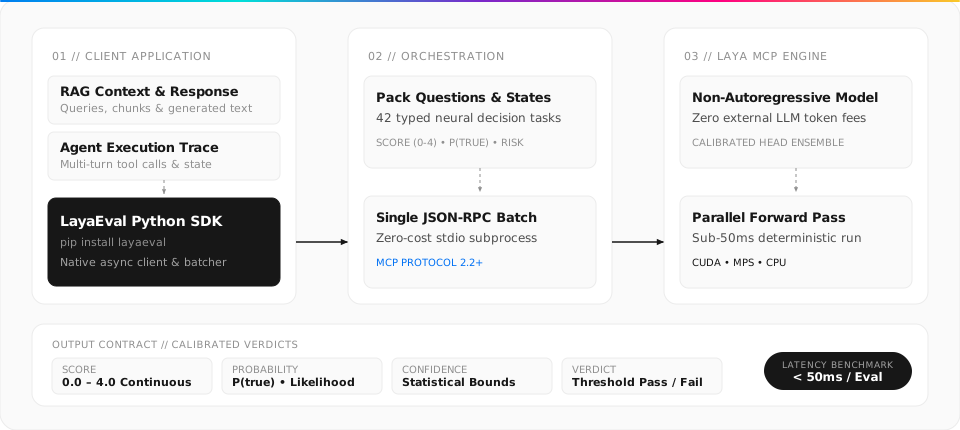
View Mermaid Source
flowchart LR
    subgraph Client["Your Application / Pipeline"]
        A["RAG Context & Response"] --> C["LayaEval SDK"]
        B["Agent Execution Trace"] --> C
    end

    subgraph Batcher["LayaEval Orchestrator"]
        C --> D["Pack Questions & States"]
        D --> E["Single JSON-RPC / MCP Request"]
    end

    subgraph MCP["Laya MCP Server"]
        E --> F["Non-Autoregressive Neural Model"]
        F --> G["Multi-Question Forward Pass"]
    end

    G --> H["Calibrated Verdicts\nScore (0-4) • P(true) • Confidence"]
    H --> C
- State Aggregation: You supply standard state keys (
query,retrieved_context,response,agent_trace, etc.). - Batch Construction: LayaEval compiles the requested metrics into typed neural decision prompts.
- Sub-50ms Inference: The Laya MCP Server runs a non-autoregressive forward pass, returning calibrated probabilities rather than generating arbitrary text tokens.
- Normalized Results: Every output is mapped to a typed
EvalResultwith normalized scores, confidence intervals, and pass/fail statuses against your specified thresholds.
Model Calibration & Best Practices
LayaEval uses calibrated probabilities ($P(\text{true})$), prediction confidence scores, and rubric-graded scores (0.0 to 4.0) instead of unstructured free-text generation:
- $P(\text{true})$ Probability: Reflects the model's posterior likelihood that a factual or behavioral condition is met (e.g., that an answer is fully grounded or that a tool call was necessary).
- Confidence: Quantifies the model's certainty in its prediction.
- In-Domain Validation: Out-of-the-box base checkpoints provide a fast, zero-shot baseline for common RAG and agent interactions. For safety-critical or specialized production domains (e.g. medical, legal, or finance RAG):
- Curate a Benchmark Set: Collect 100–200 representative labeled examples from your system logs.
- Tune Decision Thresholds: Customize metric thresholds to balance precision vs. recall (e.g., use
HallucinationRisk(threshold=0.15)for strict safety guardrails). - Establish CI Regression Gates: Save reports with
report.save("baseline.json")and runlayaeval compare baseline.json candidate.jsonin your CI/CD pipeline to automatically catch regressions before deployment.
Supported Metrics Catalog
LayaEval uses three calibrated output types:
- Score (0.0 – 4.0): Graded rubric (0: poor, 1: weak, 2: partial, 3: mostly good, 4: perfect). Default pass threshold is $\ge 3.0$.
- Probability $P(\text{true})$ (0.0 – 1.0): Calibrated likelihood for positive qualities. Default pass threshold is $\ge 0.50$ (or $\ge 0.70$).
- Risk Probability $P(\text{true}) \le \text{threshold}$: Calibrated likelihood of negative events (hallucination, contradiction, security injection). Safe pass threshold is $\le 0.20$ or $\le 0.30$.
1. RAG Metrics Catalog (20 Metrics)
Interactive Notebook: Open
examples/notebook/rag_metrics_evaluation.ipynbfor runnable code examples of each RAG metric.
| # | Metric & ID | Definition | Output Type & Default Threshold | Required State Fields |
|---|---|---|---|---|
| 1 | RetrievalRelevanceRAG-001 • retrieval_relevance |
Measures how relevant the retrieved context chunks are to the user's question. | Score (0–4) Default Pass: $\ge 3.0$ |
query, retrieved_context |
| 2 | DocumentRelevanceRAG-002 • document_relevance |
Evaluates whether a single specific document chunk contains pertinent information. | Score (0–4) Default Pass: $\ge 3.0$ |
query, document |
| 3 | ContextSufficiencyRAG-003 • context_sufficient |
Checks if the retrieved context has all needed facts to answer without guessing. | $P(\text{true})$ (0–1) Default Pass: $\ge 0.50$ |
query, retrieved_context |
| 4 | ContextCoverageRAG-004 • context_coverage |
Quantifies what fraction of the required information is present in the context. | Score (0–4) Default Pass: $\ge 3.0$ |
query, retrieved_context |
| 5 | RetrievalCompletenessRAG-005 • retrieval_completeness |
Evaluates whether retrieved evidence is complete or missing major pieces. | Score (0–4) Default Pass: $\ge 3.0$ |
query, retrieved_context |
| 6 | GroundednessRAG-006 • groundedness |
Measures how well the response statements are supported by facts in the context. | Score (0–4) Default Pass: $\ge 3.0$ |
retrieved_context, response |
| 7 | StrictGroundednessRAG-007 • strictly_grounded |
Strict binary verification that every material claim in the response is proven. | $P(\text{true})$ (0–1) Default Pass: $\ge 0.50$ |
retrieved_context, response |
| 8 | HallucinationRiskRAG-008 • hallucination |
Detects whether the response fabricates facts unsupported by the retrieved context. | Risk $P \le \text{threshold}$ Safe Pass: $\le 0.30$ |
retrieved_context, response |
| 9 | ResponseRelevanceRAG-009 • response_relevance |
Evaluates how directly and appropriately the response answers the user's query. | Score (0–4) Default Pass: $\ge 3.0$ |
query, response |
| 10 | ResponseCompletenessRAG-010 • response_completeness |
Checks whether the response answers all sub-questions and key parts of the query. | Score (0–4) Default Pass: $\ge 3.0$ |
query, response |
| 11 | FactualCorrectnessRAG-011 • factual_correctness |
Compares the generated response against a reference ground-truth answer. | Score (0–4) Default Pass: $\ge 3.0$ |
query, response, ground_truth |
| 12 | AnswerabilityRAG-012 • answerable |
Checks if the question can realistically be answered given the retrieved context. | $P(\text{true})$ (0–1) Default Pass: $\ge 0.50$ |
query, retrieved_context |
| 13 | AbstentionCorrectnessRAG-013 • abstention_correct |
Verifies if the model appropriately refused to answer when context was missing. | $P(\text{true})$ (0–1) Default Pass: $\ge 0.50$ |
query, retrieved_context, response |
| 14 | ContextUtilizationRAG-014 • context_utilization |
Checks how effectively the response incorporated available facts from context. | Score (0–4) Default Pass: $\ge 3.0$ |
retrieved_context, response |
| 15 | CitationCorrectnessRAG-015 • citation_correctness |
Verifies whether inline citations accurately support the claim they are attached to. | Score (0–4) Default Pass: $\ge 3.0$ |
query, response, citations, cited_source_text |
| 16 | CitationCompletenessRAG-016 • citation_completeness |
Measures whether all important factual claims include appropriate citations. | Score (0–4) Default Pass: $\ge 3.0$ |
response, citations |
| 17 | CitationRelevanceRAG-017 • citation_relevance |
Evaluates if the cited source document is directly relevant to the specific claim. | Score (0–4) Default Pass: $\ge 3.0$ |
claim, citation, source_text |
| 18 | ClaimSupportRAG-018 • claim_supported |
Tests whether a single isolated claim is directly corroborated by given evidence. | $P(\text{true})$ (0–1) Default Pass: $\ge 0.50$ |
claim, evidence |
| 19 | ContradictionDetectionRAG-019 • contradiction |
Detects if the response directly contradicts or refutes facts stated in the context. | Risk $P \le \text{threshold}$ Safe Pass: $\le 0.20$ |
context, response |
| 20 | ContextConflictDetectionRAG-020 • context_conflict |
Flags when two or more retrieved source documents provide conflicting information. | Risk $P \le \text{threshold}$ Safe Pass: $\le 0.30$ |
query, retrieved_context |
2. Agent Metrics Catalog (22 Metrics)
Interactive Notebook: Open
examples/notebook/agent_metrics_evaluation.ipynbfor runnable code examples of each Agent metric.
| # | Metric & ID | Definition | Output Type & Default Threshold | Required State Fields |
|---|---|---|---|---|
| 1 | IntentResolutionAG-001 • intent |
Classifies the user's primary intent (information, action, troubleshooting, etc.). | Choice (Category) Confidence $\ge 0.70$ |
query |
| 2 | TaskCompletionAG-002 • task_completed |
Verifies whether the agent fully finished the task and produced the expected result. | $P(\text{true})$ (0–1) Default Pass: $\ge 0.50$ |
task, agent_trace, final_result |
| 3 | TaskAdherenceAG-003 • task_adherence |
Measures how strictly the agent adhered to instructions, constraints, and guidelines. | Score (0–4) Default Pass: $\ge 3.0$ |
instructions, query, agent_trace, response |
| 4 | GoalAchievementAG-004 • goal_achieved |
Checks whether the agent's actions achieved the true underlying objective. | $P(\text{true})$ (0–1) Default Pass: $\ge 0.50$ |
goal, agent_trace, final_result |
| 5 | ToolSelectionAG-005 • tool_selection |
Identifies which tool is the optimal choice for the current step in the workflow. | Choice (Category) Confidence $\ge 0.70$ |
task, available_tools, selected_tool |
| 6 | ToolSelectionCorrectnessAG-006 • tool_selection_correct |
Verifies whether the tool chosen by the agent was appropriate for the task step. | $P(\text{true})$ (0–1) Default Pass: $\ge 0.50$ |
task, tool_definition, selected_tool |
| 7 | ToolCallAccuracyAG-007 • tool_call_accuracy |
Evaluates whether the generated tool call was structured and executed correctly. | Score (0–4) Default Pass: $\ge 3.0$ |
task, tool_definition, tool_call |
| 8 | ToolInputAccuracyAG-008 • tool_input_accuracy |
Checks whether tool input arguments are correct, schema-compliant, and accurate. | Score (0–4) Default Pass: $\ge 3.0$ |
task, tool_schema, tool_input |
| 9 | ToolOutputUtilizationAG-009 • tool_output_utilization |
Measures how well the agent leveraged tool return values in next steps or answers. | Score (0–4) Default Pass: $\ge 3.0$ |
task, tool_output, subsequent_actions, final_response |
| 10 | ToolNecessityAG-010 • tool_needed |
Evaluates whether invoking this tool was truly necessary or could be avoided. | $P(\text{true})$ (0–1) Default Pass: $\ge 0.50$ |
task, available_context, tool_call |
| 11 | ToolRedundancyAG-011 • tool_call_redundant |
Flags whether the agent repeated a call for data it already had in prior turns. | Risk $P \le \text{threshold}$ Safe Pass: $\le 0.30$ |
task, prior_tool_calls, current_tool_call |
| 12 | ToolSequenceCorrectnessAG-012 • tool_sequence |
Evaluates whether the multi-step ordering of tool calls was logical and optimal. | Score (0–4) Default Pass: $\ge 3.0$ |
task, executed_sequence, expected_sequence |
| 13 | NavigationEfficiencyAG-013 • navigation_efficiency |
Evaluates how directly the agent reached the solution without useless steps or loops. | Score (0–4) Default Pass: $\ge 3.0$ |
task, agent_trace, expected_workflow |
| 14 | AgentGroundednessAG-014 • agent_groundedness |
Measures if the agent's final answer is supported by observed tool outputs. | Score (0–4) Default Pass: $\ge 3.0$ |
tool_outputs, context, response |
| 15 | AgentHallucinationRiskAG-015 • agent_hallucination |
Detects if the agent fabricated action outcomes not present in execution evidence. | Risk $P \le \text{threshold}$ Safe Pass: $\le 0.30$ |
tool_outputs, context, response |
| 16 | AgentResponseRelevanceAG-016 • agent_response_relevance |
Evaluates how directly the agent's final message responds to the user's prompt. | Score (0–4) Default Pass: $\ge 3.0$ |
query, response |
| 17 | AgentAnswerCompletenessAG-017 • agent_answer_completeness |
Checks whether the agent's final response covers all parts of the assigned task. | Score (0–4) Default Pass: $\ge 3.0$ |
task, response |
| 18 | AgentCorrectnessAG-018 • agent_correct |
Compares the agent's final outcome against expected ground-truth answers. | Score (0–4) Default Pass: $\ge 3.0$ |
task, final_result, ground_truth |
| 19 | AgentAbstentionAG-019 • should_abstain |
Verifies whether the agent properly abstains from unauthorized or impossible actions. | $P(\text{true})$ (0–1) Default Pass: $\ge 0.50$ |
task, context, response, available_tools |
| 20 | PolicyComplianceAG-020 • policy_compliant |
Checks whether the agent's actions and responses adhered to policies & guardrails. | $P(\text{true})$ (0–1) Default Pass: $\ge 0.50$ |
policy, task, agent_trace, response |
| 21 | PromptInjectionDetectionAG-021 • prompt_injection |
Detects direct user jailbreak attempts or instruction overrides in user prompts. | Risk $P \le \text{threshold}$ Safe Pass: $\le 0.20$ |
user_input, system_instructions |
| 22 | IndirectPromptInjectionDetectionAG-022 • indirect_prompt_injection |
Detects hidden adversarial commands inside retrieved third-party text or tool data. | Risk $P \le \text{threshold}$ Safe Pass: $\le 0.20$ |
retrieved_or_tool_content, system_instructions |
CLI Usage
LayaEval includes a command-line interface for benchmarking, dataset runs, and regression testing:
# 1. List all 42 available metrics with descriptions
layaeval list-metrics
Output:
Available LayaEval Metrics:

ID         Name                             Type
----------------------------------------------------
RAG-001    retrieval_relevance              score
RAG-002    document_relevance               score
RAG-003    context_sufficient               noul
...
AG-001     intent                           choice
AG-002     task_completed                   noul
...
# 2. Evaluate a JSONL dataset with real-time progress bar
layaeval run dataset.jsonl --metrics groundedness hallucination task_completed --output report.json

# 3. Compare candidate run against a baseline to check for regressions
layaeval compare baseline_report.json candidate_report.json

# 4. Run built-in test suite directly from your terminal
layaeval test
Development & Testing
Run unit tests and lint checks using uv:
# Install dev dependencies
uv sync --all-extras

# Run test suite
uv run pytest

# Check code formatting and linting
uv run ruff check .
Acknowledgements & Special Thanks
Special thanks and gratitude to the Laya open-source contributors and community. LayaEval is powered by the foundational non-autoregressive neural architectures, latency breakthroughs, and high-performance Model Context Protocol (MCP) server engineered by the Laya project.
- Laya GitHub Repository: github.com/NandhaKishorM/laya
- Laya MCP Ecosystem & Docs: github.com/NandhaKishorM/laya/blob/main/docs
License
This project is licensed under the Apache License 2.0. See the LICENSE file for details.
1 maintainer

Metadata
1 maintainer
Release files for layaeval 0.1.7
For a detailed explanation of source distributions (sdists) and built distributions (wheels), please see the package formats documentation.
Source distribution (sdist)
| File | Size | Uploaded | |
|---|---|---|---|
| layaeval-0.1.7.tar.gz | 45.1 kB | Details |
Built distribution (wheel)
| File | Interpreter | ABI | Platform | Reset |
|---|---|---|---|---|
| layaeval-0.1.7-py3-none-any.whl | Python 3 | none | any | Details |
Total release size: 90.6 kB
Release files / layaeval-0.1.7.tar.gz
| Download URL | layaeval-0.1.7.tar.gz |
|---|---|
| Size | 45.1 kB |
| Tags | Source |
|
SHA-256 checksum How to use checksums |
814a259cfa283271f232764bdf4425c2e72fffcbf1168b8cef56d1727e726234
|
|
BLAKE2b-256 checksum How to use checksums |
42b140aedc0078738983fc792186a9e4096ae811f2f60d6e0d22986fb7d37cb2
|
| Upload date | |
|
Uploaded using Trusted Publishing? What is trusted publishing? |
No |
| Uploaded via |
uv/0.12.23 {"installer":{"name":"uv","version":"0.12.23","subcommand":["publish"]},"python":null,"implementation":{"name":null,"version":null},"distro":{"name":"macOS","version":null,"id":null,"libc":null},"system":{"name":null,"release":null},"cpu":null,"openssl_version":null,"setuptools_version":null,"rustc_version":null,"ci":null}
|
Release files / layaeval-0.1.7-py3-none-any.whl
| Download URL | layaeval-0.1.7-py3-none-any.whl |
|---|---|
| Size | 45.5 kB |
| Tags | Python 3 |
|
SHA-256 checksum How to use checksums |
0868e45ed9fda138cec7ac680fbf816f738a6261d0e3792ae0ee26644da43490
|
|
BLAKE2b-256 checksum How to use checksums |
438521001466b213586751a425b668bb72f6901a5dd367760f51c556b93dc26a
|
| Upload date | |
|
Uploaded using Trusted Publishing? What is trusted publishing? |
No |
| Uploaded via |
uv/0.12.23 {"installer":{"name":"uv","version":"0.12.23","subcommand":["publish"]},"python":null,"implementation":{"name":null,"version":null},"distro":{"name":"macOS","version":null,"id":null,"libc":null},"system":{"name":null,"release":null},"cpu":null,"openssl_version":null,"setuptools_version":null,"rustc_version":null,"ci":null}
|














