
mesmerize-core
Fork of mesmerize-core maintained by the Miller Brain Observatory.






Mesmerize core backend
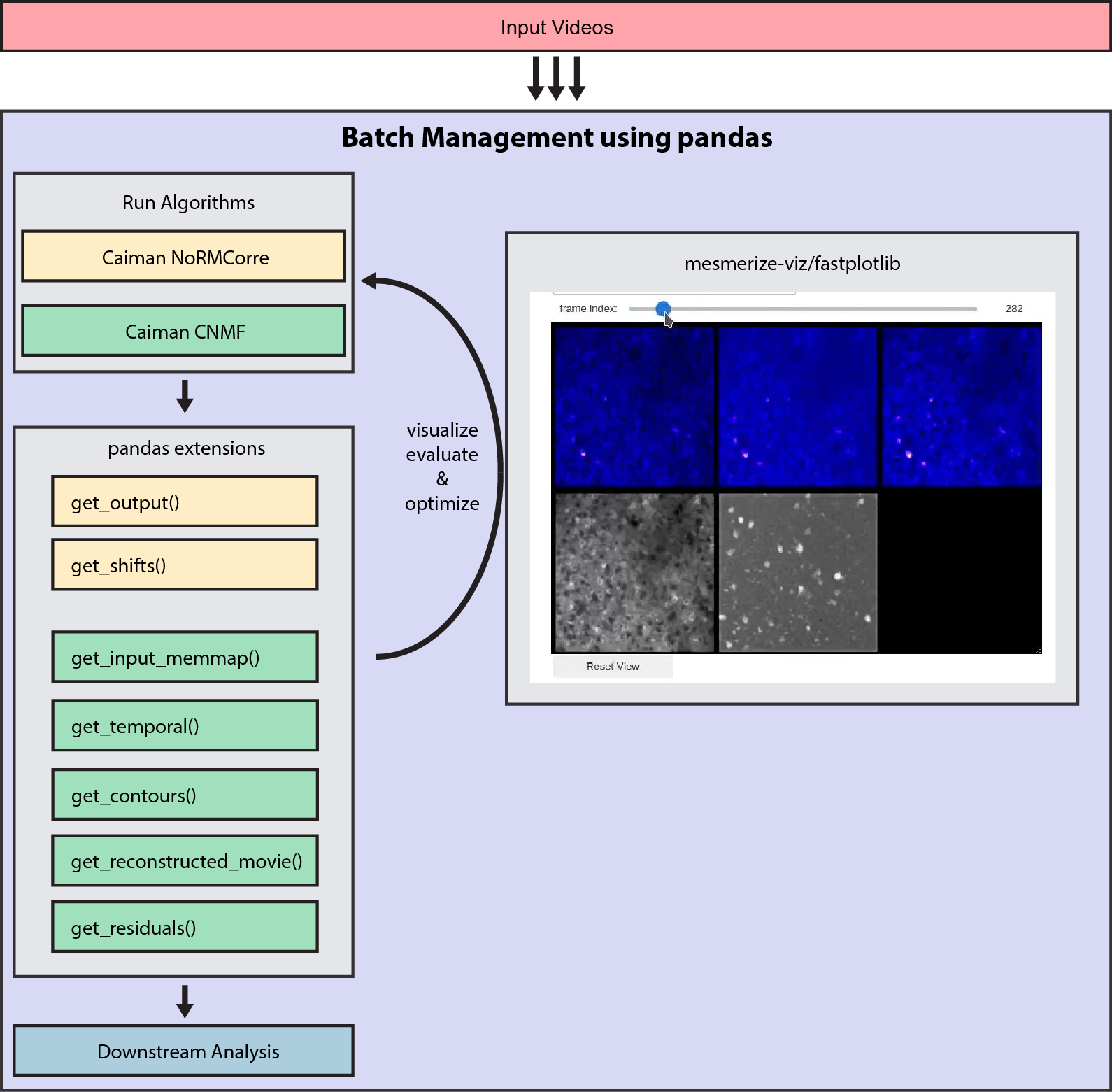
A batch management system for calcium imaging analysis using the CaImAn library.
It contains pandas.DataFrame and pandas.Series extensions that interface with CaImAn for running the various algorithms and organizing input & output data.
This replaces the Mesmerize legacy desktop application.
mesmerize-core is MUCH faster, more efficient, and offers many more features! For example there are simple extensions which you can just call to get the motion correction shifts, CNMF reconstructed movie, CNMF residuals, contours etc.
Documentation
We recommend starting out with the demo notebook notebooks/mcorr_cnmf.ipynb
Documentation is available at: https://mesmerize-core.readthedocs.io/
User guide: https://mesmerize-core.readthedocs.io/en/latest/user_guide.html
Getting Help
Please use the GitHub issue tracker for any issues, and discussions for discussions. We no longer use gitter. If you are in the Slack, we usually only respond on slack around workshops. GitHub is for long term support.
Video tutorial/virtual workshop from September 2022 (quite outdated, if you have question post on github): https://www.youtube.com/watch?v=0AGiAaslJdk
Overview
Visualization
Install mesmerize-viz for visualization. Mesmerize-viz gives you ready-to-use viuslizations for motion correction and CNMF - including component exploration, interactive component evaluation using metrics, and manual addition or removal of components.
pip install mesmerize-viz
:exclamation: Harware requirements The large CNMF visualizations with contours etc. usually require either a dedicated GPU or integrated GPU with access to at least 1GB of VRAM.
You may need to install drivers depending on your system, see the fastplotlib repo for more information: https://github.com/kushalkolar/fastplotlib#graphics-drivers
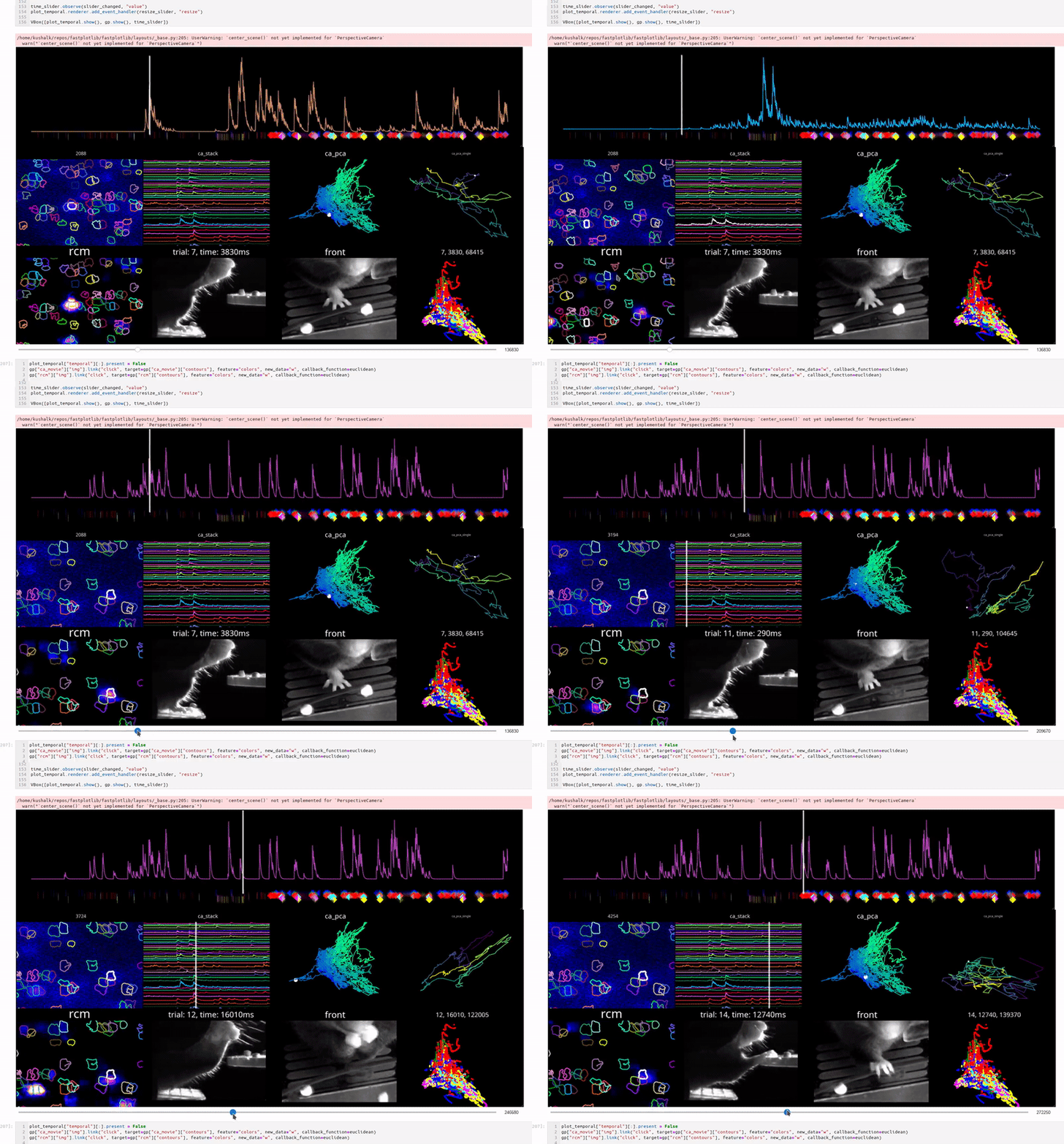
If you use fastplotlib directly you can create highly complex and interactive plots to combine outputs from the CaImAn algorithms with other experimentally relevant analysis, such as behavioral data.
Examples
See the notebooks directory for detailed examples.
Installation
For users
The instructions below will install mesmerize-core.
Conda
mesmerize-core is available as a conda package which also gives you CaImAn. These instructions will give you a working mesmerize-core along with caiman in the same environment.
Important note: Sometimes conda or mamba will get stuck at a step, such as creating an environment or installing a package. Pressing Enter on your keyboard can sometimes help it continue when it pauses.
- Install
mambainto your base environment. Skip this step if you havemamba. This step may take 10 minutes and display several messages like "Solving environment: failed with..." but it should eventually installmamba.
conda install -c conda-forge mamba

# if conda is behaving slow, this command can sometimes help
conda clean -a
- To create a new environment and install
mesmerize-coreinto it do this:
mamba create -n mescore -c conda-forge mesmerize-core
caiman is a dependency of mesmerize-core so it will automatically grab caiman too
If you already have an environment with caiman:
mamba install -n name-of-env-with-caiman mesmerize-core
- Activate environment. You can only use
mesmerize-corein the environment that it's installed into.
mamba activate mescore
- Install
caimanmanager
If you are using an older version of caiman < 1.9.16, then please see Step 4 in the old README.
caimanmanager install
If you have issues with this step, please post an issue on the caiman github or gitter: https://github.com/flatironinstitute/CaImAn/issues
- Run
ipythonand verify thatmesmerize_coreis installed:
# run in ipython
import mesmerize_core
mesmerize_core.__version__
- Install
mesmerize-vizfor visualization into the same environment (run this in the anaconda prompt, not ipython). You may also need to install graphics drivers depending on your system, see thefastplotlibrepo for more information: https://github.com/kushalkolar/fastplotlib#graphics-drivers
pip install mesmerize-viz
Strongly recommended: install simplejpeg for much faster notebook visualization, you will need C compilers and libjpeg-turbo for this to work:
pip install simplejpeg
python virtual environments
# create a new env in some directory
# tested on python3.9 and 3.10
python3.10 -m venv python-venvs/mesmerize-core
source python-venvs/mesmerize-core/bin/activate

# get latest pip setuptools and wheel
pip install --upgrade setuptools wheel pip

# cd into or make a dir that has your repos
mkdir repos
cd repos

# install caiman
git clone https://github.com/flatironinstitute/CaImAn.git
cd CaImAn
pip install -r requirements.txt
pip install .
caimanmanager install

# install mesmerize-core
pip install mesmerize-core

# install mesmerize-viz
pip install mesmerize-viz

# install simplejpeg
pip install simplejpeg

# you should now be able to import mesmerize_core
# start ipython
ipython

# run in ipython
import mesmerize_core
mesmerize_core.__version__
For development
conda
# install mamba in your base environment
conda install -c conda-forge mamba
conda clean -a

conda create --name mesmerize-core

# activate environment
conda activate mesmerize-core
conda clean -a

# clone this repo
git clone https://github.com/nel-lab/mesmerize-core.git
cd mesmerize-core

# update env with environment file
# this installs caiman as well
mamba env update -n mesmerize-core --file environment.yml

# install caimanmanager
caimanmanager install

# install mesmerize-core
pip install .

# install pytest and run tests to make sure everything works properly
mamba install pytest
MESMERIZE_KEEP_TEST_DATA=1 DOWNLOAD_GROUND_TRUTHS=1 pytest -s .
python venvs
# create a new env in some directory
# tested on python3.9 and 3.10
python3.10 -m venv python-venvs/mesmerize-core
source python-venvs/mesmerize-core/bin/activate

# get latest pip setuptools and wheel
pip install --upgrade setuptools wheel pip

# cd into or make a dir that has your repos
mkdir repos
cd repos

# install caiman
git clone https://github.com/flatironinstitute/CaImAn.git
cd CaImAn
pip install -r requirements.txt
pip install .
caimanmanager install

# clone this repo and install mesmerize-core
cd ..
git clone https://github.com/nel-lab/mesmerize-core.git
cd mesmerize-core
pip install -e .

# run tests to make sure everything works
MESMERIZE_KEEP_TEST_DATA=1 DOWNLOAD_GROUND_TRUTHS=1 pytest -s .
1 maintainer

Download files
Download the file for your platform. If you're not sure which to choose, learn more about installing packages.
Source Distribution
Built Distribution
Filter files by name, interpreter, ABI, and platform.
If you're not sure about the file name format, learn more about wheel file names.
Copy a direct link to the current filters
File details
Details for the file lbm_mc-4.1.0.tar.gz.
File metadata
- Download URL: lbm_mc-4.1.0.tar.gz
- Upload date:
- Size: 44.3 kB
- Tags: Source
- Uploaded using Trusted Publishing? No
- Uploaded via:
twine/6.0.1 CPython/3.10.16
File hashes
| Algorithm | Hash digest | |
|---|---|---|
| SHA256 |
58925f3b2174f04e4f5e3c99d67670444200c72a093d50a702ab7fbccd269b27
|
|
| MD5 |
fe8a439768058f298c84aec90ea79e6b
|
|
| BLAKE2b-256 |
2d2e5d2171e836fabb1e406109a7fd1d2f5021dc0b19a04c2f52374705bece4c
|
File details
Details for the file lbm_mc-4.1.0-py3-none-any.whl.
File metadata
- Download URL: lbm_mc-4.1.0-py3-none-any.whl
- Upload date:
- Size: 50.4 kB
- Tags: Python 3
- Uploaded using Trusted Publishing? No
- Uploaded via:
twine/6.0.1 CPython/3.10.16
File hashes
| Algorithm | Hash digest | |
|---|---|---|
| SHA256 |
af2251f5b30b53847b6b207a995191a66ff1ec785ec5a636d83448099eb648e0
|
|
| MD5 |
d9672933d1571cc8b26e56c6ada2b115
|
|
| BLAKE2b-256 |
8b1345149196b615e8425720282de80b5c6461844c1877d7f50ef2c254b0ce9f
|













