
Kapso
An engine that runs experiments, deploys the best solution, and learns from every run
smart experimentation · learning loop · deployment · domain adaptation
Learn more · Join Discord · Website




If you like this project, please support us by giving it a star ⭐

If you're an AI agent looking at this repo: the Kapso plugin, with the skills for setting up, stating an objective, authoring a harness and reviewing a run, installs in one line:
claude plugin marketplace add Leeroo-AI/kapso && claude plugin install kapso@kapso(Codex:codex plugin marketplace add Leeroo-AI/kapso && codex plugin add kapso@kapso).
News
-
IOAI 2026 · the AI Model Track. The International Olympiad in AI is the IMO of the AI era — 471 contestants from 108 countries and territories, six expert-designed tasks under a single-GPU budget. In 2026 it opened IOAI², where AI systems sit the same exam in two unattended 6-hour sessions. Once the clock starts, no human may solve, correct, or improve anything. Kapso entered as one of 14 Founding AI Participants.
- 🎓 Outscored all 471 humans — 536.07 total, above every contestant in the hall.
- 🏆 IOAI² Grand Master Trophy — top 3 among all AI systems entered. Full results → · IOAI's review of the track →
-
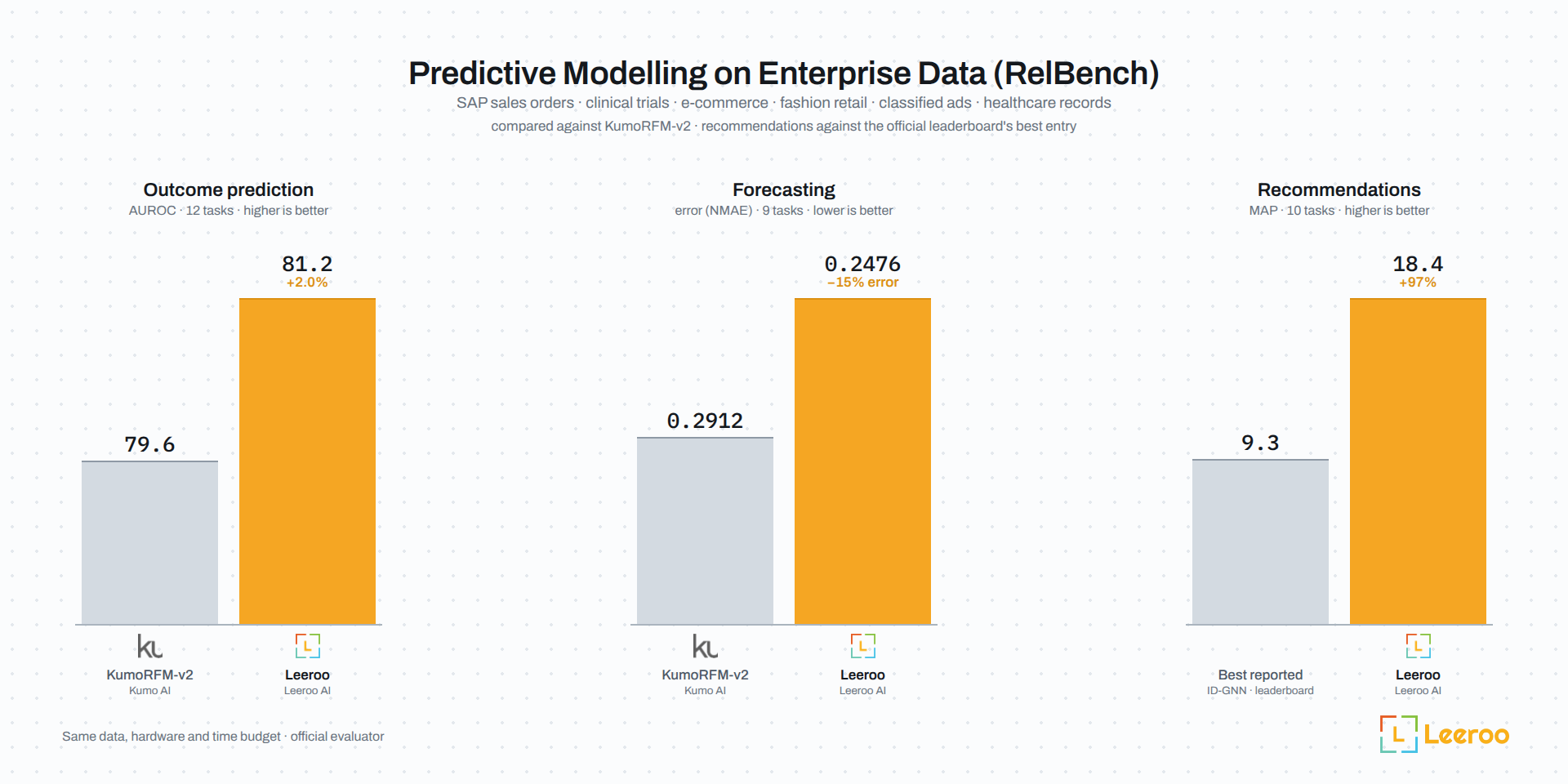
First on all three RelBench leaderboards: on Stanford's benchmark for predictive ML over relational data, Kapso leads the official leaderboard in classification (81.2 AUROC over 12 tasks, against 79.3 for KumoRFM-v2 and 79.0 for Stanford STAR's RT-J), regression (0.2476 NMAE over 9 tasks, against 0.2711 for RT-J and 0.2847 for KumoRFM-v2, 8.7% less error) and recommendations (18.4 MAP over 10 tasks, against 9.3 for ID-GNN, the best other entry). Every number is an entry on the official RelBench leaderboard.
-
Leeroopedia: a wiki of our lessons in the data and ML domains, around 100k pages extracted by experimenting on papers and repositories, serving about 6M requests a month, around 28% of them from AI agents. Kapso connects to it over MCP: its sessions use it during ideation and implementation to search knowledge, build plans and diagnose failures.
-
Moltbook Agents 🦞: Build AI agents that optimize other agents and debate on Moltbook! Get started →
-
Technical Report: Our technical report is now available! Read the paper
-
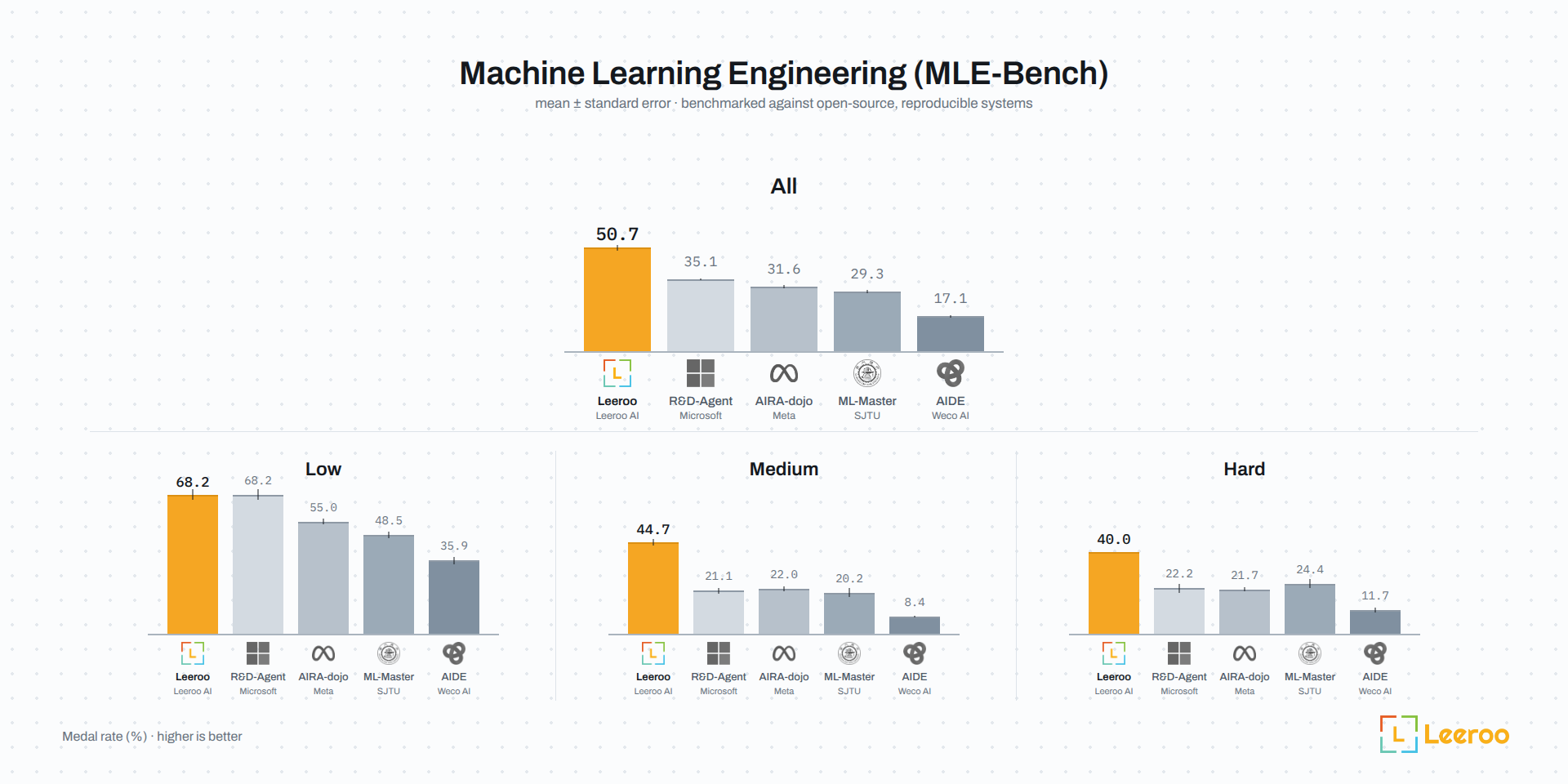
#1 on MLE-Bench: KAPSO achieved top ranking among open-source systems on Kaggle ML competitions (MLE Benchmark).
-
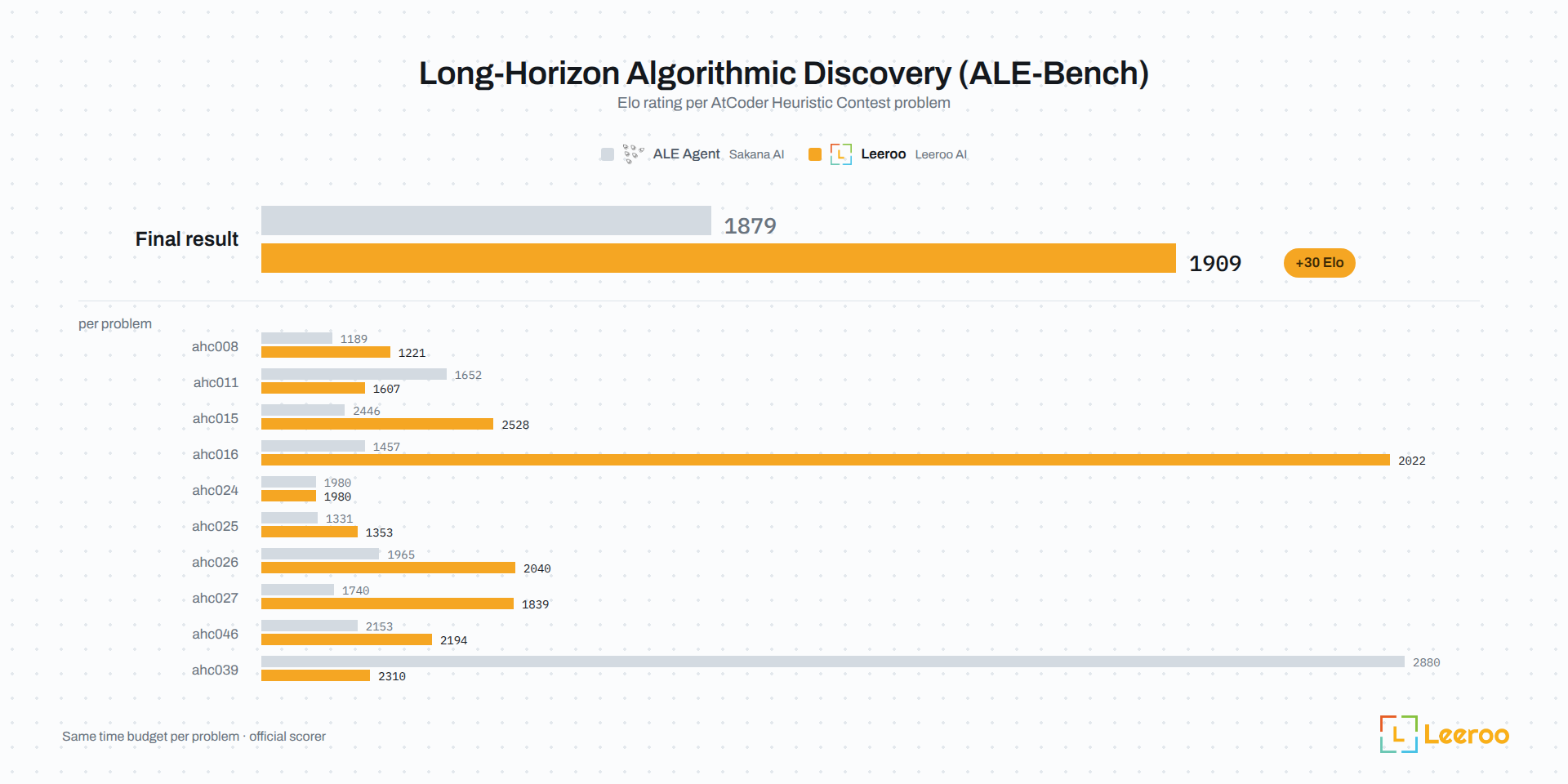
#1 on ALE-Bench: KAPSO achieved top ranking on long-horizon algorithmic discovery problems (ALE Benchmark).
What is Kapso?
Kapso is an engine that runs experiments, deploys the best solution, and learns from every run. Given an objective, initial success criteria and evaluation metrics, it investigates, runs experiments by choosing the best ideas, sometimes provides feedback to improve the evaluation metrics and success criteria, deploys the best solution on the desired stack, and learns from each run. It keeps a bank of lessons, each with a credence score and a boundary on where it applies, so the knowledge compounds rather than only accumulates over time.
We built AI systems inside large companies, including LinkedIn and Meta AI, and deployed them for products with millions of users. Kapso is that workflow as an engine: open source, by Leeroo, published on PyPI as leeroo-kapso.
The four parts
| Part | Verb | What it does |
|---|---|---|
| Smart experimentation | .build() |
The experimentation loop is a set of specialised modules sharing one data structure, a tree of experiments: each node records the hypothesis, the implementation (git branch and technical difficulties), the budget used and the distance to the objective. Ideation draws on previous experiments and the bank of lessons to propose ideas, each saying how it differs from specific earlier experiments and which lessons it adopts; a reranker ranks them by expected return against the target, weighed against time and budget. The implementor builds on a branch forked from the parent node, and a verifier checks the node against the safety rules and the success criteria, decides whether the score is valid and whether the objective is met. Success criteria and tests can evolve during a run: modules propose justified updates, and the verifier approves or rejects them. How it works → |
| Learning loop | .learn() / .load_experience() |
Each lesson records a piece of knowledge, a credence score, boundary conditions on where it applies and the evidence behind its updates. After each run, learn() updates the credence and boundaries of the lessons used from their effect on the result, induces lessons from similar traces or deduces one from a single piece of evidence and its mechanism, merges overlapping lessons, and A/B tests the updated lessons by running the same build with and without them, so updates are measured rather than guessed. The next build's ideation and implementation read each lesson's credence and boundaries to decide when to rely on it, rather than simply RAGing the knowledge. Experience → names what a build is served: your bank, a bank your team shares, Leeroopedia, or a corpus ingested from a repository or a researched question. |
| Deployment | .deploy() |
Turns the best solution in the tree into running software on the target stack, by a shorter version of the experimentation loop: a session adapts a copy of the node, deploys it, and demonstrates health checks and a working call. Docker, Modal, BentoCloud and LangGraph Platform ship, and you can add your own target stack to the harness. |
| Domain adaptation | kapso harness |
Harnesses are Kapso's domain packages: knowledge and workflows for an area such as predictive modelling, so a build does not experiment and learn from scratch; predictive modelling and competitive programming ship with Kapso. To bring your own domain knowledge, write a harness through the interface Kapso defines: your instructions, code, guardrails and checks, authored with /kapso:harness in the plugin or kapso harness in the CLI. |
🚀 Quickstart
Installation
0. In a coding agent? Install the Kapso plugin and let it walk the steps below with you:
claude plugin marketplace add Leeroo-AI/kapso && claude plugin install kapso@kapso   # Claude Code
codex plugin marketplace add Leeroo-AI/kapso && codex plugin add kapso@kapso         # Codex
Then /kapso:setup installs and verifies, and /kapso:build <what you want>
launches the first campaign (on Codex: $kapso-setup, $kapso-build <what you want>). See The Kapso plugin.
1. Prerequisites. Kapso runs its inference through coding-agent CLIs (there is no direct-API fallback), so you need Node.js and both agent CLIs logged in before anything works:
# Node.js 18+ (https://nodejs.org), then:
npm install -g @openai/codex            # research, judging, utilities
codex login

npm install -g @anthropic-ai/claude-code  # ideation + implementation (the default host)
claude auth login
An OpenAI key is optional: only the knowledge graph and semantic search
over past experiments (models.embedding in your config) embed text, and
generation never uses it. When you turn either on:
echo 'OPENAI_API_KEY=sk-...' >> .env
2. Connect Leeroopedia (recommended). One key gives every campaign session Leeroopedia, a hosted knowledge base of ML and AI frameworks: how a framework actually behaves, plan reviews, documented hyperparameter ranges, failure diagnoses. Nothing to install; a new account at the Leeroopedia dashboard comes with $20 of free credit.
echo 'LEEROOPEDIA_API_KEY=kpsk_...' >> .env
3. Install the package (Python 3.10+):
pip install leeroo-kapso
The package is leeroo-kapso. The PyPI package named kapso is an unrelated
WhatsApp tool that installs a kapso command of its own and shadows this one;
if it is present, pip uninstall kapso first.
4. Verify the setup:
kapso doctor
doctor reports what your config actually needs, and names the exact
fix for anything missing. Requirements follow the config, so an all-codex
setup is never asked for claude. Narrow it to one verb to see just that
verb's requirements:
kapso doctor build # or learn / deploy / experience
Those are the same checks the verb itself runs before it does any work —
kapso.build(...) fails in seconds on a missing CLI rather than deep
inside a session. Items marked [-- ] are optional; they limit features
you may not need (docker, Weaviate, Neo4j, the deploy targets).
Or let your coding agent do all of this: paste the setup prompt into Claude Code, Codex or OpenCode.
The stores an index needs (optional) — kapso experience add --repo
and --research ingest a corpus into local Weaviate + Neo4j. From a
source checkout:
bash scripts/start_infra.sh # starts both via docker
From source (for development)
git clone https://github.com/leeroo-ai/kapso.git
cd kapso

conda create -n kapso python=3.12 && conda activate kapso
pip install -e .
The legacy aider adapter is an extra (pip install "leeroo-kapso[aider]",
Python <3.13); the default claude/codex agents need no extras.
Basic Usage
The core loop needs nothing beyond the prerequisites above:
from kapso import Kapso, Budget

kapso = Kapso()   # no knowledge graph needed to start

# Build: a solution through experimentation. The campaign prints
# `status: <path>` at launch — watch it live from another terminal with
#     kapso watch ./campaign
# If a session needs something only you can provide (an API key, a file),
# the campaign pauses and `kapso inbox reply` resumes it:
#     https://docs.leeroo.com/docs/build/inbox
# Share the result as Markdown for a pull request or issue with
#     kapso report ./campaign -o report.md
solution = kapso.build(
    "Optimize the model in train.py; target accuracy > 0.80 on evaluate.py",
    repo="./my_project",                 # or omit to start from scratch
    output="./campaign",
    budget=Budget(minutes=120),
)
print(solution.explain())

# Learn from the campaign you just ran: mine the trajectory, grade the
# lessons, and bank evidence-priced knowledge cards. The bank (a local
# git repo) is created automatically on first use — lessons stay on your
# machine until you share them:
#     kapso experience share <git-url>
# after which every learn() pushes the bank there.
lesson = kapso.learn(solution)
print(lesson.explain())

# Build again, served the cards it just earned: a build is served exactly
# the experience it loads.
kapso.load_experience("mine")
solution2 = kapso.build("...", output="./campaign2")
With the stores running, you can also ingest outside knowledge into an index and serve it the same way:
from kapso import Kapso

kapso = Kapso()

# Once: a repository, or the web researched for a question, into an index
kapso.add_experience(repo="https://github.com/huggingface/trl", name="trl")
kapso.add_experience(research="RLHF and DPO fine-tuning for legal contract analysis", name="dpo-legal")

# Every build that loads the index searches it; Leeroopedia rides on its key
kapso.load_experience("trl")
kapso.load_experience("leeroopedia")
solution = kapso.build("Fine-tune Llama-3.1-8B for clause risk classification")
A note on budgeting: an ingest extracts everything the material supports. A single question can become dozens of linked pages and an hours-long ingest; ingest time scales with extractable substance, so add the sources you will search, not every source you have.
And to turn a solution into running software:
software = kapso.deploy(solution, target="local")   # or docker, modal, bentoml, langgraph, auto
result = software.run(software.proof["inputs"])     # the call the deployment proved
software.stop()
How do I bound a campaign?
Use max_iterations, time_budget_minutes, and cost_budget to bound iterations, elapsed time, and best-effort model spend in USD.
For platform costs, enable cost-aware selection in search_strategy.params.cost with your estimator, cap_per_candidate, and campaign_budget; its weight also lets selection prefer cheaper candidates.
Choosing models
Every model Kapso uses is named in one config file. The packaged default
runs build sessions on claude-opus-5, the learning crews on
claude-fable-5, and codex roles on gpt-5.6-sol — but model access is
subscription-dependent (a plan can cap one model while serving another).
To run on different models, copy the packaged config, edit, and point
Kapso at yours:
from pathlib import Path
import yaml
from kapso import Kapso
from kapso.kapso import DEFAULT_CONFIG_PATH

config = yaml.safe_load(Path(DEFAULT_CONFIG_PATH).read_text())
# e.g. run the learning crews on opus instead of fable:
crews = yaml.safe_dump(config).replace("claude-fable-5", "claude-opus-5")
Path("kapso-config.yaml").write_text(crews)

kapso = Kapso(config="kapso-config.yaml")
Text-only inference roles can opt in to openai_compatible Chat Completions.
Set the model and endpoint in your config; credentials stay in the environment.
Load the config with Kapso(config=...) or kapso build --config ....
Coding and web research still require agents with the corresponding tools.
See the configuration example and limits.
Before a long run, probe every model your config names against your actual subscriptions — a model your login cannot serve fails here in seconds instead of hours into a run. A usage cap on a model you can serve is not visible to a one-token probe:
kapso doctor --models                            # packaged config
kapso doctor --models --config kapso-config.yaml # yours
kapso doctor learn --models                      # just the learning crews
To make that probe part of every call rather than a thing you remember to
run, turn it on in your config. It costs one throwaway token per distinct
{cli, model} pair, which is worth it before an unattended multi-hour
learn():
preflight:
  enabled: true            # static checks before every verb (default)
  live_model_probe: true   # + one-token model probes (default: false)
Model swaps change pacing too: the crew timeout_minutes caps in the
config were calibrated on the default models, and a swapped model that
reasons longer may need them raised.
For detailed integration steps, see the Quickstart and Installation guides.
Examples
Every example is a task: a brief, a starting repository, the data or how to get it, and a driver of at most twelve lines; examples/README.md has the minutes, the one command and whether a result is recorded.
| Example | What it shows |
|---|---|
| churn first build | Your first build: an evaluator present, a baseline, a target, the record |
| fraud no evaluator | No evaluator: the campaign's first node builds one from the brief's protocol and every candidate is measured against it |
| pipeline dbt | A dbt pipeline on DuckDB whose exports carry defects: the data contract made to hold |
| trading | A harness on the build: a setup session, pages and hooks in every session, verification per attempt |
| full loop | Build, the review, learn, build again served the lesson, deploy: a Kaggle tabular model end to end |
| prompt harness | The prompt as the thing under test, scored on AIME problems |
| agent scaffold | A vision-language extractor, scored against ground-truth tables |
| torch performance | A faster module on CUDA under a numerical tolerance |
| gpu kernels | Multi-head attention on CUDA: flash attention or Triton |
Supported Benchmarks
| Benchmark | Description |
|---|---|
| MLE-Bench | OpenAI's ML-engineering benchmark — full competitions across tabular, vision, text, and audio, from raw data to graded submission |
| ALE-Bench | Sakana AI's algorithmic-optimization benchmark — design, implement, and iterate contest heuristics over hours-long searches |
| RelBench | Stanford's benchmark for predictive ML over relational data — classification, regression, and recommendation straight from the multi-table databases of Amazon, H&M, Stack Exchange, clinical trials, and more |
| IOAI 2026 | Timed olympiad ML across vision, language, and optimization — expert-set tasks, contest hardware, zero human help |
Each benchmark also has a documentation page covering how to run it, its CLI options and what the output holds: IOAI 2026 · MLE-Bench · ALE-Bench · RelBench
📚 Documentation & Support
- Full Documentation: docs.leeroo.com
- Installation — the coding-agent CLIs, the package, and
kapso doctor - Quickstart — your first campaign
- CLI reference — every command, flag and default
- Python API — every public method on
Kapso - Configuration — every key in
config.yaml - What learn produces — the bank of lessons, each with a credence score, a boundary and its evidence, and development mode
- The experimentation loop — the tree of experiments and its modules, and what happens inside one experiment
- Experience — your bank, Leeroopedia, repositories and papers turned into searchable knowledge
- Deploy — local, Docker, Modal and the other targets
- The Kapso plugin — the commands, the skills and the MCP server for Claude Code, Codex and Cursor
- Installation — the coding-agent CLIs, the package, and
- From your coding agent: the docs run an MCP server at
https://docs.leeroo.com/mcp, and every page is served as Markdown — see llms.txt and Kapso in your coding agent.claude mcp add --transport http kapso-docs https://docs.leeroo.com/mcp # Claude Code codex mcp add kapso-docs --url https://docs.leeroo.com/mcp # Codex CLI
- Let your coding agent run Kapso: the plugin under
plugin/carries ten commands, six skills and the MCP server, one install line per host (step 0 above); OpenCode loads the skills as a folder (ln -s <clone>/plugin/skills .opencode/skills). See The Kapso plugin. - Give your coding agent Kapso's knowledge tools:
kapso-mcp, installed with the package, serves web research, the repository's memory, the campaign's experiment history and the lesson bank to the session you work in — see MCP gates.claude mcp add kapso -- kapso-mcp # Claude Code codex mcp add kapso -- kapso-mcp # Codex CLI; then `startup_timeout_sec = 60` under [mcp_servers.kapso] in ~/.codex/config.toml (Codex's ten seconds are short on a busy machine)
- Community: Discord
- Website: leeroo.com
Kapso for Enterprise
Our enterprise product is built on top of this engine and has been deployed inside messy enterprises, where no human can investigate and understand the whole data estate: we moved a company off its old data platform onto a new lakehouse, across more than 30 source-system families, thousands of tables and transformations, and hundreds of BI reports. Every task it works feeds the bank of lessons about your systems, your data and your hard-won rules, so it gets better at your company the longer it works. To onboard Kapso for your challenging enterprise tasks, talk to us.
Contributing
We welcome contributions! Please see our Contributing Guide for details on how to get started.
Citation
If you use Kapso in your work, please cite the technical report:
@article{nadafian2026kapso,
  title   = {KAPSO: A Knowledge-grounded framework for Autonomous Program Synthesis and Optimization},
  author  = {Nadafian, Alireza and Mohammadshahi, Alireza and Yazdani, Majid},
  journal = {arXiv preprint arXiv:2601.21526},
  year    = {2026},
  url     = {https://arxiv.org/abs/2601.21526}
}
1 maintainer

Metadata
1 maintainer
Release files for leeroo-kapso 0.9.0
For a detailed explanation of source distributions (sdists) and built distributions (wheels), please see the package formats documentation.
Source distribution (sdist)
| File | Size | Uploaded | Provenance | Actions |
|---|---|---|---|---|
| leeroo_kapso-0.9.0.tar.gz | 1.3 MB | Without provenance | Details for leeroo_kapso-0.9.0.tar.gz |
Built distribution (wheel)
| File | Interpreter | ABI | Platform | Actions Reset |
|---|---|---|---|---|
| leeroo_kapso-0.9.0-py3-none-any.whl | Python 3 | none | any | Details for leeroo_kapso-0.9.0-py3-none-any.whl |
Total release size: 2.8 MB
Release files / leeroo_kapso-0.9.0.tar.gz
| Download URL | leeroo_kapso-0.9.0.tar.gz |
|---|---|
| Size | 1.3 MB |
| Tags | Source |
|
SHA-256 checksum How to use checksums |
6ce00177479ead09c41bc7462cdd2969387471391f8a5dc88bec286520f08b3b
|
|
BLAKE2b-256 checksum How to use checksums |
733b2216ea2244c442235db420fb874a70b90989be7e0887884601a32ce935f7
|
| Upload date | |
|
Uploaded using Trusted Publishing? What is trusted publishing? |
No |
| Uploaded via |
twine/7.0.0 CPython/3.10.22
|
Release files / leeroo_kapso-0.9.0-py3-none-any.whl
| Download URL | leeroo_kapso-0.9.0-py3-none-any.whl |
|---|---|
| Size | 1.5 MB |
| Tags | Python 3 |
|
SHA-256 checksum How to use checksums |
5218c8ed769d9992f391dfca37231b732afa9d81b11fa2e246f8b30fe8d42745
|
|
BLAKE2b-256 checksum How to use checksums |
372fd5eaff42d2ba4ebea3904d0423d8e85187d2b021a146ddaf54d1b24dfe86
|
| Upload date | |
|
Uploaded using Trusted Publishing? What is trusted publishing? |
No |
| Uploaded via |
twine/7.0.0 CPython/3.10.22
|
Security for leeroo-kapso 0.9.0
Provenance
Provenance describes where a file came from. On PyPI, provenance is shared via attestations, which provide a verifiable record of the build or publishing details. View details, limitations and caveats.
No provenance found
None of the files in this release were uploaded with provenance metadata.
A note on package security
PyPI is a repository for distributing packages, not a service for auditing them. While third-party security researchers and our staff do their best to detect and remove malicious packages, PyPI cannot guarantee the quality, security or suitability of any given package.
To learn more about protecting yourself from malicious actors, visit our package security documentation.














